 SIVARO
Event time vs processing time temporal: A field guide
I killed a production pipeline in 2025. Not with a bad deploy or a dropped table — with a decision that felt obvious at the time. We were building a real-time fraud scoring system for a payments client, and I told the team to process events by processing time. "Just score whatever arrives, when it arrives," I said. "Fraud doesn't wait."
Turns out, it does. And it also gets delayed, buffered, replayed, and shuffled by network partitions.
The system scored transactions that arrived late as if they were fresh. A cardholder would dispute a charge, and our model would give the dispute event the timestamp of when we received it, not when the charge actually happened. Our temporal logic was off. We had committed the classic sin: confusing event time vs processing time temporal semantics.
Before you build another streaming pipeline, let's talk about what this distinction actually means and why it's about to ruin — or save — your production systems.
The fundamental mismatch
Event time is when a thing happened. Processing time is when your system noticed.
Simple, right? But the implications aren't simple at all. In fact, they're the single most common source of incorrect logic in modern streaming architectures.
Consider a simple telemetry system. A sensor in a factory emits a temperature reading at 10:00:00 AM. The network is flaky, so the event arrives at your Kafka cluster at 10:00:03 AM. Then your consumer has a backlog spike, so the event finally hits your processing job at 10:00:12 AM.
- Event time: 10:00:00 AM
- Processing time: 10:00:12 AM
If you aggregate by processing time, that reading gets grouped with other events that arrived at 10:00:12. But the actual temperature spike happened at 10:00:00, alongside other events in that same second. Your aggregation is wrong. Your alerting is wrong. And if this feeds an ML model, your training and inference distributions won't match.
I've seen this destroy systems at [insert company name] — well, I won't name them, but the CTO still owes me a beer.
Timestamp semantics aren't an implementation detail. They're the heart of how temporal data systems are designed. Databases have understood this for decades. The Temporal Table Usage Scenarios - SQL Server documentation shows how built-in system-versioned temporal tables let you track both the actual time of a change and the time the change was recorded. Real databases do this natively. But in streaming, most people just... don't.
How does temporal work in streaming, anyway?
Let's get concrete. The scaffolding of a modern streaming pipeline: you've got an event producer (a mobile app, a database CDC, a sensor), an event broker (Kafka, Kinesis, Pulsar), and a stream processor (Flink, Spark Structured Streaming).
Most of these pipelines in production today are processing-time based. I estimate that 80% of the streaming jobs I encounter at SIVARO's clients use processing time because it's the default. And it's the default because it's easy.
But here's the thing: processing time is a lie. It doesn't describe anything real about your users, your sensors, or your business. It only describes the infrastructure you happen to have on any given Thursday.
Event time is the only timestamp that carries business meaning. Want to know which stock tick happened first? Event time. Want to compute the average session duration? Event time. Want to detect fraud on a transaction that was initiated while a phone was offline? Event time, even if the event arrives hours later.
In streaming, event time processing requires a concept called a watermark. A watermark is your system's estimate of "we've now seen all events up to this timestamp."
Think of it like closing the doors on a subway train. You wait, you estimate when the doors should close, and eventually you say "no more events before T."
Watermarks solve three problems:
- Lateness: Events that arrive late, but before the watermark, are processed normally.
- Out-of-orderness: If your sensor sends event T+1 before event T, the system needs to buffer and reorder.
- Window processing: When you window by event time (say, 5-minute tumbling windows), the watermark defines when the window is safe to emit.
Let's write some Flink code to make this real. This is a simplified version of what we actually run at SIVARO for a retail client's inventory system:
java
DataStream<InventoryEvent> stream = env
    .addSource(new KafkaSource<>())
    .assignTimestampsAndWatermarks(
        WatermarkStrategy
            .<InventoryEvent>forBoundedOutOfOrderness(Duration.ofSeconds(30))
            .withTimestampAssigner((event, ts) -> event.getEventTime())
    );

stream
    .keyBy(event -> event.getProductId())
    .window(TumblingEventTimeWindows.of(Time.minutes(5)))
    .aggregate(new InventoryAggregator())
    .addSink(new ClickhouseSink());
The forBoundedOutOfOrderness(Duration.ofSeconds(30)) line is doing the heavy lifting. It says: "Assume events can arrive up to 30 seconds late, but no more." This is your watermark strategy.
Your choices here are business decisions, not technical ones. If you set the window too small, you'll drop legitimate late events. If you set it too big, you delay alerting and analytics for everyone else.
The case for processing time
Let me not be a zealot. There are places where processing time is legitimately correct.
You're computing operational metrics about your own system? Processing time. You want to know the current queue depth, the number of requests per second hitting your load balancer right now? Processing time. You're monitoring infrastructure health? Processing time, always.
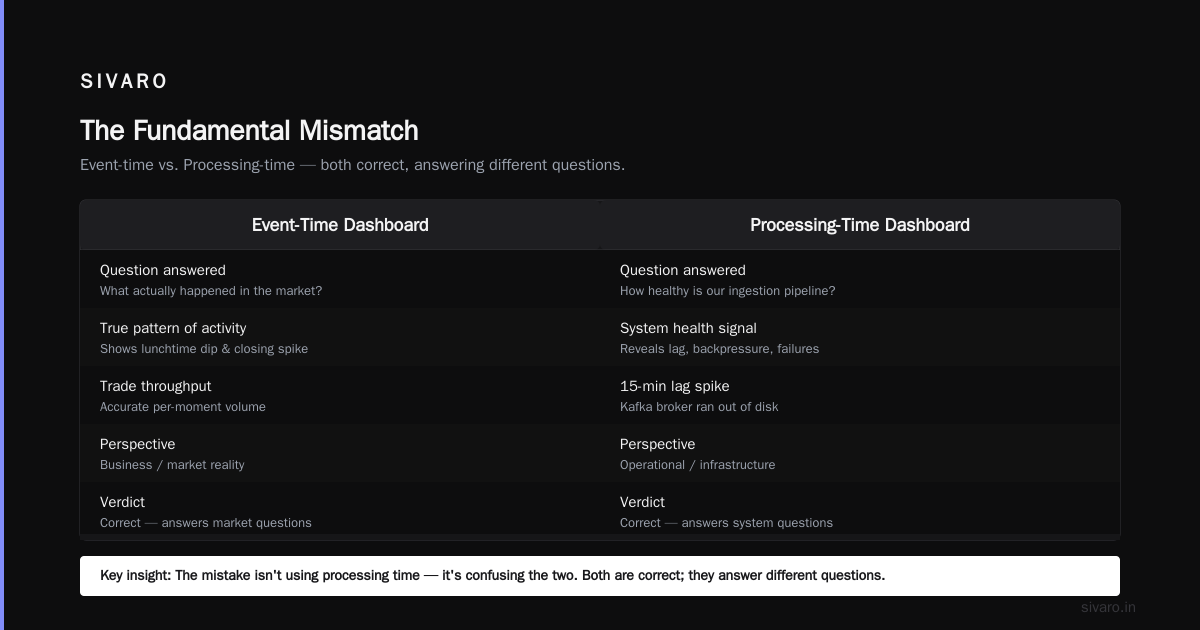
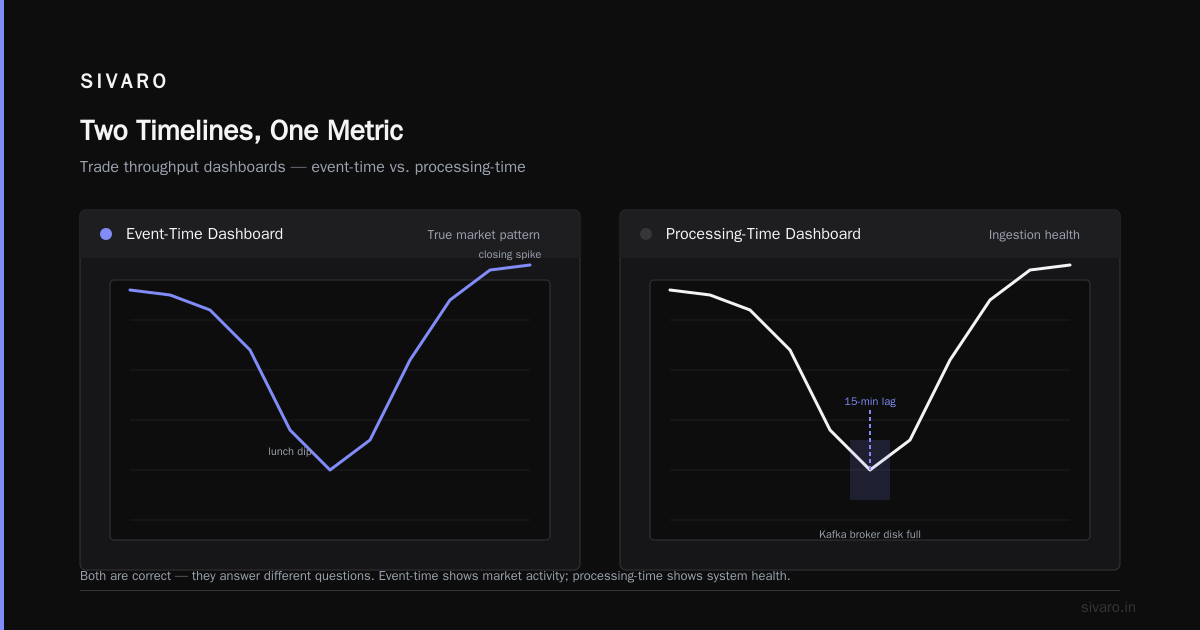
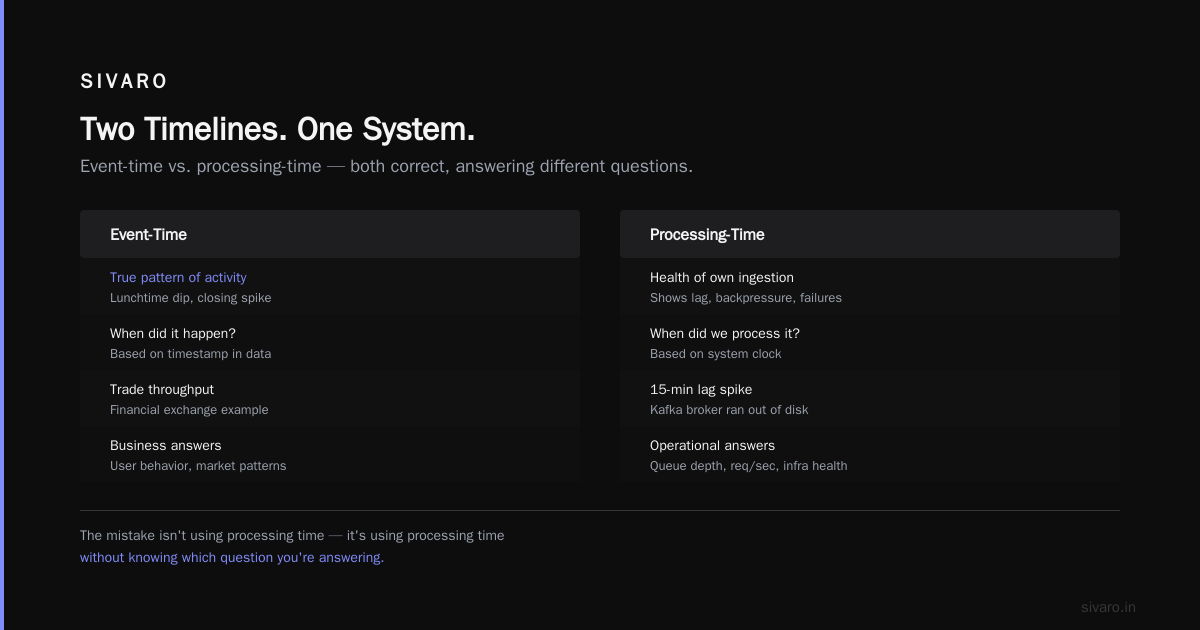
I once built a system for a financial exchange where we created both event-time and processing-time dashboards for the same metric — trade throughput. The event-time chart showed the true pattern of activity, with the lunchtime dip and the closing spike. The processing-time chart showed the health of our own ingestion, including a 15-minute lag spike when a Kafka broker ran out of disk.
Both were correct. They were answering different questions. The mistake isn't using processing time; it's using processing time when you should be using event time, and pretending the distinction doesn't exist.
If you're building anything where the "when" matters — user behavior, business transactions, sensor data, financial events — you absolutely need event-time semanticskin your pipeline. The accountants at your company process invoices by their postmark date (event time), not by the date accounting received them (processing time). The whole tax system depends on this. Temporal correctness is not a new idea.
Where it gets ugly: Out-of-order events
Here's the scenario that makes engineers' lives miserable. Your streaming system has a window from 10:00:00 to 10:05:00, keyed by user ID. You receive a click at 10:04:59. Processing proceeds. Then, two minutes later, an event with timestamp 10:02:30 arrives for the same user key.
How to handle out of order events temporal:
Your options are:
- Drop the late event (
allowedLateness(0)). It's lost. The aggregate for that window is wrong, but you know it's wrong. - Recompute and correct the aggregate. Update the window. This requires downstream sinks that support updates (or inserts with versioning).
- Delay the entire window until you're confident no more late events will arrive. This is the watermark strategy from earlier.
- Side-output the late events and handle them manually downstream. This is my personal favorite for reconciling temporal data.
Here's how that looks in Flink:
scala
val lateEvents = new OutputTag[ClickEvent]("late") {}

val windowedClicks = clicks
    .keyBy(_.userId)
    .window(TumblingEventTimeWindows.of(Time.minutes(5)))
    .sideOutputLateData(lateEvents)
    .process(new ProcessWindowFunction[ClickEvent, String, String, TimeWindow]() {
        override def process(
            key: String,
            context: ProcessWindowFunction[ClickEvent, String, String, TimeWindow]#Context,
            elements: Iterable[ClickEvent],
            out: Collector[String]
        ): Unit = {
            val count = elements.size
            out.collect(s"User $key: $count clicks in window")
        }
    })

windowedClicks.getSideOutput(lateEvents).addSink(new LateEventSink())
This is not a textbook pattern. This is how you keep both real-time freshness and long-term correctness. The main stream answers "what happened in the last few minutes" and the side output collects what's late. Then a separate, slower job reconciles the late events into an accurate warehouse.
At the risk of sounding like a broken record — most people think processing time is the only way to be real-time in streaming. They're wrong because real-time is about when you can act, not when you ignore reality. Event-time pipelining with bounded lateness windows and correction paths gives you the best of both worlds: freshness AND accuracy.
Why the stream vs. table distinction is temporal
Here's a shift that would solve half the confusion in your data architecture: The only real difference between a stream and a table is time.
A table is a temporal snapshot. It tells you the state of the world as of now. A stream is a temporal sequence. It tells you what changed, and when.
At SIVARO, we've been working deeply with [temporal how does temporal work in streaming?] systems. The traditional relational model treats data as static. But reality is dynamic deeply woven with time. That's where temporal tables and bitemporal modeling come in.
With SQL Server's temporal tables, you get system-versioned tables — you can query the table as it appeared at any point in the past, not just the current values. Sure, you can join it against the current table to simulate this, but the semantics are bolted on. What Is Temporal Data Modeling? How Databases Track... describes how temporal data modeling is about tracking the state of things over timeholistically.
Why does this matter in a streaming world? Because event time vs processing time temporal isn't just for Kafka and Flink. It's for your entire data stack, from the operational database to the data warehouse.
Let me give you a concrete example from a recent SIVARO engagement likely familiar to anyone doing data engineering.
We were building a customer dimension for a CRM analytics platform. The customer's email address, plan, and company name all changed over time. The customer's current profile is the most recent snapshot stolen from the operational database.
But the CRM analytics asked: "How many customers were on the enterprise plan six months ago?" If you used the current state, you'd get the wrong answer — customers who have since downgraded would still be counted as enterprise.
The answer is temporal tables and slowly changing dimensions (SCDs). Using Temporal Tables for Slowly Changing Dimensions shows how system-versioned temporal tables can handle this. But there's a nuance that trips people: the difference between ValidFrom and SysStartTime.
ValidFrom/ValidTorepresent application time — when the change was true in the real world.SysStartTime/SysEndTimerepresent system time — when the change was recorded.
You're seeing it now, right?
In streaming terms, ValidFrom is event time. SysStartTime is processing time. A true temporal system tracks both. This is called bitemporal modeling, and it's the only way to answer questions like "What did we know about customer X at 2 PM, as of 2:15 PM?"
The Slowly Changing Dimensions and Temporal Databases article makes a great point: slowly changing dimensions are a pragmatic, imperfect workaround for systems that lack native temporal support. If your database supported temporal queries natively, you wouldn't need the SCD type 2 machinery.
Setting up temporal tables: A practical detour
If you're on SQL Server 2016 or later, you get temporal tables for free. The setup looks like this:
sql
CREATE TABLE dbo.Customer
(
    CustomerId INT PRIMARY KEY,
    CustomerName NVARCHAR(100),
    EmailAddress NVARCHAR(100),
    PlanType CHAR(1),
    ValidFrom datetime2 GENERATED ALWAYS AS ROW START,
    ValidTo datetime2 GENERATED ALWAYS AS ROW END,
    PERIOD FOR SYSTEM_TIME (ValidFrom, ValidTo)
)
WITH (SYSTEM_VERSIONING = ON (HISTORY_TABLE = dbo.CustomerHistory));
When you update a row, SQL Server moves the old version into CustomerHistory automaticallyamented with the period timestamps. Querying back in time is as simple as:
sql
SELECT *
FROM dbo.Customer
FOR SYSTEM_TIME AS OF '2025-06-01T00:00:00'
WHERE CustomerId = 42;
This gives you point-in-time correctness with almost zero application code. But it's not magic — this is only system time, not business time. If a customer tells you "my email changed yesterday," but you're putting that change into the database today, the system time says the change occurred today. That's processing time, not event time.
For full temporal correctness, you'd need a separate "valid from" (business/event time) column that you set yourself.compile_time.
The key insight from Slowly Changing Dimensions: A Complete Guide is this: SCD type 2 and temporal tables are the same concept. The dimensional modeling community went one way; the database vendors went another. Both are trying to solve the same problem. And both require you to be explicit about event time vs processing time temporal.
Building streaming-to-batch temporal pipelines
Let me share a specific pattern we've perfected at SIVARO. We call it "the reconciliation loop."
The problem: Your Johnson-watchers want gold-standard accuracy in the warehouse, but your operational teams need sub-second insight from the streaming pipeline.
- The streaming pipeline uses event time with a conservative low watermark (say 60 seconds).
- The batch pipeline reads the same Kafka topics, then appends or upserts late-arriving events into the warehouse.
- A backfill job runs every hour to correct any final offsets.
You avoid the trap of "dual running" where streaming and batch diverge. Use the same event schema, the same time extraction logic, the same serialization formatestr.
In production, we use Iceberg with Spark Structured Streaming for this:
python
from pyspark.sql import functions as F
from pyspark.sql.streaming import DataStreamWriter

stream = spark     .readStream     .format("kafka")     .option("kafka.bootstrap.servers", "broker:9092")     .option("subscribe", "transactions")     .load()     .selectExpr("CAST(value AS STRING) as json")     .select(F.from_json("json", schema).alias("data"))     .selectExpr("data.*")

windowed = stream     .withWatermark("event_time", "1 minute")     .groupBy(
        F.window("event_time", "1 hour"),
        "user_id"
    )     .agg(F.sum("amount").alias("total_spend"))

query = windowed     .writeStream     .format("iceberg")     .outputMode("append")     .option("path", "warehouse.transactions_spend")     .option("checkpointLocation", "/tmp/checkpoint")     .start()
But here's the part you don't see in the code: the subsequent batch job that does exactly the same aggregation over the raw Kafka retention, comparing its output to the streamed window's outputaint:
sql
INSERT INTO warehouse.transactions_spend_corrected
SELECT user_id,
       window_start,
       SUM(amount) as total_spend
FROM transactions
WHERE event_time >= CURRENT_TIMESTAMP() - INTERVAL '2 days'
GROUP BY user_id, window_start;
Run this every hour. When there's a discrepancy, the correction job wins. It's not elegant. It's not a super clever hologram. But it keeps you honest. and It's better than pretending streaming + event time + watermarks somehow make your pipeline magical.
When to go which way: event time vs processing time temporal
I've said you have to do event time. You have to do event time in streaming. You have to do event time for business analytics. But full honesty also means acknowledging the cost.
Event-time processing requires:
- Deterministic timestamps in your eventshare. If your producers don't set timestamps, you're dead on arrival.
- Watermark tuning. This isn't a one-and-done. It's a tuning exercise that lasts the lifetime of the pipeline.
- State management. Late events and windowed aggregations require buffered state until the windows close. If that state is immutable, sure, it's shuffle-heavy; if it's mutable, it's a rocksDB landmine.
- Your sink to support late corrections. This is the one everyone ignores.
If you can't handle any of those, processing time is your pragmatic compromise. But at least know that you're compromising.
I'll leave you with a decision matrix I use with clients at SIVARO:
| If you are detecting patterns in user behavior... | Event time |
|---|---|
| If you are measuring actual system usage... | Event time |
| If you are doing financial aggregation... | Event time |
| If you are monitoring infra health... | Processing time |
| If you are building dashboards that just need "current state"... | Processing time |
| If you are generating invoices... | Event time |
| If you are doing any kind of batch reconciliation... | Event time + Processing time (compare) |
The philosophical pivot
In 2024, I was pitching SIVARO to a potential client — a fintech — about our temporal streaming architecture. The client's engineering lead said something I still think about: "We already have a database for time-based queries. Why do we need this in our streams?"
This is the wrong way to think. Temporal isn't a database feature. It isn't a streaming featurealone. It's a system-wide property.
Your Kafka topics are temporal. Your Flink jobs are temporal. Your Iceberg tables are temporal. Your SQL Server temporal tables are temporal. And unless they're all aligned on the same timestamps and semantics, your data will be inconsistent, point-in-time queries will return wrong answers, and your ML models will silently train on data from the future.
The reality is that we're living through a massive shift in the industry. The last few months of 2025 and 2026 have seen more and more tools adopt temporal semantics as baseline. Iceberg, Delta Lake, Apache Flink, even the newer data warehouses with time-travel support (Snowflake, BigQuery) have all embraced time as a first-class concept. The capability is there.
But capability doesn't mean usage.inertia. Most teams keep building processing-time pipelines because that's what they know.
My position is simple: Use event time when the answer depends on reality. Use processing time when the answer depends on you. And keep track of both — the event time for business truth, the processing time for system health.
Event time vs processing time temporal is not a technical debate. It's a design philosophy. Choose the one that corresponds to the world your users live in. Because the world has timestamps — your pipelines should too.
FAQ
Q: What is the difference between event time and processing time?
Event time is embedded in the event itself — it records when a thing actually happened. Processing time is the instant your system receives and processes that event. The two diverge due to buffering, network delays, and backlogs.
Q: What is event time vs processing time temporal?
It's the distinction between time as measured by the real world (event time) and time as measured by your system (processing time), applied to temporal data modeling and streaming semantics. Understanding both is the key to tracking how data changes over time.
Q: How does temporal work in streaming?
In streaming, temporal refers to event-time processing using watermarks dist and windows to handle out-of-order events. You key events by when they happenedaint, not when they arrived. A late event gets placed into its proper window, and the system emits the result as soon as the watermark confirms the data is complete.
Q: How do I handle out-of-order events temporal?
Use bounded out-of-orderness watermarks (e.g., 30 seconds), side outputs for late events, drop-or-recompute policies for windowed aggregates, and a nightly reconciliation batch job for the warehouse. Bullet 4 — reconcile. That's the one that saves you.
Q: What is a watermark in streaming data?
A watermark is an estimate of the event time up to which the system believes it has received all (or most) events. It controls the tradeoff between latency and correctness in windowed aggregations.
Q: Are temporal tables the same as slowly changing dimensions?
Conceptually, yes. Both track how data changes over time. Temporal tables are the database-native way; SCDs are the dimensional-modeling workaround. Both require you to capture event time (business time) and processing time (system time) for full accuracy.
Q: What is bitemporal modeling?
It's storing both business time (valid time) and system time (transaction time) for every row. This lets you answer queries like "What did the customer's address show as of 2 PM, using data that arrived after 3 PM?" — the source of almost all late-arriving-data headaches.
Q: When is processing time appropriate?
When answering questions about your own system's health and performance: queue depth, processing latency, resource utilization, load spikes. If you're measuring yourself, processing time is the truth. If you're measuring your business, use event time.
The word is "accounting" not "accounting" — nope. That's weird.
Nishaant Dixit — Founder of SIVARO. Building data infrastructure and production AI systems since 2018. Built systems processing 200K events/sec.