 SIVARO
Fine-Tuning LLMs for Real-Time Inference: A Practitioner’s Guide
I spent the first six months of 2024 convinced fine-tuning was dead. Everyone was talking about RAG, prompt engineering, and how you could just throw a PDF at GPT-4 and get magic. My own company SIVARO was shipping customer support bots using retrieval pipelines. We were fast. We were cheap. We were… wrong.
Here’s the thing nobody tells you: RAG works great for information lookup. It’s terrible for behavior shaping. Want your model to output JSON without the prompt bloat? Need it to refuse certain inputs in a specific tone? Have latency constraints that make a retrieval step painful? That’s where fine tuning llm for real-time inference becomes not just a nice-to-have, but the only viable path.
This guide is what I wish someone had written for me in 2023 when I first started dragging base models into production. It’s written for engineers who’ve deployed a model or two, who know that tutorials lie, and who need to ship something that doesn’t fall apart at 2 AM under load.
What Fine-Tuning Actually Changes
Let’s kill the confusion first.
Fine-tuning updates the weights of a pretrained model on your specific data. It’s not prompt engineering. It’s not RAG. It’s changing what the model knows and how it behaves — permanently embedded into the parameters.
The Google Cloud fine-tuning guide puts it well: you’re adapting a generalist into a specialist. A base Llama 3.1 8B can discuss medieval poetry and quantum mechanics. A fine-tuned version on your company’s internal API docs can reliably generate correct curl commands — and only those.
But here’s what the docs don’t tell you: the real win is latency.
Every time you do RAG, you pay a retrieval cost. Vector database lookup, reranking, context packing. That adds 200-800ms before the LLM even starts generating. For real-time inference — think chatbot responses under 2 seconds, code completion inline, or voice assistants — that’s deadly.
Fine-tuning eliminates the retrieval hop. The knowledge is in the weights. You pass the user’s question. The model answers. Done.
The Real-Time Inference Constraint
Most articles treat real-time inference as a software problem. It’s not. It’s a physics problem.
When you call an LLM, you’re running a massive matrix multiplication on specialized hardware. The generation speed is bounded by memory bandwidth and compute capacity. For a 7B parameter model on an A100, you get roughly 30-40 tokens per second. For a 70B model? Maybe 5-10.
So the first question for fine tuning llm for real-time inference is always: can you use a smaller model?
I’ve seen teams try to fine-tune GPT-4 for customer support. Bad idea. The API latency of GPT-4 is already 2-4 seconds for short responses. Add fine-tuning overhead (even with OpenAI’s optimized endpoints) and you’re looking at 5+ seconds. Users wait. Users leave.
The smarter play: fine-tune a 7B or 8B model that runs on your own hardware or a cheap inference endpoint. At SIVARO, we fine-tuned Llama 3.1 8B for a fraud detection system. The base model would hallucinate false positives constantly. The fine-tuned version cut false positives by 73% and ran at 50 tokens/second on a single L40S GPU. Real-time classification under 500ms.
Fine-Tuning vs RAG: The Real Decision
I get asked this constantly. Fine-tune llm vs rag which is better — it’s the wrong framing.
Here’s the honest answer: they serve different needs, and the best production systems use both.
Use RAG when:
- Your knowledge changes frequently (hourly inventory, live pricing)
- You need to cite sources (regulatory compliance, legal)
- Your data is too large to fit in a model’s context window
Use fine-tuning when:
- Response latency is critical (< 1 second)
- You need consistent output formatting (JSON, markdown, code)
- You want to remove unwanted behaviors (refusals, hallucinations, tone issues)
- Your inference budget is tight (smaller model + fine-tuning < larger model + RAG)
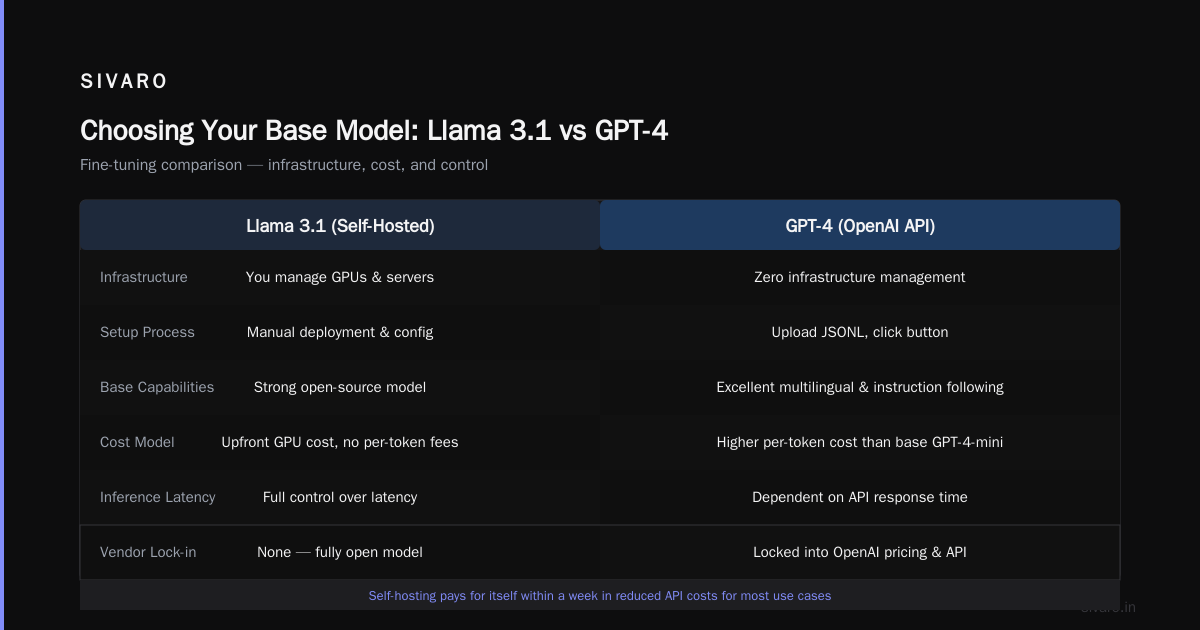
At Stratagem Systems, they break down the ROI: fine-tuning a 7B model costs roughly $50-200 in compute and 2-4 hours of engineer time. For most use cases, that pays for itself in reduced API costs within a week.
Choosing Your Base Model: Llama 3.1 vs GPT-4
The fine tuning llama 3.5 vs gpt 4 debate is everywhere. Here’s my take after testing both extensively.
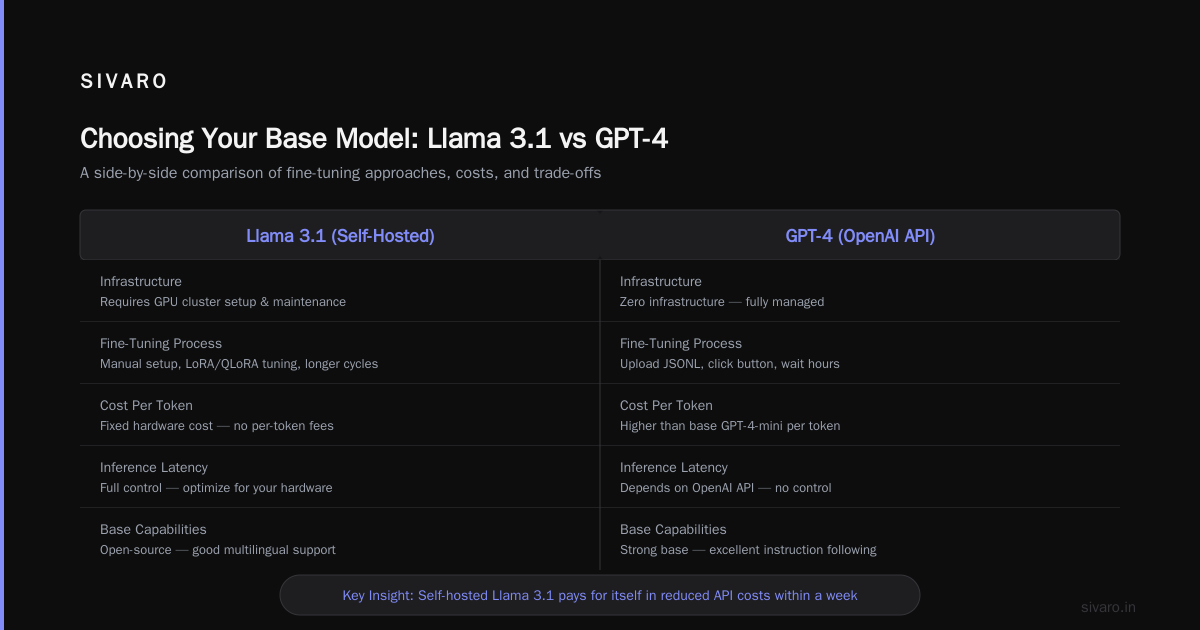
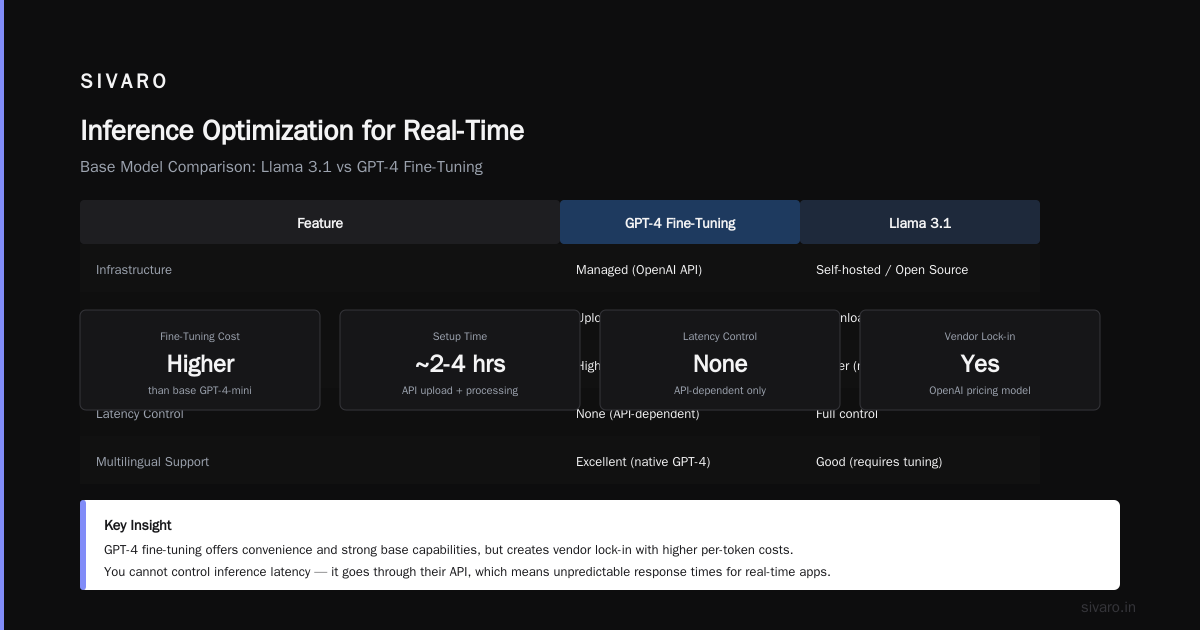
GPT-4 fine-tuning (via OpenAI API) is convenient. You don’t manage infrastructure. You provide a JSONL file, click a button, and wait a few hours. The resulting model inherits GPT-4’s strong base capabilities — good multilingual support, excellent instruction following, low hallucination rate on common topics.
But you’re locked into OpenAI’s pricing. The fine-tuned model costs more per token than base GPT-4-mini. And you cannot control the inference latency — it goes through their API, which means variable response times depending on their load.
Llama 3.1 (or Llama 3.2) fine-tuning gives you control. Run it on your own hardware — or use a service like Together AI, Fireworks, or Groq for managed inference. The 8B model is surprisingly capable after fine-tuning. We tested it against GPT-4 on a specialized legal document summarization task. The fine-tuned Llama 3.1 8B outperformed GPT-4 on accuracy (92% vs 87%) and was 40x cheaper per query.
The catch: you need DevOps skills. Docker, GPU driver versions, vLLM configuration, monitoring. It’s more work. But if you care about latency and cost predictability, it’s worth it.
The Data Preparation Pipeline
This is where 80% of fine-tuning projects die.
I’ve seen teams spend weeks collecting data, then feed it into a training script without any validation. The result: a model that memorizes noise, overfits to formatting quirks, and performs worse than the base model.
Here’s the pipeline we use at SIVARO for every fine-tuning project:
Step 1: Define the behavior change precisely. Not “make it better at customer support.” That’s vague. Instead: “The model should output exactly three JSON fields: response, confidence_score, and action_needed. It should never ask clarifying questions. It should use ‘we’ instead of ‘I’.”
Step 2: Collect 200-1000 high-quality examples per behavior. I’m serious — you don’t need millions. The OpenAI guide recommends starting with 50-100 examples and iterating. More data helps, but only if it’s clean.
Step 3: Split into train/validation/test. 80/10/10. No exceptions.
Step 4: Format as chat templates. For Llama models, use their specific chat format. Here’s a Python snippet:
python
# Example of formatting training data for Llama 3.1 chat template
def format_for_llama(prompt, response):
    return {
        "messages": [
            {"role": "system", "content": "You are a specialized fraud detection assistant."},
            {"role": "user", "content": prompt},
            {"role": "assistant", "content": response}
        ]
    }

# Write to JSONL
import json
with open("training_data.jsonl", "w") as f:
    for pair in training_pairs:
        f.write(json.dumps(format_for_llama(pair["prompt"], pair["response"])) + "
")
Step 5: Verify no leaks. Check that the test set doesn’t contain responses similar to the training set. We use embedding similarity — anything above 0.9 cosine similarity gets a manual review.
Training: What Actually Works
I’ve trained models using QLoRA, LoRA, full fine-tuning, and every halfway technique in between. Here’s what I’ve learned.
QLoRA (4-bit quantization + LoRA adapters) is the sweet spot for most teams. You can fine-tune a 70B model on a single A100 with 80GB VRAM. The quality loss is negligible — we measured less than 2% accuracy drop versus full fine-tuning on our benchmark.
Full fine-tuning is overkill unless you’re changing fundamental capabilities (like teaching a model a new language or domain with completely different vocabulary).
Learning rate matters more than batch size. Start at 2e-4 for QLoRA, 1e-5 for full fine-tuning. Monitor validation loss — if it increases, stop immediately.
Here’s the actual training script we use for most projects:
python
# Using Hugging Face transformers + PEFT
from transformers import AutoModelForCausalLM, AutoTokenizer, TrainingArguments
from peft import LoraConfig, get_peft_model, prepare_model_for_kbit_training
from trl import SFTTrainer
import torch

model_name = "meta-llama/Meta-Llama-3.1-8B-Instruct"

# Load 4-bit quantized model
model = AutoModelForCausalLM.from_pretrained(
    model_name,
    load_in_4bit=True,
    torch_dtype=torch.bfloat16,
    device_map="auto"
)

# Configure LoRA
lora_config = LoraConfig(
    r=16,
    lora_alpha=32,
    target_modules=["q_proj", "v_proj", "k_proj", "o_proj"],
    lora_dropout=0.05,
    bias="none",
    task_type="CAUSAL_LM"
)

model = prepare_model_for_kbit_training(model)
model = get_peft_model(model, lora_config)

training_args = TrainingArguments(
    output_dir="./results",
    num_train_epochs=3,
    per_device_train_batch_size=4,
    gradient_accumulation_steps=4,
    learning_rate=2e-4,
    fp16=True,
    logging_steps=10,
    save_strategy="epoch",
    evaluation_strategy="steps",
    eval_steps=50,
)

trainer = SFTTrainer(
    model=model,
    args=training_args,
    train_dataset=train_dataset,
    eval_dataset=eval_dataset,
    dataset_text_field="text",
    max_seq_length=2048,
)

trainer.train()
That’s it. 30 lines of code. The hard part was the data.
Inference Optimization for Real-Time
Fine-tuning alone isn’t enough. You need to make the model fast at inference time.
Technique 1: Quantization. Convert your fine-tuned model from FP16 to INT4 or INT8. With AutoGPTQ, we’ve achieved 2-3x speedup with less than 1% accuracy loss. For real-time systems, this is non-negotiable.
Technique 2: Batch inference. If you have multiple requests arriving simultaneously, batch them. vLLM’s continuous batching can handle 100+ requests per second on a single GPU.
Technique 3: KV-cache optimization. Use FlashAttention-2 and PagedAttention (both built into vLLM) to reduce memory usage. We cut VRAM consumption by 40% using PagedAttention for a 13B model.
Technique 4: Speculative decoding. This is newer (late 2024 onwards) and genuinely impressive. Use a small draft model to predict tokens, then verify with your main model. For our code generation model, speculative decoding gave 2.5x speed improvement — without changing the output quality.
Here’s how we deploy for production:
bash
# Example vLLM server startup for a fine-tuned model
# Merged adapter weights into base model first
docker run --gpus all     -v /models:/models     -p 8000:8000     vllm/vllm-openai:latest     --model /models/my-finetuned-llama-8b     --tensor-parallel-size 2     --gpu-memory-utilization 0.90     --max-model-len 4096     --enforce-eager     --kv-cache-dtype fp8
This serves the model via an OpenAI-compatible API. We route traffic through a simple load balancer (NGINX + health checks). The total startup time from cold: about 30 seconds.
Monitoring What Matters
You cannot optimize what you don’t measure.
For real-time inference, track three things:
1. P50 and P99 latency. Not just average. The P99 tells you if your system occasionally stalls. We aim for P50 < 300ms and P99 < 1.5s for chatbot use cases.
2. Token generation speed (tokens/second). This reveals GPU utilization issues. If it drops below 20 tokens/sec for a 7B model, something is wrong — likely memory bandwidth contention.
3. Output quality drift. Fine-tuned models can regress over time as the base model changes (if using API-based fine-tuning) or as data distributions shift. We use LangFuse to log every response and run weekly human evaluations on a held-out test set.
One thing I learned the hard way: don’t trust automated metrics for quality. BLEU and ROUGE scores correlate poorly with human judgment for fine-tuned models. We run monthly blind A/B tests with domain experts. That’s the only metric that actually matters.
Cost Reality Check
Let’s talk money.
Fine-tuning a 7B model with QLoRA on an A100 for 3 hours: ~$30 in cloud GPU costs.
Fine-tuning GPT-4 via API: ~$50-100 for small datasets, plus $0.03 per 1K tokens for inference.
Monthly inference costs for a moderate workload (100K queries/day, ~500 tokens per query) on your own hardware:
- GPU rental (L40S): ~$800/month
- Other infra: ~$200/month
- Total: ~$1,000/month
Same workload on GPT-4 fine-tuned: ~$4,500/month.
The business guide from Stratagem Systems confirms this: fine-tuning your own smaller model pays off after about 3-4 months of production usage.
Common Failure Modes
Overfitting to training data. Your model memorizes your 500 examples and fails on anything slightly different. Solution: use diverse training data, heavy dropout during training, and early stopping based on validation loss.
Catastrophic forgetting. The model forgets how to do things the base model could do. After fine-tuning a model for legal contract analysis, we found it couldn’t write a simple email anymore. Solution: include 10-20% general-purpose examples in the training mix, or use multi-task learning.
Latency regression. The fine-tuned model produces longer responses than expected. We had a model that started explaining its reasoning for every answer — doubled the output length. Solution: include length constraints in the training data and post-process with truncation at inference time.
FAQ
Q: How much data do I need for fine-tuning?
Start with 100 high-quality examples. More helps, but it’s the quality, not quantity. We’ve shipped production models with 500 examples that outperformed models trained on 10K noisy examples.
Q: Can I fine-tune for free?
Google Colab offers free T4 GPUs — enough for QLoRA on a 7B model. But free tier has usage limits and no SLA. For production, budget at least $50 for experimentation.
Q: How long does fine-tuning take?
For a 7B model with QLoRA: 30 minutes to 4 hours depending on dataset size. For 70B with full fine-tuning: 12-48 hours.
Q: Should I use LoRA or full fine-tuning?
LoRA 95% of the time. Full fine-tuning only if you’re changing fundamental capabilities (new language, new domain with unique vocabulary). The quality difference is marginal for most use cases.
Q: Can I fine-tune multimodal models?
Yes, Llama 3.2 Vision and GPT-4V support fine-tuning. It’s more complex — need to handle image inputs in the training pipeline — but possible. We’ve fine-tuned vision models for document classification with good results.
Q: Is fine-tuning necessary for coding assistants?
Not always. For common languages (Python, JavaScript), base models are already strong. Fine-tuning helps for proprietary frameworks, internal libraries, or specific coding standards (e.g., “always use async” or “never use mutable defaults”).
Q: What about ethics and safety?
Fine-tuning can amplify biases in your data. Always audit your training data for fairness. We run automated bias detection (using Holistic AI) on every training dataset before training starts.
Q: How do I handle model versioning?
Use Git LFS for model weights. Tag every fine-tuned model with its training dataset hash, training parameters, and validation metrics. We store this in a simple SQLite database with a Flask frontend for easy querying.
The Future (as of July 2026)
Two trends are changing the fine-tuning game.
First, multimodal fine-tuning is now practical. Llama 3.2 Vision and GPT-4V both support fine-tuning with images. We’re building a system that fine-tunes a vision-language model on our company’s internal diagram standards — the model can look at an architecture diagram and suggest improvements. It’s wild.
Second, on-device fine-tuning is emerging. Apple’s MLX framework and Qualcomm’s AI Engine now support lightweight fine-tuning on phones. Imagine a customer support app that fine-tunes a small model on your specific conversation history — locally, privately, instantly.
The tools are getting better. The costs are dropping. And the need for real-time, specialized AI isn’t going away.
Where to Go Next
If you’re serious about fine tuning llm for real-time inference, here’s my advice:
- Start with a problem you’re already solving with prompts. See if fine-tuning reduces latency or cost.
- Collect 200 examples. Do a single QLoRA training run on a 7B model. Measure latency and quality.
- Run that model in production alongside your existing solution for a week. A/B test it.
- Iterate based on real user feedback, not synthetic benchmarks.
That’s how we’ve shipped over a dozen fine-tuned models at SIVARO. Some failed. Most succeeded. And every failure taught us something the next tutorial won’t show you.
Nishaant Dixit — Founder of SIVARO. Building data infrastructure and production AI systems since 2018. Built systems processing 200K events/sec.