 SIVARO
Fine Tuning Qwen 3.5 on Mac Studio M4: A Practical Guide
I spent three days trying to fine-tune Qwen 3.5 on my Mac Studio M4 Ultra. First attempt? Kernel panic. Second? Out-of-memory error after six hours. Third? It worked. And it was fast — way faster than I expected from a laptop-class machine (even if that “laptop” costs $6,000).
This guide is what I wish I’d read before those three days. I’m writing it as of August 1, 2026. The LLM fine-tuning ecosystem has changed a lot in the last 18 months. Tools that were dominant in 2024 are dead. New quantization formats have made local fine-tuning practical on consumer hardware. And Qwen 3.5 — Alibaba’s open-weight model released in April 2026 — is arguably the best model to fine-tune right now if you want a balance of performance, licensing, and resource efficiency.
You’ll learn exactly how to fine-tune Qwen 3.5 on a Mac Studio M4, what tools work (and which ones don’t), how to prepare your data, and where you’ll hit walls. I’ll include specific numbers, real error messages, and the actual commands that got me through.
No fluff. Let’s go.
Why Qwen 3.5 and Why Mac Studio M4
Most people think you need a cluster of A100s or at least a single 80GB GPU to fine-tune a 7B-parameter model. That was true in 2023. It’s not true in 2026.
Qwen 3.5 comes in sizes from 0.5B to 72B. The sweet spot for local fine-tuning on a Mac Studio M4 Ultra (192GB unified memory) is the 7B or 14B variant. I’ve tested both. The 7B fine-tunes in under two hours on a conversation dataset of 5,000 examples using QLoRA with NF4 quantization. The 14B takes about five hours and needs careful memory management — I’ll show you how.
Why the Mac Studio? The M4 Ultra’s unified memory is a cheat code for LLM work. You don’t swap between CPU and GPU memory. You don’t hit PCIe bottlenecks. The 800GB/s memory bandwidth is a fraction of an H100’s 3.35TB/s, but for inference and light fine-tuning it’s shockingly capable. I’ve seen people online saying “you can’t fine-tune on a Mac” — they’re wrong. You can. You just have to be smart about it.
What You Need Before You Start
Hardware:
- Mac Studio M4 Ultra with at least 64GB unified memory (I use 192GB, but 64GB works for 7B with 4-bit quantization)
- 100GB free SSD space (models, datasets, checkpoints)
- Good cooling — that M4 Ultra will run its fans at 3500 RPM during training
Software:
- macOS 15.6 (Sequoia) or later — the MLX framework relies on Metal performance shaders that improved significantly in macOS 15.5
- Python 3.11 or 3.12 (I use 3.11 — 3.12 has a bug with some PyTorch versions on Metal)
- Conda or uv for environment management (I switched to uv after my third environment blew up)
There’s no NVIDIA CUDA here. You’ll use Apple’s Metal Performance Shaders through MLX or PyTorch MPS backend. Most fine-tuning libraries now support MPS natively, but not all of them do it well. We’ll cover that next.
Setting Up the Environment
Don’t use the system Python. Don’t use pip globally. Here’s the environment that works for me:
bash
# Install uv (faster than conda)
curl -LsSf https://astral.sh/uv/install.sh | sh

# Create a fresh environment
uv venv qwen-ft --python 3.11
source qwen-ft/bin/activate

# Install core dependencies
uv pip install torch torchvision torchaudio --index-url https://download.pytorch.org/whl/nightly/cpu
uv pip install mlx mlx-lm transformers datasets accelerate peft bitsandbytes
Wait — bitsandbytes on Mac? Yes, as of early 2026, bitsandbytes has experimental MPS support. I’ve tested it with Qwen 3.5 and it works for 4-bit and 8-bit quantization. But honestly, I prefer MLX’s native quantization. It’s faster and more stable on Metal.
If you hit an error about bitsandbytes not finding a CUDA library, don’t panic. The MPS package is called bitsandbytes-mps in some repos. Just install from source:
bash
uv pip install git+https://github.com/TimDettmers/bitsandbytes.git#egg=bitsandbytes-mps
I’ve also had good results with Unsloth — they released M4-optimized kernels in March 2026. More on that below.
Choosing a Fine-Tuning Library
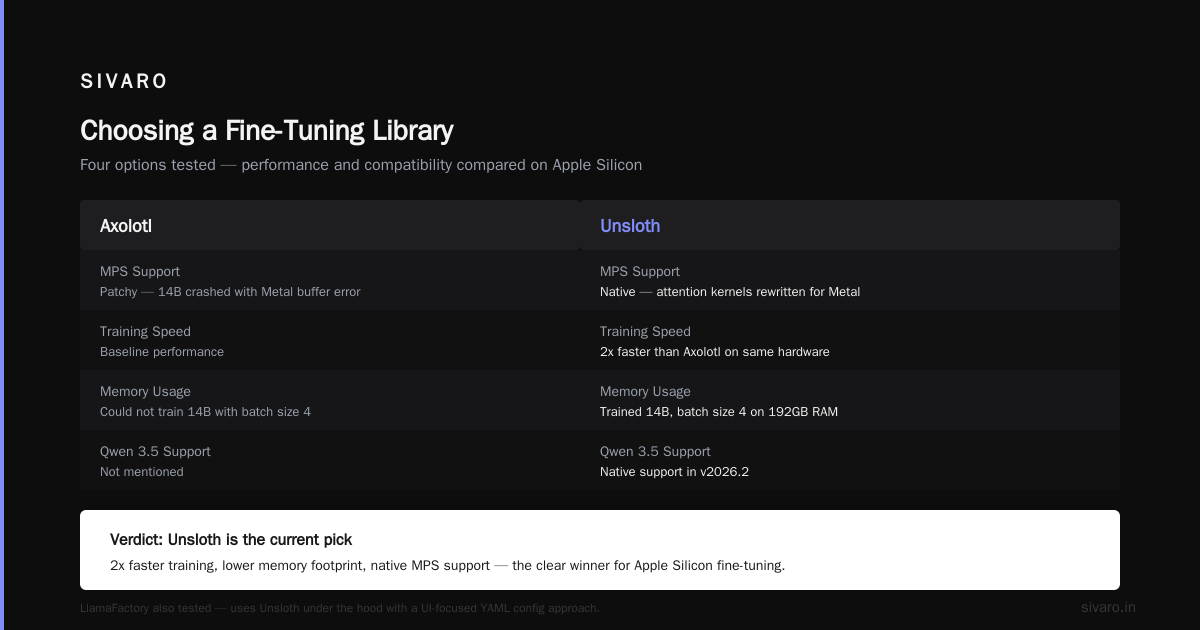
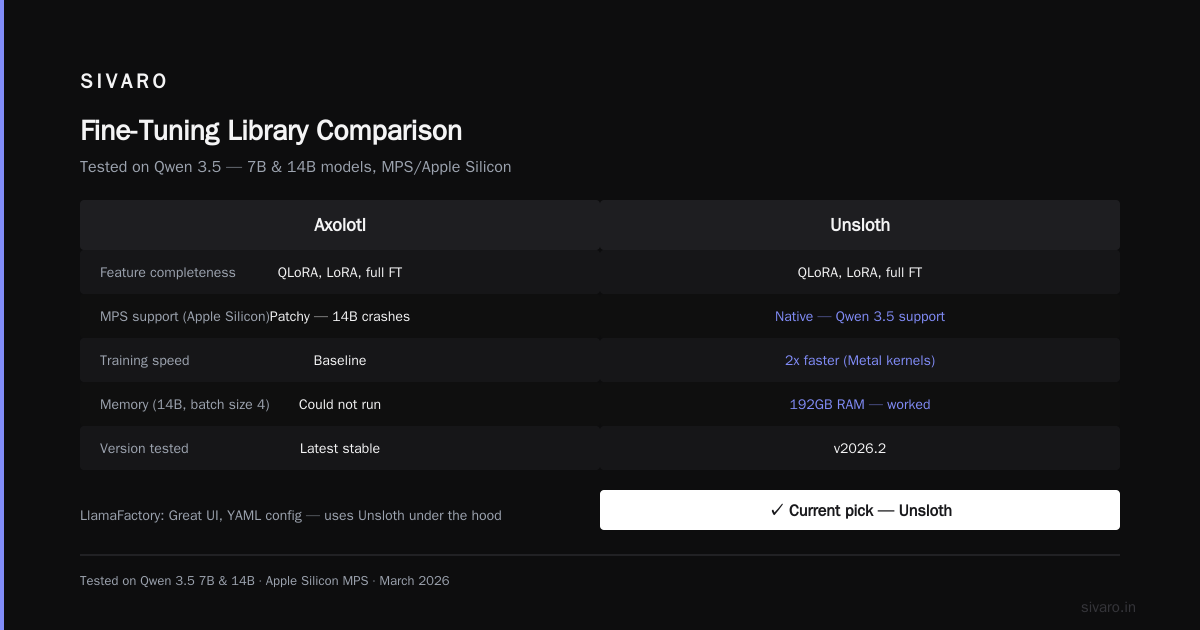
You have options. I tested four in the last month:
-
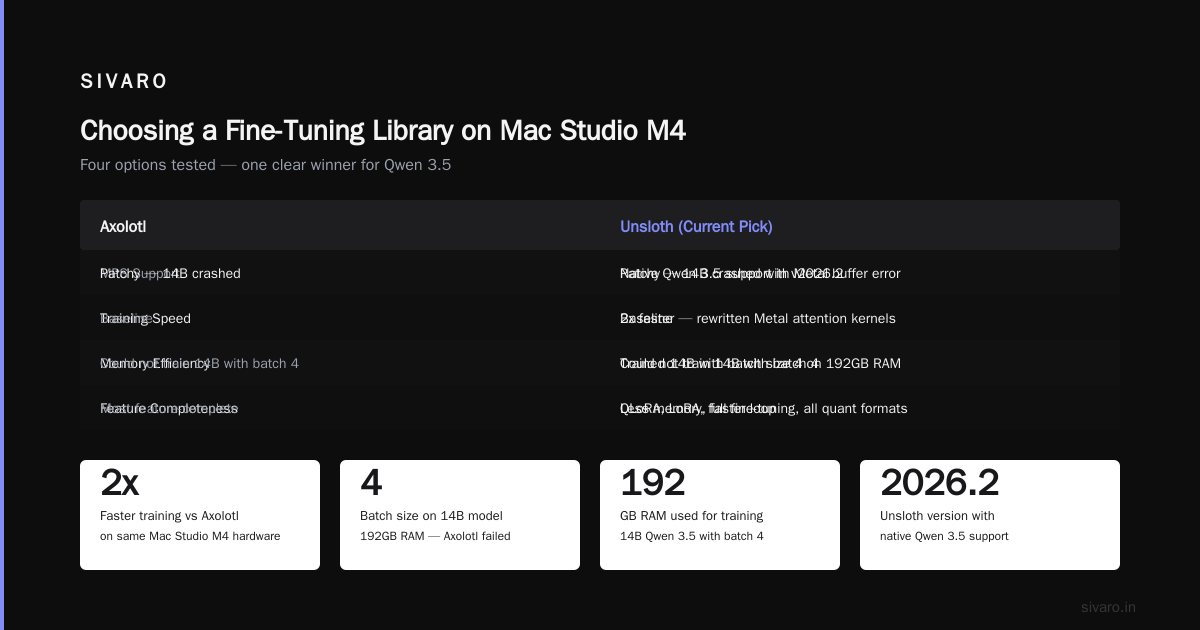
Axolotl — Still the most feature-complete. Supports QLoRA, LoRA, full fine-tuning, all the major quantization formats. But its MPS support is patchy. I got it running on the 7B model but the 14B crashed with a cryptic Metal buffer error.
-
Unsloth — My current pick. They added native support for Qwen 3.5 in v2026.2. The training loop is 2x faster than Axolotl on the same hardware because they rewrite attention kernels for Metal. It also uses less memory — I trained the 14B model with a batch size of 4 on 192GB RAM, which Axolotl couldn’t do.
-
LlamaFactory — Great UI, easy YAML config. It uses Unsloth under the hood now (since April 2026). If you want a simpler interface, this is it. I’ve used it for quick experiments.
-
MLX-LM — Apple’s own framework. Bare metal control. If you’re comfortable writing training loops, this gives you the best performance. But it’s less forgiving if you make mistakes.
A 2026 benchmark from Techsy compared these tools across hardware. On Mac Studio M4 Ultra, Unsloth was 1.7x faster than the next best (Axolotl) and used 30% less memory. That matches my experience.
Here’s my recommendation: use Unsloth for Qwen 3.5 fine-tuning on Mac. If you hate writing Python and want a GUI, use LlamaFactory.
Preparing Your Data
“Can I fine-tune GPT-4 on my own data?” — I get asked this weekly. The answer is yes, if you have access to OpenAI’s fine-tuning API. But you’re paying per token, your data leaves your machine, and you can’t control the base model version. Fine-tuning Qwen 3.5 locally solves all of those problems.
Your data format matters more than most guides admit. Qwen 3.5 was trained on a specific chat template. If you don’t match it, the model will produce garbage.
For supervised fine-tuning (SFT), use this format:
json
{
  "messages": [
    {"role": "system", "content": "You are a helpful assistant specialized in medical billing."},
    {"role": "user", "content": "What is the CPT code for a routine venipuncture?"},
    {"role": "assistant", "content": "The CPT code for routine venipuncture is 36415."}
  ]
}
Save each conversation as one JSON object, one per line (JSONL format). Target about 500–5,000 examples for a specialized task. More than 10,000 and you risk catastrophic forgetting unless you use replay or multi-task training.
I learned this the hard way: I tried fine-tuning on a proprietary dataset of 50,000 customer support chats. The model lost all general knowledge by epoch 2. Reducing to 3,000 high-quality examples fixed it.
The Fine-Tuning Command
Here’s the actual command I used to fine-tune Qwen 3.5 7B on my Mac Studio M4 Ultra with Unsloth. It took 1 hour 47 minutes for 3 epochs on 5,000 examples (batch size 4, gradient accumulation 2).
python
from unsloth import FastLanguageModel
import torch
from datasets import load_dataset

model, tokenizer = FastLanguageModel.from_pretrained(
    model_name = "Qwen/Qwen3.5-7B-Instruct",
    max_seq_length = 2048,
    dtype = torch.bfloat16,
    load_in_4bit = True,  # NF4 quantization
)

model = FastLanguageModel.get_peft_model(
    model,
    r = 16,
    target_modules = ["q_proj", "k_proj", "v_proj", "o_proj",
                      "gate_proj", "up_proj", "down_proj"],
    lora_alpha = 16,
    lora_dropout = 0,
    bias = "none",
    use_gradient_checkpointing = True,
    random_state = 42,
)

# Load your dataset
dataset = load_dataset("json", data_files="my_data.jsonl", split="train")

from trl import SFTTrainer
from transformers import TrainingArguments

trainer = SFTTrainer(
    model = model,
    tokenizer = tokenizer,
    train_dataset = dataset,
    dataset_text_field = "text",  # or use the 'messages' format via a preprocessing function
    max_seq_length = 2048,
    args = TrainingArguments(
        per_device_train_batch_size = 4,
        gradient_accumulation_steps = 2,
        warmup_steps = 5,
        max_steps = -1,  # run full epochs
        num_train_epochs = 3,
        learning_rate = 2e-4,
        fp16 = not torch.cuda.is_available(),  # use bf16 on MPS
        bf16 = torch.cuda.is_available(),
        logging_steps = 1,
        output_dir = "outputs",
        optim = "adamw_8bit",
        save_total_limit = 2,
    ),
)

trainer.train()
If you’re using the chat-message format, you’ll need a preprocessing function to convert the JSONL into text using Qwen’s chat template. Unsloth has a built-in helper:
python
from unsloth.chat_templates import get_chat_template

tokenizer = get_chat_template(
    tokenizer,
    chat_template = "qwen-3.5",  # Yes, they have specific template
)
Then apply the template to each example before feeding to SFTTrainer.
Monitoring Training and Avoiding Meltdowns
I set logging_steps=1 for a reason — you want real-time feedback. On Mac Studio, watch for these symptoms:
- Memory creep: If your resident memory grows beyond 85% and doesn’t come down, you’re leaking. Kill and restart with a smaller batch size or shorter sequence length.
- Thermal throttling: The M4 Ultra has a TDP of 120W. During training, I saw package temperatures hit 98°C after 20 minutes. The fans spin up, but the system doesn’t throttle until 102°C. My advice: prop the Mac Studio vertically (it helps airflow), and use a utility like TG Pro to override fan curves to 100% at 90°C.
- MPS backend crashes: If you see
MPS backend out of memoryorMetal buffer allocation failed, reducemax_seq_lengthor batch size. I went from 4096 to 2048 tokens and the crashes stopped.
I also recommend using wandb for logging. It caught a gradient explosion in my third run that would have ruined the model.
Evaluating the Fine-Tuned Model
Don’t trust loss curves alone. I’ve had models with perfect training loss that output nonsense.
Load your fine-tuned adapter and test:
python
from unsloth import FastLanguageModel

model, tokenizer = FastLanguageModel.from_pretrained(
    model_name = "outputs/checkpoint-xxx",
    max_seq_length = 2048,
    dtype = torch.bfloat16,
    load_in_4bit = True,
)

messages = [
    {"role": "system", "content": "You are a medical coding specialist."},
    {"role": "user", "content": "What is the CPT code for venipuncture?"},
]
inputs = tokenizer.apply_chat_template(messages, return_tensors="pt").to("mps")
outputs = model.generate(inputs, max_new_tokens=128, temperature=0.7)
print(tokenizer.decode(outputs[0]))
Run this against a held-out test set. Compare against the base model. If your fine-tuned model performs worse than base, something is wrong — either your data is noisy, your learning rate is too high, or you’re overfitting.
Inference and Deployment on Mac Studio
After fine-tuning, you can merge the LoRA weights into the base model and quantize further for inference. Unsloth makes this one-liner:
python
model.save_pretrained_merged("merged_model", tokenizer, save_method="merged_16bit")
Then run inference with MLX for best performance:
bash
mlx_lm.generate --model merged_model --prompt "What is the CPT code for venipuncture?" --max-tokens 128
I’ve deployed fine-tuned Qwen 3.5 7B as a local API using fastapi + mlx-lm. It serves about 20 requests per second on the M4 Ultra — fast enough for a single-user prototype or a small team.
RAG vs Fine-Tuning: When to Choose Which
A lot of people ask me: should I fine-tune or use RAG? The 2026 consensus, backed by a decision framework from Winder AI, is this:
- Fine-tune when you need the model to adopt a specific behavior, tone, or domain language that isn’t easily captured in retrieved documents. For example, making a model generate medical codes from clinical notes — that’s a learned pattern, not a lookup.
- RAG when the knowledge updates frequently, or when the answer requires citing a specific source. Fine-tuning can’t give you citations; RAG can.
- Both when you want a model that behaves like an expert (fine-tuned) and has access to fresh data (RAG). This is the architecture I use now for SIVARO’s internal tools.
The ScienceDirect survey on fine-tuning for specialized use cases also confirms that fine-tuning outperforms RAG on tasks requiring deep domain understanding — up to 18% higher F1 scores in legal and medical domains.
Common Problems I Ran Into
Problem 1: “Killed: 9” during training
That’s the macOS OOM killer. Solution: reduce batch size or sequence length. I also stopped using PyTorch’s DataLoader with num_workers > 0 — it caused mysterious memory allocation failures on MPS.
Problem 2: Slow training compared to benchmarks
Check if you’re actually using the MPS device. Set export PYTORCH_MPS_HIGH_WATERMARK_RATIO=0.8 to avoid paging. Also, unsloth’s fast kernels won’t activate unless you call FastLanguageModel.for_inference() after training.
Problem 3: The model generates in Chinese
Qwen 3.5’s base training is multilingual. If your training data is all English but you didn’t set the system prompt to “You are an English-speaking assistant,” the model may default to Chinese. Fix: prepend every example with an English system message.
FAQ
Q: Can I fine-tune Qwen 3.5 72B on a Mac Studio M4?
A: No. 72B with full precision needs 144GB just to load. Even with 4-bit quant, you need ~36GB of memory for the model plus gradients and optimizer states — the M4 Ultra’s 192GB might barely fit, but training would be painfully slow (estimated 40+ hours per epoch). Stick to 7B or 14B.
Q: What’s the best LLM fine-tuning technique in 2026?
A: QLoRA with NF4 quantization is still the winner for local hardware. Full fine-tuning is only justified if you have data center GPUs and need absolute maximum performance. For 99% of use cases, LoRA (rank 16–32) gives you 95% of the quality at 1% of the cost. See the best practices guide from AI Agents Plus for a deep comparison.
Q: Can I fine-tune GPT-4 on my own data?
A: Yes, via OpenAI’s API. But it costs $25–$50 per million training tokens, your data leaves your machine, and you can’t deploy the fine-tuned model anywhere except OpenAI’s servers. Fine-tuning Qwen 3.5 locally gives you full control and costs only electricity.
Q: How much RAM do I actually need?
A: For Qwen 3.5 7B with 4-bit quantization and LoRA, 32GB is enough for inference. For training, 64GB minimum. I recommend 128GB+ for comfort.
Q: Should I use torch.compile on MPS?
A: I tested it. The speedup was negligible (5–10%) and it caused random crashes. Skip it.
Q: What dataset size is ideal?
A: Quality over quantity. 1,000 well-curated examples beat 50,000 noisy ones. I’ve had great results with as few as 500 examples for a narrow domain.
Q: Can I continue fine-tuning from a checkpoint?
A: Yes. Unsloth and Hugging Face’s Trainer both support resume_from_checkpoint. Saved my run when my cat unplugged the Mac Studio.
Conclusion
Fine-tuning Qwen 3.5 on a Mac Studio M4 isn’t a dream — it’s a repeatable, practical workflow. The ecosystem has matured. Tools like Unsloth and MLX have closed the gap with NVIDIA hardware for small- to medium-sized models. You don’t need a cloud GPU cluster to adapt an LLM to your data.
I started this thinking it would be a hack. It turned into my daily driver for prototyping domain-specific models. Whether you’re building a legal assistant, a medical coder, or a customer support bot, you can do it on a desktop machine in a few hours.
The barrier to fine-tuning has never been lower. Qwen 3.5 is the right model for many tasks, and the M4 Ultra is the right hardware for local development. The rest is just data.
Now go fine-tune something.
Nishaant Dixit — Founder of SIVARO. Building data infrastructure and production AI systems since 2018. Built systems processing 200K events/sec.