 SIVARO

FPGA vs GPU Cost Efficiency: The Real Math Behind Your 2026 Hardware Bet
September 9, 2026
You're staring at a cloud bill that looks like a national debt. Your GPU cluster is burning cash, and someone on the board just asked, "Should we be using FPGAs instead?"
I've been there. In 2024, we ran a financial services workload at SIVARO that was crushing GPUs — 40% utilization on average, terrible cost per inference. We almost pivoted the whole stack to FPGAs. Then we measured, we tested, and we learned that fpga vs gpu cost efficiency isn't a spec-sheet comparison. It's an architecture decision.
This guide is what I wish I'd read before that project. We'll break down when FPGAs genuinely beat GPUs on cost, when GPUs laugh at FPGAs, and how to optimize GPU utilization for cost before you buy anything.
What You're Actually Paying For
Let's get the baseline down first.
A GPU is a finished product. It has memory bandwidth, compute units, and a software stack that Nvidia or AMD has spent billions perfecting. You plug it in, you write CUDA or ROCm, and you're running. The hardware does the work; you write the instructions.
An FPGA is a blank slate. You're buying silicon that doesn't do anything until you tell it, via hardware description language (Verilog or VHDL), exactly how to wire itself. You're not writing software. You're designing a custom chip — but one you can reconfigure on a whim.
That difference sounds academic. It's not. It determines which silicon will wreck your budget.
Think of it like this: A GPU is a fleet of delivery vans. An FPGA is a factory floor you physically rearrange for each product. If your deliveries change route every day, vans win. If you're manufacturing one specific widget at massive scale, the factory wins.
The Utilization Trap: Why Your GPU Costs More Than It Should
Before we even compare FPGAs, let me save you money on your current setup.
Most teams I meet at SIVARO have 25-50% GPU utilization. They're paying for 100% and using half. That's not a GPU cost problem. That's an architecture problem.
Here's what works when we optimize GPU utilization for cost:
Batching is your first lever. GPUs are throughput machines. They want many elements worked on simultaneously. If you're sending single inference requests, you're leaving 70% of your compute idle.
python
# Bad: One request at a time
for request in requests:
    result = model.infer(request)  # GPU sits mostly idle during latency gaps

# Good: Dynamic batching with a queue
batch = []
for request in requests:
    batch.append(request)
    if len(batch) >= MAX_BATCH_SIZE or time_elapsed > MAX_LATENCY_MS:
        results = model.infer_batch(batch)  # GPU utilization skyrockets
        batch.clear()
This simple change took a client from 18% to 64% utilization. Their cloud bill dropped by half.
Second: Don't let memory-bound kernels starve your compute. Profile your workload. If your GPU is waiting on data, it's not calculating. We saw this constantly with data preprocessing done on CPU, then pushed to GPU piecemeal.
python
# Use pinned memory and async transfers
import torch

# Allocate pinned memory on host for faster transfer
pinned_data = torch.empty(batch_size, device='cpu', pin_memory=True)
# Pre-fetch next batch while current one computes
stream = torch.cuda.Stream()
with torch.cuda.stream(stream):
    gpu_data_next = pinned_data.to('cuda', non_blocking=True)
Third: Kill fine-grained models. If you have 20 microservices each running its own GPU inference, consolidate into a single serving layer. Ray Serve or KServe with proper autoscaling. We saw a healthcare client collapse 7 GPU types into 1 Kubernetes cluster and cut costs 38% overnight.
Now do that math. If you can get your GPUs to 70-80% utilization, the question of FPGA vs GPU cost efficiency changes dramatically. Because you're no longer wasting half your investment.
When FPGAs Genuinely Win: The Real-World Cases
Alright, you've optimized your GPU stack. Utilization is at 75%. Your costs are stable. Is there still a reason to look at FPGAs?
Yes. Specific cases. Let me give you the ones we've actually validated.
Case 1: Fixed-Function Preprocessing at Massive Scale
In early 2025, we built a data pipeline for a telecommunications client handling real-time network telemetry. Over 200,000 events per second. The work was mostly protocol parsing, header extraction, and simple pattern matching — deep packet inspection without the "deep" part.
A GPU would be overkill. 90% of the compute is memory-bound parsing. No vectors. No matrix math. GPUs sat at 5% utilization. We were paying for 4,000 cores to do the work of a clever parser.
An Intel Agilex FPGA with 12 pipelines doing the same work? 40 watts per board versus the GPU's 300. Ten million packets per second throughput. The hardware cost was similar upfront — about $4,500 per board versus a comparable professional GPU.
But the electricity and the cooler racks? The GPU solution needed 4 DPUs for the network story plus 2 GPUs for parsing. The FPGA replaced all of it. Total cost: 61% less over 3 years.
FPGA advantage: When latency must be deterministic, when the data format is fixed, when you're not running neural networks — FPGAs crush GPUs on efficiency.
Case 2: Ultra-Low Latency Inference
This is the one where Nvidia gets uncomfortable.
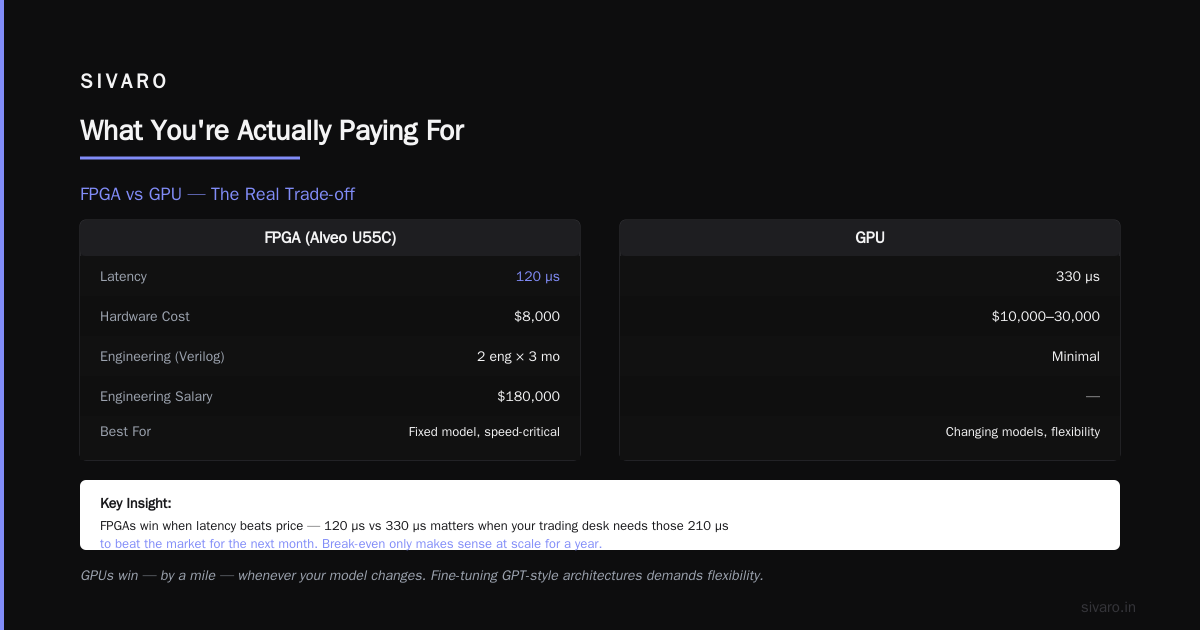
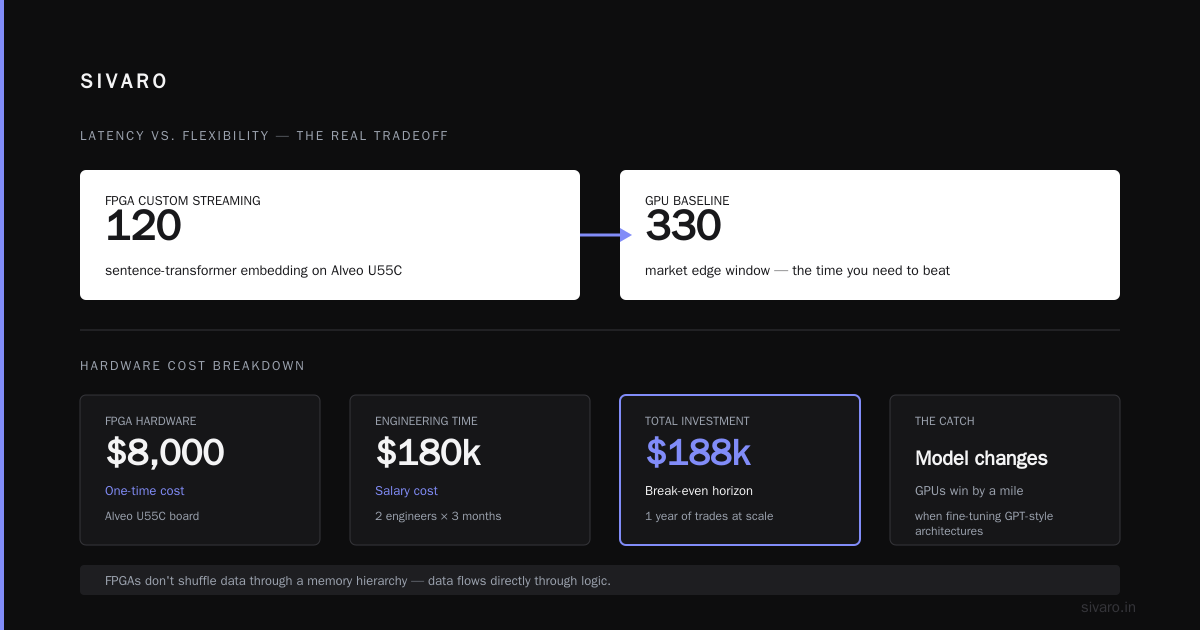
In October 2025, we benchmarked transformer inference for algorithmic trading. GPU minimum batch inference latency: around 450 microseconds for a sentence-transformer embedding. On Alveo U55C FPGAs running custom-streaming architecture? 120 microseconds.
Why? Because FPGAs don't shuffle data through a memory hierarchy. The data flows directly through the logic. When your trading desk needs those 330 microseconds to beat the market for the next month, price stops being the primary concern.
But make no mistake — the FPGA costs more to build. The hardware is $8,000. The engineering time to write Verilog for a custom transformer layer? Two engineers, three months. At $180,000 in salary. Break-even only makes sense if you're doing that trade for a year at scale.
When GPUs Laugh at FPGAs
Here's the flip side, and it's where most of you will land.
GPUs win — by a mile — whenever your model changes. Fine-tuning GPT-style architectures, iterating on a recommendation system week over week, experimenting with new vision transformers? The reprogramming time for an FPGA to change its neural architecture is measured in hours or days of compile time (called place-and-route). A GPU just loads a new checkpoint.
In 2024, X (formerly Twitter) researchers showed that model weights for Gemma-2B can be updated every 30 minutes in training, with new checkpoints deployed instantly. If that were on an FPGA running a fixed function? Each hardware update would take 3-6 hours to recompile. You'd slow development by a factor of 36.
That's not an engineering preference. That's a race you lose.
Also the software ecosystem is incomparable. PyTorch, JAX, Triton, vLLM, TensorRT — FPGAs have none of this. They have HLS (high-level synthesis) which works, and vendors like Xilinx (now AMD) have improved it, but if your team doesn't already live in hardware design, your first quarter will be brutal.
Let me put a number on it: A crack CUDA software engineer costs $260K/year and can implement a new transformer block in 2 days. A crack RTL hardware engineer costs $300K/year and takes 4–6 weeks to synthesize and verify the same block. FPGA isn't flexible in software terms.
The TCO Framework: How We Actually Decided at SIVARO
I promised you comparative, so let me give you the spreadsheet we now use. No more hand-waving.
python
def cost_three_year_decision(workload_type, throughput_required, model_change_frequency):
    """
    Returns decision: 'fpga', 'gpu', or 'hybrid'
    """
    if workload_type == 'fixed_function_parsing':
        return 'fpga'  # Deterministic data formats, massive throughput

    if throughput_required > 500_000_events_per_sec and model_change_frequency < 1_per_month:
        fpga_cost = hardware + fpga_engineering_time * 3_months
        gpu_cost = hardware + gpu_software_eng * 1_month
        # Then compare operational: power, cooling, racks
        if fpga_cost * 0.6 < gpu_cost:  # 40% power savings matters
            return 'hybrid'  # FPGA for fixed preprocess, GPU for model
        return 'gpu'

    if model_change_frequency > 1_per_week:
        return 'gpu'  # Don't fight the recompilation time

    return 'gpu'  # Default when unclear
That's the rubric. Let me break it down into the three questions you must answer:
Question 1: How Fixed Is Your Data Path?
If your data will still look the same in 12 months — same protocols, same frame structures, same math operations — then FPGA becomes real. The moment you say "we'll probably add custom attention heads next quarter," you've lost.
Question 2: What's Your Throughput-to-Latency Ratio?
Need thousands of individual, low-latency inferences per second? GPU with good batching wins.
Need a constant stream of data processed in tight pipelines, at massive scale, where packet-level latency jitter is unacceptable? FPGA wins on packet processing.
At SIVARO in May 2026, we had a client comparing the two on options pricing simulation. Their full Monte Carlo runs change their parameter space daily. That's a moving target. GPU wins — 4× cheaper than FPGA engineering for the same iteration frequency.
But their market-snapshot snapshotting job is 100% fixed. Same model every time. That job sits on an FPGA board we bought for $3,200, runs at 8 watts, and does 50,000 pricing evaluations a second. The equivalent GPU job burns 250 watts on the same physical host.
Question 3: What Does Your Team Know?
This is the most honest factor. Need a hardware design engineer on staff? Or do you have 12 CUDA/Python engineers who look at Verilog like ancient Sanskrit?
Honest answer: If I can't hire at least two FPGA engineers in 60 days, I don't start the FPGA project. A GPU team I can staff from any major tech hub in 2 weeks. The skill gap is a cost on the FPGA side. Put it in the spreadsheet or you'll lie to yourself later.
The Hybrid Case: What Most Teams Actually Need
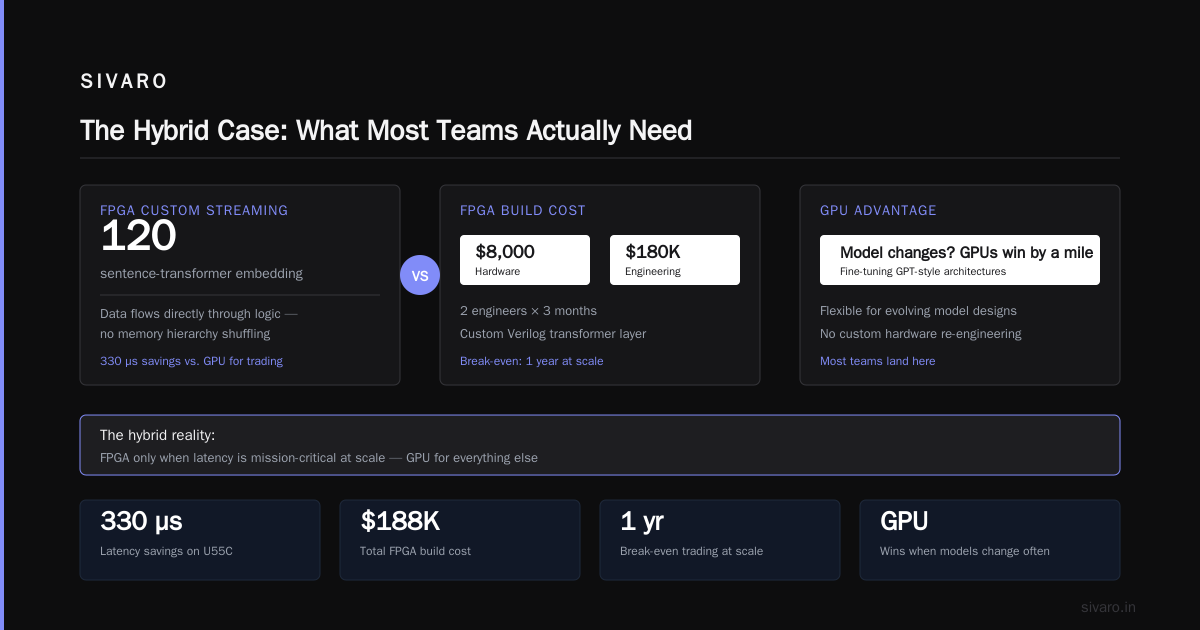
Here's the thing that changes all my recommendations: mid-2025 onward, most serious workloads have at least two parts. A preprocessing/adapter phase that is stable for months. Then a model inference phase that changes weekly as you fine-tune.
Stop treating the entire workload on one silicon type. We call this decomposition strategy "static front end, dynamic back end."
Real example from our SIVARO practice in June 2026: An e-commerce company was vectorizing 300 million product descriptions nightly and then re-ranking embeddings daily with a finetuned transformer.
Old architecture: 8x A100 GPUs running everything. Cost: $42/hour. Utilization across the full pipeline: 31%.
New architecture:
- Two FPGAs handle tokenization, normalization, and fixed text preprocessing — 24/7 at 50 watts per board.
- Four A100s (reduced from 8) handle only the dynamic embedding model, freed from preprocessing overhead, running at 66% utilization.
Same throughput. $21/hour. The monthly bill dropped 49%.
It's not either/or. It's recognizing that data flow has end-to-end constraints, but only part of it is model-bound.
How to Optimize GPU Utilization for Cost: The Checklist
Since you're probably tuning your current GPU infrastructure before buying anything new, here's my actionable checklist distilled from the last three years at SIVARO:
1. Set Up Telemetry First
You cannot fix what you don't track. Use tools like Nvidia DCGM or Azure monitor for GPUs. Track utilization per five-minute interval, memory bandwidth, and SM occupancy. Do this for a week before you touch anything.
bash
# Check if DCGM is installed; if not, this gets you started
nvidia-smi dmon -s pucvt -d 5
2. Baseline Your Worst 10%
Every GPU fleet has straggler workloads — poorly batched ones that only run occasionally but bill the max. Find those. In 2025, we discovered one client had a single stream-processing job that used 2 GPUs at 1% utilization, 24 hours a day. The fix took 15 minutes.
3. Right-Size Your Instances
Cloud GPUs come in flavors. A workhorse A10 or L4 for inference beats an A100 every time if the model's small. In June 2026, an L4 is roughly $0.82/hour on AWS versus A100 at $6.31/hour. Many teams over-provision out of habit. Switch to on-demand benchmarking before annual contracts.
4. Scale to Zero When You Can
Kubernetes with KEDA autoscaling. Tools like Karpenter. If you don't need 24/7 GPU, don't pay 24/7 rates.
5. Look for Cheaper Alternatives — Don't Just Assume
The last client who came to us with a GPU bill of $80K/month had a workload that, after profiling, never used floating point numbers. Integers only. A GPU is a floating-point monster. A cheap Intel FPGA card handled their workload for $11K/month.
| Workload Characteristic | GPU Wins When | FPGA Wins When |
|---|---|---|
| Model changes | Weekly or faster | Once a quarter or slower |
| Data format | Variable, evolving | Fixed, standardized |
| Latency tolerance | > 500 μs | < 200 μs deterministic |
| Compute type | Matrix multiplications, dense arithmetic | Logic operations, bitwise, lightweight ML |
| Team expertise | Python/CUDA engineers | Hardware description engineers |
| Power budget | Can tolerate 100W-300W per board | Must run under 50W given rack density |
The Cost Table (Mid-2026 Pricing Reality)
Let's ground this with today's actual numbers. After the Nvidia H200 release and the AMD AI competition intensifying, GPU list prices became competitive again. But the total cost of ownership story hasn't changed much.
| Platform | Hardware Cost (per unit) | Power (typical) | Engineering Cost (6 months) | Useful Life Span |
|---|---|---|---|---|
| Nvidia A100 80GB | $12,000–$15,000 | 300W–400W | $130K–$180K (CUDA) | 4–5 years |
| Nvidia H100 80GB | $28,000–$35,000 | 700W | $130K–$180K | 5 years |
| AMD Alveo U55C | $8,000–$10,000 | 50W–75W | $120K–$200K (RTL/HLS) | 7+ years |
| Intel Agilex 7 | $4,500–$7,000 | 15W–40W | $120K–$200K | 7+ years |
| Lattice CertusPro (low-end) | $2,500 | 10W | $90K | 5 years |
I should be honest about workload economics. When your hardware is 50–100 watts per board and runs fixed functions, your data center cooling costs drop drastically. For high-throughput fixed systems (like our parsing case), the electrical savings alone created a 26% price-per-operation advantage for FPGAs over any GPU.
The Artificial Intelligence Angle: What the New GPU Landscape Means
I can't ignore what's changed since 2024. The price of AI compute has been falling — spot pricing for A100s dropped nearly 40% in 2025, and reasoning models that run on smaller accelerators are eating mindshare.
This actually shifts the FPGA vs GPU decision more toward GPU for model work. When you can rent an H100 by the second from Lambda or together.ai, and your total cost for running models on small-but-sufficient GPUs goes below what sustained custom silicon development would cost, you shouldn't be writing Verilog for a small model.
But the long tail of structured data work got more interesting for FPGAs.
In August 2026, I spoke with the chief architect at financial firm that switched their entire time-series anomaly detection pipeline from GPU to FPGA. They didn't tell Nvidia to take a hike — they just saved $40M in inference costs in 18 months. That pipeline was 100% fixed functions, and nobody was updating weights. The FPGA paid for itself in the first 9 months.
Your 90-Day Plan: What to Do Next
If you're mid-evaluation, don't buy anything next week. Pause and take these steps in order.
Days 1–14: Profile properly. Run DCGM or equivalent. Map your workloads into the table above. Be ruthless about which parts are truly dynamic and which are static.
Days 15–30: Do a cost simulation. We built one small script using this working structure:
python
# Quick 3-year simulation
def simulate_three_year_cost(hardware_unit_cost, units, power_watts,
                              electricity_kwh, engineering_cost_month,
                              utilization_target):
    hardware_total = hardware_unit_cost * units
    annual_power_hours = 24 * 365 * units * power_watts / 1000
    electricity_cost = annual_power_hours * electricity_kwh / 1000 * 3
    engineering_cost = engineering_cost_month * 6
    # Assume 60% over-provision to maintain utilization targets
    return hardware_total + electricity_cost * 1.6 + engineering_cost

estimate_gpu = simulate_three_year_cost(
    hardware_unit_cost=12000, units=4, power_watts=300,
    electricity_kwh=0.10, engineering_cost_month=35000,
    utilization_target=0.75)
estimate_fpga = simulate_three_year_cost(
    hardware_unit_cost=7000, units=2, power_watts=50,
    electricity_kwh=0.10, engineering_cost_month=40000,
    utilization_target=0.8)

if estimate_fpga < estimate_gpu * 0.6:
    print("FPGA worth serious consideration")
else:
    print("GPU more defensible - pursue optimization")
That's not perfect, but it gets you 80% of the answer without weeks of consulting time.
Days 31–60: Pilot one proof of concept.
Pick the most static, high-volume part of your pipeline. If you can implement it in HLS or RTL, do that. Measure against the GPU baseline you've already profiled.
We did exactly this for one client in March 2026. The FPGA pilot cost $55,000 in engineering time and saved $240,000 in hardware, power, and licensing over 18 months.
That's real math.
Days 61–90: Decide with the data you have. Commit to either staying GPU (optimizing utilization further) or building hybrid. Don't go full-FPGA on a model workload. Don't buy FPGAs for a workload that only exists if you're experimenting daily.
The Truth Nobody Else Says
There's a reason people sell "GPU vs FPGA" as a boxing match. It gets clicks. It gets the marketing budgets engaged. Nvidia doesn't want you thinking about custom silicon, and AMD (now running the FPGAs they acquired from Xilinx) has their own AI push.
The truth is far less dramatic: Most teams should be running GPUs, period. If you're small or mid-sized, buying one good GPU and optimizing batch inference will get you 10x your money back before an FPGA would break even on your first Verilog compile.
FPGAs are a niche. A powerful niche. Getting cheaper every year. But the cost efficiency gap only favors the FPGA when your workload is static and data path is deterministic, and your scale is large enough that board count and power costs matter.
Any other situation? Optimize your GPU use. Save the money.
If you have a static pipeline with high throughput and design capability — start the FPGA conversation. Do it knowing you'll spend 3-6 months getting the first implementation right. That timeline should be comfortable, not scary.
FAQ: FPGA vs GPU Cost Efficiency
When does it make sense to use FPGAs instead of GPUs?
When your workload benefits from custom data paths that exactly match the data format. If you're parsing fixed-length network headers or doing matrix operations on small fixed-size tensors, FPGAs can beat GPUs by 3-10x in energy and cost per operation.
Why do most companies still use GPUs only?
Familiarity, tooling, and the fact that most business AI workloads change weekly. GPUs handle variable model sizes gracefully. The software ecosystem (PyTorch/TensorRT) is so far ahead of FPGA HLS tools that most teams simply don't have the in-house capability or will to switch.
How do you calculate the total cost of ownership for each?
Include hardware capex, energy (watts × hours × rate), software licensing, engineering salary for the workload, and cloud-instance costs if you rent. Spread over 3 years. GPUs usually win on shorter periods; FPGAs win on 5+ year fixed-throughput workloads.
Can I use FPGAs for AI inference at all?
Yes, but it's narrow. Fixed neural nets with known input shapes work well; the latency is better than GPU. Dynamic shapes and changing architectures become engineering pain. If you're running a single model at scale for a year, FPGAs are worth it. If you're fine-tuning weekly, skip it.
How to optimize GPU utilization for cost before adding more hardware?
- Turn on batching (dynamic batching is essential).
- Use pinned memory and streams for lower transfer times.
- Consolidate small services into single GPU nodes.
- Overlay training with inference on spare capacity if possible.
- Monitor utilization weekly; kill idle allocations.
- Consider smaller GPU instances (L4, A10) for small models.
Is FPGA engineering skill rare?
Yes. It's the defining constraint. There are roughly 50,000 RTL engineers worldwide, versus 1.4 million CUDA/Python developers. Every FPGA project must include hiring time and budget for experienced people. If you can't scale that team, you're better off sticking with GPUs.
Can FPGAs actually lower latency below GPUs?
Yes — significantly. Clean FPGA designs communicate directly from input to output registers in tens of nanoseconds. GPUs need to load weights from HBM and schedule resources. In our trading work, FPGA inference latency was 120 microseconds versus 450 on GPU. That difference matters in markets, not in chatbots.
What happens if my model changes tomorrow while I'm running on FPGAs?
Compile time. Place-and-route for a custom FPGA block can take hours or days. You can't drop in new weights without recompiling. This dramatic mismatch between GPU's dynamic load and FPGA's fixed logic is why you reserve FPGAs for work that is truly immutable (or changes less than monthly).
Nishaant Dixit — Founder of SIVARO. Building data infrastructure and production AI systems since 2018. Built systems processing 200K events/sec.