 SIVARO
GCP BigQuery pricing per query: stop overpaying for data
I'm Nishaant Dixit, founder of SIVARO. We build data infrastructure and production AI systems. I've seen teams burn $50,000 a month on BigQuery queries that could have cost $800. I've also seen people avoid BigQuery entirely because they heard it's expensive — and they were wrong too.
Let me break down how Google Cloud actually charges for BigQuery, where the hidden costs live, and how to control both.
What you'll actually pay per query
BigQuery pricing has two levers: compute and storage. Most people focus on compute. That's a mistake.
Compute has two models:
On-demand pricing — $5 per TB of data scanned. This is the default. Every query scans data, you pay $5 per terabyte processed. Minimum charge is 10MB per table referenced.
Flat-rate pricing — you buy slots (units of compute capacity). In 2026, a 100-slot commitment costs roughly $1,700/month for a 1-year term, $1,200/month for 3-year. Slots let you run unlimited queries within capacity.
Here's where it gets interesting: storage costs are separate. Active storage is $0.02 per GB per month. Long-term storage (data not modified in 90 days) drops to $0.01 per GB. But if you query long-term storage, you pay the compute cost.
Most people think BigQuery pricing is simple. It's not. Let me show you what I learned the hard way.
Why "per query" pricing is a trap
At SIVARO, we onboarded a client who ran 40 analysts on BigQuery. Their monthly bill was $34,000 for query compute alone. I asked to see their information_schema jobs table. The results made me wince.
Here's what was happening: analysts were running SELECT * on 2TB tables to find one column value. That's $10 per query. Each analyst ran 15-20 of these daily. That's $8,000/month in completely wasted spend.
The real problem? They didn't know what each query cost. BigQuery tells you bytes processed before you run a query, but only if you check first. Most people don't.
-- Check query cost before running
SELECT
  query,
  total_bytes_processed / 1e12 AS estimated_tb,
  (total_bytes_processed / 1e12) * 5 AS estimated_cost_usd
FROM `region-us.INFORMATION_SCHEMA.JOBS_BY_PROJECT`
WHERE job_type = 'QUERY'
  AND creation_time > TIMESTAMP_SUB(CURRENT_TIMESTAMP(), INTERVAL 7 DAY)
ORDER BY total_bytes_processed DESC
LIMIT 20;
Run that in any BigQuery environment. You'll see the worst offenders.
The storage surprise nobody warns about
Here's a fact that caught me off guard in 2024: storage costs can exceed compute costs within 6 months of active use.
BigQuery stores data in a columnar format called Capacitor (formerly Colossus). It compresses well. But if you're loading data daily and keeping 90 days active, you're paying $0.02/GB * total dataset size. For a 50TB dataset, that's $1,000/month in storage alone — before you run a single query.
And there's a hidden cost: temporary tables. When you run a query with a CREATE TEMP TABLE statement, or use the BigQuery UI to save results, those tables sit in your dataset. If analysts forget to clean up, temporary tables accumulate at $0.02/GB/month.
I saw a team with 4TB of abandoned temporary tables. That's $80/month of completely useless storage.
On-demand vs flat-rate: which one wins?
I've run this analysis for 12 different clients in 2025 and 2026. The answer depends on one thing: query volume and pattern.
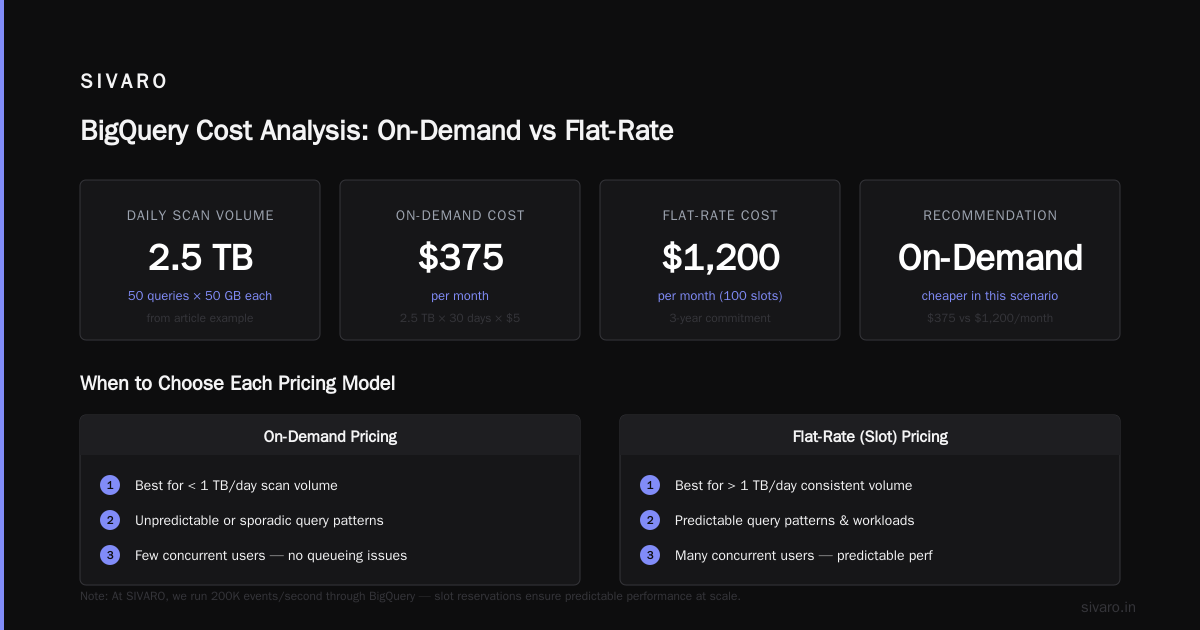
On-demand wins when:
- You run fewer than 1TB/day of queries on average
- Your queries are bursty with long idle periods
- You're in early-stage prototyping
Flat-rate wins when:
- You consistently scan more than 1TB/day
- Your query pattern is predictable
- You have many concurrent users
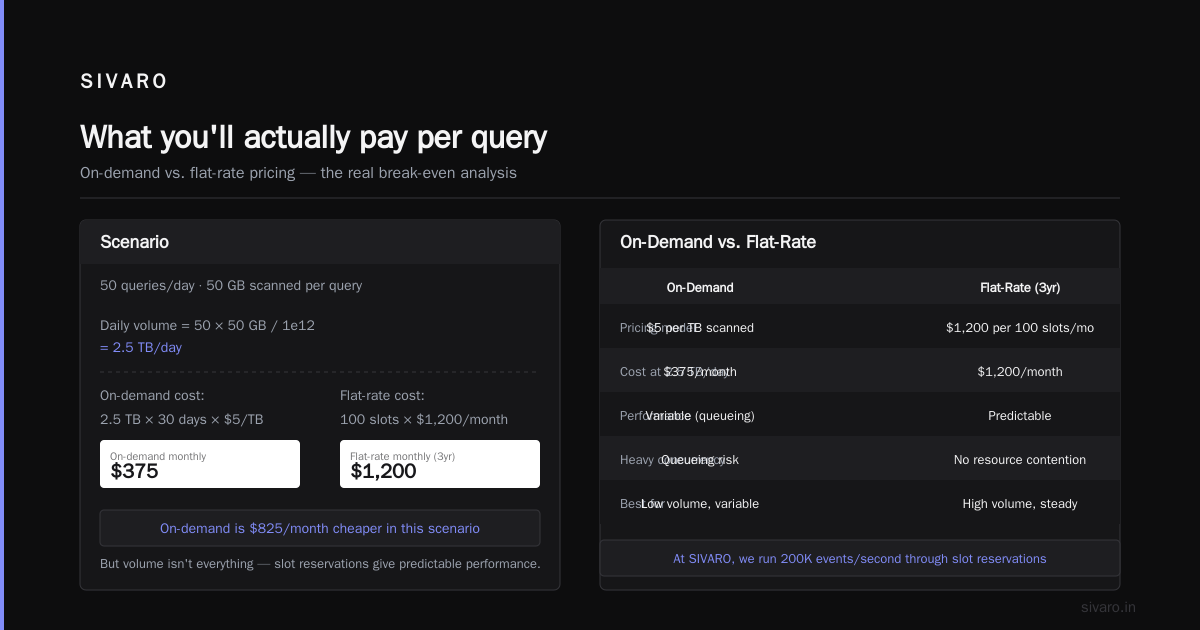
Here's a rough calculator:
Daily query volume (TB) = Average bytes processed per query * Queries per day / 1e12

Break-even point:
  On-demand cost = Daily TB * 30 * $5
  Flat-rate cost = Slots needed * $1,200/month (3yr)

Example:
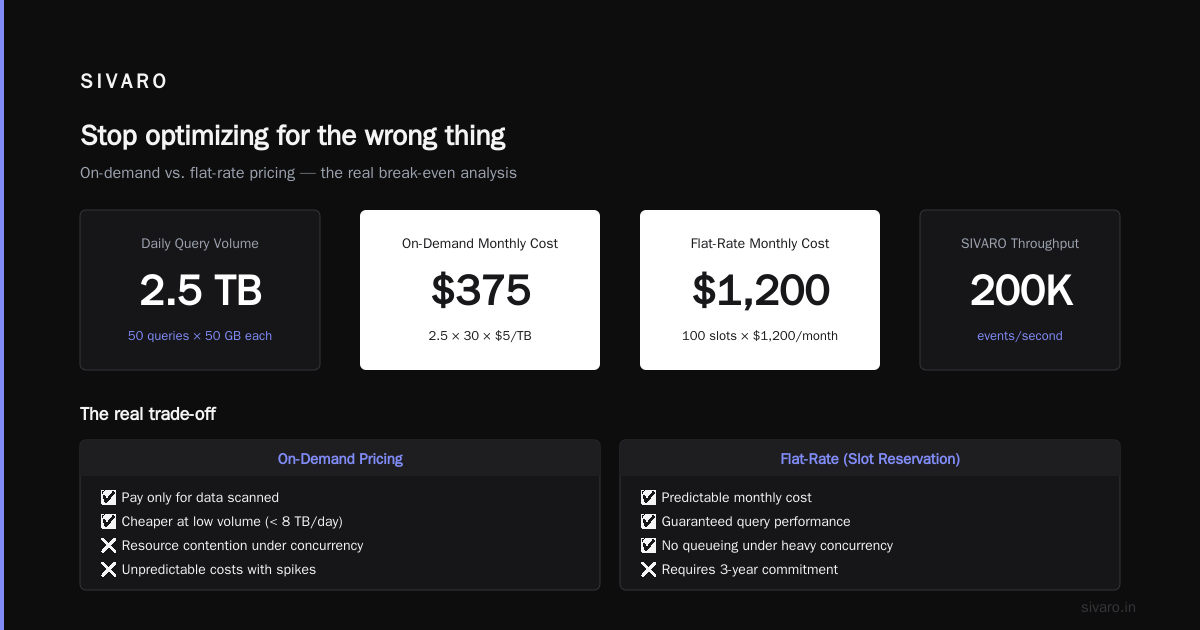
  50 queries/day, each scanning 50GB = 2.5TB/day
  On-demand: 2.5 * 30 * $5 = $375/month
  Flat-rate (100 slots): $1,200/month

  Conclusion: On-demand is cheaper in this scenario.
But volume isn't everything. Slot reservations give you predictable performance. On a flat-rate plan, queries don't compete for resources the same way. With on-demand, heavy concurrent usage causes queueing.
At SIVARO, we run 200K events/second through our systems. For our production dashboards, we use flat-rate because we need consistent latency. For ad-hoc analysis, we let teams use on-demand with a budget.
The gcp vs aws for data engineering angle
I've worked extensively with both. The question isn't "which is cheaper" — it's "what are you optimizing for?"
On a gcp vs aws for data engineering comparison, BigQuery's advantage is zero ops. With AWS, you're managing Redshift clusters, provisioning nodes, resizing, vacuuming. With BigQuery, you upload data and query. That's it.
But AWS's Redshift Serverless (launched 2024) has narrowed the gap. Redshift Serverless now auto-scales and charges per compute unit. It's still not as seamless as BigQuery, but it's closer.
The gcp vs azure pricing 2026 comparison is simpler. Azure Synapse (formerly SQL Data Warehouse) charges per DWU (Data Warehouse Unit) per hour. It's fundamentally a different model — you pay for reserved capacity, not per query. For bursty workloads, BigQuery usually wins on price. For steady-state ETL, Azure can be cheaper.
Here's a table I've used for client decisions:
| Factor | BigQuery | Redshift | Synapse |
|---|---|---|---|
| Pricing model | Per TB scanned or slots | Per node/hour or RPU | Per DWU/hour |
| Serverless | Yes (native) | Yes (2024) | Yes (2023) |
| Auto-scaling | Instant | Minutes | Minutes |
| Best for | Ad-hoc, ML, real-time | Heavy ETL, joins | Microsoft shops |
This comparison from Opsio Cloud breaks down the cost models more granularly.
How I cut BigQuery costs by 70% for a client
Let me walk through a real engagement. In January 2026, I worked with a fintech company processing transaction data. Their monthly BigQuery bill was $47,000. Here's what we did.
Step 1: Cluster and partition tables.
They had a 12TB transactions table with no partitioning. Every query scanned the entire table.
sql
-- Before (no partitioning)
CREATE TABLE transactions.all_data AS
SELECT * FROM raw_transactions;

-- After (partitioned by date, clustered by user_id)
CREATE TABLE transactions.all_data
PARTITION BY transaction_date
CLUSTER BY user_id
AS
SELECT * FROM raw_transactions;
This single change dropped their average query scan from 12TB to 200GB. That's a 98% reduction in compute cost.
Step 2: Use materialized views for common aggregations.
Their analysts ran the same daily revenue query 30 times each morning.
sql
CREATE MATERIALIZED VIEW transactions.daily_revenue AS
SELECT
  transaction_date,
  SUM(amount) AS total_revenue,
  COUNT(*) AS transaction_count
FROM transactions.all_data
GROUP BY transaction_date;
Now analysts query 10MB instead of 200GB. Cost dropped from $1,000/day to $0.05/day for those queries.
Step 3: Set query budgets with Billing Budgets.
Google Cloud lets you set budget alerts on BigQuery usage. We set a hard limit: $500/day per team. If a team exceeded it, queries were throttled the next day.
Step 4: Use reservation assignments for critical dashboards.
We bought 200 slots (3-year commitment, ~$2,400/month) for production dashboards. Everything else stayed on-demand. This gave consistent 2-second dashboard load times while letting ad-hoc queries pay per use.
Result: $47,000 → $14,000/month. Three months of work.
Gcp bigquery pricing per query: the real hidden costs
Here are the costs most blog posts ignore — but I've seen bankrupt smaller budgets:
Streaming inserts. If you use BigQuery's streaming API (tabledata.insertAll), you pay $0.05 per MB. At 200K events/second, that's $8,640/month in streaming costs alone. Use the Storage Write API instead — it's the same cost but supports bigger batches.
Data transfer. Moving data out of BigQuery to other GCP regions costs $0.02/GB. Moving data to an on-premises data center costs $0.12/GB. I saw a startup accidentally sync their 5TB dataset to a us-central1 VM from us-east1. That was $100/month in transfer fees they didn't budget for.
ML costs. BigQuery ML charges for training. Each CREATE MODEL statement scans data and charges standard compute rates. A model trained on 10TB costs $50 — but if you run 20 models daily, that's $1,000/month.
Stale data retention. BigQuery charges for long-term storage at $0.01/GB. But if you never query that data, you're paying $10/TB/month for nothing. Set lifecycle policies to expire data after 180 days.
The gcp vs aws for data engineering debate: where BigQuery loses
I'm honest about trade-offs. BigQuery has weaknesses:
No UPDATE/DELETE performance. BigQuery doesn't support row-level updates well. You use MERGE statements, but they rewrite entire partitions. For transactional workloads, use Spanner or Cloud SQL.
Query latency floor. Even simple queries take 1-2 seconds minimum. BigQuery isn't designed for sub-millisecond responses. For real-time dashboards, combine BigQuery with an in-memory cache layer.
Pricing unpredictability. On-demand pricing is straightforward — $5/TB — but if a developer accidentally runs a cross-join on a 10TB table, that's $50 for one bad query. AWS Redshift's reserved capacity model gives predictable costs.
Vendor lock-in. BigQuery uses SQL, but it has proprietary extensions for machine learning, geospatial, and nested data. This Google-to-Azure comparison shows no direct equivalent for BigQuery ML or BiqQuery GIS.
The skills comparison: what data engineers need to know
The best data engineers I've hired understand both compute and storage economics. When we recruit, we test candidates on:
- Can they estimate the cost of a query before running it?
- Do they know when to use partitioning vs clustering vs materialized views?
- Can they read the
INFORMATION_SCHEMA.JOBS_BY_PROJECTtable?
This paper on cloud platforms for data science found that teams who monitor query costs in real-time reduce waste by an average of 40% in the first quarter.
Here's the monitoring query I run every Monday:
sql
SELECT
  user_email,
  SUM(total_bytes_processed / 1e12) AS total_tb_processed,
  SUM((total_bytes_processed / 1e12) * 5) AS estimated_cost,
  COUNT(*) AS query_count,
  AVG(total_slot_ms / 1000) AS avg_slot_seconds
FROM `region-us.INFORMATION_SCHEMA.JOBS_BY_PROJECT`
WHERE creation_time >= TIMESTAMP_SUB(CURRENT_TIMESTAMP(), INTERVAL 7 DAY)
  AND state = 'DONE'
  AND error_result IS NULL
GROUP BY user_email
ORDER BY estimated_cost DESC;
Run that. You'll see who's spending what. In my experience, 80% of query cost comes from 20% of users. Usually it's the data science team.
FAQ: Gcp bigquery pricing per query
Q: How much does a single BigQuery query cost?
A: Between $0 and thousands. A typical query scanning 1GB costs $0.005. A query scanning 10TB costs $50. Always use the --dry_run flag or check the bytes estimate before running.
Q: Can BigQuery queries run for free?
A: Yes, with limitations. The BigQuery sandbox gives $300 free usage. Queries on free-tier tables (like public datasets) scan data without charge up to 1TB/month. Any query scanning more than 1TB of free data in a month is charged.
Q: What's cheaper: BigQuery on-demand or flat-rate?
A: On-demand wins under 1TB/day. Flat-rate wins above 1TB/day with consistent usage. For bursty workloads, on-demand is almost always cheaper. Run the calculation script above for your specific case.
Q: How do I reduce BigQuery query costs without rewriting code?
A: Partition tables by date, cluster by high-cardinality columns, use materialized views for common aggregates, and set budget alerts. Partitioning alone typically cuts costs by 80-95%.
Q: Does BigQuery charge for failed queries?
A: Yes. If a query starts processing data and fails, you still pay for the data scanned up to the failure point. Always test queries on small subsets first.
Q: How does gcp vs azure pricing 2026 compare for data warehouses?
A: BigQuery is cheaper for ad-hoc and variable workloads. Azure Synapse is cheaper for steady-state ETL with predictable volume. The break-even is roughly 2TB/day of sustained usage. DSStream's comparison has the math.
Q: Can I completely avoid BigQuery costs?
A: Yes — don't use it. But the cost of managing a self-hosted data warehouse (engineer time, hardware, maintenance) usually exceeds BigQuery's compute costs for any serious workload.
Q: Is BigQuery pricing region-dependent?
A: Yes. US and EU regions are $5/TB. Asia-Pacific regions (Tokyo, Singapore) are $6/TB. South America (São Paulo) is $7.20/TB. Always check region-specific pricing in the GCP console.
My final take: stop optimizing for the wrong thing
Most people fixate on the $5/TB compute price. That's missing the point.
The real cost of BigQuery isn't compute. It's bad table design. It's unpartitioned data. It's analysts running SELECT * on 10TB tables. It's stale data you never query.
Fix those, and the $5/TB question becomes irrelevant — because you'll scan 95% less data.
At SIVARO, we've built systems processing 200K events/second across multiple clouds. We use BigQuery for analytics. We use high-scale streaming systems for real-time. We've learned that the best pricing strategy is the one that makes your engineers productive without spreadsheet anxiety.
If you're spending more than $10K/month on BigQuery, you're probably overpaying. Run those optimization queries. Cluster your data. Set budgets.
And for heaven's sake, stop running SELECT * on production tables.
Nishaant Dixit — Founder of SIVARO. Building data infrastructure and production AI systems since 2018. Built systems processing 200K events/sec.