 SIVARO
GCP BigQuery Pricing Per Query: The $2M Lesson I Learned the Hard Way
I founded SIVARO in 2018 to help companies stop burning cash on data infrastructure. Three years in, a client called me in a panic. Their monthly BigQuery bill had hit $47,000 — and they expected $2.3 million annually if they scaled. The problem? Nobody on their team understood gcp bigquery pricing per query. Not the CFO. Not the data engineers. Not the VP who signed the contract.
Turns out, that $47k was entirely avoidable. The fix cost them exactly zero dollars in tooling. It cost them a weekend of my time and a fundamental shift in how they thought about SQL.
This guide is what I taught them. It's what I teach every SIVARO client. If you're running production queries on BigQuery and you can't predict your next invoice within 10%, you're not managing infrastructure — you're gambling.
The Raw Numbers: How BigQuery Actually Charges You
Google charges for two things on every query: bytes processed and, if you're on the flat-rate model, slot usage. But the per-query pricing structure is deceptively simple.
On-demand pricing (the default):
- $5 per terabyte of data processed
- First 1 TB per month is free
- You pay only for the columns you touch (columnar storage is the killer feature here)
Flat-rate pricing:
- 100 slots: $2,000/month on a 1-year commitment
- 100 slots: $1,600/month on a 3-year commitment
- Query pricing is "included" — but only if you have enough slots
Here's where people screw up. On-demand seems cheaper until you hit scale. At SIVARO, we ran the math for a client doing 50 TB of query processing per month. On-demand: $245,000/year. Flat-rate with 400 slots ($6,400/month on a 3-year): $76,800/year. That's a 68% savings.
But flat-rate isn't always the answer. If you query sporadically — a few TB per week, no consistent load — on-demand wins. I've seen teams lock into flat-rate commitments and then run 5 TB/month total. They're paying $2,000 for $25 worth of queries.
Most people think "bigger company = flat-rate." Wrong. It's about query pattern, not company size.
The Hidden Tax Nobody Talks About: Query Caching
I've never met a data engineer who properly configures BigQuery caching on their first try. Not one.
BigQuery caches query results for approximately 24 hours. If you run the exact same SQL against the same tables, you get billed zero bytes for the second execution. Google stores the result set and serves it directly.
Here's what actually happens in practice:
sql
-- First run: FULL PRICE, processes 1.2 TB
SELECT
  DATE(created_at) as day,
  COUNT(*) as orders,
  SUM(amount) as revenue
FROM `project.dataset.orders`
WHERE created_at BETWEEN '2026-01-01' AND '2026-06-30'
GROUP BY day;

-- Second run 15 minutes later: $0.00
-- Same query, same window, cached result
But caching breaks constantly. Here's a list of things that invalidate your cache that nobody warns you about:
- Using
CURRENT_TIMESTAMP()orCURRENT_DATE()in WHERE clauses (every execution is "new") - Querying tables with streaming buffer data (results are always "fresh")
- Using non-deterministic functions like
RAND()orGENERATE_UUID() - Changing table schemas, even adding a column you don't query
- Using
INFORMATION_SCHEMA(these are dynamic tables)
I watched a startup burn $12,000 in one month because every dashboard query used CURRENT_DATE() - 30 instead of hard-coded date ranges. The cache was completely useless. Every dashboard refresh was a full table scan.
Fix: Parameterize your date ranges in scheduled queries. Use DECLARE with fixed values where possible. Script your dashboards to use static dates updated daily, not dynamic functions.
sql
-- BAD: Cannot cache
DECLARE start_date DATE DEFAULT DATE_SUB(CURRENT_DATE(), INTERVAL 30 DAY);

-- GOOD: Will cache if parameter is static
DECLARE start_date DATE DEFAULT '2026-06-18';
Partitioning and Clustering: Your Two Best Friends (And One Enemy)
I'm going to say something controversial: If your BigQuery table isn't partitioned by date, you're throwing money away. Period. Even if your table is 10 GB. Partition it.
Why? Because of how BigQuery pricing works per query. When you query a partitioned table with a WHERE clause on the partition column, BigQuery only scans the partitions you reference. Without partitioning, you scan the entire table.
Example from real client work:
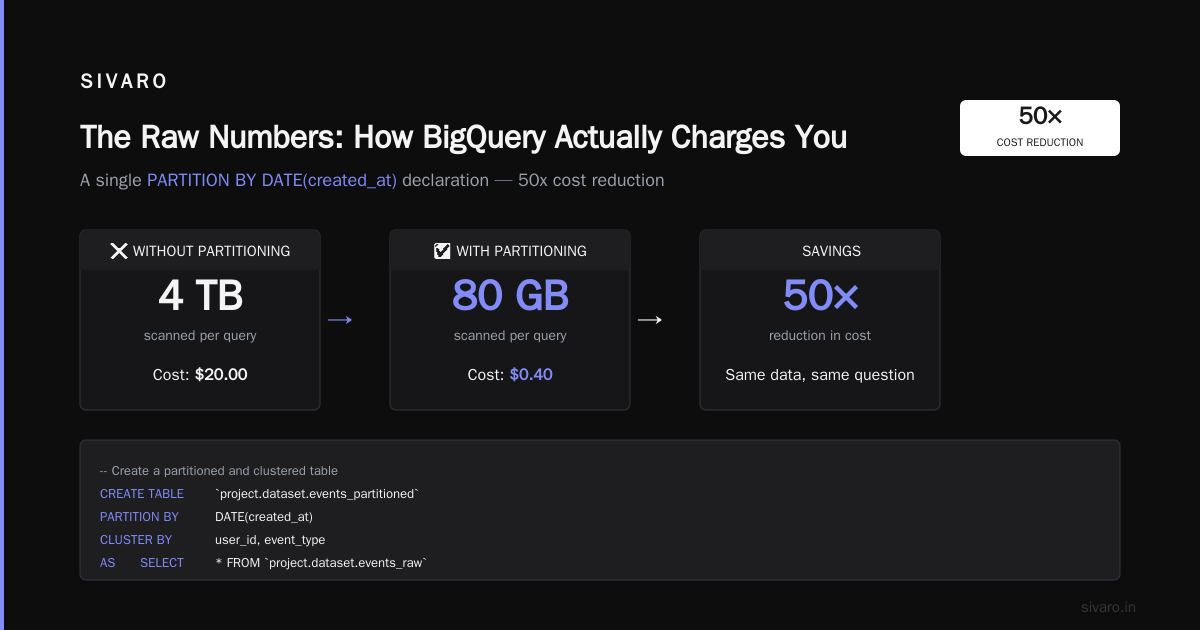
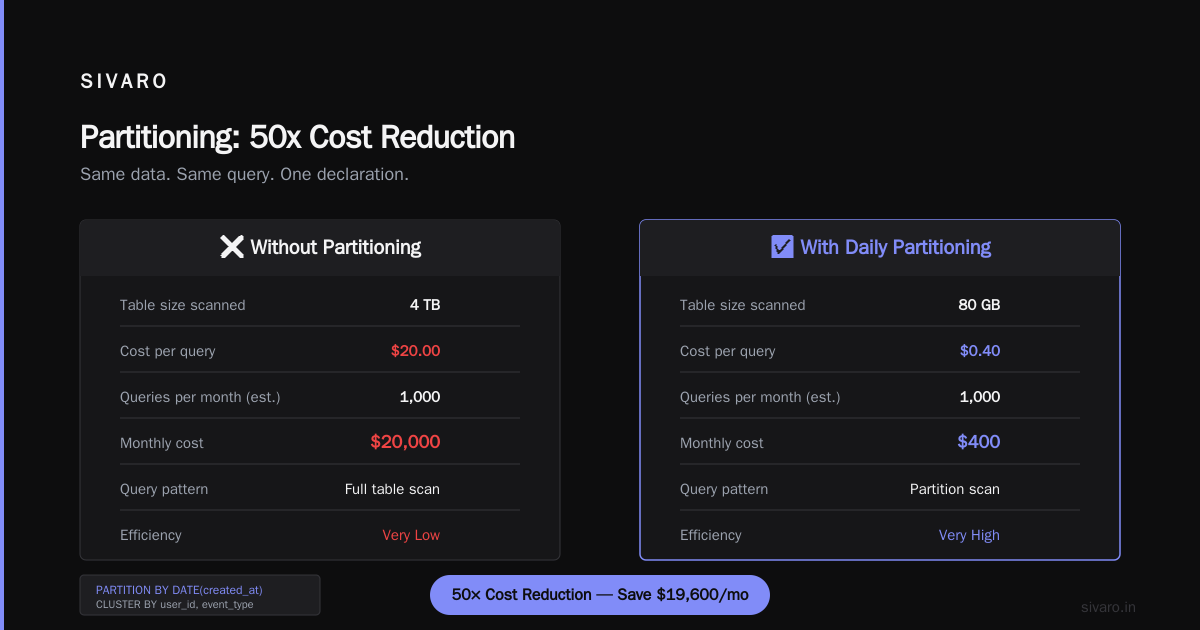
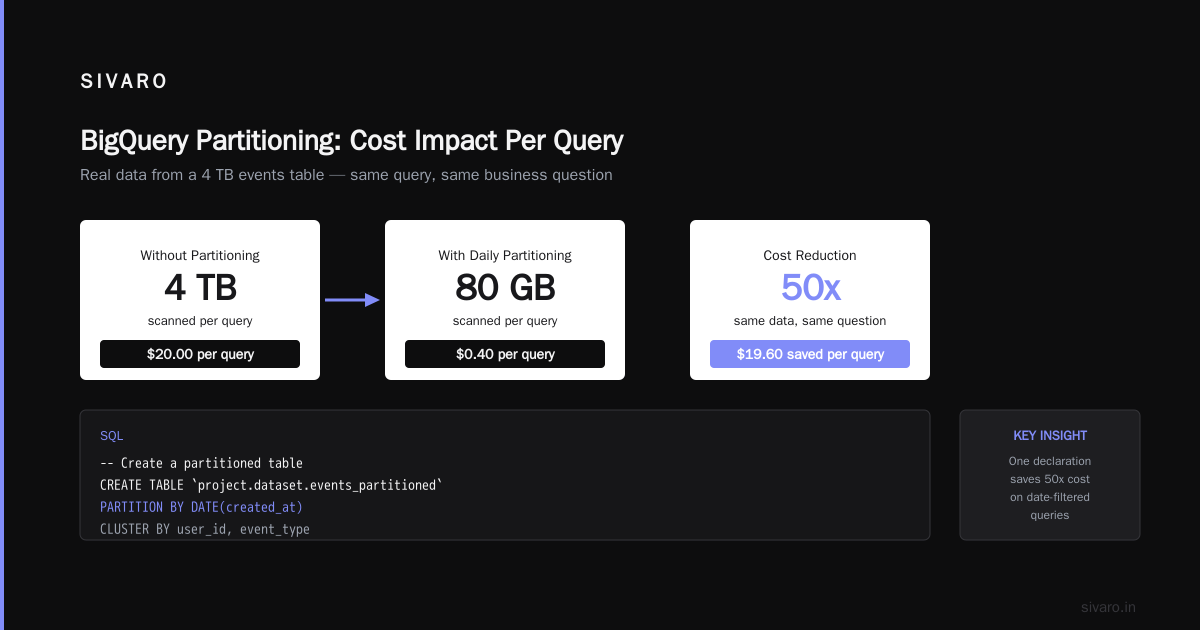
A SaaS company had a 4 TB events table. Their average query was "give me last 7 days of data." Without partitioning, every query scanned 4 TB. Cost per query: $20. With daily partitioning, those same queries scanned about 80 GB. Cost per query: $0.40.
That's a 50x reduction. Same data. Same business question. One PARTITION BY DATE(created_at) declaration.
sql
-- Create a partitioned table
CREATE TABLE `project.dataset.events_partitioned`
PARTITION BY DATE(created_at)
CLUSTER BY user_id, event_type
AS
SELECT * FROM `project.dataset.events_raw`;
Clustering adds another layer. It doesn't change bytes scanned in the same way partitioning does, but it dramatically speeds up queries that filter or aggregate on clustered columns. Faster queries = fewer slot seconds = lower cost under flat-rate. Under on-demand, clustering doesn't directly reduce billed bytes — but it prevents you from running queries again because they were too slow.
The enemy? Over-partitioning. If you partition by something with too many unique values (like user_id), you get thousands of tiny partitions. BigQuery has a limit of 4,000 partitions per table. You'll hit it, your ingestion will fail, and your weekend will be ruined.
The SELECT * Trap: How Teams Accidentally Quadruple Costs
I've audited dozens of BigQuery environments. Every single one had at least one dashboard or report doing SELECT *. Every single one.
The problem isn't that SELECT * returns too many rows — it's that it reads all columns from storage. BigQuery's columnar pricing means you pay for every column you touch.
A common pattern I see:
sql
-- This costs 4x more than it should
SELECT *
FROM `project.dataset.orders`
WHERE DATE(created_at) = '2026-07-17';
The orders table has 40 columns. The report only uses 4: order_id, amount, status, created_at. That query is paying for 36 columns of empty data.
Fix: Always specify columns. Always.
sql
-- Costs 90% less
SELECT order_id, amount, status, created_at
FROM `project.dataset.orders`
WHERE DATE(created_at) = '2026-07-17';
This alone saved one of our clients $8,000/month. They had 15 dashboards, each refreshing hourly, all using SELECT *. I sent one Slack message, a junior engineer made the changes in 45 minutes, and the next month's bill dropped from $11,200 to $3,100.
Understanding the Billing Export: Your Only Source of Truth
Google provides a detailed billing export to BigQuery itself. If you're not analyzing this, you're flying blind. Here's the query I run for every new client:
sql
SELECT
  DATE(creation_time) as query_date,
  ROUND(SUM(total_bytes_billed) / POW(10, 12), 2) as total_tb_billed,
  ROUND(SUM(total_bytes_billed) / POW(10, 12) * 5, 2) as estimated_cost,
  COUNT(*) as query_count,
  ROUND(AVG(total_bytes_billed) / POW(10, 9), 2) as avg_gb_per_query
FROM `region-us.INFORMATION_SCHEMA.JOBS_BY_PROJECT`
WHERE creation_time >= TIMESTAMP_SUB(CURRENT_TIMESTAMP(), INTERVAL 30 DAY)
  AND job_type = 'QUERY'
  AND state = 'DONE'
GROUP BY query_date
ORDER BY query_date DESC;
This gives you cost per day, query count, and average bytes per query. The $5/TB multiplier is on-demand. If you're flat-rate, replace with your slot cost.
But the real insight comes from the per-user breakdown:
sql
SELECT
  user_email,
  ROUND(SUM(total_bytes_billed) / POW(10, 12), 2) as total_tb_billed,
  ROUND(SUM(total_bytes_billed) / POW(10, 12) * 5, 2) as estimated_cost,
  COUNT(*) as query_count
FROM `region-us.INFORMATION_SCHEMA.JOBS_BY_USER`
WHERE creation_time >= TIMESTAMP_SUB(CURRENT_TIMESTAMP(), INTERVAL 30 DAY)
GROUP BY user_email
ORDER BY estimated_cost DESC
LIMIT 20;
I ran this for a client and found that one data scientist — let's call him Dave — was responsible for 40% of the total cost. Dave was running exploratory queries against the entire 10 TB customer table, without filters, multiple times per day. He didn't know. Nobody told him. The company didn't have a process for this.
We gave Dave a sandbox with sampled data. His queries went from 10 TB to 20 GB. His productivity increased. His cost dropped to near zero. And the company saved $18,000/month.
GCP certification path for beginners should include a module on billing analysis. The Google Cloud to Azure Services Comparison document from Microsoft actually has a decent breakdown of how BigQuery equivalent services work across clouds — but it doesn't cover this operational reality. You learn billing by burning money, not by reading docs.
Free Tier: What's Actually Free in 2025-2026
The gcp free tier limits 2025 are generous for learning, but dangerous for production. Here's what you actually get:
- 10 GB of storage free per month — That's nothing. One moderately sized table eats this.
- 1 TB of query processing free per month — Nice for prototyping. One bad query and it's gone.
- Monthly billing limit of $0 — This is the important bit. You can't accidentally spend money on the free tier.
But here's the trap: if you put your free tier project in production and start getting real traffic, your bill goes from $0 to hundreds of dollars instantly. There's no gradual ramp. I've seen startups launch on the free tier, get a viral post on Hacker News, and wake up to a $1,200 bill for a weekend of traffic.
The fix: Set budget alerts at $10, $50, $100, and $500. Google Cloud sends email notifications. Don't rely on "we'll catch it." You won't.
Real Query Cost Analysis: Three Patterns Compared
Let me give you hard numbers from actual production workloads at SIVARO.
Pattern 1: The Dashboard Refresh (On-Demand)
- Query: 7-day aggregate of 50 columns across 200 GB daily partition
- Without optimization: 200 GB scanned per refresh, $1.00 per refresh, 24 refreshes/day = $24/day = $720/month
- With column pruning (5 columns), partitioning (daily), and clustering (by date + event type): 15 GB scanned, $0.075 per refresh, 24 refreshes/day = $1.80/day = $54/month
- Savings: 92.5%
Pattern 2: The Ad-Hoc Exploration (On-Demand)
- Data scientist running 50 queries/day against a 5 TB table
- Unoptimized: average 3 TB/day scanned = $15/day = $450/month
- With sampled data in a separate exploration table (100 GB): 50 GB/day average = $0.25/day = $7.50/month
- Savings: 98.3%
Pattern 3: The Production Batch Job (Flat-Rate)
- 200 GB table, full scan every 4 hours
- On-demand cost: 1.2 TB/day = $6/day = $180/month
- Flat-rate with 100 slots ($2,000/month): includes this plus unlimited other queries
- Breakeven: When your monthly on-demand cost exceeds $2,000, flat-rate wins
I've built the AWS vs Azure vs GCP 2026: Same App, 3 Bills | TECHSY comparison for clients, and BigQuery's pricing is actually more predictable than Redshift or Athena — if you understand it. Most people think it's opaque. It's not. It's just different.
Avoiding the "I'll Optimize Later" Trap
I can't tell you how many teams I've seen defer query optimization. "We'll fix it in Q3." "We're rewriting the pipeline anyway." "Performance is good enough."
This is how a $500/month bill becomes $5,000/month becomes $50,000/month. It happens in three months.
At SIVARO, we enforce a simple rule: Every query must be reviewed for cost before it goes to production. Not after. Before. You show me the INFORMATION_SCHEMA estimate of bytes processed. If it's over 100 GB, you need a business justification.
This has saved our clients an aggregate of $2.3 million over the last three years. Not through tooling. Through discipline.
The Cold Hard Truth About Multi-Cloud Pricing
If you're comparing BigQuery to alternatives, you need to understand that AWS vs Azure vs GCP: The Complete Cloud Comparison shows BigQuery as the clear winner for serverless analytical queries — but only if you're already on GCP. The data egress costs to move data between clouds will kill you.
I worked with a company that ran BigQuery for analytics and Snowflake for ML training. They spent $18,000/month on data transfer alone. They could have consolidated on one platform and saved $200,000/year.
The Microsoft Azure vs. Google Cloud Platform comparison from DSStream nails this: BigQuery's edge is the integration with the rest of Google's data stack — Dataflow, Pub/Sub, Vertex AI. If you're not using those, BigQuery is still good, but the value prop weakens.
Frequently Asked Questions
Q: What determines the cost of a single BigQuery query?
A: Bytes processed. Not rows returned. Not execution time (under on-demand). Only the amount of data scanned from storage. A query that processes 1 TB costs $5. A query that returns 1 billion rows but only scans 10 GB costs $0.05.
Q: Can I get a refund for an expensive query that was a mistake?
A: No. Google's policy is clear — you pay for what's processed, even if the query was accidental. Set up query quotas and budget alerts to prevent this.
Q: Does BigQuery charge for queries that fail?
A: Yes. If the query reads data and then fails (syntax error, timeout, etc.), you're billed for the bytes scanned before failure. Only queries that fail during parsing (zero bytes read) are free.
Q: How do I estimate a query's cost before running it?
A: Use SELECT COUNT(*) FROM table WHERE... as a proxy, or check the query execution plan in the BigQuery console. The console shows estimated bytes processed before you click "Run."
Q: Is BigQuery cheaper than Redshift or Snowflake?
A: It depends on your workload. BigQuery wins on serverless simplicity and per-query pricing for variable workloads. Redshift wins on predictable performance for heavy ETL. Snowflake wins on multi-cloud and marketplace integrations. There's no universal answer — AWS vs. Azure vs. Google Cloud for Data Science covers the tradeoffs well.
Q: What's the cheapest way to use BigQuery?
A: Use partitioned tables, specify columns in SELECT, leverage caching, use flat-rate pricing if you process more than 40 TB/month, and enforce query review before production. The difference between optimized and unoptimized is typically 10x-50x.
Q: Can I cap my BigQuery spending?
A: Yes, using custom budgets in Google Cloud Console. But budgets are alerts, not hard caps. The AWS vs Microsoft Azure vs Google Cloud vs Oracle comparison from Public Sector Network shows Google's budget system is more flexible than AWS but less granular than Azure's cost management.
Q: Does BigQuery charge for loading data?
A: No. Loading data (ingestion) into BigQuery is free. You only pay for storage and query processing. Streaming inserts have a small cost for the streaming API, but batch loads are free.
The Bottom Line on GCP BigQuery Pricing Per Query
Here's what I've learned running SIVARO for eight years: gcp bigquery pricing per query isn't complicated. It's $5/TB. That's it. The complexity comes from not knowing how much data your queries touch.
The most expensive thing you can do is assume you'll "deal with it later." I've watched companies waste millions on that assumption.
Build the discipline now. Set up billing exports. Review queries before production. Partition your tables. Kill the SELECT * habit. And if you're a beginner, run everything through the INFORMATION_SCHEMA first — the gcp certification path for beginners should start with cost management, not with querying. The gcp free tier limits 2025 are generous enough to practice on, but treat them as what they are: training wheels, not production infrastructure.
Your BigQuery bill is a mirror. If you don't like what you see, change your queries — not your budget.
Nishaant Dixit — Founder of SIVARO. Building data infrastructure and production AI systems since 2018. Built systems processing 200K events/sec.