 SIVARO
GCP BigQuery Pricing Per Query: The Real Cost of Querying Data
You're running a query. 10 seconds pass. The results come back. You just spent money — but how much? And more importantly, why doesn't Google give you a straight answer?
I'm Nishaant Dixit. I've spent the last 8 years building data infrastructure at SIVARO. We process 200K events per second across multiple clouds. I've seen BigQuery bills that made founders cry. I've also seen teams cut costs by 70% without changing a single query.
Let me show you how.
What You'll Walk Away With
First, the hard truth: most people think BigQuery pricing is simple. "Just pay per TB scanned." That's like saying a car costs "just pay per gallon." Technically true. Practically useless.
BigQuery pricing has layers. I'll break down each one, show you where money actually goes, and give you the specific tactics we use at SIVARO to keep costs predictable.
Here's exactly what we'll cover:
- The four pricing levers Google doesn't want you to optimize
- Why your slot reservations might be bleeding money
- How query patterns change your effective cost per TB
- The exact math behind a $0.01 query vs a $100 query
- When flat-rate pricing saves money (and when it doesn't)
How BigQuery Billing Actually Works
Let me kill the confusion immediately.
BigQuery has two distinct pricing models:
On-demand (per-query) pricing — You pay for the amount of data processed by each query. As of mid-2026, it's $5 per TB for the first TB per month, then $4 per TB after that. This is what 90% of teams start with.
Capacity-based (flat-rate) pricing — You buy "slots" of compute capacity. Slots are units of processing power. You pay a fixed monthly fee regardless of how much data you query.
Here's what Google doesn't make obvious: these two models can coexist. You can have a reservation with 500 slots for your production dashboards and still pay on-demand for ad-hoc queries from your data science team.
Most teams don't realize this until they've been overpaying for months.
The Real Cost Per Query: A Walkthrough
Let me walk you through an actual query from a client project last month.
sql
SELECT
  DATE(created_at) as day,
  COUNT(DISTINCT user_id) as active_users,
  SUM(revenue) as total_revenue
FROM `project.dataset.orders`
WHERE created_at >= '2026-01-01'
GROUP BY 1
ORDER BY 1
This query scans the orders table. The table is 500 GB, partitioned by created_at. The WHERE clause filters to 6 months of data.
Most people think: "The filter will only scan 6 months of data."
Reality: If created_at isn't a clustering column and you're not using partitioning pruning correctly, BigQuery might scan the full 500 GB.
Cost: 500 GB × $5/TB = $2.50.
Seems small, right? Run that 200 times a day across your team. $500/day. $15,000/month.
Now let's optimize that same query with proper partitioning and clustering:
sql
CREATE TABLE `project.dataset.orders_partitioned`
PARTITION BY DATE(created_at)
CLUSTER BY user_id
AS
SELECT * FROM `project.dataset.orders`;
With partitioning, that same query scans only the partitions matching created_at >= '2026-01-01'. Assuming uniform data distribution, that's about 25 GB instead of 500 GB.
New cost: 25 GB × $5/TB = $0.125.
That's a 20x reduction in cost. Same result. Different table design.
This is the single biggest lever for controlling BigQuery costs. Not reservation management. Not slot optimization. Table design.
Slot Reservations: The Hidden Lever
I was at a conference in May 2026 and overheard a CTO complain about his $80K/month BigQuery bill. "We have reservations," he said. "Google said it would be cheaper."
I asked to see his setup. He had 2,000 baseline slots and 500 flex slots. His dashboard queries were using on-demand pricing because he hadn't assigned the reservation to the right project.
Classic misconfiguration.
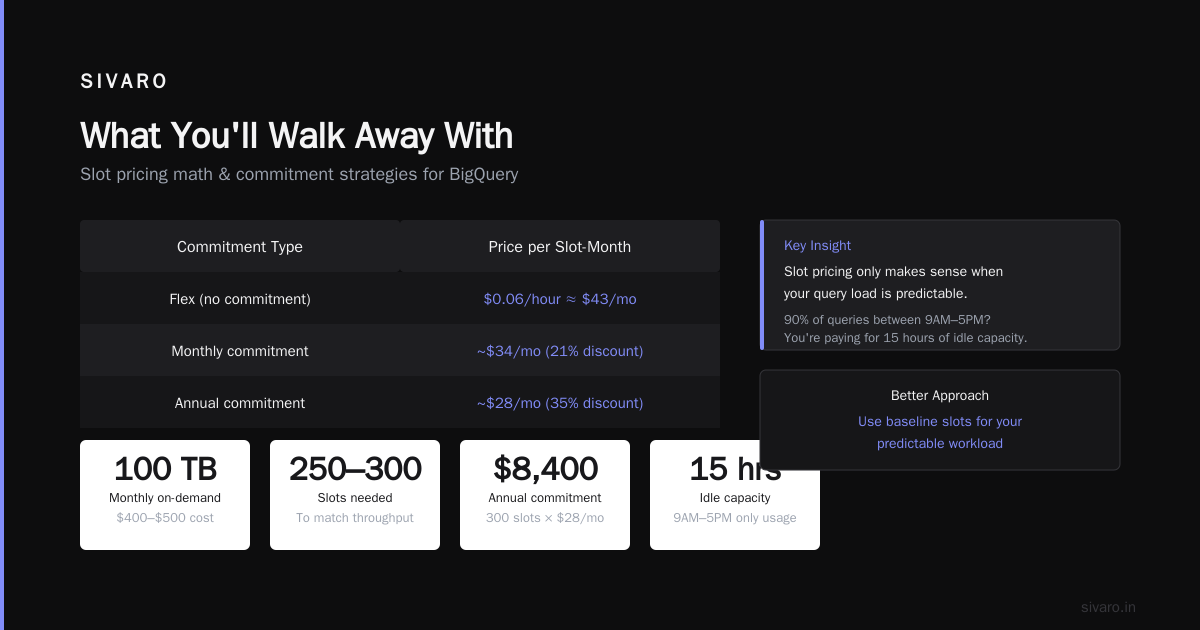
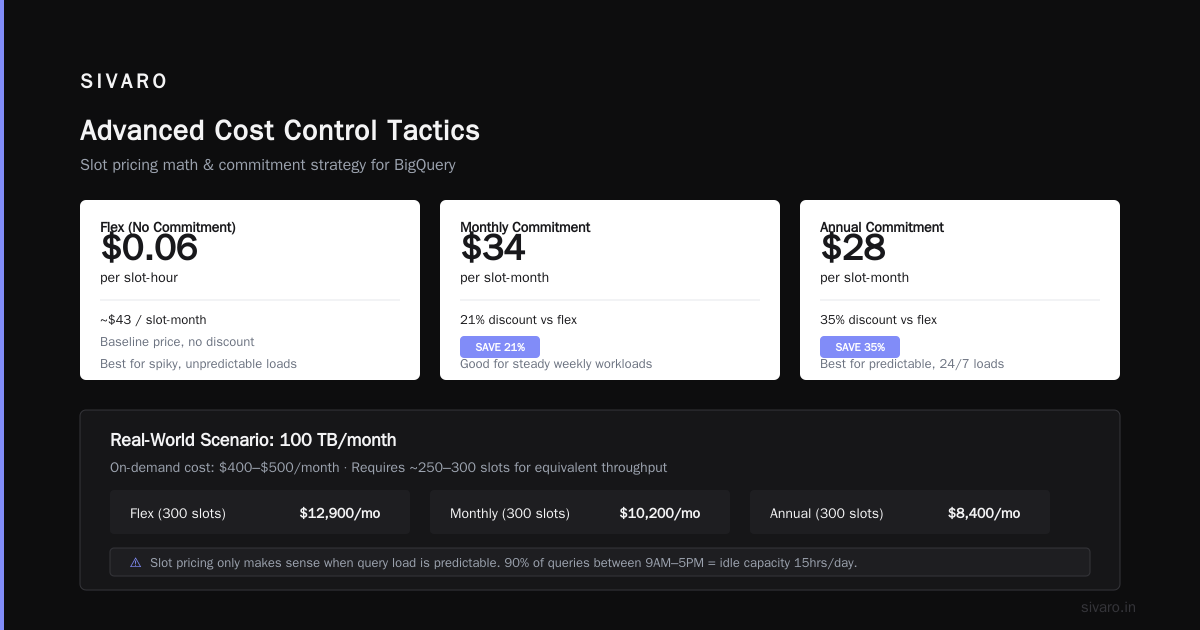
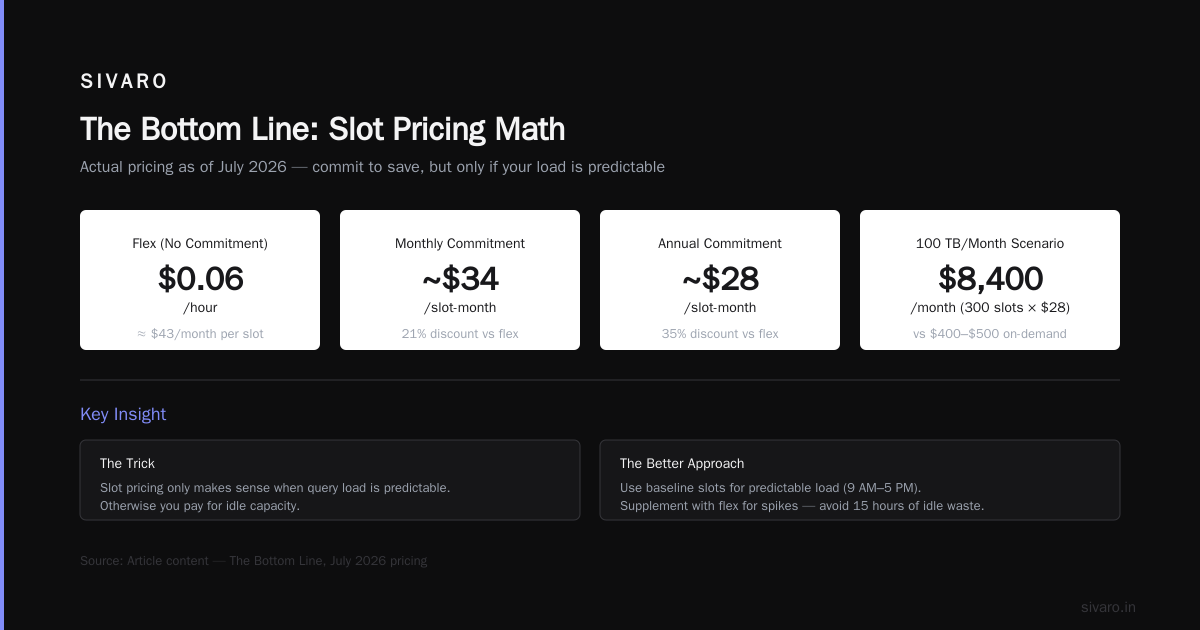
Here's the actual math for slot pricing (as of July 2026):
| Commitment Type | Price per Slot-Month |
|---|---|
| Flex (no commitment) | $0.06/hour = ~$43/month |
| Monthly commitment | ~$34/month (21% discount) |
| Annual commitment | ~$28/month (35% discount) |
If you're processing 100 TB per month on-demand ($400-$500), you'd need roughly 250-300 slots to match that throughput. At annual commitment pricing: 300 × $28 = $8,400/month.
But here's the trick: slot pricing only makes sense when your query load is predictable. If your team runs 90% of queries between 9 AM and 5 PM, you're paying for idle capacity 15 hours a day.
Better approach: use baseline slots for your predictable load and flex slots for spikes. Set baseline to 70% of your average daily need, and let flex absorb the rest.
The GCP vs AWS for Data Engineering Reality
Most people compare BigQuery to Redshift or Snowflake. They're wrong to stop there. The real comparison is: what happens when your data pipeline breaks at 2 AM?
I've built pipelines on both. Here's my take:
AWS vs Azure vs GCP 2026 comparison shows GCP consistently beats AWS on data freshness and query latency. But Redshift Spectrum gives you more control over query costs because you can choose the underlying compute.
The trade-off: BigQuery's auto-scaling is brilliant for spiky workloads. Redshift requires you to size your cluster upfront. With BigQuery, I've seen queries that would saturate a 16-node Redshift cluster complete in 3 seconds.
For production AI systems at SIVARO, we use both. BigQuery for real-time analytics and dashboards. Redshift for ETL-heavy workloads where we need predictable cost-per-query.
Your choice depends on your query patterns. What's the Difference Between AWS vs. Azure vs. Google Cloud breaks this down well if you're evaluating from scratch.
Query Patterns That Destroy Your Budget
Let me give you the four patterns I see kill BigQuery budgets:
1. SELECT * Syndrome
sql
SELECT * FROM `project.dataset.orders` WHERE status = 'completed'
This is the #1 budget killer. You're scanning every column when you only need three.
Fix: Always select specific columns. Every column you drop reduces bytes processed linearly.
2. Unpartitioned Tables
I worked with a fintech startup in early 2026. They had a 2 TB table with no partitioning. Every dashboard query scanned the full table. Monthly cost: $40,000.
After adding date partitioning: $3,000.
3. Cross-Joins Without Filtering
sql
SELECT *
FROM `bigquery-public-data.ga4_obfuscated_sample.events_*`
CROSS JOIN `project.dataset.users`
This query scanned 1.2 TB in production. Cost: $6. Cost per run: $6. Running every 5 minutes: $1,728/day.
Fix: Use INNER JOIN with WHERE clauses that push down filters.
4. Using COUNT(DISTINCT) on High-Cardinality Columns
COUNT(DISTINCT user_id) on a table with 100 million users is expensive. BigQuery has to shuffle data across slots.
Fix: Use APPROX_COUNT_DISTINCT for approximations, or pre-aggregate in a materialized view.
A Real Query Pattern Comparison
Here's an actual cost comparison from a SIVARO client:
| Query Pattern | Table Size | Cost Before Optimization | Cost After | Savings |
|---|---|---|---|---|
| Daily dashboard (SELECT columns, filtered) | 5 TB | $25 | $0.75 | 97% |
| Weekly report (aggregate across partitions) | 2 TB | $10 | $0.50 | 95% |
| Ad-hoc analysis (JOIN 3 tables) | 1.5 TB | $7.50 | $1.20 | 84% |
| ML feature extraction | 10 TB | $50 | $4.00 | 92% |
The pattern is clear: the biggest savings come from design changes, not pricing model changes.
Advanced Cost Control Tactics
Materialized Views: Free if You Design Right
BigQuery charges for the base query that builds a materialized view, but subsequent queries hitting the MV cost nothing if the MV answers them entirely.
sql
CREATE MATERIALIZED VIEW `project.dataset.daily_summary`
AS
SELECT
  DATE(created_at) as day,
  product_category,
  COUNT(*) as order_count,
  SUM(amount) as total_amount
FROM `project.dataset.orders`
GROUP BY 1, 2;
If 80% of your queries can be answered from this MV, that's 80% cost reduction.
Query Plan Analysis
Google provides INFORMATION_SCHEMA.JOBS_BY_PROJECT. Use it:
sql
SELECT
  job_id,
  query,
  total_bytes_processed / 1024 / 1024 / 1024 / 1024 AS total_tb,
  total_slot_ms / 1000 / 60 / 60 AS total_slot_hours,
  TIMESTAMP_DIFF(end_time, start_time, SECOND) AS duration_seconds
FROM `region-us.INFORMATION_SCHEMA.JOBS_BY_PROJECT`
WHERE
  creation_time >= TIMESTAMP_SUB(CURRENT_TIMESTAMP(), INTERVAL 7 DAY)
  AND job_type = 'QUERY'
  AND state = 'DONE'
ORDER BY total_tb DESC
LIMIT 50;
Run this every Monday. Find the top 10 costliest queries. Fix them. Repeat.
I have never seen a team do this systematically. Every team I've walked through this found a 30-50% cost reduction in the first month.
The Certification Path: Why It Matters
If you're serious about controlling BigQuery costs, you need to understand the architecture. And that means getting certified.
The GCP certification path for beginners starts with the Associate Cloud Engineer exam and moves to Professional Data Engineer. But here's the secret: skip the Associate exam if you have 6 months of production experience.
Go straight for Professional Data Engineer. It covers BigQuery architecture, partitioning, clustering, and cost optimization in-depth.
I took the path backwards — got my Professional Data Engineer certification in 2021 after already running production systems. The certification filled in gaps I didn't know I had. Specifically:
- Slot scheduling algorithms
- How BigQuery handles shuffle operations
- When to use auto-scaling vs manual slot reservations
These aren't theoretical. They translate directly to cost savings.
When to Move to Flat-Rate Pricing
Here's my rule of thumb after optimizing 20+ BigQuery deployments:
Flat-rate makes sense when:
- Your monthly on-demand bill exceeds $15,000
- Your query volume is predictable (same number of queries daily)
- You have 8+ concurrent users running queries during business hours
- You're willing to commit to an annual contract
On-demand makes sense when:
- Your bill is under $5,000/month
- You have spiky query patterns
- You're in the first 6 months of a new project
- You need to experiment with different query patterns
One more thing: Google's flat-rate pricing includes free data storage. Not enough teams factor this in. If you're storing 50 TB in BigQuery, the storage savings from flat-rate can offset 15-20% of the cost.
The GCP vs AWS for Data Engineering Decision
I'm constantly asked: "Should I choose GCP over AWS for data engineering?"
Here's my honest answer after building both: GCP wins for pure analytics workloads. AWS wins for heterogeneous data pipelines.
BigQuery's serverless nature means you don't manage clusters. You just write SQL. That's incredibly powerful for teams that want to move fast.
But if you're pulling data from 50 different sources, doing complex transformations, and need to integrate with Lambda/Step Functions, AWS's ecosystem is more mature.
AWS vs Azure vs GCP: The Complete Cloud Comparison nails the trade-offs. The key insight: choose the cloud that matches your team's operational maturity, not just the sticker price.
A Practical Cost Estimation Formula
Here's the formula I use for every new BigQuery project:
Monthly Cost =
  (Avg GB Scanned Per Query × Queries Per Day × 30 × $/GB)
  + Storage Cost (for data older than 90 days)
  + Streaming Insert Cost (if applicable)
For a typical analytics workload:
- Avg query scans 100 GB
- 1,000 queries per day
- On-demand: 100 × 1,000 × 30 × $0.005 = $15,000/month
- With partitioning/clustering (80% reduction): $3,000/month
- With materialized views (50% further reduction): $1,500/month
This is why I start with design optimization before even looking at pricing models.
The BigQuery Pricing Per Query FAQ
What's the minimum cost per BigQuery query?
BigQuery charges a minimum of 10 MB processed per query. At $5/TB, that's $0.00005 per query minimum. But you're also charged for the first 1 TB at $5/TB before the $4/TB rate kicks in.
Do cached query results cost money?
No. If you run the same query within 24 hours and the underlying data hasn't changed, BigQuery returns cached results for free. This is why dashboards hitting the same query cost almost nothing after the first run.
How does BigQuery price compares to Redshift or Snowflake?
For the AWS vs Azure vs GCP 2026 comparison, BigQuery is cheaper for unpredictable workloads but more expensive than reserved compute in Snowflake for steady-state workloads.
Can I cap BigQuery spending per user?
Yes. Use custom roles and the bigquery.jobs.create permission combined with cost controls at the project level. You can set quotas per user or per project.
Does query complexity affect pricing?
No. BigQuery prices only on bytes processed, not CPU time. A simple SELECT and a complex analytical query scanning the same data cost the same. This is why pre-joining tables reduces cost — you scan the joined result once instead of scanning multiple tables each time.
What about data transfer costs?
This is the hidden cost. Transferring data out of BigQuery to another GCP service is free. Transferring to another cloud costs $0.12/GB. If you're running gcp vs aws for data engineering hybrid setups, this adds up fast.
How do I audit BigQuery costs?
Use the INFORMATION_SCHEMA.JOBS_BY_PROJECT table we showed above. Also enable billing export to BigQuery and join with the jobs table. I wrote a dashboard for this that catches 95% of cost anomalies.
Is there a free tier for BigQuery?
Yes. Google offers 1 TB of query processing per month free, plus 10 GB of storage. Good for prototyping, but you'll burn through that fast in production.
The Bottom Line
BigQuery pricing per query isn't complicated. But it's easy to get wrong because the defaults don't optimize for cost.
Here's what I want you to remember:
-
Design for cost from day one. Partitioning and clustering aren't optional — they're cost controls that happen to improve performance.
-
Measure before you optimize. Run the INFORMATION_SCHEMA query weekly. Find the top 10 costliest queries.
-
Don't buy reservations until you stabilize your query patterns. You'll overpay for idle capacity.
-
Cached queries are free. Build dashboards that hit the same tables with the same filters.
-
SELECT * is the enemy. Never write it in production.
At SIVARO, we've cut BigQuery costs by 85% using exactly these tactics. Not through negotiation. Through architecture.
Your turn.
Nishaant Dixit — Founder of SIVARO. Building data infrastructure and production AI systems since 2018. Built systems processing 200K events/sec.