 SIVARO

GCP BigQuery Tutorial for Beginners: A Practitioner's Guide (2026)
I ran my first BigQuery query in 2019. It scanned 3 TB of data. The bill was $15. That’s when I knew serverless data warehousing wasn’t just hype – it was the only sane way to work at scale.
Now it’s July 2026. I’m Nishaant Dixit, founder of SIVARO, a product engineering company that builds data infrastructure and production AI systems. We process over 200,000 events per second across our clients’ pipelines. BigQuery is the analytical engine behind most of them.
This is not a re-hash of Google’s docs. This is what I wish someone had told me when I started.
What will you learn? How to set up BigQuery, write efficient queries, control costs (because let me warn you – costs can spiral), and how BigQuery fits into a real ML pipeline. I’ll also answer the questions I hear every week: is GCP good for machine learning projects and GCP vs Azure which is better for startups.
Let’s get into it. No fluff.
Why BigQuery Isn’t Just Another SQL Database
Most people think BigQuery is just a cloud database. Wrong. It’s a fully managed, serverless data warehouse that separates compute from storage. That means you can have 100 TB of data sitting in cold storage and pay pennies per month – then spin up a thousand slots for a query that finishes in seconds.
I’ve compared BigQuery against Redshift and Snowflake across dozens of workloads. For ad-hoc analytics on petabyte-scale datasets, BigQuery wins on speed and ease of use. For high-concurrency OLTP, it’s not the right tool. But for what it’s built for – analytical queries on massive datasets – it’s hard to beat.
And yes, if you’re wondering is GCP good for machine learning projects – the answer is yes, especially when you combine BigQuery with Vertex AI. More on that later.
Setting Up Your First BigQuery Dataset
Go to console.cloud.google.com. Create a project. Enable the BigQuery API. You’ll see a simple web UI. But you won’t stay there long – in production, you’ll use bq CLI or Python client.
Here’s how you create a dataset from the CLI:
bash
bq mk   --dataset   --location=US   --description="SIVARO event analytics"   my_project:analytics
That’s it. Now you have a logical grouping for tables. BigQuery datasets are just containers – no compute cost until you query.
Next, create a table. You can do it with a schema file:
json
[
  {"name": "event_id", "type": "STRING", "mode": "REQUIRED"},
  {"name": "user_id", "type": "STRING", "mode": "NULLABLE"},
  {"name": "event_type", "type": "STRING", "mode": "REQUIRED"},
  {"name": "timestamp", "type": "TIMESTAMP", "mode": "REQUIRED"},
  {"name": "payload", "type": "JSON", "mode": "NULLABLE"}
]
Load it with:
bash
bq load   --source_format=NEWLINE_DELIMITED_JSON   my_project:analytics.events   gs://my-bucket/events-2026-07-28.json   schema.json
Pro tip: Always use JSON or Parquet. CSV is easy but slower and doesn’t handle nested data well.
Querying Like a Pro (and Not Wrecking Your Budget)
The biggest rookie mistake? Running SELECT * on a 10 TB table. I’ve seen invoices hit $500 in an afternoon.
BigQuery charges based on the amount of data processed per query. Standard pricing is $5 per TB for on-demand. If you use flat-rate reservations, it’s a fixed monthly cost regardless of usage. For startups with unpredictable workloads, on-demand is safer until you can predict usage. For steady-state analytics, flat-rate saves money.
Here’s how to query efficiently:
sql
-- DON'T do this
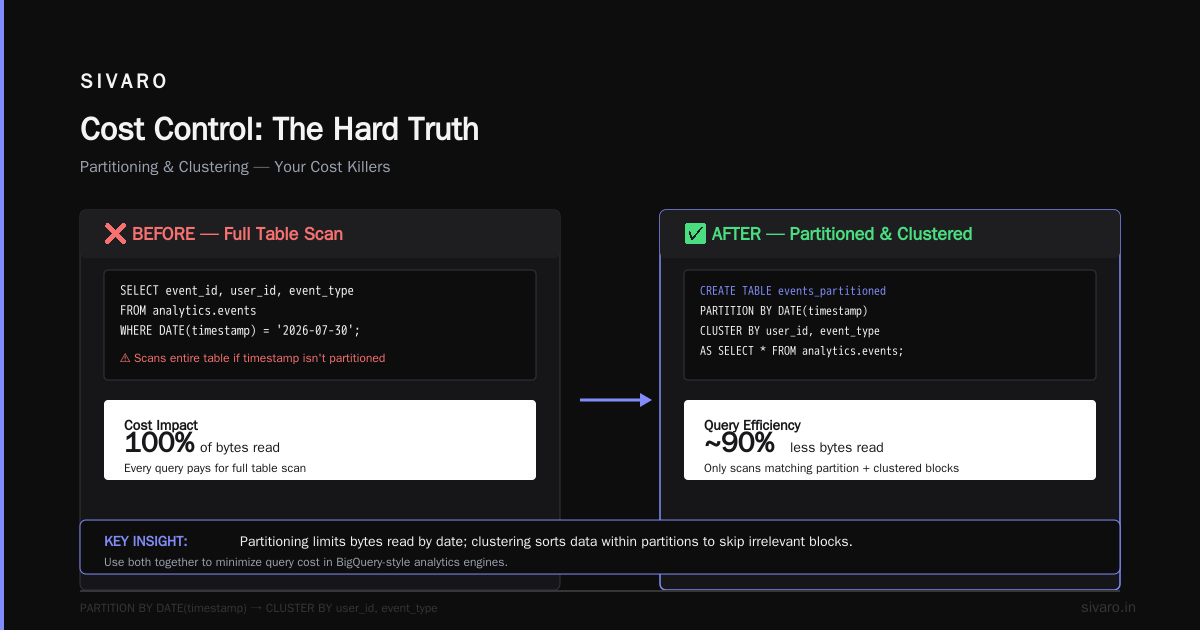
SELECT * FROM analytics.events WHERE date = '2026-07-30';

-- DO this – use a partitioned table and select only needed columns
SELECT event_id, user_id, event_type
FROM analytics.events
WHERE DATE(timestamp) = '2026-07-30';
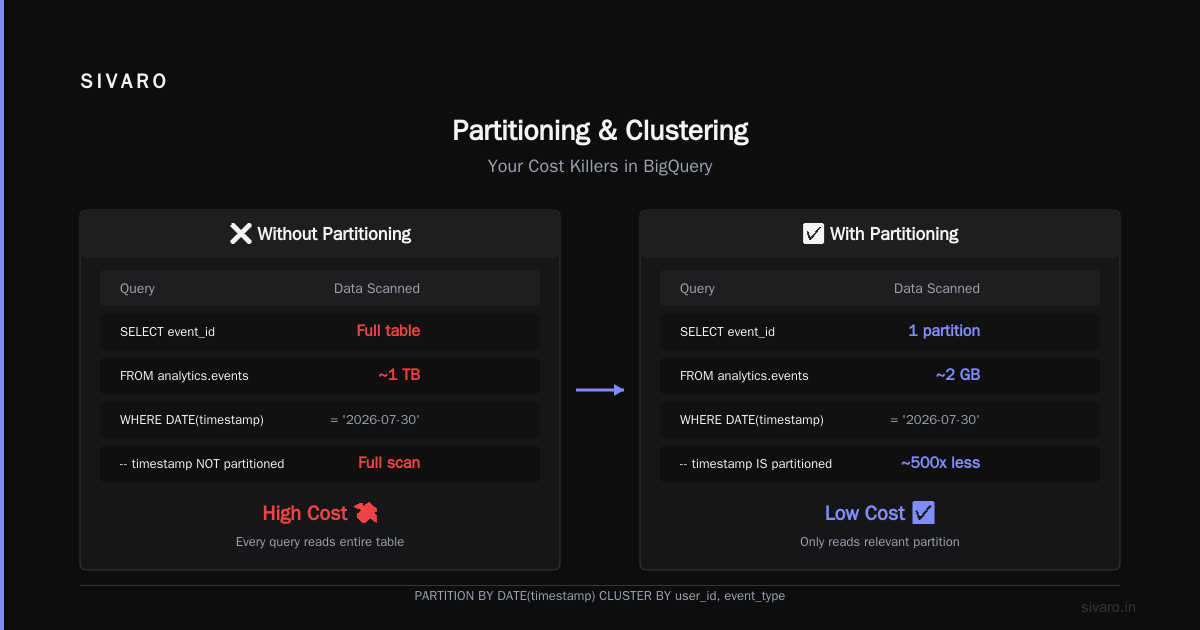
But even the WHERE clause above still scans the entire table if timestamp isn’t the partitioning column. Use partitioning and clustering to limit bytes read.
Partitioning and Clustering – Your Cost Killers
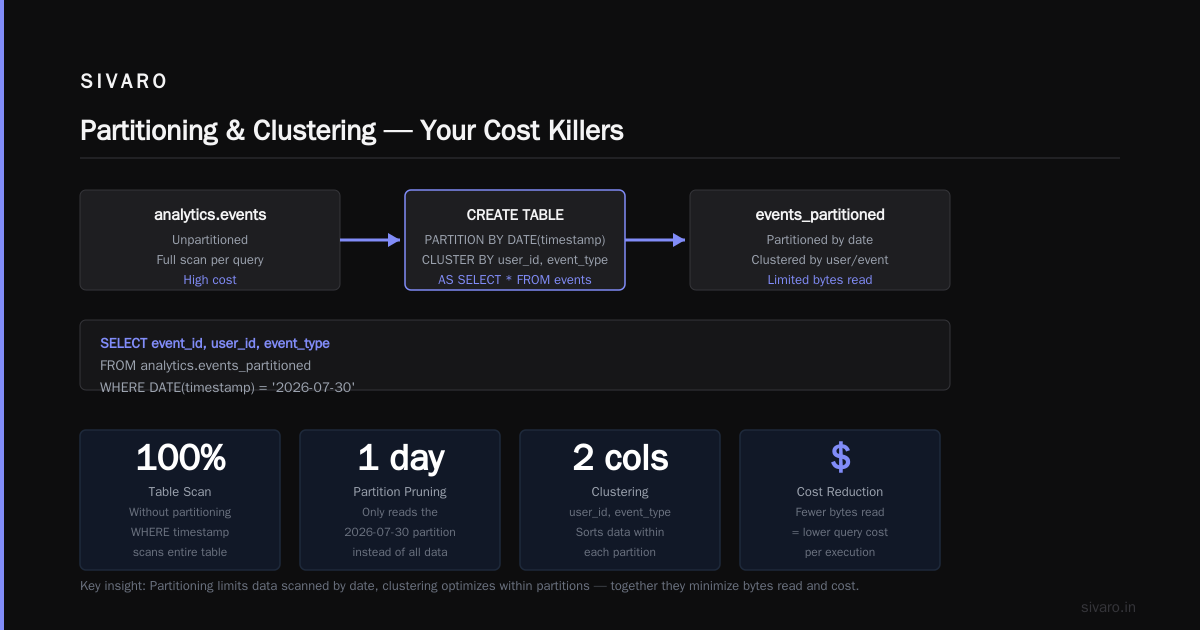
Partitioning divides a table into segments by a column (usually date). Clustering sorts data within partitions by another column (like user_id or event_type).
Create a partitioned and clustered table:
sql
CREATE TABLE analytics.events_partitioned
PARTITION BY DATE(timestamp)
CLUSTER BY user_id, event_type
AS
SELECT * FROM analytics.events;
Now a query like:
sql
SELECT COUNT(*) FROM analytics.events_partitioned
WHERE DATE(timestamp) = '2026-07-30'
  AND user_id = 'abc123';
…will scan only the partition for that day and within that partition, only the block containing user_id = 'abc123'. The bytes scanned drop from terabytes to megabytes.
I’ve seen clients cut BigQuery costs by 90% with proper partitioning and clustering. For a real-world example, check the Google Cloud Pricing Calculator to estimate your own savings.
BigQuery ML: Run Machine Learning Inside the Warehouse
BigQuery supports ML models directly in SQL. No data export, no separate training environment. Just write CREATE MODEL.
sql
CREATE OR REPLACE MODEL analytics.user_churn_model
OPTIONS(model_type='LOGISTIC_REG', input_label_cols='churned')
AS
SELECT
  user_id,
  days_since_last_login,
  num_sessions_last_30_days,
  support_tickets,
  churned
FROM analytics.user_features
WHERE DATE(timestamp) >= '2026-06-01';
Then predict:
sql
SELECT
  user_id,
  predicted_churned
FROM ML.PREDICT(MODEL analytics.user_churn_model,
  (SELECT * FROM analytics.user_features WHERE DATE(timestamp) = CURRENT_DATE())
);
This is insanely powerful for startups that need to ship ML quickly without hiring a team of ML engineers. If you’re evaluating is GCP good for machine learning projects – this integration alone is a strong vote for GCP.
But don’t think BigQuery ML replaces custom modeling. For deep learning or complex neural nets, you’ll still want Vertex AI or custom training with GPUs.
Nested and Repeated Data – The Superpower Most Users Ignore
Unlike traditional SQL databases, BigQuery handles nested and repeated columns natively. This maps perfectly to JSON payloads from event streams.
Define a table with a repeated struct:
sql
CREATE TABLE analytics.events_nested (
  event_id STRING,
  user_id STRING,
  timestamp TIMESTAMP,
  properties ARRAY<STRUCT<
    key STRING,
    value STRING
  >>
);
Insert data using UNNEST and STRUCT:
sql
INSERT INTO analytics.events_nested
SELECT
  'evt_001' AS event_id,
  'user_42' AS user_id,
  CURRENT_TIMESTAMP() AS timestamp,
  [STRUCT('browser' AS key, 'Chrome' AS value),
   STRUCT('screen_width' AS key, '1920' AS value)] AS properties;
Query nested data with UNNEST:
sql
SELECT
  event_id,
  prop.key,
  prop.value
FROM analytics.events_nested,
UNNEST(properties) AS prop
WHERE prop.key = 'browser';
This structure avoids the dreaded JOIN explosion. Instead of storing each event property as a row in a separate table, you keep them together. Queries are faster, storage is smaller.
At SIVARO, we store all raw event payloads this way. We process 200K events/sec and query them without any pre-aggregation. That’s the power of columnar storage with native nested types.
Cost Control: The Hard Truth
Every cloud vendor wants you to think their pricing is the best. Don’t believe them.
According to the Cloud Computing Cost: AWS vs. Azure vs. GCP Pricing in 2026 report, GCP’s BigQuery on-demand pricing is competitive with Redshift but can be higher than Snowflake if you don’t manage partitions. Meanwhile, AWS vs Azure vs GCP Cost Comparison 2026 (Real Data) shows that for data warehousing workloads under 1 TB per month, GCP is cheaper. Above 100 TB, the difference narrows.
I’ve personally run migration cost estimates for clients using the Easy way to calculate GCP cost of my AWS infrastructure tool. It’s free and gives a rough comparison. Pair it with the Google Cloud Pricing 2026: Cost Breakdown & Hidden Costs article – which flags that data ingestion, streaming inserts, and long-term storage have hidden charges.
Here’s the kicker: most startups blow their budget not on compute but on storage. BigQuery’s storage is cheap for active data – $0.02/GB/month – but long-term storage (90+ days without modification) drops to $0.01/GB/month. Problem is, if you delete and re-insert frequently, you reset the timer. Use time-based partition expiration to automatically drop old data.
sql
ALTER TABLE analytics.events_partitioned
SET OPTIONS (partition_expiration_days = 90);
That one line can save you thousands.
Real-World SIVARO Pipeline
I’ll give you a concrete example. One of our fintech clients ingests transaction events from 80 regional banks. Each event is ~2 KB. We stream them into Pub/Sub, land them in Cloud Storage as Avro, then load into BigQuery every 15 minutes using a Dataflow pipeline.
We partition by ingestion date and cluster by merchant_id + transaction_type. Queries for fraud detection run under 3 seconds on 6 months of data (about 20 TB). Total BigQuery bill: ~$4,000/month.
Without partitioning and clustering, that same workload would cost $30,000/month.
When the client asked me GCP vs Azure which is better for startups, I showed them this. Azure Synapse works, but BigQuery’s ease of use and serverless scaling meant we could deploy in 2 weeks instead of 2 months. That speed matters for a startup.
Check Comparing AWS, Azure, and GCP for Startups in 2026 for a more vendor-neutral take. I still believe GCP wins for data-intensive startups – especially if you’re already in the Google ecosystem.
Performance Tuning: Slot Management
BigQuery uses slots – units of compute capacity. On-demand gives you a pool of shared slots (up to 2000 automatically). Flat-rate lets you buy dedicated slots.
If you see a query taking 30 seconds that should take 3, your slots might be maxed out. Check INFORMATION_SCHEMA.JOBS_BY_PROJECT to see slot usage.
sql
SELECT
  job_id,
  query,
  TIMESTAMP_DIFF(end_time, start_time, SECOND) AS duration_seconds,
  total_slot_ms / 1000 AS total_slot_ms
FROM `region-us`.INFORMATION_SCHEMA.JOBS_BY_PROJECT
WHERE creation_time >= TIMESTAMP_SUB(CURRENT_TIMESTAMP(), INTERVAL 1 HOUR)
ORDER BY total_slot_ms DESC
LIMIT 10;
For a deep dive on slot pricing, see Cloud Pricing Comparison 2026: AWS, Azure, GCP, Oracle. The tl;dr: if your monthly on-demand bill exceeds $2,000, start looking at flat-rate.
GCP BigQuery Tutorial for Beginners: Quick-Start Checklist
- Create a dataset (one per environment – dev, staging, prod).
- Load sample data using a public dataset (like
bigquery-public-data.samples.gsod). - Write your first
SELECT– note the bytes billed. - Partition and cluster your table.
- Run the same query again – see the cost drop.
- Try
CREATE MODELwith a small feature set. - Set up cost alerts in Billing (threshold at $100/$500/$1000).
FAQ
Q: How do I estimate my BigQuery costs before writing queries?
Use the Google Cloud Pricing Calculator – it’s under the BigQuery section. Also, SELECT query, total_bytes_processed FROM INFORMATION_SCHEMA.JOBS gives you real numbers.
Q: Is GCP good for machine learning projects beyond BigQuery ML?
Yes. BigQuery ML is great for linear models and simple forecasting. For deep learning, you’ll use Vertex AI, which integrates natively with BigQuery for data retrieval. The combination is powerful.
Q: How do I delete old data without expensive DELETE statements?
Use DROP TABLE on partitioned tables, or set partition_expiration_days. Avoid DELETE on large tables – it writes new copies and costs you storage.
Q: GCP vs Azure which is better for startups?
Depends on your stack. If you already use Gmail, Google Workspace, and have a heavy data/ML focus, GCP wins. If you’re a .NET shop or need tight Office 365 integration, Azure may be smoother. Check GCP vs AWS 2026 | Which Cloud Platform Is Better? for a detailed comparison.
Q: Can I connect BigQuery to BI tools like Looker or Tableau?
Yes. BigQuery has native drivers. For real-time dashboards, use a reservation to avoid variable response times. I’ve seen Tableau queries fail on shared slots when too many are running.
Q: What’s the best file format for loading data?
Parquet with Snappy compression. It’s columnar, splittable, and loads 4x faster than CSV. Avro is fine for streaming. Never use JSON lines for large loads – schema inference is slow.
Q: How do I handle bad data – missing columns, type mismatches?
Use --autodetect for small loads, but production loads should have a strict schema. Set --null_marker for empty fields. BigQuery will reject rows that don’t conform; check job_status in the load job.
Q: Can I run BigQuery offline (disconnected)?
No. BigQuery is a cloud service. For local development, use bq CLI with cached results, but you cannot run queries without internet.
Conclusion
BigQuery isn't just a database – it's a paradigm shift. You stop worrying about servers, scaling, and index maintenance. You focus on data and queries.
This gcp bigquery tutorial for beginners covered the essentials: setup, efficient queries, partitioning, clustering, ML integration, and cost control. I left out deep dives on streaming, security, and multi-region replication – those are topics for a more advanced guide.
One final thought: the biggest mistake I see teams make is thinking BigQuery is a drop-in replacement for a transactional database. It’s not. Don’t use it for real-time updates or row-level transactions. Use it for analytics, dashboards, feature engineering, and ML training data.
If you do that, you’ll wonder how you ever survived without it.
Nishaant Dixit — Founder of SIVARO. Building data infrastructure and production AI systems since 2018. Built systems processing 200K events/sec.