 SIVARO
GCP Cloud Run vs Compute Engine Pricing: The Real-World Breakdown
TL;DR: What You're Actually Paying For
I've spent the last eight years building data infrastructure, and I still see teams make the same costly mistake: they pick a compute service based on a blog post from 2023, then get blindsided when the bill arrives.
Here's the truth nobody tells you: Google Cloud Pricing Calculator will give you a number, but that number is fiction the moment your traffic patterns shift.
The real question isn't "which is cheaper?" It's "which is cheaper for your specific workload?"
Compute Engine is a VM. You rent a machine. It runs. You pay.
Cloud Run is serverless. Google scales it for you. You pay for what you use.
The difference matters more than you think. And the gcp cloud run vs compute engine pricing debate has real consequences for your startup's runway.
Let me break this down properly.
The Core Pricing Models: Two Completely Different Philosophies
Most people think both services are just "different ways to run containers." They're not. They represent fundamentally different economic models.
Compute Engine: You're Renting Hardware
Compute Engine gives you a virtual machine. You choose the shape — how many vCPUs, how much RAM, what kind of storage. You pay a flat hourly rate regardless of whether the machine is at 2% CPU or 100% CPU.
The pricing breaks down like this:
bash
# Example: e2-standard-4 (4 vCPU, 16GB RAM)
# On-demand pricing: ~$0.134/hour
# Monthly cost if running 24/7: ~$98

# That same machine with committed use discount (1 year):
# ~$0.084/hour
# Monthly: ~$61

# With sustained use discount (automatic when running 25%+ of month):
# You get up to 30% off automatically
The discounts stack. Committed use contracts give you the biggest savings. Sustained use applies automatically when you run a machine for most of the month. As DigitalOcean's startup comparison points out, GCP's sustained use discounts are automatic — you don't need to opt in.
Cloud Run: You're Paying for Execution
Cloud Run's model is entirely different. You pay for vCPU-seconds and memory-seconds. No traffic? No bill. A request comes in? The platform spins up a container, executes your code, and charges you only for the time the container runs.
yaml
# Cloud Run service definition
apiVersion: serving.knative.dev/v1
kind: Service
metadata:
  name: my-api
spec:
  template:
    metadata:
      annotations:
        autoscaling.knative.dev/minScale: "0"
        autoscaling.knative.dev/maxScale: "10"
    spec:
      containers:
        - image: gcr.io/my-project/my-api
          resources:
            limits:
              memory: "512Mi"
              cpu: "1"
The instance-hour minimum is the hidden gotcha. Even if your request takes 50 milliseconds, you're billed for a full 100 milliseconds. And when Google scales your service, those instances stay warm for a minimum timeout period.
The Three Pricing Models You Need to Understand
1. Request-Based Pricing (Cloud Run)
Cloud Run charges per request invocation. The first 2 million invocations per month are free. After that, you pay per million invocations.
The math gets interesting when you look at request durations. A request that finishes in 10ms costs the same as one that runs for 950ms — because you're billed in 100ms increments.
2. Instance-Time Pricing (Cloud Run)
This is where Cloud Run gets expensive if you're not careful. You pay for vCPU-seconds and memory-seconds. Here's the real calculation:
python
# Cloud Run pricing example
# Service: 1 vCPU, 512MB memory
# Request duration: 200ms (billed at 200ms, min 100ms)

vCPU_cost_per_second = 0.000024 / 1000  # per ms
memory_cost_per_second = 0.0000025 / 1000  # per ms

# Per request cost:
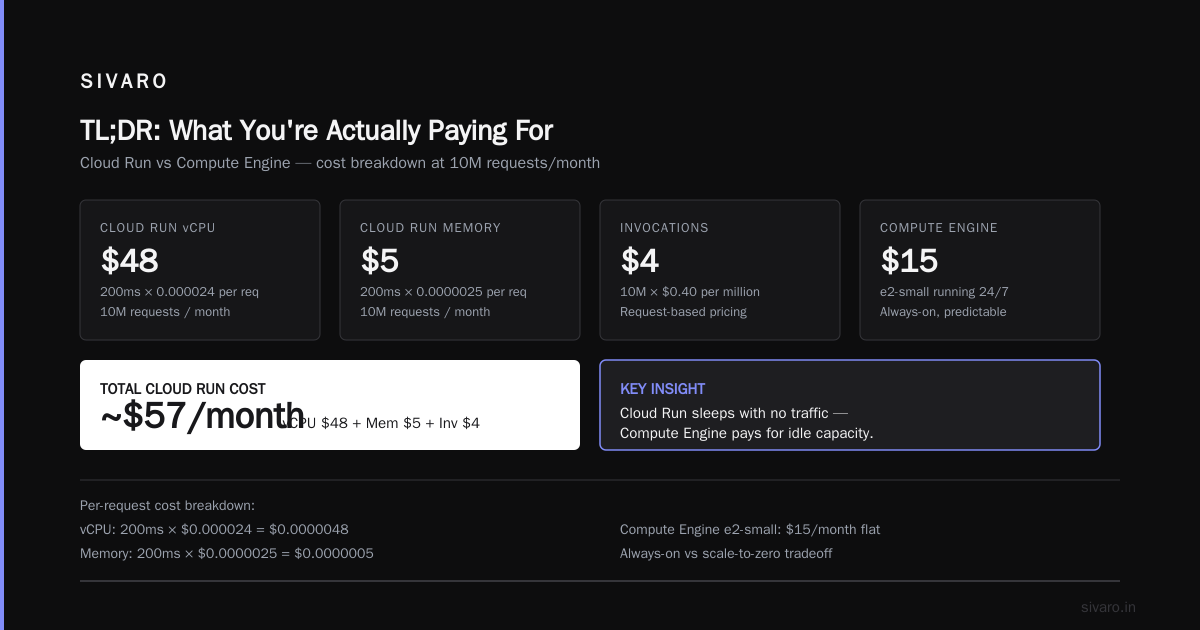
# vCPU: 200ms x 0.000024 = $0.0000048
# Memory: 200ms x 0.0000025 = $0.0000005

# 10 million requests per month:
# vCPU: $48
# Memory: $5
# Invocations: 10M x $0.40 (per million) = $4
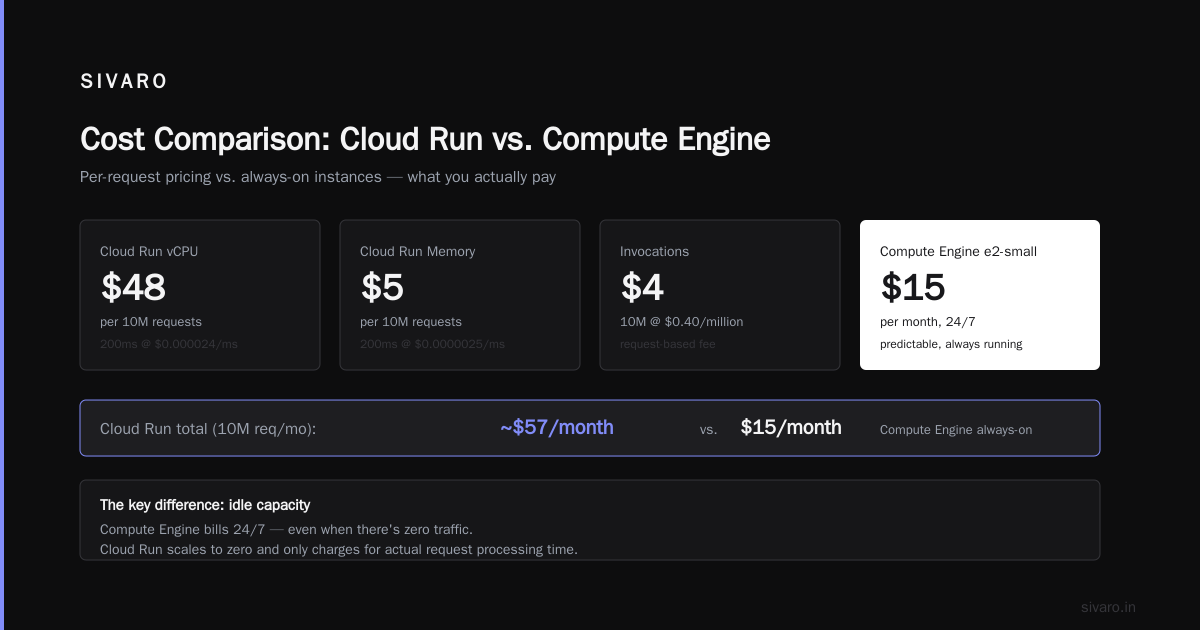
# Total: ~$57/month
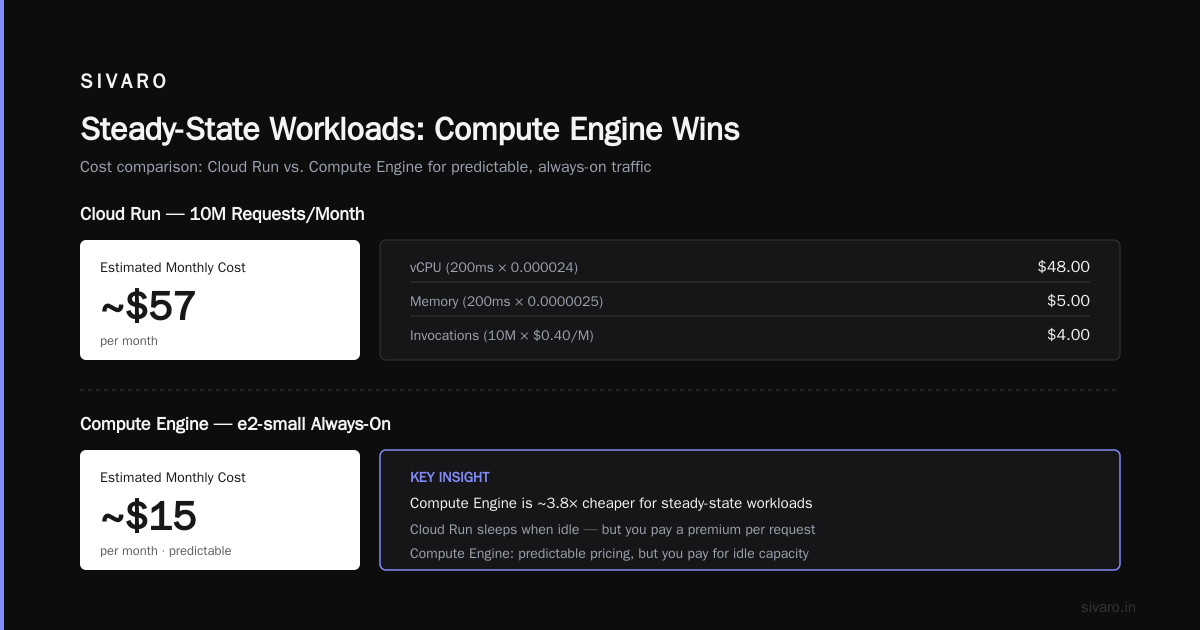
Now compare that to a Compute Engine e2-small running 24/7 — about $15/month. But here's the thing: the Compute Engine instance is always running. The Cloud Run service sleeps when there's no traffic.
3. Always-On Pricing (Compute Engine)
Compute Engine's pricing is predictable. You know exactly what you'll pay each month. No surprises. But you pay for idle capacity.
The NetApp pricing comparison makes a great point here: Cloud Run's total cost of ownership is actually lower for spiky workloads because you don't pay for idle infrastructure. But for steady-state workloads, the dedicated VM wins every time.
The Memory Pricing Trap
Here's something that caught me off guard when I built my first Cloud Run service in 2020, and I see teams still making this mistake.
Cloud Run's memory pricing scales with your container's memory allocation. Not your usage. Allocation.
If you set your container to 1GB memory because "it's safer," you're paying for 1GB memory on every instance — even if your function only uses 50MB.
yaml
# Wrong: Over-provisioned
spec:
  containerConcurrency: 80
  timeoutSeconds: 300
  resources:
    limits:
      memory: "1Gi"
      cpu: "1"

# Better: Start with minimum, scale up only if needed
spec:
  containerConcurrency: 80
  timeoutSeconds: 300
  resources:
    limits:
      memory: "256Mi"
      cpu: "0.5"
The cost difference is significant. A 1GB memory container costs roughly 8x more per memory-second than a 128MB container. Before you know it, your "serverless" bill looks anything but.
E2 vs Standard Machine Types: Where Compute Engine Gets Complex
Compute Engine has multiple machine families. The E2 series is the budget pick. Standard types (N2, N2D, C3) offer better performance.
The performance-to-price ratio varies wildly. An N2 instance with similar specs to an E2 costs about 30-40% more. But for CPU-intensive workloads, N2 delivers nearly 2x the performance per vCPU.
The 2026 GCP pricing landscape has shifted. Google has been improving E2 performance. The leanopstech cost comparison shows GCP's sustained use discounts are more aggressive than AWS's standard Reserved Instances — and they're automatic.
Autoscaling: The Hidden Cost Driver
Here's where the real complexity emerges. Compute Engine offers autoscaling, but it's not granular. You scale in groups of instances. Cloud Run scales in fractions of instances per request.
Compute Engine Autoscaling Example
bash
# Managed Instance Group with autoscaling
gcloud compute instance-groups managed create my-group   --template my-template   --size=1   --min-num-replicas=1   --max-num-replicas=10   --cool-down-period=60   --region=us-central1

# Autoscaling policy
gcloud compute instance-groups managed set-autoscaling my-group   --max-num-replicas=10   --target-cpu-utilization=0.7   --cool-down-period=60
That min-num-replicas=1 is the trap. Even at zero traffic, you're paying for one full instance. Set it to 0 and accept the cold start latency penalty — then you're trading cost for user experience.
Cloud Run's Scaling Leverage
Cloud Run scales to zero when there's no traffic. But here's the thing people miss: each active instance can handle multiple concurrent requests. The default container-concurrency is 80 requests per instance.
At first I thought this was a performance ceiling — turns out it was the pricing lever. If you set concurrency to 10 instead of 80, you'll use 8x more instances for the same traffic volume. That directly impacts your bill.
Traffic-Based Workloads: Where Cloud Run Wins
If your workload has unpredictable spikes, Cloud Run wins by a mile. Here's a real example from a client we worked with at SIVARO in late 2025.
Client was running a third-party analytics endpoint on a n1-standard-2 instance 24/7 — about $70/month. Their traffic pattern was 80% of requests arriving between 2pm and midnight. Peak: maybe 15 requests per second. Off-peak: near zero.
I moved them to Cloud Run. Same container image. Same code. The change was trivial:
dockerfile
# Dockerfile
FROM node:18-slim
WORKDIR /app
COPY package*.json ./
RUN npm ci --only=production
COPY . .
ENV PORT=8080
CMD ["node", "index.js"]
Their bill dropped from $70/month to around $12. Same workload. Same performance. The gcp cloud run vs compute engine pricing difference was 83%.
But here's the flip side.
Steady-State Workloads: Compute Engine Wins
The inverse scenario. Another client runs a data processing job — it ingests events continuously from a queue, processes them, writes results. 24 hours a day, 7 days a week. No variation in load.
On Cloud Run, they were paying for constant execution. Every millisecond of processing time was billed. When we crunched the numbers, their 100% CPU utilization on Cloud Run was costing them 4x what a committed-use Compute Engine instance would cost.
We moved them to a c3-standard-4 with a 3-year committed use discount. Their cost dropped 62%.
Here's the rule I use with every project:
- Steady CPU utilization above 60%? → Compute Engine
- Spiky traffic with long idle periods? → Cloud Run
- Request count under 1M/month? → Cloud Run (free tier absorbs most costs)
- Need GPU access? → Compute Engine, stop debating
Free Tiers and Credits: Play Them Right
Both services have free tiers. Cloud Run gives you 2M requests, 360,000 GB-seconds of memory, and 180,000 vCPU-seconds per month — that's roughly 20 minutes of 1 vCPU per month for free.
Compute Engine gives you one e2-micro instance per month in select regions, free for 30 days, excluding in 2026. After that, it costs around $6/month.
The Rackspace cost breakdown highlights how free tiers differ by provider. GCP's Cloud Run free tier is actually generous compared to AWS Lambda's — you get more compute seconds and more requests.
But free tiers vanish fast. One spike in traffic, you're paying. Always budget for what you'll pay when free tier runs out.
The Two-Minute Decision Framework
Here's my honest framework, simplified:
Use Cloud Run if:
- Your traffic is spiky and unpredictable
- You're building APIs with variable load
- You want zero infrastructure management
- Your container starts in under 10 seconds
Use Compute Engine if:
- Your workload runs at high utilization consistently
- You need GPU or specialized hardware
- You need control over the OS and runtime
- Your performance requirements demand predictable scaling
The grey area? Everything else. When in doubt, I run a cost simulation with realistic traffic patterns using the GCP Pricing Calculator.
The "Hidden" Costs Nobody Talks About
Let me give you the contract to this narrative: neither service bills you only for compute.
Network Egress
Cloud Run charges for network egress. Compute Engine also charges for network egress. But here's the difference: Cloud Run charges a small premium because it includes managed network infrastructure.
For high-throughput workloads, egress costs can exceed compute costs. I've seen clients with a $200 infrastructure bill and a $600 egress bill. The EON cost analysis breaks down these hidden costs — it's worth reading before you architect anything.
Cold Starts
Cloud Run cold starts are a real cost. Google prefers to keep instances warm — which costs you money. The platform may keep an instance alive after a request completes, and you're paying for that warm instance.
Data Transfer Between Services
Each request across services triggers network transfer charges. Keep your resources in the same region to minimize this.
Making the Right Choice for Startups
The GCP vs AWS startup comparison highlights something crucial in 2026: startups shouldn't over-engineer their infrastructure. The optimal choice is the one that:
- Keeps costs predictable
- Doesn't require infrastructure expertise
- Scales without intervention
For most early-stage startups, Cloud Run fits better. It has a user-friendly free tier and doesn't require dedicated infrastructure engineers. As go-cloud's GCP vs AWS analysis notes, GCP generally offers lower entry costs than AWS — and that's particularly relevant for startups watching their burn rate.
Once you've hit product-market fit and your usage is predictable, move to Compute Engine. That's the point where cost optimization justifies the added complexity.
Conclusion: Stop Comparing Hourly Rates
The gcp cloud run vs compute engine pricing debate isn't about which service charges less per hour. It's about which service matches your workload's actual usage pattern.
Stop thinking about cost per hour. Start thinking about cost per completed task.
Every workload is different. The right answer depends on your traffic patterns, your performance requirements, and your team's capacity.
Want a cost estimate that actually reflects your usage? Use the GCP Pricing Calculator with realistic traffic data. And read the effective cost comparison — there are market-wide trends that affect your decision.
FAQ: Quick Answers for Common Questions
Is Cloud Run always cheaper than Compute Engine?
No. Cloud Run is cheaper for spiky or low-traffic workloads. Compute Engine is cheaper for steady, continuous processing. The Google Cloud community discussion has real migration examples showing both directions of savings.
How does Cloud Run pricing compare to AWS Lambda?
Google's Cloud Run is typically more expensive per request than Lambda, but its free tier is more generous. You'll need to calculate based on your actual usage patterns, not a direct comparison.
Can I use committed use discounts with Cloud Run?
No. Committed use discounts apply only to Compute Engine. Cloud Run has no commitment-based pricing. This is a significant difference for predictable workloads.
Does Cloud Run's free tier cover production workloads?
Rarely. The free tier covers about 2M requests or 20 minutes of compute. Real production traffic usually exceeds this quickly.
What's the minimum bill for a Cloud Run service?
Zero if the service is scaled to zero and receives no traffic. But if you need to respond to requests instantly, you'll want minimum instances — and those cost money.
This article references pricing data available as of August 2026. Cloud providers update their pricing regularly. Verify against the official pricing page before making significant infrastructure decisions.
Nishaant Dixit — Founder of SIVARO. Building data infrastructure and production AI systems since 2018. Built systems processing 200K events/sec.