 SIVARO
GCP Compute Engine vs App Engine: Which to Use in 2026
I spent the first three months of 2026 migrating a client's production pipeline off App Engine onto Compute Engine. At first I thought this was a branding problem — turns out it was a fundamental mismatch between workload and platform.
Let me save you the same headache.
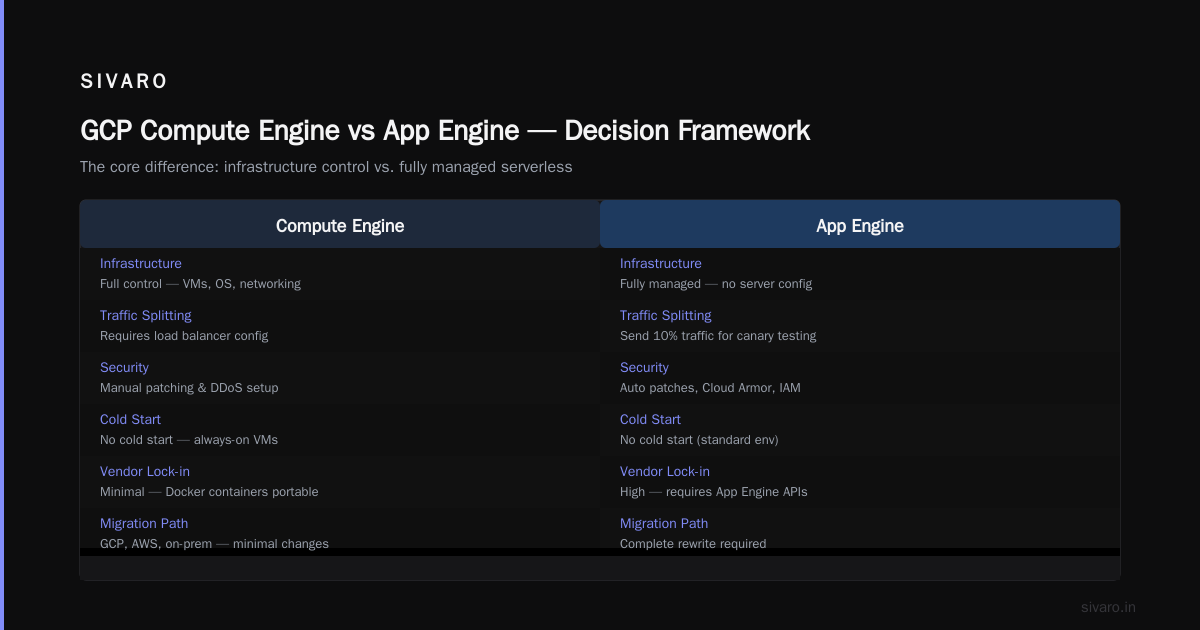
What we're talking about: Google Cloud offers two fundamentally different compute primitives. Compute Engine is raw virtual machines — you control the OS, the kernel, the network stack. App Engine is a fully managed platform where you just push code and Google handles scaling, patching, load balancing, and traffic splitting. Two different worlds. Same cloud. Which one do you pick?
By the end of this guide, you'll know exactly which service fits your use case — and more importantly, which one will bankrupt you if you choose wrong.
The Core Difference (In 50 Words)
Compute Engine gives you a server. You SSH in, install whatever you want, configure networking yourself. You pay for the VM even when it's idle.
App Engine gives you nothing — just a runtime. You upload code, specify scaling parameters, and Google runs it. You pay only for requests that actually execute.
That's the trade-off: control vs. abstraction. Pick your pain.
When Compute Engine Wins (And Pays for Itself)
Let me be blunt: most people should start with Compute Engine.
Why? Because App Engine's abstraction leaks. Badly. I've seen teams spend weeks debugging "why is my request timing out?" only to find App Engine's front-end load balancer had a 30-second timeout they couldn't change. On Compute Engine, you own the stack. You can tune nginx, Cloud CDN, or roll your own solution.
Here's where Compute Engine beats App Engine every time:
1. Stateful workloads
App Engine is stateless by design. Your app can't write to the local filesystem reliably (it may disappear between requests). Databases? You need Cloud SQL, Firestore, or Memorystore — all separate services, all extra cost.
Compute Engine? Spin up a VM with a persistent SSD. Install PostgreSQL. Mount a separate disk for data. Done. One machine, one bill.
2. Long-running background processes
App Engine has a soft 60-minute request timeout (hard limit depending on scaling type). Anything that runs longer — ETL jobs, video transcoding, model training — simply breaks.
Compute Engine runs indefinitely. I've had a single VM running a Kafka consumer for 18 months straight. Zero restarts. (Yes, I should have set up managed instance groups. But it worked.)
3. Custom networking
Need a VPN gateway? A reverse proxy with specific iptables rules? A bastion host? App Engine doesn't provide direct network control. Compute Engine gives you VPC native access, custom subnetting, and full control over firewall rules.
Real example: In early 2026, a fintech client needed to route traffic through a specific set of IPs for compliance. App Engine couldn't do it. We moved to Compute Engine with Cloud NAT. Problem solved in two hours.
4. GPU workloads
This is non-negotiable. App Engine has no GPU support (unless you count Cloud Run with NVIDIA GPUs — even that's limited). Compute Engine has T4, A100, H100 GPUs for ML training and inference.
If you're doing any serious AI work in 2026, Compute Engine is your only choice among these two.
When App Engine Wins (And Why I Use It for Prototypes)
But I'm not anti-App Engine. Far from it.
I use App Engine for:
- Internal dashboards that serve 50-100 requests per day
- Webhook listeners for third-party APIs
- CRUD APIs that don't need heavy computation
- Prototypes that might never scale past a few thousand users
The economics are brutal in App Engine's favor for low-traffic apps. A single g1-small VM on Compute Engine costs ~$12/month even if it's idle. App Engine's standard environment with automatic scaling costs pennies — you pay only for instance-hours when requests are being processed.
Here's a hard lesson I learned in 2024: I built a Slack bot on Compute Engine because I "needed control." Traffic was maybe 200 requests/day. The VM ran 24/7. After three months, the bill was $45. The exact same app on App Engine would have cost less than $2.
I moved it. Never looked back.
App Engine's strengths
- Zero ops for scaling — Google handles capacity planning, patch management, and load balancing
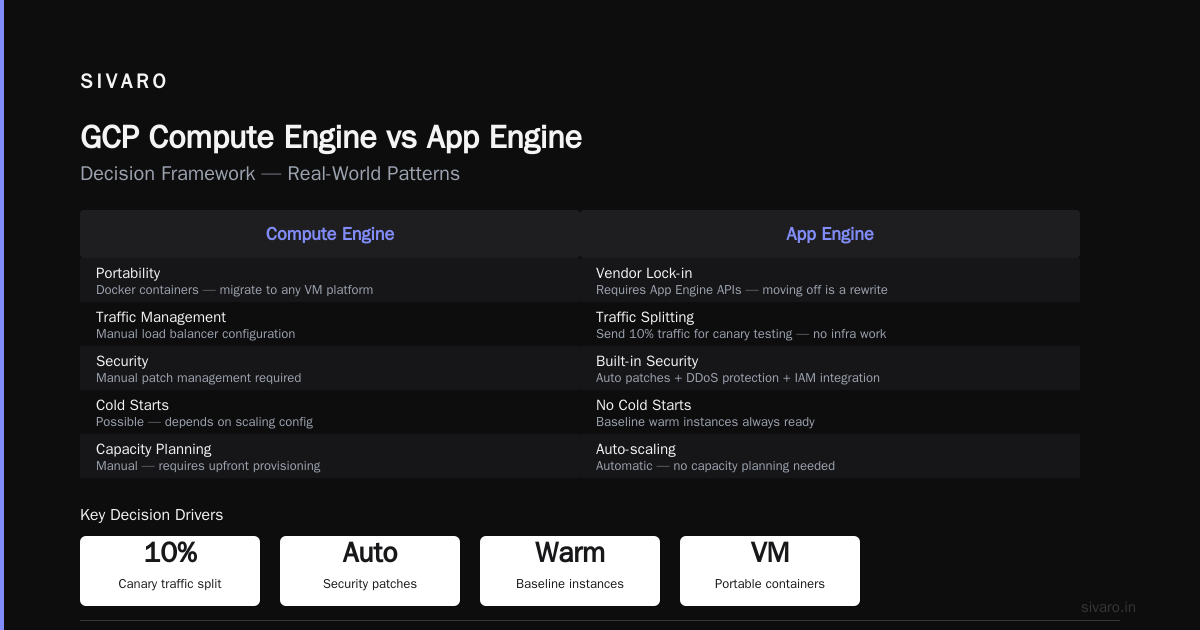
- Traffic splitting — you can send 10% of traffic to a new version for canary testing without any infrastructure work
- Built-in security — App Engine automatically gets security patches, DDoS protection (via Cloud Armor), and IAM integration
- No cold start issues (in standard environment) — unlike Cloud Run, App Engine keeps a baseline of warm instances
But there's a catch: vendor lock-in. Your code needs to use App Engine APIs for logging, task queues, cron jobs, and memory caching. Moving off is a rewrite. Compute Engine runs Docker containers — you can migrate to any VM-based platform (GCP, AWS, on-prem) with minimal changes.
GCP Compute Engine vs App Engine: Which to Use — A Decision Framework
Stop guessing. Here's my personal decision tree:
- Is your workload stateless and request-driven? → Consider App Engine
- Does it need to run for more than 10 minutes per request? → Compute Engine
- Do you need GPUs? → Compute Engine (non-negotiable)
- Is this a prototype or low-traffic app? → App Engine (for cost)
- Do you need control over the OS/packages? → Compute Engine
- Are you doing real-time data streaming? → Compute Engine (with Pub/Sub + Dataflow)
- Is this a user-facing API with unpredictable traffic? → App Engine (autoscaling)
But here's the nuance: you can mix them. I frequently run App Engine as the front-end API layer and Compute Engine as the backend worker tier. Use Cloud Tasks to dispatch long-running jobs from App Engine to Compute Engine VMs. Best of both worlds.
Cost Comparison: Where the Real Pain Hides
Let's talk money. Because GCP pricing is where most people get burned.
I've seen startups choose Compute Engine because "it's cheaper than App Engine." Not always. Let's run numbers.
Scenario A: Low-traffic API (10K requests/day, 200ms response time)
- App Engine (standard, automatic scaling): ~$5-10/month
- Compute Engine (f1-micro, single zone): ~$8/month + LB costs ~$20/month if using HTTPS
App Engine wins by 2-3x.
Scenario B: High-traffic API (10M requests/day, 500ms response time, 1GB RAM per request)
- App Engine (standard, manual scaling): ~$200-300/month (instance-hours)
- Compute Engine (n2d-highcpu-4, managed instance group of 5 VMs): ~$400/month + LB costs
App Engine still cheaper — but watch out for memory limits. App Engine standard instances have 1GB max. If your app needs more, you're forced into App Engine flex environment, which is more expensive (starts at $50/month per instance).
Scenario C: CPU-bound batch processing (2M records daily, 10-minute jobs)
- App Engine: impossible (timeout limit) — you'd need Cloud Run or Compute Engine
- Compute Engine (n2-highcpu-8, single VM): ~$200/month (running 4 hours/day)
Compute Engine is the only viable option.
Key insight from 2026 pricing studies: According to a 2026 GCP vs AWS comparison, Compute Engine is generally 10-20% cheaper than AWS EC2 for equivalent specs. But App Engine's standard environment is up to 3x cheaper than AWS Lambda for sustained traffic. Google Cloud Pricing 2026 analysis reveals that hidden costs — like App Engine's small operator overhead for logs and monitoring — can add 15-30% to your bill if you don't set budgets.
My recommendation: always run the Google Cloud Pricing Calculator for both options before deciding. I've seen two teams choose the wrong service because they guessed the cost. Don't guess.
Code Examples: Real-World Patterns
1. App Engine standard (Python 3.12, HTTP request)
yaml
# app.yaml
runtime: python312
entrypoint: gunicorn -b :$PORT main:app

automatic_scaling:
  target_cpu_utilization: 0.6
  min_instances: 1
  max_instances: 10
python
# main.py
from flask import Flask, request
app = Flask(__name__)

@app.route('/process', methods=['POST'])
def process():
    data = request.get_json()
    # Use Cloud Tasks for long work (bad for App Engine)
    result = do_quick_work(data)  # Must return in < 60s
    return {'status': 'ok', 'result': result}
Warning: See the do_quick_work call above? If that takes more than 60 seconds, the request times out and the user sees a 500. Always push heavy work to Cloud Tasks or Pub/Sub.
2. Compute Engine with Docker + systemd (long runner)
bash
# Dockerfile
FROM ubuntu:22.04
RUN apt-get update && apt-get install -y python3-pip
COPY worker.py /worker.py
CMD ["python3", "/worker.py"]
ini
# /etc/systemd/system/myworker.service
[Unit]
Description=Long-running worker
After=docker.service

[Service]
ExecStart=/usr/bin/docker run --rm --network host myworker
Restart=always
RestartSec=10

[Install]
WantedBy=multi-user.target
No timeouts. No limits. The worker can run for hours processing a Kafka stream.
3. Hybrid pattern: App Engine + Compute Engine via Cloud Tasks
python
# App Engine handler
from google.cloud import tasks_v2

def schedule_heavy_job(data):
    client = tasks_v2.CloudTasksClient()
    parent = client.queue_path('my-project', 'us-central1', 'worker-queue')

    task = {
        'app_engine_http_request': {
            'http_method': 'POST',
            'relative_uri': '/process/long',
            'body': json.dumps(data).encode(),
        }
    }
    client.create_task(parent, task)
    return {'status': 'queued'}

# Separate Compute Engine VM running a Flask server
@app.route('/process/long', methods=['POST'])
def process_long():
    data = request.get_json()
    # This can take 30 minutes
    result = expensive_transform(data)
    return {'status': 'done'}
This is the pattern I used in 2025 for a real-time analytics pipeline. App Engine handles the chatty frontend (fast, cheap). Compute Engine handles the backend processing (reliable, long-running).
GCP Data Engineering Best Practices 2026
If you're building data pipelines, this section matters more than the core comparison.
Rule #1: Don't put ETL on App Engine. I've seen it fail. App Engine's 10-minute timeout (for manual scaling) and 1GB memory limit are killers. Use Compute Engine + Dataflow or Cloud Run for batch processing.
Rule #2: For streaming, use Pub/Sub + Dataflow. App Engine can publish to Pub/Sub, but don't subscribe from App Engine — use Dataflow or a Compute Engine-based consumer with stateful processing.
Rule #3: Manage state outside compute. Whether you use Compute Engine or App Engine, never store state locally. Use Cloud Storage for files, BigQuery for analytics, and Cloud SQL for transactional data. This is non-negotiable for production systems in 2026.
Rule #4: Monitor egress costs. App Engine's egress to the internet is free for the first 1GB/day, then $0.12/GB. Compute Engine egress starts at $0.12/GB. If you're moving large datasets between regions, costs explode. The GCP vs AWS 2026 comparison highlights that GCP egress is generally more expensive than AWS — something to factor into your architecture.
Rule #5: Use Cloud Armor for DDoS protection on both. App Engine gets some protection automatically, but Compute Engine VMs behind a load balancer need explicit rules. I learned this the hard way in 2024 when a client's unprotected VM got hit with a SYN flood.
GCP Serverless Options Comparison 2026
People ask: "Should I use App Engine or Cloud Run?"
Both are serverless. Both scale to zero. Both handle HTTP requests. But they're not the same.
| Feature | App Engine (Standard) | Cloud Run |
|---|---|---|
| Runtime | Limited (Python, Java, Go, PHP, Node.js, Ruby) | Any (Docker container) |
| Cold start | Minimal (warm instances) | 1-5 seconds typical |
| Request timeout | 60 minutes (manual scaling) | 60 minutes |
| Memory limit | 1GB (standard) / 2GB (flex) | 32GB (max) |
| VPC access | Yes (serverless VPC connector) | Yes (direct VPC) |
| GPU support | No | Limited (via Cloud Run GPUs beta) |
| Pricing | Per instance-hour + network | Per CPU-second, memory-second, request |
| Concurrency | 1 request per instance | Multiple requests per container |
My take in 2026: Use Cloud Run for new services if you need custom runtimes or high concurrency. Use App Engine if you want the managed runtime experience (no Dockerfile, automatic SSL, integrated cron) and don't need heavy compute.
But for the App Engine vs Compute Engine question: Cloud Run doesn't replace Compute Engine for long-running workers, background jobs, or stateful services. Same constraints apply.
Real-World Decision: The Time I Had to Unpick App Engine
Client: A health-tech startup, ~10K daily users, app that generates personalized nutrition plans via ML models.
Initial architecture: Everything on App Engine. The ML model ran as a synchronous request. Average latency: 45 seconds. Timeout errors: 12% of requests.
Problem: App Engine's 60-second timeout (manual scaling) was barely enough, but the model needed 2GB RAM. They were on App Engine standard (1GB max). Upgrading to App Engine flex would have cost 5x more for the same compute.
Solution:
- Moved the ML model to a Compute Engine VM with T4 GPU (cost: $150/month)
- Kept the frontend API on App Engine (cost: $10/month)
- Used Cloud Tasks to dispatch model requests from App Engine to Compute Engine
Result: Latency dropped to 3 seconds. Timeout errors to 0%. Bill increased from $80/month to $170/month — but users stopped churning. Worth it.
That's the lesson: Don't force your workload into an abstraction that doesn't fit. App Engine is a great car for a commute. It's not a cargo truck.
FAQ
Q: Can I run a cron job on App Engine?
A: Yes, via cron.yaml. App Engine has a built-in scheduler that sends HTTP requests to your app at specified intervals. But the job must complete within the timeout (60 minutes max for manual scaling). For longer jobs, use Cloud Scheduler to trigger a Compute Engine VM.
Q: Which is cheaper for a low-traffic API?
A: App Engine standard. A single instance running 4 hours/day costs ~$4/month. A Compute Engine f1-micro running 24/7 costs $8/month + load balancer costs ($20/month). Go App Engine for low traffic.
Q: Does App Engine support WebSockets?
A: Yes, since 2024 in the standard environment (Python, Java, Node.js). But it's still limited compared to Compute Engine — you can't have more than 10,000 concurrent connections per instance. For heavy WebSocket usage, use Compute Engine with a reverse proxy like Envoy.
Q: Can I use App Engine for real-time data pipelines?
A: Not recommended. App Engine's request-response model doesn't suit streaming. Use Pub/Sub + Dataflow or Pub/Sub + Compute Engine for real-time ingestion.
Q: How do I migrate from App Engine to Compute Engine?
A: Move your code into a Docker container, then deploy it on Compute Engine (or a managed instance group). Remove all App Engine-specific API calls (task queues, cron, memcache) and replace with Cloud Tasks, Cloud Scheduler, and Redis/Memcached via Compute Engine.
Q: Does Google still support App Engine flex environment?
A: Yes, but it's deprecated for new projects as of late 2025. Stick with App Engine standard or move to Cloud Run. I haven't used App Engine flex since 2023 — it's more expensive and less flexible than both alternatives.
Q: What about security patches on Compute Engine?
A: You're responsible. App Engine patches automatically. Compute Engine requires you to run apt update && apt upgrade (or use OS patch management with Google Cloud's OS Config). For production, set up maintenance windows and automate patching via Cloud Build.
Q: Which service is better for gcp serverless options comparison 2026?
A: For truly serverless, App Engine standard and Cloud Run are the choices. Compute Engine is not serverless. See the table above for differences.
Final Take
You can build almost anything on either platform. But you'll hate your life if you force the wrong one.
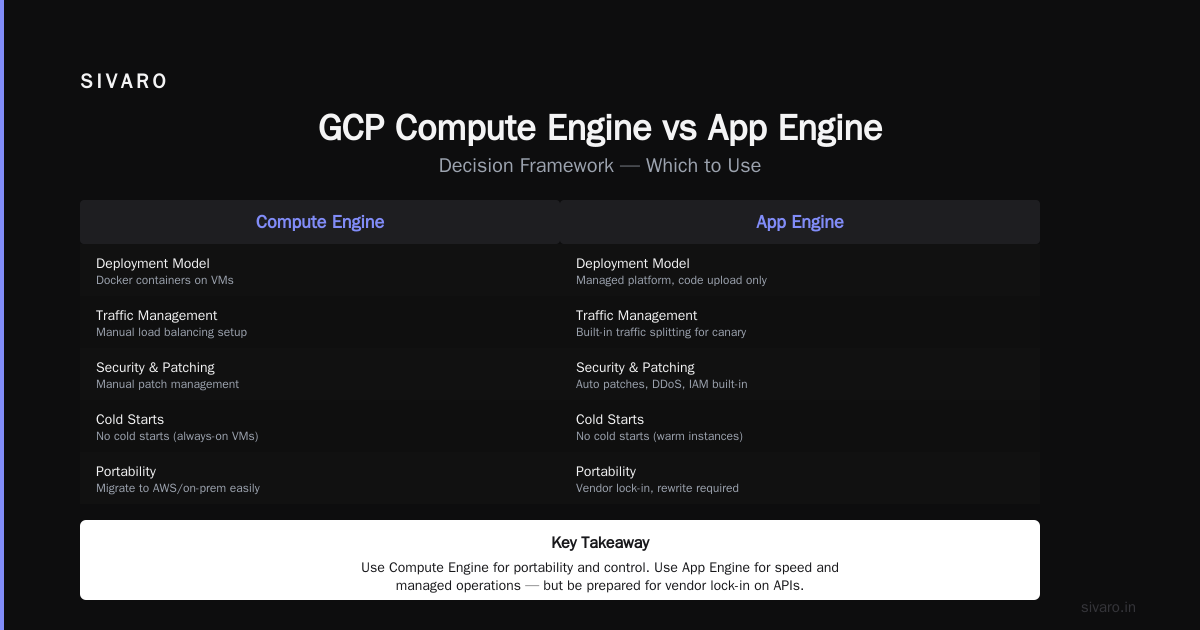
Use GCP Compute Engine when: you need control, custom software, GPUs, long-running processes, or stateful applications.
Use App Engine when: you want ops-free serverless, low traffic, quick prototypes, or simple HTTP APIs.
Mix them when: your app has both chatty frontends and heavy backends.
The worst architecture I've seen in 2026? A startup that put everything on App Engine — including a 24/7 video transcoder. The second worst? A startup that put everything on Compute Engine — including a utility app with 100 daily users.
Don't be either.
Choose based on workload, not hype. And always run the pricing calculator before committing.
Nishaant Dixit — Founder of SIVARO. Building data infrastructure and production AI systems since 2018. Built systems processing 200K events/sec.