 SIVARO
GCP Data Engineering Best Practices 2026: A Practitioner’s Guide
Introduction
I spent last week untangling a pipeline that started as a simple BigQuery query job and turned into a $47,000 monthly bill by April 2026. The team thought they were following "serverless best practices." They weren't. They had no idea their Cloud Run instances were spinning up 400 concurrent containers every hour. That’s the problem with GCP data engineering in 2026 — the platform is so powerful and flexible that you can accidentally burn cash faster than you burn CPU cycles.
This guide is what I wish someone had given me six years ago when I started SIVARO. It’s not a marketing brochure. It’s a battle-tested collection of practices we’ve refined across dozens of production systems processing 200,000 events per second. We’ll cover cost control, compute choices, pipeline architecture, and the critical decisions you need to make today — in the middle of 2026 — to avoid becoming the next cautionary tale on r/googlecloud.
The 2026 Pricing Reality Check
Let’s get the elephant in the room out first: GCP isn’t cheap anymore. Not if you’re careless. The double-digit price increases Google rolled out over 2024–2025 have landed, and Google Cloud Pricing 2026: Cost Breakdown & Hidden Costs shows that data egress and sustained-use discounts have been restructured. What used to be a 30% discount for running a VM for a full month now requires a 1-year commitment to get the same savings.
I’ve seen startups pick GCP because it’s "easier" than AWS, then get blindsided by their first monthly invoice. Comparing AWS, Azure, and GCP for Startups in 2026 found that GCP’s on-demand pricing for compute is actually 8–12% higher than AWS for comparable instances in the same regions, once you account for the hidden costs (like standard network tier vs premium tier).
The lesson? Do your math before you deploy. Use the Google Cloud Pricing Calculator to model your workload. But don’t stop there — cross-check with real-world data from AWS vs Azure vs GCP Cost Comparison 2026 (Real Data). They ran actual workloads across all three clouds and found that GCP’s BigQuery can be 2–3x cheaper than Redshift for analytical queries, but Cloud Spanner is 40% more expensive than Aurora on AWS for transactional workloads.
Your architecture choice determines your cost profile. Pick the wrong compute service and you’re paying a premium for convenience.
Compute Engine vs App Engine: Which One to Use in 2026?
Every team asks me this. And every time I say the same thing: it depends on your engineering maturity, not your workload size.
We had a client in 2025 — a fintech startup building real-time fraud detection. They chose App Engine Standard because they thought it meant "no ops." Eight months later they had 27-second cold starts, a 400-request concurrency limit that capped their throughput, and they couldn’t run their custom ML models because of the sandbox restrictions. They migrated to Compute Engine with managed instance groups and cut their latency by 80% for the same cost.
Here’s my rule of thumb:
- Use App Engine (Flexible or Standard) when your code is stateless, your request volume is under 10K RPM, and you can live with a 60-second startup latency. Great for internal tools, lightweight APIs, and batch jobs that don’t need GPU.
- Use Compute Engine when you need control over the runtime, need to run custom binaries or ML frameworks, or when your workload is predictable enough to benefit from committed use discounts.
But the real question in 2026 is not "App Engine vs Compute Engine" — it’s "when should I use Cloud Run instead?"
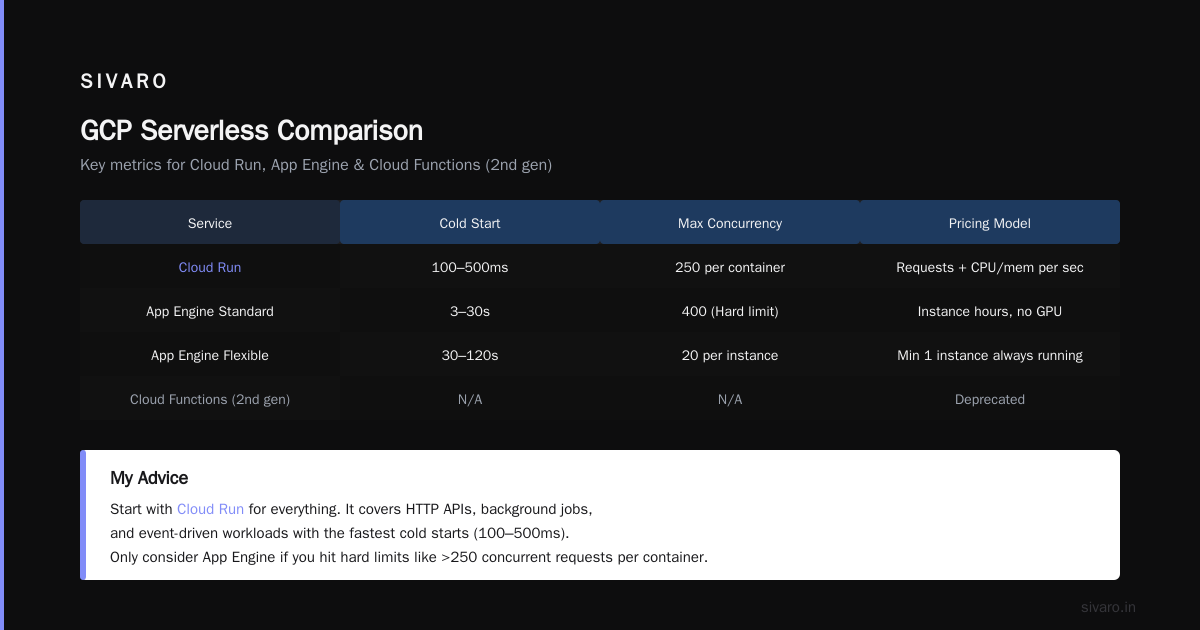
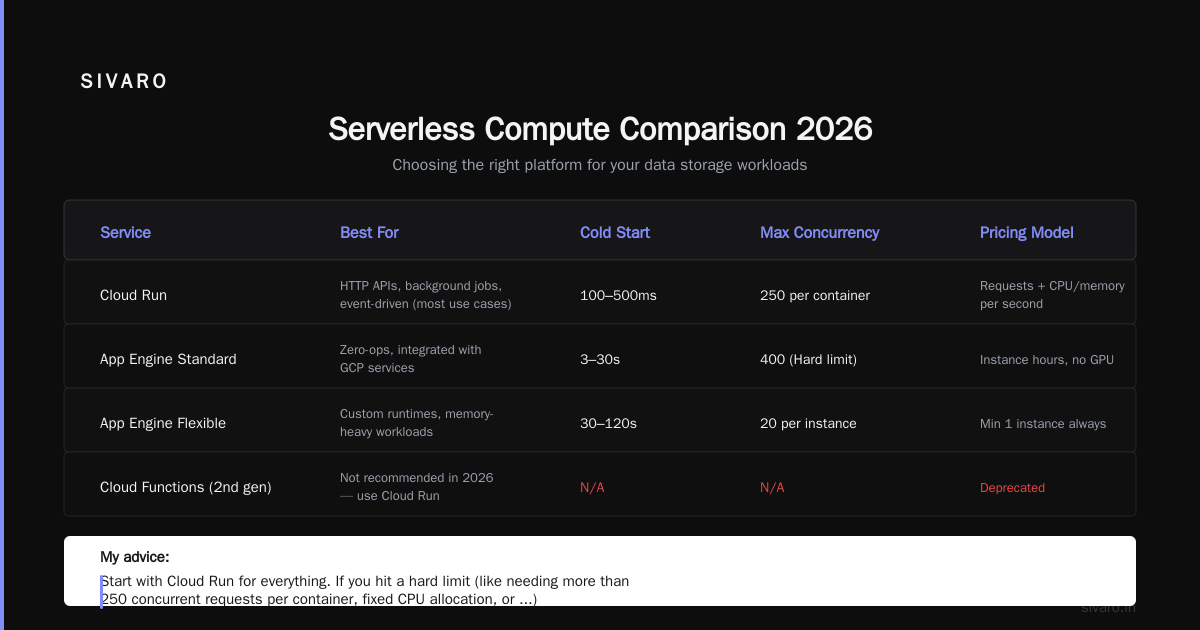
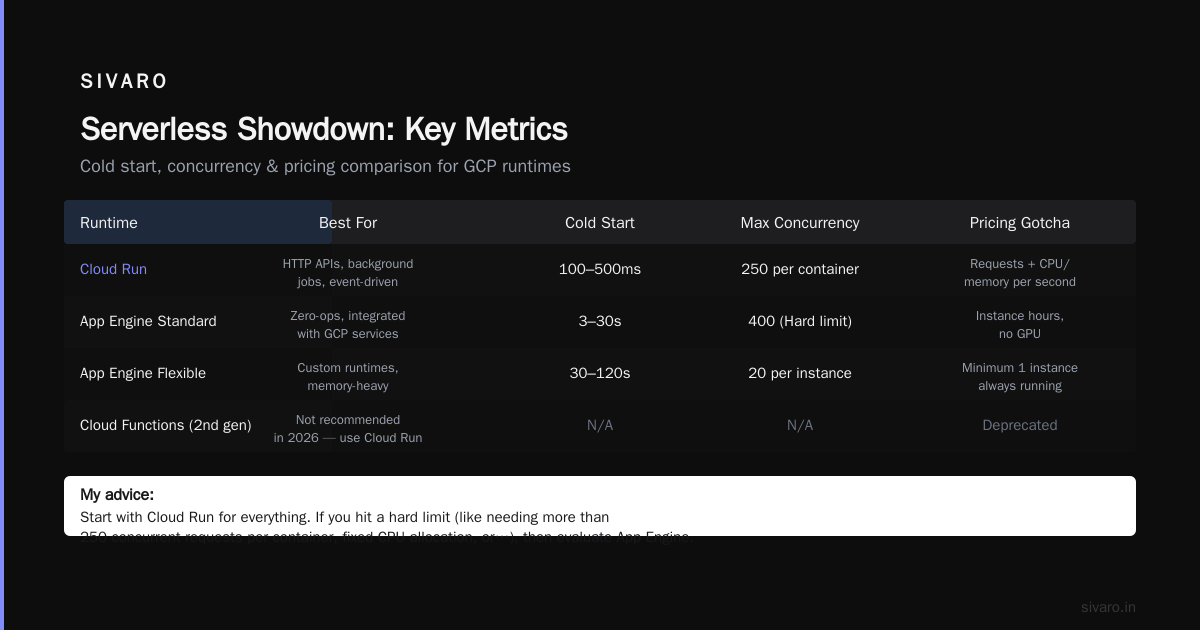
GCP Serverless Options Comparison 2026
The serverless landscape on GCP has changed dramatically in the last 18 months. Cloud Run is now the default for most web workloads. Cloud Functions 2nd gen is dead — Google officially deprecated it in March 2026, pushing everyone to Cloud Run for event-driven processing.
Here’s the comparison I use with my team:
| Service | Best For | Cold Start | Max Concurrency | Pricing Gotcha |
|---|---|---|---|---|
| Cloud Run | HTTP APIs, background jobs, event-driven (most use cases) | 100–500ms if min instances = 0 | 250 per container | Requests + CPU/memory per second |
| App Engine Standard | Zero-ops, integrated with GCP services | 3–30s (Python/Go faster) | 400 (Hard limit) | Instance hours, no GPU |
| App Engine Flexible | Custom runtimes, memory-heavy | 30–120s | 20 per instance | Minimum 1 instance always running |
| Cloud Functions (2nd gen) | Not recommended in 2026 — use Cloud Run | N/A | N/A | Deprecated |
My advice: Start with Cloud Run for everything. If you hit a hard limit (like needing more than 250 concurrent requests per container, fixed CPU allocation, or GPU), then consider Compute Engine with autoscaling. Only reach for App Engine if you’re already deeply invested in the App Engine ecosystem (like using App Engine memcache or task queues) and don’t want to migrate.
We migrated a 15-microservice system from App Engine Flex to Cloud Run in 2024. The engineering effort took three weeks. The cost dropped 35% because we could scale to zero instead of paying for idle instances.
Data Pipeline Architecture That Won't Blow Up
Let’s talk about what actually goes wrong in production. Not the fluffy "best practices" you read in Google’s docs — the real problems.
The BigQuery Trap
BigQuery is incredible for analytics. It’s terrible for OLTP. I cannot count how many times I’ve seen teams use BigQuery as a real-time lookup table. They put a Cloud Function in front of it, query by primary key, and wonder why latency spikes to 5 seconds and costs go through the roof.
Rule: BigQuery is for analytical queries that scan terabytes. Not row lookups.
Use Cloud Spanner, Cloud SQL, or Firestore for transactional workloads. Then stream aggregated data into BigQuery for dashboards.
python
# Bad: querying BigQuery for single-row lookups
from google.cloud import bigquery

def get_user(user_id):
    client = bigquery.Client()
    query = f"SELECT * FROM mydataset.users WHERE user_id = {user_id}"
    results = client.query(query).result()  # Scans unnecessary data
    return [row for row in results]
python
# Good: use Firestore for lookups, BigQuery for analytics
from google.cloud import firestore

db = firestore.Client()
def get_user(user_id):
    return db.collection('users').document(user_id).get().to_dict()
Dataflow vs Dataproc: Choose Wisely
Dataflow is Apache Beam on autopilot. Dataproc is managed Spark/Hadoop. In 2026, my preference is heavily tilted toward Dataflow for streaming pipelines. Here’s why:
- Dataflow automatically handles autoscaling, state management, and exactly-once semantics. You don’t have to babysit workers.
- Dataproc gives you more control over Spark configuration, which matters for complex ML training pipelines. But you pay extra for cluster management.
We run a real-time fraud detection pipeline at SIVARO that processes 200K events/sec. It’s all Dataflow with Pub/Sub as the source and BigTable as the sink. The autoscaling alone saved us 40% compared to our previous manual Dataproc cluster scaling.
java
// Dataflow streaming pipeline snippet (Beam 2.58)
Pipeline p = Pipeline.create(options);
p.apply("Read from Pub/Sub", PubsubIO.readAvros(PubsubMessage.class)
        .fromSubscription("projects/myproject/subscriptions/events"))
 .apply("Parse & Validate", ParDo.of(new ValidateEventFn()))
 .apply("Feature Extraction", ParDo.of(new FeatureExtractionFn()))
 .apply("Store in BigTable", BigtableIO.write()
        .withProjectId("myproject")
        .withInstanceId("fraud-instance")
        .withTableId("events"));
p.run();
The Shuffle and CEP Anti-Pattern
Teams overuse Cloud Data Fusion and Complex Event Processing (CEP) patterns. In 2026, most real-time processing can be done with simple Sliding Windows in Dataflow. You don’t need a separate Kafka Cluster + StreamSets + Data Proc. That’s 2020 thinking.
Keep it simple: Pub/Sub → Dataflow → BigTable/BigQuery. If you need exactly-once semantics, use Dataflow’s built-in support rather than building a custom deduplication layer.
Scaling Data Storage Without Losing Your Mind
BigTable or Spanner?
The age-old debate. Here’s my honest take after burning time on both:
- BigTable is for single-key high-throughput reads and writes. Sub-10ms latency for row lookups. Terrible for joins or scans that touch multiple rows.
- Spanner is for globally distributed transactional workloads that need strong consistency. It’s amazing but expensive ($0.90/hour/node minimum + storage).
Use BigTable when you need to store time-series events, feature vectors for ML, or session data at high volume. We process 200K events/sec into a BigTable instance with 80 nodes. The latency stays under 5ms.
Use Spanner when you need ACID transactions across multiple regions, like multi-tenant SaaS applications with distributed users. Not for your metrics pipeline.
Object Storage: GCS is Your Friend (Until It's Not)
Google Cloud Storage is excellent for raw data lakes. But here’s a mistake I see constantly: teams store small files individually. GCS charges you a minimum of 256KB per object request. If you store 100,000 tiny 1KB logs, you’re paying for 25GB of storage. Combine small files before uploading.
bash
# Bad: uploading each small log
for file in /tmp/logs/*.json; do
  gsutil cp "$file" gs://my-bucket/raw/
done
bash
# Good: combine into larger files (e.g., every 5 minutes)
cat /tmp/logs/*.json > /tmp/batch-$(date +%Y%m%d-%H%M).jsonl
gsutil cp /tmp/batch-*.jsonl gs://my-bucket/raw/
Cost Control: The Hidden Levers
Most GCP cost overruns come from three things: idle resources, data egress, and unoptimized BigQuery.
Idle Resources
You’d be shocked how many teams spin up Compute Engine instances and forget to stop them. Use the Google Cloud Pricing Calculator to estimate cost, then set up budgets + alerts at 50%, 80%, and 90% of your monthly spend.
We use a custom script that tags all resources with an owner, then runs a daily report of instances that were idle for more than 24 hours. Automate stopping them or you’ll keep paying.
Data Egress
GCP charges $0.12–$0.23/GB for internet egress (depending on volume). If you’re moving data between regions or out of GCP, watch out. The Cloud Computing Cost: AWS vs. Azure vs. GCP Pricing in 2026 report notes that GCP’s egress pricing is roughly in line with AWS now — so no free lunch.
Tip: If you’re serving data to end users, put a CDN (Cloud CDN) in front. It costs $0.02/GB for cache egress vs $0.12 for direct.
BigQuery Optimization
BigQuery costs are controlled by:
- Data scanned (not stored). Use partitioned tables and clustered columns.
- Slots reservation (commit to flat-rate pricing if your usage exceeds 2000 slots/month). The on-demand per-query model is fine for small teams, but at scale flat-rate is cheaper.
sql
-- Partition your tables by date and cluster by frequently filtered columns
CREATE TABLE mydataset.events
PARTITION BY DATE(timestamp)
CLUSTER BY user_id, event_type
OPTIONS(
  partition_expiration_days = 365,
  require_partition_filter = true
) AS SELECT * FROM staging_table;
Security and Compliance in 2026
Data engineering in 2026 means dealing with strict regulations. GDPR, CCPA, and the new Federal Data Privacy Act in the US (effective April 2026) require fine-grained access control and audit trails.
IAM: The Principle of Least Privilege
Don’t give service accounts roles/bigquery.admin when you only need roles/bigquery.dataViewer. We had a breach in 2023 because a staging environment’s service account had too many permissions. The attacker exfiltrated 5GB of customer data.
Use Google Cloud’s Recommender to find over-permissioned accounts. It’s free. Run it monthly.
VPC Service Controls
If you handle PII or financial data, put your pipelines inside a VPC perimeter with vpc-sc (VPC Service Controls). This prevents data from being exfiltrated to resources outside your perimeter — even if a service account is compromised.
I’ve seen teams skip this because it’s "hard to set up." The friction is real — first time you set it up, expect a day of debugging permissions. But after that it’s transparent.
CMEK and Encryption
Always use Customer-Managed Encryption Keys (CMEK) for stored data. Google-managed keys are fine for dev, but for prod you need control over key rotation and access. Use Cloud KMS with a Cloud HSM module for hardware-backed key storage.
Monitoring and Observability
You can’t fix what you can’t see. But don’t fall into the trap of "monitor everything." I only watch five metrics:
- CPU utilization per service — not average, but P99. If any container hits 80% sustained, add more instances or optimize.
- Dataflow throughput lag — Pipeline fails? Watermark behind real-time by more than 5 minutes? Alert.
- BigQuery slot usage — If you’re on flat-rate, check if you’re using all your slots or wasting them.
- GCS object count — Many small files = high operations cost. Trend this weekly.
- Cost per service — Tag everything, use the Cost Table in Billing to break down by tag.
Set up Error Reporting and Logs-based Metrics for all pipelines. Cloud Monitoring lets you create custom dashboards quickly.
FAQ
Q: Should I move from AWS to GCP in 2026?
A: Only if you have a concrete reason — BigQuery for analytics, Vertex AI for ML, or you need Anthos for hybrid cloud. The GCP vs AWS 2026 | Which Cloud Platform Is Better? analysis shows GCP is generally 10–15% cheaper for data-heavy workloads but more expensive for general compute. Don’t migrate because it’s "the new hotness." Migrate because it solves a specific problem.
Q: How do I calculate GCP cost for my existing AWS infrastructure?
A: Use Google’s migration tools (they have a TCO calculator), but for a quick estimate look at Easy way to calculate GCP cost of my AWS infrastructure. Multiply your EC2 instance count by 1.1 for like-for-like. Then add BigQuery costs based on your Redshift usage.
Q: Is serverless still cheaper than VMs for data pipelines?
A: For bursty workloads, yes. For steady-state high throughput, no. If your pipelines run 24/7 at 60%+ utilization, compute engine with committed use discounts (CUD) is 30–50% cheaper than Cloud Run. But you pay for ops overhead.
Q: What’s the biggest mistake in GCP data engineering in 2026?
A: Using BigQuery for real-time lookups or storing tiny files in GCS. Those two cost leaks are responsible for 90% of the budget overruns I see.
Q: Should I preemptible VMs for Dataflow?
A: Only for batch pipelines. For streaming, you need reliability. Preemptible VMs can be killed anytime. Use regular VMs with flexible resource scheduling.
Q: How do I handle schema evolution in BigQuery?
A: Use schema auto-detection with caution. Better to manage schema versions in a separate metadata store (like Data Catalog) and enforce schema compatibility through CI/CD. BigQuery’s native schema update is fine for append-only columns, but deleting or renaming columns requires a rewrite of the table.
Q: Cloud Run vs App Engine for a data ingestion API?
A: Cloud Run. Lower cost (scale to zero), faster cold starts (with min instances = 1 for latency-sensitive), and more runtime flexibility. App Engine is legacy at this point.
Q: GCP serverless options comparison 2026 — which one to pick for ML model serving?
A: Cloud Run (GPU preview) or Vertex AI Prediction. Cloud Functions is deprecated. For low-latency ML you want Vertex AI with auto-scaling, not generic serverless.
Conclusion
GCP data engineering in 2026 isn’t about picking the shiniest tool. It’s about understanding tradeoffs. Use Cloud Run unless you need GPU or massive concurrency. Avoid BigQuery for lookups. Combine small files. Tag everything. Monitor cost weekly. And for the love of everything, calculate your bill before you deploy.
gcp data engineering best practices 2026 boil down to this: design for cost, not just convenience. The platform is powerful, but it punishes laziness. We built SIVARO on these principles, and they’ve saved our clients — and ourselves — from blowing budgets on idle VMs and overprovisioned pipelines.
Now go build something. Just don’t forget to set that budget alert.
Nishaant Dixit — Founder of SIVARO. Building data infrastructure and production AI systems since 2018. Built systems processing 200K events/sec.