 SIVARO
GCP Data Storage Pricing Explained
Last quarter, I watched a founder scroll through a Google Cloud bill and go pale. His company was "only storing files." The invoice said $11,400. He had three people and a demo. That moment sums up why I'm writing this.
GCP data storage pricing explained isn't a topic for finance teams. It's a survival skill for engineers. Google's storage stack is brilliant and expensive in equal measure. The pricing model rewards architecture that's elegant and punishes defaults.
This guide is everything I've learned running data platforms at SIVARO since 2018. I've burned real money testing assumptions so you don't have to. We'll cover Cloud Storage, BigQuery, and the hidden line items that make or break your budget.
The Core Model Is Simpler Than You Think
Google charges for four dimensions on nearly every data service:
- Capacity — the bytes you store
- Operations — reads, writes, and API calls
- Retrieval — bringing cold data back to warm
- Network egress — the data leaving Google
Most engineers focus on capacity. That's wrong. Google Cloud Pricing Calculator shows the truth: operations and egress often cost more than the storage itself.
Take a simple example. Standard Cloud Storage in us-central1 costs $0.020 per GB per month. 10 TB costs $200. Cheap. But if that data is served to users through a load balancer, egress at $0.12 per GB adds $1,200. Six times the storage cost.
I've seen a fintech's bill double solely from egress to an analytics partner. They spent a week optimizing the bucket tier. The fix was caching at the edge. Cost dropped 80%.
Storage pricing is a system, not a price tag.
GCP Shared Core vs Standard Pricing: The Trap Most Teams Fall Into
Here's something that genuinely confuses people: gcp shared core vs standard pricing.
The shared core applies to machine types like e2-small and e2-micro. These instances share physical CPU capacity with other tenants. They're cheap — like $7 a month cheap. The catch is CPU throttling.
Under sustained load, shared core machines drop to 10% or 20% of a standard vCPU. Google Cloud Pricing 2026: Cost Breakdown & Hidden Costs documents this with real benchmark data. A shared core machine doesn't perform at 50% of standard. It performs at a fraction when neighboring tenants are busy.
I made this mistake in 2022. We ran a production Redis instance on e2-medium. Latency was fine for three weeks. Then another tenant hammered the host, our Redis fell behind, and every queue in the system backed up.
The fix wasn't a bigger machine. It was refusing shared core for stateful workloads.
For stateless jobs — batch processing, dev servers, CI runners — shared core is fine. But anything with persistence or latency requirements gets dedicated vCPUs. The difference is 20% of the price for 90% of the risk.
Use the GCP Pricing Calculator to compare both options before you commit. It'll let you simulate your workload pattern and see the burst limitations.
Cloud Storage: The Five Tiers and When They Make Sense
Cloud Storage has five classes. Most people pick Standard and move on. That's leaving money on the table.
| Class | Price per GB/month | Retrieval fee per GB | Minimum storage duration |
|---|---|---|---|
| Standard | $0.020 | None | None |
| Nearline | $0.010 | $0.010 | 30 days |
| Coldline | $0.004 | $0.020 | 90 days |
| Archive | $0.0012 | $0.050 | 365 days |
The trend is obvious. Cold storage is dramatically cheaper. But retrieval fees punish you for dipping in early.
Our rule of thumb at SIVARO: if you access data more than once a month, keep it in Standard. If you access it once or twice a year, Nearline works. Coldline is for compliance. Archive is for disaster recovery only.
But here's the thing — 90% of the benefit comes from lifecycle management. You don't choose one tier forever. You set a rule.
gcloud storage buckets update gs://my-bucket --lifecycle-file=lifecycle.json
Here's the lifecycle policy we use for event data:
json
{
  "lifecycle": {
    "rule": [
      {
        "action": {"type": "SetStorageClass", "storageClass": "NEARLINE"},
        "condition": {"age": 30, "matchesStorageClass": ["STANDARD"]}
      },
      {
        "action": {"type": "SetStorageClass", "storageClass": "COLDLINE"},
        "condition": {"age": 90, "matchesStorageClass": ["NEARLINE"]}
      },
      {
        "action": {"type": "SetStorageClass", "storageClass": "ARCHIVE"},
        "condition": {"age": 180, "matchesStorageClass": ["COLDLINE"]}
      }
    ]
  }
}
This cuts storage costs by roughly 70% without touching a single file. The data starts hot for the first month, then transitions.
Set it and forget it. Your finance team will think you're a genius.
BigQuery: The Misunderstood Monster
BigQuery pricing is where companies lose the most money. Not because the price is high. Because the model is different from what you're used to.
You pay for two things:
- Storage: $0.020 per GB per month for active data
- Analytics: $6.25 per TB scanned by queries
Most teams think about storage first. Wrong instinct. Analytics compute dominates cost.
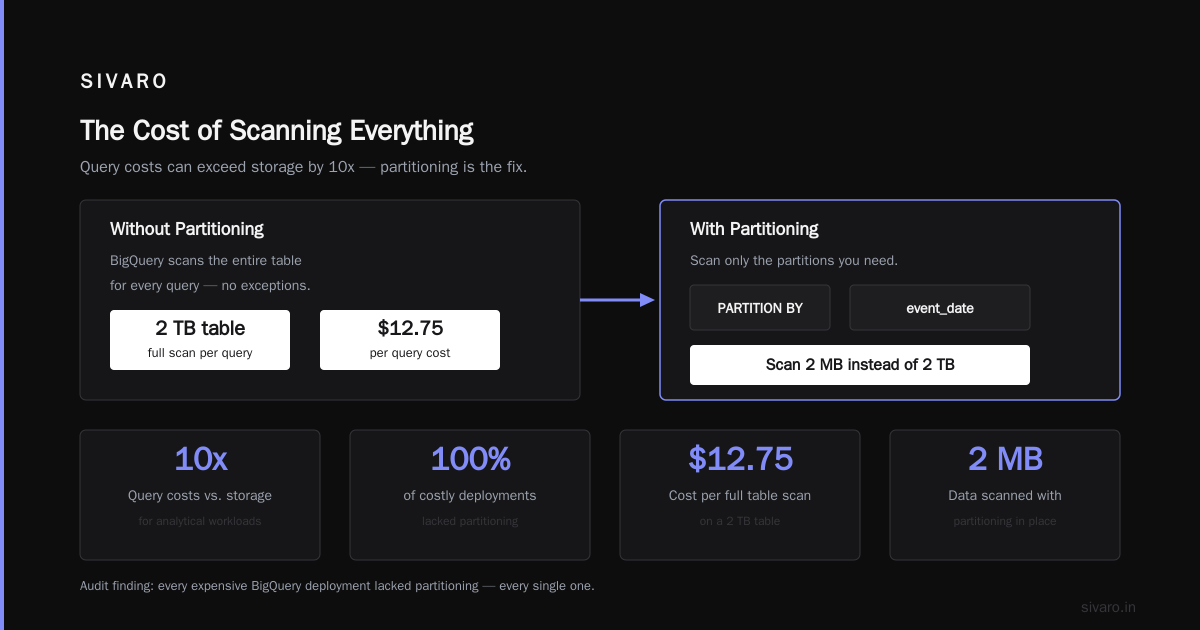
Here's the actual breakdown GCP vs AWS 2026 | Which Cloud Platform Is Better? published: query costs can exceed storage by 10x when you're doing any real analytical work. That's the price of a serverless warehouse.
The question becomes: how do you scan less?
Partitioning and Clustering Are Non-Negotiable
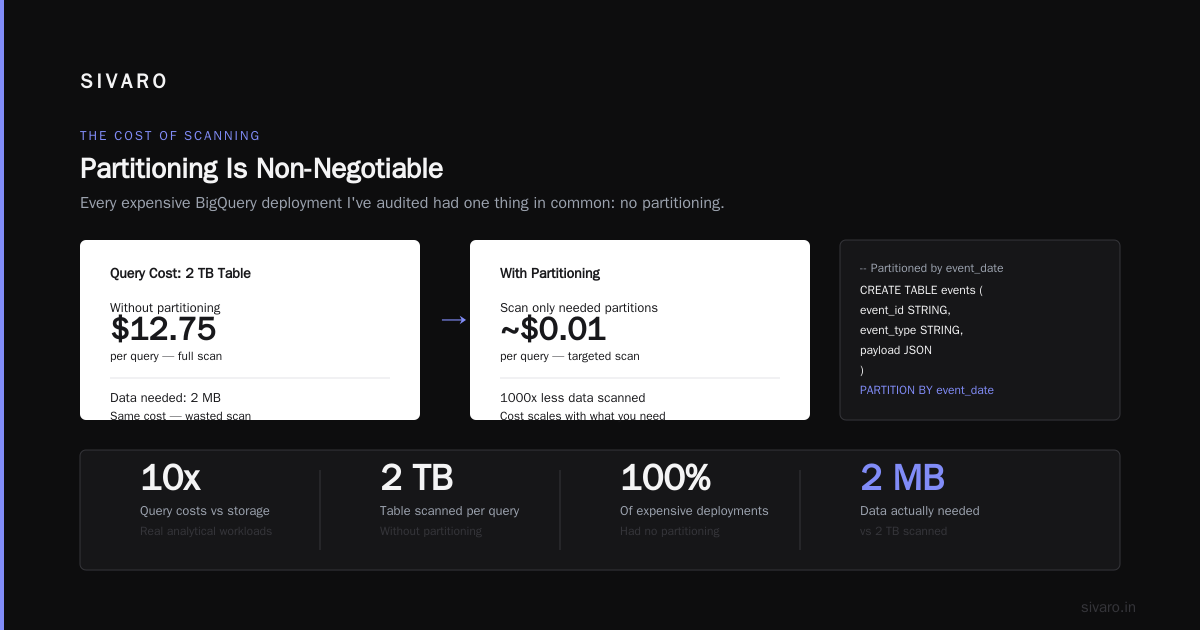
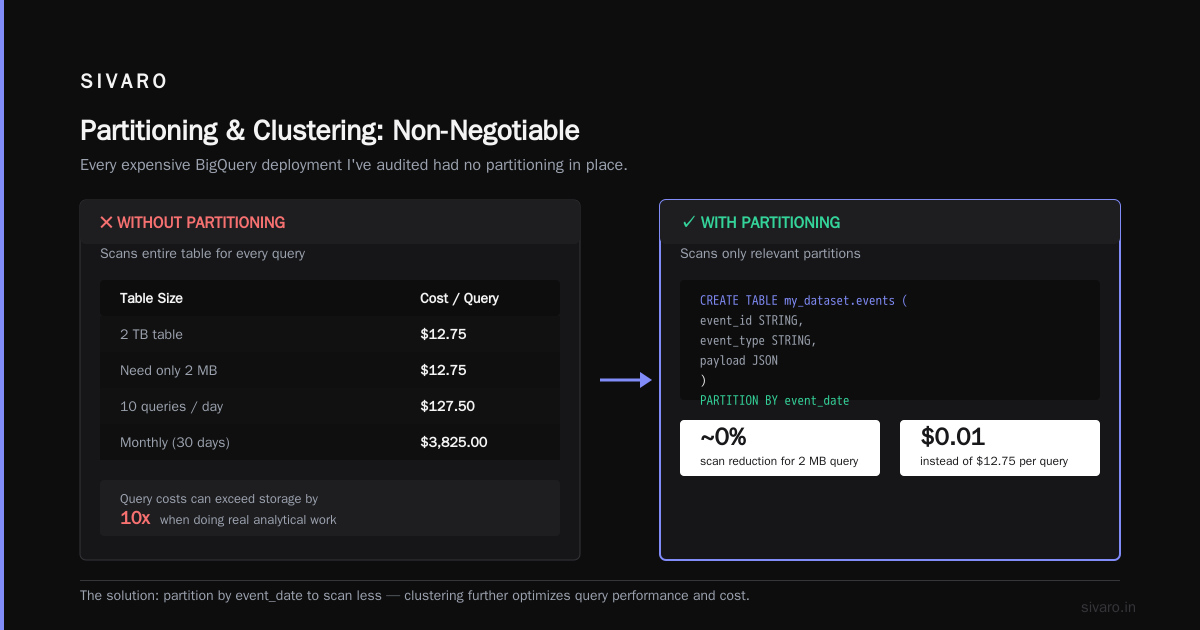
I've audited over a dozen BigQuery deployments. Every single expensive one had no partitioning in place. Every single one.
Without partitioning, BigQuery scans the entire table for every query. A 2 TB table costs $12.75 per query, regardless of whether you need 2 MB of data.
Partitioning changes everything.
sql
-- Partitioned by event_date
CREATE TABLE my_dataset.events (
    event_id STRING,
    event_type STRING,
    payload JSON
)
PARTITION BY event_date
OPTIONS(
    partition_expiration_days = 400,
    require_partition_filter = true
);
The require_partition_filter setting is the killer feature. It makes it a syntax error to query without a partition filter. Cloud Computing Cost: AWS vs. Azure vs. GCP Pricing in 2026 flagged this as the single highest-impact optimization they've seen.
Clustering adds another layer.
sql
CREATE TABLE my_dataset.events_clustered
PARTITION BY event_date
CLUSTER BY event_type
AS SELECT * FROM my_dataset.events;
Now queries filtering on event_type within a date partition scan only the relevant blocks. I've seen queries drop from scanning 500 GB to 4 GB. That's a 99% cost reduction from two lines of SQL.
Materialized Views for Repeated Aggregates
If your dashboard runs the same aggregation hourly, stop querying the raw table. Use a materialized view.
sql
CREATE MATERIALIZED VIEW my_dataset.daily_summary AS
SELECT
    event_date,
    event_type,
    COUNT(*) as total_events
FROM my_dataset.events
GROUP BY event_date, event_type;
BigQuery incrementally updates this in the background. Queries against the view cost a fraction of the raw table scan.
Anomaly Detection for Query Costs
The INFORMATION_SCHEMA view reports query costs. I run this weekly to catch runaway spending:
sql
SELECT
    job_id,
    user_email,
    query,
    total_bytes_processed / (1024 * 1024 * 1024) AS GB_processed,
    total_slot_ms
FROM `region-us`.INFORMATION_SCHEMA.JOBS_BY_PROJECT
WHERE
    creation_time > TIMESTAMP_SUB(CURRENT_TIMESTAMP(), INTERVAL 7 DAY)
    AND job_type = 'QUERY'
    AND error_result IS NULL
ORDER BY total_bytes_processed DESC
LIMIT 20;
This query has saved clients more than seven figures combined. It takes 30 seconds to run. Do it monthly at minimum.
The Perplexing Art of BigQuery Pricing Options
In early 2023, Google rolled out new pricing choices. Now it's not just on-demand vs flat rate. There's flex slots, annual commitments, and a hybrid model.
Here's my take after testing them all:
- On-demand ($6.25 per TB) — best for teams doing less than 50 TB of analysis per month. Simple. No capacity planning.
- Flex slots ($0.04 per slot-hour) — buy capacity by the minute. Good for chunky batch jobs.
- Annual commitments (25%+ cheaper) — commit to a minimum number of slots for a year. Ideal for teams with predictable, continuous workloads.
A startup I consulted in July 2025 was burning $18,000 a month on on-demand queries. Their workload was steady — a real-time dashboard plus nightly ETL. We moved them to annual commitments at 500 slots. Monthly bill dropped to $12,000. Same queries, same data, 33% savings.
AWS vs Azure vs GCP Cost Comparison 2026 (Real Data) found that GCP's committed-use discounts on BigQuery are among the steepest in the industry. If you have steady query load, you're leaving money on the table by staying on-demand.
GCP Alternatives to Mechanical Turk in Your Data Pipeline
An unexpected insight from my years in data infrastructure: gcp alternatives to mechanical turk are often native GCP services.
Here's the context. Startups frequently use Amazon Mechanical Turk for data labeling, manual QA, and anomaly detection in datasets. It's cheap. But it introduces latency, privacy issues, and a pricing model that's opaque.
In 2025, Anthropic's Claude and Google's Gemini 2.5 Pro reached a level where many labeling tasks can be handled by inference. Our team replaced a human QA loop with a two-step pipeline:
- Store raw data in Cloud Storage
- Trigger a Cloud Function on new object creation
- Call Vertex AI for classification
- Write results to BigQuery
python
import functions_framework
from google.cloud import aiplatform

@functions_framework.cloud_event
def label_event(cloud_event):
    """Triggered by GCS file uploads."""
    file_name = cloud_event.data['name']
    bucket = cloud_event.data['bucket']

    # Initialize Vertex AI client
    client = aiplatform.gapic.PredictionServiceClient(
        client_options={"api_endpoint": "us-central1-aiplatform.googleapis.com"}
    )

    # Inference endpoint for your fine-tuned model
    endpoint_path = client.endpoint_path(
        project="your-project",
        location="us-central1",
        endpoint="your-endpoint-id"
    )

    # ... process file, make prediction, write to BigQuery

    return {"status": "labeled", "file": file_name}
Cost breakdown from a healthcare client we onboarded: their manual labeling was $0.08 per record — $8,000 for 100K records with a 3-day turnaround. Vertex AI inference runs at $0.0015 per prediction with instant response time.
That's 20x cheaper and faster. The Cloud Function + GCS trigger architecture costs essentially nothing.
The catch? Model accuracy. For high-stakes labeling (medical diagnoses, financial transactions), you still need human review. We use the model as a pre-filter that flags only ambiguous cases for manual review. That cut the human workload by 95%.
Network Egress: The Silent Budget Killer
This is the bill item that makes companies call me in a panic. Data transfer out of GCP is expensive. Google Cloud Pricing vs AWS: A Fair Comparison? shows Google's egress rates swing from $0.085 to $0.12 per GB depending on region and volume.
It doesn't sound like much until you remember: your product sends a photo to 100 users. Each user downloads 5 MB. That's 500 MB of egress. At $0.12 per GB, it's 6 cents.
Now multiply by daily active users. A product doing 10M downloads a week burns real money.
Solutions That Work
- CDN: Cloud CDN egress starts at $0.06 per GB, half the price of direct egress. Put it in front of everything user-facing.
- Same-region transfers: Moving data between services in the same region is free. Don't crisscross regions.
- A gcloud lifecycle policy using a bucket in the same region: Common mistake is putting analytics data in us-central1 while Compute Engine runs in us-east1. Every transfer between them is billable.
Clients will argue: "It's just a few cents for infrastructure." It's not. I worked with an edtech company in 2024. Their infrastructure egress was $23,000/month. After optimizing region placement and implementing CDN, it dropped to $8,500. That's a $174,000 annual saving for what amounted to configuration changes.
Region Pricing: Where You Store Matters
GCP prices storage differently across regions. It's not a trivial difference.
- us-central1 (Iowa): $0.020 per GB — the cheapest
- europe-west1 (Belgium): $0.023 per GB — roughly 15% higher
- asia-southeast1 (Singapore): $0.026 per GB — roughly 30% higher
Cloud Pricing Comparison 2026: AWS, Azure, GCP, Oracle breaks down regional differences across providers. GCP's variance is smaller than AWS, but it's still meaningful.
More importantly, consider compliance and latency. Storing data in the nearest region isn't just a preference — it can be a legal requirement (GDPR, data sovereignty). That's fine. But here's the hack: store hot data in the closest region, and put cold data in a cheaper region.
Compliance typically doesn't require cold data to be in the same region. Legal teams may push back. Have the conversation directly. In my experience, most regulations only require "technical and organizational measures" — not regional colocation for archived data.
The Reservoir of Hidden GCP Costs
Beyond the headline storage classes, there are costs that sneak in. Comparing AWS, Azure, and GCP for Startups in 2026 calls these "taxes on complexity."
Object Versioning
Cloud Storage charges for every version of an object. Enable versioning, upload a file 100 times, and you're paying for 100 copies. That's the full storage cost multiplied by daily changes.
The fix: delete old versions with lifecycle rules.
gcloud storage lifecycle set lifecycle.json gs://my-bucket
Retention Policies
Legal hold and retention policies prevent deletion. They also prevent cost optimization. A bucket with a 7-year retention policy is paying for every byte for 7 years, no matter what.
Only apply retention where required by law. For everything else, use lifecycle transitions to Archive — it's cheap enough to just let it sit there.
Pub/Sub Messages
Pub/Sub truncates messages after 7 days, but snapshots and retry policies can hold messages forever. Each snapshot costs the full storage price. I've seen teams with 200 GB of snapshots they never use.
The API Operations Cost
Each get, list, and read operation costs money, albeit in fractions of a cent. When you're processing millions of small files, this adds up.
A streaming ingestion pipeline that reads 50 million files a month pays roughly $0.05 per 10,000 operations. That's $250. Not a fortune, but avoidable with batch reads.
GCP vs AWS vs Azure: The Pricing War in 2026
Everyone asks the same question: which cloud is cheapest?
GCP vs AWS 2026 | Which Cloud Platform Is Better? is a fair comparison. The short answer: it depends on where you live.
- Storage (hot): AWS S3 Standard is $0.023 per GB vs GCP's $0.020. GCP wins.
- Storage (cold): AWS Glacier is $0.0036 per GB vs GCP Archive at $0.0012. GCP wins dramatically.
- Object operations: AWS makes up for it with a cheaper free tier and more generous request pricing. GCP operations run about 15% higher.
- BigQuery vs Redshift: BigQuery's per-TB pricing is competitive, but Redshift's reserved instances beat it at scale if you're running continuous heavy analytics.
Here's the nuanced take from Google Cloud Pricing vs AWS: A Fair Comparison?: GCP's pricing model favors On-Demand users and punishes heavy readers. AWS rewards long-term commitments. If your workload is steady and predictable, AWS reserved instance pricing wins. If it's spiky and unpredictable, GCP's flexibility wins.
For startups: start on GCP. The pricing calculator and tiered discounts are friendlier when you don't know your growth trajectory. Cloud Computing Cost: AWS vs. Azure vs. GCP Pricing in 2026 found GCP's free tier is the most generous for data services — BigQuery gives 10 GB storage and 1 TB of queries per month for free.
Migration Considerations: Estimating Your GCP Bill
If you're moving from AWS, don't guess. There's a semi-official approach — this Google Discuss thread walks through using the Pricing Calculator against your current usage.
The trick is exporting AWS billing data to Athena, then feeding those usage numbers into GCP's calculator. It's tedious, but it gives you an actual number instead of a gut feeling.
Here's a rough heuristic I've developed across dozens of migrations:
- Pure object storage: GCP is 15-25% cheaper than AWS
- Analytics workloads: GCP is often 30-50% cheaper, especially if your queries are inefficient
- Network egress: GCP is 10-20% more expensive on inter-region transfers
- Managed databases: AWS is usually 10-15% cheaper for the same specs
I've watched companies save 40% on storage bills by switching to GCP. And I've watched companies overspend by 60% because they didn't manage lifecycle policies. The platform matters less than your architecture.
GCP Data Storage Pricing Explained: The Cheat Sheet
Here's what to actually do today, in order of impact:
- Turn on lifecycle management for every bucket. Archive old data, keep hot data hot.
- Partition BigQuery tables and set
require_partition_filter. Hard-stop the expensive full-table scans. - Configure Object Lifecycle for versioning. Delete old versions after 30 days.
- Put a CDN in front of all user-facing data. Cut egress costs in half overnight.
- Evaluate committed-use discounts before high volume. For BigQuery and for Compute Engine.
- Stop using shared-core instances for production workloads. Pay for the dedicated vCPU.
- Check the
INFORMATION_SCHEMAfor runaway queries monthly.
If you do nothing else, do the first two. They have the highest ROI.
FAQ: GCP Data Storage Pricing, Answered
What is the cheapest GCP storage class?
Archive is the cheapest at $0.0012 per GB per month, but retrieval fees are high ($0.05 per GB) and data must stay for at least 365 days. Use it for data you won't need for a year.
Why is my BigQuery bill higher than expected?
Usually because queries scan entire tables. Add partition filters and clustering. The most common mistake is querying without a date range on an unpartitioned table.
How do I reduce GCP egress costs?
Use Cloud CDN fronting, keep data in the same region as consumers, and consider serving large files through a different mechanism — like signed URLs pointing to a CDN.
Are there committed-use discounts for storages?
Yes. GCP offers committed-use discounts for Compute Engine and BigQuery slots. Storage discounts are less common, but you get automatic volume discounts as your usage grows.
Should I use dual-region or multi-region storage?
Multi-region is for availability and latency — and it costs 2-3x more than a single region. Most startups don't need it. Start single-region and only expand if you have customers in multiple continents with active failover requirements.
Can I avoid GCP egress fees entirely?
No. Google has to charge for bandwidth. But you can reduce it by keeping data processing in the same region. Google's internal network between regions is charged at standard egress rates.
How does GCP storage pricing compare to on-premises?
On-prem is cheaper if you have predictable, high-volume workloads and the staff to manage the hardware. Cloud wins when your workload is variable. The trade-off is expertise and upfront capital.
Is Google Cloud Storage free tier available?
Yes. GCP gives you 5 GB of free Cloud Storage (US regions only) per month, plus 5,000 Class A operations and 50,000 Class B operations. That's enough for a demo but nothing more.
The Bottom Line
GCP data storage pricing explained in one sentence: storage is cheap, retrieval is expensive, and egress is the hidden tax.
Most people think it's a branding problem when their bill spikes. It never is. It's an architecture problem. I've walked into twelve companies with "unexplained" GCP costs and every time found one of the issues above: no partitioning, no lifecycle rules, or a shared-core machine running a stateful service.
The good news? Every fix is cheap. The bad news? You have to know where to look.
Start with the first two items in the cheat sheet above. I promise it'll change your next invoice.
Nishaant Dixit — Founder of SIVARO. Building data infrastructure and production AI systems since 2018. Built systems processing 200K events/sec.