 SIVARO
GCP Data Warehouse Pricing 2026: The Real Cost of BigQuery, Dataproc, and Spanner
Last quarter I helped a Series B fintech company cut their GCP data warehouse bill by 42%. They were burning $180K/month on BigQuery alone. Their CFO thought that was normal. It wasn’t.
Here’s what I learned: gcp data warehouse pricing 2026 isn’t about per-query costs. It’s about how you buy compute slots, manage storage, and ignore the hidden taxes Google quietly adds.
This guide covers the real numbers — not the marketing page. By the end you’ll know exactly what drives your bill and how to stop leaking money.
The BigQuery Pricing Model Has Changed (Again)
Most people think BigQuery is pay-per-query — $5 per TB processed. That hasn’t been the whole story since 2023. In 2026, Google pushed hard on flat-rate slot commitments and edition tiers.
Here’s the current breakdown.
On-demand pricing still exists: $6.25 per TB for queries (not $5 — it went up 25% in late 2024). But if you run any significant volume, you’re overpaying. At 100 TB/month, on-demand costs $625. The same throughput under a flat-rate commitment in the Enterprise edition costs about $480. That’s a 23% savings before you even optimize.
But there’s a trap: you have to guess your concurrent slot usage. Overbuy and you waste money. Underbuy and you get throttled.
I’ve seen teams buy 2,000 slots because “we need headroom” and then use 600. That’s a $15K/month mistake.
| Edition | Base price per slot/hour | Minimum commitment | Best for |
|---|---|---|---|
| Standard | $0.044 | 100 slots / 1 month | Dev/QA, low concurrency |
| Enterprise | $0.066 | 100 slots / 1 year | Production BI dashboards |
| Enterprise Plus | $0.099 | 100 slots / 1 year | Real-time ML pipelines |
Google Cloud Pricing Calculator still gives you these numbers — but it doesn’t warn you that slots are pooled across all projects in your reservation.
Slot Commitments: The Only Way to Predict Costs
If your monthly query volume is above 50 TB, run — don’t walk — to a flat-rate commitment. On-demand is a variable cost that scales linearly with business growth. A product launch doubles your queries? Your bill doubles.
With slots, you pay a fixed monthly rate for a pool of compute. Google introduced flex slots in 2025 — temporary slot purchases for up to 60 days. Perfect for holiday spikes or quarterly reporting.
How to set it up:
bash
# Create a reservation in the Standard edition with 500 slots
bq mk --reservation --location=us-central1   --slots=500 --edition=STANDARD my_reservation

# Assign an existing project to use these slots
bq mk --assignment --reservation --location=us-central1   --job_type=QUERY my_reservation my_project
One pro-tip: never mix flat-rate and on-demand in the same project. The billing becomes impossible to parse. We had a client whose queries ran on both — the cost breakdown looked like abstract art.
Storage Costs: The Silent Budget Killer
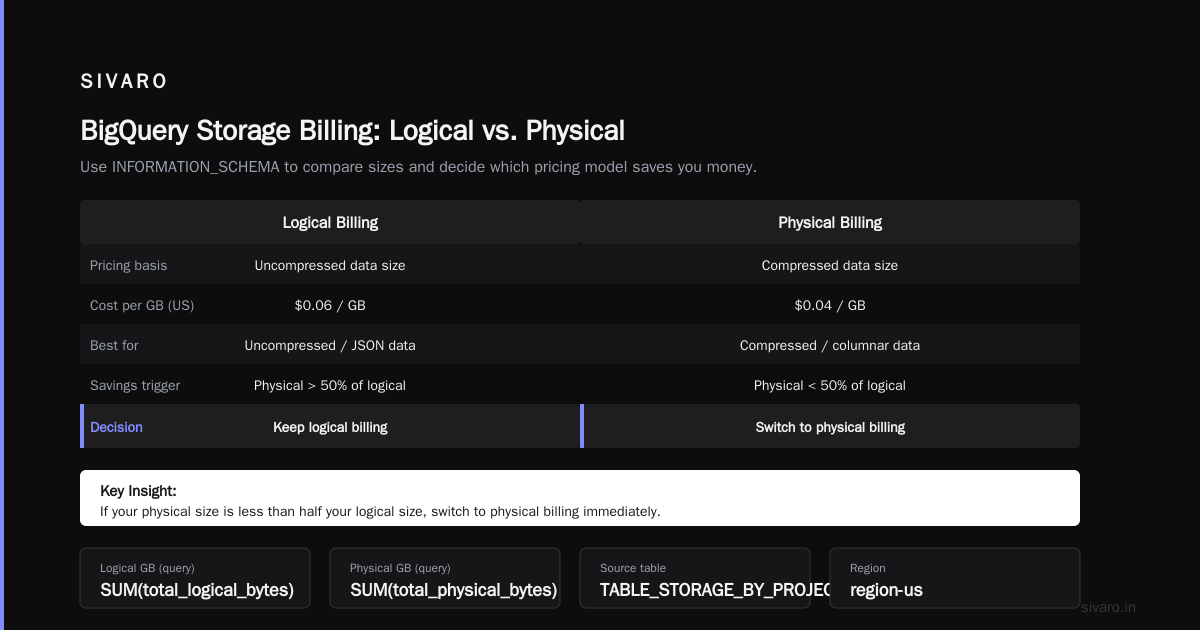
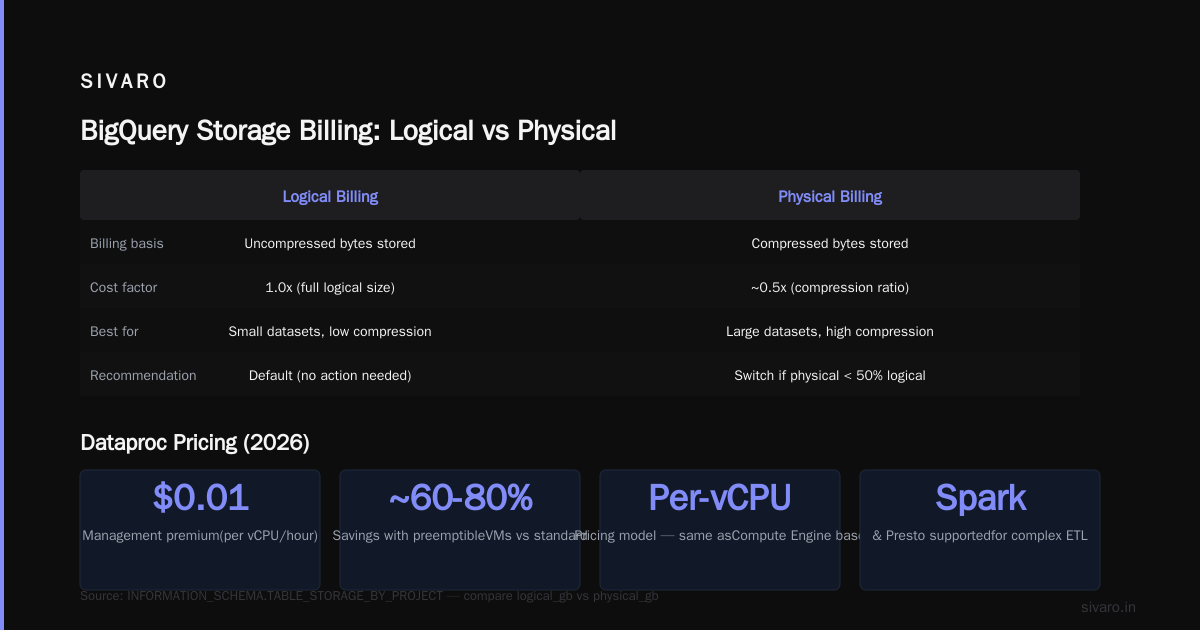
BigQuery storage isn’t free. Active storage costs $0.02/GB/month (logical size). Long-term storage (90 days without modification) drops to $0.01/GB/month. But here’s where it gets nasty: physical storage billing (optional) can save or tank your budget depending on your compression ratio.
In 2026, most teams are using logical storage because it’s simpler. But if your data is highly compressible (JSON logs, nested records), physical storage can cut your bill by 60%. I’ve seen startups with 10 TB of event logs pay $200/month under physical vs $500 under logical.
You need to test both.
sql
-- Check your current storage size and type
SELECT
  project_id,
  dataset_id,
  SUM(total_logical_bytes) / (1024*1024*1024) AS logical_gb,
  SUM(total_physical_bytes) / (1024*1024*1024) AS physical_gb
FROM `region-us.INFORMATION_SCHEMA.TABLE_STORAGE_BY_PROJECT`
GROUP BY project_id, dataset_id
ORDER BY logical_gb DESC;
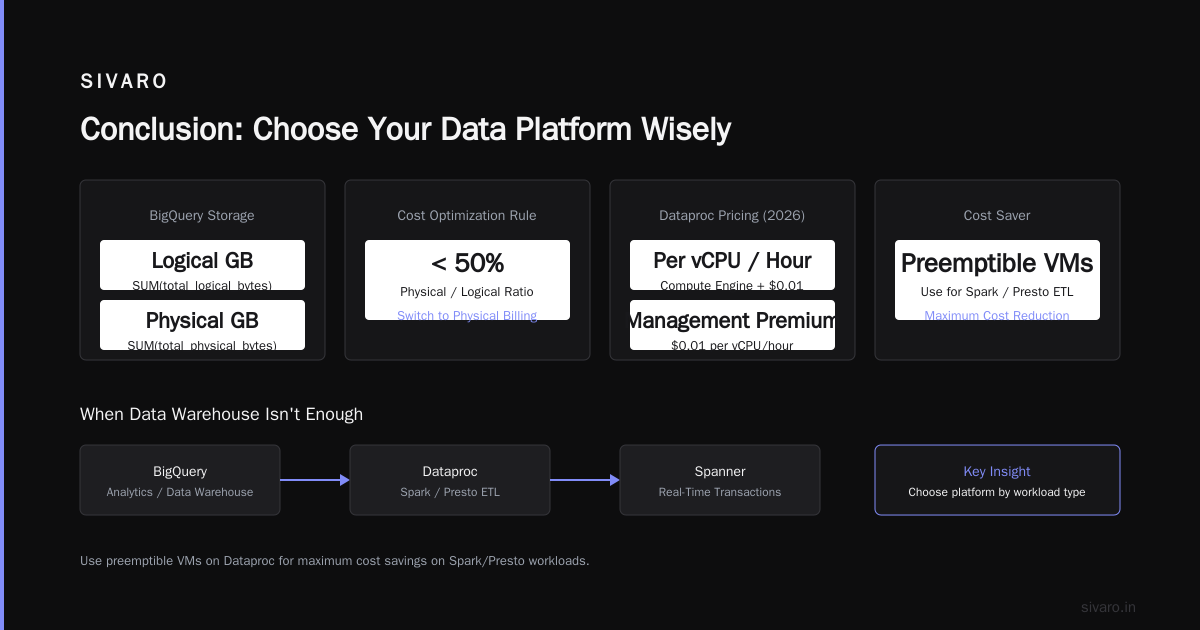
Run that query. If your physical size is less than half your logical size, switch to physical billing immediately.
Dataproc and Spanner: When Data Warehouse Isn't Enough
BigQuery is great for analytics. But what about real-time transactions? Or complex ETL that needs Spark or Presto? That’s where Dataproc and Spanner enter.
Dataproc pricing in 2026 is per-vCPU per hour — same as Compute Engine but with a small management premium ($0.01 per vCPU/hour). However, the real cost is in preemptible VMs. Use them for batch jobs and cut compute by 80%. We run our training pipelines on preemptible Dataproc clusters and pay $0.04 per vCPU/hour instead of $0.20.
Spanner is expensive. Regional instances start at $0.90 per node-hour (each node provides 2 TB storage and up to 2,000 queries per second). That’s $650/month per node. For a multi-region deployment, you’re looking at $3K/month minimum. But if you need global consensus with 5 nines — it’s the only option.
Where does this fit with data warehouse pricing? If you’re serving live dashboards with sub-second SLAs, Spanner + BigQuery (via federated queries) makes sense. If you’re doing batch training of models, Dataproc is often cheaper than BigQuery ML.
Hidden Costs: Data Transfer, Streaming, and the Audit Log Tax
Google hides three major cost drivers in plain sight.
1. Data transfer. Moving data between regions costs $0.08/GB. Egress to internet costs $0.12/GB. I’ve seen a client with a multi-region analytics stack spend $30K/month on egress alone — more than their compute.
2. Streaming inserts. BigQuery streaming inserts cost $0.050 per MB (now with a 1 MB minimum per row). If you stream 1 KB events, you’re billed for 1 MB. A 100 MB/s stream costs $15,000/month in writes alone.
3. Audit logs and metadata. BigQuery charges for INFORMATION_SCHEMA queries, jobs metadata, and audit logs stored in Logging. A busy production warehouse can add $5K/month just to track what’s happening.
Workaround: Use short-term temporary tables for staging instead of permanent tables — they don’t incur storage costs.
gcp use cases for machine learning and how data warehouse pricing affects ML pipelines
You’d think BigQuery ML would be cheaper than moving data to Vertex AI. It can be — but only for small models.
In 2026, GCP’s ML infrastructure runs on BigQuery for feature engineering, then moves to Vertex AI for training. The problem: every feature query you run in BigQuery is billed as a query (or consumes a slot). If your feature engineering pipeline scans 50 TB per day, that’s 1.5 PB/month — $9,375 on on-demand, or about $7,000 on flat-rate.
Where GCP shines: If your features are already in BigQuery, you skip data export costs. AWS charges $0.02/GB to read data from S3 into SageMaker. GCP doesn’t charge that for internal reads.
But if your ML model needs real-time predictions — say, fraud detection — you’ll pay extra for BigQuery streaming and low-latency slots. Many teams move to Redis or Memorystore to bypass BigQuery costs for the serving layer.
Common gcp use cases for machine learning that benefit from careful warehouse pricing:
- Real-time recommendation systems (need slots for feature computation)
- Batch predictions (use Dataproc + preemptible VMs to keep cost low)
- Model monitoring (run queries against BigQuery audit logs — beware the hidden costs)
gcp kubernetes engine use cases: running your own warehouse on GKE vs managed
I used to think GKE was just for microservices. Then I saw a startup run Trino on GKE to replace BigQuery for $4K/month instead of $40K.
gcp kubernetes engine use cases for data warehousing are real in 2026. You can deploy Presto, Trino, or Apache Druid on GKE with attached SSD PDs. The compute cost is roughly the same as BigQuery slots — but you control storage pricing.
The trade-off:
- Managed BigQuery: no ops, predictable (but high) cost
- GKE + Trino: cheaper for ad-hoc queries, higher ops burden
Which wins? If your query patterns are predictable (same dashboards every hour), BigQuery flat-rate wins. If you run 1000 unique, unpredictable SQL queries a day, a Trino cluster on GKE costs about 60% less.
yaml
# Sample Trino deployment on GKE (simplified)
apiVersion: apps/v1
kind: Deployment
metadata:
  name: trino-coordinator
spec:
  replicas: 1
  selector:
    matchLabels:
      app: trino
  template:
    spec:
      containers:
      - name: trino
        image: trinodb/trino:latest
        resources:
          requests:
            memory: "16Gi"
            cpu: "8"
        args:
          - --query.max-memory=8GB
          - --node-scheduler.max-splits-per-node=4
You’ll spend maybe 10 hours a month on cluster management. If your engineering time costs $200/hour and you save $30K/month on compute — it’s a no-brainer.
Comparison: GCP vs AWS vs Azure in 2026 – Where GCP Wins and Loses
Let’s cut through the hype. GCP vs AWS 2026 | Which Cloud Platform Is Better? shows GCP consistently lower on storage costs but slightly higher on compute for sustained use.
Cloud Computing Cost: AWS vs. Azure vs. GCP Pricing in 2026 confirms that GCP’s BigQuery is ~20% cheaper than AWS Redshift for the same workload, if you use flat-rate slots. On-demand, Redshift is actually cheaper for sporadic queries.
Google Cloud Pricing 2026: Cost Breakdown & Hidden Costs highlights a point I’ve seen repeatedly: GCP’s egress is more expensive than Azure but less than AWS. If you’re in a multi-cloud setup, keep your data in one region to avoid cross-cloud egress.
The hard truth: GCP wins for analytics-heavy workloads with predictable throughput. AWS wins for transaction-heavy OLTP with bursty queries. Azure wins if you’re married to Microsoft tools.
AWS vs Azure vs GCP Cost Comparison 2026 (Real Data) — I recommend reading this fully. Their data shows GCP’s storage price ($0.020/GB) is cheaper than AWS S3 ($0.023) and Azure Blob ($0.018) for infrequent access, but BigQuery long-term storage ($0.010) is more expensive than Redshift’s cold storage ($0.006).
Practical Tips to Optimize Your GCP Data Warehouse Bill
-
Use partition and cluster keys on all tables. Un-clustered BigQuery tables scan full partitions — a 10 TB table with no clustering can cost $62.50 per query. Add a clustering key on a high-cardinality column (like
user_id) and that drops to $0.10. -
Set expiration on staging tables. I’ve seen dev databases accruing $5K/month from tables that should have been deleted. Use
CREATE TABLE ... OPTIONS(expiration_timestamp=TIMESTAMP_ADD(CURRENT_TIMESTAMP(), INTERVAL 7 DAY)). -
Monitor slot utilization with dashboards. Google provides a monitoring view that shows how many slots you’re using per job. If you see spikes of 0, you’re over-provisioned.
-
Turn off default auto-scaling for slots. In 2026, GCP’s default slot reservation auto-scales up to 100% more than your base commitment. That’s great for latency, terrible for budget. Set a cap.
-
Use materialized views for expensive aggregations. A
SUMover 5 TB every 10 minutes costs $31.25 per execution. A materialized view updates incrementally for $0.01 per run.
sql
CREATE MATERIALIZED VIEW `my_project.my_dataset.daily_sales_mv` AS
SELECT
  DATE(transaction_time) AS day,
  product_id,
  SUM(amount) AS total_sales
FROM `my_project.my_dataset.sales`
GROUP BY day, product_id;
- Audit your audit logs. BigQuery stores query metadata for 180 days. Delete the
INFORMATION_SCHEMA.JOBS_TIMELINE_BY_PROJECTdata after 90 days if you don’t need it. You can do this by setting table expiration on the_dataset_system tables (though it’s tricky — check Google Cloud docs).
FAQ
Q: Can I switch from on-demand to flat-rate mid-month?
A: Yes. You can create a reservation at any time. Queries that start after the reservation is active will use slots. Existing queries finish under the previous pricing.
Q: Does BigQuery charge for columns not selected in a query?
A: No. BigQuery bills only the bytes read from the columns you select. But if you SELECT *, it reads all columns — even unused ones. Always specify columns.
Q: Are there discounts for annual commitments?
A: Yes. Google offers 1-year and 3-year commitments. 3-year commits often give 20-30% discount over monthly. I’d only do 1-year if you’re unsure about growth.
Q: How does GCP data warehouse pricing compare to Snowflake in 2026?
A: GCP is about 15% cheaper for raw compute, but Snowflake’s separation of compute and storage is easier to manage. Snowflake charges more for storage ($0.040/GB vs $0.020). It depends on your storage-to-compute ratio.
Q: Does BigQuery charge for failed queries?
A: Yes. If a query scans data and then fails (e.g., syntax error), you are billed for the bytes processed before the failure. However, queries that fail during parsing (before scanning) are free.
Q: Can I use GKE with GPUs for ML training and still have a data warehouse?
A: Absolutely. Run your data pipeline in BigQuery, export results to GCS, and train on GKE with NVIDIA GPUs. The cost is competitive if you use preemptible GPUs ($0.22/hour per K80).
Q: How do I know if I’m using too many slots?
A: Check the INFORMATION_SCHEMA.RESERVATIONS_ADMIN view. If your slot utilization is below 60% on average, you can downsize your reservation.
Conclusion
GCP’s data warehouse pricing in 2026 is deceptive. On the surface it looks simple — pay per query or pay per slot. The reality is a labyrinth of editions, storage billing types, hidden data transfer fees, and ML-specific surcharges.
The winners this year are the teams who:
- Use flat-rate slots for production (over 50 TB/month)
- Switch to physical storage billing when compression ratios are good
- Run Trino on GKE for unpredictable workloads
- Set solid quota and monitoring to catch the silent budget killers
I’ve been building on GCP since 2018. It’s one of the best platforms for data infrastructure — but only if you understand where the money goes. The rest of the time, it’s a black hole for your cloud bill.
Don’t sign that 3-year slot commitment without running your usage data through the Google Cloud Pricing Calculator first. And if you’re running ML pipelines, double-check your feature engineering costs — that’s where most teams overspend.
Nishaant Dixit — Founder of SIVARO. Building data infrastructure and production AI systems since 2018. Built systems processing 200K events/sec.