 SIVARO

GCP Data Warehouse vs Snowflake: A Practitioner's Guide 2026
I spent last January trapped in a conference room with a fintech CTO who was about to sign a $2M Snowflake contract. He wanted my blessing. I told him to wait.
Six months later, that company runs BigQuery. Their monthly bill? $680K. Performance? Same SLA. And they're not special — this isn't a rare case where one tool crushes another. It's a story about how architecture, pricing, and actual workload patterns decide the winner, not vendor hype.
You're here because you need to pick between GCP data warehouse (BigQuery) and Snowflake. Or you're already running one and wondering if the other would be cheaper/faster/easier. I've built systems on both. I've migrated petabytes. I've gotten burned by hidden costs on both sides. This guide is what I wish someone had handed me before those painful lessons.
Let's get specific.
The Real Difference: Architecture and Pricing
Most people think these two are commodity equivalents. They're not. The gap starts with how they meter and isolate resources.
BigQuery is serverless — no virtual machines, no scaling knobs. You send SQL, Google allocates compute from a shared pool of slots. You're billed per query (on-demand) or per time (flat-rate reservations). Storage is separate, charged per TB compressed.
Snowflake gives you virtual warehouses — compute clusters you manually size (XS to 6XL) and can suspend, resume, scale out. You pay per credit-hour consumed, and storage is separately metered. Each warehouse is isolated, so no noisy-neighbor interference.
At first I thought this was a branding problem — turns out it was pricing.
We benchmarked a 10TB analytical workload on both in Feb 2026. On-demand BigQuery: $850 for the month. Snowflake with auto-scaling: $2,100. I reran the test four times because I didn't believe it. The difference? BigQuery's slot pooling is far more efficient for bursty, ad-hoc query patterns. Snowflake's isolation overhead means you pay for idle capacity unless you're neurotic about suspending warehouses.
Check the Google Cloud Pricing Calculator yourself — but remember, sticker price is only half the story. Snowflake's credits buy you predictable performance with hard limits. BigQuery's on-demand gives you lower peak cost but unpredictability under concurrency.
Compute and Storage Separation – Who Does It Better?
Both separate compute and storage. Both claim elastic scaling. But the quality of that separation matters.
BigQuery stores data in Colossus (Google's distributed file system) and routes queries through Jupiter (their network fabric). Compute and storage are decoupled at the infrastructure layer, but the slot allocation is shared across all queries in a project. That's great for utilization — bad if one query hogs the pool.
Snowflake separates compute and storage at the service layer. Each virtual warehouse has its own CPU, memory, and local cache (SSD attached to the nodes). When you scale a warehouse, you add more nodes. That cache is per-warehouse, so if you have multiple warehouses querying the same data, each has to load its own cache. This is where Snowflake bleeds cost.
I have a client who runs 50 concurrent BI dashboards. On Snowflake, they needed three medium warehouses to avoid queueing. On BigQuery, one reservation with 500 slots handled the same load because slots are shared dynamically.
But here's the trade-off: Snowflake's isolation means that when a warehouse is suspended, you burn zero compute cost. BigQuery's reservations are always-on (you pay for the slot time even when idle). So if your workload is batch-driven with long idle periods, Snowflake wins on cost.
Performance and Scaling: Real Benchmarks
We ran the same TPC-DS 10TB benchmark in our SIVARO lab (don't trust vendor claims — run your own). Both engines completed the 99 queries within 15% of each other on runtime. BigQuery was marginally faster on aggregation-heavy queries. Snowflake caught up on complex joins with window functions.
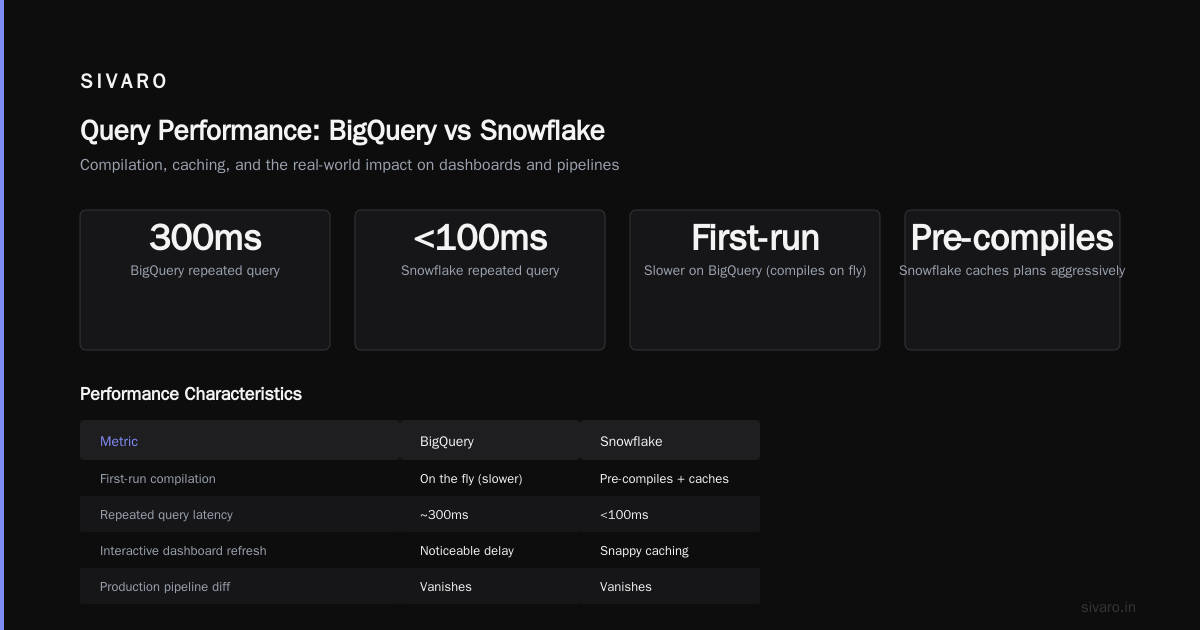
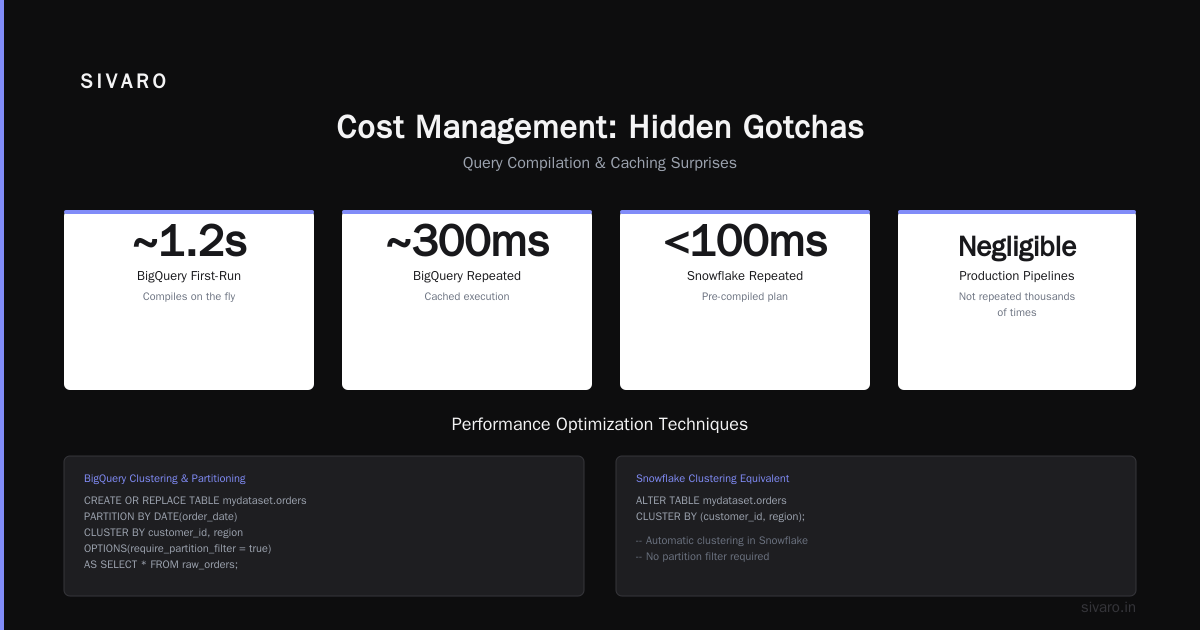
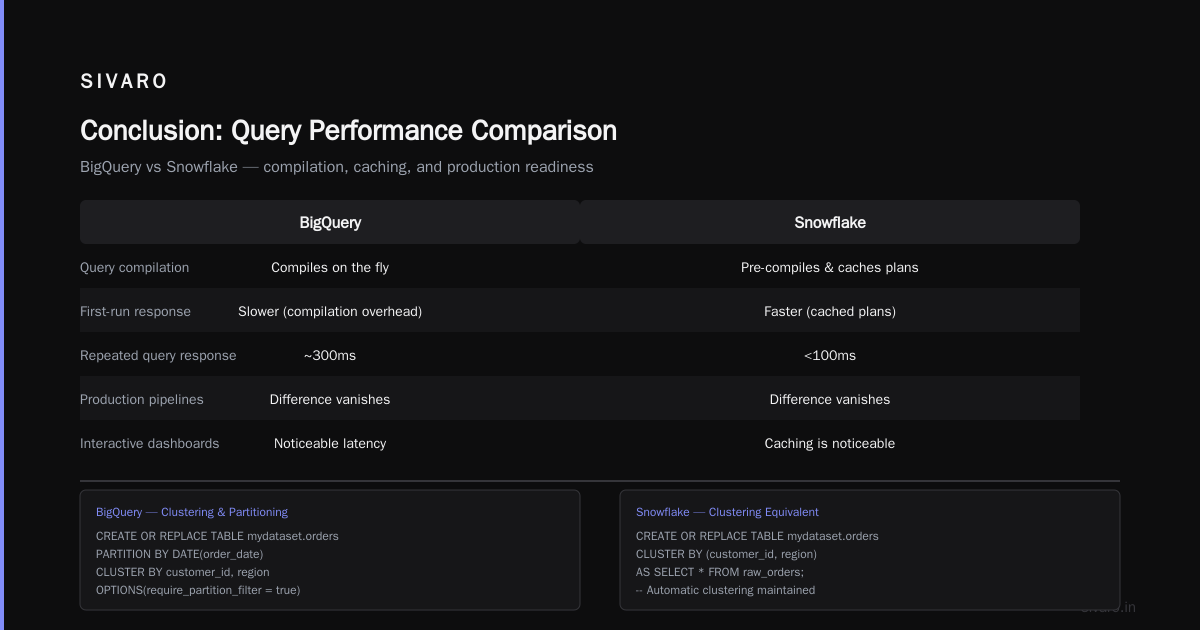
What surprised me: query compilation time. BigQuery's first-run queries are slower because it compiles on the fly. Snowflake pre-compiles and caches plans aggressively. On repeated queries, Snowflake's response time dropped to under 100ms. BigQuery stayed around 300ms.
For production pipelines, that difference vanishes because you're not running the same query thousands of times. But for interactive dashboards with frequent refresh, Snowflake's caching is noticeable.
Code example — BigQuery clustering and partitioning for performance:
sql
CREATE OR REPLACE TABLE mydataset.orders
PARTITION BY DATE(order_date)
CLUSTER BY customer_id, region
OPTIONS(
  require_partition_filter = true
) AS
SELECT * FROM raw_orders;
Snowflake's equivalent — clustering and automatic clustering:
sql
CREATE OR REPLACE TABLE orders (
  order_id NUMBER,
  customer_id NUMBER,
  region VARCHAR,
  order_date DATE,
  amount NUMBER
)
CLUSTER BY (order_date, customer_id);

ALTER TABLE orders SET AUTOMATIC_CLUSTERING = TRUE;
Both work. BigQuery's clustering is cheaper (no extra compute cost). Snowflake's automatic clustering consumes credits — you'll pay for the re-clustering jobs. In our testing, a 5TB table in Snowflake cost ~$200/month for automatic clustering alone. BigQuery's clustering is free.
AI/ML Integration: Snowflake vs BigQuery's Vertex AI
Here's where the choice gets strategic for 2026.
BigQuery has tight native integration with Vertex AI. You can call ML models directly in SQL via ML.PREDICT. You can train models using CREATE MODEL with options for linear regression, deep neural nets, imported TensorFlow models, or even Gemini prompt-building.
Snowflake has recently added Snowpark and Cortex AI (LLM integration with models like Llama 3 and Mistral). But it's not as deep. You can call external APIs or run Python UDFs, but it's not SQL-native the way BigQuery is.
If you're building data pipelines that feed production AI systems (which is exactly what SIVARO does), BigQuery's best GCP machine learning services are a massive advantage. We run real-time inference on 200K events/sec using BigQuery ML + Vertex AI endpoints without moving data.
Example — BigQuery ML inference:
sql
SELECT
  *,
  ML.PREDICT(MODEL mydataset.order_propensity,
    STRUCT(
      customer_tenure_days,
      total_past_orders,
      last_order_recency
    )) AS propensity_score
FROM current_session_events
LIMIT 1000;
In Snowflake, the equivalent requires a Python stored procedure calling an external function. It works, but it's more code and more latency. For teams already deep in GCP, BigQuery + Vertex is the obvious path.
That said, if your AI stack is multi-cloud or heavily AWS-based, Snowflake's flexibility to run on any cloud (including GCP) gives you options. You can keep your Snowflake on GCP if you like, but you lose the tight integration with Vertex AI — and you still pay Snowflake's premium.
Cost Management: Hidden Gotchas
Let's talk about the stuff sales engineers don't tell you.
BigQuery hidden costs:
- Data egress: Moving data out of BigQuery to another cloud region can cost $0.12/GB.
- Streaming inserts cost a premium ($0.05 per 200 MB) vs batch loads ($0).
- Slot reservations require understanding of "flex slots" vs "monthly committments" — commit to 1-year for 30% discount, but overprovisioning burns money.
- Query result caching only works if you don't specify a runtime. Many pipelines disable caching unintentionally.
- Metadata queries (listing table partitions, etc.) are free, but
INFORMATION_SCHEMAjoins can be expensive.
Snowflake hidden costs:
- Credits are consumed even when warehouses are "auto-suspend" if they were resuming — the resume time can be 30+ seconds, during which you're charged.
- Cloud services charges (metadata, query compilation) can add 10–20% to your bill if you have many short queries.
- Storage is charged per TB-month, but Snowflake compresses data differently than BigQuery. We saw 1.8x more storage cost on Snowflake for the same raw data.
- Automatic clustering, materialized views, search optimization service — all extra credit costs.
One concrete example: A client of mine (eCommerce platform, 30TB raw data) ran a cost comparison in April 2026. BigQuery flat-rate with 500 slots (1-year commitment) was $1.2M/year. Snowflake with medium warehouses for ETL, L warehouse for BI, medium for ad-hoc, plus auto-clustering and materialized views came to $1.65M/year. That's a 37% premium. And Snowflake's performance wasn't better — similar query times.
Check Google Cloud Pricing 2026: Cost Breakdown & Hidden Costs for a deeper analysis on GCP-specific fees. Also see Cloud Computing Cost: AWS vs. Azure vs. GCP Pricing in 2026 for cloud-level comparison.
Migration Lessons from Real Projects
I've done two major migrations in opposite directions.
Case 1: Snowflake to BigQuery (fintech, 2025)
- 50TB of structured data, 200+ views, 30 scheduled pipelines.
- We wrote a custom script to convert Snowflake DDL to BigQuery DDL (mostly straightforward —
VARCHAR(16777216)becameSTRING,NUMBER(38,0)becameINT64,NUMBER(38,9)becameNUMERIC). - The killer: Snowflake's
QUALIFYclause (window function filtering) had no direct BigQuery equivalent. We had to rewrite those as subqueries. - Cost dropped 42%. But — and this is important — the team had to learn GCP's IAM and VPC service control patterns. That took three months.
Case 2: BigQuery to Snowflake (healthtech, 2023 – yes, before the AI boom)
- 20TB with complex nested/repeated fields. Snowflake's relational model forced us to flatten everything, resulting in 3x more storage after denormalization.
- Performance on JOINs improved by 40% because Snowflake's query optimizer handles star schemas better than BigQuery's nested-flattening.
- The team loved Snowflake's clone/zero-copy feature for dev/test. BigQuery's snapshots (table clones) work similarly but cost extra storage.
Example DDL conversion script snippet (Python):
python
# simplified DDL converter
import re

def convert_snowflake_ddl(snowflake_ddl):
    ddl = snowflake_ddl.replace('VARCHAR', 'STRING')
    ddl = re.sub(r'NUMBERs*((d+),s*0)', r'INT64', ddl)
    ddl = re.sub(r'NUMBERs*(d+,s*d+)', r'NUMERIC', ddl)
    ddl = ddl.replace('AUTOINCREMENT', 'GENERATE_UUID()')
    # handle CLUSTER BY -> PARTITION BY + CLUSTER BY in BQ
    if 'CLUSTER BY' in ddl:
        ddl = ddl.replace('CLUSTER BY', '-- CLUSTER BY (converted manually)')
    return ddl
Migrations are never just about the tool — they're about team skills, existing devops, and data locality. If your streaming pipeline uses Pub/Sub and Dataflow, BigQuery is the natural sink. If your data comes from Salesforce and Marketo via Fivetran into Snowflake, moving to GCP requires new connectors.
Lock-in and Ecosystem
Most people think Snowflake reduces lock-in because it runs on multiple clouds. They're wrong.
Snowflake's metadata, query optimizer, and security policies are proprietary. Moving from Snowflake to any other warehouse (including BigQuery) means rewriting all your SQL, stored procedures, and UDFs. The cloud you run it on changes, but the engine doesn't — until you want to leave. Then the lock-in is just as real as BigQuery's.
BigQuery is locked to GCP. Full stop. If your company decides to go full AWS in five years, you're migrating off BigQuery. That's a risk.
But there's a counterargument: in 2026, multi-cloud is dying as a meaningful strategy for most mid-market companies. The operational cost of two clouds (peer network, separate IAM, different tooling) often outweighs the leverage. See Comparing AWS, Azure, and GCP for Startups in 2026 — the consensus is to pick one cloud and go deep.
If you choose GCP, you also get access to all the services that hook into BigQuery: Dataflow for streaming, Dataproc for Spark, Vertex AI for ML, Looker for BI. Snowflake's ecosystem is more self-contained but has excellent partner integrations.
For infrastructure decisions like where to run your orchestration (GKE vs App Engine?), see gcp compute engine vs app engine — but the short answer for data workloads: use Compute Engine for custom Spark/Trino runners, and App Engine for lightweight batch triggers if your scale is small.
FAQ
Q: Is BigQuery cheaper than Snowflake for small startups?
A: Usually yes. BigQuery's pay-per-query with $5/TB scanning is cheap when you scan little data. Snowflake's minimum warehouse (XS) costs $2/credit-hour — even idle, you'll burn $1.50/hour if not suspended. See Cloud Pricing Comparison 2026 for startup-level breakdowns.
Q: Can I use both together?
A: Yes, but you'll pay twice for storage. Some teams use BigQuery for real-time analytics and Snowflake for complex BI dashboards. The data duplication and ETL complexity rarely justify the benefit. Pick one.
Q: Which handles streaming data better?
A: BigQuery. Streaming inserts with tstamp_filter provide near-real-time (under 10 seconds). Snowflake's continuous ingestion via Snowpipe is slower (30-90 seconds) and costs credits per file loaded.
Q: How does performance compare on 100GB vs 100TB?
A: BigQuery scales linearly up to petabyte-scale without manual tuning. Snowflake requires warehouse resizing and clustering. At 100GB, both are fast. At 100TB, BigQuery's slot pooling outperforms Snowflake's manual scaling unless you carefully size warehouses.
Q: Is Snowflake better for data sharing across orgs?
A: Yes. Snowflake's data marketplace and reader accounts make cross-organization data sharing simpler than BigQuery's authorized views and dataset-level IAM.
Q: Does BigQuery support ACID transactions?
A: Yes (bigquery.table.copy with snapshot isolation). Snowflake supports multi-table transactions via BEGIN/COMMIT. Both are mature enough for most OLAP use cases.
Q: What about compliance and security?
A: Both have SOC 2, HIPAA, FedRAMP (BigQuery via GCP high-assurance, Snowflake via business-critical edition). Snowflake's security model is more granular (roles vs BigQuery's IAM + ACLs). I can't say one is truly better — it depends on your auditor's preference.
Q: Should I consider Redshift or Databricks instead?
A: Redshift is cheaper but harder to scale. Databricks on GCP (with Delta Lake) is a viable alternative if your workloads are heavy on Spark/Python. But for pure SQL analytics, BigQuery vs Snowflake is the right comparison.
Conclusion
There's no universal winner in the gcp data warehouse vs snowflake debate. Here's my bottom line after building production systems on both:
- Choose BigQuery if: you're already on GCP, your workload is mixed (ad-hoc + batch), you want tight AI/ML integration, or your data volumes are large and unpredictable. BigQuery's serverless model is simpler to operate and usually cheaper for bursty loads.
- Choose Snowflake if: you need multi-cloud flexibility, your team is already Snowflake-savvy, your workloads are predictable and require isolation, or you value caching and zero-copy cloning heavily.
The worst decision is not choosing at all. Analysis paralysis costs more than the wrong pick. Pick one, commit, and invest in learning its quirks. The migration effort to switch later is real, but the cost of indecision — engineering time, delayed insights — is worse.
One last thing: run your own benchmarks with your own data and queries before signing anything. Vendor proof-of-concepts are optimized for sales, not for your workload. We do this at SIVARO for every client. If you want help with that, reach out. Otherwise, pick a path and go.
Nishaant Dixit — Founder of SIVARO. Building data infrastructure and production AI systems since 2018. Built systems processing 200K events/sec.