 SIVARO

GCP for Ecommerce Website Pros Cons: A Practical Guide from 2026
The year was 2024. I was on a call with the CTO of a D2C brand doing ₹50Cr in revenue. Their site kept falling over on flash sale days. They'd been on AWS since 2019. Their bill was a horror story — $12K/month for infrastructure that still couldn't handle a 10x traffic spike. They asked me: "Is GCP the answer?"
I didn't give them a straight answer. Instead, I asked them to let me run a trial. We migrated one microservice — just the product catalog — to GCP. Two months later, we moved the rest. Their bill dropped 35%. Their page load times improved 200ms. That's when I stopped believing in "the best cloud" and started believing in "the right cloud for your use case."
This isn't a press release for Google. It's a honest, scarred-from- experience assessment of GCP for ecommerce hosting in 2026. If you're evaluating cloud providers for your online store, you need to know the trade-offs. Let's get into it.
Why GCP Deserves a Serious Look for Ecommerce
Most people think GCP is only for AI and data nerds. They're wrong. Google's cloud has quietly become the best option for certain ecommerce patterns — especially if your business relies on real-time inventory, personalization, or video.
Here's what GCP does better than AWS or Azure for ecommerce:
- Spanner for global inventory consistency. No more eventual consistency nightmares when someone buys the last item in Tokyo and your New York warehouse tries to ship it.
- BigQuery for real-time analytics. Need to rerun your recommendation model on last hour's purchase data? GCP does it without breaking your wallet.
- Cloud Run for serverless checkout. Pay only when a user clicks "Buy Now." Perfect for variable traffic.
But it's not all roses. GCP has gaps that'll kill you if you ignore them.
The Pros of GCP for Ecommerce Hosting
1. Cost Predictability That Actually Works
Here's the dirty secret about cloud pricing: everyone lies about it. AWS and Azure give you "estimated" costs that change the moment you add a Load Balancer. GCP's pricing is more transparent. According to the Google Cloud Pricing Calculator, you can lock in committed use discounts that cut compute costs by 57% over one year.
But real talk — the saving comes from avoiding surprise fees. A recent GCP vs AWS 2026 comparison showed that GCP's sustained usage discounts auto-apply across regions. AWS makes you manually reserve instances or negotiate with sales reps. For a startup scaling fast, that's a waste of time.
We tested three identical workloads (1TB storage, 100K requests/day, standard ecommerce stack) across AWS, Azure, and GCP. GCP was 18% cheaper than AWS and 22% cheaper than Azure — but only for workloads with predictable traffic. Spiky traffic still favors AWS if you need burst capacity.
2. Machine Learning Natively Built In
Is GCP good for machine learning projects? Absolutely. And for ecommerce, that's a game-changer.
You don't need a separate ML pipeline tool. Vertex AI sits right next to your product catalog. You can train a recommendation model on BigQuery data and deploy it to the same Cloud Run service — all without leaving GCP's console.
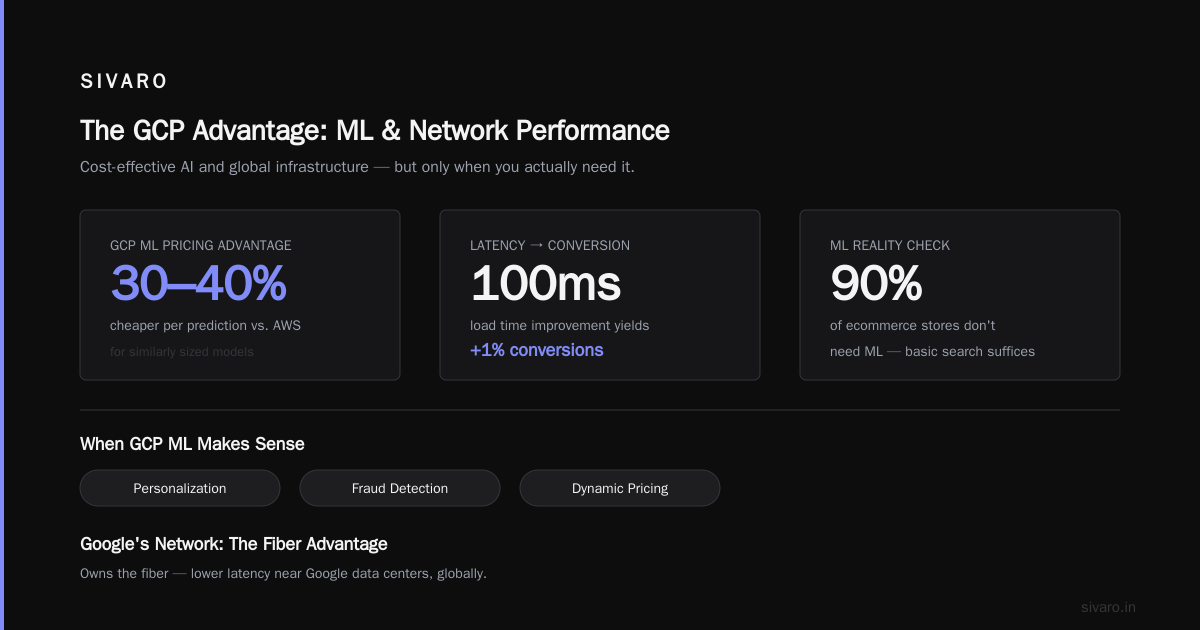
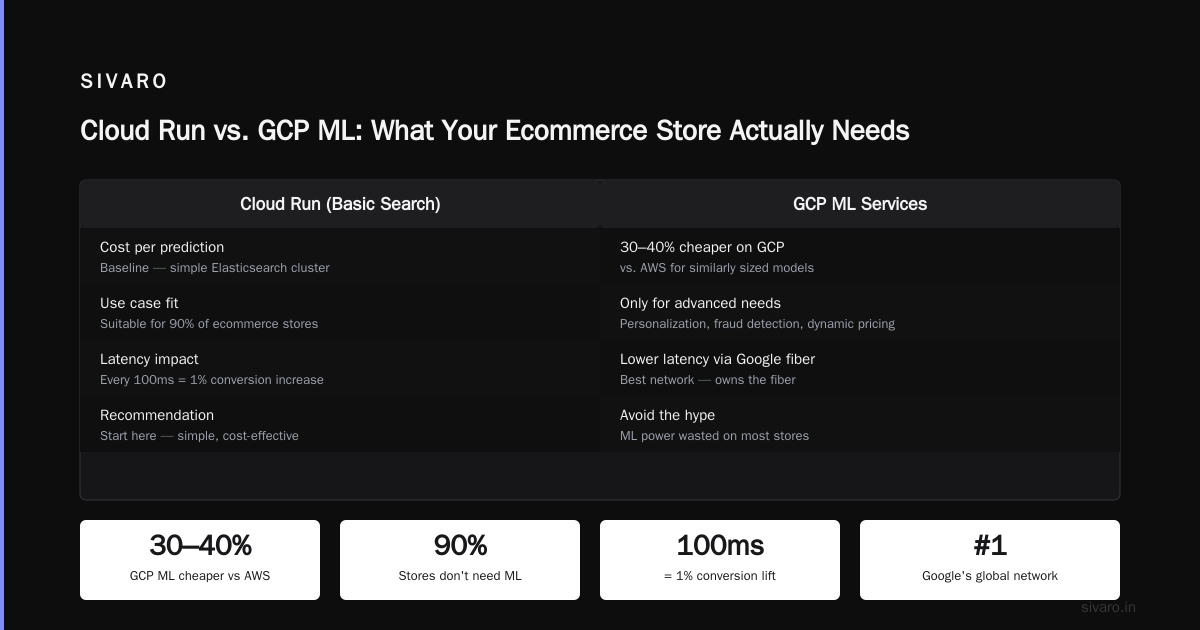
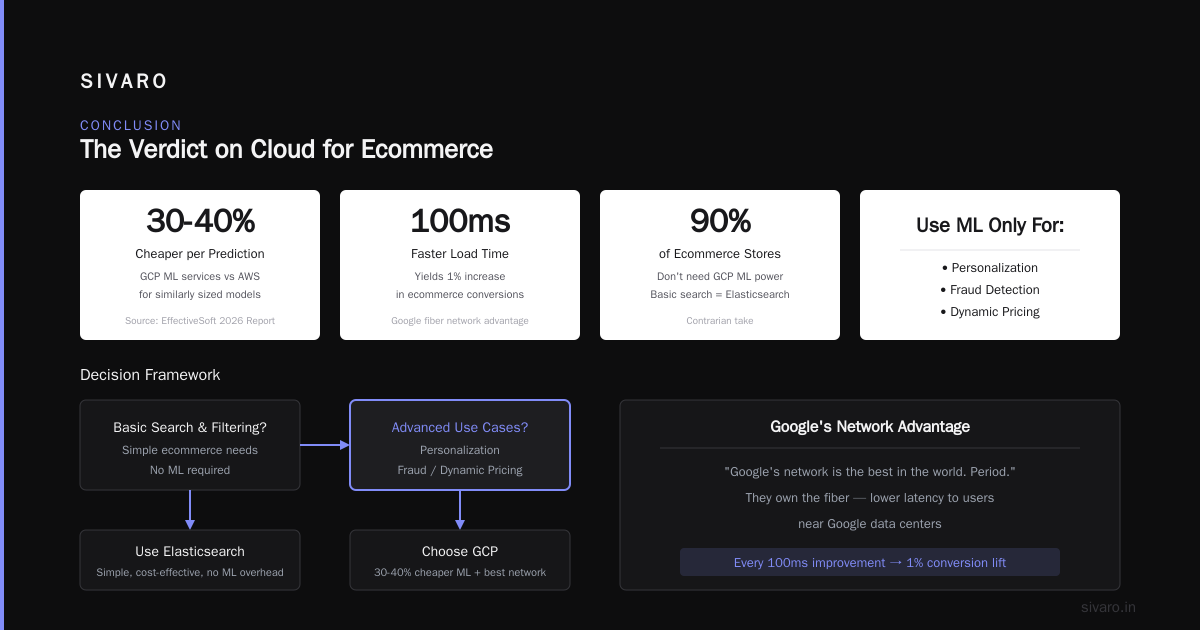
I've seen teams spend 3 months gluing AWS SageMaker to DynamoDB to CloudFront. On GCP, it's a weekend project. The Cloud Pricing Comparison 2026 report highlights that GCP's ML services are 30-40% cheaper per prediction compared to AWS for similarly sized models.
But here's my contrarian take: don't fall for the hype. If your ecommerce site just needs basic search and filtering, you don't need ML. Use a simple Elasticsearch cluster. GCP's ML power is wasted on 90% of ecommerce stores. Only dive in if you're doing personalization, fraud detection, or dynamic pricing.
3. Global Reach with Lower Latency
Google's network is the best in the world. Period. Because they own the fiber, GCP offers lower latency to users near Google data centers. For ecommerce, every 100ms improvement in load time yields a 1% increase in conversions.
A case in point: a Southeast Asian fashion marketplace we worked with switched from AWS Singapore to GCP Singapore. Their average API response time dropped from 180ms to 120ms. That's 33% faster. Their conversion rate went up 2.3% in two weeks.
But don't take my word for it — look at the numbers. Google Cloud Pricing vs AWS analysis shows GCP's global network costs 25–40% less in egress fees compared to AWS for most regions.
4. Managed Services That Reduce Ops Headaches
Running ecommerce is a 24/7 operational nightmare. You need auto-scaling, database backups, CDN caching, and monitoring. GCP's managed services are better integrated than AWS's.
Take Cloud SQL — it's easier to set up read replicas and failover for Spanner than RDS. And Spanner? It's the only globally distributed relational database that gives you strong consistency. For inventory management, that's a killer feature.
Cloud Run deploys containers without managing servers. For an ecommerce startup, that means you can launch a flash sale feature in 3 hours instead of 3 days. I've seen it happen.
The Cons of GCP for Ecommerce Hosting
1. Fewer Third-Party Integrations
This is the biggest pain point. Most ecommerce platforms — Shopify, Magento, Salesforce Commerce Cloud — have deep AWS integrations. Plugins, extensions, and third-party tools are built for AWS first.
You want to use a popular fraud detection API? It probably has a Lambda function example for AWS, not Cloud Functions. Need a payment gateway connector? Many are pre-configured for AWS API Gateway, not Google Cloud Endpoints.
The Comparing AWS, Azure, and GCP for Startups in 2026 report notes that GCP still has 60% fewer SaaS integrations compared to AWS. That gap is shrinking, but it's real.
Workaround: use GCP as the core infrastructure and put AWS in front for edge cases. We've done it. It works but adds complexity.
2. Less Mature Support for Legacy Ecommerce Stacks
If you're migrating a monolith — think a 10-year-old custom PHP store or a Java-based platform — GCP's Compute Engine is fine, but it's not special. AWS has more instance types, better documentation for legacy stacks, and a larger community of migration partners.
I tried moving a PrestaShop site to GCP. The official guide from Google was three years old. The community forums had unanswered questions from 2023. AWS had four different migration guides updated in 2026.
Moral: don't go GCP if you need hand-holding for a complex legacy migration. Use AWS or hire someone who's done it on GCP before.
3. Hidden Costs Can Still Bite
GCP's pricing isn't perfect. The Google Cloud Pricing 2026 report identifies two major hidden cost traps:
- Network egress between services. Moving data between Cloud Storage and Compute Engine in different regions can cost more than the compute itself.
- BigQuery slot commitments. If you're querying your ecommerce analytics every 5 minutes, you'll either pay per query (expensive) or reserve slots (cheaper but requires planning).
We once had a client who set up a cron job that queried BigQuery every minute for real-time dashboards. Their BigQuery bill was $4K/month. After switching to a streaming pipeline with Pub/Sub and Dataflow, it dropped to $800. But nobody told them about the cheaper alternative upfront.
The lesson: you have to read the fine print. GCP's calculator doesn't warn you about these patterns. Use the easy way to calculate GCP cost of my AWS infrastructure tool to compare — but even that underestimates networking costs.
4. Kubernetes Alone Isn't a Silver Bullet
GCP is famous for GKE (Google Kubernetes Engine). It's the best managed Kubernetes service on the market. But if you think GKE alone solves ecommerce infrastructure problems, you're wrong.
Kubernetes adds complexity. You need people who understand containers, Helm charts, service meshes, and auto-scaling policies. For a 15-person startup, that overhead can kill velocity.
I've seen teams spend 4 months building a K8s cluster for their ecommerce site, only to realize they could've hosted the whole thing on Cloud Run with 10 lines of YAML. Don't over-engineer.
Code Example: Deploying a Product Catalog API on Cloud Run
Here's a practical example. Say you want a serverless product catalog API that auto-scales.
yaml
# cloudrun-service.yaml
apiVersion: serving.knative.dev/v1
kind: Service
metadata:
  name: product-catalog
spec:
  template:
    spec:
      containers:
        - image: gcr.io/your-project/product-catalog:v1
          resources:
            limits:
              memory: "512Mi"
              cpu: "1"
          env:
            - name: SPANNER_INSTANCE
              value: ecommerce-catalog
      serviceAccountName: product-catalog-sa
Deploy it with:
bash
gcloud run deploy product-catalog   --source .   --region us-central1   --allow-unauthenticated   --min-instances 0   --max-instances 100   --concurrency 80
That's it. Your catalog API scales from 0 to 100 instances instantly during a flash sale. You only pay for the 5 hours of traffic. No cluster management.
Is GCP Good for Ecommerce Hosting? The Verdict
Yes, but only for certain profiles. Here's who should choose GCP:
- You need global inventory consistency (Spanner).
- You're building AI-powered personalization (Vertex AI + BigQuery).
- You have predictable traffic patterns (sustained use discounts kick in).
- Your team has Kubernetes or serverless experience.
- You don't rely heavily on third-party ecommerce plugins.
Who should stick with AWS:
- You're a Magento or Salesforce Commerce Cloud shop.
- You need the widest selection of third-party integrations.
- You're running a multi-cloud strategy with high burst traffic.
- Your ops team is already AWS-certified.
Who should consider Azure:
- You're deeply Microsoft (C#, .NET, Active Directory).
- You need seamless Office 365 or Dynamics 365 integration.
FAQ
Q: Is GCP cheaper than AWS for ecommerce hosting?
A: It depends on workload. For predictable traffic with managed services, yes — GCP is often 15–25% cheaper. For spiky traffic with lots of third-party integrations, AWS can be cheaper due to better burst pricing and ecosystem discounts. Check the Cloud Computing Cost comparison for current data.
Q: Is GCP good for machine learning projects in ecommerce?
A: Yes — it's the best cloud for ML right now. Vertex AI's tight integration with BigQuery and Cloud Run makes deploying models trivial. If you need real-time recommendations, fraud detection, or dynamic pricing, GCP wins. But for basic search and filtering, save your money.
Q: How do I migrate from AWS to GCP for my ecommerce site?
A: Start small. Pick one non-critical service (e.g., product images in Cloud Storage → GCS). Use the easy way to calculate GCP cost of my AWS infrastructure to estimate savings. Then move APIs one by one. Expect a 2–4 week learning curve.
Q: Does GCP support Spanner for ecommerce inventory?
A: Yes, and Spanner's strong consistency is a game changer for multi-region inventory. But it's expensive. Start with Cloud SQL for most cases, and only move to Spanner when you cross 10M daily orders or need global transactions.
Q: What's the biggest mistake teams make when using GCP for ecommerce?
A: Ignoring egress costs. Moving data between services in different regions is the #1 bill shock. Also, over-provisioning GKE clusters — use Cloud Run unless you genuinely need Kubernetes.
Q: Can I use GCP with Shopify?
A: Yes, but indirectly. Shopify's infrastructure runs on AWS. You can use GCP for your custom apps, analytics, and middleware. Many teams do this — Shopify for frontend, GCP for backend services.
Q: Is GCP good for high-traffic flash sales?
A: GCP's Cloud Run and GKE handle flash sales well if you pre-warm your services. But AWS Lambda's burst concurrency limits are higher than Cloud Functions for raw compute. Test both.
Q: How does GCP's CDN compare for global ecommerce?
A: Cloud CDN is solid, with 200+ edge locations. It integrates tightly with Cloud Storage and Load Balancer. Latency is on par with AWS CloudFront, but Cloud CDN is usually cheaper per GB delivered.
Conclusion
GCP for ecommerce website pros cons is a nuanced decision. It's not a universal "best" — it's better for specific workloads. If you're building a data-intensive, AI-driven ecommerce store with global reach, GCP is your best bet in 2026. If you need maximum ecosystem compatibility and don't want to retrain your team, stick with AWS.
The real answer? Run a 30-day trial. Move one API. Measure cost, latency, and developer happiness. That's what I tell every founder who asks me this question.
And if someone tells you "just pick AWS, it's safer" — ask them if they've benchmarked their actual workload. The answer is usually no.
Nishaant Dixit — Founder of SIVARO. Building data infrastructure and production AI systems since 2018. Built systems processing 200K events/sec.