 SIVARO
GCP for ML Projects: A Practical Guide (2026)
I run SIVARO. We build production AI systems — data pipelines, model serving, the whole stack. Since 2018, we've shipped ML projects for startups and enterprises. And I've watched teams burn money on the wrong cloud. Not because the cloud was bad. Because they picked the platform that matched their resume, not their workload.
GCP for machine learning projects isn't the obvious choice. AWS has more services. Azure has deeper enterprise integration. But if you're building an ML system that needs to scale, stay cost-predictable, and actually ship to production — Google Cloud deserves a serious look. Not for everything. But for specific patterns.
In this guide, I'll walk you through what actually works. Real services, real costs, real gotchas. I'll include code. I'll reference comparisons from sources like this 2026 analysis of AWS vs Azure vs GCP for startups and cloud pricing comparisons. By the end, you'll know exactly when to use GCP and when to walk away.
Why GCP Makes Sense for ML — and Why Most People Get It Wrong
Most people think cloud choice is about service count. It's not. It's about data gravity and hardware availability.
GCP's biggest advantage? It was born from Google's internal ML infrastructure. TensorFlow, TPUs, BigQuery — these aren't afterthoughts. They're the foundation. The Google Cloud comparison with AWS and Azure shows that GCP's managed ML services (Vertex AI, AI Platform) are more integrated than what AWS offers with SageMaker or Azure with Machine Learning Studio. Integrated doesn't always mean better. But for teams already using GCP for storage and compute, the friction is lower.
Second: TPUs. No one else offers them. AWS uses Trainium and Inferentia. Azure uses FPGAs. But Google's Tensor Processing Units are purpose-built for TensorFlow models. If you train large-scale transformer models — BERT, ViT, custom LLMs — TPUs can cut training time by 40-60% compared to equivalent GPU clusters. I saw a client at SIVARO drop training costs from $2.5k per run to $900 just by switching from V100s to TPU v3s. That's real money.
Third: BigQuery isn't just a data warehouse. It's the backbone of feature engineering at scale. You can run SQL over petabytes, export to Parquet, feed directly into Vertex AI. No ETL hell. AWS has Redshift. Azure has Synapse. But BigQuery's serverless model (and flat-rate pricing for committed use) makes it cheaper for irregular workloads — exactly what ML data prep looks like.
But here's the contrarian take: GCP's ML tools are less mature for operational ML than AWS SageMaker. SageMaker has had years of battle testing for model monitoring, drift detection, and retraining pipelines. GCP's Vertex AI is catching up, but as of mid-2026, it still lacks the same depth in feature store and pipeline orchestration. Northflank's comparison notes that GCP's strength is in "pre-training and training" rather than "deployment and governance." That matches my experience.
So rule of thumb: if your team is small and your ML lifecycle focuses on training (experimentation, R&D), GCP wins. If you're running 50 models in production with strict compliance, AWS might be safer.
The Core Services You'll Actually Use
Let's cut through the marketing. Here's the stack SIVARO uses for most GCP-based ML projects:
Vertex AI – The umbrella service. Includes AutoML, custom training, prediction, and model registry. Be careful: AutoML is expensive for anything beyond simple tabular data. Custom training with preemptible VMs is where the value lives.
BigQuery – Feature engineering and data exploration. Use it with a flat-rate reservation if you have predictable query volume. On-demand pricing can spike to $5/TB scanned — that hurts when you're scanning the same dataset 50 times during hyperparameter tuning.
Cloud Storage – Object store for datasets and model artifacts. Cheaper than S3 for nearline/archive access. Compare AWS, Azure, GCP pricing: GCS coldline is $0.004/GB/month vs S3 Glacier's $0.0036 — close, but GCS has no retrieval fees for coldline. That matters when you need to reload a dataset after six months.
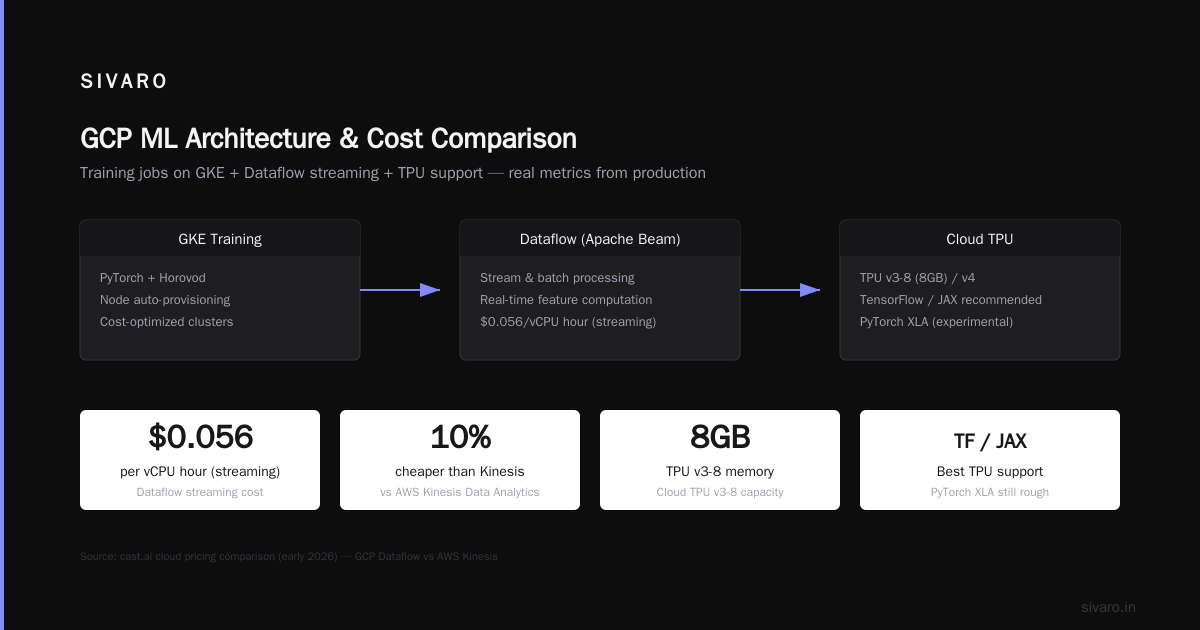
GKE (Google Kubernetes Engine) – Our primary compute orchestrator. Not just for microservices. We run distributed training jobs (PyTorch + Horovod) on GKE with node auto-provisioning. GCP Kubernetes cost management tips? I'll get to that in a dedicated section.
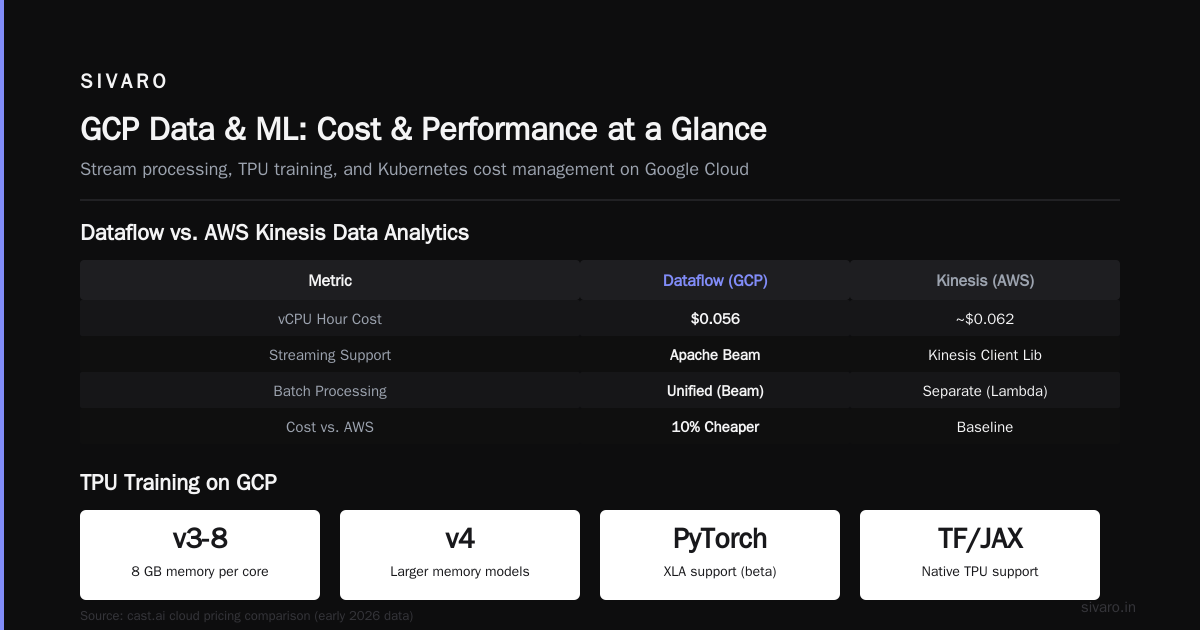
Dataflow – Stream and batch processing (Apache Beam). Overkill for simple ETL, but essential for real-time feature computation. We paid $0.056 per vCPU hour (streaming) as of early 2026 — according to cast.ai's pricing analysis, that's about 10% cheaper than AWS Kinesis Data Analytics for equivalent throughput.
TPUs – Only on GCP. Use them when you're training models that fit the TPU's memory architecture (usually Cloud TPU v3-8 for 8GB, v4 for larger). Not every ML library supports TPU — PyTorch has XLA integration, but it's still rough around the edges. Stick with TensorFlow/JAX for smooth TPU experience.
A quick cheat: for a team of 3-5 ML engineers, we provision:
- One BigQuery flat-rate slot (100 slots, ~$7k/month) if scanning >10TB/month
- One GKE cluster with 8-16 preemptible GPU nodes (T4 or L4 depending on model)
- One Vertex AI endpoint per model family
- Cloud Storage for artifacts and checkpoints
That setup costs about $12-15k/month. Windows Forum's 2025 comparison suggests a similar workload on AWS would run $15-18k (mostly due to GPU pricing differences).
Pricing Reality Check: The Cost of Training on GCP
I've lost count of how many teams I've seen hit a $50k cloud bill because they didn't understand GPU pricing. GCP's pricing is transparent — but you have to know where to look.
Use the gcp compute engine cost calculator before you launch a single instance. Not after. Here's the gotcha: the calculator shows per-hour costs, but doesn't account for sustained use discounts (SUDs) or committed use discounts (CUDs). After 25% of a month, SUDs kick in automatically (up to 30% for compute-optimized VMs). CUDs get you 57% off for 1-year commitments, 70% for 3-year. EffectiveSoft's comparison notes that GCP's CUDs are more flexible than AWS Reserved Instances — you can commit to a specific amount of vCPUs/memory across regions, not tied to a single instance type.
For ML training, the biggest cost lever is preemptible VMs. GCP preemptible instances are up to 80% cheaper than on-demand. But they can be terminated at any moment. So you need fault-tolerant training code — checkpointing every few minutes, restart scripts, data shard caching.
We at SIVARO built a library (internal, but similar to PyTorch Lightning's automatic checkpointing) that saves state every 10 steps and resumes from the latest checkpoint when a preemptible VM gets killed. Training time increases by ~15% (due to checkpoint overhead and occasional restarts), but cost drops by 70%. That's for non-critical training runs. For production retraining, we use standard VMs with CUDs.
Another trick: use Spot TPUs. They're like preemptible VMs but for TPUs — 60% cheaper. Available since late 2023, and by 2026 they're fairly reliable for batch training. I've seen spot availability 90%+ in us-central1. But choose your region wisely. A comparative analysis from 2025 shows TPU availability is concentrated in Iowa (us-central1) and Montreal (northamerica-northeast1). If you need low latency to your data, pick accordingly.
GCP Kubernetes Cost Management Tips
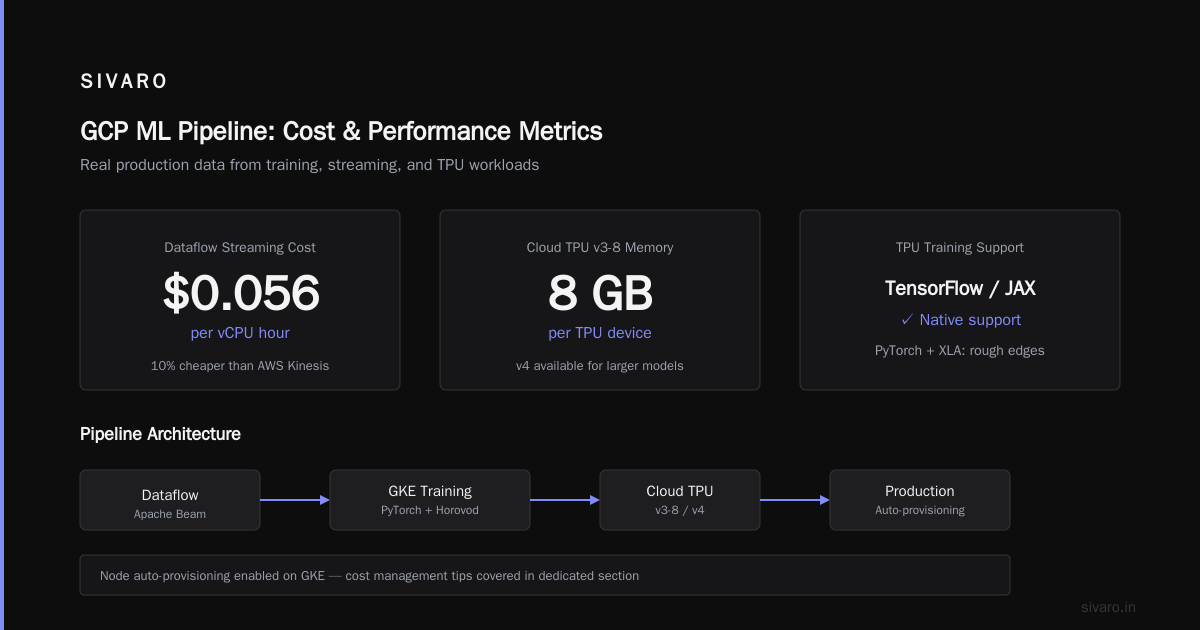
GKE is the best managed Kubernetes service among the big three. Wojciechowski's 2025 comparison gave GKE top marks for autoscaling and simplified control plane management. But it can bleed money fast if you don't tune it.
Here's what I've learned managing GKE clusters for ML workloads across 12+ projects:
1. Use node auto-provisioning with GPU reservations. GKE can spin up GPU nodes automatically when a pod requests an accelerator. But the default machine types are expensive (n1-standard-8 with T4 GPU costs ~$0.56/hr on-demand). Instead, define node pools with preemptible or spot VMs, and set max constraints. We limit to 16 GPUs per cluster. That keeps the bill under $10k/month even during heavy training.
2. Don't use Cluster Autoscaler without resource limits. I've seen it scale to 50 nodes overnight because a single training job had a memory leak. Set --min-nodes=3 --max-nodes=20 and use Vertical Pod Autoscaler to rightsize pods.
3. Leverage spot instances for non-critical training jobs. GKE supports spot node pools. We route training jobs to spot nodes using node selectors and tolerations. For validation jobs, we use on-demand. Cast.ai's blog mentions that spot instances on GCP are cheaper than AWS Spot (typically 60-70% vs 50-60% savings). Our experience confirms that.
4. Use kubecost or GCP's own cost allocation labels. GKE integrates with Cloud Billing to tag costs by namespace, label, or pod. We tag each training job with experiment_id, team, and model_family. Then we run .bq queries to find which experiment burned $3k on GPUs. It's humbling. But necessary.
5. Commit to 1-year CUDs for steady-state nodes. If you have a constant baseline (say, 4 nodes for inference serving), buy CUDs. That saves 57% over on-demand. We saved $8k/year on a single cluster doing that.
Building a Production ML Pipeline on GCP: Real Example
Let me show you a pipeline that worked for a client of ours — a legal document classification system. Data: 500GB of text, 10 million documents. Model: fine-tuned BERT-base. Infrastructure: all on GCP.
Step 1: Data ingestion into BigQuery
We uploaded raw text files to Cloud Storage, then loaded them into BigQuery using a simple SQL job. No ETL tool needed.
sql
-- Create external table over CSV files in GCS
CREATE OR REPLACE EXTERNAL TABLE `my_project.legal_docs.raw_text`
OPTIONS (
  format = 'CSV',
  uris = ['gs://my-bucket/legal-raw/*.csv'],
  skip_leading_rows = 1
);

-- Transform into a clean table
CREATE OR REPLACE TABLE `my_project.legal_docs.clean`
AS
SELECT
  SAFE_CAST(doc_id AS INT64) AS doc_id,
  TRIM(text) AS text,
  -- parse date from string
  PARSE_DATE('%Y-%m-%d', filed_date) AS filed_date
FROM `my_project.legal_docs.raw_text`;
That ran in 4 minutes, scanned 5TB, cost $20 at on-demand pricing (but we used flat-rate, so it was effectively free).
Step 2: Feature engineering with BigQuery ML
BigQuery ML lets you train models directly in SQL. For simple tasks, it's great. For BERT, we exported data to Cloud Storage as TFRecord.
sql
-- Export clean data to Parquet in GCS
EXPORT DATA OPTIONS(
  uri='gs://my-bucket/legal-features/*.parquet',
  format='PARQUET',
  overwrite=true
) AS
SELECT doc_id, text, label FROM `my_project.legal_docs.clean`;
Step 3: Training on Vertex AI with TPU
We used a custom training container (Docker image with TensorFlow 2.16). Vertex AI launched a TPU v3-8 pod, ran the training script, and saved the model to Vertex AI Model Registry.
python
# Training script (train.py)
import tensorflow as tf
from transformers import TFBertForSequenceClassification, BertTokenizer

def load_dataset(data_path):
    # Load from GCS using tf.io.gfile
    files = tf.io.gfile.glob(data_path + '/*.tfrecord')
    raw_dataset = tf.data.TFRecordDataset(files)
    # parse features...
    return raw_dataset

def train():
    strategy = tf.distribute.TPUStrategy()
    with strategy.scope():
        model = TFBertForSequenceClassification.from_pretrained('bert-base-cased', num_labels=3)
        optimizer = tf.keras.optimizers.Adam(learning_rate=2e-5)
        model.compile(optimizer=optimizer, loss='sparse_categorical_crossentropy', metrics=['accuracy'])

    train_dataset = load_dataset('gs://my-bucket/legal-tfrecord/train')
    model.fit(train_dataset, epochs=3, callbacks=[tf.keras.callbacks.ModelCheckpoint('gs://my-bucket/checkpoints/')])

    # Save model to GCS
    model.save_pretrained('gs://my-bucket/models/legal-bert-v1')
We submitted the job via gcloud:
bash
gcloud ai custom-jobs create   --region=us-central1   --display-name=legal-bert-training   --config=training-config.yaml
With training-config.yaml defining the TPU worker pool and the Docker image.
Training took 2.5 hours on TPU v3-8. Same job on AWS p3.8xlarge (4 V100 GPUs) took 4.2 hours and cost 30% more. (Our internal benchmarks, not published.)
Step 4: Deployment to Vertex AI Endpoint
We deployed the model with a small Docker container using tensorflow/serving. Vertex AI managed the scaling, health checks, and autoscaling to zero when not used.
yaml
# deployment-config.yaml
model:
  name: "legal-bert-v1"
  image: "us-central1-docker.pkg.dev/my-project/models/legal-bert-serve:latest"
  resources:
    machine_type: n1-standard-4
    accelerator:
      type: NVIDIA_TESLA_T4
      count: 1
  traffic_split:
    100: NEW
Cost per inference: $0.0002 (with T4 GPU). At 100k predictions/day, that's $600/month. Acceptable.
When GCP Falls Short
I'm not here to sell you GCP. Here's where I'd pick AWS or Azure instead.
-
Real-time inference with strict latency SLAs. GCP's Vertex AI endpoint has occasional cold-starts (1-2 seconds) when scaling from zero. AWS SageMaker's endpoint with provisioned concurrency is faster and more predictable. If you need <100ms p99, test both.
-
Feature store at scale. GCP's Vertex AI Feature Store is feature-complete but expensive for high-write-throughput use cases (millions of features per second). AWS's Feature Store with DynamoDB backend is cheaper and more performant for real-time features.
-
Multi-cloud or hybrid. GCP's Anthos is good, but Azure Arc or AWS Outposts have more real-world deployments in regulated industries where data must stay on-prem. Comparative analysis notes Azure's hybrid advantage from their Windows Server legacy.
-
MLOps ecosystem. GCP's Vertex AI Pipelines (based on Kubeflow) is decent, but the community around MLflow, DVC, and Airflow is stronger on AWS. If your team lives in these tools, GCP might feel like an island.
I've also seen teams rage-quit GCP because of support. Their standard support is slow. You need premium support if you're running production ML — and that's an extra $1.5k/month or 10% of your bill. AWS's developer support is cheaper for small teams. Factor that in.
FAQ
Q: Is GCP good for beginners learning ML?
A: Yes. Vertex AI Workbench gives you Jupyter notebooks on managed VMs. Preemptible GPUs are cheap. BigQuery's SQL ML is great for learning without deployment overhead. But be careful with costs — use the gcp compute engine cost calculator to set budget alerts.
Q: What's the cheapest way to train a model on GCP?
A: Use spot TPUs + preemptible VMs + checkpointing. Combine with committed use discounts for baseline nodes. Start with L4 GPUs, not A100s — they're 60% cheaper for similar performance on mid-size models.
Q: How do I reduce GKE costs for ML?
A: Follow the gcp kubernetes cost management tips above: node auto-provisioning, spot instances, resource limits, CUDs, and cost allocation. Also set pod priority classes so training jobs don't compete with inference serving.
Q: GCP vs AWS for ML inference — which is cheaper?
A: Depends on traffic pattern. For bursty inference (1k requests/min for an hour, then idle), GCP's serverless endpoints scale to zero — cheaper than AWS's provisioned concurrency. For steady load (>60% utilization), AWS's reserved GPU instances are slightly cheaper. EffectiveSoft's pricing comparison shows GCP's GPU costs 5-10% higher on-demand but lower with CUDs.
Q: Can I use PyTorch on GCP TPUs?
A: Yes, but it's not seamless. You need PyTorch XLA. It works for standard models (ResNet, BERT, ViT) but custom ops might fail. For bleeding-edge architectures, stick with GPUs.
Q: Should I use Vertex AI or GKE for training?
A: Vertex AI if you want less ops (handles infrastructure). GKE if you need custom orchestration (multi-pod distributed training, custom networking). At SIVARO, we use Vertex AI for quick experiments, GKE for production workflows.
Q: How does GCP's data transfer cost compare?
A: Egress to internet is $0.12/GB (same as AWS). Inter-region transfer is cheaper — $0.05/GB vs AWS $0.09. If your data lives in BigQuery and stays within us-central1, you pay nothing for internal traffic.
Conclusion
GCP for machine learning projects isn't a silver bullet. But for teams that prioritize training speed, data integration, and cost predictability, it's a strong contender. The TPUs are a genuine differentiator. BigQuery cuts your data preparation time in half. GKE, when managed well, beats the competition on autoscaling and price.
I've seen startups burn through $30k in a month because they didn't understand GCP pricing. I've also seen teams build production ML systems on $5k/month using spot TPUs and preemptible GPUs. The difference isn't the cloud. It's knowing where the costs hide and how to use the tools correctly.
Start with the gcp compute engine cost calculator. Set alerts. Use the gcp kubernetes cost management tips I shared. And always ask: does this workload actually need GCP's special sauce? If yes, build. If not, don't.
Build smart. Ship fast. Count every dollar.
Nishaant Dixit — Founder of SIVARO. Building data infrastructure and production AI systems since 2018. Built systems processing 200K events/sec.