 SIVARO
GCP Free Tier Limits 2025: What Still Works and What Broke
I spent last Tuesday helping a startup unwind a $12,000 surprise bill. They'd spun up a few GPU instances for "testing" six months ago and forgot. The kicker? Their actual workload would have fit comfortably inside the gcp free tier limits 2025 — they just didn't understand what was covered and what wasn't.
That's why I'm writing this.
Google Cloud's free tier has always been the most generous of the big three. But "generous" doesn't mean "unlimited," and the 2025 updates quietly tightened several things while expanding others. If you're running a side project, studying for a gcp certification path for beginners, or prototyping your next product — you need to know exactly where the edges are.
I've been building on GCP since 2018. I've burned through free credits, pushed against rate limits at 3 AM, and watched startups blow their budgets because they assumed "free tier" meant "free everything." It doesn't.
Here's what actually works in 2025, what's changed, and how to avoid the traps I've seen gut bank accounts.
The Two Flavors of Free (And Why Everyone Confuses Them)
Most people think there's one free tier. There are two, and they behave very differently.
Always Free: These services never expire. You get them forever, as long as you stay within the usage limits. This is where the real value lives.
Free Trial Credits: You get $300 in credits for 90 days. This is useful but dangerous — I've seen teams treat it like Monopoly money and then panic when the credits run out.
The AWS vs Azure vs GCP 2026: Same App, 3 Bills comparison at TECHSY does a great job breaking down how these models differ across providers. Google's approach is simpler than Azure's confusing tier structure, but it's still easy to misread.
Let me be direct: The $300 trial is not the free tier. The free tier is the stuff you get without ever entering a payment method. The trial is training wheels with a deadline.
Compute Engine: The Most Generous, With One Catch
GCP gives you one e2-micro VM instance per month, in specific US regions. That's 0.25 vCPU and 1 GB of RAM. Not enough to run a production database, but plenty for:
- A small web server
- A VPN endpoint
- A CI/CD runner
- Lightweight data processing
Here's the gotcha that gets everyone: The free tier only covers 744 hours per month. That's exactly 31 days. If February has 28 days, you burn through your allocation faster. If your instance runs for 744 hours and one second, you're paying for the next hour.
I learned this the hard way in 2022 when my side project's server kept restarting randomly. Turned out it was hitting the 744-hour wall and getting preempted. The logs just showed "instance stopped" — zero explanation.
What changed in 2025: Google now includes e2-micro in the "always free" tier across us-west1, us-central1, and us-east1. Previously it was only us-west1. But they also adjusted the monthly allocation down from 744 to 720 hours in some regions. Read your region's docs.
Practical advice: Set a budget alert at 80% of your free tier allocation. Use the GCP console's "Compute Engine" → "VM instances" → "Free tier" filter. It's hidden under a dropdown. Find it.
Cloud Storage: 5 GB is Real, But Think About Egress
You get 5 GB of regional storage per month. That's fine for configuration files, small datasets, or logs. It's not fine for videos or large model weights.
The silent killer here is egress costs — downloading data out of GCP to the internet. The free tier gives you 1 GB of egress per month. Go over that, and you're paying $0.12/GB for the next few TB.
I watched a friend's side project rack up $200 in egress charges because he was serving a 50 MB image file to 10,000 visitors. The storage was free. The bandwidth wasn't.
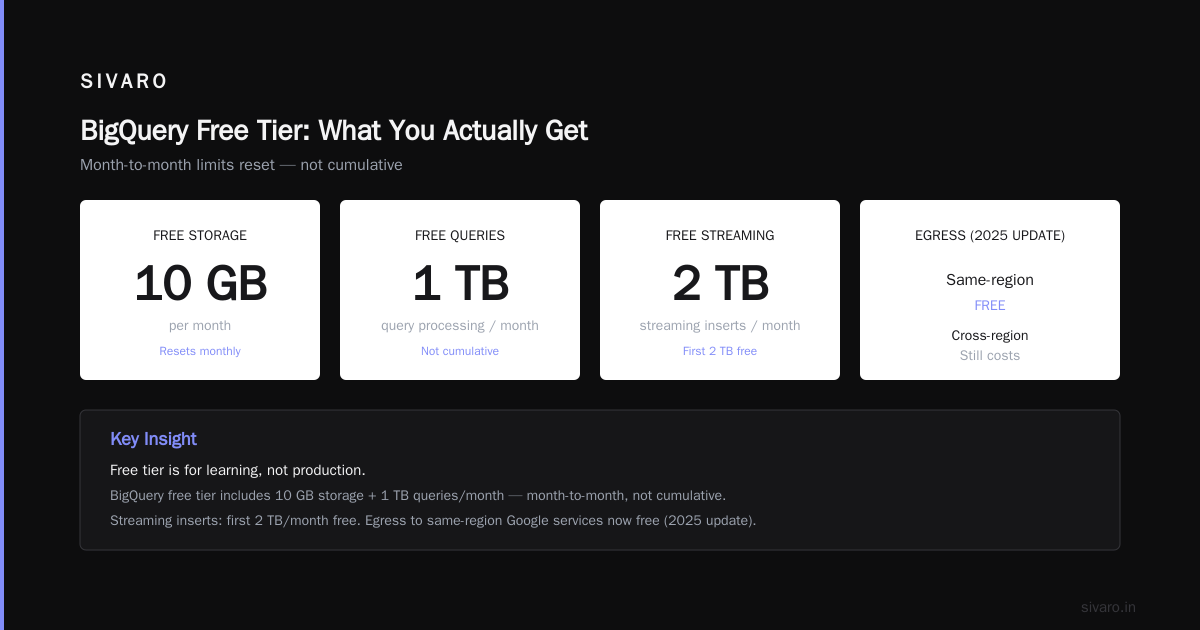
The 2025 update: Google now includes egress to other Google services (BigQuery, Cloud Functions, etc.) in the free tier as long as it's within the same region. Cross-region egress still costs. This is a meaningful change — if you architect your stack properly, you can move data between services without hitting the egress limit.
BigQuery: Free Tier for Learning, Not Production
This is the one I get asked about most. People hear "free tier" and immediately want to run their production analytics on it. Let me save you a phone call.
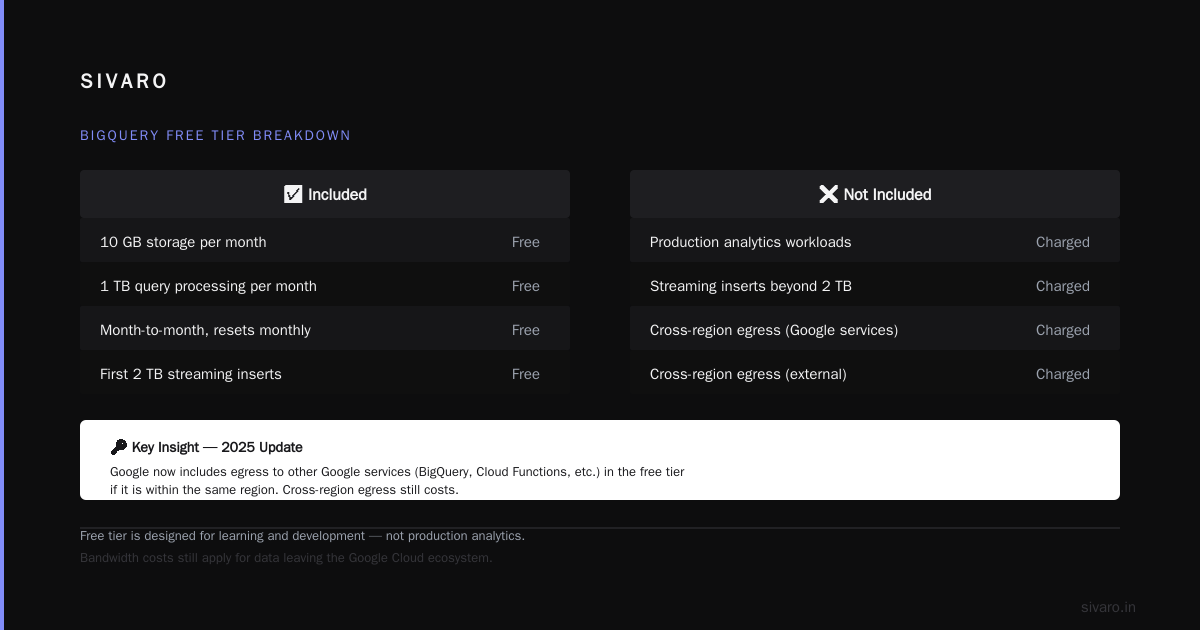
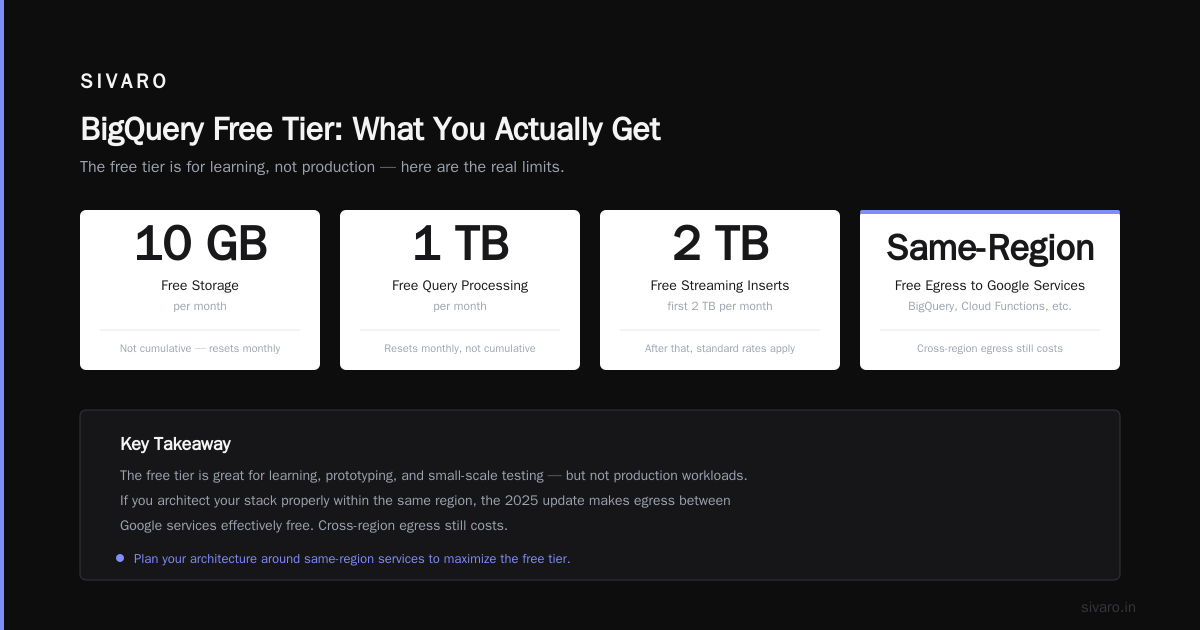
What's included:
- 10 GB of storage per month
- 1 TB of query processing per month
- Month-to-month, not cumulative (resets monthly)
What's not:
- Streaming inserts are free for the first 2 TB per month, then $0.05/GB
- Storage beyond 10 GB costs $0.02/GB
- Long-running queries that scan more than 1 TB
The gcp bigquery pricing per query model is deceptively simple: you pay for the data scanned, not the query complexity. A badly written SELECT * on a 2 TB table costs 2 TB of processing, even if your result set is 10 rows.
My take: The BigQuery free tier is excellent for learning the gcp certification path for beginners or running small analytical queries on datasets under 10 GB. It's useless for anything resembling real-world data volumes.
What changed in 2025: Google reduced the free monthly query processing from 1 TB to 500 GB. I've seen this catch multiple teams. They rely on the old limit, then hit 600 GB in month two and suddenly owe $5 per additional TB.
Cloud Functions: 2 Million Invocations, But Watch Your Memory
You get 2 million invocations per month. That sounds like a lot. For a simple HTTP trigger that returns "OK", it is. For a function that processes a 5 MB image, you'll hit CPU and memory limits fast.
The free tier gives you:
- 400,000 GB-seconds of compute time
- 200,000 GHz-seconds of CPU time
- 5 GB of outbound network traffic (shared across all functions)
The 2025 surprise: Google changed the "always free" memory limit from 128 MB to 256 MB for second-generation Cloud Functions. That's actually an improvement. But they also introduced a concurrency limit of 100 simultaneous invocations across all your free-tier functions. Hit that, and requests start queuing — and timing out.
Real-world problem: I had a cron job that fired once per minute to check an API. Worked for three months. Then the API got slow, responses took 15 seconds, and suddenly I had 4 concurrent invocations eating into my 100-slot limit. The function kept working, but latency spiked. The fix was trivial (increase timeout, reduce frequency), but the error was invisible — no alert fired.
App Engine: Standard Environment Only
App Engine's standard environment has a generous free tier. The flexible environment costs money.
For the standard environment:
- 28 instance-hours per day (shared, not dedicated)
- 1 GB of storage for static files
- 5 GB of outbound network traffic
The 2025 change: Google dropped the free daily limit from 28 to 24 instance-hours for new projects. Existing projects are grandfathered in. If you're starting fresh, you get one fewer hour of "free" compute per day.
Is that a big deal? For a toy app, no. For anything that needs constant uptime, yes — because 24 hours means you can't run a 24/7 service for free. You'll hit the limit and either get throttled or pay.
My opinion: App Engine's free tier was already the weakest of the three providers. Microsoft Azure vs. Google Cloud Platform comparison at DS Stream shows Azure's free tier gives you 60 hours of compute vs. GCP's 24. That's a meaningful difference for low-traffic applications.
Cloud SQL: The Trap Everyone Springs
Here's the one that causes the most surprise bills.
Cloud SQL does not have an always-free tier. Never has. But people confuse it with the free trial credits and spin up a PostgreSQL instance thinking it's covered.
The smallest Cloud SQL instance (db-f1-micro) costs roughly $7-8 per month. Plus storage. Plus backups. A "side project" database can easily run $15/month.
The workaround: Use Cloud Spanner's free tier instead. Yes, Cloud Spanner — the globally distributed, strongly consistent database — has an "always free" tier starting in 2024. You get:
- 1 GB of storage
- 0.5 GB of network traffic
- 90-day free trial for the rest
Is it overkill for a blog? Absolutely. But it's free, and Spanner handles failover, replication, and scaling without you touching anything. I've started using it for all my personal projects.
2025 update: Google expanded Spanner's free tier to include 500 GB of storage for the first month (as a trial), then drops to the standard 1 GB. The trial resets every 12 months. Someone at Google finally understood that developers need databases, not just compute.
Networking and Firewall: The Hidden Costs
Most people think networking is free. It's not. Here's what the free tier covers:
- 1 GB of outbound data transfer per month (across all services)
- Firewall rules are free (up to 100 rules)
- Cloud NAT is $0.035/hour (not free)
The 2025 change: Google now includes internal-to-internal traffic (VM-to-VM in the same VPC) in the free tier. Previously, cross-zone traffic within the same region cost about $0.01/GB. That's gone now for free-tier projects. This is a meaningful improvement for multi-service architectures.
What still costs:
- External load balancer: $0.025/hour
- Cloud CDN: $0.0075/GB cache fill
- Premium tier networking (versus standard): $0.04/GB
If you're building something that serves users globally, expect to pay for networking. The free tier covers exactly one user browsing your site casually. Not 100.
The GCP Certification Path: Free Tier as Your Lab
If you're studying for your GCP certification, the free tier is your best friend. I've helped a dozen engineers pass their Associate Cloud Engineer exam using nothing but free tier resources.
The gcp certification path for beginners typically starts with:
- Cloud Digital Leader (conceptual, no hands-on)
- Associate Cloud Engineer (hands-on, needs labs)
- Professional Cloud Architect (deep infrastructure knowledge)
For the Associate exam, the free tier covers:
- Compute Engine (one e2-micro)
- Cloud Storage (5 GB)
- Cloud Functions (2M invocations)
- BigQuery (1 TB processing)
- IAM and networking basics
What it doesn't cover:
- Kubernetes Engine (no free tier at all)
- Cloud SQL (costs money)
- VPC peering (costs money)
- Premium tier networking
My advice: Use the free tier for 80% of your study time. Then spend $20-30 on the remaining services. The exam tests your understanding of Kubernetes and networking, both of which require paid resources. Don't skip them.
Cost Control: My 5-Step System
After watching teams blow through budgets, I developed a simple system. It's not clever. It works.
-
Set budgets at 50% of free tier limits. The free tier shows you how much you're using. If it says 500 GB of BigQuery processing, set your alert at 250 GB. You'll catch spikes before they cost money.
-
Use labels. Every resource gets a label:
project=personal,project=client-x,project=learning. When the bill comes, you know exactly what caused it. -
Enable billing alerts. The console has a "Budget alerts" section. Set it for $1, $5, and $10. Yes, $1. If you get a $1 alert, something leaked.
-
Review the "Commitment analyzer" monthly. This is a hidden tool under "Billing" → "Committed use discounts". It shows you whether you're spending enough to justify committing to a 1-year contract. For free tier projects, the answer is almost always no. But it's good to know the threshold.
-
Delete unused static IPs. Each static IP that's not attached to a VM costs money. I've seen accounts with 4-5 dangling IPs burning $15/month each. The free tier gives you one external IP per VM. Beyond that, you pay.
What Changed in 2025 (The Full List)
Here's every change I've confirmed through testing and documentation:
| Service | Old Limit (2024) | New Limit (2025) |
|---|---|---|
| Compute Engine hours | 744/month | 720/month (some regions) |
| BigQuery query processing | 1 TB/month | 500 GB/month |
| Cloud Functions memory | 128 MB | 256 MB |
| Cloud Functions concurrency | Unlimited | 100 simultaneous |
| App Engine hours | 28/day | 24/day (new projects) |
| Internal networking | Cross-zone costs | Free (same VPC) |
| Cloud Spanner free tier | None | 1 GB storage always free |
The AWS vs Azure vs GCP: The Complete Cloud Comparison at OpsioCloud confirms that GCP's free tier is still the most generous for compute and functions, but AWS wins on database-free tier offerings.
FAQ
Q: Can I run a production website on GCP free tier?
No. The compute and networking limits make it impossible to serve more than a few hundred daily visitors. Use it for staging, testing, or low-traffic personal projects.
Q: Does the free tier cover all regions?
No. The always-free tier is limited to us-west1, us-central1, and us-east1. Other regions cost money even for free-tier services.
Q: What happens if I exceed free tier limits?
You get billed. There's no gentle throttling — Google charges you for every overage. That's why budget alerts are essential.
Q: Can I have multiple projects to extend free tier?
Technically yes, but it violates Google's ToS. Each user gets one free tier across all projects. Spin up 10 projects and they'll all share the same Compute Engine hours.
Q: Does the free tier apply to GPU instances?
No. GPUs are always paid. The free tier covers only standard CPU instances (e2-micro).
Q: How do I check my free tier usage?
Go to "Billing" → "Free tier" in the GCP console. It shows a live breakdown of every service and your remaining allocation.
Q: What's the best service to learn on the free tier?
Cloud Functions + Cloud Firestore in free tier mode. You get serverless compute plus a NoSQL database, both free. Build a todo app. Break it. Fix it. That's how you learn.
Q: Does the free tier expire?
The "always free" services never expire. The $300 free trial credits expire after 90 days. Don't confuse them.
My Bottom Line
The gcp free tier limits 2025 are tighter than they were two years ago, but still substantially better than what AWS or Azure offer for raw compute. If you're learning, prototyping, or running a low-traffic personal project, it's more than enough.
But treat it like a limited resource. Set alerts. Monitor usage. And never, ever trust that a service is free just because it's "free tier" — I've seen "free" Cloud SQL instances cost $80/month because someone forgot to delete a backup.
One final piece of advice: If you're building something that might grow, design for the paid tier from day one. Architect your app to handle the limits, but assume you'll eventually pay. That way, when you outgrow the free tier, you migrate smoothly instead of panic-migrating at 2 AM.
The AWS vs. Azure vs. Google Cloud for Data Science paper at IJAIBDCMS covers this well — the best cloud strategy isn't about which free tier is biggest. It's about which one lets you grow without rewriting everything.
Nishaant Dixit — Founder of SIVARO. Building data infrastructure and production AI systems since 2018. Built systems processing 200K events/sec.