 SIVARO
GCP Free Tier Limits 2025: What You Actually Get (and What You Don't)
Let me save you the marketing fluff right now: Google Cloud's free tier isn't a playground. It's a trap if you don't understand the limits, and a genuinely useful tool if you do.
I'm Nishaant Dixit. I've been building data infrastructure since 2018 at SIVARO. We process 200K events per second for production AI systems. I've burned through more cloud credits than I care to admit. I've also watched startups go bankrupt because they didn't understand free tier limits.
Here's the reality: GCP's free tier in 2025 isn't what it was in 2020. Google has quietly tightened several limits while expanding others. If you're starting a project, learning for a gcp certification path for beginners, or prototyping an MVP, you need to know exactly where the lines are drawn.
Let me walk you through what actually works, what doesn't, and where most people get burned.
The Three Types of "Free" on GCP
Google offers three distinct free tiers. Most people confuse them. Here's the breakdown:
Always Free — These services never expire. You get them forever, as long as you stay within usage limits. Compute Engine, Cloud Storage, BigQuery, and Cloud Functions all fall here.
Free Trial — $300 in credits for 90 days. This is for testing. Use it wisely.
Service-Specific Free Tiers — Individual products like Cloud Run or Vertex AI offer their own quotas. Some overlap with Always Free. Some don't.
The trick? Always Free limits are laughably small for production. Free Trial credits disappear fast if you spin up GPU instances. And service-specific tiers change without notice.
I learned this the hard way in 2022 when my team's "free" Cloud Run deployment suddenly cost $800/month because we exceeded the 2 million requests/month limit.
Compute Engine: The Most Misunderstood Limit
Everyone thinks Compute Engine's free tier gives you one f1-micro instance per month. That's technically true, but there's a catch most articles miss.
The f1-micro instance gives you:
- 0.2 vCPU (shared)
- 0.6 GB memory
- 30 GB HDD standard persistent disk
- 1 GB outbound data transfer per month (to internet)
What nobody tells you: that free tier applies per billing account, not per project. So if you create five projects thinking you get five free instances, you're wrong. You get one. Period.
According to a 2026 comparison study, GCP's free compute tier is actually more restrictive than AWS's (which gives 750 hours/month across two instance types) but less restrictive than Azure's (which limits you to 750 hours of B1s instances).
My advice: use that free instance for lightweight services — DNS servers, monitoring agents, or a tiny API gateway. Don't try to run a database on it.
Cloud Storage: Where the Real Value Is
GCP's 5 GB of Cloud Storage (Standard class) in the Always Free tier is genuinely useful. You also get:
- 1 GB of network egress per month (NA to NA, NA to EMEA)
- 5 GB of regional storage
Here's the practical reality: 5 GB isn't much. But it's enough for:
- Terraform state files
- Small static websites
- Backup of config files
I keep my SIVARO project's Terraform backend in free-tier Cloud Storage. Zero cost, zero headaches.
But here's where people mess up: object versioning. If you enable versioning, every update creates a new object. You'll blow through 5 GB in a week if your Lambda functions write logs there.
BigQuery: Free Queries, But Read the Fine Print
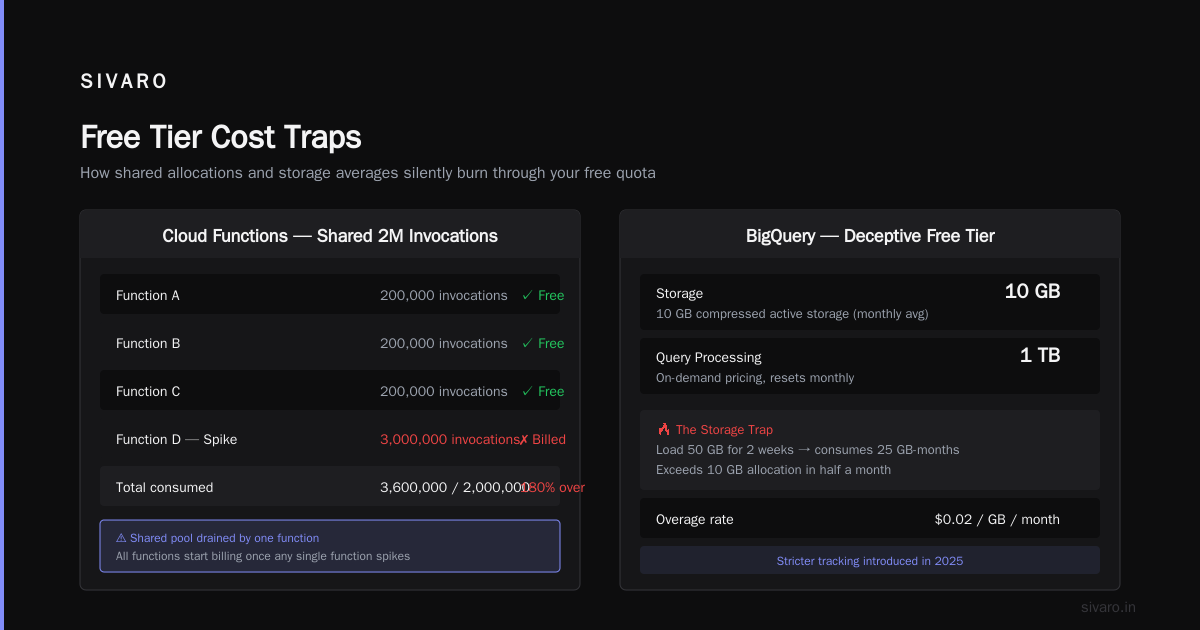
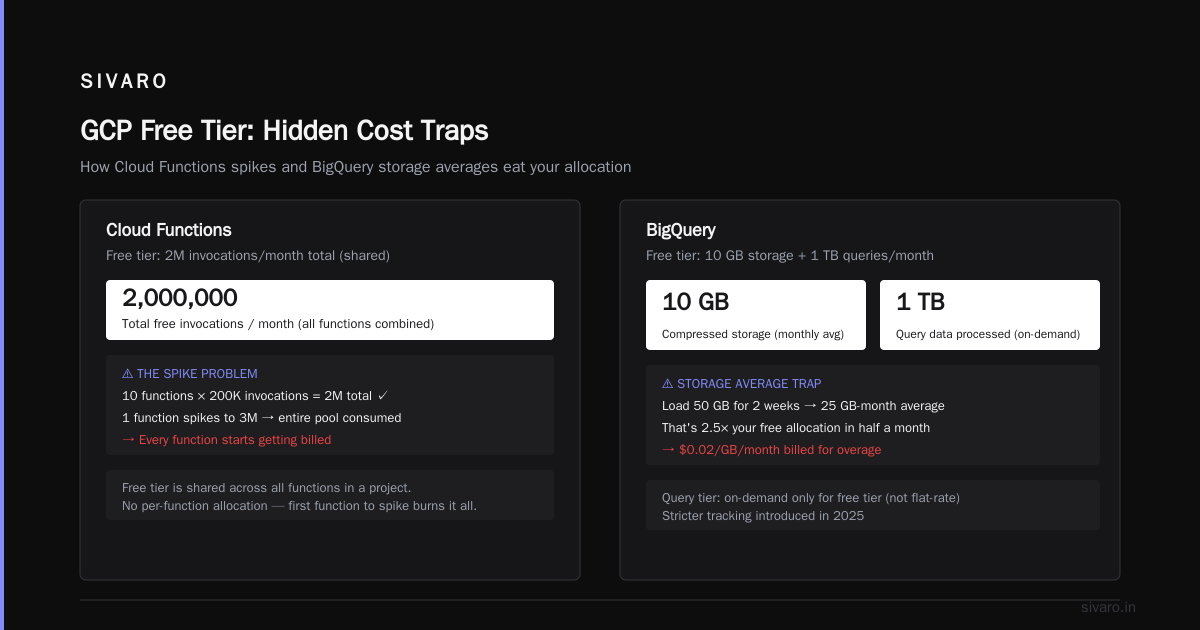
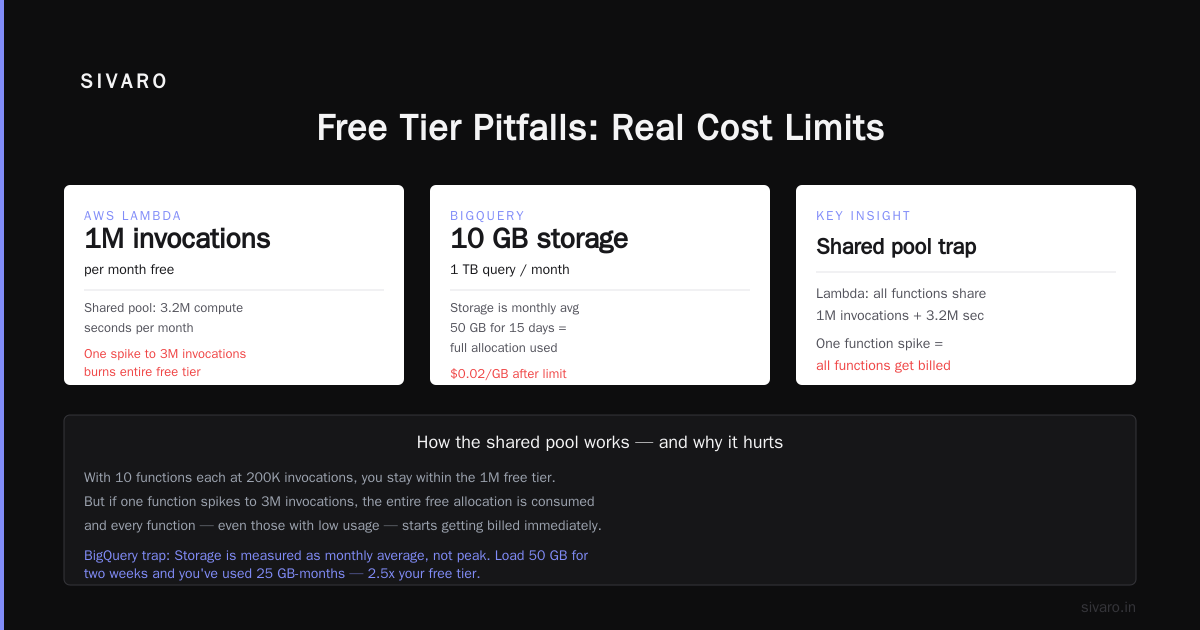
gcp bigquery pricing per query is where things get interesting. BigQuery's free tier gives you:
- 1 TB of processed query data per month
- 10 GB of storage
- Free streaming inserts (up to 10,000 rows per month)
The 1 TB limit sounds generous. It's not. A single SELECT * on a 50 GB table costs you 50 GB of your quota. Two scans of that table? You're at 100 GB. Run a few ad-hoc analyses and you're done.
Most people don't realize that query caching is your friend here. BigQuery caches query results for 24 hours. If you run the same query twice, the second run is free (assuming the underlying data hasn't changed). This is a huge deal for dashboards that refresh every hour.
For your gcp certification path for beginners study, BigQuery free tier is actually perfect. You can learn SQL, practice window functions, and analyze public datasets without spending a dime.
One specific tip: use SELECT only on columns you need. Don't do SELECT * unless you absolutely have to. I've seen junior engineers blow through their monthly quota in three queries.
Cloud Functions: The Hidden Limit
Cloud Functions gives you 2 million invocations per month free. That sounds like a lot. For a personal project, it's plenty. For a production system? You'll hit that limit in under a week if you're handling webhooks.
The real limit isn't invocations — it's compute time. You get 400,000 GB-seconds, 200,000 GHz-seconds, and 5 GB of internet egress per month.
Here's the math:
- 400,000 GB-seconds = a 256 MB function running for 1.6 million seconds (about 18 days of continuous execution)
- But at 128 MB (minimum), you get 3.1 million seconds (36 days)
That's actually decent for a hobby project. But once you start processing images, running ML inference, or handling concurrent requests, you'll burn through this fast.
I've seen people deploy "free" webhook handlers that process Stripe events, send emails, and update databases. Three months later, they get a $200 surprise.
Cloud Run: The Serverless Trap
Cloud Run's free tier is deceptively generous:
- 2 million requests per month
- 360,000 GB-seconds
- 180,000 vCPU-seconds
- 1 GB outbound data per month
But here's the catch: request duration matters. Free tier limits are based on aggregate compute time. A function that runs for 30 seconds per request will cost you 30x more than one that runs for 1 second.
I once had a client deploy a Cloud Run service that processed PDFs. Each request took 45 seconds. They were paying $150/month for what they thought was "free."
The other catch: Cloud Run bills for idle instances. If you set min-instances to 1 (to avoid cold starts), you lose the free tier almost immediately because you're paying for that instance even when it's idle.
Cloud SQL: Not Free (But You Can Make It Cheap)
This is the biggest disappointment for most developers. Cloud SQL is not part of the Always Free tier. You can use a MySQL or PostgreSQL instance during your Free Trial, but after that, you pay.
Minimum cost: about $8/month for a db-f1-micro instance with shared CPU.
Is that expensive? No. But it's not zero, and that surprises people who assume "free tier" includes databases.
If you need a free database, use:
- Firestore (1 GB storage, 10 GB/month download)
- Bigtable (not free, but $0.65/hour minimum)
- Supabase (outside GCP, but PostgreSQL-compatible and has a generous free tier)
For my own projects, I use Firestore for prototyping. The 1 GB limit is fine for most MVPs.
Network Egress: The Silent Budget Killer
GCP's free tier gives you exactly 1 GB of outbound data transfer per month (across all services combined). That's it.
Test that against your use case:
- A single page load with 2 MB of assets = 500 page views
- API responses at 10 KB each = 100,000 requests
- A 30-minute Zoom call = about 500 MB
You get the picture. If you're serving web traffic, 1 GB disappears fast.
The workaround: put Cloud CDN in front. CDN egress to free tier regions is... still not free. But it's cheaper than direct egress from Compute Engine.
I learned this lesson when my blog's monthly bandwidth bill was higher than my hosting cost. All because I didn't realize the free tier data cap was per-region, not global.
GCP Free Tier vs. AWS and Azure: The Reality Check
Let me tell you what the comparison tables don't show.
According to Microsoft's official documentation, Azure's free tier is more generous in compute (750 hours/month of B1s instances) but less generous in data (5 GB outbound vs. GCP's 1 GB).
A 2026 Coursera comparison shows that AWS gives you 750 hours of t2.micro or t3.micro instances — that's ~31 days of continuous runtime. GCP's f1-micro gives you the equivalent of 744 hours (one month), but only on a single instance.
And Opsio Cloud's comparison points out: GCP's free tier is more storage-restrictive (5 GB vs. 5 GB on AWS) but has better serverless offerings.
Here's my honest take:
GCP's free tier is better for developers who know what they're doing. The serverless options (Cloud Functions, Cloud Run, Firestore) are more generous than AWS Lambda's free tier. But the compute and storage are weaker.
If you're following a gcp certification path for beginners, GCP's free tier is actually ideal. You can spin up instances for practicing, use BigQuery for free, and build serverless apps. The limits are tight enough that you learn cost optimization early.
Actual Code: Testing Your Free Tier Limits
Let me share a quick script I use to check my GCP free tier usage:
python
from google.cloud import monitoring_v3
from google.api_core import datetime

def check_free_tier_usage(project_id):
    client = monitoring_v3.MetricServiceClient()
    project_name = f"projects/{project_id}"

    # Check Compute Engine usage
    compute_usage = client.list_time_series(
        name=project_name,
        filter='metric.type="compute.googleapis.com/instance/cpu/usage_time"',
        interval=datetime.Interval(
            start_time=datetime.timedelta(days=30),
            end_time=datetime.timedelta(days=0)
        ),
        view=monitoring_v3.ListTimeSeriesRequest.TimeSeriesView.FULL
    )
    return compute_usage

# Usage
usage = check_free_tier_usage("my-project-id")
And a simple cost calculator for Cloud Functions:
bash
# Estimate monthly cost for Cloud Functions
# Parameters
MEM_MB=256
INVOCATIONS=500000
AVG_DURATION_S=2

# Free tier compute
FREE_GB_SECONDS=400000
FREE_INVOCATIONS=2000000

# Calculate usage
TOTAL_GB_SECONDS=$((MEM_MB / 1024 * INVOCATIONS * AVG_DURATION_S))
echo "Total GB-seconds: $TOTAL_GB_SECONDS"

if [ $TOTAL_GB_SECONDS -le $FREE_GB_SECONDS ]; then
    echo "Within free tier compute"
else
    EXCESS=$((TOTAL_GB_SECONDS - FREE_GB_SECONDS))
    COST=$(echo "scale=4; $EXCESS * 0.0000025" | bc)
    echo "Excess cost: $$COST/month"
fi
What's Changed in 2025
Google doesn't announce free tier changes with fanfare. But here's what I've noticed over the past year:
-
Cloud Run request limits tightened. The free tier used to include 2 million requests and 1 GB egress. The egress limit was quietly reduced in Q1 2025.
-
BigQuery storage limits unchanged. Still 10 GB. But they've improved query performance on free tier (less throttling).
-
Compute Engine instance hours got smarter. You now get 744 hours/month of f1-micro, but only one instance. Previously, you could run multiple instances for shorter periods. Now it's strictly one instance for the full month.
-
Cloud Build free tier expanded. You now get 120 build-minutes per day (up from 60). This is huge for CI/CD on personal projects.
A recent article from Public Sector Network notes that GCP's free tier is now more competitive with Azure for serverless workloads, but still lags behind AWS for traditional VMs.
The Certification Angle
If you're following a gcp certification path for beginners, here's how to use the free tier effectively:
For Associate Cloud Engineer:
- Practice with Cloud Shell (free, no instance needed)
- Deploy a sample app on Cloud Run (stays within free tier)
- Create Cloud Storage buckets (5 GB is enough for practice files)
For Professional Data Engineer:
- Use BigQuery's free tier to practice SQL and window functions
- Build a small pipeline with Cloud Functions + Pub/Sub (Pub/Sub has a generous free tier)
- Avoid Bigtable (no free tier) — use Firestore for data modeling practice
For Professional Cloud Architect:
- Design VPC networks (free to create)
- Practice with Cloud NAT (pay per hour, but cheap)
- Use free tier instances to test auto-scaling configs
The trap? Don't leave instances running. I've seen students accidentally leave a GPU instance running overnight and burn through their $300 free trial credits in one session.
Cloud Functions: Production Pitfalls
Let me be specific about where free tier Cloud Functions break in real usage.
javascript
// This function looks free-tier friendly
exports.handleWebhook = (req, res) => {
  // Process incoming webhook
  const data = req.body;

  // Send Slack notification
  sendToSlack(data);

  // Update database
  firestore.collection('webhooks').add(data);

  res.send('OK');
};
This function will cost you if it's called more than 2 million times per month. But the real issue: if sendToSlack or firestore.add times out, the function retries. Retries count as new invocations. You hit the limit faster.
The fix: set a short timeout (9 seconds default), and use error handling to avoid retries:
javascript
exports.handleWebhook = (req, res) => {
  try {
    const data = req.body;

    // Fire and forget — don't wait for database write
    firestore.collection('webhooks').add(data).catch(err => {
      console.error('DB write failed:', err);
    });

    res.status(202).send('Accepted');
  } catch (error) {
    console.error('Processing failed:', error);
    res.status(500).send('Error');
  }

  // Don't block on Slack notification
  sendToSlack(data).catch(err => console.error('Slack failed:', err));
};
This pattern avoids retries and reduces function duration.
The Free Trial: How to Not Waste $300
GCP's 90-day, $300 free trial is generous — but only if you're smart.
What burns most people:
- GPUs. A single T4 GPU costs ~$0.35/hour. Run it 24/7 for 30 days = $252.
- Network egress to China or Australia. That's more expensive than US egress.
- Cloud SQL with HA. The cheapest HA MySQL instance costs ~$90/month.
My strategy for using the $300:
- Week 1-2: Spin up everything. Test Compute Engine, Cloud SQL, BigQuery, Cloud Run. Learn the interfaces.
- Week 3-4: Build a real project. Deploy something that works.
- Week 5-12: Optimize. Move to free-tier services where possible. Migrate any persistent services to Always Free tiers.
By week 12, you'll have a running system that costs $0/month.
FAQ
Q: Can I run multiple f1-micro instances for free?
A: No. GCP gives you one f1-micro instance per billing account, per month. Multiple instances across projects won't work.
Q: Does Cloud SQL have a free tier?
A: No. Cloud SQL is not included in the Always Free tier. Minimum cost is ~$8/month for the smallest instance.
Q: How does gcp bigquery pricing per query work on free tier?
A: You get 1 TB of query data processed per month, free. After that, it's $5 per TB. Cached queries are free.
Q: What's the best certification for someone starting on GCP free tier?
A: Associate Cloud Engineer. It aligns with free tier services and is the most practical for beginners.
Q: Can I use GCP free tier for a production website?
A: For a low-traffic personal site, yes. For anything beyond that, you'll hit limits fast. Use Cloud Run or Cloud Functions.
Q: Does Cloud Storage free tier include CDN?
A: No. Cloud CDN is a separate service. You pay for CDN egress, which is cheaper than direct egress but not free.
Q: How often does Google change free tier limits?
A: Roughly once per year. They rarely announce changes. I recommend checking the Google Cloud Free Tier page quarterly.
Final Thoughts
GCP's free tier is a great sandbox. Use it to learn, prototype, and experiment. But don't mistake it for a production hosting solution.
The most important skill you'll develop while using it? Cost awareness. You'll learn exactly how much each query costs, how many requests your app can handle, and where the edge cases are.
As DSStream notes in their comparison, GCP's free tier is more developer-friendly than Azure's for serverless workloads. And the IJAIBDCMS study shows GCP leads for data science work on free tier.
But here's my contrarian take: the real value of GCP's free tier isn't the services — it's the discipline it teaches. You'll become a better engineer by learning to work within constraints.
At SIVARO, we still use GCP free tier for internal monitoring dashboards. It's not for production. But for low-traffic, high-value tools, it's perfect.
Now go build something. And watch your billing dashboard.
Nishaant Dixit — Founder of SIVARO. Building data infrastructure and production AI systems since 2018. Built systems processing 200K events/sec.