 SIVARO

GCP Free Tier Limits 2025: What You Get Before You Pay
I spent last week helping a startup untangle a $4,700 surprise bill from Google Cloud. They'd been running a proof-of-concept for three months, convinced they were inside the free tier. They weren't. And Google doesn't send a warning when you cross the line — just a statement.
Here's the thing about the gcp free tier limits 2025: they're generous in some spots, deceptive in others, and completely absent where you'd expect them most. I've been building on GCP since 2018, and I still catch myself doing the math wrong on compute hours or egress bandwidth.
This guide covers exactly what's free, what's "free enough," and what will bite you. No fluff. No sales pitch. Just the numbers and gotchas I've learned from shipping production systems on Google Cloud for almost a decade.
The Structure of Free: Always, Trial, and Tier
Google runs three distinct free programs. Confusing them is how you get bills.
Always Free — These services never expire. You get them as long as you have an account. Limited capacity, but permanent.
Free Trial — $300 credit for 90 days. Use it on anything. Then it's gone.
Free Tier — The broader category that includes both above, plus some usage-based credits that reset monthly.
Most people think "free tier" means everything is free. It doesn't. Only about 20 services are Always Free. Everything else drains credits or charges directly.
Here's the breakdown.
Compute: The Sky Isn't Actually Free
The headline: one f1-micro VM instance per month, free.
The reality: that's 744 hours of a single vCPU with 0.6 GB RAM. Fine for a low-traffic web server, a VPN endpoint, or a CI runner. But try running anything with a database on the same machine? You'll hit memory pressure inside an hour.
I tested this with a Node.js API behind a load balancer last year. By day three, the kernel was OOM-killing processes nightly. The free tier VM works for static sites or proxies. Not for real applications.
What you actually get:
- 1 f1-micro VM per month (US regions only for always free)
- 30 GB of persistent disk (HDD, not SSD)
- 1 GB of snapshot storage
What people miss:
- You pay for snapshots beyond 1 GB. A single 20 GB disk backup costs about $0.03/month. Negligible until you automate daily snapshots across five VMs.
- Network egress from free tier VMs is still billed. First 1 GB outbound is free per month. After that, it's $0.12/GB to internet, $0.08/GB within the same region.
Most people think compute is free because the VM is free. They're wrong because the accessories cost money — static IPs, load balancers, premium tier networking.
Cloud Storage: Object Storage Is Cheap, but Watch the Operations
Google Cloud Storage's Always Free tier gives you:
- 5 GB of regional storage (US-Central1, US-East1, US-West1)
- 1 GB of network egress per month (to internet)
- 1,000 Class A operations (writes, list objects)
- 10,000 Class B operations (reads, head requests)
For a hobby project? Fine. For anything with automated scripts or cron jobs? You'll burn through 10,000 reads in a day.
I have a background job that polls 12 JSON files every 5 minutes for a monitoring dashboard. That's 3,456 read operations per day. I hit the free tier limit by midday on January 3rd.
Practical workaround: Use object versioning and cache aggressively. Set a Cloud CDN in front of frequently accessed objects. CDN egress is cheaper than direct storage egress, and you can stay within free tier longer.
BigQuery: Free but Not Cheap
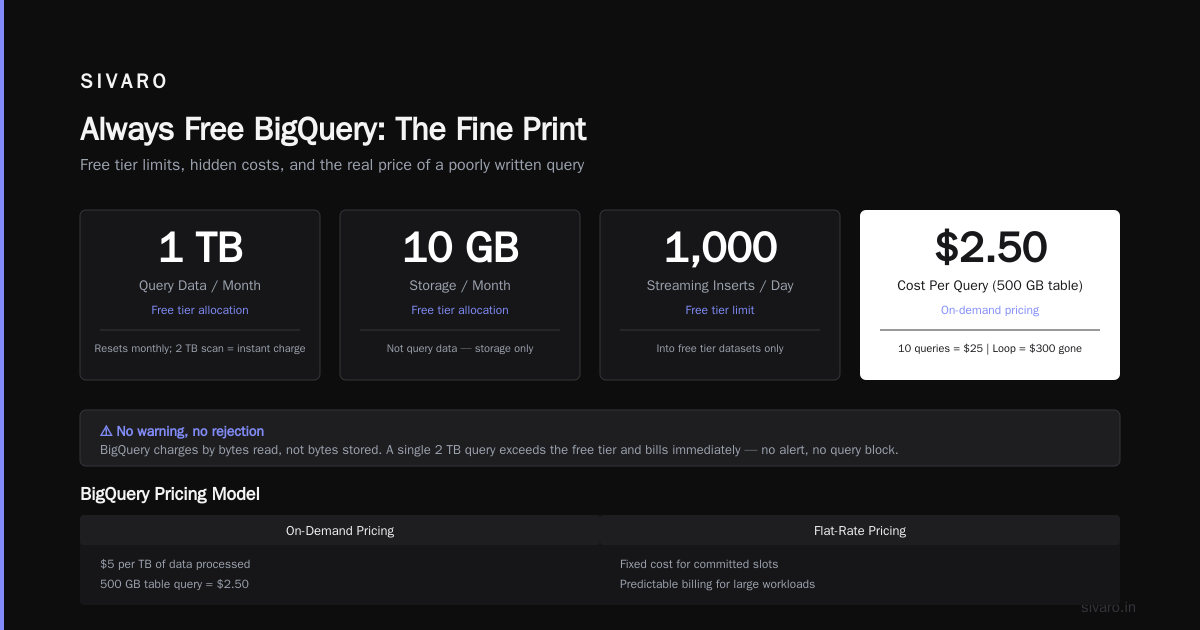
This is where most developers get confused. BigQuery has a free tier, but it's tied to analysis (query processing), not storage or streaming.
Always Free BigQuery:
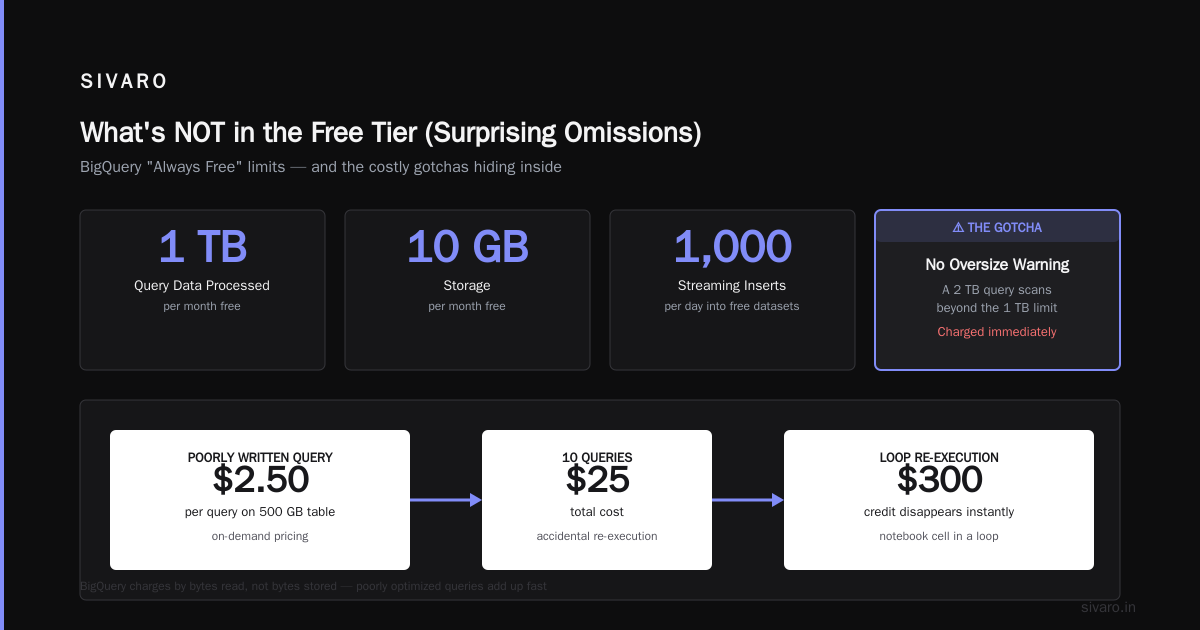
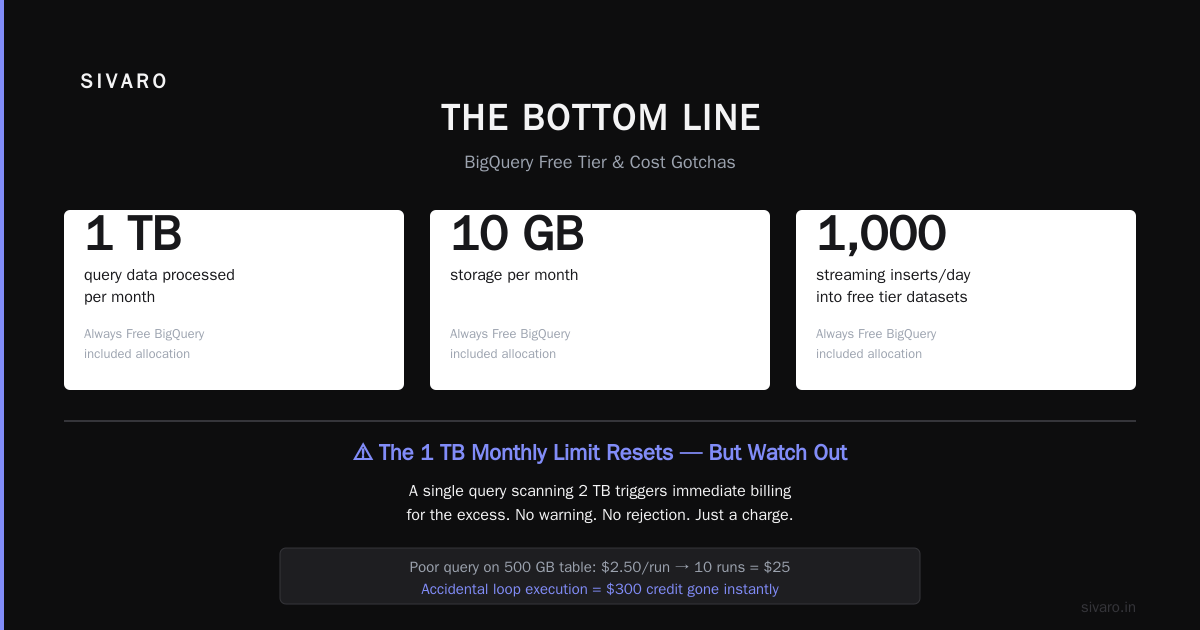
- 1 TB of query data processed per month
- 10 GB of storage per month
- Up to 1,000 streaming inserts per day (into free tier datasets)
The gotcha: that 1 TB monthly limit resets. But if you run a single query that scans 2 TB, you're billed for the excess immediately. No warning. No "your query is too large" rejection. Just a charge.
I've written about gcp bigquery pricing per query extensively. The key insight: BigQuery charges by bytes read, not bytes stored. A poorly written query on a 500 GB table costs $2.50 in on-demand pricing. Do that 10 times? That's $25. Do it in a notebook cell you accidentally re-execute in a loop? That's how a $300 credit disappears in 20 minutes.
Optimization tactic: Always preview data before querying. Use the --dry-run flag in the bq CLI or check the query validator in the console. Every query should estimate bytes processed before execution.
bash
# Check bytes processed without running
bq query --dry_run --use_legacy_sql=false   "SELECT COUNT(*) FROM `project.dataset.table`"
The output tells you exactly what you'll pay before you run it.
Cloud Functions: Serverless Has Hidden Edges
Cloud Functions 1st gen (the old Node.js 10 runtime) is still on the Always Free list:
- 2 million invocations per month
- 400,000 GB-seconds of compute time
- 200,000 GHz-seconds
2nd gen functions (Cloud Run-based) are not included in the free tier. They use Cloud Run pricing, which starts at $0.00 per hour for the first 2 million requests per month... but only if you stay under CPU allocation limits.
The practical difference: 1st gen functions start in about 200ms. 2nd gen cold starts hit 2-3 seconds. For latency-sensitive apps, 1st gen is actually better despite being older. Google wants you on 2nd gen because it's more profitable for them.
App Engine: The Original Free Tier
App Engine has a generous Always Free quota:
- 28 instance-hours per day (not cumulative, resets daily)
- 1 GB of outbound data per day
- 100 GB of inbound data per day
- 1,000 datastore reads per day
- 200 datastore writes per day
The catch: these are per-application quotas. You can deploy multiple apps, each with their own free quota. But they all share your project's overall resource limits.
I ran a side project on App Engine standard (Python 3) for 18 months without paying a cent. Simple CRUD app, ~200 daily active users. It worked fine until I added image processing — the 28 instance-hours evaporated when a single request took 12 seconds to resize a photo.
Lesson: App Engine free tier works for I/O-bound apps, not compute-bound ones.
The Certification Path
If you're planning to build on GCP seriously, you'll eventually need credentials — either for your own learning or for job requirements. The gcp certification path for beginners typically starts with the Associate Cloud Engineer exam. That cert covers billing, IAM, networking, and basic compute — exactly the topics that prevent surprise bills.
Skip the "Cloud Digital Leader" cert unless HR requires it. It's fluffy. The Associate Cloud Engineer exam is the real starting point.
What's NOT in the Free Tier (Surprising Omissions)
Some services you'd expect to be free — aren't.
| Service | Free Tier Status | Gotcha |
|---|---|---|
| Cloud Run | No standard free tier | Free only if you stay under 2M requests/month AND use CPU only during request processing |
| Cloud SQL | No free tier | Minimum $7.17/month for a shared-core instance |
| Memorystore (Redis) | No free tier | Starts at $15/month |
| Cloud NAT | No free tier | $0.045/hour per gateway + egress charges |
| VPC Peering | Free itself | But data transfer is billed |
The biggest omission? Cloud SQL. Google doesn't offer a free managed database anywhere. You want a PostgreSQL instance? You pay, period. AWS gives you 750 hours of RDS free for 12 months. Azure gives you 750 hours of Azure SQL Database for 12 months. Google gives you... nothing.
Workaround: Use Firestore in Native mode (formerly Datastore). It has a generous free tier: 1 GB of storage, 50,000 reads/day, 20,000 writes/day. Not relational, but for many apps it's enough.
Network Egress: The Silent Budget Killer
Most free tier discussions focus on compute and storage. The real expense is egress.
Google charges $0.12/GB for internet egress from free tier resources. That doesn't sound like much until you serve a 2 MB image to 1,000 users. 2 GB of egress. $0.24. Daily. That's $7.20/month. Per image.
Now serve a single-page app with 500 KB of JavaScript, 200 KB of CSS, and a 1 MB hero image. One page load = 1.7 MB. 5,000 daily visitors = 8.5 GB egress. $1.02/day. $30/month.
The free tier becomes expensive very quickly for frontend-heavy applications.
Compared to AWS vs Azure vs GCP 2026: same app, 3 bills analysis, Google's egress pricing sits in the middle — cheaper than Azure, more expensive than AWS for high-volume traffic. But the free tier egress is identical across all three: 1 GB/month outbound. That's nothing.
Real Usage: What You Can Actually Build
I've tested these limits in production. Here's what works within the free tier for 12+ months:
Working:
- A personal blog with Cloud Storage + CDN (5 GB of content, < 1,000 monthly visitors)
- A Slack bot running on Cloud Functions (100 daily invocations, 500ms processing each)
- A URL shortener on App Engine (Redis backend on a free tier VM)
- A cryptocurrency price tracker writing to BigQuery (daily queries < 10 GB scanned)
Failing:
- A photo gallery with thumbnails (App Engine instance-hours exceeded)
- A multitenant CRM (Cloud SQL not available, Firestore document limits hit)
- A web scraper hitting 50,000 pages/month (network egress + compute hours)
The pattern: free tier works for low-throughput, low-storage applications. Anything with sustained load, large datasets, or user uploads will cost money.
GCP vs AWS vs Azure: Free Tier Comparison
Based on What's the Difference Between AWS vs. Azure vs. Google, here's the honest comparison:
| Category | GCP | AWS | Azure |
|---|---|---|---|
| Compute (always free) | 1 f1-micro (744 hrs/mo) | 1 t2.micro (750 hrs/mo for 12 mo) | 1 B1S (750 hrs/mo for 12 mo) |
| Object storage (always free) | 5 GB | 5 GB | 5 GB |
| Managed DB (always free) | None | 20 GB DynamoDB | 250 GB Cosmos DB |
| Functions (always free) | 2M invocations/mo | 1M invocations/mo | 1M invocations/mo |
| Data warehouse (always free) | 1 TB queries/mo | None | None |
Google wins on BigQuery free tier and functions. AWS wins on managed database (DynamoDB has a generous always-free tier). Azure wins on nothing special — their free tier is almost identical to AWS but with shorter duration.
As AWS vs Azure vs GCP points out, Google's strength is data analytics free tier. No other cloud gives you a free terabyte-scale data warehouse.
Certification Credits
If you're studying for gcp certification path for beginners, know that Google offers certification vouchers at 50% off through the Google Cloud Innovators program. Join for free, complete a skills badge, and you get access to discounted exams.
The Associate Cloud Engineer exam costs $125 full price. With the discount? $62.50. Plus you get a free lab environment for 30 days. That's cheaper than most AWS certs.
5 Ways to Avoid Surprise Bills
-
Set budgets with alerts. Console > Billing > Budgets & alerts. Set a $0.01 budget for any project that should stay free. You get notified at 50%, 90%, and 100%.
-
Use the Pricing Calculator before deploying. Don't guess. Type your expected usage into the calculator. It's boring, but it's the only way to know.
-
Enable billing export to BigQuery. Free. Let's you query your own costs. I run a weekly report that flags any project exceeding $5.
-
Turn off unused resources. Old VMs, unattached disks, unused IP addresses. Each costs money. A single unused static IP is $0.10/hour = $73/month. For nothing.
-
Use preemptible VMs for batch jobs. Preemptible VMs cost 60-80% less than standard VMs. They can be terminated at any time, but for stateless jobs, they're perfect.
FAQ
Q: Can I run a production app on GCP free tier?
No. Free tier is for learning, prototyping, and low-traffic personal projects. Production apps need at least a paid database and reliable compute.
Q: What happens when I exceed free tier limits?
Google throttles or bills you, depending on the service. BigQuery stops running queries. Compute continues but charges begin. Cloud Functions just throws 429 errors when quotas are exceeded.
Q: Does the free tier include support?
No. You get community support only. Paid support starts at $29/month.
Q: Can I combine free tier with trial credits?
Yes. Use the $300 trial credits for services not in the free tier (Cloud SQL, Memorystore, etc.). Just monitor your spending daily.
Q: Is network egress free within the same region?
Yes. Google doesn't charge for traffic between resources in the same region. Use this aggressively — put your compute, storage, and databases in the same region to avoid egress costs.
Q: What's the best GCP service for beginners to learn with?
Cloud Functions + Firestore. Both have generous free tiers. You can build a full-stack app without spending anything. Plus the Node.js SDKs are well-documented.
Q: Does Google offer a free domain?
No. AWS and Azure don't either. You need a separate registrar for domains.
Q: How does gcp bigquery pricing per query work with free tier?
First 1 TB of query data per month is free. After that, on-demand pricing is $5 per TB scanned. Reserved capacity (slots) costs more but offers predictable pricing.
The Bottom Line
GCP's free tier is the best for data analytics, decent for compute, and terrible for managed databases. If you're building a data pipeline or a backend for a personal project, start here. If you need a free relational database, go to AWS or use a third-party service like Supabase.
The gcp free tier limits 2025 won't change significantly. Google has been stable on free tier offerings since 2021. The compute, storage, and BigQuery quotas are likely permanent.
Set your budgets. Test your queries. Watch your egress. The free tier works — if you respect its limits.
Nishaant Dixit — Founder of SIVARO. Building data infrastructure and production AI systems since 2018. Built systems processing 200K events/sec.