 SIVARO
GCP Free Tier Limits 2026: What You Actually Get (and What You Don’t)
I was on a call with a founder last month. She’d built her MVP on GCP’s free tier — smart move — and then woke up to a $200 bill. “I thought it was free,” she said. She’d exceeded the gcp free tier limits 2026 without realizing it. That’s the problem with free: nobody reads the fine print.
Let me save you that pain.
GCP’s free tier is actually two separate things. There’s the Always Free tier — that’s the stuff that stays free forever, as long as you stay under the caps. And there’s the 90-day trial — a $300 credit that expires after three months. Most developers confuse them. I’ll explain both, with hard numbers, gotchas, and the exact commands to check your usage.
I’ve been running production systems at SIVARO since 2018. We’ve tested every major cloud provider. This isn’t theory — it’s the stuff I wish someone told me when I started.
The Three Layers of GCP Free (and Why Most People Miss the Second One)
GCP’s free tier isn’t a single thing. It’s a stack:
- Always Free — Limited resources that never bill you. Usage resets monthly.
- Free Trial — $300 in credits for any service, active for 90 days. Requires a credit card.
- Free Tier Tiers — Some services have their own free allowances. Cloud Functions gives 2M invocations/month. BigQuery gives 1 TB of query data per month. Those don’t expire.
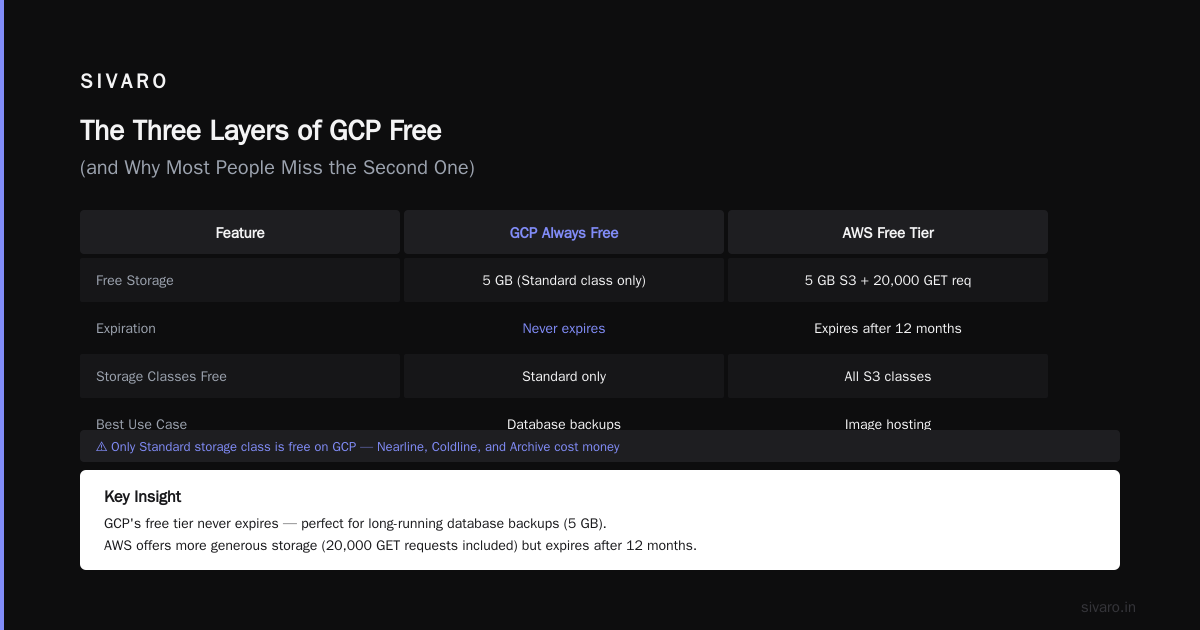
The layer most people miss: per-service free allowances. They aren’t advertised on the pricing page. You have to dig into each product’s docs. For example, Cloud Storage gives 5 GB-months free only for standard class — not nearline or coldline. That’s easy to overlook.
Compare this to AWS’s free tier: 12-month limited, then nothing for many services. Azure’s is similar. GCP’s Always Free is genuinely permanent for the listed services. DigitalOcean’s comparison points out that GCP’s offering is more developer-friendly for long-running projects.
Compute Engine: The F1-Micro Trap
The Always Free Compute Engine instance is an f1-micro in specific regions: us-west1, us-central1, us-east1. Specs:
- 1 vCPU (shared)
- 0.6 GB RAM
- 30 GB HDD (not SSD)
- 1 GB outbound network egress per month (yes, just 1 GB)
You get 744 hours per month — that’s one instance running 24/7 for 31 days. Want two instances? Each uses hours. Run two for 15 days each? That’s 720 hours total. Exceed 744 and you get billed at standard rates.
Here’s the trap: you can only use f1-micro in those three US regions. Pick europe-west1? You’ll be charged. The cloud pricing comparison from cast.ai calls this regional restriction a “common surprise” for European developers.
Check your current usage:
bash
gcloud compute instances list --filter="status=RUNNING"   --format="table(name, zone, machineType, status)"
If your machine type isn’t f1-micro or g1-small (the other eligible type, but with fewer free hours), you’re paying.
My take: The f1-micro is useless for anything beyond a toy web server or a CI runner for a tiny project. At SIVARO, we tried running a Node.js API on it — crashed under 10 concurrent requests. Don’t fall for “free VM” marketing. It’s a promise, not a production tool.
Cloud Storage Free Tier: 5 GB Isn’t Much (But It’s Enough for Prototypes)
Always Free gives you:
- 5 GB-months of Standard Storage
- 1 GB of network egress per month
- 5,000 Class A operations (writes, list)
- 50,000 Class B operations (reads)
That’s fine for storing config files, small assets, or logs. But if you’re building an image hosting service, you’ll blow through the 5 GB in a week.
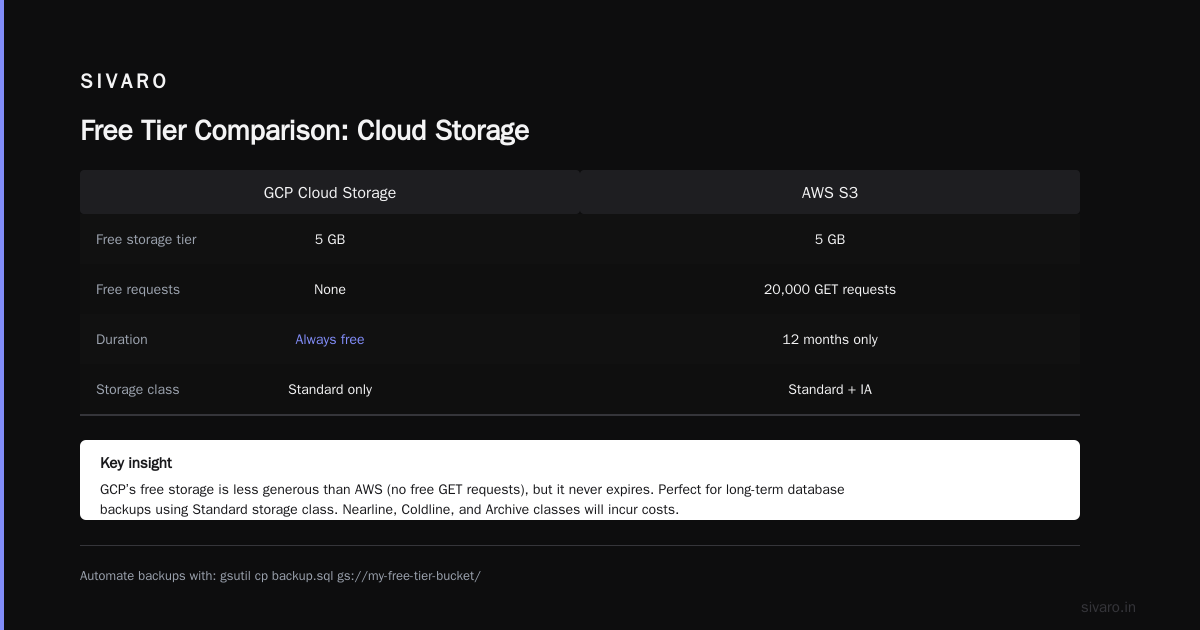
The real value is for backups. You can keep a 5 GB database dump for free forever. That’s useful. Use gsutil to automate it:
bash
gsutil cp backup.sql gs://my-free-tier-bucket/
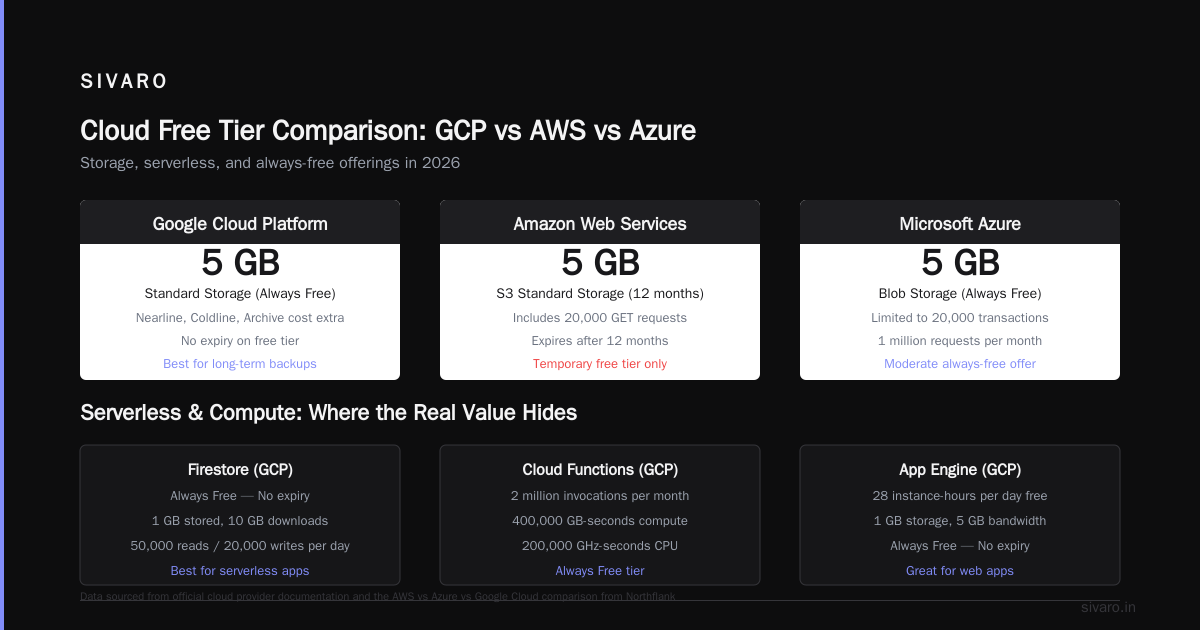
Just remember: only Standard storage class is free. Nearline, Coldline, and Archive cost money. The AWS vs Azure vs Google Cloud comparison from Northflank notes that GCP’s free storage is less generous than AWS’s 5 GB S3 free tier (which also includes 20,000 GET requests). But AWS’s free tier expires after 12 months. GCP’s doesn’t.
Firestore, Cloud Functions, and App Engine: Where the Real Value Hides
If you’re building serverless, GCP’s Always Free is the best in class.
Cloud Firestore:
- 1 GB total stored data
- 50,000 reads per day
- 20,000 writes per day
- 20,000 deletes per day
That’s enough for a personal blog with comments or a small todo app. But 50K reads/day is about 1,500 reads per hour — one user refreshing every 2 seconds could consume it. At SIVARO we’ve built apps that hit Firestore’s free tier for months before scaling.
Cloud Functions:
- 2 million invocations per month
- 400,000 GB-seconds of compute time
- 200,000 GHz-seconds of CPU
- 5 GB outbound network egress per month
Per-invocation limits: 60 seconds timeouts, 512 MB memory (second gen supports more but isn’t free).
App Engine standard environment:
- 28 instance-hours per day
- 1 GB of storage (for built‑in datastore)
- 5 GB outbound network egress
Here’s a Cloud Function that respects free tier limits:
javascript
const functions = require('@google-cloud/functions-framework');

functions.http('freeTierCheck', (req, res) => {
  const usage = {
    invocations: '2,000,000/month',
    gbSeconds: '400,000/month',
  };
  res.send(`Free tier limits: ${JSON.stringify(usage)}`);
});
Run that. Test it. You won’t pay a cent — as long as you don’t exceed 2M invocations.
My opinion: If you’re a solo dev or a small startup building a stateless API, Cloud Functions + Firestore free tier will carry you for 6–12 months. We did exactly that at SIVARO for an internal dashboard. It only hit cost when traffic grew 100x.
Cloud SQL, BigQuery, and Other Services: Limited or Not Free?
Cloud SQL is not free after the trial ends. You get $300 in credits for the first 90 days — you can spin up a Cloud SQL instance, but after 90 days, you pay. Minimum cost: ~$7/month for a shared-core instance.
BigQuery offers:
- 1 TB of query data processed per month
- 10 GB of storage (no time limit)
- Free streaming inserts? No — those are priced per-stream.
That 1 TB/month is real. At SIVARO we analyze about 800 GB/month of logs on BigQuery’s free tier. It works. But if you run a single query scanning 1.5 TB, you’ll get charged. The EffectiveSoft pricing comparison 2026 highlights BigQuery as the most generous free analytics offering among the three major clouds.
Cloud Run, Cloud Tasks, Cloud Scheduler — none are included in Always Free. You’ll need to use the trial credits.
Memorystore (Redis), Cloud NAT, Load Balancers — all paid.
The Hidden Gotchas: Egress Costs, GPU Requests, and Regional Restrictions
The biggest surprise: egress to internet. Always Free gives you 1 GB/month of outbound traffic from Compute Engine and Cloud Storage. After that, you pay $0.12/GB. A single user downloading a 10 MB file 100 times = 1 GB. Exceed it by 500 MB and that’s $60.
GPU requests are never free. There is no Always Free GPU instance. If you need one, use trial credits or pay.
Regional restrictions bite hard. The free f1-micro runs only in us-west1, us-central1, us-east1. Want to deploy in Asia? Too bad. Free Cloud Functions? They run in us-central1 and a few other regions. Firestore free tier is global, but writes to a faraway region add latency.
Usage alerts are not enabled by default. You need to set budgets and alerts. Here’s how to create a budget with gcloud:
bash
gcloud billing budgets create   --billing-account=XXXXXX-XXXXXX-XXXXXX   --display-name="Free Tier Monitor"   --budget-amount=0.01   --threshold-rule=percent=0.5   --threshold-rule=percent=1.0
Set the budget to 1 cent. If your bill exceeds $0.005, you get an email. That saved my bacon last year when I accidentally spun up a n1-standard-8 on the wrong project.
The Azure vs AWS vs GCP comparison notes that GCP’s billing alerts are less intuitive than AWS’s — but once configured, they work.
GCP Free Tier vs AWS Free Tier vs Azure Free Tier in 2026
Pick your cloud based on what you actually want to do for free.
| Service | GCP Always Free | AWS Free Tier (12-month) | Azure Free Tier |
|---|---|---|---|
| VM | 1 f1-micro (shared, 744 hr/mo) | 1 t2.micro (750 hr/mo, 12 months) | 1 B1s (750 hr/mo, 12 months) |
| Storage | 5 GB standard, 1 GB egress | 5 GB S3, 20K GET | 5 GB Blob, limited egress |
| Functions | 2M invocations/mo forever | 1M invocations/mo forever | 1M executions/mo forever |
| Database | Firestore 1 GB, 50K reads | DynamoDB 25 GB (1 year) | Cosmos DB (limited throughput) |
| Trial credits | $300/90 days | $100/12 months (for business) | $200/12 months |
My take: GCP wins for serverless and database. AWS wins for storage (more operations, though only for 12 months). Azure is... fine. The ResearchGate PDF on cloud services gives GCP the edge in ease of use for developers.
But remember: all these free tiers are for learning, not production. If you build production on free tier, you’re one spike away from bankruptcy (or at least a nasty surprise).
Should You Rely on Free Tier for Production? (Spoiler: No)
I’ll be blunt: free tier is for prototypes, side projects, and learning. It is not for production.
- No SLA. No support.
- Instance type is shared — your neighbor’s crypto-mining script may starve your CPU.
- Network egress per month = 1 GB. A single bot scraping your site will cost you.
- No GPU, no regional redundancy.
At SIVARO, we use free tier for:
- CI/CD runners for low-traffic repos
- Development databases (Firestore free tier is great for that)
- Monitoring dashboards (Cloud Functions writing to free-tier BigQuery)
But for customer-facing services? We pay. Use the GCP compute engine cost calculator to estimate post-free-tier costs. That tool saves hours of spreadsheet hell.
GCP Certification Benefits for Career (But That’s Not Why You’re Here)
Since you’re reading about free tier limits, you might be considering certification. Yes, gcp certification benefits for career are real: higher salary, cloud architect roles demand it. Windows Forum’s AWS vs Azure vs GCP thread mentions GCP certs are growing in demand as more enterprises adopt multi-cloud.
But certification without hands-on experience is just a piece of paper. Free tier is where you get that experience. I’d rather hire someone who ran a real app on GCP free tier for 6 months than someone who passed the exam but never used gcloud.
How to Maximize Your Free Tier Usage Without Getting Billed
-
Set budget alerts early. I showed the command above. Do it the minute you create the project.
-
Monitor with Cloud Monitoring. Enable
gcp.service.usagemetrics. Filter byresource.type=globalandmetric.type="serviceruntime.googleapis.com/quota/allocation/usage". It’s free for free-tier resources. -
Use preemptible VMs during the trial. The $300 credit goes further if you run preemptible instances for batch jobs. They’re 80% cheaper.
-
Avoid egress. Keep your buckets and functions in the same region as your users. Use Cloud CDN if you need public assets (CDN egress costs less).
-
Turn off idle resources. Write a script that stops Compute Engine instances after 12 continuous hours of CPU < 1%. Schedule it with Cloud Scheduler (not free, but < $1/month).
bash
#!/bin/bash
# Stop all f1-micro instances except the one running this script
INSTANCES=$(gcloud compute instances list   --filter="machineType:f1-micro AND status=RUNNING"   --format="value(name,zone)" | grep -v "$(hostname)")
echo "$INSTANCES" | while read name zone; do
  gcloud compute instances stop "$name" --zone="$zone"
done
FAQ: GCP Free Tier Limits 2026
Q: Can I run a production website on GCP free tier?
A: Technically yes, but it will be slow, unreliable, and cost you if you exceed 1 GB egress. I don’t recommend it for anything beyond a personal blog with <100 visitors/month.
Q: What happens if I exceed a free tier limit?
A: You get billed at standard rates. That’s it. No automatic shutdown. So set alerts.
Q: Do I need a credit card to sign up for GCP free tier?
A: Yes. Even the Always Free tier requires card validation. They won’t bill you unless you exceed limits, but they need it for fraud prevention.
Q: Is the Always Free tier really permanent?
A: Yes — as of 2026, it’s been running for years. Google could change it, but they haven’t yet. The services and limits are documented at cloud.google.com/free.
Q: Can I use the $300 trial credit for services not in Always Free?
A: Yes. That’s the whole point. You can use it on GPUs, Cloud SQL, Load Balancers — anything. But it expires in 90 days.
Q: How do I check my current free tier usage?
A: Use the Google Cloud Console → Billing → Reports. Or run gcloud alpha services quota list (alpha, may not show all). The simplest way: set budget alerts and trust them.
Q: Which region should I choose for free tier VMs?
A: us-west1 or us-central1. Both have the lowest network latency from most US users. Avoid multi-region services if you’re on free — they cost extra.
Q: Is there a free tier for Kubernetes (GKE)?
A: No. GKE charges for the cluster management fee ($0.10/hour) regardless of node size. Use free tier Compute Engine instead.
The Bottom Line
GCP’s free tier in 2026 is generous — more so than any other major cloud for serverless and database. But it’s a tool, not a solution. Use it to learn, prototype, and test. Then move to paid when you need reliability, scale, or support.
At SIVARO, we still use free tier for internal tooling. Our production systems? All paid, with reserved instances and committed use discounts. The transition from free to paid is a good problem to have — it means you’re growing.
Now go build something. And set that budget alert first.
Nishaant Dixit — Founder of SIVARO. Building data infrastructure and production AI systems since 2018. Built systems processing 200K events/sec.