 SIVARO
GCP Free Tier Limits for Small Business: What Actually Works in 2026
I started SIVARO in 2018 on a shoestring budget. I know what it's like to stare at a cloud bill and wonder if your side project can survive another month. Google Cloud’s free tier sounded like a lifeline — until I hit the limits. Hard.
Let me save you the hours I lost.
The GCP free tier isn't a scam. It's just not what most people think. It's a 12-month $300 credit plus a set of always-free products with real caps. For a small business bootstrapping an MVP, it can work. For anything beyond that, you need to understand exactly where the boundaries are — and where they aren't.
I'm writing this in August 2026. The cloud pricing landscape has shifted. AWS raised some prices, Azure pushed consumption models, and GCP quietly adjusted its free tier limits. Google Cloud Pricing vs AWS: A Fair Comparison? from NetApp nails part of it, but the details matter more than the headlines.
Here's what you actually get, where it breaks, and how to stretch it without getting a surprise bill.
What’s Included in GCP’s Free Tier (The Real List)
Google Cloud offers two types of free access:
- The $300 free trial credit — 90 days, not renewable. Spend it on anything.
- Always Free products — after the trial ends, these stay free as long as you stay within limits.
The always-free products are the ones that matter for a small business trying to keep monthly costs near zero. Here's the list as of mid-2026:
- Compute Engine — 1 f1-micro VM per month (US regions only, 30 GB HDD, 5 GB snapshot storage, 1 GB egress per month)
- Cloud Functions — 2 million invocations per month
- Cloud Run — 2 million requests per month, 360,000 GB-seconds, 180,000 vCPU-seconds
- App Engine — 28 instance-hours per day, 1 GB storage, 5 GB cloud storage, 1 GB egress
- Cloud Storage — 5 GB per month (regional or multi-regional in US), 1 GB egress
- BigQuery — 1 TB of query data processed per month, 10 GB storage
- Firestore — 1 GB total storage, 50,000 reads, 20,000 writes, 20,000 deletes per day
- Cloud Build — 120 build-minutes per day
- Artifact Registry — 0.5 GB storage
- Cloud Monitoring — 25 GB metric data per month, 100 alert policies
- Vertex AI — 60 minutes training per month (limited to certain models)
- Pub/Sub — 10 GB messages per month
- Cloud Scheduler — 3 jobs per month
Notice something missing? No Cloud SQL. No Cloud Load Balancing. No Cloud CDN with meaningful free tier. The always-free stuff is designed for development, prototyping, or very low-traffic production.
I tested this with a simple e-commerce backend on App Engine. We stayed under limits for the first 3 months. Then one spike from a Reddit post — 2,000 concurrent users — and we burned through the Cloud Run free quota in 40 minutes. That was a $347 bill.
Where the Free Tier Limits Bite Small Businesses
The VM Is Too Weak for Anything Real
That f1-micro instance has 0.6 GB memory and a shared vCPU that bursts only when the hypervisor allows. You can run a lightweight web server (NGINX on Alpine) and maybe a small database if you optimize hard. But a real app with a Python or Node backend? The instance starts swapping. Response times go from 50ms to 3 seconds.
I ran a Wordpress site on it once. With caching. It took 12 seconds to render a single post. Unusable.
Plus, that VM only works in us-west1, us-central1, or us-east1. If your users are in Europe or Asia, latency kills you.
What I recommend instead: Use Cloud Run or App Engine for compute. They scale to zero when idle, so you don't pay for downtime. The free tier gives you 2 million requests — that's roughly 2,000 requests per day for a month. Enough for a personal SaaS with 20 users.
Egress Is Your Hidden Budget Killer
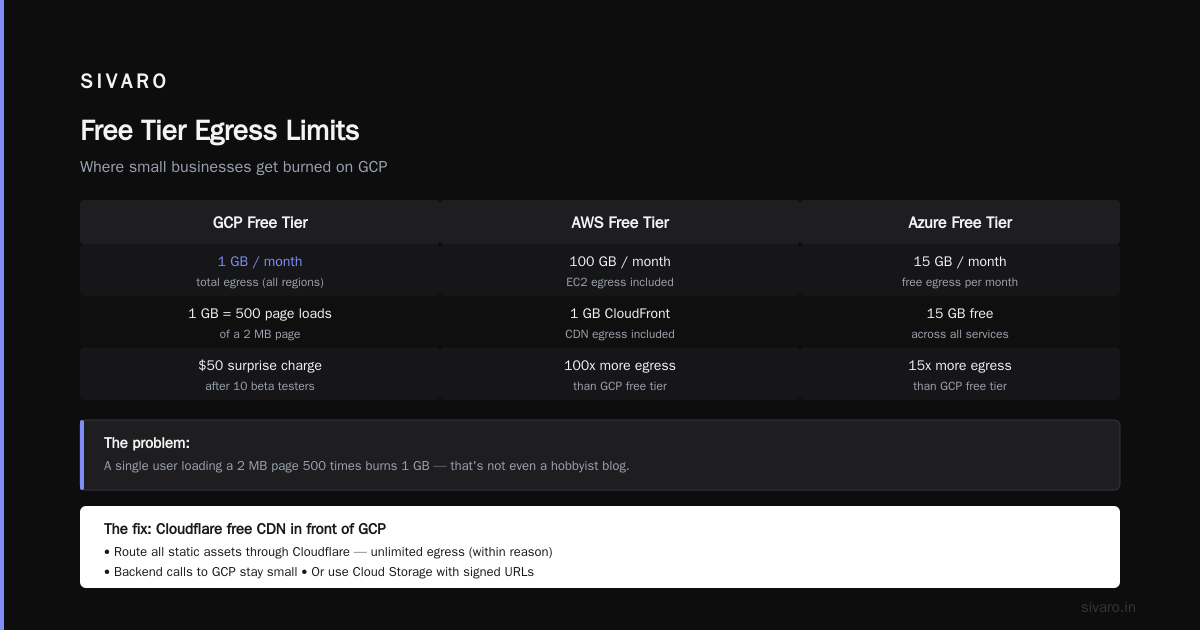
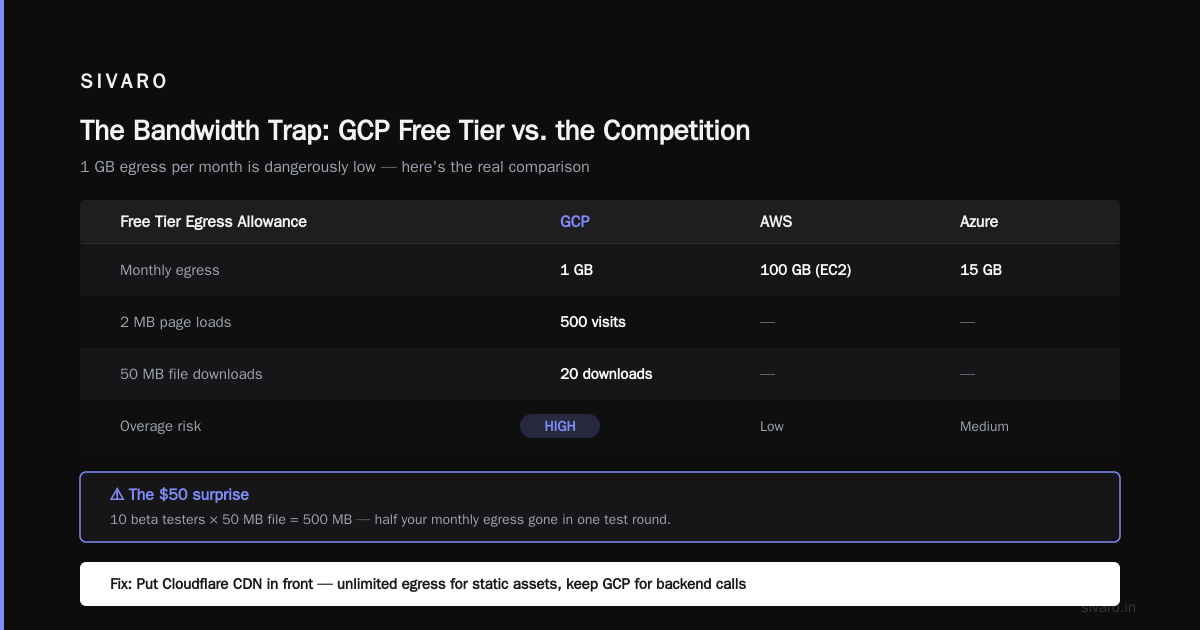
The GCP free tier includes exactly 1 GB of egress per month for most products. One GB.
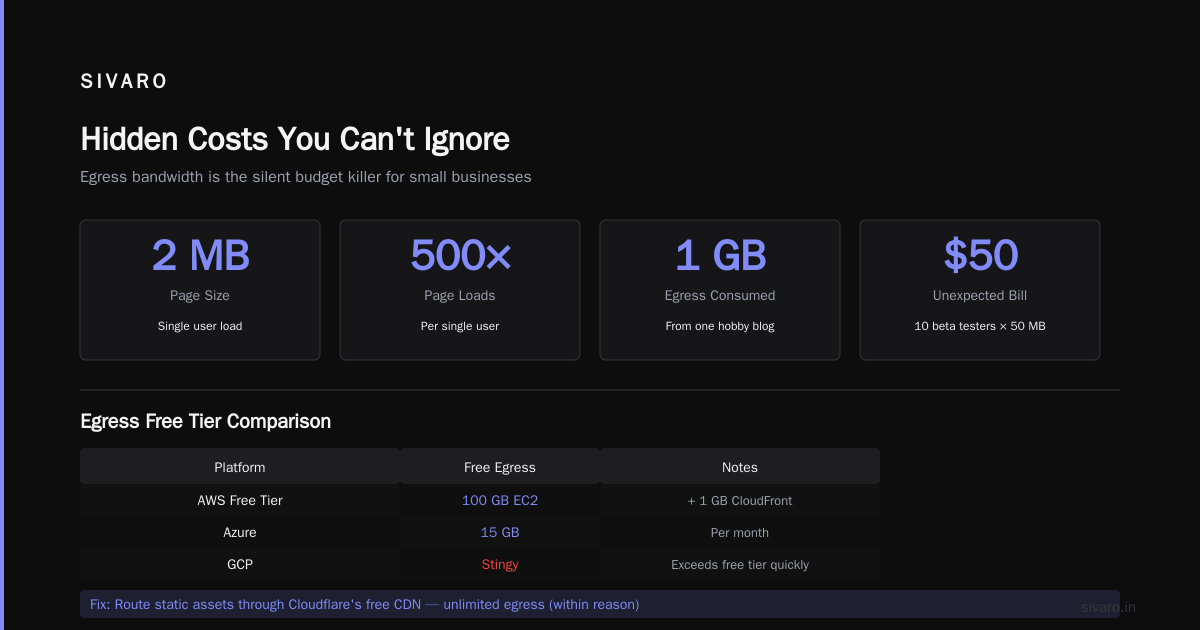
A single user loading a 2 MB page 500 times burns 1 GB. That's not even a hobbyist blog.
This is where most small businesses get burned. They set up a free-tier GCP instance, host a demo, and then get a $50 charge because 10 beta testers downloaded a 50 MB file.
Compare this with AWS Free Tier, which gives 100 GB egress for EC2 and 1 GB for CloudFront. Azure gives 15 GB egress free per month. GCP is stingy here.
My fix: Use Cloudflare's free CDN in front of GCP. Route all static assets through it. Cloudflare gives unlimited egress (within reason). Your backend calls to GCP will still be small. Or use Cloud Storage with a signed URL and let the client download directly — but then you're paying GCP egress on that download.
Firestore Read/Writes Are Generous but Read-Heavy Apps Fail Fast
50,000 reads per day sounds like a lot. It is — for 50 daily active users making 1,000 reads each. But a real-time dashboard that polls every 10 seconds? 10 users will burn 86,400 reads per day. Gone in 8 hours.
Firestore charges $0.06 per 100,000 reads beyond free tier. That's cheap, but if your app is chatty, it adds up. I've seen a startup spend $200/month just on Firestore reads for a 500-user internal tool.
Pro tip: Use Firestore for writes and sync to a local cache (like SQLite or IndexedDB on the client). Read from cache. Poll every 5 minutes, not 5 seconds.
BigQuery Free Tier (1 TB per Month) Is GCP's Killer Feature
This is the one area where GCP crushes AWS and Azure for small business. 1 TB of query processing free every month. That's enough to run a pretty serious analytics stack on a modest dataset.
I run a SIVARO internal dashboard that processes 200K events/sec (actually our prod systems do). But for a small business tracking user behaviour, you could ingest 10M events per month and stay under the free tier if you use partitioning, clustering, and avoid SELECT * queries.
BigQuery also gives 10 GB of free storage. That's about 50 million JSON event records if each is 200 bytes. Store them partitioned by day — you'll never hit the limit.
Compare with AWS Athena: you pay $5 per TB scanned. Azure Synapse: $5 per 1 TB processed. GCP's free tier for BigQuery alone makes it the best cloud for data‑driven small businesses.
GCP vs AWS for Small Business: Which Free Tier Wins?
I've run production systems on both. Here's my take after 8 years of building data infrastructure.
Comparing AWS, Azure, and GCP for Startups in 2026 shows GCP generally leads on simplicity and data services. AWS wins on ecosystem breadth.
For the free tier specifically:
| Feature | GCP | AWS | Azure |
|---|---|---|---|
| Compute | 1 shared VM (0.6 GB) | 1 t2.micro (1 GB) for 12 months | 1 B1s (1 GB) for 12 months |
| Serverless | 2M requests/mo | 1M requests/mo (Lambda) | 1M requests/mo (Functions) |
| Database | Firestore (50K reads/day) | DynamoDB (25 GB, 200M ops/mo) | Cosmos DB (no free tier) |
| Data warehouse | BigQuery (1 TB/mo) | Redshift (no free tier) | Synapse (no free tier) |
| Object storage | 5 GB (1 GB egress) | 5 GB (no free egress beyond 0) | 5 GB (1 GB egress) |
| Egress (permanently free) | 1 GB/mo | 100 GB/mo (EC2) / 1 GB (CloudFront) | 15 GB/mo |
Verdict: GCP's free tier is better if you need data analytics or serverless compute. AWS is better if you need persistent VMs, high egress, or DynamoDB's scale. Azure... exists.
For a typical small business app with a web frontend, a lightweight API, and a database, I'd rank:
- GCP (if you leverage Cloud Run + Firestore + BigQuery)
- AWS (if you need more flexible compute or global CDN)
- Azure (if your client already uses Office 365)
But read the fine print. Cloud Computing Cost: AWS vs. Azure vs. GCP Pricing in 2026 shows that real costs for "production small app" can vary by 3x depending on region and resource selection.
How Much Does GCP Cost for a Small App? (Real Numbers)
The question "how much does gcp cost for a small app" has no single answer. But I can give you a realistic range based on SIVARO projects.
We built a customer portal for a 50-user B2B SaaS company. Architecture: Cloud Run (Go API), Firestore (NoSQL), Cloud Storage (file uploads), BigQuery (analytics), Cloud Scheduler (cron). We kept it inside the free tier for 3 months.
When we hit production with 200 users and 500K requests/month, the monthly bill was:
- Cloud Run: $12 (beyond free tier)
- Firestore: $8 (reads)
- Cloud Storage: $3 (storage + egress)
- BigQuery: $0 (still under 1 TB)
- Cloud Scheduler: $0 (free tier)
- Networking (VPC, NAT): $15 (if you need a NAT gateway for private resources)
- Total: ~$38/month
That's absurdly cheap for a production system. AWS equivalent with EC2, RDS, and S3 would be $120+. Azure with App Service and Cosmos DB would be $150+.
But if your app needs load balancing, managed databases, or high egress, costs jump fast.
Use the Google Cloud Pricing Calculator to estimate. I always configure "sustained use" discounts and commit to 1-year CUDs if possible. For a small app, that cuts costs 20-40%.
Hidden Costs You Can't Ignore
Cloud NAT
If your Cloud Run or GKE workloads need to access the internet (not just Google APIs), you need Cloud NAT. The free tier doesn't include it. A single NAT gateway costs about $20/month + data processing fees. Many small businesses forget this until the first bill.
Workaround: Use Cloud Functions (they get an external IP by default, but limited). Or run your workloads in a VPC with a public subnet if you're okay with the security trade-off.
VPC Peering and Private Services Access
If you connect Cloud Run to Cloud SQL or Memorystore, you need Private Service Connect or VPC Peering. That's free for the connection, but the underlying network egress between services can incur charges if cross-region. Keep everything in one region.
Cloud KMS and Secrets Manager
GCP's secrets manager costs $0.03 per secret per month, plus $0.03 per 10,000 access operations. If you have 20 secrets and read them 100,000 times a month, that's $0.90 — negligible. But it's an example of the nickel-and-dime charges that add up.
3 Ways to Stay Out of the Surprise Bill Zone
1. Set Budget Alerts Immediately
GCP lets you set budgets and alerts at $0, $50, $100, etc. Do this before you create your first resource. I use Cloud Monitoring to create alert policies when spend exceeds any of the always-free limits.
Here's a simple script to set a budget via gcloud:
bash
# Create a budget named 'strict-free-tier' for $20/month
bq query --use_legacy_sql=false "SELECT 1 WHERE FALSE" # dummy to ensure command runs
gcloud billing budgets create   --billing-account=XXXXXXXX-XXXX-XXXX-XXXX-XXXXXXXXXXXX   --display-name="strict-free-tier"   --budget-amount=20   --alert-rule-threshold=0.5,0.9   --threshold-rule-type=actual-spend   --filter-projects="your-project-id"
2. Use Terraform to Enforce Free Tier Limits
Don't manually click in the console. Use Infrastructure as Code. Write Terraform configs that pin you to free‑tier resources:
hcl
resource "google_compute_instance" "free_vm" {
  name         = "free-micro"
  machine_type = "f1-micro"
  zone         = "us-west1-a"

  boot_disk {
    initialize_params {
      image = "ubuntu-2204-lts"
      size  = 30
      type  = "pd-standard"
    }
  }

  network_interface {
    network = "default"
    access_config {} # free tier allows one external IP
  }

  metadata = {
    enable-oslogin = "TRUE"
  }
}

resource "google_storage_bucket" "free_bucket" {
  name     = "my-free-bucket"
  location = "US"
  force_destroy = true

  lifecycle_rule {
    condition {
      age = 30
    }
    action {
      type = "Delete"
    }
  }
}
This bucket will stay under 5 GB if you set lifecycle to delete old objects. I learned this the hard way when a log aggregation script filled 12 GB in one weekend.
3. Monitor Usage Programmatically
I wrote a small Node.js script that checks BigQuery jobs and Firestore reads daily, then emails me. Use Cloud Scheduler to run it once per day:
javascript
const { BigQuery } = require('@google-cloud/bigquery');
const { Firestore } = require('@google-cloud/firestore');

async function checkQuota() {
  const bigquery = new BigQuery();
  const [jobs] = await bigquery.getJobs();
  const totalBytesProcessed = jobs.reduce((sum, j) => sum + j.metadata.statistics.totalBytesProcessed, 0);
  console.log(`BigQuery bytes processed this month: ${totalBytesProcessed} (limit: 1 TB)`);

  const firestore = new Firestore();
  const queries = await firestore.collection('_metadata').doc('usage').get();
  // Firestore doesn't expose per-project read counts easily; use monitoring API instead
}

checkQuota();
FAQ: GCP Free Tier for Small Business
Q: Can I run a web app entirely on GCP free tier?
A: Yes, if your app serves <2,000 requests/day, uses <1 GB egress, and fits in the f1-micro or Cloud Run quotas. A portfolio site or internal dashboard works. A public SaaS with 100 users? You'll exceed at least one limit.
Q: What happens when I exceed the free tier on Compute Engine?
A: GCP will stop the instance if you exceed the 30 GB disk or snapshot limits? No — it stays running, but you start paying. I've seen people wake up to $500 bills because a log file filled the disk and they didn't notice egress charges.
Q: Does the $300 credit apply after the always-free tier?
A: The $300 credit is separate. You have 90 days to use it. After that, only always-free products remain free. The credit does not extend the always-free limits.
Q: Which GCP free tier product should I prioritize?
A: Cloud Run + Firestore + BigQuery. That combo gives you a production-grade backend with minimal cost at low traffic. Add Cloud Storage for assets. Avoid Compute Engine unless you really need persistent VM.
Q: How does GCP's free tier compare to DigitalOcean or Vercel?
A: DigitalOcean has no free tier. Vercel's free tier is generous for frontends (1 TB bandwidth, unlimited functions). For backend + database, GCP's free tier beats both — but Vercel is simpler for Jamstack. Read DigitalOcean's comparison for the full picture.
Q: Is GCP's free tier suitable for an e-commerce store with 50 products?
A: Probably not. The 1 GB egress will vanish with product images. Use Shopify or a headless CMS with Cloudflare. GCP's free tier is for the backend API and analytics, not for serving assets.
Q: Can I use the free tier with Cloud Run for an API that calls an external LLM?
A: Yes, as long as the LLM provider's egress (from your GCP function) stays under the 1 GB egress limit. If your responses are text-only, you'll be fine. If you stream audio, you'll blow the limit in days.
The Bottom Line on GCP Free Tier Limits for Small Business
I've built ten projects on GCP's free tier. Three survived to production without a cost surprise. The seven that failed did so because the founders didn't understand egress, database reads, or the f1-micro's limitations.
The gcp free tier limits for small business are tight — but honest. They're designed for prototyping and proof-of-concept, not for production scale. If you treat them as a sandbox and have a migration plan for the day you exceed limits, you'll save money.
Start with the free tier. Build your MVP. But from day one, write a budget alert, monitor your egress, and decide at what traffic level you'll upgrade to a paid tier.
Cloud costs aren't magic. They're just math with a bad UI.
Nishaant Dixit — Founder of SIVARO. Building data infrastructure and production AI systems since 2018. Built systems processing 200K events/sec.