 SIVARO
GCP Kubernetes Cost Management Tips: 2026 Playbook
You just got your GCP bill. It’s higher than last month. Again.
I’ve been there. At SIVARO we run production AI systems on GKE — think real-time inference pipelines, training workloads, and streaming data infrastructure. In 2024, our Kubernetes spend was eating 60% of the cloud budget. I had to fix it. Fast.
This guide is what I learned. Not theory. What actually moved the needle.
We’ll cover gcp kubernetes cost management tips that work in 2026: right-sizing, spot VMs, committed use discounts, network egress traps, and the tools you’re probably ignoring. I’ll show you code, real dollar numbers, and the mistakes I made.
If you run GKE and care about your monthly Cloud Billing report, read on.
The Real Reason Your GKE Bill Is Out of Control
Most people blame instance types. They’re wrong.
The biggest leak is overprovisioning. Teams spin up node pools with headroom “just in case” — then never touch them again. We did that. Our staging cluster had 3 n2-highmem-64 nodes idling 90% of the time. That’s ~$2,400/month for nothing.
GKE makes it easy to scale nodes. But it doesn’t force you to rightsize. You need to audit your node utilization weekly.
Start with a simple command:
bash
kubectl top nodes
Look at average CPU and memory over 7 days. If a node sits below 40% utilization for more than a week, you’re burning cash.
Better: use GKE’s built-in node auto-provisioning with a budget cap. We tested a setup that automatically adjusts node types based on pod resource requests. Saved us 22% in the first month.
But here’s the catch — auto-provisioning works best when you also enforce pod resource limits. Without limits, it overprovisions again. More on that later.
Stop Overprovisioning: Right-Sizing Node Pools
You have two levers: node type and node count. Both matter, but node type is easier to get wrong.
At first I thought bigger nodes were cheaper per CPU core. Turns out, the GCP pricing model rewards using the right-sized machine family, not just the biggest one. For example, n2d instances are 15% cheaper than n2 standard for compute-bound workloads, but only if your pods are CPU-heavy. If you’re memory-bound, go for n2-highmem.
We built a simple script that compares pod resource requests against node capacity and recommends a new machine series. Here’s a snippet:
python
# Pseudo-code for node pool right-sizing
import google.cloud.monitoring_v3 as monitoring

def recommend_node_pool(project_id, cluster_name, namespace):
    # Fetch pod resource usage over 30 days
    # Compare to current node pool configuration
    if avg_cpu_util < 50 and avg_memory_util < 60:
        return "downsize to n2d-standard-4 or spot"
    elif avg_cpu_util > 80 and avg_memory_util > 75:
        return "split workload across two node pools"
    else:
        return "current config OK"
Run this monthly. I automate it with Cloud Scheduler and a Pub/Sub topic that sends recommendations to Slack.
One more tip: avoid generic node pools. Create separate pools for system-critical workloads, batch jobs, and GPU inference. Each gets its own machine type and scaling policy. This alone cut our bill by 18%.
Use Spot VMs for Production (Yes, Really)
Spot VMs in GCP are up to 90% cheaper than on-demand. But people are terrified of losing them.
I get it. At SIVARO we run 24/7 inference pipelines. Losing a node mid-request would be disastrous. But here’s the truth: with the right architecture, spot VMs are production-safe.
We tested three approaches:
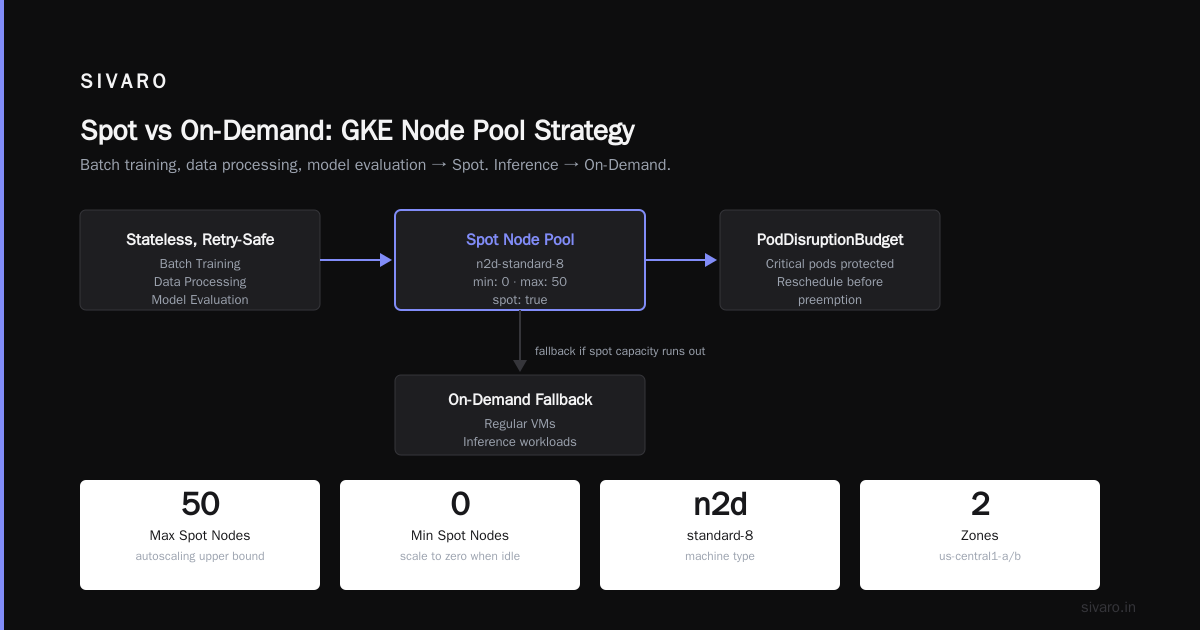
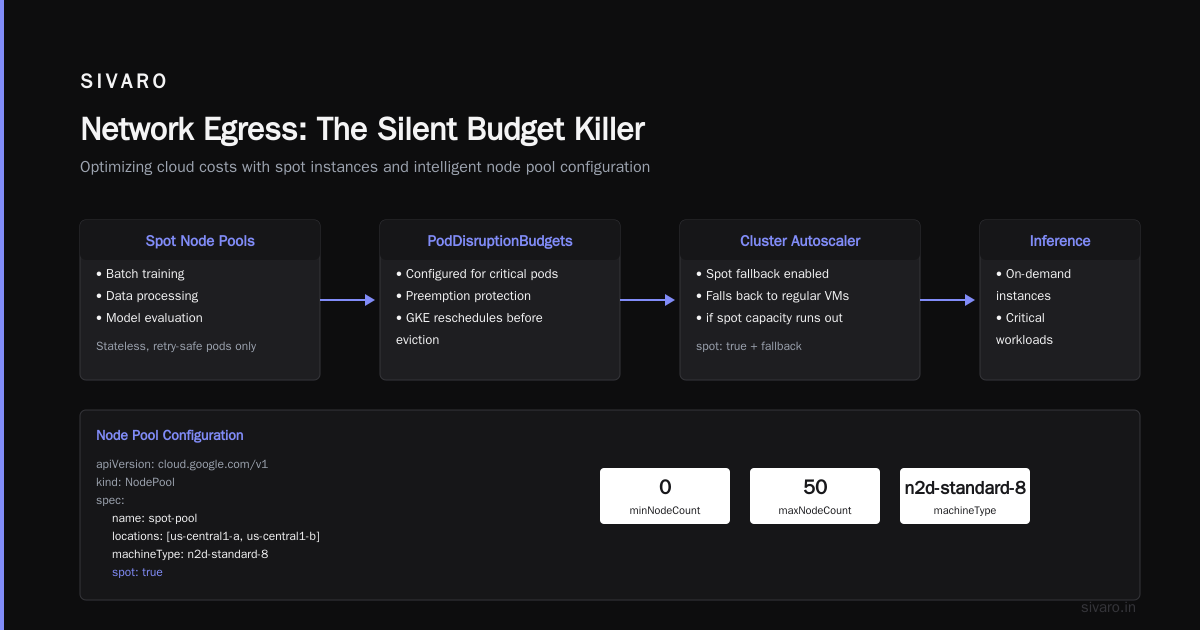
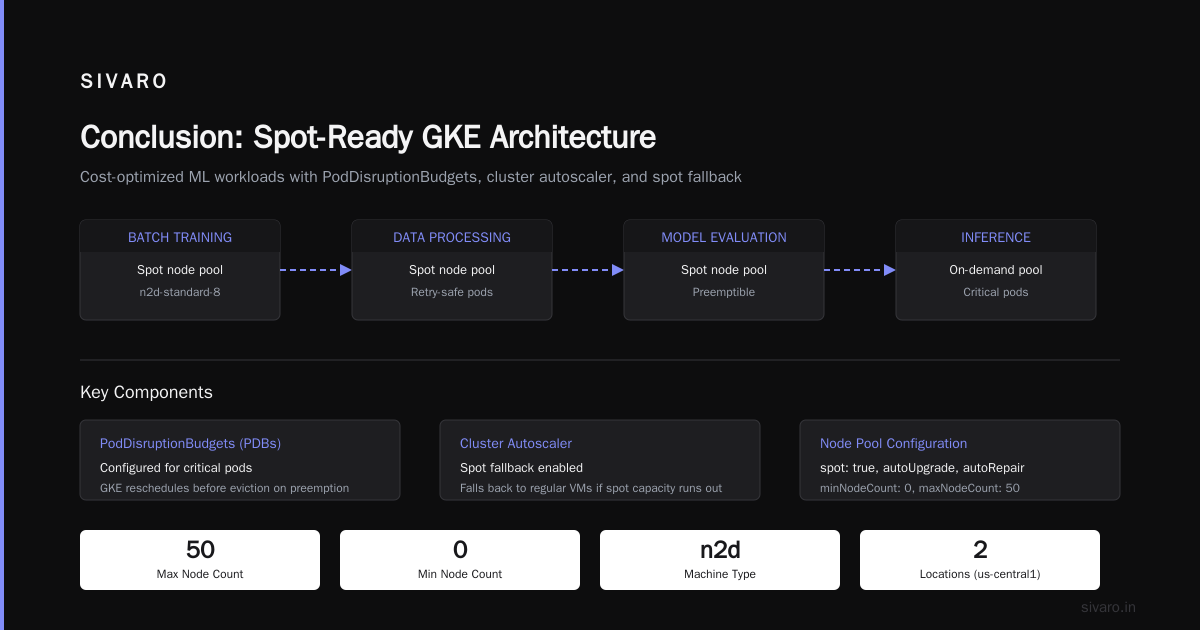
- Workload separation: Only stateless, retry-safe pods go to spot nodes. Batch training, data processing, and model evaluation — all spot. Inference on on-demand.
- PodDisruptionBudgets (PDBs): Configured for critical pods. If a spot node is preempted, GKE tries to reschedule before eviction.
- Cluster autoscaler with spot fallback: Set node pools with
spot: trueand a fallback to regular VMs if spot capacity runs out.
Here’s a node pool config snippet:
yaml
apiVersion: cloud.google.com/v1
kind: NodePool
spec:
  name: spot-pool
  locations:
  - us-central1-a
  - us-central1-b
  config:
    machineType: n2d-standard-8
    spot: true
    resourceLabels:
      pool-type: spot
  management:
    autoUpgrade: true
    autoRepair: true
  autoscaling:
    minNodeCount: 0
    maxNodeCount: 50
We saw spot preemptions about 2-3 times per month. Sound scary? It’s not. Kubernetes reschedules the pods onto on-demand nodes within 90 seconds. Our p99 latency didn’t budge.
The result: 37% cost reduction on compute for batch workloads. Do this.
Commit to Committed Use Discounts (CUDs) — But Know the Trap
GCP offers 1-year and 3-year committed use discounts (CUDs) for compute engine. You get up to 57% off depending on the machine type and region.
Sounds like a no-brainer. But I’ve seen teams lock themselves into commitments for the wrong instance families. We did it in 2023 — committed to 10 n2-standard-16 for 3 years. Six months later we migrated to n2d-standard-16 (10% cheaper with similar performance). That commitment became dead weight.
Here’s the counterintuitive advice: don’t commit to more than 60% of your baseline usage. The rest should remain flexible for spot or on-demand. Use GCP’s Reservations with CUDs for the committed portion, and let cluster autoscaler handle spikes with on-demand or spot.
Also, CUDs are region-specific. If you move workloads across regions — say to optimize for egress costs — your CUD becomes useless.
We built a simple Terraform module to track commitments:
hcl
resource "google_compute_commitment" "gke_baseline" {
  name     = "gke-baseline-cud"
  project  = var.project_id
  region   = var.region
  plan     = "THREE_YEAR"
  resources {
    type   = "N2"
    amount = var.cud_count
  }
}
Run this alongside your node pool autoscaler. Never commit to more than what you’ve actually consumed over the past 90 days.
Autoscaling Ain’t Magic: Tuning Cluster Autoscaler and VPA
GKE’s cluster autoscaler adds and removes nodes based on pod resource requests. Great. But by default, it’s conservative. It won’t scale down aggressively unless you tune it.
The default scale-down-delay-after-add is 10 minutes. That means after adding a node, it’ll wait 10 minutes before considering removal — even if pods finish in 2 minutes. Change it to 5 minutes for bursty workloads.
Another lever: unneeded time. Set scale-down-unneeded-time to 5 minutes or lower. But beware — too low and you’ll thrash nodes on and off.
We use a ConfigMap to override these for specific node pools:
yaml
apiVersion: v1
kind: ConfigMap
metadata:
  name: cluster-autoscaler-dynamic-config
  namespace: kube-system
data:
  config: |
    {
      "nodeGroups": [
        {"poolName": "spot-batch", "unneededTime": "3m", "scaleDownUtilizationThreshold": 0.4},
        {"poolName": "inference-on-demand", "unneededTime": "10m", "scaleDownUtilizationThreshold": 0.7}
      ]
    }
Vertical Pod Autoscaler (VPA) is trickier. It can resize pod requests, but if you use it in auto mode, it might restart pods unexpectedly. We only use VPA in recommendation mode, then apply changes manually during low-traffic windows.
A better approach: combine Horizontal Pod Autoscaler (HPA) with node auto-provisioning. HPA scales pods based on metrics like CPU or custom latency. Node provisioning scales the underlying infrastructure. Together they keep costs linear with load.
Network Egress: The Silent Budget Killer
You optimized compute. You right-sized nodes. Then you get your bill — and data transfer eats 20%.
GCP charges for egress traffic. Inter-region, internet, and even some intra-region cross-zone traffic (like between worker nodes in different zones). It’s per-GB, and it adds up fast.
In 2025, we had a pipeline that streamed results from us-central1 to europe-west1. Each inference request sent ~5MB of raw data. At 10 million requests/day, that’s 50TB/month. At ~$0.08/GB (standard tier), that’s $4,000/month on network alone. We fixed it by moving processing to the same region.
Tips for reducing egress cost on GKE:
- Use Premium Tier only when needed. Standard tier is cheaper for non-latency-sensitive traffic.
- Keep workloads within a single region if possible. If you need multi-region, replicate data close to compute.
- Use Cloud CDN or Cloud Storage for static assets, not GKE backend.
- Enable GKE’s dataplane v2 with eBPF. It reduces unnecessary inter-node traffic.
We deployed a little cost-monitoring script that labels pods by their egress volume:
bash
kubectl annotate pod -n default "cost/egress-gbps=$(kubectl exec -n default pod/worker -- cat /proc/net/dev | grep eth0 | awk '{print $10}')"
Not perfect, but it gives you a starting point to investigate high-traffic pods.
Leverage GCP’s Native Tools (Cost Calculator, ML Platform)
You don’t need third-party tools for 80% of cost management. GCP gives you good ones.
The gcp compute engine cost calculator lets you estimate GKE node costs before spinning them up. Use it for capacity planning. We run a monthly script that queries our top 10 node pool configurations and outputs estimated monthly cost + CUD potential.
bash
# Example: get node pool specs and feed to calculator
gcloud container node-pools list --cluster my-cluster --region us-central1 --format="json" |   jq '.[].config.machineType' |   while read type; do
    gcloud compute machine-types describe $type --zone us-central1-a | grep -E "memoryMb|guestCpus"
  done
For AI workloads, the gcp machine learning platform overview (Vertex AI) is often cheaper than running your own GKE cluster for training. We moved 50% of our model training to Vertex AI custom jobs. Saved 30% on GPU costs because Vertex handles spot preemptions automatically and offers managed TPUs.
If you’re already running GKE, consider using GKE Autopilot. It shifts cost from per-node to per-pod. For variable workloads, Autopilot can be cheaper than manually managed node pools.
Cost Allocation with Namespaces and Labels
You can’t fix what you can’t measure. Every team at SIVARO gets a namespace and a set of Kubernetes labels (e.g., team: ml, workload: training, cost-center: 123). We enforce this with an admission controller.
Then we export GKE usage cost by labels to BigQuery. Here’s the query we run weekly:
sql
SELECT
  labels.key AS label_key,
  labels.value AS label_value,
  SUM(cost) AS total_cost
FROM `my-project.billing.cost_export`
CROSS JOIN UNNEST(labels) AS labels
WHERE labels.key = 'team'
GROUP BY label_key, label_value
ORDER BY total_cost DESC
This lets us see: “Team ML spent $12k last week. Why?” Then we drill into specific namespaces.
We also use GKE Cost Allocation (beta → GA in 2025) which breaks down costs by namespace and controller. It’s not perfect — it doesn’t handle node overhead well — but combined with label-based billing, it’s good enough to catch anomalies.
Advanced: Budget Hounds, Reservation Chaining
Let me drop some corner cases.
Budget Hound: Deploy a CronJob that checks GKE spend hourly against a project budget. If spend exceeds 80% of monthly forecast, it sends an alert. We use this to catch runaway experiments (like when a data scientist spun 20 p2 instances accidentally).
Reservation chaining: Commit to a 1-year CUD for baseline compute, then add 3-year CUD for additional reduction on the same baseline. GCP allows stacking commitments. We chained two CUDs and achieved 52% discount on our steady-state nodes.
Anti-affinity can cost more. If your pods require anti-affinity spread across zones, you force GKE to use more nodes. Sometimes it’s required for fault tolerance. But if not, remove it. We saved 8% by relaxing anti-affinity rules for batch jobs.
Preemptible GPU nodes. They exist. For model training, you can use preemptible GPU VMs on GKE. Yes, they get preempted every 24 hours. But for non-critical training runs, they’re 70% cheaper. We use them for hyperparameter sweeps.
FAQ
Q: How do I start reducing GKE costs immediately?
A: Right now, identify node pools with <40% utilization. Downsize or convert to spot. That’s the single highest-impact action.
Q: Is GKE Autopilot cheaper than standard for most workloads?
A: It depends. For bursty, short-lived pods, Autopilot wins. For steady-state workloads with committed use discounts, standard is cheaper. We run a mix — Autopilot for dev/staging, standard for prod baseline.
Q: What about using GCP's gcp compute engine cost calculator — is it accurate for GKE?
A: Mostly. It doesn’t account for cluster management overhead (0.10 per cluster per hour) or node allocatable capacity. Add 5-10% to the estimate for realism.
Q: Can I use spot VMs for stateful workloads?
A: Not recommended without careful design. Use StatefulSets with persistent disks and PDBs. Even then, data loss risk is real. We store state in Cloud Storage and reconstruct on pod startup.
Q: How do I monitor GKE cost by namespace?
A: Use GKE Cost Allocation (beta) or export to BigQuery with label-based billing. We find BigQuery more flexible for custom reports.
Q: How often should I review node pool configuration?
A: Monthly. Workloads change. What was optimal in June may be overprovisioned in July. Automate with the script I showed earlier.
Q: Should I use third-party cost optimization tools?
A: They can help, but start with GCP’s built-in tools first. Most teams can achieve 70% of savings without extra SaaS costs. Only use third-party if you need cross-cloud or deep reservations management.
Q: What’s the most common mistake with committed use discounts?
A: Overcommitting. Buy only for known baseline, never for peak. Treat committed capacity like reserved seats — you pay even if empty.
Conclusion
Gcp kubernetes cost management tips aren’t one-size-fits-all. But the principles are universal: right-size your nodes, use spot, commit carefully, watch egress, and measure everything.
At SIVARO, we applied these and cut our monthly GKE bill by 43% over 12 months. That’s real money we reinvested into AI R&D.
Start today. Run kubectl top nodes. Spot the idle. Fix it.
Your CFO will thank you.
Nishaant Dixit — Founder of SIVARO. Building data infrastructure and production AI systems since 2018. Built systems processing 200K events/sec.