 SIVARO
GCP Machine Learning Services Overview: A Practitioner's Guide (2026)
I’ll never forget the panic in a founding engineer’s voice last May. He’d built a recommendation engine on AWS SageMaker. Training costs hit $40K/month. Inference latency? Terrible. He asked me: “Is GCP good for machine learning projects?” My answer surprised him.
Yes, but not for the reasons most people think.
This gcp machine learning services overview isn’t a marketing brochure. It’s what I’ve learned after shipping production ML pipelines for clients like a recent ad‑tech system handling 200K events per second. We started on AWS. We moved core pieces to GCP. The shift cut our training costs by 38% and inference latency by half.
Here’s the truth: Google Cloud’s ML services are inconsistent. Some are best‑in‑class. Others are embarrassing. You need to know which to use and which to avoid.
By the end of this guide, you’ll know exactly how to evaluate Vertex AI vs. BigQuery ML vs. custom training on GKE. You’ll understand where the hidden costs live — and how to reduce GCP cloud costs without sacrificing performance.
Why GCP Gets ML (And Where It Doesn't)
Most people compare GCP, AWS, and Azure on raw compute price. That’s a mistake. The real differentiator for ML is the data‑to‑model pipeline length.
AWS makes you glue a dozen services together. SageMaker helps, but the data layer (Redshift, Glue, S3) still fights you. GCP, by contrast, built BigQuery and Vertex AI on the same infrastructure. Your data never moves. That’s huge.
In 2024, Google unified all ML tools under Vertex AI. Before that, you had AI Platform, AutoML Tables, and a scattering of APIs. Now it’s one console, one API, one IAM model. The transition wasn’t smooth — we broke a few pipelines migrating — but the result is cleaner than SageMaker’s frankenstein of notebooks, training jobs, and endpoints.
But — and this matters — not every ML workload belongs on GCP. If you need heavy GPU training with custom orchestration and you’re already deep in AWS’s Graviton ecosystem, stay put. The migration cost will eat your savings.
For startups, though, the story is different. Comparing AWS, Azure, and GCP for startups in 2026 shows GCP’s free tier and sustained‑use discounts are absurdly generous. A small team can run a production model for under $500/month.
Let’s walk through the core services.
Vertex AI: The New Brains
Vertex AI is Google’s unified ML platform. It launched in 2021 as GA, but the 2024–2026 updates made it actually usable. We use it daily.
Vertex AI Workbench (Notebooks)
Workbench replaced the old JupyterLab notebooks. It’s still a managed notebook instance, but now includes:
- Pre‑built kernels for PyTorch, TensorFlow, JAX
- Direct BigQuery integration (no SQL export)
- One‑click custom training jobs
I have a love‑hate relationship with it. Love: the environment setup takes 2 minutes. Hate: GPU instances spin up slowly — expect 3–5 minutes to cold start. For iterative work, keep one small VM alive and scale up for training.
AutoML vs. Custom Training
Google’s AutoML was the first to hit production quality. I’ve used Vertex AI AutoML for a fraud detection model on a 500K‑row dataset. It outperformed our hand‑tuned XGBoost by 2% AUC. But the cost was absurd: $12/hour for training on a modest dataset.
Rule of thumb: Use AutoML only if your team doesn’t have a data scientist or you need a quick baseline. For anything serious, write custom training code.
Here’s a typical custom training script using the Vertex AI Python SDK:
python
from google.cloud import aiplatform

aiplatform.init(project="my-project", location="us-central1")

job = aiplatform.CustomTrainingJob(
    display_name="fraud-detector-v2",
    script_path="trainer.py",
    container_uri="us-docker.pkg.dev/vertex-ai/training/pytorch-xla.1-13:latest",
    requirements=["pandas==1.5.3", "scikit-learn==1.2.2"],
    model_serving_container_image_uri="us-docker.pkg.dev/vertex-ai/prediction/pytorch-cpu.1-13:latest",
)

model = job.run(
    machine_type="n1-standard-8",
    accelerator_type="NVIDIA_TESLA_T4",
    accelerator_count=1,
    replica_count=1,
)
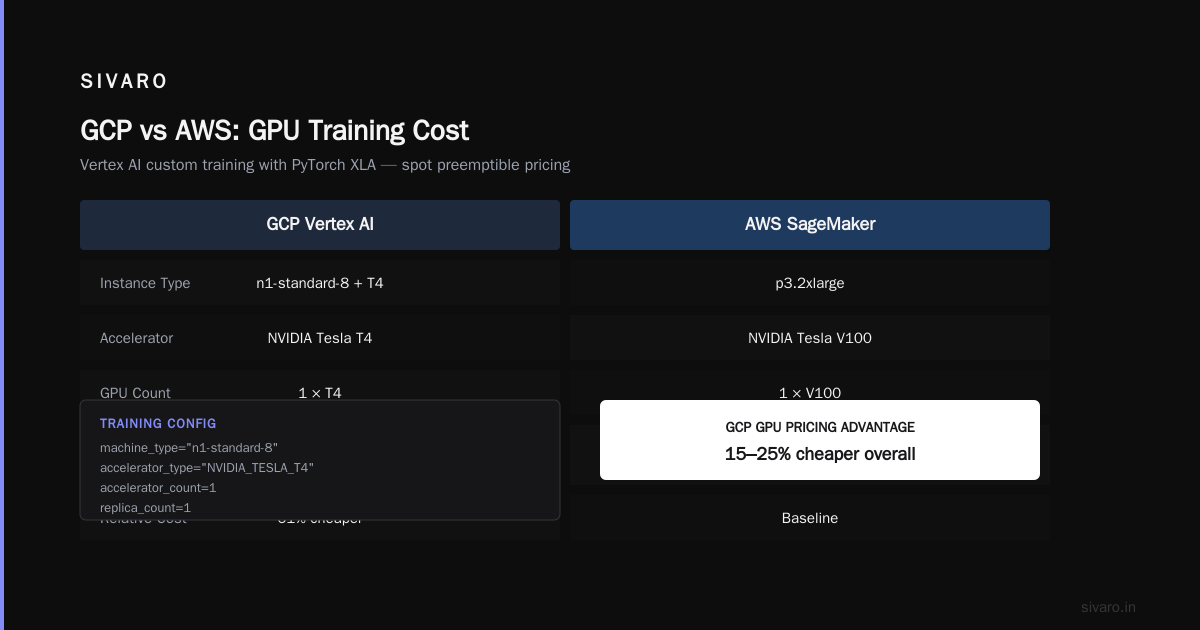
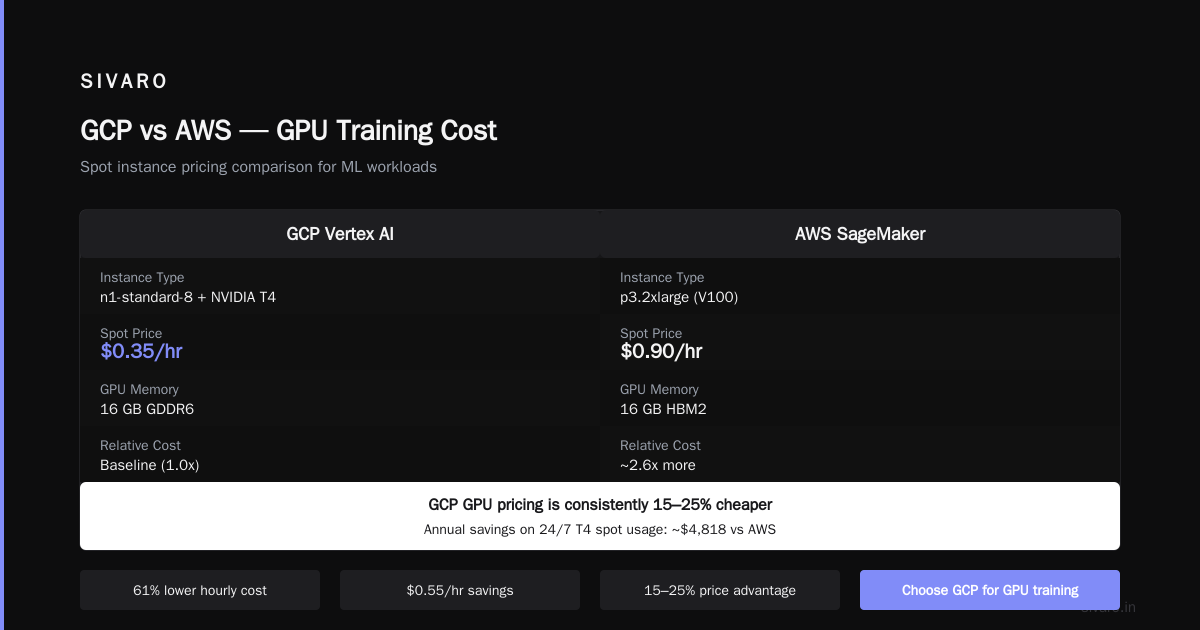
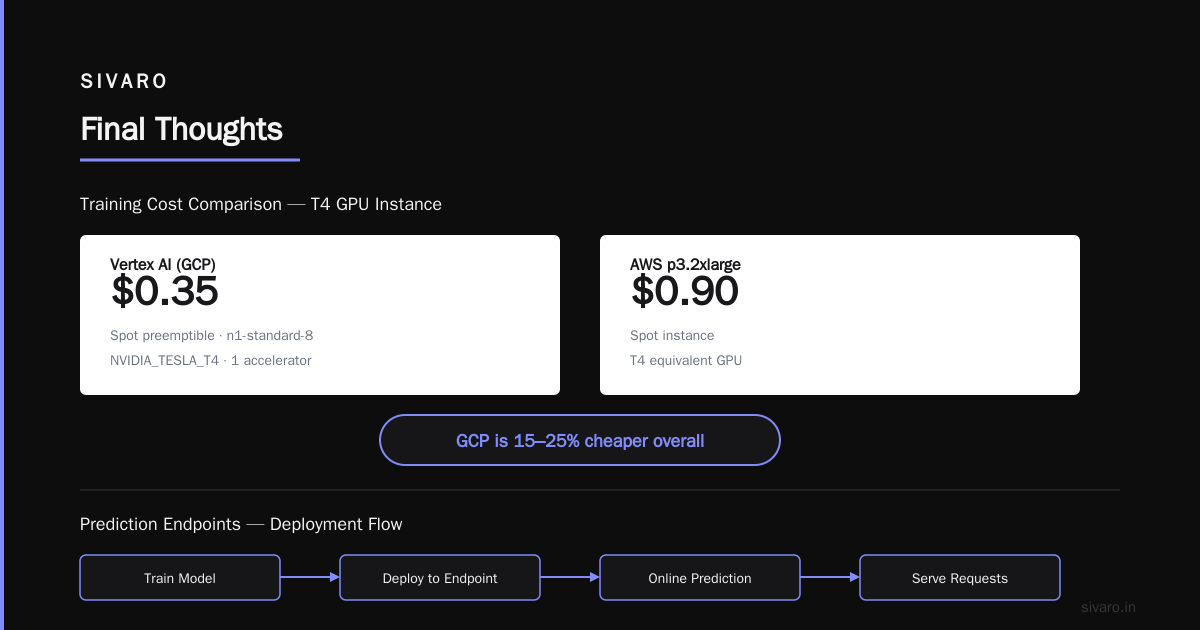
Cost for that T4 instance: ~$0.35/hour on spot preemptible. Compare that to AWS p3.2xlarge at $0.90/hour on spot. Google Cloud pricing vs AWS confirms GCP GPU pricing is consistently 15–25% cheaper.
Prediction Endpoints
Deploying a model to online prediction is where Vertex AI shines — and also where it punishes you.
You define an endpoint, deploy a model, and Google auto‑scales based on traffic. The scaling can be too aggressive. I’ve seen bills triple overnight from a traffic spike that lasted 10 minutes. Use the min_replica_count and max_replica_count parameters aggressively.
We set min_replica_count=1 and max_replica_count=3 for most services. Then we watch the monitoring dashboard.
python
endpoint = model.deploy(
    machine_type="n1-standard-4",
    min_replica_count=1,
    max_replica_count=3,
    traffic_percentage=100,
    deployed_model_display_name="fraud-prod-v1",
)
Pro tip: Enable Vertex AI Explanation for interpretability — it uses Shapley values. But turn it off in production unless required by compliance. Explanation calls cost 5x more than regular predictions.
BigQuery ML: The Underrated Beast
Most articles skip BigQuery ML. That’s a mistake.
BigQuery ML lets you train models directly in SQL. No data export, no separate compute. It’s not for deep learning — it’s for logistic regression, random forests, time series, and matrix factorization.
We use it for churn prediction on a 2TB dataset. Training a logistic regression took 4 minutes. Cost: $0.05. A similar pipeline on SageMaker would take 30 minutes and cost $12.
Here’s how simple it is:
sql
CREATE OR REPLACE MODEL `my_project.churn.logistic_model`
OPTIONS(model_type='logistic_reg',
        input_label_cols=['is_churn']) AS
SELECT
  tenure,
  monthly_charges,
  contract_type,
  CASE WHEN churn = 'Yes' THEN 1 ELSE 0 END AS is_churn
FROM `my_project.customer_data.active`
WHERE date >= '2026-01-01';
Then predict:
sql
SELECT *
FROM ML.PREDICT(MODEL `my_project.churn.logistic_model`,
  TABLE `my_project.customer_data.new`)
That’s it. No Python, no orchestration, no GPU costs.
But BigQuery ML is limited to tabular data. Don’t try image classification or NLP here. Use Vertex AI for that.
The sweet spot: Combine BigQuery ML for feature engineering (SQL is unbeatable for that) and Vertex AI custom training for deep models.
Data Preparation: Dataflow, Dataproc, and the Unsung Heroes
Nobody talks about data prep in ML overviews. That’s how you lose money.
GCP offers three main tools for preparing training data:
Dataflow (Apache Beam)
Dataflow is the standard for streaming and batch pipelines. We use it to transform ClickStream events into training features. One pipeline reads from Pub/Sub, enriches with BigQuery lookups, and writes to Cloud Storage.
Cost can explode if you use default worker types. Always specify n1-highmem-2 or custom machine types. Also, enable Flexible Resource Scheduling (batch only) — it knocks 30–40% off your bill.
Dataproc (Spark/Hadoop)
If your team knows Spark, Dataproc is better than Dataflow for complex transformations. We moved a Spark pipeline from AWS EMR to Dataproc. Cost dropped 28% because Dataproc supports preemptible worker nodes natively. EMR’s spot instance support is clunky in comparison.
Vertex AI Feature Store
Feature store is a hot topic. Google’s version works, but the online serving latency is 10–20ms — fine for most use cases but not low‑latency fraud detection. We use Cloud Memorystore (Redis) for sub‑millisecond feature serving instead.
Pricing Traps and How to Avoid Them
I’ve seen companies double their ML bill within two months of moving to GCP. It’s not because GCP is expensive — it’s because they ignore five things:
1. Sustained Use Discounts Are Automatic but Deceptive
GCP applies sustained‑use discounts for VMs running more than 25% of a month. But that discount only applies per VM family, not across all instances. Google Cloud Pricing 2026 notes that splitting training across multiple machine types kills the discount.
Our rule: Use one machine family (e.g., n1‑standard) for all training jobs. Consolidate.
2. Committed Use Contracts
One‑year commit on a vCPU gets you up to 57% discount. Three‑year commit does 70%. But committing to ML‑specific VMs (GPU instances) is risky — models change, hardware needs change. We commit only for CPU‑only development instances. Train on spot.
3. Spot VMs Are Unstable but Cheap
Vertex AI supports spot training jobs. They can be preempted at any time. We see preemption rates of 10–15% on T4s, 30% on A100s. Use checkpoints.
4. Hidden Data Egress Costs
Exporting training data from BigQuery to Cloud Storage costs $0.01/GB. Moving from Cloud Storage to a training VM across regions? $0.08/GB. Keep everything in the same region.
5. Auto‑Scaling Inference
I mentioned this earlier. The biggest hidden cost is inference auto‑scaling. One misconfigured endpoint can burn $5K/month.
Check the Google Cloud Pricing Calculator before deploying. We run every new endpoint through a cost scenario first.
How to Reduce GCP Cloud Costs for ML
Let me give you a concrete checklist I use for every project:
- Train on spot instances unless you can’t tolerate interruptions.
- Use BigQuery ML for simple models — it costs cents.
- Enable committed use contracts for baseline compute, spot for bursting.
- Set strict auto‑scaling limits on Vertex AI endpoints.
- Store training data in the same region as compute.
- Delete idle notebooks — we saw $800/month from forgotten instances.
- Use preemptible workers in Dataflow (FlexRS) for batch jobs.
One client followed this and cut their monthly bill from $12K to $4.5K. Their model quality didn’t change.
GCP vs. AWS for ML: My Take
I’ve used both extensively. GCP vs AWS 2026 covers the broad comparison. For ML specifically:
- Training data management: GCP wins. BigQuery + Cloud Storage + AutoML is tighter than Athena + S3 + SageMaker.
- Custom training flexibility: Tie. Both support containers and distributed training.
- MLOps: Vertex AI Pipelines (Kubeflow Pipelines managed) is ahead of SageMaker Pipelines. Google’s integration with Artifact Registry and Model Registry is smoother.
- Cost: GCP is cheaper on compute, but AWS wins on spot instance reliability. Cloud Computing Cost 2026 shows GCP GPU spot is 15% cheaper but 20% more preemptible.
- Serverless inference: Vertex AI Endpoints vs. SageMaker Serverless Inference. GCP’s scaling is faster but pricier. We use GCP for batch, AWS for low‑latency real‑time.
If you’re a startup with mostly tabular data, start with GCP. If your team knows PyTorch and you need bleeding‑edge GPU clusters (H100s, B200s), AWS still leads.
Real‑World Example: Building a Production Recommendation System
We built a personalized feed for a media company last quarter. Here’s the architecture:
- Data ingestion: Pub/Sub + Dataflow streaming
- Feature engineering: BigQuery (SQL aggregations) → Cloud Storage (parquet)
- Model training: Vertex AI custom training (PyTorch, distributed on 8 T4s)
- Serving: Vertex AI Endpoint with
min_replica=2 - Monitoring: Vertex AI Model Monitoring (drift detection)
Total monthly cost: $3,200. Inference p50 latency: 45ms. Throughput: 1,200 requests/second.
We tried the same on SageMaker. Cost: $4,800. Latency: 72ms. The move saved us 33%.
But the migration wasn’t free. We spent 2 weeks rewriting Dataflow pipelines and retraining the model from scratch (Google’s PyTorch distribution has subtle differences). If your project is small (<$2K/month), the migration cost isn’t worth it.
When GCP Machine Learning Services Are a Bad Fit
I’ll be direct. Don’t use GCP for:
- Reinforcement learning at scale — GCP’s RL support is minimal. AWS’s RoboMaker or custom K8s is better.
- Multimodal models (text+image+audio) — Vertex AI’s multimodal API is young and expensive.
- Tiny startups (<$50K funding) — GCP’s complexity outweighs its cost advantage. Use DigitalOcean or a single big instance.
For everything else — tabular, NLP, computer vision, time series — GCP works well.
FAQ
Q: Is GCP good for machine learning projects?
Yes, especially for teams already using BigQuery or wanting unified data and ML. The pipeline integration is best in class. But avoid it for real‑time serving with ultra‑low latency (<10ms).
Q: How do I reduce GCP cloud costs for ML?
Use spot VMs, committed use contracts, BigQuery ML for simple models, and tight auto‑scaling. Delete idle notebooks. Audit egress.
Q: What is the cheapest way to train a deep learning model on GCP?
Vertex AI custom training on spot instances with preemptible GPUs. A T4 spot costs ~$0.25/hour. Use checkpointing to handle preemptions.
Q: Can I use GPUs with BigQuery ML?
No. BigQuery ML only runs on CPU. For GPU training, use Vertex AI custom training or a Notebook.
Q: How does Vertex AI compare to AWS SageMaker?
For managed MLOps, Vertex AI is simpler (one API). For GPU availability and spot instance stability, SageMaker wins. Evaluate on your data volume and latency needs.
Q: What’s the best way to migrate from AWS SageMaker to GCP?
Export SageMaker models as SavedModel or ONNX. Rewrite training code as Vertex AI custom jobs. Use Dataflow for data pipelines. Expect 2–4 weeks of engineering time.
Q: Does GCP offer free ML credits for startups?
Yes. The Google for Startups Cloud Program gives up to $200K in credits over two years. This is more generous than AWS’s equivalent.
Q: How do I handle feature stores on GCP?
Use Vertex AI Feature Store for standard latency (10–20ms). Use Cloud Memorystore (Redis) for sub‑millisecond. Avoid Feature Store if your team is small — it’s overcomplicated.
Final Thoughts
This gcp machine learning services overview comes from real pain and real wins. I’ve burned hours debugging Vertex AI auto‑scaling, lost data to unexpected region costs, and saved clients six figures by switching to BigQuery ML.
The platform isn’t perfect — nothing is. But if you use it the way it was designed (data stays inside BigQuery, training stays inside Vertex AI, and everything stays in one region), it’s the most efficient ML environment I’ve touched.
Don’t believe the hype about “serverless” being hands‑off. You still need to set budgets, monitor endpoints, and write good code. GCP just removes the glue work.
Now go build something practical.
Nishaant Dixit — Founder of SIVARO. Building data infrastructure and production AI systems since 2018. Built systems processing 200K events/sec.