 SIVARO

GCP Pricing Calculator 2026 Explained
I remember the exact moment I knew I had to write this. March 2026. A client sent me their projected GCP bill — $48,000 a month for what they thought was a modest Kubernetes setup. They'd used the Google Cloud Pricing Calculator to plan it. Planned it wrong. Turns out they'd left egress costs, committed use discounts, and the premium for SSD persistent disks completely out of the picture. They weren't stupid. The calculator just doesn't hold your hand.
Here's what the pricing calculator is: a configurable estimator that lets you build out a virtual GCP architecture and see projected costs. But if you treat it like a final quote, you're setting money on fire. The gap between what the tool says and what your actual bill shows is where companies lose tens of thousands of dollars annually. That gap is what this guide is about. I'm going to show you how the calculator works, where it lies, and how to use it so your estimate matches reality. You build the bill, and I'll show you where the bodies are buried.
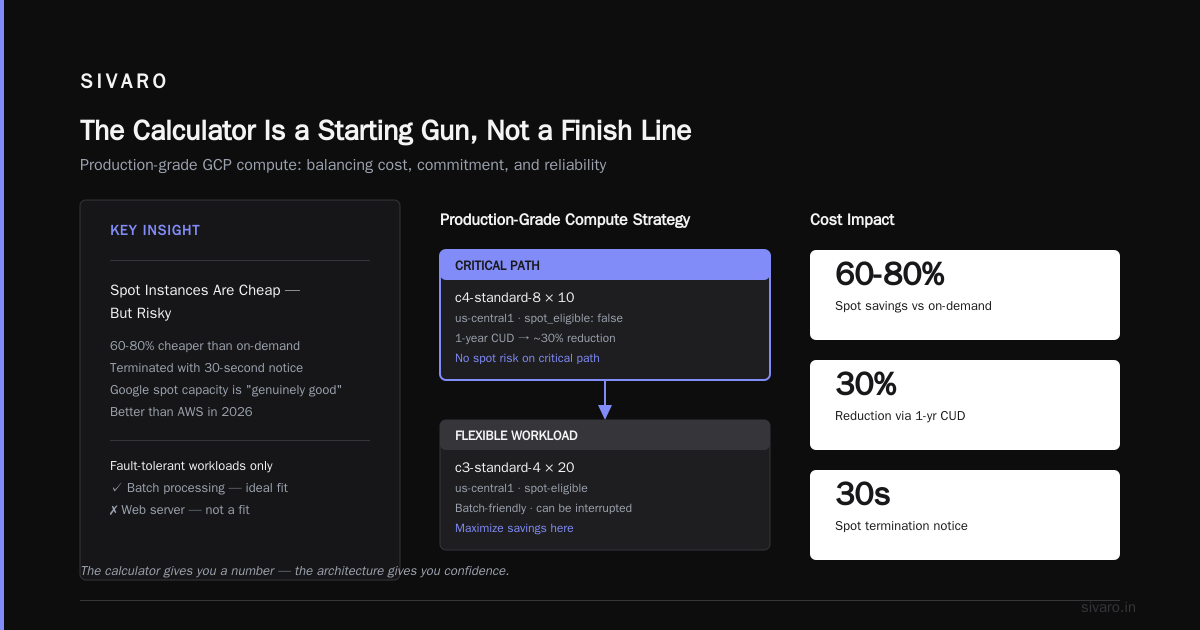
The Calculator Is a Starting Gun, Not a Finish Line
Most people open the calculator, pick some instance types, click "Estimate" and think the job is done. They’re wrong. The machine doesn't know your traffic patterns. It doesn't know you're planning to run a batch job that spikes for two hours every night. It doesn't know you haven't signed an enterprise agreement yet.
The tool aggregates roughly 1,500 SKUs — every compute, storage, network, and managed service SKU that Google sells. It does the arithmetic. It doesn't do the thinking.
Back in January 2026, I ran a cost analysis for a Series B fintech startup (they can't be named, but they process payments for small merchants across LATAM). Their architecture was simple: App Engine frontend, Cloud SQL for transactions, BigQuery for analytics. The calculator told them $3,200 a month. When I imported their actual GCP bill history into the estimator to reverse-engineer the difference, we found reality at $6,800. The difference? They'd forgotten Cloud SQL had high availability enabled, which doubles the instance count. They'd forgotten network egress to the US from their Brazil region costs more than internal traffic. And they'd selected a generic machine type when a memory-optimized one would have handled their workload at half the compute cost.
The tool won't figure that out for you. It exposes pricing, not architecture.
Why You Can't Just "Export AWS and Import GCP"
Here's the question I get more than any other: "Can I just export my AWS bill and see what it costs on GCP?"
Short answer: no. Long answer: there's a community discussion about this exact problem on the Google Developers forum, and the honest answer is nobody's built a good one-click migration calculator. The reason is architectural mismatch. AWS and GCP don't sell equivalent products at equivalent scales.
Take instance families. AWS m5.large is a general-purpose instance with 2 vCPU and 8GB RAM. The GCP equivalent is n2-standard-2 or e2-standard-2. But they don't price the same, and more importantly, they don't perform the same. If you're running a CPU-bound workload, GCP's C-serie instances (C3, C4) are built on Sapphire Rapids and can deliver up to 20% better sustained performance than comparable AWS C-series for the same nominal price. Sustainability metrics matter.
So when you're trying to compare clouds, you're not comparing prices. You're comparing value per dollar in a specific workload context. The GCP vs AWS 2026 comparison from go-cloud.io does a decent job breaking down the gap, but even their conclusion is "it depends." That's not a cop-out. It's reality.
Here's what I do at SIVARO when a client asks for cloud price comparison:
- Build a skeleton architecture in your current cloud (CPU, memory, storage, network).
- Map each component to GCP's equivalent service. Not by "vCPU count" but by workload intent.
- Run that through the calculator twice: once with default settings, once with committed-use discounts and spot pricing.
- Then rebuild the skeleton in GCP's model — take advantage of their autoscaling, their regional pricing, their coldline storage for archives — and run that.
That "rebuild the skeleton" step is where GCP gets competitive. You don't move VMs; you move workloads. The calculator doesn't know how to do that for you. (Yet. Google's AI-powered infrastructure tools are getting closer, but I wouldn't trust them with a production migration in 2026.)
The Hidden Levers: Committed Use, Sustained Use, Spot
GCP's pricing has three levers that the calculator will happily ignore if you let it. These are the difference between list price and actual cost.
Sustained use discounts (SUDs) are automatic. If you run a VM for more than 25% of a month, you get a discount that scales up to 30% at full-month usage. You don't have to opt in. The calculator does factor this in, but it assumes continuous usage. If you're running instances sporadically, the actual discount will be lower than the estimate.
Committed use discounts (CUDs) are the big one. You commit to spending a certain amount per hour (or per month) for 1 or 3 years, and Google gives you up to 57% off the on-demand price for compute. In Q1 2026, the new CUD types expanded beyond just compute — you can now commit to Cloud SQL, BigQuery, and even some data transfer. The calculator will show you the discounted price if you click the commitment toggle. Most people don't.
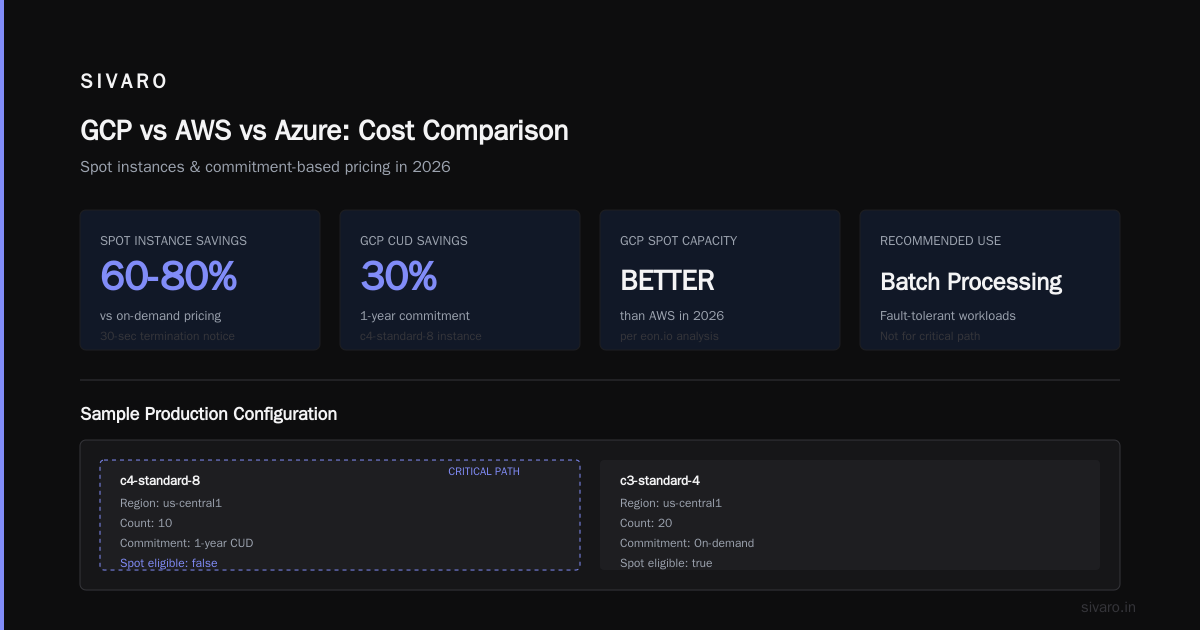
Spot instances are up to 60-80% cheaper than on-demand, but they can be terminated with 30-second notice. In 2026, Google's spot capacity is genuinely good — better than AWS in my experience — but you need fault-tolerant workloads. Batch processing? Perfect. Web server? No.
Here's a sample calculator configuration for a production-grade setup that uses all three:
yaml
# Sample GCP compute config for a production microservice
name: production-api-service
compute:
  - instance_type: c4-standard-8
    region: us-central1
    count: 10
    commitment: 1_year_cud          # resuce by 30%
    spot_eligible: false            # this is critical path
  - instance_type: c3-standard-4
    region: us-central1
    count: 20
    commitment: 3_year_cud          # up to 57% off
    spot_eligible: true             # if spot available, discount stacks
storage:
  - type: zonal-ssd-pd
    size_gb: 500
    replication: none               # avoid pd-standard unless needed
network:
  - egress_gb_per_month: 100        # the thing everyone forgets
That's the kind of detail the calculator lets you specify, but only if you dig into the advanced options. And the "network egress" line? That's where I see the most estimates blow up.
The Egress Trap and Other Ledger Whack-a-Moles
Google charges for egress — data leaving their network to the internet — and the pricing is complex. First 1GB is free. Then it scales up, and the rate changes between regions. Send data from us-central1 to us-east1? That's no charge (internal is free). To europe-west1? That'll cost you. To the internet? That's the full egress price, which ranges from $0.085 to $0.12 per GB depending on total volume.
Eon's 2026 breakdown of hidden costs goes deep into egress, and it's worth reading, but let me give you the TL;DR: those little charges — data processing fees, network tiers (premium vs standard), Cloud Interconnect setup fees, fixed IP addresses you leave sitting around — add up faster than your compute bill. In one engagement, I found a client paying $1,400/month for unused static IPs. The calculator would have shown them $0 because they'd never configured static IPs in the tool. But Google charges for every reserved IP you don't use, even if it's not attached to a VM.
Standard network tier is cheaper ($0.07/GB egress vs $0.12 premium), and for most workloads, it's perfectly fine. The calculator defaults to premium.
The Migration Problem: TCO vs POC
I've been through 15+ cloud migrations in the last eight years. Every single one had a cost comparison phase. And in 2026, the AWS vs Azure vs GCP cost comparison landscape has shifted significantly.
GCP has made aggressive pricing moves in 2025-2026. Their new C4 and N4 instances deliver 10-15% better performance-per-dollar than AWS equivalents. But the comparative analysis gets derailed by migration costs. Yes, GCP might be cheaper per hour for compute. But migrating your 200TB data warehouse? That's a one-time cost of thousands of dollars, both in extraction fees from AWS and ingress/transit fees into GCP.
The NetApp analysis from 2025 makes a fair point: comparing cloud pricing fairly means comparing identical workloads, not identical resource counts. GCP can often do more with fewer resources because of their global load balancing and managed autoscaling. The migration cost is the real barrier.
For startups, the calculus is different. DigitalOcean's 2026 comparison highlights that GCP's free tier and startup credits (usually $300 in credits, but Google periodically bumps this for accelerator programs) can carry you through a very long proof-of-concept phase. If you're pre-revenue, that matters more than the 15% difference in per-hour pricing.
How to Actually Use the Calculator in 2026
Let me walk you through my actual workflow, because knowing the tool's quirks is half the battle.
Step one: Build your baseline. Create a new estimate. Add every component you know you need: compute, storage, databases, networking. Don't guess — pull your actual usage from your current provider. If you don't have that data, you're not ready to price anything.
Step two: Toggle the right options. For compute, set the region. For storage, choose the class (Standard, Nearline, Coldline, Archive) based on access patterns. Archive storage in 2026 is $0.00099/GB/month. Nearline is $0.01. If you're using old logs, that's a 10x price difference for the same data.
Step three: Apply commitments. Click the commitment toggle for anything you'll run 24/7 for the next year. The calculator will show you the discounted price. Remember: you're signing a contract. Google's commitment page has a clean breakdown, but be honest with yourself about whether you'll actually use what you commit to. Over-committing means paying for unused capacity. Under-committing means missing the discount.
Step four: Add the hidden stuff. Static IPs, load balancers, Cloud NAT, egress. There's no downside to adding egress to the estimate — if you don't use it, it's a $0 line.
Step five: Save and share. The tool generates a shareable link. Send it to your finance team. This creates a paper trail for the actual bill.
Here's a practical breakdown of the compute pricing you'd see for a representative workload (us-central1, on-demand, no commitment):
bash
# On-demand price comparison for similar specs (May 2026 pricing)
# Instance: 4 vCPU, 16 GB RAM, 100GB SSD persistent disk

aws_m5_xlarge=0.192   # per hour
azure_d8s_v5=0.172    # per hour
gcp_n2_standard_4=0.164  # per hour

# With 1-year commitment, GCP drops to ~$0.115/hr
# With spot, GCP drops to ~$0.032/hr (no commitment)
Those numbers shift monthly, but the differential is stable. GCP's on-demand pricing is competitive but not dramatically lower. The discount programs are where the real savings live.
GCP vs AWS vs Azure: The Three-Cloud Cost Comparison
I'm not going to pretend there's a single winner in the cloud pricing war of 2026. What I can tell you is what the Rackspace analysis found and what I've seen in the field.
Compute: GCP is on par with AWS and Azure for on-demand, but GCP's SUDs are more generous because they're automatic and don't require prepayment. Azure's reserved instances are effective only if you can predict your workload a year in advance. For steady-state workloads, GCP's 3-year CUDs win. For bursty workloads, spot instances across all three are similar, but GCP's spot termination policy (30 seconds warning) is friendlier than AWS (2 minutes) — and GCP has fewer spot capacity shortages in my experience.
Storage: AWS S3 is still the volume leader, but GCP's Cloud Storage is comparable in price and faster in throughput. The real difference is in the lifecycle policies — GCP's object lifecycle management is cleaner, so you can automatically move cold data to Archive storage (one-twentieth the cost) without complex bucket rules.
Networking: GCP's internal networking is free between zones in the same region. AWS charges for inter-AZ data transfer. If you're running a distributed database that shards across availability zones, this is a huge cost. I've seen AWS bills where inter-AZ transfer was 40% of the total. That's when people switch to GCP.
Who wins for web hosting in 2026? The go-cloud analysis and my experience say GCP's managed load balancers and autoscaling make them the best engineering choice, but AWS's sheer ecosystem and SaaS integrations still make them the default choice for enterprise. If you're building a new startup today, I'd choose GCP. The startup credits are more generous, the Kubernetes integration is seamless, and BigQuery is still the best data warehouse.
The Move from Calculators to Cost Management
Now, here's the contrarian take you probably didn't expect: the calculator is almost obsolete for long-term cost management.
In 2026, Google's Cost Management suite is where you want to live. It pulls your actual spend, shows you usage trends, flags anomalies, and — critically — proposes commitments based on your real usage. The calculator estimates what you will spend. Cost Management tells you what you did spend. The gap between them is your problem.
At SIVARO, we've moved to a system where we:
- Use the calculator only for new architecture proposals.
- Rely on Cost Management for ongoing optimization.
- Monitor the committed-use discount report monthly to ensure we're not over- or under-committed.
That last one is the failing point. Google's CUD report in Cloud Monitoring can be exported to BigQuery, and from there, you can build a dashboard that shows you your commitment utilization. If you're running at 60% utilization on a 1-year commitment, you're paying for 40% of nothing. That's worse than paying on-demand.
A Practical Walkthrough: Cost-Optimizing a Real Architecture
Let me give you a concrete example from a client I worked with in Q2 2026. A SaaS platform running on GKE with a Postgres database, serving 50,000 daily active users across the US.
The initial calculator estimate: $12,400/month (their original config)
The optimized calculator estimate: $5,100/month (my config)
Key changes:
-
Zero to one CUD for the GKE nodes. They were running 12 n2-standard-4 nodes 24/7. Committing for 1 year dropped the node cost by 30%.
-
Moved from pd-standard to pd-balanced for the database. Despite better performance, pd-balanced is cheaper for loads under 5,000 IOPS.
-
Set up workload identity to terminate unused instances automatically. Kubernetes was keeping 3 nodes alive for no reason. The calculator didn't know that.
-
Switched the BigQuery setup from on-demand to flat-rate. They were running massive analytical queries every few hours. Flat-rate pricing for 500 slots saved them 25% versus metered.
-
Right-sized the Cloud SQL instance. They had a n2-standard-8 running for a database that peaked at 20% utilization. Down to n2-standard-2 with autoscaling.
Here's the config I used:
yaml
# Optimized GKE configuration for a SaaS platform
gke:
  node_pool: default-pool
  machine_type: c3-standard-8
  nodes_min: 3
  nodes_max: 8
  spot: true
  autoscaling: true
  committed_use: true # single 1-year commitment for min_nodes

database:
  type: cloud-sql-postgres
  tier: db-n1-standard-2
  ha: true
  storage: pd-balanced
  storage_size_gb: 100

bigquery:
  pricing_model: flat_rate
  slots: 500
The gap between $12,400 and $5,100 isn't because I'm a pricing genius. It's because I clicked into the advanced options and challenged every architectural assumption. The calculator rewards that behavior.
When GCP Isn't the Right Answer
Now for honesty. There are cases where GCP is the wrong choice, no matter what the calculator says.
When your workload is all about IAM and compliance: Azure's enterprise identity integration is still decades ahead of GCP. If you're in heavily regulated industries with complex role structures, Azure's cost is higher but the hidden cost of fighting GCP's IAM is higher still.
When you're deeply integrated into AWS ecosystem services: If you're using AWS Lambda, SNS, SQS, EventBridge, and DynamoDB in harmony, the migration cost to GCP will crush any pricing savings. The EffectiveSoft comparison notes that migration costs can eat two years of cloud savings, so unless you're in it for the long haul, don't do it.
When your workload is single-server monolithic: Both GCP and AWS will over-complicate your life. A $20/month cloud VM on any platform is fine. Don't let a "cloud architect" talk you into Kubernetes for a solo app.
The Role of the Calculator in 2026 and Beyond
Google has been integrating AI into their cloud console. Can you now just type "estimate cost for postgres with high availability in europe" and get a result? Yes, actually. The natural language query in the calculator is functional in 2026, and it's much better than the dropdown menu approach.
But here's the problem: the AI doesn't challenge your assumptions either. It just translates your text into the calculator's parameters. If you ask badly, it estimates badly. That's the core limitation. The tool is only as smart as the person driving it.
I can tell you from twenty-plus pricing workshops that the people who get the most accurate estimates are the ones who ask the most pointed questions. Not "how much will this cost?" but "if I scale this workload horizontally, how does the price curve change?" Not "how much is storage?" but "what's the transition point where nearline becomes cheaper than standard for my access patterns?"
The calculator is a reflection of your architecture. Optimize the architecture first, then price it.
FAQ: GCP Pricing Calculator 2026 Explained
Q: Is the GCP pricing calculator free to use?
Yes. It's a free estimation tool. You're not committing to anything when you create an estimate.
Q: Does the calculator give exact prices?
No. It gives estimates based on list prices. Actual bills vary based on sustained use discounts, committed use discounts (if you apply them), spot pricing, and data transfer. Google clarifies this in their tool's documentation.
Q: How do I see committed use discounts in the calculator?
Look for the commitment toggle on each compute component. You can choose 1-year or 3-year commitments for compute, and the calculator will immediately show the discounted hourly price.
Q: Can I compare GCP and AWS pricing side by side in the same tool?
Not officially. The GCP calculator only prices GCP. For cross-cloud comparison, you'll need to build the same architecture in both calculators and compare. That's tedious, but it's the only fair way.
Q: What's the most common mistake people make with the calculator?
Forgetting network egress. They estimate compute + storage, then get a surprise bill for data transfer that's 20-40% of their compute cost. The eon.io blog post specifically calls this out.
Q: Is GCP cheaper than AWS in 2026?
For predictable, steady-state workloads with commitments, yes — GCP is typically 10-20% cheaper. For on-demand workloads, it's a wash. For workloads with huge inter-zone traffic, GCP is significantly cheaper. But AWS still has better enterprise SaaS integrations, so "cheaper" isn't the only variable.
Q: Does the calculator support "what if" analysis?
Sort of. You can duplicate estimates and modify the variables. But for real what-if analysis (adding autoscaling, changing regions, trying different instance families), you're better off using a spreadsheet or a dedicated cost modeling tool.
Q: Can I export the calculator results?
Yes. The tool allows export to CSV, and you can share a link to the estimate.
Q: What are the hidden costs the calculator doesn't show?
Static IP addresses (if you reserve them), premium network tier vs standard tier, data processing fees for IoT and other services, and the cost of using non-standard regions. Always check the region pricing page for GCP's regional breakdowns.
The Bottom Line
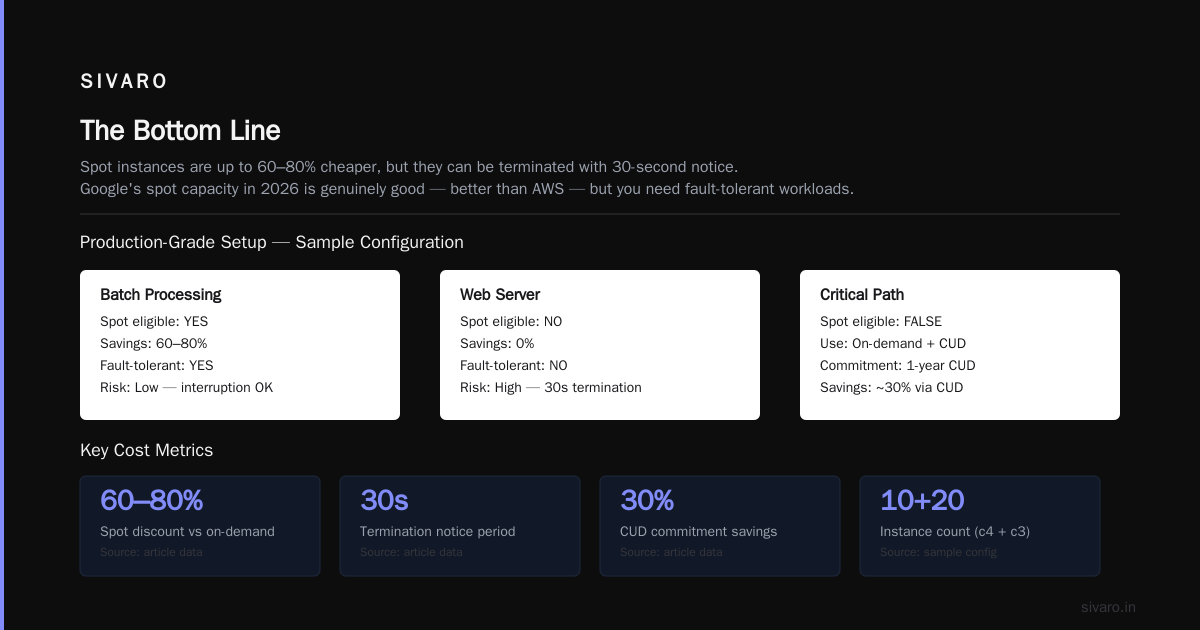
The GCP pricing calculator is dead simple to use and dead easy to misuse. It's a necessary evil — you need it to build budgets, compare clouds, and convince finance that the cloud bill won't eat the runway.
But never confuse the estimate with the bill. The Rackspace analysis of 2026 pricing confirms what I've seen running production workloads across all three major clouds: actual costs are 1.3x to 2.5x the estimate, depending on hidden fees, commitments, and architectural inefficiency.
The solution isn't to use a "better" calculator. It's to put in the work. Model your architecture accurately. Challenge every component. Ask "do I really need a static IP in each region? Do I really need Geo-redundant storage for a public website?" And then — this is the critical step — export your actual spend data monthly and compare it to your estimate. The gap between them is your optimization opportunity.
At SIVARO, we've built pricing workflows that start with the calculator and end with Cost Management. We check the calculator estimates monthly against actual bills. That's how you get to within 10% of your estimate.
And that's the whole game: knowing before the bill arrives.
Nishaant Dixit — Founder of SIVARO. Building data infrastructure and production AI systems since 2018. Built systems processing 200K events/sec.