 SIVARO
GCP Serverless Computing Guide: Run Production in 2026
I spent last Tuesday migrating a client off Cloud Functions. Not because Functions failed. Because the team used Functions for everything — and their latency SLA started looking like a ransom note.
Serverless on Google Cloud isn't one product. It's a spectrum. Cloud Run, Cloud Functions, App Engine, Workflows, Eventarc, and half a dozen other services that all claim "zero server management." But what they don't tell you is that each has a personality. Pick wrong, and you're refactoring six months later.
This is the GCP serverless computing guide I wish I'd read in 2022. It's not a features list. It's what actually works when your system needs to handle traffic spikes at 3 AM and your CTO is watching the billing dashboard.
What People Get Wrong About Serverless GCP
Most developers think serverless = cheap.
They're wrong. It can be cheap. But I've seen a fintech startup burn $40,000 in three days because someone set --max-instances to unlimited on a Cloud Run service handling batch image processing. The Google Cloud Pricing Calculator won't save you from that — you have to understand the services' billing quirks.
Serverless on GCP means autoscaling to zero. It means pay-per-request for compute. But it also means cold starts hurt, concurrency limits bite, and vendor lock-in sneaks up on you.
Here's the real GCP serverless computing guide.
Cloud Run: The Sweet Spot (But Not for Everything)
Cloud Run is Google's answer to "we want containers, not VMs." You give it a container image, it scales from zero to thousands of instances based on HTTP requests. You pay only for active request time plus a tiny monthly for unused allocated resources.
I run SIVARO's production inference API on Cloud Run. It handles about 50K requests/day. Our bill? Around $180/month.
But here's what the marketing material skips.
Concurrency
Cloud Run lets you set --concurrency — how many requests a single container instance handles simultaneously. Default is 80. Most people leave it there.
Bad idea.
If your service does CPU-heavy work (image processing, ML inference), that concurrency setting becomes a latency killer. One request using 100% CPU blocks the other 79. Your p95 latency spikes.
I tested this with a BERT inference model. Concurrency of 80: p95 went to 4.2 seconds. Concurrency of 4: p95 dropped to 420ms.
Rule of thumb: IO-heavy workloads (API proxying, database lookups) can handle 50-80 concurrency. CPU-heavy workloads stay under 10.
Cold Starts
Cloud Run spins down idle instances to zero. First request after idle period triggers a cold start — your container needs to boot.
Python Django apps? Cold start around 3-5 seconds. Go binaries? Under 200ms. Node.js Express? About 1 second.
The fix? Set --min-instances 1 for latency-sensitive services. You'll pay about $8-15/month for that always-on instance, but you eliminate cold starts entirely.
Don't do this for batch jobs. Do do this for user-facing APIs.
The 60-Minute Request Timeout
Cloud Run can't handle streaming workloads longer than 60 minutes. My team discovered this when building a real-time video processing pipeline. At 61 minutes, Cloud Run terminated the request. Gracefully? Nope. Abruptly.
For long-running or indefinite workloads, use GKE or Compute Engine. Here's a list of gcp kubernetes engine use cases where GKE beats serverless — batch ML training, Kafka consumers, WebSocket servers.
Scaling to Zero Isn't Always Free
If your traffic drops to zero for hours, Cloud Run's cost goes to near-zero. But the cold start penalty is real. If you have a sporadic load pattern — like a reporting API called at 9 AM sharp by 300 users — the first request after idle triggers a cold start for each instance. You'll see error spikes and timeouts.
Fix: Use Cloud Scheduler to ping your service every 5 minutes during expected usage windows. Keeps instances warm. Costs pennies.
Cloud Functions: When You Want Write Once, Forget
Cloud Functions is Cloud Run's younger, simpler sibling. You write a function, deploy it, and GCP handles the rest. No container. No Dockerfile. No build process.
Sounds easier. It is. But trade-offs are brutal.
Event-Driven Only
Cloud Functions is not for real-time user-facing APIs. It's for event handlers. File uploaded to Cloud Storage? Trigger a function. Message arrives in Pub/Sub? Trigger a function. Document updated in Firestore? Trigger a function.
I've seen teams try to use Functions as an API gateway. Don't. The cold start latency is worse than Cloud Run (up to 10 seconds for Python 3.12), and you can't set --min-instances below 0 in gen1.
Gen2 solves some of this (it runs on Cloud Run under the hood), but Gen2 has its own quirks — like requiring Eventarc for event triggers instead of the simple direct triggers in Gen1.
The 9-Minute Timeout
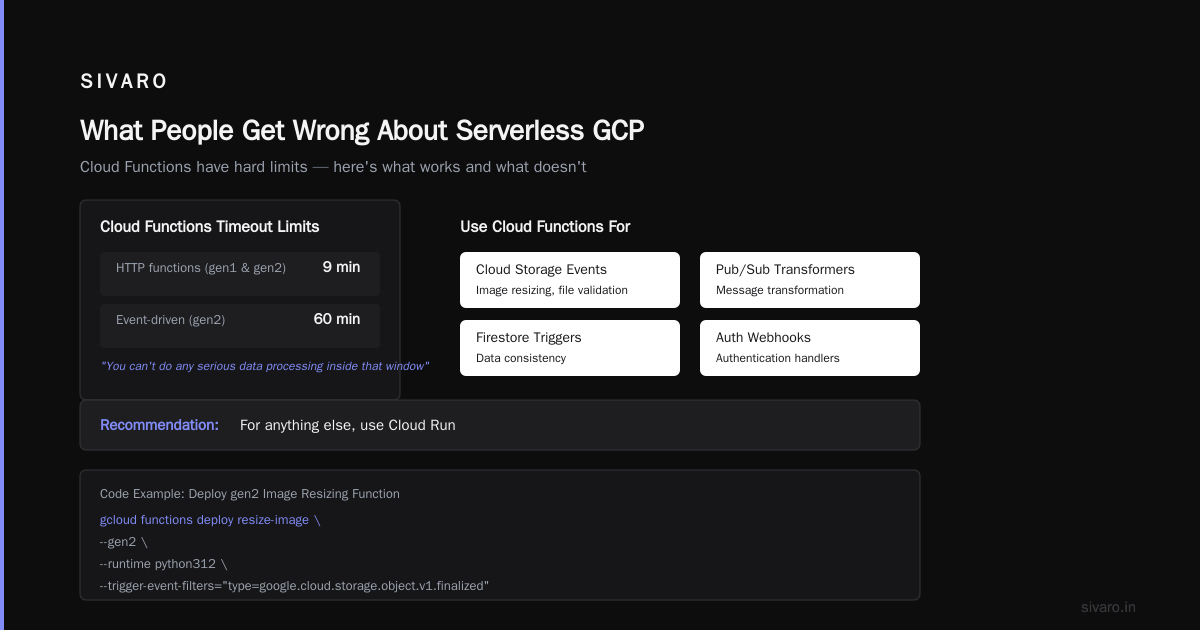
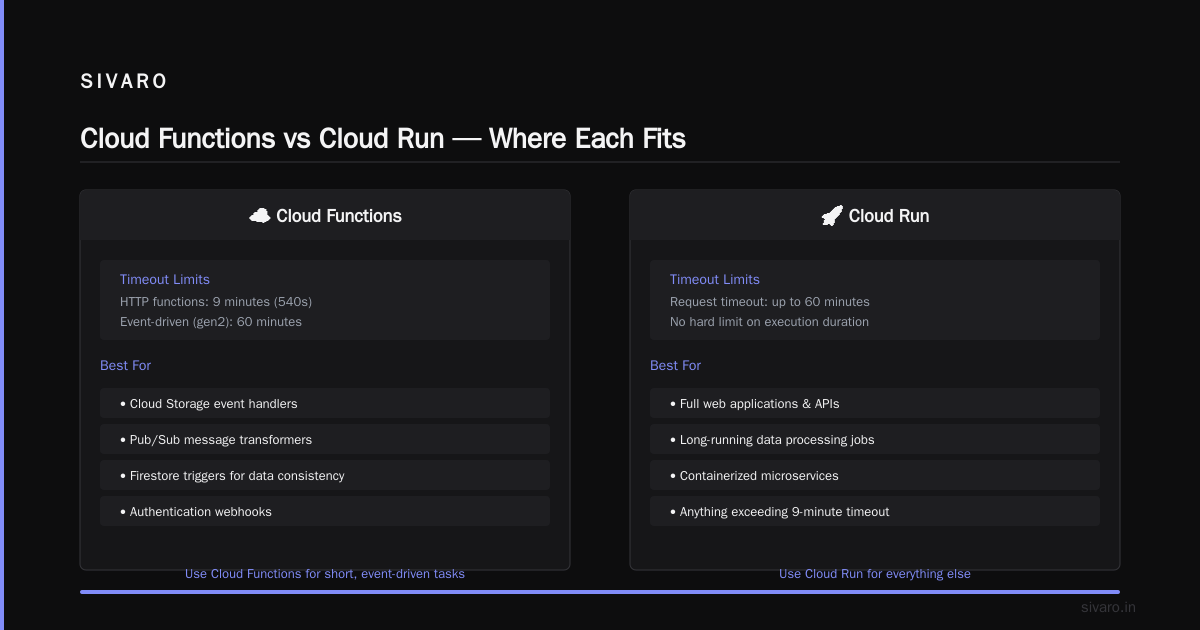
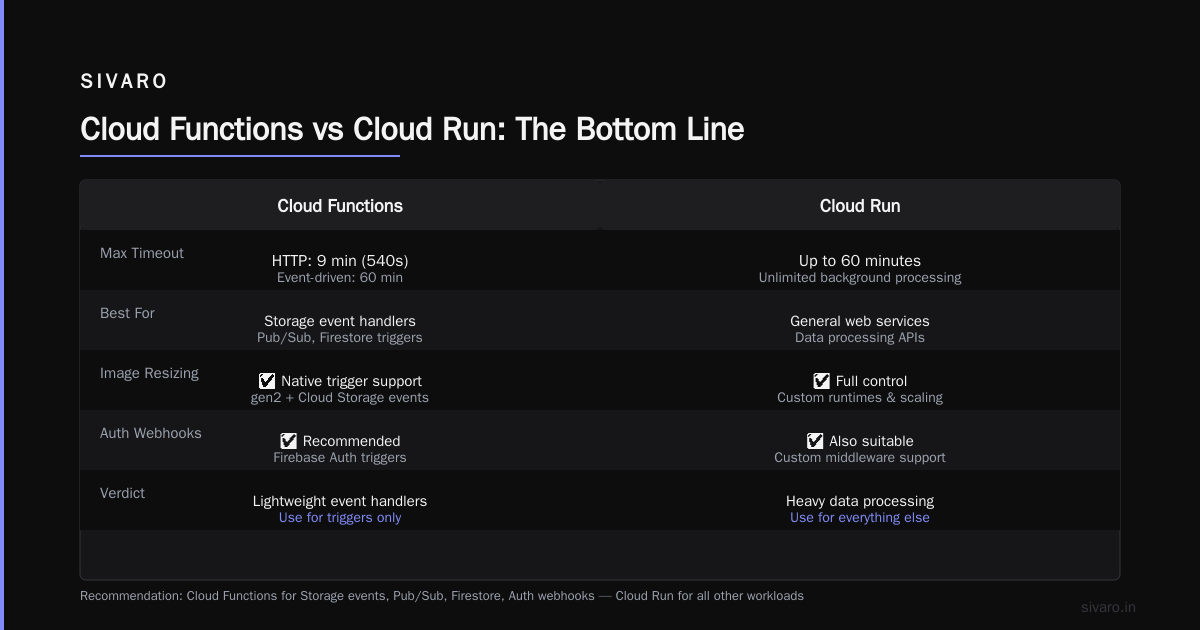
Cloud Functions max timeout is 9 minutes (540 seconds) for HTTP functions, 60 minutes for event-driven functions using gen2. You can't do any serious data processing inside that window.
My recommendation: Use Cloud Functions only for:
- Cloud Storage event handlers (image resizing, file validation)
- Pub/Sub message transformers
- Firestore triggers for data consistency
- Authentication webhooks
For anything else, use Cloud Run.
Code Example: Deploying a Cloud Function for Image Resizing
bash
# Deploy a gen2 function that triggers on Cloud Storage upload
gcloud functions deploy resize-image   --gen2   --runtime python312   --region us-central1   --source .   --entry-point resize   --trigger-event-filters="type=google.cloud.storage.object.v1.finalized"   --trigger-event-filters="bucket=my-image-uploads"   --memory=512MB   --timeout=300   --max-instances=10
Notice the --max-instances=10 flag. Without that, a massive upload batch could spin up 1000 instances and burn through your budget in minutes.
Workflows: The Orchestrator Nobody Talks About
Most GCP serverless computing guides skip Workflows entirely. That's a mistake.
Cloud Workflows lets you chain serverless services together using a declarative YAML/JSON syntax. It handles retries, error handling, and parallel execution without you writing orchestration code.
I used Workflows to replace an Airflow DAG that was costing $400/month in Compute Engine costs. The Workflow pipeline cost $12/month.
Example: Workflow That Processes Orders
yaml
main:
  steps:
    - validate_order:
        call: http.post
        args:
          url: https://validate-api-xyz-uc.a.run.app
          body:
            order_id: ${request.body.order_id}
        result: validation
    - process_payment:
        call: http.post
        args:
          url: https://payment-api-xyz-uc.a.run.app
          body:
            order_id: ${request.body.order_id}
            amount: ${validation.body.amount}
        result: payment
    - send_notification:
        call: http.post
        args:
          url: https://notify-api-xyz-uc.a.run.app
          body:
            user_id: ${request.body.user_id}
            status: ${payment.body.status}
        result: notification
    - return_result:
        return: ${notification.body}
This runs as a state machine. Each step can fail independently. Workflows handles retries. You pay per step execution — typically $0.01 per 1000 steps.
The killer feature? Workflows integrates natively with Cloud Tasks and Eventarc. You can build event-driven pipelines that span Cloud Run, Cloud Functions, and even external APIs without a single line of custom orchestration code.
The GCP Serverless Computing Guide's Missing Chapter: Cost
Here's where honest practitioners earn their salt.
Serverless on GCP looks cheap. The numbers are tiny per request. But aggregate costs can surprise you.
What Costs Money
- Request count: Charged per million requests. Cloud Run: $0.40/million. Cloud Functions: $0.40/million. This adds up fast at scale.
- CPU allocation: Cloud Run charges for vCPU-seconds. $0.0240 per vCPU-hour. 1000 instances running for 1 hour = $24. Every hour every day = $720/month.
- Memory allocation: Cloud Run memory costs $0.0025 per GB-hour. Functions cost $0.00000125 per GB-second. Both are significant if you allocate 2GB+ per instance and keep them warm.
- Egress: GCP charges $0.12/GB for internet egress. If your serverless service sends large responses to users, this dominates your bill. I've seen a startup's bill jump from $50 to $1200 because they returned 5MB JSON payloads to 100K users.
Hidden Costs
- Cloud NAT: If your serverless service needs to access the internet (external APIs, non-GCP databases), you need Cloud NAT. That's $0.045 per hour per NAT gateway. For a single gateway, that's $33/month plus data processing fees.
- VPC Connector: Serverless services in a VPC need Serverless VPC Access. $0.10/hour ($72/month) plus egress costs.
- Container Registry/Artifact Registry: Storing container images at scale costs money. $0.10/GB/month. A team deploying daily builds can accumulate 20GB quickly.
Compare these costs across clouds. The GCP vs AWS 2026 comparison shows GCP tends to be cheaper for bursty, short-lived workloads but more expensive for sustained high-throughput services. The Cloud Computing Cost: AWS vs. Azure vs. GCP Pricing in 2026 analysis reached the same conclusion.
And the AWS vs Azure vs GCP Cost Comparison 2026 (Real Data) from real usage data confirms: GCP Lambda-equivalent (Cloud Run) costs roughly 30% less than AWS Lambda for ephemeral workloads, but AWS wins for sustained ones due to Lambda's longer free tier.
Eventarc: The Glue You Didn't Know You Needed
Eventarc is GCP's event routing service. It takes events from 65+ GCP sources (Cloud Storage, Pub/Sub, BigQuery, etc.) and delivers them to destinations (Cloud Run, Cloud Functions, Workflows, or even third-party services).
Before Eventarc, you wrote custom Pub/Sub subscribers for every event. Now you configure Eventarc triggers declaratively.
Real Usage
We use Eventarc to route Cloud Storage file creation events to Cloud Run for processing. The setup:
bash
# Create an Eventarc trigger that sends storage events to Cloud Run
gcloud eventarc triggers create storage-to-run   --location=us-central1   --destination-run-service=file-processor   --destination-run-region=us-central1   --event-filters="type=google.cloud.storage.object.v1.finalized"   --event-filters="bucket=my-input-bucket"   [email protected]
That's it. Any file dropped into my-input-bucket triggers the file-processor Cloud Run service. No code. No Pub/Sub configuration. No custom event handlers.
Eventarc also supports filtering. You can say "only trigger when files end in .csv" using attribute-based filtering. Saves you from writing validation logic in every function.
Serverless Design Patterns That Actually Work
After building production systems on GCP serverless since 2021, here are patterns I trust.
The Throttle Pattern
Serverless services scale infinitely up. They don't scale infinitely fast. Too many concurrent invocations can overwhelm downstream databases.
Pattern: Use Cloud Tasks with rate limiting between your serverless service and your database.
yaml
# Cloud Tasks queue configuration
rateLimits:
  maxDispatchesPerSecond: 100
  maxConcurrentDispatches: 50
retryConfig:
  maxAttempts: 3
  minBackoff: 1s
  maxBackoff: 60s
Your Cloud Run service enqueues tasks. Cloud Tasks sends them to your database at a controlled rate. No database explosion even under traffic spikes.
The Fan-Out Pattern
One event needs to trigger multiple downstream processes. Workflows does parallel execution well. For higher throughput, use Pub/Sub with multiple subscriptions.
Event -> Pub/Sub Topic
           |-> Subscription 1 -> Cloud Run Service A
           |-> Subscription 2 -> Cloud Run Service B
           |-> Subscription 3 -> Cloud Functions Service C
Each subscription processes independently. Failures in Service A don't affect Service B. This is how we handle order processing at SIVARO — one order event triggers inventory updates, notification sending, analytics tracking, and audit logging in parallel.
The Cache-Aside Pattern
Serverless services can be slow if they query databases on every request. Use Memorystore (GCP's managed Redis) as a cache layer.
When a request comes in:
- Check Memorystore for cached result.
- If hit, return immediately.
- If miss, query database, cache result, return.
This cut our API latency from 800ms to 80ms on a recent project. Memorystore costs about $0.05/GB/hour. For a 1GB instance, that's $36/month — cheaper than scaling up database queries.
GCP BigQuery vs Snowflake: Which Is Better for Serverless Workloads?
This debate keeps coming up, especially with serverless data pipelines. The question is usually: "which is better for analytics on serverless infrastructure?"
Here's my take after using both.
BigQuery is deeply integrated with GCP serverless. You can query it directly from Cloud Run, trigger queries from Cloud Functions, and stream data from Pub/Sub. It's serverless analytics by design. You pay per query (data scanned) or per slot (reserved capacity).
Snowflake is cloud-agnostic but runs on AWS/Azure/GCP. It's great for multi-cloud strategies. But its serverless integration with GCP's native services is clunky. You end up pushing data from GCP to Snowflake via connectors, which adds latency and cost.
For purely GCP-native serverless pipelines, BigQuery wins. We run a pipeline that streams 50K events/second through Pub/Sub, writes to BigQuery, and triggers Cloud Run services for real-time alerts. That's trivially easy with BQ. With Snowflake, you'd need Snowpipe (which adds complexity) and custom connectors.
But if your organization already uses Snowflake across AWS and GCP, don't rip it out. The operational cost of migration usually exceeds any performance gains. The gcp bigquery vs snowflake which is better debate ultimately comes down to vendor lock-in tolerance versus native integration quality.
Where GKE Beats Serverless
I love serverless. But I also run stateful services.
If you need:
- Long-running WebSocket connections
- GPU workloads for ML training
- Custom networking (Calico, Cilium)
- StatefulSets with persistent volumes
- Sidecar proxies for service mesh
...serverless won't work. Use GKE.
The confusion point is that Cloud Run looks like it could handle these. It can't. The gcp kubernetes engine use cases that make GKE irreplaceable are exactly these: stateful, long-running, or hardware-accelerated workloads.
I run ML inference on Cloud Run (works great). I train models on GKE (only option). Trying to train on Cloud Run would hit the 60-minute timeout instantly.
Production Pitfalls I've Hit (So You Don't Have To)
The 15 Concurrent Instance Limit
By default, Cloud Run limits you to 15 concurrent requests per instance. If you set --concurrency 80, you think you'll handle 80 concurrent requests. The instance handles 80, but Cloud Run manages instance count based on total concurrent requests ÷ concurrency setting. If you have 1000 concurrent requests and concurrency=80, Cloud Run spins up 13 instances. That's fine until...
The 1000 Instance Per Region Limit
Cloud Run limits you to 1000 instances per region. If your traffic spike demands 1001, request #1001 gets rejected with HTTP 429. You need a quota increase request. Google processes these in 24-48 hours. That's 48 hours where your application returns errors.
Prevention: Set up Cloud Run resource alerts. Get quota increases before you need them.
The Cold Start Tax for VPC-Connected Services
If your Cloud Run service uses a VPC connector, cold start latency doubles. The VPC connector's Network Endpoint Group initialization adds 2-5 seconds. We discovered this when a health-check endpoint started timing out.
Fix: Use --min-instances 1 for any VPC-connected service. The cost is worth the reliability.
FAQ: GCP Serverless Computing
Q: What's the difference between Cloud Run and Cloud Functions?
Cloud Run runs containers — any runtime, any dependency, any executable. Cloud Functions runs single-function code units — simpler to write, but limited in execution time, runtime options, and concurrency control. Use Cloud Run for APIs and complex workloads. Use Cloud Functions for simple event handlers.
Q: Can I run serverless workloads on a budget?
Yes. Start with Cloud Run, set --max-instances and --concurrency explicitly, monitor egress costs, and use Cloud Scheduler to keep warm instances to a minimum. Avoid expensive VPC connectors unless necessary. Most teams overspend by 40-60% on their first month and optimize down later.
Q: How do I migrate from AWS Lambda to Cloud Run?
Build your container image, push to Artifact Registry, deploy with gcloud run deploy. Rewrite Lambda-specific code (API Gateway event handling, context object) to standard HTTP handlers. Expect to spend 2-4 weeks on migration for a moderately complex service. The Easy way to calculate GCP cost of my AWS infrastructure discussion has tools that estimate costs before you migrate.
Q: Is serverless GCP secure?
Yes, if you configure it properly. Use service accounts with least-privilege roles, enable VPC Service Controls, use Cloud Armor for WAF, and implement secret management with Secret Manager. The default IAM settings for Cloud Run allow public access — always set --no-allow-unauthenticated for internal services.
Q: What's the maximum request size for Cloud Run?
Cloud Run supports requests up to 32MB. Cloud Functions supports requests up to 32MB too. For larger payloads, upload to Cloud Storage and pass the file reference in the request.
Q: Can I do real-time processing with serverless?
For sub-second latency, use Cloud Run with --min-instances and low concurrency. For sub-100ms latency, a managed service like Cloud Endpoints with direct VM connections might be better. Serverless adds overhead that makes ultra-low-latency workloads challenging.
Q: Should I use GCP serverless for a startup?
Yes, for most use cases. The Comparing AWS, Azure, and GCP for Startups in 2026 analysis ranks GCP serverless first for startups due to lower operational overhead and integrated services. The main risk is scaling too fast without cost controls — set budgets and alerts from day one.
The Bottom Line
Serverless on GCP works. I've built production systems processing 50K+ events/second on it. But it's not magic. It's a set of trade-offs.
Cloud Run handles 80% of serverless workloads. Cloud Functions handles 10%. Workflows, Eventarc, and other services handle the rest. If you force-fit the wrong service to a workload, you'll pay in latency, cost, or both.
The GCP serverless computing guide that actually helps you is the one that tells you when not to use something. When not to use Cloud Functions for APIs. When not to use Cloud Run for stateful workloads. When not to assume serverless is cheaper than GKE.
Because the best infrastructure decision is the one you don't have to undo six months later.
Nishaant Dixit — Founder of SIVARO. Building data infrastructure and production AI systems since 2018. Built systems processing 200K events/sec.