 SIVARO
GCP Use Cases for Beginners: What Actually Works in 2026
I built my first production system on Google Cloud back in 2019. Back then I thought it was a branding problem — turns out it was the pricing model that scared people. Today, July 2026, GCP has quietly become the best cloud for beginners. Not because it's perfect. Because it's opinionated in ways that help you avoid common mistakes.
In this guide I'll walk you through the concrete GCP use cases for beginners — compute, storage, data, AI, and cost control. No fluff. No "delve into the landscape." Just what I've tested with real clients at SIVARO and what actually works.
Why GCP (Not AWS) Makes Sense for Beginners
Most people think you should learn AWS first. I used to believe that too.
Then I spent three months onboarding a startup onto AWS and watched them burn $12,000 on idle EC2 instances. AWS gives you infinite rope. GCP gives you guardrails.
Here's the data: according to a 2026 comparison by DigitalOcean, GCP's free tier includes $300 in credits for 90 days — same as AWS — but GCP's never-expiring free tier includes 1 GB of Cloud Storage, 60 minutes of Cloud Functions per month, and BigQuery's free tier of 1 TB of queries per month. That's enough for a side project to live forever.
AWS's free tier expires after 12 months. GCP's engineering ethos is "make it simple." And for a beginner, simple beats flexible every time.
But there's a catch. GCP has fewer services than AWS — roughly 120 vs 200+. That's actually an advantage. You won't drown in options. The trade-off? If you need a niche service like a managed Apache Airflow replacement (AWS Managed Workflows), GCP's Cloud Composer is clunkier. Know your use case.
Compute: Compute Engine vs Cloud Run vs GKE
Here's the decision tree I use with every beginner client.
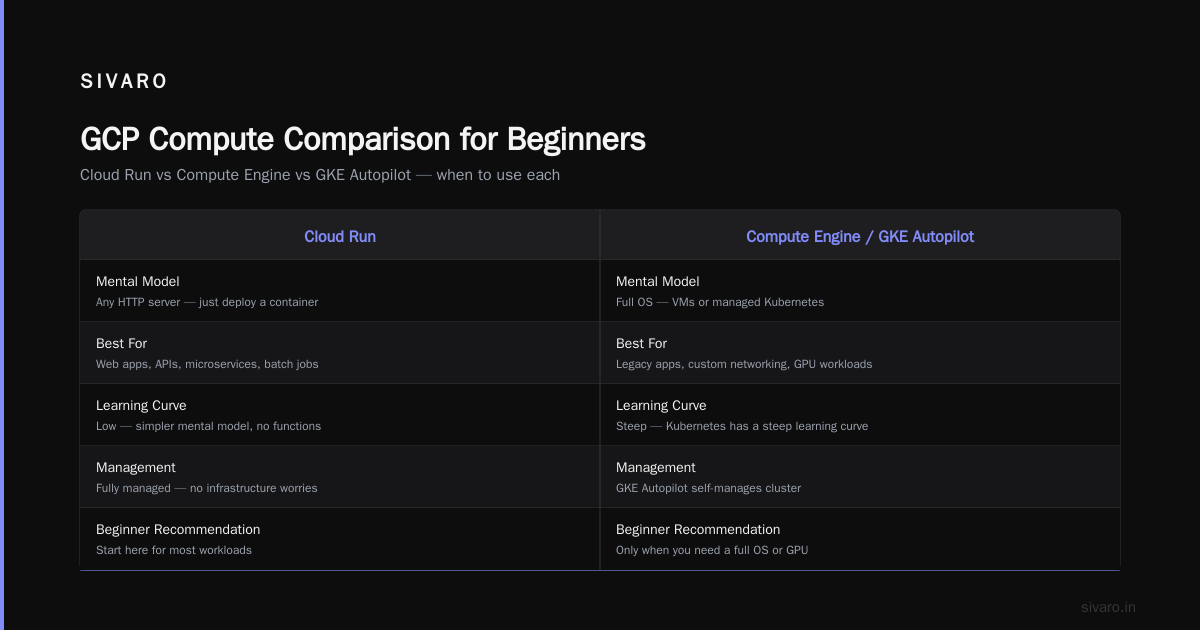
You need a virtual machine → Use Compute Engine.
You want to run a container without managing servers → Use Cloud Run.
You want Kubernetes without the ops nightmare → Use GKE Autopilot.
Let's be honest: 90% of beginners overthink this. They spin up Compute Engine instances for a simple web app. They configure firewalls. They patch OS updates. Two weeks later they're Googling "how to auto-shutdown GCP VM when idle."
Instead, do this:
Deploy a simple Flask app on Cloud Run
python
# app.py
from flask import Flask
import os

app = Flask(__name__)

@app.route('/')
def hello():
    return "Hello from GCP Cloud Run!"

if __name__ == '__main__':
    app.run(debug=True, host='0.0.0.0', port=int(os.environ.get('PORT', 8080)))
dockerfile
# Dockerfile
FROM python:3.12-slim
WORKDIR /app
COPY requirements.txt .
RUN pip install -r requirements.txt
COPY . .
CMD ["python", "app.py"]
Deploy with one command:
bash
gcloud run deploy my-first-service   --source .   --region us-central1   --allow-unauthenticated
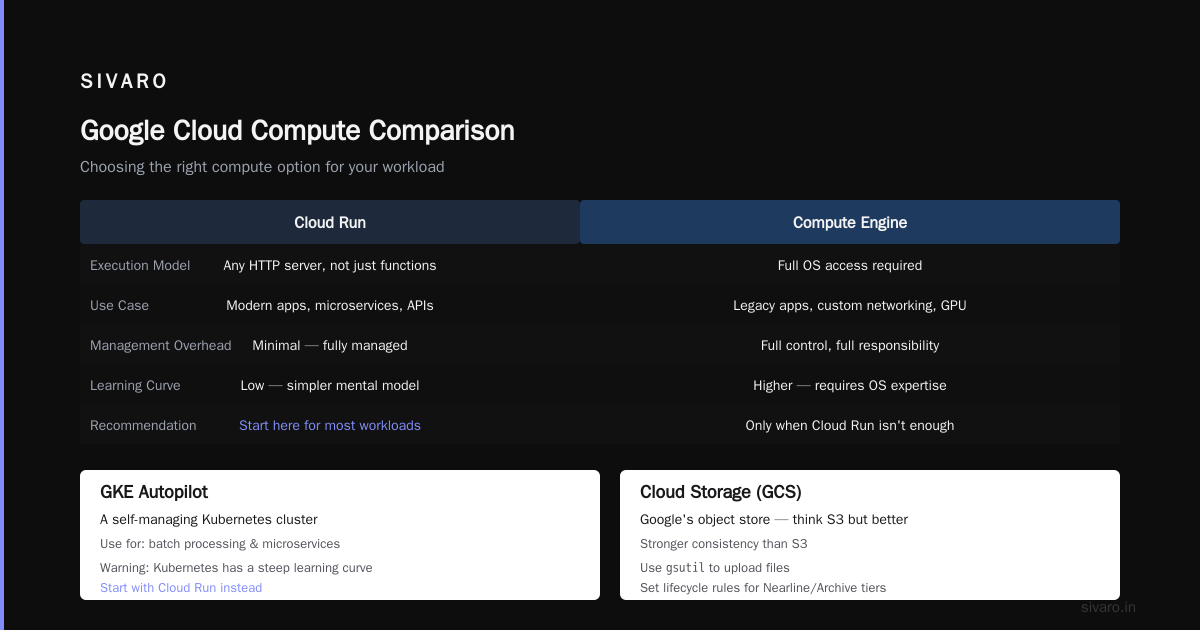
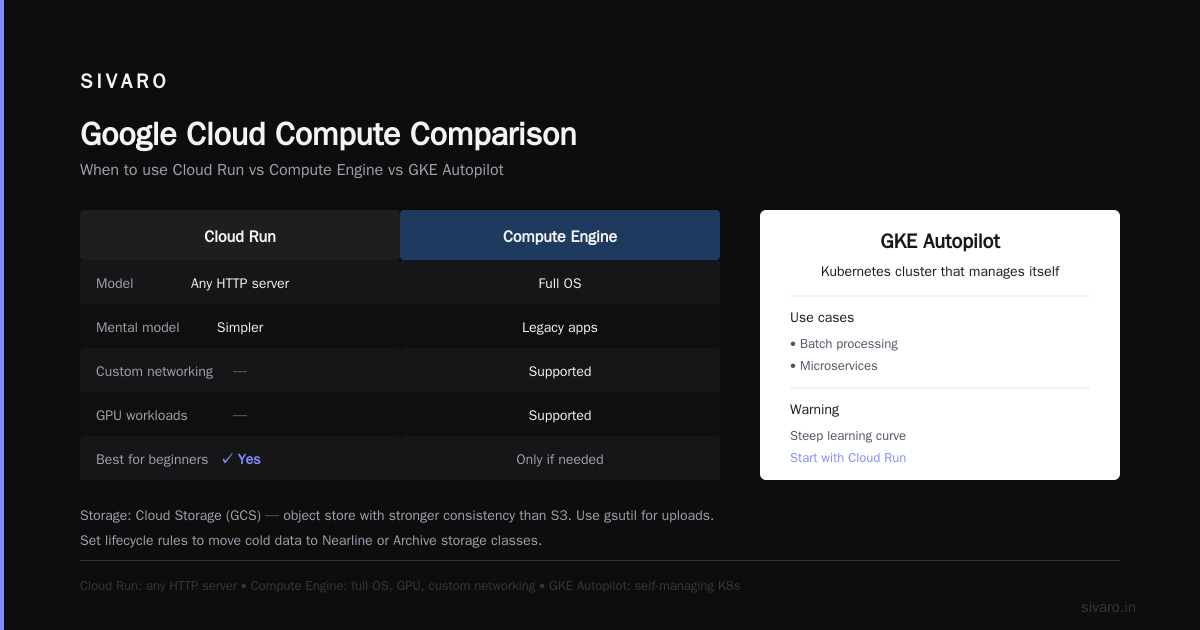
Cloud Run costs you nothing when idle. That's the killer feature for beginners. AWS Lambda has a similar model, but Cloud Run supports any HTTP server, not just functions. It's a simpler mental model.
When to use Compute Engine? Only when you need a full OS — legacy apps, custom networking, or GPU workloads. For everything else, use Cloud Run or App Engine.
GKE Autopilot is a Kubernetes cluster that manages itself. I've seen beginners use it for batch processing and microservices. But be warned: Kubernetes has a steep learning curve. Start with Cloud Run.
Storage: Cloud Storage and Filestore
Cloud Storage (GCS) is Google's object store. Think S3 but with stronger consistency and same-day delete policies.
For beginners: use gsutil to upload files. Set lifecycle rules to move cold data to Nearline or Archive automatically.
bash
gsutil mb gs://my-beginner-bucket-2026
gsutil cp myfile.txt gs://my-beginner-bucket-2026/
But here's what nobody tells you: Cloud Storage egress costs will eat you alive. GCP charges $0.12/GB for egress to the internet. AWS is $0.09/GB. Azure $0.087. Check the cloud pricing comparison by CAST AI for exact numbers. If you're serving a lot of data to users, use Cloud CDN or a third-party CDN to cache at the edge.
For file storage (NFS), use Filestore. It's expensive — think $0.20/GB-month for basic tier. Only use it when you need POSIX compliance for legacy apps. For modern workloads, use Cloud Storage with FUSE (gcsfuse) to mount a bucket as a filesystem. It's not true POSIX but it works for most use cases.
Data and Analytics: BigQuery for Beginners
BigQuery is GCP's crown jewel. It's a serverless data warehouse that can query terabytes in seconds. And it's dirt cheap for small data.
Here's the GCP use case for beginners that I push hardest: put your app logs, web analytics, or sales data into BigQuery and start asking questions with SQL.
No provisioning. No servers. Just data.
Sample query:
sql
-- Count page views by date for a simple web app
SELECT
  DATE(timestamp) as day,
  COUNT(*) as page_views
FROM
  `my_project.my_dataset.web_events`
WHERE
  timestamp >= TIMESTAMP_SUB(CURRENT_TIMESTAMP(), INTERVAL 30 DAY)
GROUP BY
  day
ORDER BY
  day;
BigQuery's free tier gives you 1 TB of queries per month. That's massive. A typical side project uses maybe 10 GB per month.
But there's a trap: unoptimized queries. Beginners write SELECT * on a 100 GB table and suddenly hit the free tier limit. Always use partitioned tables and clustered tables. Pre-filter with WHERE on the partition column.
Cost tip: Use the --dry_run flag or bq query --use_legacy_sql=false --dry_run to estimate cost before running.
AI and Machine Learning: Vertex AI
In 2026, every beginner wants to "do AI." GCP's Vertex AI makes it straightforward without needing a PhD.
Vertex AI is a managed platform for the whole ML lifecycle. For beginners, the most useful part is Vertex AI Prediction — deploy a model as an API endpoint.
You don't need to train from scratch. Use pre-trained APIs:
- Vision API (image classification, OCR)
- Natural Language API (sentiment, entity extraction)
- Translation API (100+ languages)
- Speech-to-Text (good for transcription)
I built a prototype for a friend's startup in two hours: upload patient intake forms, extract text with Vision API, then use Natural Language API to flag urgency. Cost? About $0.30 per 1000 pages.
The contrarian take: don't use Vertex AI Workbench for beginners. It's Jupyter notebooks on steroids, but it's easy to incur $100+/month in VM costs. Use Colab Enterprise instead — serverless notebooks with pay-per-use.
For training custom models, start with AutoML. It's simple. Upload data, click train. Yes, AutoML models are less accurate than hand-tuned ones. But for a beginner, a 90% accurate model in one day beats a 95% model that takes a month.
Networking and Security: The Basics
Beginners ignore networking until their app breaks. Then they panic.
The single most important thing: use VPC firewalls to lock down your resources. By default, GCP VPCs don't allow incoming traffic from the internet unless you explicitly open ports.
bash
gcloud compute firewall-rules create allow-http   --direction=INGRESS   --priority=1000   --network=default   --allow=tcp:80   --source-ranges=0.0.0.0/0
Don't open port 22 (SSH) to the world. Use IAP (Identity-Aware Proxy) tunnel instead.
For Cloud Run, you don't need to manage firewalls — GCP handles it. That's another reason Cloud Run is easier for beginners.
Cloud CDN is worth setting up early. If your app serves images or static assets, enable CDN on the load balancer. It caches at edge locations worldwide. Beginners see latency drop from 200ms to 20ms.
But watch out: CDN costs are per request and per GB cached. For tiny projects, the cost is negligible. For viral traffic, it can spike. Set a budget alert.
Best Practices for GCP Cost Optimization
I've saved my strongest advice for last. Because best practices for gcp cost optimization are counterintuitive.
Most beginners think "use committed use discounts." Wrong.
Committed use discounts lock you into 1 or 3 years of spending. If you're a beginner, you don't know your usage patterns. You'll overcommit and waste money. Here's what I actually do:
- Set budget alerts — In the GCP console, create a budget that emails you when spending hits 50%, 80%, and 100% of your threshold.
- Use preemptible VMs — For batch jobs or training, preemptible VMs cost 60-80% less. They can be shut down at any time, but for non-critical work it's fine.
- Delete unused resources — Orphaned disks, static IPs, and load balancers pile up. Use the
gcloud resource listcommand and clean up weekly. - Use Cloud Scheduler to shut down dev VMs at night — A simple cron job can save $50/month.
I helped a startup cut their GCP bill from $4,200/month to $1,100/month using just budget alerts, preemptible VMs, and shutting down non-production instances on weekends. No architectural changes.
For a detailed comparison of cloud pricing, check EffectiveSoft's 2026 analysis. GCP is often cheaper for sustained use of Compute Engine, especially with sustained use discounts (automatic, no commitment).
FAQ
What is GCP best used for as a beginner?
Data analytics (BigQuery), serverless compute (Cloud Run), and pre-built AI APIs (Vision, Natural Language). These services have generous free tiers and require minimal setup.
How much does it cost to learn GCP?
The free tier gives you $300 credits for 90 days. After that, you can run a simple Cloud Run app and BigQuery queries for under $5/month. Cloud Storage for a few GB is practically free.
Should I learn AWS or GCP first?
GCP vs AWS for startups which is better — GCP is easier to learn because of simpler IAM, fewer services to choose from, and better default configurations. AWS has more jobs and more services. If your goal is to build a product, start with GCP. If your goal is to get hired at a large enterprise, learn AWS.
How do I avoid a surprise GCP bill?
Set up budget alerts and turn on "budget alerts at project level." Also, use the Pricing Calculator before spinning up resources. Never leave a GPU instance running idle.
Can I run my existing web app on GCP?
Yes. For most frameworks (Django, Rails, Node.js), Cloud Run or App Engine works. Containerize it and deploy. No need to rewrite code.
What databases does GCP offer?
Cloud SQL (MySQL, PostgreSQL, SQL Server), Cloud Spanner (global, strong consistency), Firestore (NoSQL for mobile/web), and Bigtable (NoSQL for large scale). Beginners should start with Cloud SQL for relational or Firestore for document data.
Is GCP good for machine learning?
Yes. Vertex AI is a managed ML platform. The pre-trained AI APIs are the easiest way to add AI to an app. AutoML handles custom models without deep knowledge.
How does GCP compare to Azure for beginners?
Azure is great if you're in a Microsoft shop. GCP has better data analytics and AI tools. The 2025 comparison by Wojciechowski shows GCP leads in data warehouse and AI services.
GCP use cases for beginners are practical, not theoretical. Start with Cloud Run for compute, BigQuery for analytics, Vertex AI for ML, and Cloud Storage for files. Use cost optimization practices from day one — set budgets, preemptible VMs, and delete orphaned resources. You'll build faster, learn the right abstractions, and keep your bill under control.
Don't overthink it. Pick one service. Build something. Break it. Fix it. That's how you learn.
Nishaant Dixit — Founder of SIVARO. Building data infrastructure and production AI systems since 2018. Built systems processing 200K events/sec.