 SIVARO
GCP vs AWS for Startups: Which Is Better in 2026?
You’re building something new. Maybe it’s a fintech app processing 50K transactions a day. Maybe an AI tool that summarizes legal documents. Maybe you’re just trying to get to product-market fit before your runway runs out.
The cloud choice you make right now can save you six figures — or cost you a co-founder.
I’ve been on both sides. At SIVARO, we’ve shipped production systems on AWS, GCP, and even a small Azure stint that I’d rather not revisit. We’ve helped startups migrate from one to another. I’ve seen founders blow $200K on services they didn’t need, and I’ve seen others build the same thing for $8K/month on a platform nobody recommended.
So here’s the real question: gcp vs aws for startups which is better — not in theory, but for your specific stage, tech stack, and growth trajectory.
This guide is not a feature table. It’s a practical, honest breakdown from someone who has debugged Kubernetes clusters at 3 AM on both platforms. You’ll learn how they differ on cost, AI/ML maturity, data engineering tooling, migration paths, security posture, and the hidden gotchas that only show up when you’re scaling.
Let me start with a confession.
I used to think AWS was the safe choice. “Nobody got fired for buying AWS,” right? Turns out, startups get fired for burning cash on services they don’t use — and AWS is really good at making you feel like you need everything.
Then I watched a Series A company waste 18 months fighting IAM policies and networking complexity. They could have shipped their product twice on GCP in the same time.
So no, both don’t have “equal merit.” The right answer depends on your context. By the end of this article, you’ll know exactly which platform fits your startup’s DNA.
Pricing: The Trap That Eats Your Runway
Most people compare list prices and pick a winner. That’s like comparing menu prices without checking if half the ingredients are hidden charges.
Cloud Pricing Comparison 2026: AWS, Azure, GCP, Oracle breaks down the numbers. AWS typically publishes lower per-hour compute rates. But that’s like a hotel charging $50/night and $40 for parking.
AWS’s pricing model is complex. You get nickel-and-dimed on data transfer, NAT gateways, CloudWatch logs, and every API call to S3. A startup I advised was paying $12K/month on EC2 but $8K on data egress and logging. They moved to GCP and cut the bill by 40% — not because GCP compute is cheaper (it’s similar), but because GCP doesn’t charge for ingress, and egress costs are 50-70% less.
GCP’s sustained-use discounts kick in automatically. No commitment required. Run a VM for 31 days? You get 20% off the previous month’s usage. Run it for a year? Up to 40% discount. AWS has reserved instances that require upfront payment — great if you know exactly what you need, terrible if you’re iterating.
Cast.ai’s pricing comparison shows that for variable workloads (most startups), GCP’s committed-use discounts with no upfront cost beat AWS reserved instances by 15-25% in total cost of ownership.
But here’s the contrarian take: AWS’s free tier is more generous for the first 12 months. If you’re prototyping with zero revenue, you can run a t2.micro forever. GCP’s free tier is $300 credits for 90 days — then you pay. So for a founder building a side project while keeping the day job, AWS wins on entry cost.
My rule: If you’re pre-revenue and expect less than $5K/month cloud spend, start with AWS. If you’re funded and need to scale predictably, GCP’s pricing model is safer.
Ease of Use – Quit Pretending AWS Is “Simple”
I’ve onboarded 40+ engineers to both platforms. The average time to deploy a three-tier app on AWS: 2 weeks. On GCP (using Cloud Run + Cloud SQL + Firestore): 1 day.
Why? GCP is opinionated. It assumes you want serverless, containers, and managed services. AWS gives you 200+ levers that you can pull — and 150 of them will cost you.
Google Cloud’s console is clean. IAM is project-based, not policy-pileup. Networking is flat (VPC native). You don’t need a PhD in VPC peering to get two services to talk.
AWS’s default “everything is a separate region, separate VPC, separate subnet” philosophy meant I spent three days debugging a connectivity issue that turned out to be a missing route table entry. On GCP, the same setup works out of the box.
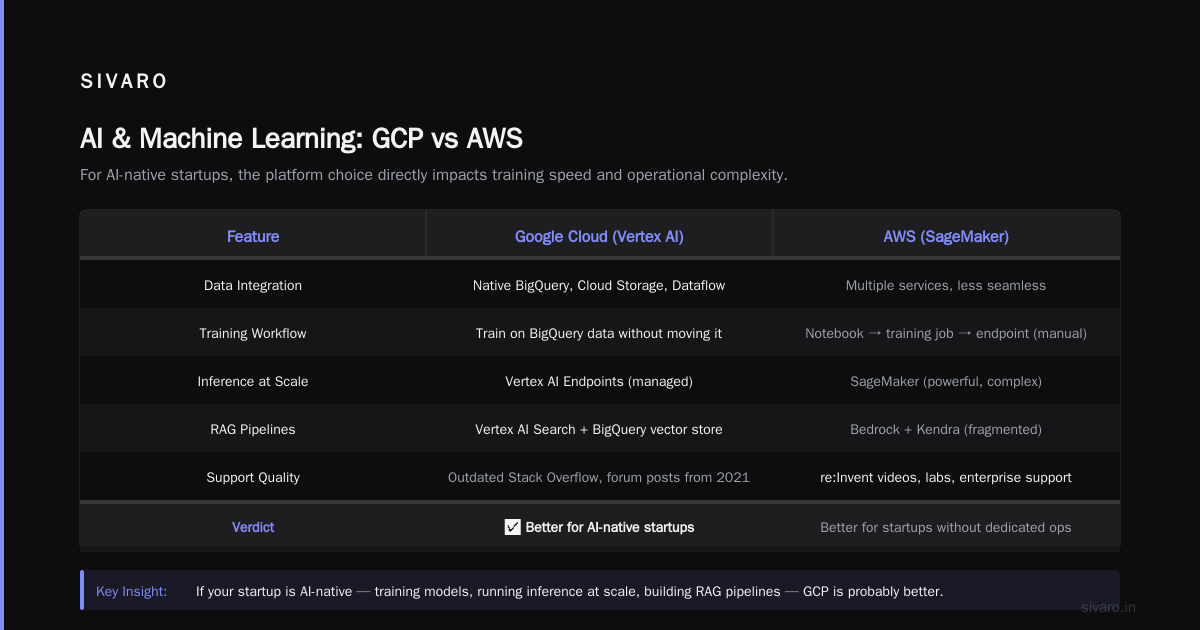
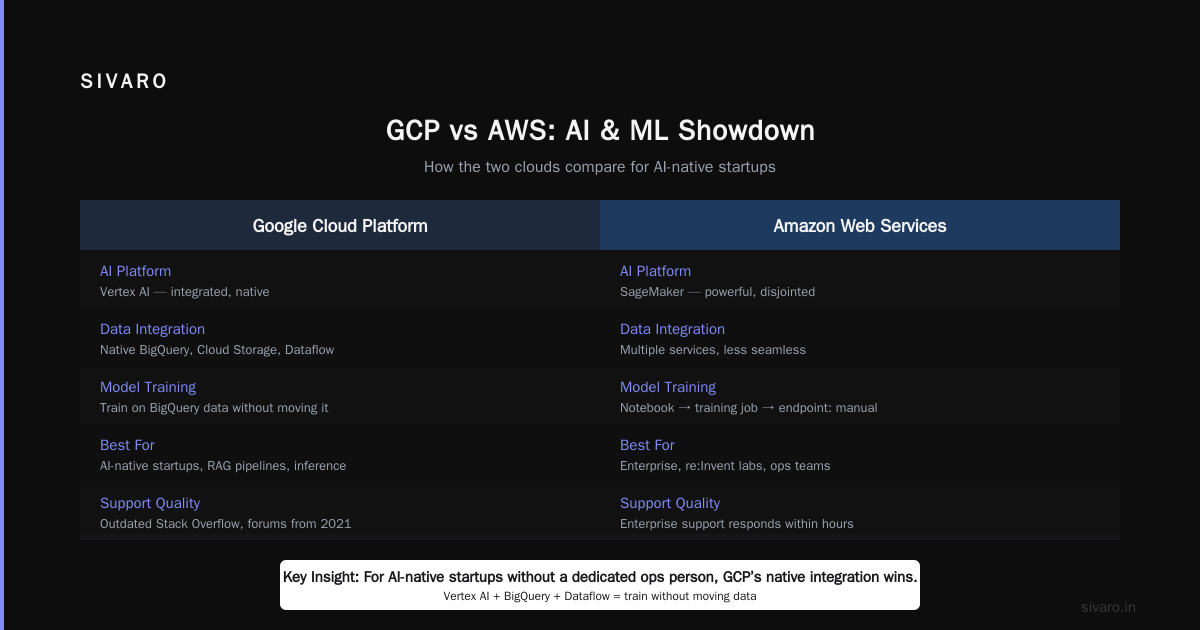
But — and this is real — AWS’s documentation is better. When you hit a wall on GCP, you often find outdated Stack Overflow answers or a forum post from 2021 that doesn’t apply anymore. AWS has re:Invent videos, labs, and enterprise support that actually responds within hours. For a startup without a dedicated ops person, that matters.
AI and Machine Learning: GCP’s Real Edge
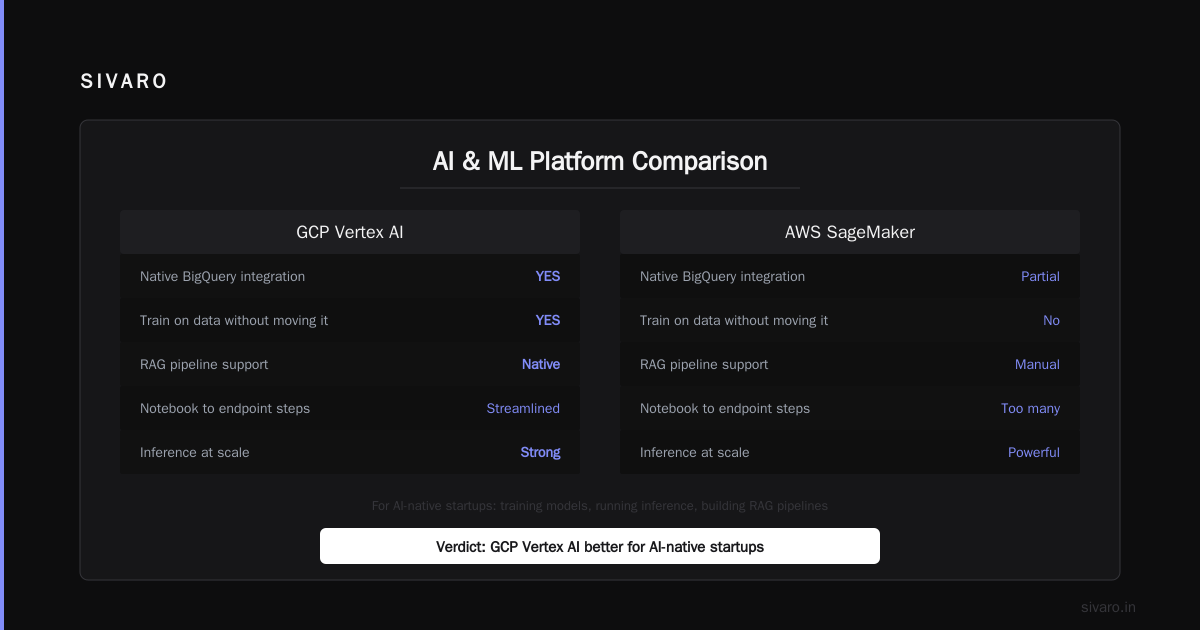
Here’s the honest truth: if your startup is AI-native — training models, running inference at scale, building RAG pipelines — GCP is probably better.
Vertex AI isn’t perfect. But it integrates natively with BigQuery, Cloud Storage, and Dataflow. You can train a model on BigQuery data without moving it. That’s huge.
AWS has SageMaker, which is powerful but feels like it was built by three different teams. The jump from notebook to training job to endpoint has too many manual steps. GCP’s Vertex AI Pipelines are a single DAG.
We recently built a production recommendation system for a B2B SaaS company. On GCP, end-to-end time: 3 weeks. On AWS, the same architecture would have taken 8 weeks because we’d need to wire up Step Functions, SageMaker, and S3 event triggers ourselves.
The Windows Forum comparison calls out GCP’s leadership in AI/ML — and that was 2025. In 2026, Google has pulled even further ahead with Gemini integration into Vertex AI. If you’re doing LLM fine-tuning, GCP’s TPUs are cheaper and faster than AWS’s NVIDIA offerings for certain model sizes.
But: AWS has Bedrock. And Bedrock supports models from Anthropic, Meta, and Amazon itself. If you need multi-model flexibility without vendor lock-in, Bedrock is a strong choice. GCP’s Vertex AI Model Garden is catching up, but the selection is narrower.
Data Infrastructure: Where SIVARO Lives
At SIVARO, we build data infrastructure and production AI systems. So I have strong opinions here.
For real-time data pipelines, streaming analytics, and batch processing, GCP’s BigQuery + Dataflow + Pub/Sub combination is brutal in a good way. BigQuery is the best serverless data warehouse on the planet — no clusters, no scaling, just SQL. AWS has Redshift, which is good but requires manual cluster management and spectrum optimization.
Google Cloud’s own service comparison maps Redshift to BigQuery, but that’s generous. Redshift is a columnar database. BigQuery is a petabyte-scale SQL engine that separates storage and compute. You don’t even know what a “warehouse” is on BigQuery — you just pay for the bytes scanned.
I’ve seen startups spend $20K/month on Redshift clusters that sit idle at night. On BigQuery, the same workload costs $4K. And if you use partitioning and clustering properly, it drops to $1.5K.
AWS counters with Athena (Presto-based) and EMR for Spark. Both are fine. But Athena is slow for anything beyond ad-hoc queries, and EMR requires managing clusters. GCP’s Dataproc and BigQuery are more mature.
For streaming: Kinesis vs Pub/Sub. Pub/Sub is simpler, has exactly-once delivery (if configured), and integrates with Dataflow for windowed aggregations. Kinesis is more widely documented, but its shard management is a pain.
My bias: For startups building on real-time data, GCP wins. But only if you’re willing to commit to Google’s ecosystem. AWS is better if you need Apache Kafka or more open-source interoperability.
Migration: “How to Migrate On Premise Servers to GCP” Is a Real Dilemma
I get asked this constantly: “how to migrate on premise servers to gcp vs aws?” It’s not a simple lift-and-shift question.
AWS has AWS Migration Hub, Server Migration Service, and Database Migration Service. They’re mature. You can replicate on-prem workloads to EC2 with minimal downtime. GCP has Migrate for Virtual Machines (formerly Velostrata), which works subtly differently — it uses storage-level replication.
For a typical startup with 20-50 on-prem VMs, I’d pick AWS for migration ease. Their partner ecosystem (Rackspace, Accenture, etc.) means you can hire someone to do it. GCP’s migration tooling is good but less battle-tested at scale.
But if you’re migrating and modernizing (re-platforming to containers or serverless), GCP is faster. Migrate for Anthos lets you containerize VM-based apps and run them on GKE. That’s a clean path to cloud-native.
We helped a logistics company migrate 30 on-prem servers to GCP. We used Migrate for Anthos, rewrote three monolithic apps into microservices on Cloud Run, and cut their infrastructure bill by 60%. That same journey on AWS would have involved six different services and a longer timeline.
Security: “How Secure Is Google Cloud Platform?”
“How secure is google cloud platform compared to AWS?” is a common fear, especially for fintech and healthtech founders.
Both platforms have SOC 2/3, ISO 27001, FedRAMP authorizations. Neither is “less secure” at the infrastructure layer. The difference is in who manages the security configuration.
Google Cloud’s default security posture is stronger. By default, GCP encrypts data at rest and in transit. Service accounts are project-scoped. VPC firewall rules are “deny all” unless specified. AWS defaults to “allow all” in many places — you must lock it down.
I’ve seen startups accidentally expose S3 buckets because the default is public-read. That doesn’t happen on GCS (Cloud Storage) — buckets are private by default, and you explicitly grant access.
On the other hand, AWS’s IAM is more granular. You can craft intricate policies that touch every resource. GCP’s IAM is simpler but sometimes too simple — you can’t grant “read only” on a table in BigQuery without creating a custom role. (You can now in 2026, but it’s still less flexible than AWS’s resource-based policies.)
For most startups, GCP’s “secure by default” approach reduces risk. If you need HIPAA or PCI compliance, both platforms offer it, but GCP’s Access Transparency logging (showing Google employee access) is a differentiator for regulated industries.
The ResearchGate comparative analysis gives GCP higher marks for built-in security, while AWS is praised for third-party integration options.
Ecosystem and Services: The Hidden Lock-In
AWS has 200+ services. GCP has ~120. That sounds like AWS wins, but it’s not that simple.
AWS’s ecosystem is vast — but many services overlap. Do you use Lambda or Fargate? DynamoDB or DocumentDB? S3 Glacier or S3 Intelligent-Tiering? Each choice leads to different cost profiles and operational complexity.
GCP has fewer services, but they’re more integrated. Cloud Run, Cloud Functions, and App Engine all run on the same container base, so migrating between them is trivial. On AWS, moving from Lambda to ECS requires rewriting your deployment.
For startups, fewer options = faster decisions. That’s good.
But if you need a specific service — say, AWS’s Managed Grafana, or Amazon Q for developer assistance — you won’t find exact equivalents on GCP. Google has Cloud Workstations (VS Code in browser) and Gemini for Cloud, but the feature parity isn’t there.
The Verdict: It Depends on Your Startup’s DNA
I can’t give you a single answer. But I can give you a decision framework.
Choose AWS if:
- You need maximum flexibility and plan to hire a dedicated cloud engineer
- You’re building on open-source tools (Kafka, Spark, Hadoop) that have better AWS integration
- You’re pre-revenue and want the 12-month free tier
- You expect to use specific services like DynamoDB, Neptune, or Managed Elasticsearch
- Your team already knows AWS
Choose GCP if:
- You’re building an AI/ML product or data-intensive application
- You want serverless-first architecture with minimal ops
- You need predictable pricing without commitment
- You value security defaults over granular control
- You’re a small team (2-5 engineers) and want to ship fast
Don’t choose either if:
- You haven’t validated product-market fit. Use a simple VPS (DigitalOcean, Linode) or Railway. Don’t get distracted by cloud.
Code Examples: Seeing the Difference
Here’s a simple “hello world” API deployed on each.
AWS (Lambda + API Gateway)
python
import json

def lambda_handler(event, context):
    return {
        'statusCode': 200,
        'body': json.dumps('Hello from AWS Lambda')
    }
Deployment requires: compress to zip, upload to S3, create Lambda function, create API Gateway endpoint, attach IAM role, configure triggers. About 12 CLI commands or 15 minutes in the console.
GCP (Cloud Run)
python
from flask import Flask
app = Flask(__name__)

@app.route('/')
def hello():
    return 'Hello from Cloud Run'

if __name__ == '__main__':
    app.run(host='0.0.0.0', port=8080)
Deployment: gcloud run deploy --source . — one command. Cloud Build builds a container, pushes to Artifact Registry, deploys to a managed instance with HTTPS endpoint automatically. Done in 2 minutes.
Cost comparison snippet
Terragrunt code to estimate costs (simplified):
hcl
# GCP – Cloud Run + Firestore
resource "google_cloud_run_service" "api" {
  name     = "my-api"
  location = "us-central1"
  template {
    spec {
      containers {
        image = "us.gcr.io/my-project/my-api:latest"
        resources {
          limits = {
            memory = "256Mi"
          }
        }
      }
    }
  }
}
# No provisioned concurrency – pay only for requests and memory.
# Firestore free tier: 1GB storage, 50K reads/day
hcl
# AWS – Lambda + DynamoDB (similar workload)
resource "aws_lambda_function" "api" {
  function_name = "my-api"
  role          = aws_iam_role.lambda_role.arn
  handler       = "index.lambda_handler"
  runtime       = "python3.12"
  filename      = "function.zip"
  memory_size   = 256
}
resource "aws_dynamodb_table" "my_table" {
  name         = "my-table"
  billing_mode = "PAY_PER_REQUEST"
  hash_key     = "id"
  attribute {
    name = "id"
    type = "S"
  }
}
# + Data Transfer, CloudWatch logs at $0.50/GB ingested
The AWS version has more moving parts. DynamoDB is excellent but has a learning curve with partitions and throughput. Firestore is simpler but less powerful for complex queries.
FAQ
Q: Is GCP cheaper than AWS for startups?
A: For most startups with variable workloads, yes — typically 15-30% lower total cost. But if you use reserved instances heavily on AWS, the gap narrows. EffectiveSoft’s comparison shows GCP wins for serverless and containerized apps.
Q: How secure is Google Cloud Platform compared to AWS?
A: Both are enterprise-grade. GCP’s default encryption and IAM model reduce misconfiguration risks, making it more secure for teams without dedicated security engineers. See DigitalOcean’s article for a side-by-side on security certifications.
Q: Which platform has better support for AI/ML?
A: GCP – Vertex AI is more integrated with data services. Bedrock (AWS) is better for multi-model access (Claude, Llama, etc.). If you’re training custom models, GCP TPUs are cheaper.
Q: How to migrate on premise servers to GCP – is it harder than to AWS?
A: AWS has more mature migration tools for VMs. GCP’s Migrate for Anthos is better if you want to containerize. Plan 2-3 weeks for either. Google’s migration docs have good step-by-step guides.
Q: Can I run containers on both?
A: Yes. GCP’s GKE is the most advanced managed Kubernetes. AWS EKS is fine but requires more maintenance. For serverless containers, Cloud Run beats AWS Fargate in simplicity.
Q: What about vendor lock-in?
A: Both lock you in. GCP’s lock-in is deeper in data services (BigQuery, Spanner). AWS lock-in is in proprietary databases (DynamoDB, Aurora) and Lambda event sources. Open-source stacks (Kubernetes, Kafka) reduce lock-in on both.
Q: Which is better for a two-person startup with no cloud experience?
A: GCP. The learning curve is gentler. You can build and deploy in a weekend. AWS will take you a month to feel comfortable.
Q: How do they compare on network performance?
A: AWS has more edge locations (105+). GCP has ~150 edge points of presence. For latency-sensitive apps, both are excellent in major regions. AWS wins in secondary regions (Southeast Asia, South America) with more data centers.
Conclusion
Let me land this.
Gcp vs aws for startups which is better — the honest answer is you need to align the cloud with your startup’s strategy, not just your budget or your CTO’s resume.
If you’re building the next generation of AI-powered tools, if your data architecture is real-time and analytical, if you want to spend less time on devops and more time on product — go GCP. It’s the better foundation for modern software.
If you’re in a heavily regulated industry, if you need the broadest possible service catalog for future pivots, if you have deep AWS expertise on your team — go AWS. It’s the safe bet that scales.
But whatever you choose, don’t over-optimize early. I’ve seen startups burn months on cloud selection. Ship your product first. You can always migrate later — and I’ve done that twice.
Just don’t migrate to Oracle Cloud. Trust me.
Nishaant Dixit — Founder of SIVARO. Building data infrastructure and production AI systems since 2018. Built systems processing 200K events/sec.