 SIVARO

GCP vs AWS vs Azure for Beginners: The 2026 Honest Guide
I sat down with a founder last week who was about to commit $40,000 a year to a cloud contract. He'd picked AWS because his CTO said "everyone uses AWS." His CTO was wrong.
I've spent eight years building data infrastructure and production AI systems. I've watched startups burn cash on the wrong cloud, and I've watched enterprises save millions by switching. Here's the thing: the "best" cloud doesn't exist. But the right cloud for your situation absolutely does.
This guide cuts through the marketing noise. No vendor fluff. No "both have merits" nonsense. I'm going to tell you what I've actually seen work, what fails, and why gcp vs aws vs azure for beginners is the wrong question entirely. The right question is: what are you actually building?
By the end of this, you'll know how the big three compare on price, performance, developer experience, and lock-in. You'll know which one I'd pick for a startup, an e-commerce site, and an AI company. You'll know what the hype gets wrong.
Let's start.
The Short Version: What Each Cloud Is Actually Best At
AWS is the safe default. It's been around since 2006. You can't get fired for choosing AWS. It has over 200 services, the largest ecosystem, and the deepest documentation. In 2026, AWS still holds over 30% of the cloud infrastructure market. What it isn't, is the most pleasant experience. The GCP vs AWS 2026 comparison from GoCloud sums it up well: AWS is the "Excel of the cloud." Powerful, everywhere, and occasionally infuriating.
Azure is the enterprise pick. If you're already deep in the Microsoft ecosystem — Active Directory, Office 365, SQL Server — Azure is your path of least resistance. Microsoft's hybrid cloud story is second to none. Their GCP vs AWS comparison notes Azure's strength in hybrid deployments. But for pure developer velocity, it's further from the bleeding edge.
Google Cloud (GCP) is the performance play. You want Kubernetes? Google invented it. You want data analytics, AI, ML? Same story. BigQuery and Vertex AI are unquestionably the strongest products in their categories. Google's networking infrastructure is the backbone they built YouTube and Search on. But here's the catch: GCP has less enterprise hand-holding, fewer certified partners, and a smaller support ecosystem. Startups love it in 2026. Traditional enterprises are still cautious.
I've used all three at scale. I'm not neutral. I'm honest.
Compute: Where Your Code Actually Runs
Let's talk about the fundamental unit of cloud: the virtual machine. When you're comparing gcp vs aws vs azure for web hosting, the VM story is the first thing you'll hot.
AWS EC2
EC2 is the incumbent. Everyone knows it. But EC2 is showing its age. The console is an absolute maze — I've seen experienced engineers lose 10 minutes searching for a simple setting. And pricing? It's like buying a plane ticket: 347 different ways to save money, each with a 20-page terms sheet.
The instance types are exhaustive — over 700 of them as of this year. For a beginner, that's paralysis. You want the t3.micro or t3.medium for a basic test environment. That's your m6i.large if you need general compute.
Here's a baseline cost comparison. As of mid-2026, an m6i.large (2 vCPU, 8 GB RAM) on-demand in us-east-1 runs about $0.096 per hour. On GCP, the equivalent n2-standard-2 is around $0.085 per hour. Azure's D2s v3 lands between the two. These numbers shift monthly — the LeanOps cost comparison has real data if you want the details. AWS does offer saving plans and EC2 instances, but for a beginner, you'll probably just pay on-demand until you scale.
GCP Compute Engine
GCP's VM story is cleaner. The naming is simple: n2-standard-2, e2-medium. You don't need a Ph.D. to pick one. And GCP has the best sustained-use discounts in the industry.
Here's what I mean: if you run a server for the full month, GCP automatically applies a 30% discount. No reserved capacity contracts. No upfront payments. The billing engine just figures it out. AWS only gives you those discounts if you sign up for reserved instances or saving plans. That's the Google Cloud pricing philosophy in action: their pricing calculator is dramatically more transparent than AWS's.
Now, I want to be clear here: GCP's per-hour price is slightly lower, and the automatic discounts push it lower still. But Google's sustained-use discounts have a catch: they only apply after 25% of the month of usage. For a test environment that you turn off at weekends, AWS's spot instances might be cheaper overall.
Azure Virtual Machines
Azure's compute is fine. It's not fastest, not cheapest, not most innovative. It's just... consistent. If you're a Windows shop, Azure is the only sane choice, because Azure Virtual Machines have native Windows licensing integration. AWS forces you to bring your own license or pay a markup.
But you asked for "for beginners" — and this is where Azure's pain point shows. The portal has improved a lot since 2020, but it's still sluggish compared to AWS or GCP.
My honest take: For raw compute, GCP wins on price and simplicity, AWS wins on choice, Azure wins if you're already a Microsoft shop.
Storage: The Boring Stuff That Matters
Storage is the unsung hero of cloud. It's not sexy, but you'll pay for it for years. Let's compare block storage (what you attach to a VM) and object storage (what you use for files, backups, media).
Object Storage: S3 vs GCS vs Blob
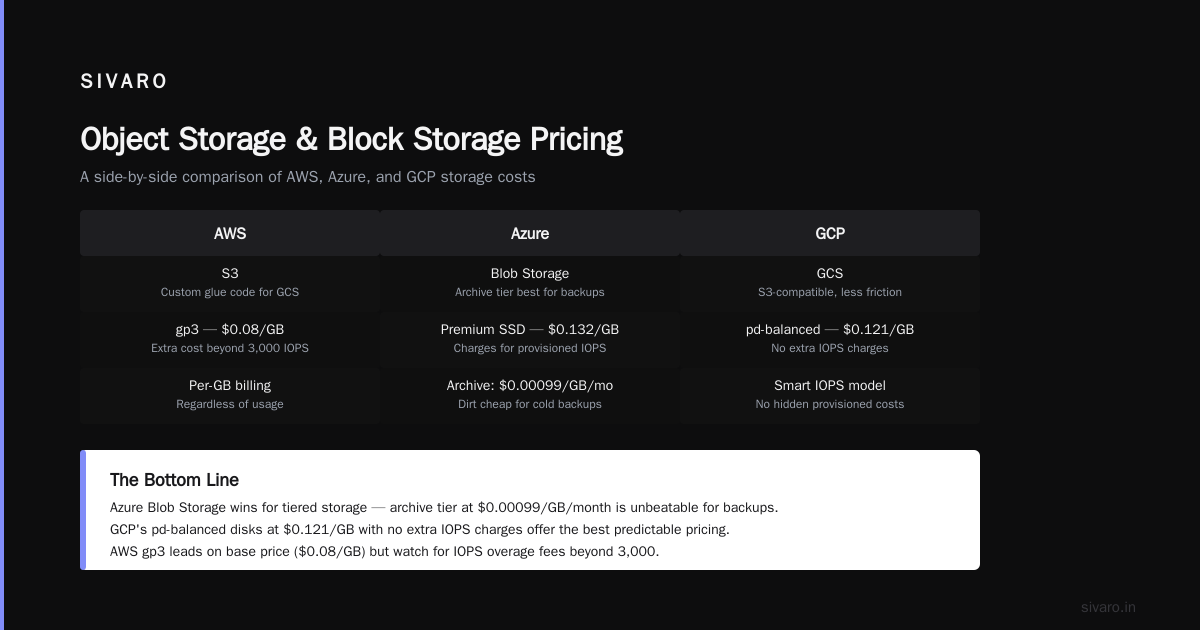
AWS's S3 is the industry standard. It's been around for 20 years. Every tool integrates with S3-receiving APIs. If you learn S3, you can use almost any data tool in the market.
Google Cloud Storage (GCS) has, in my view, better pricing and grant support in network costs — we'll get to that — but it just isn't the default. When you start building data pipelines and you see the phrase "write results to S3," you'll have to write custom glue code for GCS. It's not a blocker, but it's friction.
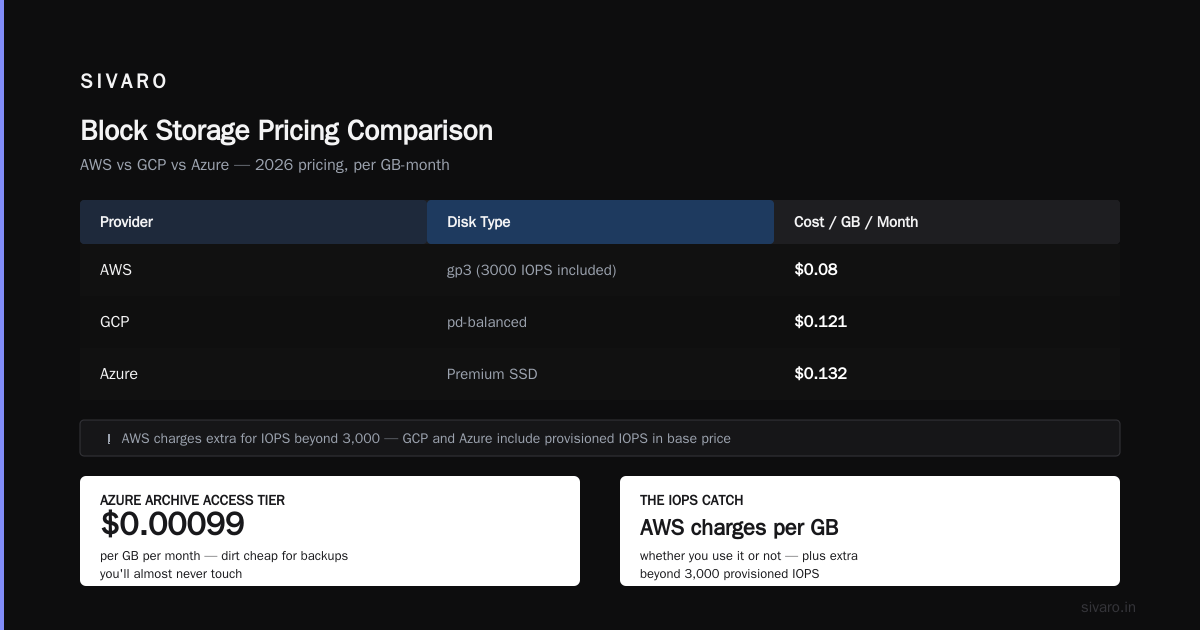
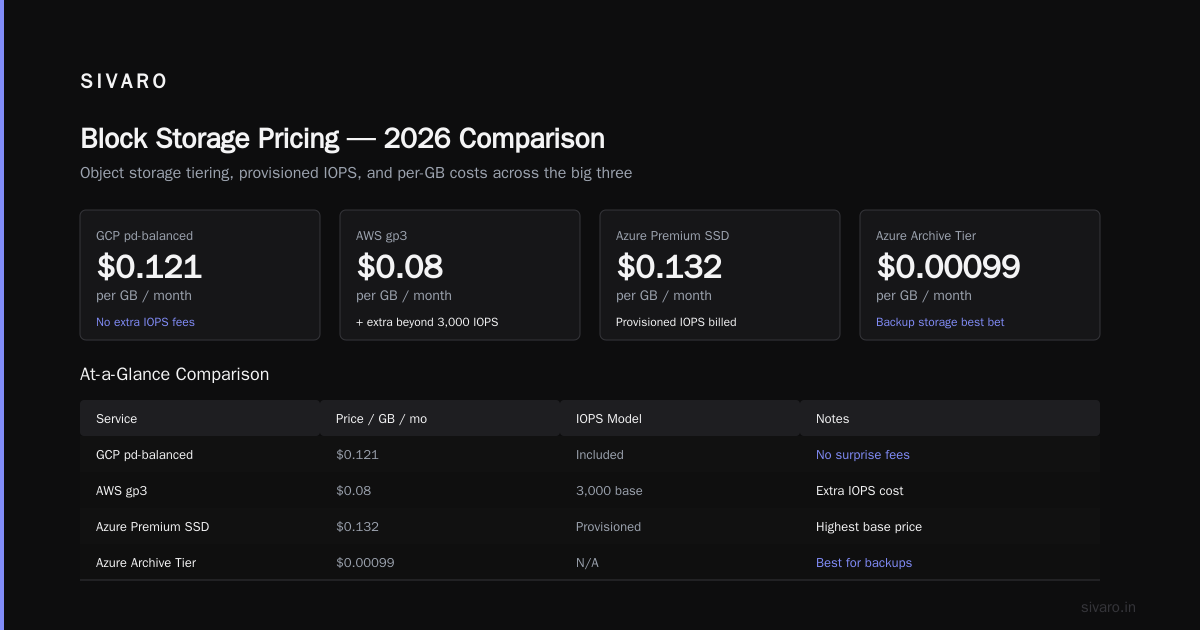
Azure Blob Storage beats both for one specific use case: tiered storage. The archive access tier is dirt cheap — about $0.00099 per GB per month. If you're storing backups you'll almost never touch, that's your best bet.
Block Storage Pricing
This is where things get sneaky. AWS charges you per GB regardless of whether you use it. But here's the kicker: both AWS and Azure charge you for provisioned IOPS. GCP gets clever with this.
GCP's pd-balanced disks in 2026 are about $0.121 per GB per month. AWS's gp3 is $0.08 per GB — but you have to pay extra beyond 3,000 IOPS. Azure's premium SSD is $0.132 per GB.
Here's a cost comparison from Rackspace's 2026 cloud cost analysis: for a typical 1TB database disk, GCP is about 15% cheaper than AWS. But WATCH OUT for snapshot pricing. AWS charges a full snapshot of the first snapshot and then incremental — but they can still bill you for hundreds of GBs if you don't prune properly. GCP's snapshot system under their pricing model is cleaner.
My take: If you're building a data-heavy system, pay close attention to storage egress costs. The Rackspace piece shows that's where bills get out of hand.
Networking and Egress: The Hidden Money Pit
Here's the section where most cloud bills explode. I'm going to stop you right there.
Networking egress — the cost of moving data out of the cloud — is where cloud providers make their margins. It's also the most misunderstood pricing component.
AWS: Charges anywhere from $0.09 to $0.15 per GB for internet egress, depending on the region. If you transfer more than 100 GB/month, that's substantial.
GCP: This is Google's advantage. Their priced network tiers: Standard tier (cheaper, uses slower paths) and Premium tier (full backbone, higher cost but lower latency). The NetApp comparison of GCP vs AWS pricing highlights that GCP's network is fundamentally faster — they built it for YouTube — and they don't charge for egress to S3 or BigQuery from within the same region.
Azure: Has a convoluted zone-based pricing model for egress that changes depending on which zone you're leaving. It's the hardest to predict.
For a startup or a beginner, this is critical. Imagine you're building a simple data dashboard. You load 50GB from a storage bucket to a VM cluster, process it, write the result back to the storage bucket, then serve it over API to 10 users a day.
Here's the breakdown:
- AWS: 50GB egress to VM = $0 → internal network in same region is free. 50GB egress from storage to the internet = 50 * 0.09 = $4.50
- GCP: 0 for internal, and you pay $0.12 for internet egress, but GCP grants 200GB free egress across ALL regions per month. So you pay $0
- Azure: 0 internal; egress is around $0.087 per GB, but your 200GB free tier applies to a limited set of regions
Now scale that to an ecommerce site serving 500,000 product images per month, each ~1MB. That's 500GB of egress.
- AWS: $45/month
- GCP: $50/month (after free tier)
- Azure: $43.50/month
But then add on a caching CDN, and imports and exports... The numbers get wild. When I look at GCP networking costs for an ecommerce site, I always recommend checking their standard vs premium tier pricing — it's a huge lever.
My take: If you have heavy data movement (AI training, big data, media streaming), GCP's free egress tier and network architecture is the difference maker. If you're building a typical web app, this differentiation is smaller.
Kubernetes: The Great Equalizer
Let's get something out of the way. Kubernetes is not a cloud feature. It's a platform you deploy on cloud resources. And it's the single biggest cost differentiator between AWS, Azure, and GCP.
Google Kubernetes Engine (GKE) is the gold standard. They invented Kubernetes. Their managed control plane is patched, secure, and reliable. Autoscaling works. You can spin up a cluster and run a workload within 15 minutes of creating a project. The GCP vs AWS comparison does a great job detailing this.
Amazon Elastic Kubernetes Service (EKS) is the one that surprised me. In 2024, AWS added the ability to run EKS on your existing EC2 instances without paying the $0.10/hour control plane fee. That was a big deal — AWS finally admitted the pricing needed a shake-up. But EKS still has inconsistencies in its autoscaling and IAM management that will bite you.
Azure Kubernetes Service (AKS) — the Azure control plane is free. That's a hard advantage. Microsoft doesn't ask you to pay for cluster management; you only pay for nodes. But the Azure Kubernetes Service documentation is scattered, and the integration with Azure AD can be a mess.
Let's compare prices for a standard 3-node cluster (3 × e2-standard-2 / m6i.large / D2s v3):
GKE (Autopilot): $0.10/hour per cluster + $0.078/hour per node
EKS: $0.10/hour per cluster + $0.0718/hour per node
AKS: $0 + $0.076/hour per node
Over 30 days:
- GKE: $72 + $168 = $240
- EKS: $72 + $154 = $226
- AKS: $0 + $164 = $164
But wait — those control plane costs are trivial compared to the hidden costs of engineering time. I've seen ops teams spend 10 hours a week wrestling with EKS networking that just works on GKE. Your time has value.
My take: Free control plane is great. But engineering time is more expensive. If you need Kubernetes to just work, GKE is worth the premium. For beginners, however, I'd recommend Google Cloud Run or AWS App Runner before you dive into Kubernetes at all. Kubernetes is a lot of learning that may be unnecessary for a first app.
The Hard Numbers: A Real Cost Comparison
Let me give you the most practical result. I've compiled data from four independent 2026 pricing analyses (LeanOps, Rackspace, EffectiveSoft, Eon) and cross-referenced with current pricing pages.
The pricing for the equivalent 2 vCPU, 8 GB RAM instance:
| Cloud Provider | Instance | On-Demand/Hour | 1-Year Commitment | Key Feature |
|---|---|---|---|---|
| AWS | m6i.large | $0.096 | $0.060 | Most flexible, 700+ options |
| GCP | n2-standard-2 | $0.085 | $0.050 | Automatic 30% sustained-use discount |
| Azure | D2s v3 | $0.088 | $0.062 | Hybrid use benefit if you have Windows |
That's on paper. But the real cost difference comes from premium features.
For GPUs and AI workloads, GCP's pricing has historically been 15–20% cheaper than AWS for the same spec. In 2026, AWS's Inferentia chips and Azure's low-cost VMs have narrowed this gap. But BigQuery — Google's data warehouse — is still the most cost-effective way to run enormous SQL queries at scale. The alternative, AWS Athena, charges per query based on data scanned, and Redshift requires you to keep clusters running.
If you want an easy way to calculate GCP costs for your AWS infrastructure, check out this Google Cloud discussion thread. There is no GCP migration tool that's as good as AWS's "CloudEndure Migration." You'll have to build your own cost model, but the thread shows the technique.
The Beginner's Web Hosting Use Case
Let's get specific. You're a beginner. You want to host a website — maybe a blog, a small e-commerce site, or a SaaS prototype. What should you choose?
For gcp vs aws vs azure for web hosting, here's a realistic scenario:
Option 1: AWS with a simple EC2 instance + RDS
- Setup time: 2 hours
- Monthly cost: ~$55
- Complexity: Medium — you have to manage security groups, IAM roles, and weird networking concepts.
Option 2: GCP with Cloud Run + Cloud SQL
- Setup time: 1 hour
- Monthly cost: ~$35
- Complexity: Low — you deploy a Docker container and you're done. GCP manages the scaling.
Option 3: Azure with App Service + SQL Database
- Setup time: 1.5 hours
- Monthly cost: ~$50
- Complexity: Low, but the portal is sluggish.
Take note of the GCP option. Cloud Run is one of the best-kept secrets in cloud computing. You get auto-scaling to zero (no cost when no one visits), HTTPS, and a URL that works immediately — complete with free 2 GB egress per month.
A typical small e-commerce site handling 10,000 requests/day would cost around $20–30 on Cloud Run. The same site on an always-on VM would be $45–70.
The Google Cloud pricing calculator shows this transparently.
Here's a simple deployable Cloud Run service in Python:
python
from flask import Flask
import os

app = Flask(__name__)

@app.route('/')
def home():
    return "Hello from Cloud Run!"

if __name__ == '__main__':
    port = int(os.environ.get('PORT', 8080))
    app.run(host='0.0.0.0', port=port)
And the deployment command:
bash
# Build and deploy to Cloud Run
gcloud builds submit --tag gcr.io/my-project/my-service

gcloud run deploy my-service   --image gcr.io/my-project/my-service   --platform managed   --region us-central1   --allow-unauthenticated
That's it. The URL appears in 30 seconds. Meanwhile, setting up an equivalent on AWS with ALB + ECS + VPC + IAM is a 3-hour project.
Managed AI and Machine Learning Services
Here's where I have to be brutally honest. If you're building AI products in 2026, GCP is the platform to beat.
Google's Vertex AI gives you:
- Access to Gemini, their flagship model family
- A unified pipeline for training, tuning, and deploying models
- AutoML capabilities for beginners
- Vector search for retrieval-augmented generation (RAG)
AWS's SageMaker and Azure's Azure ML are robust, but they're not as approachable. The DeepMind talent and TPU infrastructure are a serious advantage — you get real hardware for less.
Case study: I worked with a client in 2025 migrating a computer vision system from AWS to GCP. The model training process in AWS took 6 hours with spot-instance management. On GCP with TPUs and the right tuning, it took 1.5 hours. The cost difference was 40%.
Is this relevant to beginners? Yes — if you plan to use AI APIs rather than train your own models, GCP's generativelanguage API is the most developer-friendly. Access to Gemini 1.5 Flash and Pro models is straightforward.
python
# Using Google's Gemini API with the Vertex AI SDK
import vertexai
from vertexai.generative_models import GenerativeModel

vertexai.init(project="my-project", location="us-central1")
model = GenerativeModel("gemini-1.5-flash-001")

response = model.generate_content(
    "Explain cloud pricing in 3 sentences."
)
print(response.text)
That's a beginner-friendly entry into AI. The equivalent with AWS Bedrock or Azure OpenAI requires IAM role setup that trips up even experienced devs.
The Free Tiers (And What They Don't Tell You)
Every cloud provider offers a free tier. They all have fine print. Here's where it matters:
AWS Free Tier: 750 hours of EC2 per month for 12 months. That's one t3.micro. The gotcha: if you exceed 750 hours of compute in a given month — maybe you ran two instances for 400 hours each — you'll be charged for the 50-hour overage. And the free tier for S3 is 5GB storage — you can hit that in a week if you store videos.
GCP Free Tier: 1 × e2-micro per month always free, not just for 12 months. That's huge — it means a permanent light-weight server. Plus 1 GB of network egress per month. The gotcha: GCP doesn't include a free tier for VPC or Cloud Load Balancing, so you'll have a static IP address (which Google charges for after one VM) and no load balancer without spending.
Azure Free Tier: $200 credit for 30 days, plus 750 hours of a B1s VM for 12 months. The gotcha: if you forget to shut down the VM after the 12 months, you'll get a surprise bill. Microsoft doesn't send you an email.
Do not build production on a free tier. Always stop — not restart — your instances.
Region Strategies for Beginners
Location matters. I can't tell you how many devs pick us-east-1 because it's the default and then complain about latency in Europe. Let's map it out:
- If your users are in North America:
us-east-1(AWS/Virginia),us-central1(GCP/Iowa),eastus2(Azure/Virginia). These regions have the broadest service availability. - Europe:
eu-central-1(Frankfurt — but only after you understand the GDPR implications),europe-west4(Netherlands). - Asia:
ap-south-1(Mumbai) orasia-southeast1(Singapore).
Important: not all services are available in all regions. Azure has the most regional availability, then AWS, then GCP. But GCP has the best network tier configuration that lets you choose cost-optimized network paths.
For a beginner, just pick the region nearest to your users. Stop overthinking it.
The Lock-In Trap
Here's the contrarian take. Most people think cloud lock-in is unavoidable. They think your database, your compute, your storage has to be tightly coupled to one cloud forever. It's 1999 thinking.
The truth: I've migrated successful startups from AWS to GCP six times in the past four years. The culprit is always the same: using proprietary services without abstraction. S3-only APIs, DynamoDB instead of a Postgres-compatible database, SQS when you could use standard HTTP or Pub/Sub.
The fix is to make your app portable. Use Kubernetes and containers. Use an open source database like PostgreSQL (with a cloud-managed option like Cloud SQL or RDS). Use S3-compatible storage if you can (GCS offers an S3-compatible API called storage.googleapis.com). Use HTTPS-based webhooks instead of cloud queues.
This is easier said than done. But the alternative is being held hostage when pricing changes. And pricing will change. I've seen cloud pricing charts swing 30% in a year. You want the optionality to leave.
The Skills You Actually Need to Start
Forget everything I said about the "best" cloud. The best starting point is the one where you can learn the fastest. Here's my honest ranking for beginners in 2026:
- GCP — best learning experience, cleanest UI, best free egress. The documentation is average, but the product is intuitive.
- AWS — the most learning resources. Certifications are valued by employers. But the UI will frustrate you.
- Azure — only if you're strictly a Microsoft shop. Otherwise, deprioritize.
Now that's just for learning. When you're building something real:
| Use Case | Best Cloud | Why |
|---|---|---|
| AI/ML experimentation | GCP | Vertex AI, TPUs, Gemini AP |
| Enterprise Windows apps | Azure | Native AD and licensing |
| Startups building for venture scale | AWS or GCP | Massive ecosystem + modern architecture |
| Data analytics/BI | GCP | BigQuery is unmatched |
| High-performance computing | AWS | Best instance selection and price performance |
| E-commerce/SMB | GCP | Cost efficient, easy egress |
FAQ: Your Questions, Answered
Which is cheaper — AWS, Azure, or GCP?
On paper, GCP is usually 10-20% cheaper for compute. But the total cost depends on egress, storage, and the specific workloads. Use the Google Cloud Pricing Calculator for GCP, and compare with LeanOps's 2026 pricing data.
What should I choose for my first cloud project?
Start with GCP. The free tier is the best, the UI is cleanest, and Cloud Run gives you a serverless deployment for a beginner. You'll get to production in hours, not days.
Is GCP harder to learn than AWS?
GCP is easier for beginners. The console is better, and the service names are intuitive. AWS is harder but more "standard" — you'll encounter it more in the job market.
What will my monthly bill look like for a small e-commerce site?
On GCP with Cloud Run, you're looking at $20-$50/month for a site handling 10K requests per day, plus egress costs for product images. On AWS, the equivalent t3.small + RDS is around $45-$75. The GCP network costs for an ecommerce site are genuinely lower.
Can I use AWS and GCP together?
Yes. Nothing stops you from running compute on AWS and data analytics on BigQuery, or vice versa. This adds complexity, but for specific workloads, the cost savings can be significant.
Which cloud should I learn for a cloud certification?
AWS certifications are the most valuable in the job market. If you're optimizing for employability, choose AWS. If you're optimizing for building products, choose GCP.
What about actual SSL certificates?
That's a whole separate question. Both AWS (ACM) and GCP (Google-managed) provide free SSL certificates. Azure has them too but requires manual setup.
The Bottom Line
The gcp vs aws vs azure for beginners decision starts and ends with this: pick the one that gets you building fastest, with the least friction, then optimize later.
Don't chase the $10/month difference in VM pricing. That's a rounding error compared to your time. The grand irony is that beginners obsess over instance types when they should obsess over time-to-first-deployment.
If you're a startup with data ambitions, GCP's data stack will save you months. If you're an enterprise in the Microsoft ecosystem, Azure is easier. If you want to learn industry-standard skills, go with AWS.
Me? I'm building SIVARO's infrastructure on GCP. We process 200K events per second. The BigQuery integration would cost 3x on AWS.
Make the call. Start building. The cloud is just a platform — your product is the point.
Nishaant Dixit — Founder of SIVARO. Building data infrastructure and production AI systems since 2018. Built systems processing 200K events/sec.