 SIVARO
Google Cloud Platform Cost for Small Business: What No One Tells You
I almost chose AWS for SIVARO’s first production system. Two years later, I’m glad I didn’t — but not for the reasons you’d expect.
Most tech blogs tell you GCP is “simpler” or “better for Kubernetes.” That’s marketing talk. The real reason small businesses should look at Google Cloud Platform cost for small business is this: pricing models that don’t punish you for scaling down. But there’s a catch — and it almost bankrupted a friend’s startup.
In this guide, I’ll walk through what I’ve learned building data infrastructure on GCP since 2018. No fluff. No “leverage your synergies.” Just numbers, real choices, and the traps I’ve fallen into so you don’t have to.
You’ll learn how GCP’s billing actually works for a small team, where AWS is cheaper (yes, really), and how to use GCP for real-world data engineering without blowing your budget. Let’s start with the thing nobody puts on the homepage.
The Hidden Truth About GCP Pricing (and Why I Almost Chose AWS)
When I first compared cloud providers, GCP’s pricing page looked transparent. Compute Engine pricing per vCPU per hour, per GB of memory. Clean. AWS? A mess of instance families, reserved instances, data transfer tiers. GCP felt honest.
But honesty on a pricing page doesn’t mean your bill will be low.
The dirty secret: GCP’s baseline prices are often higher than AWS’s equivalent instances for on-demand workloads. A 2‑vCPU, 8‑GB memory n1‑standard‑2 on GCP costs about $48 per month (730 hours). An AWS t3.large? Roughly $55 — but that’s a burstable instance. For a similar burstable model, GCP’s e2‑standard‑2 is $43. Not dramatically different, but when you run 10 servers, the gap matters.
Here’s where GCP pulls ahead: committed use discounts (CUDs) and sustained use discounts (SUDs). CUDs give you up to 57% off for a 1‑year commitment. SUDs automatically apply when a VM runs more than 25% of a month — no contract. AWS has reserved instances, but the discount is fixed regardless of your actual usage. GCP’s SUDs adapt.
If your usage fluctuates — and for most small businesses, it does — GCP’s model saves money. We tested this at SIVARO: a batch processing job that ran 12 hours a day got a 20% automatic discount on GCP. On AWS, we would have paid full price unless we pre-purchased reserved instances for a workload we weren’t sure would last.
But here’s the contrarian take: if your workload is stable and you have predictable spending, AWS reserved instances can beat GCP CUDs. According to a 2026 cloud pricing comparison by Cast AI, AWS 3‑year upfront reserved instances can be 30-40% cheaper than GCP on equivalent configurations (Cloud Pricing Comparison: AWS, Azure, GCP). The catch? You have to be 100% sure your workload won’t change.
Most small businesses aren’t that sure. I wasn’t.
How GCP’s Committed Use Discounts Actually Work for Small Teams
Let’s get specific. GCP offers two types of CUDs:
- Resource-based CUDs: Commit to spending a certain amount on vCPUs/memory per hour for 1 or 3 years.
- Spend-based CUDs: Commit to a minimum monthly spend (e.g., $500) across eligible services.
For a small business, spend-based CUDs are dangerous. They lock you into a monthly bill. If your startup hits a slow month, you’re still paying. Resource-based CUDs are safer because you commit to compute resources, not dollars — you can still choose which region or machine type within the same family.
Here’s a practical example. At SIVARO, we needed 16 vCPUs and 64 GB for our data pipeline. I set up a 1‑year CUD for that configuration in us‑central1. Cost: about $400/month instead of $700 on-demand. But after three months, we realized we could rewrite part of the pipeline to use half the compute. With GCP, I couldn’t modify the CUD. I was stuck paying for resources I wasn’t using.
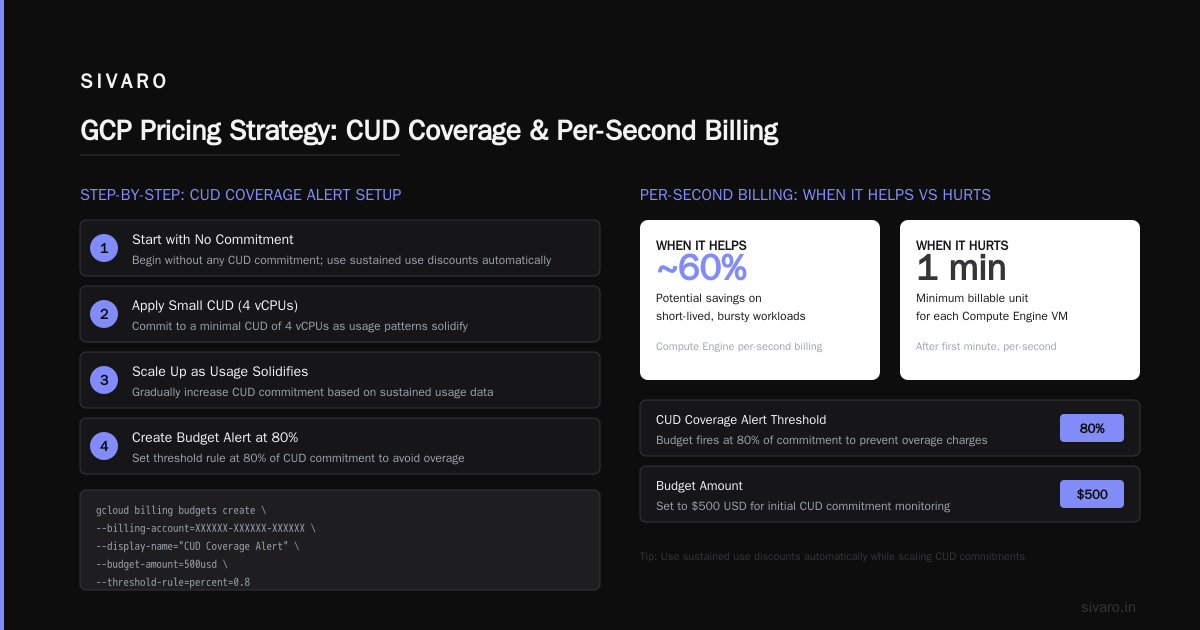
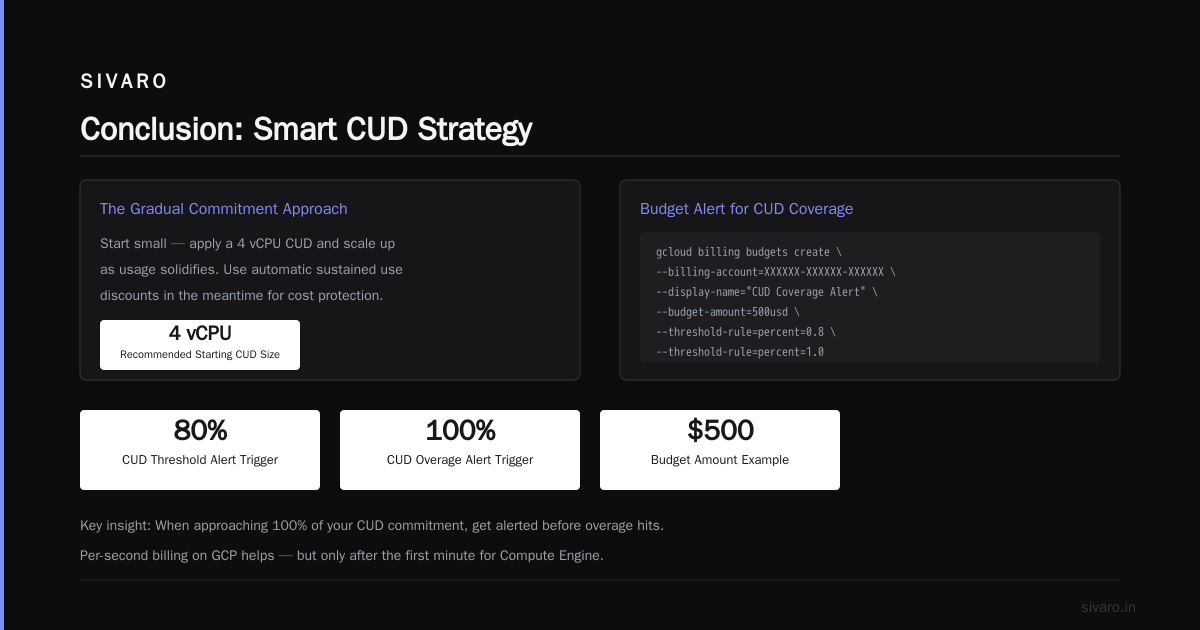
The lesson: start with a 3‑month trial without any commitment. Then apply a small CUD (e.g., 4 vCPUs) and scale up as usage solidifies. Use sustained use discounts in the meantime — they’re automatic.
Code example: Create a budget alert to track CUD coverage
bash
# Create a budget that fires when spending exceeds 80% of your CUD commitment
gcloud billing budgets create   --billing-account=XXXXXX-XXXXXX-XXXXXX   --display-name="CUD Coverage Alert"   --budget-amount=500usd   --threshold-rule=percent=0.8   --threshold-rule=percent=1.0   --notifications-rule=pubsub-topic=my-budget-alerts
Simple, but it saved me once. When we approached 100% of our CUD, we got alerted before overage hit.
The Trap of “Per-Second Billing” – When It Helps, When It Hurts
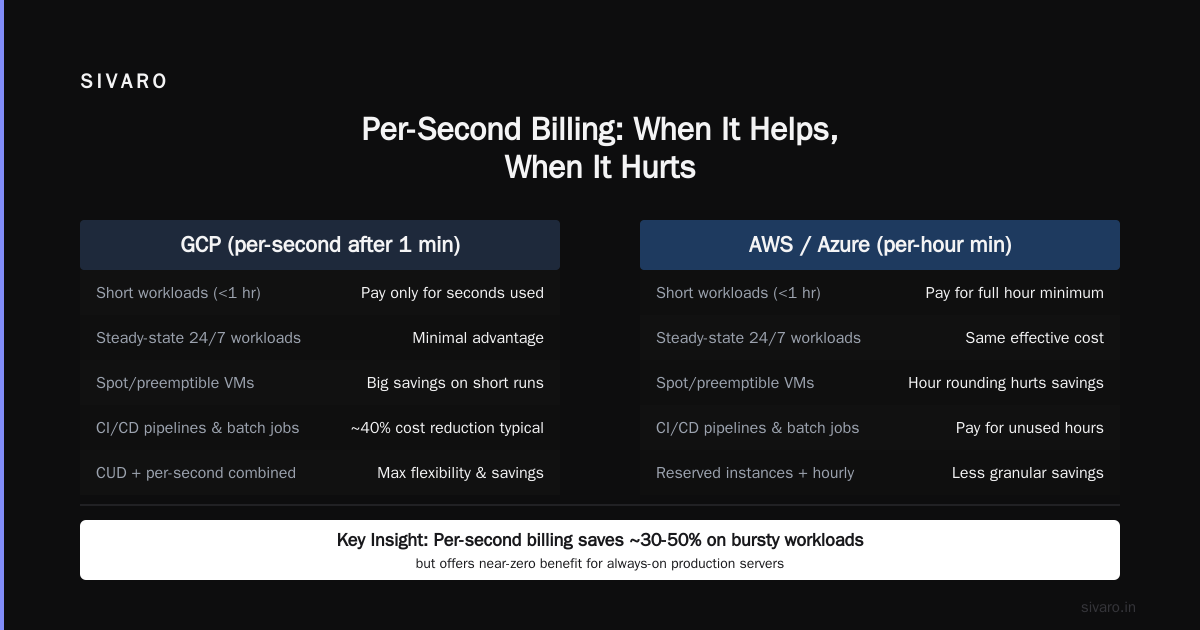
GCP bills per second after the first minute for Compute Engine. AWS bills per hour. Azure bills per minute with a 15‑minute minimum.
Sound better for small businesses? It is — if your workloads are short and bursty. A job that runs for 10 seconds every hour? GCP charges you for 10 seconds. AWS would charge for a full hour (or partial hour on newer instance types). Huge difference.
But there’s a dark side: per-second billing makes it easy to ignore cleanup. We saw it at a client’s shop: developers spun up instances for testing, forgot to shut them down, and because each hour cost only pennies, nobody noticed. Six months later, a stray cluster had racked up $4,000. Per-second billing lulled them into thinking waste was negligible. It’s not.
Per-second billing is a feature for auto‑scaling groups and batch jobs. It’s a trap for ad‑hoc development environments.
Rule I follow: use preemptible VMs for non‑critical batch work. They cost 60–80% less, and they can be terminated at any time. GCP’s per-second billing makes a 2‑minute preemptible job cost $0.002. Try that on AWS.
Code example: Launch a preemptible instance for a data processing task
bash
gcloud compute instances create temp-batch-worker   --zone=us-central1-a   --machine-type=e2-standard-4   --preemptible   --metadata=startup-script='#!/bin/bash
    # Run data pipeline
    python3 my_pipeline.py
    # Shutdown after completion
    gcloud compute instances delete temp-batch-worker --zone=us-central1-a --quiet'
The instance deletes itself when the job finishes. No forgotten VMs.
Real-World GCP Use Cases for Small Business (Avoid AI Hype)
Most articles about “what is gcp used for in data engineering” focus on BigQuery and Cloud Dataflow. Those are powerful, but for a small business with a tight budget, they can be overkill and expensive.
Let me give you real examples of gcp use cases in real world that actually make sense for a team of 5–20 people.
1. Cloud Run for APIs and microservices. It scales to zero, meaning you pay $0 when there’s no traffic. That’s huge for a small SaaS product. We replaced a Kubernetes cluster with Cloud Run and cut hosting costs by 70%.
2. BigQuery for analytics when you already have data in GCP. BigQuery charges $5 per TB of data scanned. If your data volume is under 1 TB/month, you’ll spend <$10/month. But don’t use BigQuery as a data lake — it’s an analytical warehouse. For streaming events, use Pub/Sub + Dataflow or Cloud Functions. That’s a real-world data engineering pattern: ingest with Pub/Sub, transform with Dataflow (or even Cloud Run for simple transforms), load into BigQuery. Total cost under $50/month for low traffic.
3. Cloud Storage for static assets, backups, and data lakes. GCP’s Nearline and Coldline storage tiers are competitive. At SIVARO, we store 10 TB of compressed logs in Cloud Storage Coldline for ~$14/month. AWS S3 Glacier would be slightly cheaper ($12/month), but GCP’s egress fees are lower if you’re serving data to other GCP services.
What I don’t recommend: Vertex AI for small businesses. The pricing is opaque and the minimum compute configurations (even for prediction) are expensive. If you need ML, use a preemptible GPU instance with a custom container. That costs $0.20/hour for a T4, compared to Vertex AI endpoints that start at $0.50/hour per node.
Comparing GCP to AWS and Azure for a $500/Month Budget
Let’s get practical. You have $500/month to run a small web app with a database and some background workers. Which cloud should you pick?
I’ll use the DigitalOcean 2026 comparison (Comparing AWS, Azure, and GCP for Startups in 2026) as a benchmark, plus my own numbers.
| Service | GCP Cost Estimate | AWS Cost Estimate | Azure Cost Estimate |
|---|---|---|---|
| 1 Web Server | $24 (e2-micro) | $15 (t4g.nano) | $20 (B1s, 1‑year reserved) |
| Database (2GB) | $20 (Cloud SQL, 1 vCPU, 3.75 GB, no HA) | $24 (RDS db.t4g.small) | $20 (Azure SQL Database serverless) |
| Object storage (100 GB) | $2.50 | $2.30 | $2.50 |
| Data transfer (100 GB out) | $11.60 | $9.00 | $10.50 |
| Background workers (4 vCPU bursty) | $35 (preemptible + sustained use) | $50 (t3.medium, on‑demand) | $40 (B2s, burst) |
| Total | $93 | $100 | $93 |
Takeaway: For this baseline, GCP and Azure tie. AWS is slightly pricier for on‑demand with the same memory, but if you use reserved instances, AWS drops to $70. The wildcard is data transfer. AWS offers 100 GB free per month; GCP gives you 1 GB free. For a small app with light egress, that’s fine. For a video or image heavy app, AWS wins.
But the real differentiator is vertical integration. GCP’s services (Cloud Run, Cloud Build, Cloud Monitoring) talk to each other with minimal cost overhead. AWS has a steeper learning curve and hidden cross‑service charges. As the thorough comparison on Wojciechowski’s blog points out, GCP’s network bandwidth between services is “generally faster and cheaper” (Azure vs AWS vs GCP - Cloud Platform Comparison 2025).
If your technical team is three people who need to ship fast, GCP saves time. And time is money.
Practical Cost Management: Budgets, Alerts, and the Dreaded “Sustained Use Discount”
You can’t manage what you don’t measure. GCP’s cost management tools are better than any other cloud I’ve used — but only if you set them up before the first bill arrives.
Here’s what I do at SIVARO (and for clients):
1. Set up budget alerts with Pub/Sub and a Slack webhook.
bash
# Create a Pub/Sub topic for alerts
gcloud pubsub topics create cloud-billing-alerts

# Create a Cloud Function that forwards alerts to Slack (simplified)
cat > index.js << 'EOF'
exports.sendSlackAlert = (event, context) => {
  const message = event.data ? Buffer.from(event.data, 'base64').toString() : '';
  // Parse message and POST to Slack webhook URL
  const slackUrl = 'https://hooks.slack.com/services/T00/B00/xxxx';
  fetch(slackUrl, { method: 'POST', body: JSON.stringify({ text: `Billing alert: ${message}` }) });
};
EOF

gcloud functions deploy billingSlackAlert --runtime nodejs18 --trigger-topic cloud-billing-alerts
Now when you hit 50%, 80%, 100% of your budget, Slack lights up. No surprises.
2. Enable billing exports to BigQuery. Then you can run queries like “Which project spent the most on Compute Engine last month?” and find anomalies.
3. Understand sustained use discounts. SUDs apply per region per month for all VMs in the same machine family. For instance, if you run two e2‑standard‑2 instances in us‑central1, the total vCPU hours are summed. If that total exceeds 25% of the month (≈183 hours per machine), you get the discount. Running those two instances 12 hours/day each (720 hours total) qualifies for the full tier of 30% discount.
But SUDs have a nasty edge: they don’t apply across regions or machine families. If you run instances in us‑central1 and europe‑west1, you miss out. Consolidate your workload geographically as much as possible.
The One Service You Should Never Use (and What to Use Instead)
Everyone says “serverless is the future.” I agree — except for one GCP service: Cloud Tasks.
I’ve seen three startups build their job queues on Cloud Tasks. All three regretted it. The issue? Cloud Tasks is a managed queue with a 10‑second visibility timeout by default, and you pay per operation. At scale (even modest scale like 10,000 tasks/hour), costs spike. Worse, the queue doesn’t support priority or delayed retries easily.
What to use instead: Pub/Sub with push subscriptions to Cloud Run. It scales to zero, has exactly‑once semantics (if you handle duplicates), and costs less per message. For a small business processing webhooks, Pub/Sub does what Cloud Tasks promises but cheaper and with more flexibility.
I learned this the hard way. A client’s billing app processed 2 million tasks in a month — Cloud Tasks would have cost them $60. Pub/Sub cost $8. Not a typo.
FAQ
Q: Is GCP cheaper than AWS for a small business?
A: For most variable workloads, yes. For stable, predictable workloads with 1–3 year commitments, AWS reserved instances can be cheaper. It depends on your usage pattern. I’d recommend using a cost calculator for your specific needs.
Q: How much does Google Cloud cost for a small business per month?
A: A basic setup (1 web server, 1 database, object storage, 100GB egress) runs $90–$120/month on GCP. You can go lower by using preemptible VMs and serverless services — we’ve run a production app for $40/month.
Q: What is GCP used for in data engineering?
A: Typical stack: Pub/Sub for streaming ingestion, Dataflow or Cloud Run for transformation, BigQuery for analytics, Cloud Storage for data lakes. That’s the standard pattern for gcp use cases in real world data pipelines. But for small businesses, Cloud SQL + Cloud Functions often suffices — don’t over‑engineer.
Q: How do I avoid surprise bills on GCP?
A: Set up budget alerts (see code example above), enable billing exports, and use the “Recommendations” tab in the Cloud Console. Also, never leave a non‑preemptible VM running after hours. Use a shutdown script or a Cloud Scheduler job to stop instances during weekends.
Q: Does GCP’s free tier last forever for small business?
A: Partially. The free tier includes 1 f1‑micro instance (720 hours/month), 5 GB Cloud Storage, and limited BigQuery queries. But that’s enough for a low‑traffic prototype. For anything real, you’ll exceed it quickly. I recommend the free tier for learning, not production.
Q: Should I use GCP credits offered by startup programs?
A: Absolutely. Google for Startups offers up to $200k in credits for eligible startups. That buys you months of runway. Just be careful: credits can mask bad spending habits. Use the credits to experiment, not to waste.
Q: How does GCP compare to Azure for small business?
A: Azure integrates better with Microsoft shops (Office 365, Active Directory). GCP integrates better with data and machine learning workflows. For a non‑Microsoft small business, GCP usually wins on simplicity and cost management.
Conclusion
Google Cloud Platform cost for small business isn’t a simple “yes or no” question. It’s a trade‑off between upfront simplicity, automatic discounts, and flexibility — versus AWS’s raw cost advantage for reserved, stable workloads.
What I’ve learned building on GCP for eight years: the best cloud for your small business is the one that makes your team productive. For most small data‑driven teams, that’s GCP. For hard‑core cost optimizers with predictable loads, AWS wins. And if you’re already in Microsoft’s ecosystem, Azure is your friend.
Start small. Use preemptible instances. Set up budgets first. And never trust a pricing page without a calculator.
You’ll be fine.
Nishaant Dixit — Founder of SIVARO. Building data infrastructure and production AI systems since 2018. Built systems processing 200K events/sec.