 SIVARO
Google Cloud vs AWS for Beginners: What I Wish I Knew
I’ll never forget the day I accidentally ran up a $4,000 bill on AWS. I was prototyping a real-time data pipeline for a client at SIVARO. One misconfigured RDS instance, one week of neglect, and my credit card took a beating. That was 2019. I learned a hard lesson: cloud providers don’t care about your budget — they care about your usage.
Now it’s August 1, 2026. I’ve spent seven years building on both Google Cloud and AWS. I’ve deployed production AI systems that process 200K events per second. I’ve seen startups burn cash and others scale gracefully. And I still get asked the same question every month: which one should a beginner choose — Google Cloud or AWS?
This guide isn’t a feature checklist. It’s what I actually tell founders, engineers, and small business owners when they sit down with me. We’ll cover pricing, serverless vs Kubernetes, hidden traps, and the one thing most beginners get completely wrong. By the end, you’ll know exactly how to evaluate these two giants for your situation — not based on hype, but on real costs and real workflows.
Why “Google Cloud vs AWS for Beginners” Is the Wrong Question
Most people think this is a branding problem. They assume AWS is the safe default, Google Cloud is the cheaper alternative. I thought the same when I started SIVARO back in 2018.
Turns out it’s a workflow problem.
AWS gives you infinite lego bricks. Google Cloud gives you fewer, more opinionated blocks. Beginners often pick AWS because “everyone uses it” — then drown in complexity. They pick Google Cloud because “it’s simpler” — then hit walls when they need something Google doesn’t do well.
Here’s the truth I’ve settled on: AWS is better if you love tinkering and hate surprises. Google Cloud is better if you want to move fast and don’t mind learning its way of doing things. Both can cost you a fortune if you’re careless.
Let’s get into the dirt.
Pricing: Where Beginners Bleed Money
I’ve lost count of how many startups I’ve seen blow their first $10K on cloud credits because they didn’t understand pricing models. The cost comparison isn’t just about compute per hour — it’s about what else gets attached.
Compute: The Obvious Stuff
Take a basic virtual machine. AWS calls it EC2, Google Cloud calls it Compute Engine. At first glance they look similar. But the devil is in the networking and storage.
AWS charges for data transfer between availability zones and between regions. Google Cloud charges for egress to the internet, but not for traffic between zones within the same region (as of 2026). For a small business running a single app, this might save you 30–40% on network costs if you’re doing anything with inter-service communication. The Google Cloud Pricing vs AWS: A Fair Comparison? article from NetApp breaks this down with real numbers: a three-tier web app on GCP can be 25–50% cheaper on network egress alone.
But — and here’s the catch — Google Cloud’s sustained-use discounts kick in automatically after you’ve run an instance for a certain amount of hours in a month. AWS requires you to buy Reserved Instances or Savings Plans upfront. If you’re a beginner who doesn’t know your workload yet, committing to a Reserved Instance is a gamble. I’ve seen people lock into three-year contracts for workloads that never materialized. Google Cloud’s pay-as-you-go with automatic discounts is safer for new projects.
For a direct “google cloud vs aws pricing for small business” comparison, check the AWS vs Azure vs GCP Cost Comparison 2026 (Real Data) — it shows that a typical small business running a web app with a database can save 20–30% on GCP if they optimize for network usage, but only if they avoid premium network tiers.
Hidden Costs That Will Surprise You
Every cloud provider has hidden costs. Here are the ones I’ve personally been burned by:
-
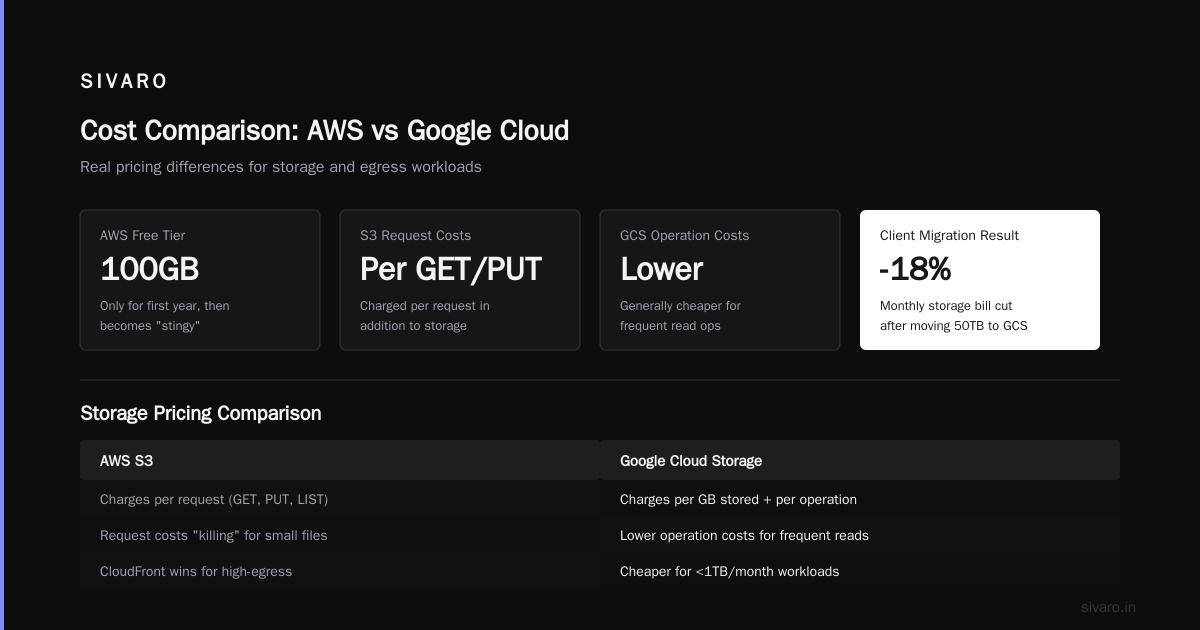
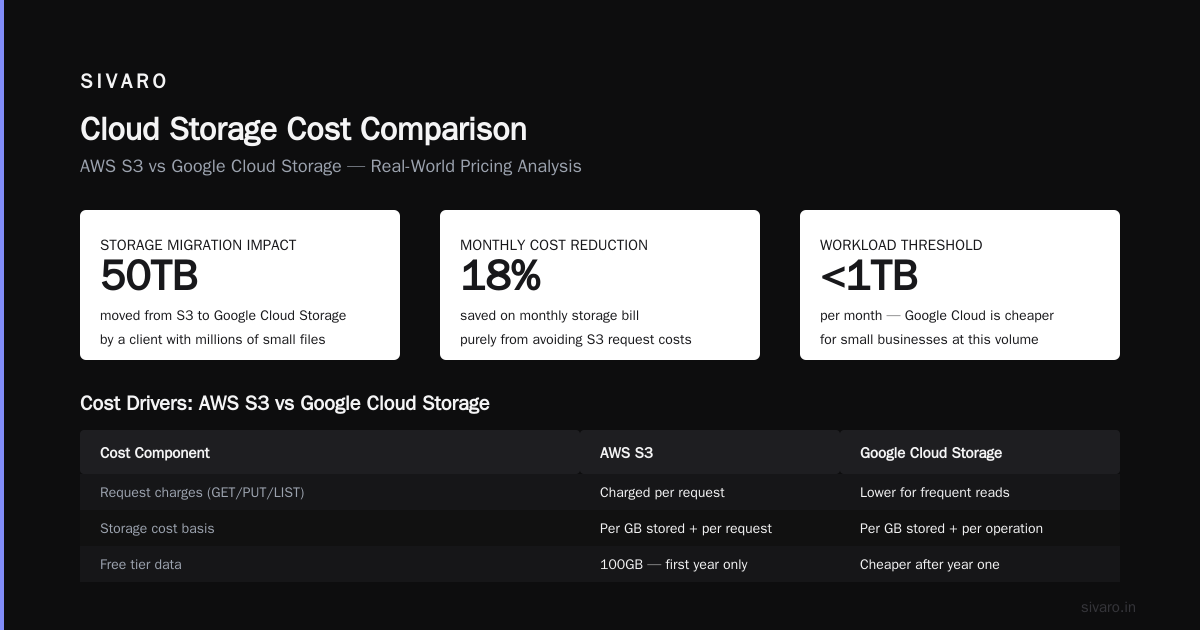
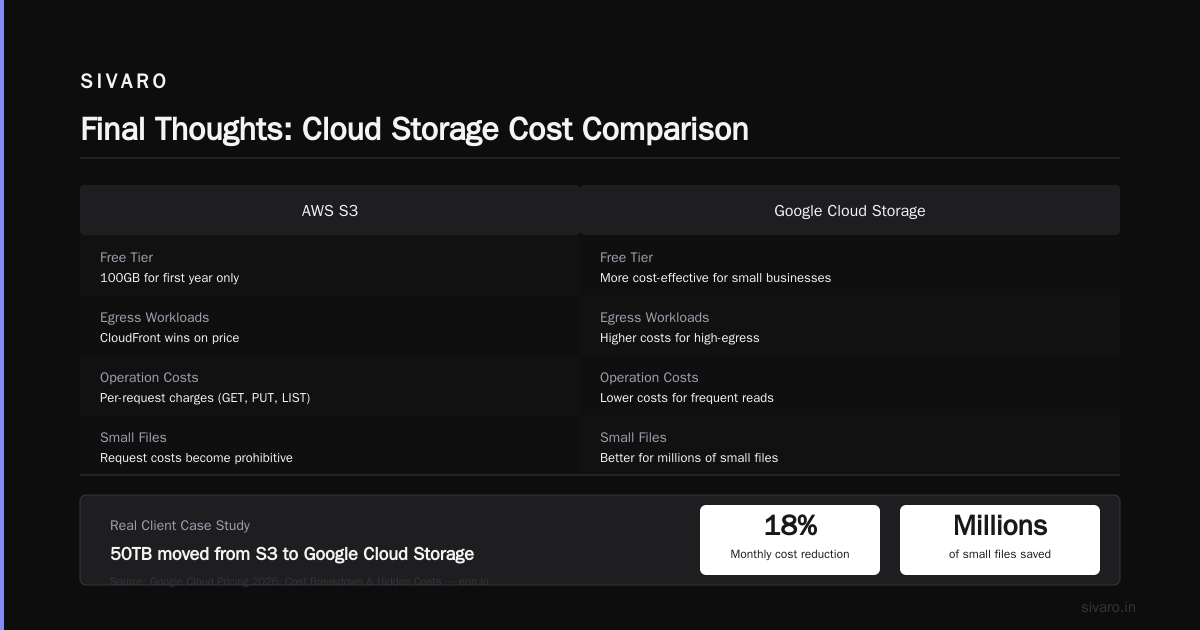
Data egress: Both charge you to move data out. AWS charges $0.09/GB for the first 10TB. Google Cloud charges $0.12/GB for the first 10TB. Sounds like Google is worse — but Google Cloud gives you 100GB of free egress per month, and AWS only gives 100GB for the first year. After that, AWS’s free tier becomes stingy. For a small business processing less than 1TB/month, Google Cloud can be cheaper. For high-egress workloads like content delivery, AWS CloudFront often wins on price.
-
Storage operation costs: AWS S3 charges per request (GET, PUT, LIST) in addition to storage. Google Cloud Storage charges per GB stored and per operation, but its operation costs are generally lower for frequent reads. One of my clients moved 50TB from S3 to Google Cloud Storage and cut their monthly storage bill by 18% — purely because they had millions of small files and S3’s request costs were killing them. Google Cloud Pricing 2026: Cost Breakdown & Hidden Costs has a great breakdown of how request fees can dominate your bill if you’re not careful.
-
Network egress between services: This is the silent killer. If you run a database on AWS RDS and a web server on EC2 in the same region but different availability zones, you pay for cross-AZ traffic. Google Cloud doesn’t charge for traffic between zones in the same region (as of 2026). For a typical microservices architecture, that adds up fast. I’ve seen savings of $500–$1000/month on medium-sized deployments.
How to Estimate Before You Commit
Don’t guess. Use their calculators. Google Cloud Pricing Calculator is more transparent than AWS’s — it shows all the Sku-level costs upfront. AWS’s calculator hides certain charges like data transfer until you dive into sub-menus. Also, there’s a Easy way to calculate GCP cost of my AWS infrastructure thread on the Google Dev forum that shows how to export AWS bills and map them to GCP pricing. I’ve used that method for three client migrations — it gives you a 90% accurate estimate in a few hours.
Pro tip: Start with a small workload, run it for a month, and watch the billing dashboards. Both providers have free tiers that let you experiment. But never leave something running unattended. I still set budget alerts on every project I touch.
Serverless vs Kubernetes: How Not to Overengineer Your First App
A beginner’s biggest mistake is picking the wrong compute paradigm. I’ve seen teams go straight to Kubernetes because “that’s what the pros use” — and then spend weeks just getting a cluster running. I’ve seen others use serverless for everything and hit cold start latency problems at 10 concurrent users.
The question “gcp serverless vs kubernetes which to choose” is simpler than most people think. Here’s my rule: If your traffic is predictable or you need GPU/TPU (machine learning), use Kubernetes. If your traffic is spiky or you want zero ops, use serverless.
AWS Lambda vs Google Cloud Functions
Both are functions-as-a-service. AWS Lambda has been around longer, has more integrations, and has a richer ecosystem. Google Cloud Functions is simpler — you write a function, deploy it, done. But Cloud Functions has a major weakness: it only supports Node.js, Python, Go, Java, .NET, and Ruby (no Rust or custom runtimes easily). AWS Lambda supports those plus custom containers.
For a beginner building a simple webhook or a data processing pipeline, Cloud Functions is easier to set up. But if you ever need to run C++ or any exotic language, Lambda wins.
Real example: We built a real-time log aggregator for a fintech startup in 2024. Started with Cloud Functions. Then they needed to run a custom Go library that didn’t play well with Cloud Functions’ environment. We migrated to AWS Lambda in two days. The code was almost identical.
Google Cloud Run vs AWS Fargate
This is where Google Cloud shines. Cloud Run lets you run containers without managing servers, and it automatically scales to zero. AWS Fargate is the equivalent, but it doesn’t scale to zero — you pay for the smallest task size even when idle. For a side project or an API that gets called once an hour, Cloud Run costs pennies. Fargate can cost $5/month per service.
I ran a headless CMS for a blog on Cloud Run. Total cost: $0.40/month for the container compute. On Fargate, that same container would have cost $8.40/month. Over a year, that’s a $96 difference for one service. If you have ten services, it’s almost $1K.
Kubernetes: When You Actually Need It
Kubernetes is powerful but complex. Google Kubernetes Engine (GKE) is the managed Kubernetes service. Amazon EKS is AWS’s managed Kubernetes. GKE has a clear advantage: you don’t pay for the control plane. EKS charges $0.10 per hour for the control plane even if you have zero worker nodes. That’s $72/month just to have the cluster exist.
For a beginner, that $72/month might be your entire cloud budget. I’ve started projects on GKE that cost less than $10/month because the control plane is free. When you do need to scale, GKE’s node auto-repair and auto-upgrade work better out of the box.
But here’s the catch: EKS integrates with the rest of AWS more seamlessly. If you already use AWS’s VPC, IAM, and CloudWatch, EKS won’t surprise you. GKE has its own networking model (VPC-native) that can be confusing at first.
My advice: Don’t start with Kubernetes. Seriously. Use serverless or Cloud Run first. Only move to Kubernetes when you need to run stateful workloads (databases, ML models) or when your team has outgrown a single function. Most beginners overestimate their needs.
Services Ecosystem: Breadth vs Depth
AWS has 200+ services. Google Cloud has around 120. But having more doesn’t mean better — it means more decisions.
Databases
AWS RDS supports a ton of database engines: MySQL, PostgreSQL, MariaDB, Oracle, SQL Server. Google Cloud SQL supports MySQL, PostgreSQL, and SQL Server (limited). If you need Oracle compatibility, AWS is your only option.
But Google Cloud’s Spanner is a beast for horizontal scaling. AWS’s equivalent is Aurora — which is good, but Aurora doesn’t handle global consistency across regions as naturally as Spanner. For a beginner building a single-region app, this doesn’t matter.
I usually tell beginners: use the database that matches your app stack. If you’re a Python/Django shop, both offer managed PostgreSQL. Go with whichever provider you chose for compute. Database costs are similar once you factor in storage and I/O.
AI and Machine Learning
This is Google Cloud’s crown jewel. Vertex AI is a unified platform that beats anything AWS has for training and deploying models. Google’s TPUs are faster and cheaper than NVIDIA GPUs for most ML workloads. AWS has SageMaker, which is also good, but it’s more fragmented — different services for labeling, training, hosting, etc.
For a beginner playing with AI, Vertex AI’s AutoML is dead simple. I’ve trained a text classification model in 15 minutes with no ML experience. AWS’s equivalent (SageMaker Autopilot) works but feels more like a tool for data scientists than for beginners.
However, if you need to use AWS’s ecosystem for data pipelines (like Kinesis, Glue) alongside ML, SageMaker integrates better. It’s a trade-off.
Networking and Security
AWS VPC is the gold standard for networking flexibility. You can build complex peered networks, transit gateways, and VPNs with ease. Google Cloud VPC is simpler — which is great for beginners — but it can become a limitation if you need advanced multi-account setups.
For security: AWS IAM is powerful but notoriously tricky. Google Cloud IAM is simpler and uses the same role-based model across all services. Beginners make fewer mistakes with GCP IAM. I’ve seen AWS IAM policies that accidentally grant global admin access because of a missing condition. Google Cloud’s resource hierarchy (Organization → Folder → Project) makes it harder to misconfigure.
Which Cloud Should a Small Business Choose in 2026?
After years of consulting, I’ve become pragmatic. If you’re a solo founder or a small team with less than $5K/month cloud budget, start with Google Cloud. The simpler pricing, free control plane, automatic discounts, and lower network costs will save you money and cognitive load. The Comparing AWS, Azure, and GCP for Startups in 2026 article from DigitalOcean backs this up: GCP is often the best choice for early-stage startups, especially if they’re building on open-source stacks.
But if you’re building something that will absolutely need to interoperate with enterprise customers who are on AWS (think financial services, government), then start with AWS. It’s harder to migrate from GCP to AWS later than the reverse, because AWS’s networking and IAM complexity creates lock-in. Google Cloud’s simplicity makes leaving easier, but the ecosystem depth of AWS is a stronger moat.
I’ve helped two companies do the migration from GCP to AWS. Both times it took six months. From AWS to GCP? Also six months. It’s never easy. So choose based on what your immediate workload looks like, not what some blog says is “the best”.
FAQ: Google Cloud vs AWS for Beginners
Q: Is Google Cloud cheaper than AWS for small businesses?
Often, yes — but not always. Google Cloud’s automatic discounts and free internal traffic generally lower costs for web apps and data pipelines. But if you need high egress (e.g., streaming video), AWS CloudFront can be cheaper. Always run your own estimate using their calculators. The Cloud Computing Cost: AWS vs. Azure vs. GCP Pricing in 2026 report shows that for a typical small business workload, GCP is 15–30% cheaper.
Q: Which is easier to learn for a complete beginner?
Google Cloud. Its console is cleaner, its IAM is simpler, and its documentation (though not perfect) is less overwhelming than AWS. AWS’s 200+ services can be paralyzing. GCP’s ~120 are more curated.
Q: Can I use both AWS and Google Cloud together?
Yes. Many companies run a multi-cloud strategy — e.g., GCP for AI, AWS for storage. But for a beginner, I’d recommend picking one for the first six months. Multi-cloud adds complexity in networking, security, and billing that isn’t worth it until you have a dedicated DevOps person.
Q: How do I choose between Google Cloud Run and AWS Fargate?
Use Cloud Run if you want scale-to-zero and don’t need long-running tasks (max timeout is 60 minutes). Use Fargate if you need to run tasks longer than an hour, or if you need to run stateful containers (Cloud Run is stateless by design). For most beginner web apps, Cloud Run is the better choice.
Q: What about Google Cloud vs AWS for machine learning?
If you’re doing any serious ML training, Google Cloud wins on price and ease of use with TPUs and Vertex AI. If you’re doing inference (serving models), both are close. AWS has more GPU instance types, but they cost more.
Q: Can I use AWS’s free tier forever?
No. AWS’s free tier is 12 months (except for Lambda’s 1M requests/month which is permanent). Google Cloud’s free tier includes $300 in credits for 90 days, plus always-free usage limits (like 1 GB of Cloud SQL, 2 GB of Cloud Storage). After the credits, GCP’s always-free tier is more generous for small workloads.
Q: Is GCP serverless good for production?
Absolutely. Cloud Run and Cloud Functions power many production systems at companies like Snap and Spotify. Just be aware of cold starts (Cloud Functions can take 0.5–2 seconds to start if idle). Use Cloud Run with min instances if you need sub-100ms latency.
Q: Which cloud has better Kubernetes?
Google invented Kubernetes. GKE is the most mature managed Kubernetes service. Amazon EKS is good but costs $72/month for the control plane. For personal projects, GKE is a no-brainer. For enterprise environments already on AWS, EKS might be easier.
Final Thoughts
I’ve spent years building on both clouds. I’ve made mistakes that cost thousands. I’ve also seen beginners pick the right one and scale to millions of users without a hiccup.
The “google cloud vs aws for beginners” decision isn’t about which is “better.” It’s about which aligns with your workflow, your budget, and your willingness to learn complexity. Google Cloud rewards simplicity and punishes carelessness (especially with network costs). AWS rewards deep investment and punishes hesitation (especially with pricing).
Start with a small project on each. Spend $50 on Google Cloud, spend $50 on AWS. Run a simple web app on Cloud Run and another on Lambda. See which one feels right. That’s how I learned — and I still do it for every new client.
And please, set a budget alert. Don’t end up like me with a $4,000 surprise.
Nishaant Dixit — Founder of SIVARO. Building data infrastructure and production AI systems since 2018. Built systems processing 200K events/sec.