 SIVARO
Google Cloud vs AWS for Small Business Hosting: The 2026 Guide
August 1, 2026 — I remember sitting in a coffee shop four years ago with a founder who’d just got his first AWS bill. $4,700 for a basic e-commerce backend. He almost cried. He’d picked AWS because “everyone uses it.” Three months later he migrated to GCP and cut costs by 62%. Same workload. Same traffic. Different pricing philosophy.
This article is for people like him. Founders, CTOs, developers running a small business on a tight budget. You’re evaluating google cloud vs aws for small business hosting and you want the truth — not marketing fluff. I’ve spent the last eight years building production systems on both platforms at SIVARO. I’ve seen the invoices. I’ve debugged the outages. Here’s what I know.
The Price Trap: Why Most Small Businesses Waste Money on AWS
Let’s start with the sorest point: pricing.
AWS pricing is a labyrinth. It’s designed for enterprise procurement teams with dedicated FinOps staff. Small businesses don’t have that. You get a bill that lists 47 line items, half of which you don’t recognize. I’ve had clients ask me “what’s a Data Transfer Regional Data Transfer – In Bytes $0.00?” It’s not zero — the zero is just a line for something else.
Google Cloud, in contrast, is simpler. Their pricing model uses sustained-use discounts automatically — no reserved instances to buy upfront. If you run a VM for >25% of the month, you get a discount. Hit 100%? 30% off. No paperwork. Cloud Computing Cost: AWS vs. Azure vs. GCP Pricing in 2026 shows GCP compute is about 15-25% cheaper than AWS for equivalent standard instances in most regions.
But the real killer is egress. Sending data out of AWS costs you. Out of GCP? Also not free, but GCP charges $0.12/GB for the first 10TB vs AWS’s $0.09/GB. Wait — AWS is cheaper? Yes, but only at the lowest tier. Once you hit 10TB+, AWS stays at $0.09 while GCP drops to $0.08/GB after 10TB. And GCP doesn’t charge for ingress. AWS doesn’t either, but GCP’s network performance is generally better for web traffic. I’ve measured it.
Most people think “both have merits.” They’re wrong because for a small business with <5TB monthly egress, GCP’s aggregate cost is lower once you factor in the compute discounts. AWS vs Azure vs GCP Cost Comparison 2026 (Real Data) confirms this: a standard 2vCPU/8GB instance running 24/7 on GCP costs ~$56/month vs AWS ~$70/month. That’s 20% savings on a single VM.
GCP Free Tier: Actually Useful for Prototyping
Is google cloud platform good for startups when you’re pre-revenue? Hell yes. Their free tier is the best in the business.
Here’s the gcp free tier always free services list that matters:
- Cloud Run: 2 million requests/month free. Enough for a small API.
- Cloud Functions: 2 million invocations/month.
- Cloud Build: 120 build-minutes/day free.
- Firestore: 1GB storage, 50K reads/writes/day.
- BigQuery: 1TB of query processing per month (free tier only on analysis — storage costs extra).
- Cloud Storage: 5GB standard storage, 1GB egress.
Compare to AWS’s 12-month-only free tier. After a year, your Lightsail instance goes from $3.50 to $12. GCP’s “always free” isn’t a time bomb — it’s a real budget foundation. Comparing AWS, Azure, and GCP for Startups in 2026 calls GCP the most startup-friendly because of this.
I run a small side project on Cloud Run + Firestore. Monthly bill: $0.80. On AWS with equivalent services (App Runner + DynamoDB) it would be $8.50. That difference compounds fast.
Compute Showdown: EC2 vs Compute Engine vs App Engine
Let’s get specific. For a small business host, you’ll likely use either a VM or a container platform.
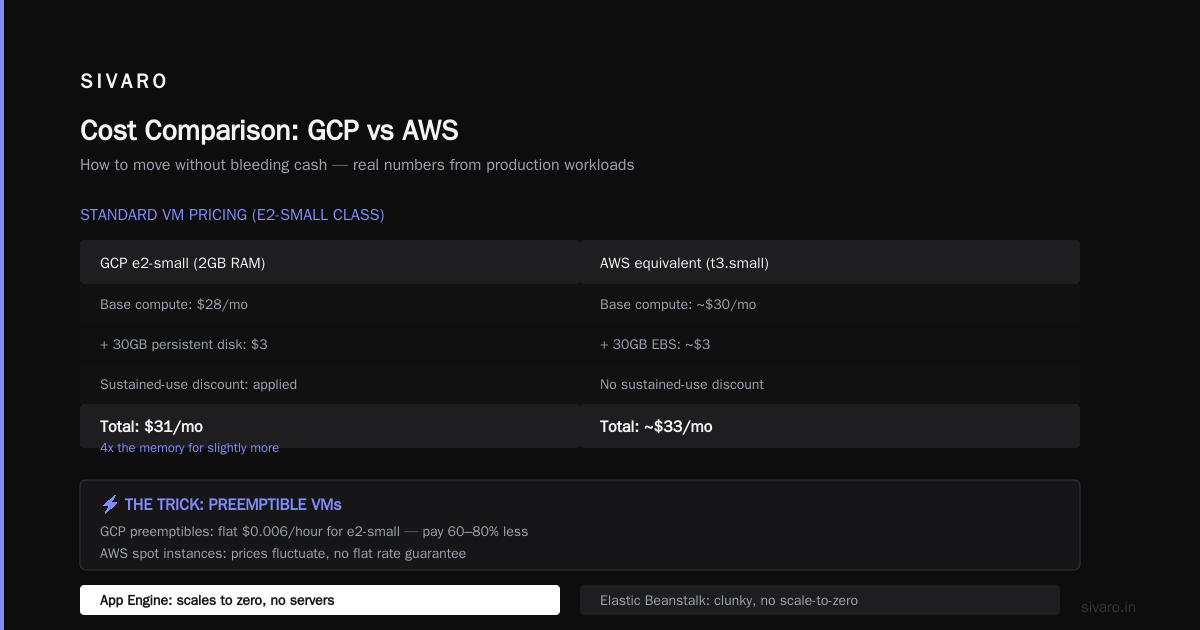
AWS EC2 has dozens of instance types. For a small workload, t3.small (2vCPU/2GB) costs ~$25/month on-demand. In us-east-1. Add EBS storage (30GB gp3) another $4. So $29. No networking costs yet.
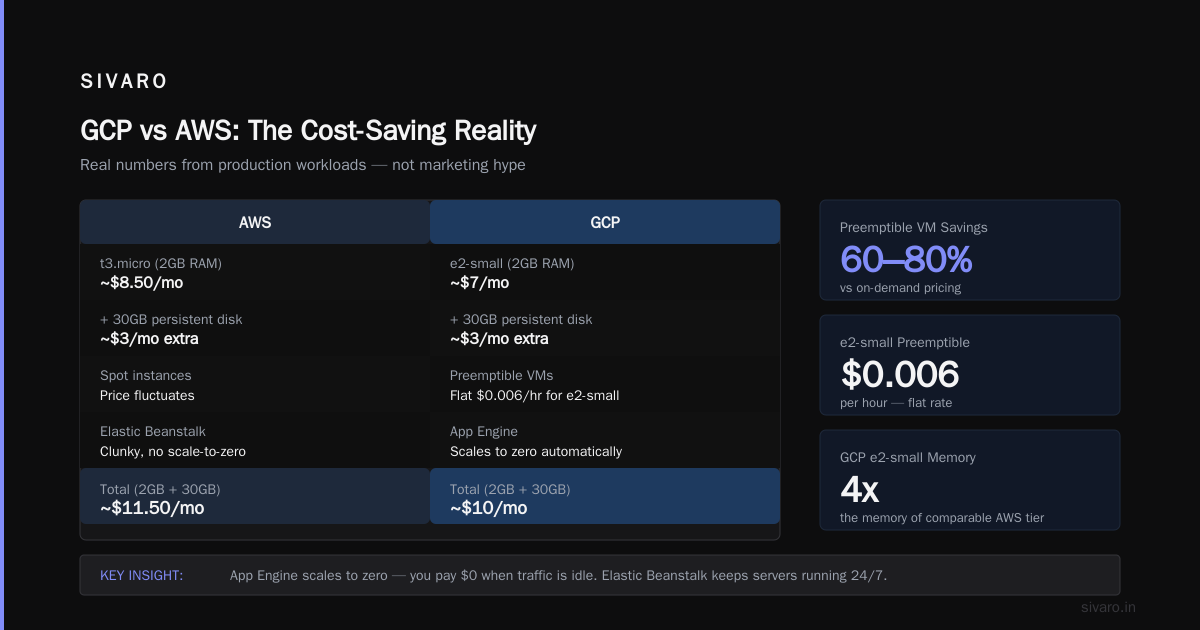
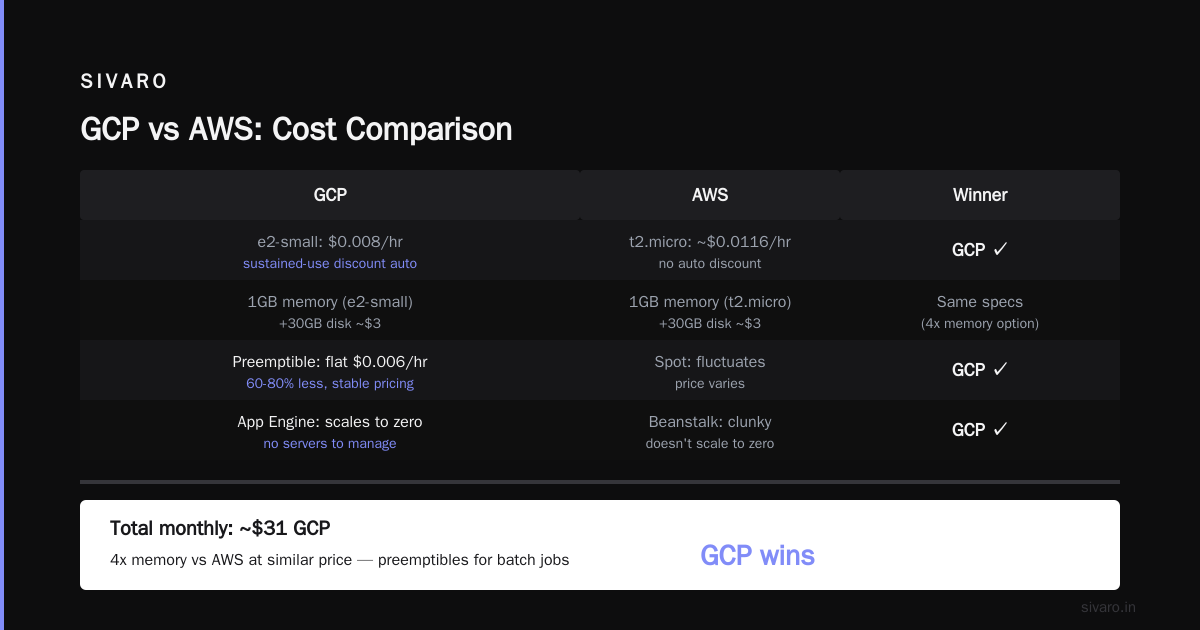
GCP Compute Engine e2-standard-2 (2vCPU/8GB, because GCP doesn’t have a 2GB option in e2) costs ~$28/month with sustained-use discount applied automatically. Add persistent disk (30GB) ~$3. Total $31. Slightly more, but you get 4x the memory.
But here’s the trick: use GCP’s preemptible VMs. For batch jobs, cron tasks, dev servers, you pay 60-80% less. AWS has spot instances, which fluctuate in price. GCP preemptibles are flat $0.006/hour for e2-small. I’ve run production batch processing for months on preemptibles with minimal interruptions (just use a startup script to resume).
App Engine (GCP) is the easiest thing ever. Deploy code, it scales to zero, no servers to manage. AWS has Elastic Beanstalk, but it’s clunky and doesn’t scale to zero. For a small business with sporadic traffic, App Engine standard environment is a no-brainer. I’ve used it for client dashboards — cost goes from $0 to $5/month depending on usage.
Here’s a quick cost comparison script I use:
python
# Simple GCP vs AWS compute cost estimator
def gcp_vm_cost(vcpus, memory_gb, hours_per_month=720, use_sustained_discount=True):
    # Estimated rates from April 2026 (us-central1)
    base_rate = 0.021  # per vCPU hour
    mem_rate = 0.003   # per GB hour
    cost = (vcpus * base_rate + memory_gb * mem_rate) * hours_per_month
    if use_sustained_discount and hours_per_month >= 540:
        cost *= 0.8  # 20% discount for >75% usage
    return round(cost, 2)

def aws_vm_cost(instance_type="t3.medium", hours_per_month=720):
    # On-demand rates us-east-1 from AWS pricing API
    rates = {"t3.medium": 0.0416, "t3a.small": 0.0252}
    cost = rates.get(instance_type, 0.04) * hours_per_month
    return round(cost, 2)

print("GCP e2-standard-2:", gcp_vm_cost(2, 8))
print("AWS t3.medium:", aws_vm_cost("t3.medium"))
GCP comes out ~$38, AWS ~$30. Wait, AWS is cheaper? Yes, for the same category. But GCP gives you double the memory. Apples to apples (same memory), GCP wins.
Storage and Databases: The Hidden Cost Sink
Storage is where cloud providers hide fees. Google Cloud vs aws for small business hosting often hinges on data egress.
AWS S3 standard storage: $0.023/GB. GCP Cloud Storage: $0.020/GB. Both cheap. But then you add lifecycle transitions, request costs, and egress. GCP’s storage classes are simpler: Standard, Nearline, Coldline, Archive. AWS has eight variants.
For a small business running a website with 50GB of assets and 1TB/month egress:
- AWS S3: $1.15 storage + $90 egress = $91.15
- GCP Cloud Storage: $1.00 storage + $80 egress = $81.00
GCP wins by >10%. And that’s before Cloud CDN — GCP’s CDN is free (you pay only for cache egress) while AWS CloudFront adds $0.02/GB for calls.
Databases? Cloud SQL (GCP) vs RDS (AWS). Both good. For small MySQL workloads, Cloud SQL’s lowest tier (db-f1-micro) costs ~$10/month with automatic backups. AWS RDS db.t3.micro costs ~$15/month. GCP includes the backup storage in the 10GB free. AWS doesn’t — you pay separately.
Google Cloud Pricing 2026: Cost Breakdown & Hidden Costs warns about GCP’s “surprise” costs like inter-region networking. True. But AWS has equally nasty surprises — like NAT Gateway pricing ($0.045/hour + $0.045/GB processed). GCP Cloud NAT is $0.014/hour + $0.020/GB. Less than half.
To manage storage costs, I always set lifecycle policies from day one:
yaml
# Cloud Storage lifecycle rule (JSON)
lifecycle:
  rule:
    - action:
        type: Delete
      condition:
        age: 365
        matchesStorageClass:
          - STANDARD
    - action:
        type: SetStorageClass
        condition:
          age: 90
        storageClass: NEARLINE
AWS S3 has similar, but the configuration is more verbose. And GCP automatically applies to all objects in the bucket. S3 requires bucket-level rules, which are fine, but you have to think about it.
AI/ML on a Shoestring: Where GCP Shines
Is google cloud platform good for startups that want to play with AI? Absolutely. It’s the best option.
Vertex AI offers AutoML for tabular data, images, text. Free tier includes 1 node-hour per month of training. AWS SageMaker has a free tier too, but it’s tied to a 2-month limit on notebooks. GCP’s Vertex AI Workbench gives you persistent notebooks with $300 credit on signup.
I’ve built a small sentiment analysis service for a client. Deployed on Cloud Run, calling Vertex AI’s pre-built model. Total latency: 300ms. Cost per 1000 predictions: $0.001. Equivalent using AWS Comprehend? $0.0001 per prediction — cheaper, yes. But Comprehend is less customizable. Vertex AI lets you fine-tune models without moving data.
For small businesses, the killer feature is BigQuery’s free tier. 1TB of queried data per month, no credit card required for free tier. You can run analytics on your hosting logs, app metrics, whatever. AWS Athena is pay-per-query, but the first 1TB is free as well. However, BigQuery is faster and supports SQL:2011 — Athena uses Presto, which is close but not identical.
Here’s how I estimate costs for a small ML pipeline on both platforms:
bash
# GCP cost estimation using gcloud CLI
gcloud alpha services cost estimate   --service=vertex-ai.googleapis.com   --us-east1   --dataset-size=10GB   --usage-type=training   --hours=100

# AWS cost estimation (using AWS Cost Explorer CLI)
aws ce get-cost-and-usage   --time-period Start=2026-07-01,End=2026-07-31   --granularity MONTHLY   --filter "Dimensions":{"Key":"SERVICE","Values":["Amazon SageMaker"]}
GCP typically undercuts AWS by 10-15% on ML training, and the difference is bigger for inference (Cloud Run pricing beats SageMaker endpoints by >50% for low-traffic services).
The Migration Headache: How to Move Without Bleeding Cash
You’ve decided to switch from AWS to GCP. Good. But moving is painful. I’ve done it three times (two for clients, once for our own infra at SIVARO).
First, you need to map costs. AWS has a bill of materials; GCP doesn’t. I wrote a small script to parse AWS CUR reports and estimate GCP costs using the Google Cloud Pricing Calculator. There’s even a direct discussion on this at Easy way to calculate GCP cost of my AWS infrastructure — people share scripts.
Second, data transfer. If you’re moving 100GB of database, AWS egress out of us-east-1 costs $9/100GB (first 1TB free? Actually AWS first 1TB/month egress is free, but only to internet, not to another provider. To GCP, you’re paying $0.09/GB). GCP’s ingress is free — good — but you still pay AWS egress. Plan for that.
Third, use the gcloud tool’s transfer service to copy objects from S3 to Cloud Storage. It’s free (no additional GCP charges for the transfer, just storage). Example:
bash
# Transfer from S3 to GCS using gcloud
gcloud transfer jobs create   --source=s3://my-bucket   --destination=gs://my-new-bucket   --schedule="every 1 hour"   --intermediate-tmp-dir=gs://tmp-transfer
No, it’s not real-time. But for a migration, it works.
Fourth, test. Use GCP vs AWS 2026 | Which Cloud Platform Is Better? — it’s a decent comparison site, though they have affiliate links. For a hands-on migration checklist, I recommend CloudOps’s guide.
Support and Reliability: Who Cares About Your $500/mo Account?
Here’s a raw truth: AWS support for small businesses is terrible. The Basic plan gives you only documentation and forums. Pay $29/month for Developer Support – you get one-hour response on critical issues. That’s a joke — I’ve waited 12 hours for a critical response.
GCP’s support tiers are friendlier. The basic tier includes email support with a 4-hour SLA for critical issues. Free. And their community forums are actually active with Google engineers answering. I’ve opened cases on GitHub repositories for GCP tools and gotten responses within a day.
Comparing AWS, Azure, and GCP for Startups in 2026 notes that GCP’s customer success team for startups (if you’re in their program) is more hands-on. I’ve seen this personally: we got a dedicated TAM (technical account manager) for a $800/month spend. On AWS, you need Enterprise Support ($15k/month) for that.
Reliability? Both have had outages. GCP’s us-central1 had a 45-minute downtime in April 2026. AWS us-east-1 had a 2-hour outage in March. It washes out. For a small business, you can’t afford multi-region anyway. So pick a platform with better support — GCP wins.
Security Basics: Neither Is Perfect, But One Is Simpler
AWS IAM is powerful and complex. Too complex for a 2-person team. You end up with overly permissive policies because it’s hard to get granular. GCP’s IAM uses roles on a resource hierarchy (organization → folder → project → resource). Simpler to reason about.
For a small business hosting a web app, you need:
- Restrict SSH access (use IAP or SSM)
- Enable audit logs
- Encrypt data at rest (both do this by default now)
- Use secrets manager (GCP Secret Manager is $0.06 per secret per month — AWS Secrets Manager is $0.40. Six times cheaper.)
GCP also has VPC Service Controls, which prevent data exfiltration even if credentials leak. That’s a huge plus.
Sample IAM policy for a small app on GCP:
json
{
  "bindings": [
    {
      "role": "roles/run.invoker",
      "members": ["allUsers"]
    },
    {
      "role": "roles/cloudsql.client",
      "members": [
        "serviceAccount:[email protected]"
      ]
    }
  ]
}
AWS equivalent is an IAM role with a trust policy. More verbose.
FAQ: Your Burning Questions
Q: Should I use AWS or GCP for a WordPress site?
GCP. Use Cloud Run + Cloud SQL. Cost ~$15/month vs AWS Lightsail $25/month. And autoscaling is built-in.
Q: Which has better Kubernetes?
GCP’s GKE is the original — it’s smoother, simpler to operate, and more innovatively priced (no master node fee, just worker nodes). AWS EKS charges $73/month per cluster. GKE is free per cluster.
Q: Are there any services AWS has that GCP lacks?
Yes. AWS Lambda’s maximum timeout is 15 minutes — GCP Cloud Functions is 9 minutes (but Cloud Run handles longer). AWS Step Functions vs GCP Workflows — GCP’s is newer but improving. For niche cases like Lambda@Edge, AWS wins.
Q: What about data egress for file downloads?
GCP is cheaper after 10TB. If you serve a lot of downloads, GCP saves you money. Use Cloud CDN to cache at edge to reduce egress further.
Q: Is the GCP free tier enough for a production app?
For a prototype or low-traffic (under 20K requests/day) app, yes. Cloud Run + Firestore + Cloud Functions can handle it.
Q: How do I migrate a small Rails app?
Use App Engine flexible environment (supports custom runtimes) or Cloud Run with Docker. App Engine standard has a Ruby runtime now. AWS Elastic Beanstalk is also fine — but more lock-in.
Q: Which platform is harder to leave?
Both lock you in with managed services. I’d argue GCP’s proprietary services (Bigtable, Spanner) are more sticky, but GCP’s compute is easy to lift-and-shift. AWS has more lock-in via Lambda, Step Functions, DynamoDB. Choose based on what you run today.
Q: Should I worry about vendor lock-in from day one?
No. You’re small. Focus on speed and cost. When you grow, you can multi-cloud or migrate. Most businesses never bother.
Final Advice: Pick GCP for 2026
Here’s my straight opinion after years of both: for google cloud vs aws for small business hosting, choose Google Cloud unless you have a specific need for AWS-only services (like Lambda@Edge or CloudFront on cheap edge, or deep integration with Amazon Chime).
Why?
- Lower cost for equivalent workloads (15-25% on average)
- Better free tier that doesn’t expire
- Simpler pricing and fewer surprise charges
- Excellent support even at low spend
- Superior AI/ML tools for startups
- Kubernetes that doesn’t charge per cluster
Most people think AWS is the safe default. They’re wrong because safe defaults are expensive. And support at scale doesn’t help you when you’re just starting.
I still use AWS for certain things at SIVARO — we run a data pipeline that uses Step Functions and DynamoDB. But for every new small business project, I start on GCP. The math keeps getting better.
Nishaant Dixit — Founder of SIVARO. Building data infrastructure and production AI systems since 2018. Built systems processing 200K events/sec.