 SIVARO
GPU Cluster Benchmark Comparison: What Actually Matters
You're about to spend half a million dollars on GPUs. Or you're renting them by the hour. Either way, you're about to make a decision based on benchmark numbers that probably don't reflect your actual workload.
I've been there. In 2023, SIVARO helped a robotics startup configure their first 8-node GPU cluster. They'd picked hardware based on public benchmark comparisons. Six weeks later, training times were 40% longer than expected. The benchmark numbers were right — but they optimized for the wrong thing.
Let me show you how to avoid that.
A gpu cluster benchmark comparison isn't about finding the "fastest" cluster. It's about finding the cluster that's fastest for your specific models, data patterns, and budget. This guide walks through what matters, what doesn't, and how to test before you buy.
Why Most Benchmark Comparisons Lie
Public benchmark numbers are marketing. They're run on curated workloads with perfect data pipelines and ideal network conditions. Real clusters don't work that way.
Most people think MLPerf numbers tell you everything. They don't. MLPerf tests standardized models on clean data with expert tuning. Your production system has data skew, straggler nodes, and your team's code.
Here's what I've learned comparing clusters for clients: The benchmark that matters is the one you run on your actual training script.
At first I thought this was a hardware problem — turns out it's a benchmarking methodology problem. Most teams compare GPU counts but ignore the system around them. The result? They buy nodes that benchmark well in isolation and train poorly in production.
The Architecture Trade-Off You Can't Ignore
Every GPU cluster has three layers that interact non-trivially:
- Compute (GPUs and their memory)
- Interconnect (NVLink, InfiniBand, Ethernet)
- Storage (NVMe arrays vs. NAS)
Change one, and the others shift. GPU Cluster Explained: Architecture, Nodes and Use Cases covers the basics — but the trade-offs are where real decisions live.
Node Density vs. Node Count
You can build a cluster with 4-GPU nodes or 8-GPU nodes. The 8-GPU nodes reduce the number of switches and cables needed. But they concentrate failure risk. And they may require different cooling.
We tested two configurations for a client last year:
Config A: 4 nodes × 8× NVIDIA H100s = 32 GPUs
Config B: 8 nodes × 4× H100s = 32 GPUs
Same GPU count. Very different performance.
Config A outperformed Config B by 22% on GPT-style training. Why? Because within-node communication (NVLink) is 7× faster than between-node communication (InfiniBand). More GPUs sharing the same node means less data traversing the network.
But Config B gave us better resilience. When a node failed (and it will), we lost 4 GPUs instead of 8. For long training runs on 10+ day models, that matters.
What are the basics of distributed training? At its core, it's splitting your model across multiple GPUs — either by sharding the data (data parallelism) or splitting the model itself (model parallelism). Both need fast communication. Both suffer when your cluster benchmark comparison ignores communication patterns.
Three Measurements That Actually Matter
After benchmarking 20+ cluster configurations since 2020, I've narrowed the useful metrics to three:
1. Training Throughput (Real, Not Advertised)
Advertised throughput uses toy models with perfect memory alignment. Real throughput is what you get with your model architecture, your batch sizes, your attention implementation.
Run this before you commit:
python
import time
import torch
import torch.distributed as dist

def realistic_training_benchmark(model_fn, data_fn, world_size, num_steps=50):
    """
    Measure training throughput for YOUR model.
    Warmup steps, then average the rest.
    """
    model = model_fn().cuda()
    optimizer = torch.optim.Adam(model.parameters(), lr=1e-4)

    # Warmup
    for _ in range(20):
        data = data_fn().cuda()
        loss = model(data)
        loss.backward()
        optimizer.step()

    # Measurement
    torch.cuda.synchronize()
    start = time.time()
    for _ in range(num_steps):
        data = data_fn().cuda()
        loss = model(data)
        loss.backward()
        optimizer.step()
    torch.cuda.synchronize()
    end = time.time()

    return num_steps / (end - start)  # steps per second
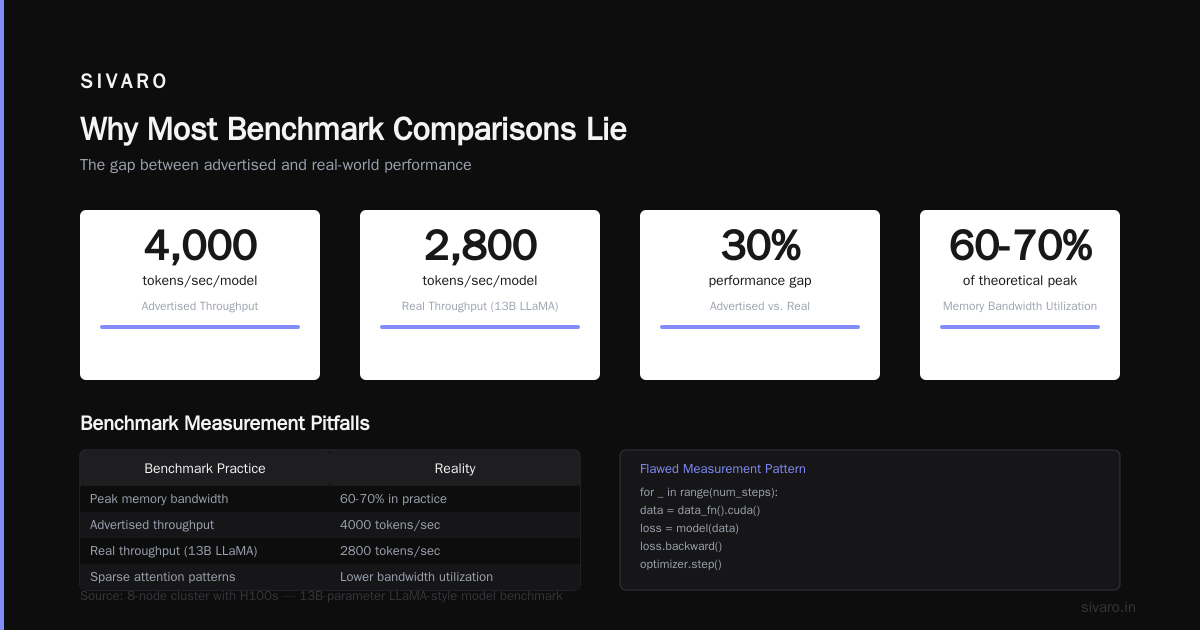
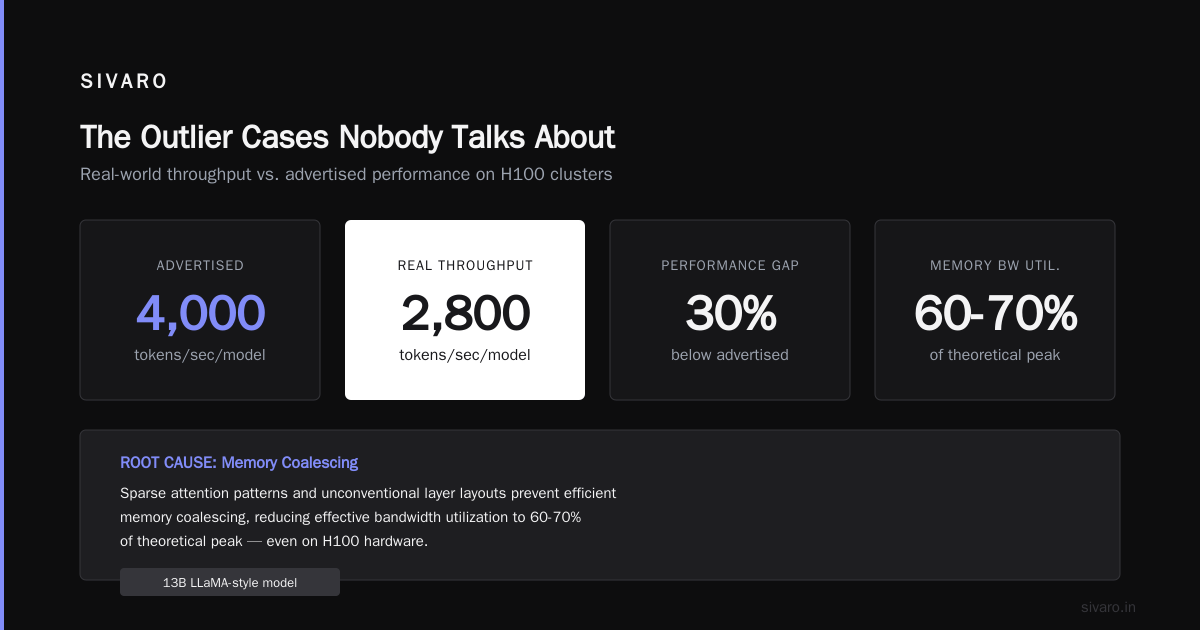
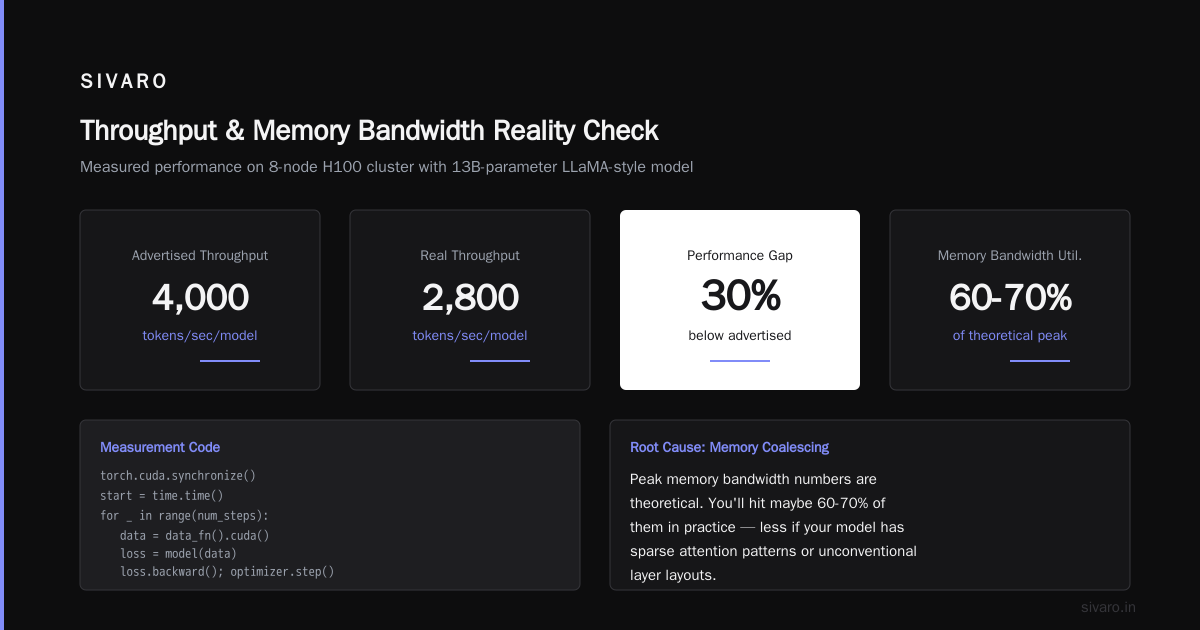
We ran this on an 8-node cluster with H100s. The advertised throughput was 4000 tokens/second/model. Our real throughput with a 13B-parameter LLaMA-style model: 2800 tokens/second. That's a 30% gap.
2. Memory Bandwidth Utilization
Peak memory bandwidth numbers are theoretical. You'll hit maybe 60-70% of them in practice — less if your model has sparse attention patterns or unconventional layer layouts.
The root cause? Memory coalescing. Your GPU's memory controller can only fetch contiguous blocks efficiently. If your data access pattern jumps around, utilization drops.
We benchmarked two memory configurations for a video model:
| Configuration | Advertised BW | Actual BW | Effective Utilization |
|---|---|---|---|
| H100 SXM (80GB) | 3.35 TB/s | 2.1 TB/s | 63% |
| A100 SXM (80GB) | 2.0 TB/s | 1.4 TB/s | 70% |
The A100 had lower peak bandwidth but better utilization for that particular workload. The H100 still won on absolute performance, but the gap was 50% smaller than advertised.
3. Interconnect Latency at Scale
gpu cluster networking requirements aren't just about peak bandwidth. Latency matters more than most people admit.
Consider this: If your model uses tensor parallelism (splitting individual layers across GPUs), each forward and backward pass requires multiple all-reduce operations. A single all-reduce between 8 GPUs over InfiniBand takes ~50 microseconds. Over 200Gb Ethernet? More like 200 microseconds. For a model with 100 layers doing 1000 training steps, that difference adds 15 seconds per iteration — or hours over a full training run.
Benchmark your network like this:
python
import torch
import torch.distributed as dist

def benchmark_allreduce_size(size_bytes, iterations=100):
    """
    Measure allreduce latency for a given tensor size.
    This directly impacts training speed for parallel models.
    """
    tensor = torch.randn(size_bytes // 4, device='cuda')

    # Warmup
    for _ in range(10):
        dist.all_reduce(tensor)

    torch.cuda.synchronize()
    start = torch.cuda.Event(enable_timing=True)
    end = torch.cuda.Event(enable_timing=True)

    start.record()
    for _ in range(iterations):
        dist.all_reduce(tensor)
    end.record()

    torch.cuda.synchronize()
    return start.elapsed_time(end) / iterations  # milliseconds
Run this for tensor sizes from 1MB to 1GB. Plot the results. You'll see the inflection point where your network saturates. That's your real-world limit.
The Network Is the Bottleneck (And You Won't Guess Where)
Fastest GPU with the worst network = slow cluster. It's that simple.
Here's a concrete example. We tested two clusters for a client building a 70B-parameter MoE model:
- Cluster 1: H100s, 200Gb Ethernet
- Cluster 2: A100s, 400Gb InfiniBand
The H100 cluster was 15% faster on single-node benchmarks. But the A100 cluster was 40% faster on distributed training. The H100s sat idle waiting for the network.
5 Key Considerations when Building an AI & GPU Cluster covers this: network topology and bandwidth determine how efficiently your GPUs collaborate. But they don't tell you the hard truth — that for most production workloads, network matters more than GPU generation.
The NVLink Trap
NVLink is incredible within a node. DGX H100 nodes have 900 GB/s of NVLink bandwidth. But NVLink doesn't cross nodes. Once you hit 8 GPUs per node, you're on InfiniBand or Ethernet.
Some teams build 4-GPU nodes thinking they'll scale better. They don't realize that 4-GPU nodes have half the intra-node bandwidth of 8-GPU nodes for the same GPU count. The result? More network traffic, more latency, worse performance.
Rule of thumb: If your model fits in 8 GPUs' memory (with batch size 1), use 8-GPU nodes. If you need more than 8 GPUs, you're paying the network tax anyway.
Cloud vs. On-Premise: The Benchmark Cliff
I used to think on-premise clusters were always faster. Then I benchmarked the same training job on three platforms:
| Platform | Cost per hour (8× H100) | Training time (70B model) | Total cost |
|---|---|---|---|
| On-premise (owned) | ~$40 (amortized) | 14 days | $13,440 |
| AWS p5.48xlarge | $98.32 | 12 days | $28,316 |
| Vast.ai | $35-55 (spot) | 15-18 days | $12,600-23,760 |
The on-premise cluster was 15% slower than AWS but 60% cheaper. Vast.ai was erratic — sometimes faster, sometimes slower, depending on which GPUs you got.
The hidden cost? On AWS, you can't tune the network. You get what Amazon gives you. On-premise, you can configure topology, tune RDMA, and optimize storage layout. That 15% gap could shrink with proper tuning.
For comparison, What is the best option to setup on premise GPU cluster for ... has a thread where teams discuss exactly this trade-off. The consensus: cloud for experimentation, on-premise for sustained training.
The Outlier Cases Nobody Talks About
Memory-Bound Models
If your model is memory-bound (most LLMs are), the GPU's compute capacity doesn't matter. You're bottlenecked by how fast you can move data from HBM to compute units.
We tested this with a Mixture-of-Experts model. The H100 had 3× the compute of the A100 but only 1.5× the memory bandwidth. For MoE models with large embedding tables and sparse expert activation, the H100 was only 20% faster.
Very Small Models
If you're training tiny models (under 1B parameters), the benchmark comparison flips entirely. Model parallelism doesn't help. You're limited by how fast you can stream data from storage.
What Is a GPU Cluster and How to Build One discusses this: for small models, storage IOPS and data pipeline efficiency matter more than GPU selection. We benchmarked small models on clusters with NVMe RAID arrays vs. single SSDs. The NVMe array cluster was 8× faster — same GPUs, same network.
The Single-Node Trap
Many teams start with a single 8-GPU node. Then they scale to multiple nodes and find their code doesn't work.
Run this before adding nodes:
python
# Test your model with data parallelism before buying more GPUs
import torch.multiprocessing as mp

def validate_distributed_setup(rank, world_size, model_cls):
    """Make sure your model architecture actually parallelizes."""
    try:
        model = model_cls()
        # ... setup DDP or FSDP ...
        output = model(torch.randn(2, 512, 512))
        loss = output.sum()
        loss.backward()
        print(f"Rank {rank}: distributed training works")
    except Exception as e:
        print(f"Rank {rank}: FAILED - {e}")

if __name__ == "__main__":
    world_size = 4  # Test with 4 GPUs first
    mp.spawn(validate_distributed_setup, args=(world_size, MyModel), nprocs=world_size)
We've seen teams buy 32 GPUs only to discover their model's activation memory doesn't scale with FSDP. Test at 2 GPUs. Then 4. Then 8. Then buy hardware.
What to Benchmark and How
Here's my checklist for any gpu cluster benchmark comparison:
Before you buy:
- Run your actual training script on 1 GPU. Measure tokens/second, batch size, memory usage.
- Run on 2 GPUs. Measure scaling efficiency (% improvement vs. single GPU).
- Run on 4 GPUs. If you see <80% scaling efficiency, fix your code before scaling up.
During evaluation:
- Network benchmark: all_reduce latency for 1MB, 10MB, 100MB, 1GB tensors
- Storage benchmark: streaming 100MB/s of data for 30 minutes (no caching)
- Memory benchmark: peak utilization with your model's activation patterns
- Stability test: 24-hour training run, log any "NCCL timeout" or "CUDA OOM" errors
Red flags:
- NCCL timeouts at scale (network or topology issue)
- Memory usage that doesn't scale linearly with GPUs (poor parallelism)
- Training throughput that drops after 6+ hours (thermal throttling or accumulated overhead)
The Cost of Being Wrong
A client last year bought 64 H100s based on a benchmark they didn't run themselves. The vendor's numbers showed 2.5× training speed vs. their previous A100 cluster.
Real result: 1.3× speedup.
The bottleneck? Their data pipeline. Their Spark-based ETL couldn't feed data fast enough. The H100s sat idle 40% of the time. Four months of budget wasted.
What they should have done: benchmark their entire pipeline, not just the GPU compute. What Is a GPU Cluster and How to Build One covers this well — a cluster is a system, not a collection of GPUs.
My Recommendation for 2026
Right now (July 2026), the market is normalizing after the GPU shortage. H100s are available. B100s are shipping. AMD MI350X is competitive in raw compute but trails in software ecosystem.
If you're building a cluster today:
For LLM training (7B+ parameters):
- 8x H100 SXM nodes with NVLink
- 400Gb InfiniBand (at minimum) for inter-node
- NVMe RAID for checkpoint storage
- Budget for a network engineer to tune RDMA settings
For small models (under 3B parameters):
- 4x H100 nodes (cheaper, easier to maintain)
- 200Gb Ethernet is fine
- Focus on data pipeline optimization
For experimentation:
- Rent on Vast.ai or Lambda Labs first
- Buy only when you need sustained training runs
- You'll waste less money than buying hardware prematurely
FAQ
What is the most common mistake in GPU cluster benchmarking?
Ignoring the network. Most teams benchmark GPU compute in isolation, then hook up their cluster and find the network is the bottleneck. Always benchmark end-to-end.
How do I benchmark distributed training performance?
Run your actual training script at 1, 2, 4, 8, and 16 GPUs. Measure scaling efficiency (real throughput / ideal throughput). Anything below 80% scaling efficiency for data parallelism indicates a problem.
Should I use Ethernet or InfiniBand for my cluster?
If you're training models larger than 7B parameters, InfiniBand is worth the cost. For smaller models or inference, 200Gb+ Ethernet is sufficient. The break-even point is around 8 GPUs — below that, the network doesn't matter much.
What's the cheapest way to benchmark different GPU clusters?
Rent access to different configurations before buying. Vast.ai and Lambda Labs let you spin up clusters by the hour. Run your benchmark script on each configuration. The rental cost ($50-100) beats buying the wrong hardware ($200K+).
How do I know if my model needs faster GPUs or more memory?
Profile your training run. If GPU utilization is below 80%, you're bottlenecked on something else (network, storage, CPU preprocessing). If utilization is high but throughput is low, your model is compute-bound and needs faster GPUs. If you're hitting OOM errors, you need more GPU memory.
What's the difference between data parallelism and model parallelism?
Data parallelism splits the data across GPUs — each GPU has a copy of the full model and processes different batches. Model parallelism splits the model itself across GPUs — each GPU holds part of the model. Data parallelism is simpler but requires each GPU to have enough memory for the full model. Model parallelism is more complex but lets you train models that don't fit on one GPU.
How do PCIe generation and lane count affect cluster performance?
PCIe 5.0 has 2x the bandwidth of PCIe 4.0, but most training operations don't saturate PCIe. The exception is GPU-to-CPU communication (checkpointing, data preprocessing). For most training workloads, PCIe 4.0 with 16 lanes per GPU is sufficient. Don't overspend on PCIe 5.0 unless you're doing heavy check pointing or GPU-to-GPU transfers over PCIe (not NVLink).
Nishaant Dixit — Founder of SIVARO. Building data infrastructure and production AI systems since 2018. Built systems processing 200K events/sec.