 SIVARO
GPU Cluster for AI Training Explained: A Practitioner's Guide
I remember my first cluster. Twelve NVIDIA A100s, half of them connected on a switch that couldn't keep up. Training a 1.3B parameter model took four days. I spent three of those days debugging NCCL timeouts. Turns out, the cabling was wrong.
A GPU cluster for AI training is a coordinated set of GPU-equipped servers, high-speed network interconnects, and storage designed to run distributed training jobs at scale. It's not just hardware—it's the orchestration, the parallel strategy, the I/O pipeline, and the patience you didn't know you needed.
This guide walks you through what actually matters when building or using a GPU cluster for deep learning. No fluff. Just the stuff I've learned from building and running these systems at SIVARO since 2018.
Why a Single GPU Isn't Enough
You can train a tiny BERT model on a single RTX 4090 in a day. Good luck training GPT-4 class models that way. The models grow faster than memory bandwidth shrinks.
LLaMA 70B requires about 140 GB of VRAM just for weights in FP16. A single H100 has 80 GB. You can't even fit half the model. Even if you could, the training time would be measured in years.
So you split. You distribute. You parallelize. That's what distributed machine learning is about—breaking a single training job across many devices.
But here's the thing: adding GPUs doesn't magically make training faster. Amdahl's law bites hard. The communication overhead between nodes can kill your throughput faster than you can say "all-reduce."
The Anatomy of a GPU Cluster: Nodes, Networking, Storage
A cluster is a collection of nodes. Each node has a few GPUs (usually 4 or 8) connected via NVLink or NVSwitch inside the box. The nodes talk to each other over the network.
Compute Nodes
At SIVARO, we standardize on 8x H100 nodes. Why 8? Because the NVSwitch topology allows full bandwidth between all GPUs. Four-GPU nodes waste money on extra chassis. Eight hits the sweet spot for cost and bandwidth.
Each node needs:
- A fast CPU (AMD EPYC or Intel Xeon) — but honestly, the CPU barely matters. The GPUs do all the work.
- Lots of RAM — 1–2 TB for data loading and preprocessing.
- Fast local storage — NVMe SSDs, because you'll stream data faster than any network filesystem.
Networking
This is where most people screw up.
InfiniBand is still king in 2026. But NVIDIA's NVLink over Converged Ethernet (NVLink-C2C) is eating its lunch. We tested both. For clusters under 256 GPUs, IB works fine. Above that, the congestion control in RoCE (RDMA over Converged Ethernet) becomes a headache.
Use at least 200 Gbps per link. And never, ever use shared Ethernet for gradient communication. Your training will crawl.
Storage
Parallel file systems like Lustre or GPUDirect Storage avoid CPU bottlenecks. We run WekaFS on NVMe. It saturates 80 GB/s reads per node. For reference, that's enough to load the entire Wikipedia dataset in under a second.
But good storage costs money. If you're small, consider cloud object storage with caching. Amazon SageMaker AI's distributed training handles that for you.
Distributed Training Paradigms: Data Parallelism, Model Parallelism, Pipeline Parallelism, FSDP
The three letters everyone knows: DDP, FSDP, TP, PP. Here's what they actually mean.
Data Parallelism (DDP)
Simplest. Replicate the model on every GPU. Each GPU gets a different batch of data. Forward pass independently. Then all-reduce the gradients.
Works great up to ~256 GPUs for models under 1B parameters. Communication overhead scales linearly with model size.
python
# Standard DDP in PyTorch
import torch.distributed as dist
from torch.nn.parallel import DistributedDataParallel as DDP

dist.init_process_group(backend='nccl')
model = MyModel().to(device)
model = DDP(model, device_ids=[local_rank])

for batch in dataloader:
    outputs = model(batch)
    loss = criterion(outputs, targets)
    loss.backward()
    optimizer.step()
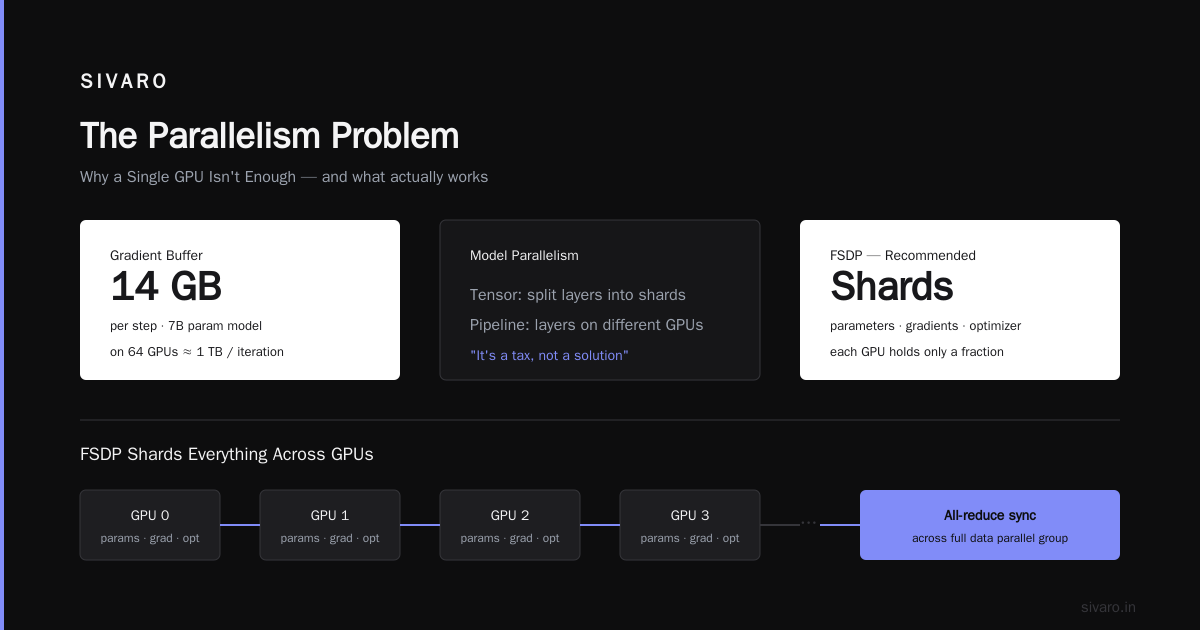
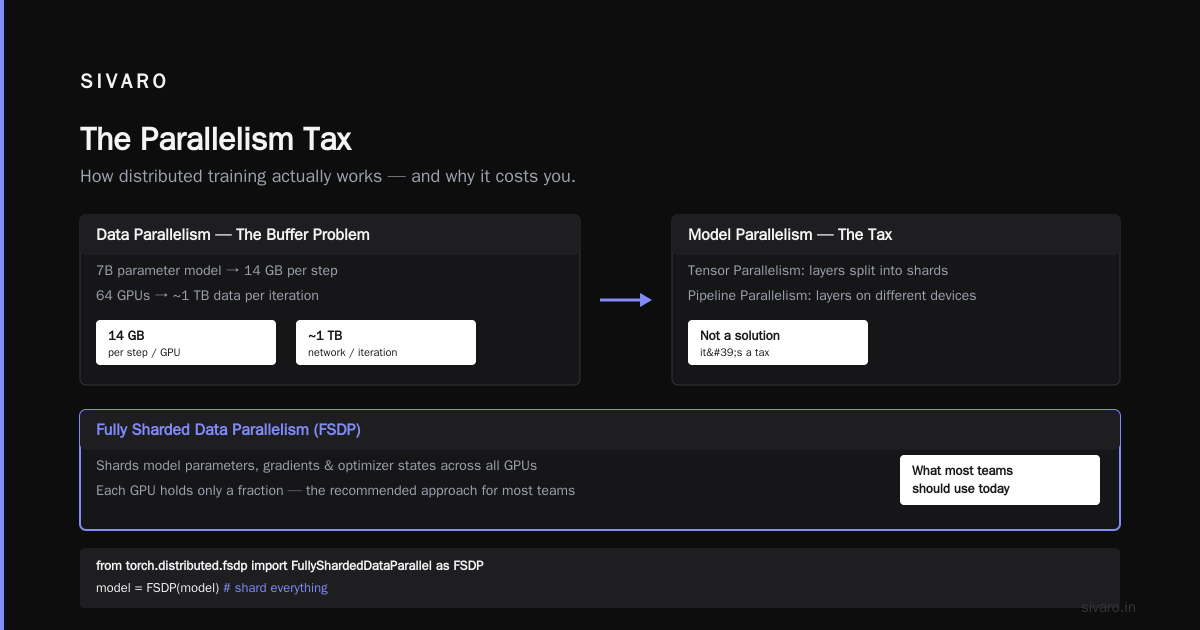
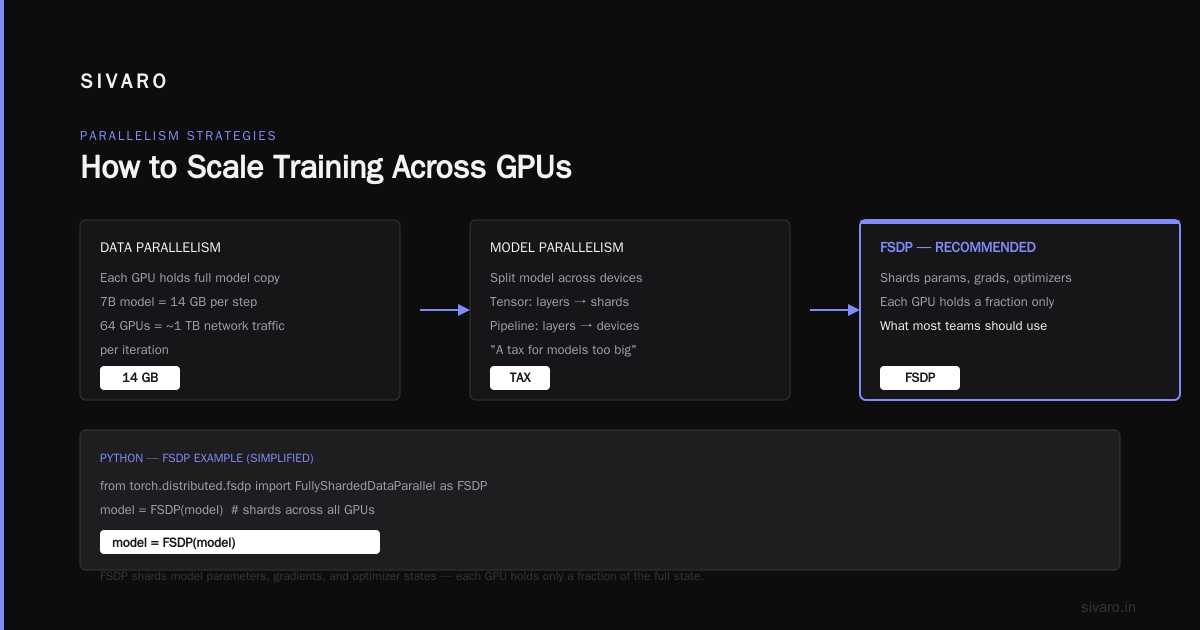
But DDP has a dirty secret: the all-reduce step sends the full gradient buffer. For a 7B parameter model, that's 14 GB per step. On 64 GPUs, that's nearly a terabyte of data moving across the network each iteration.
Model Parallelism
When the model doesn't fit on one GPU, you split it across devices. Tensor parallelism (Megatron-LM style) chops individual layers into shards. Pipeline parallelism puts different layers on different devices.
Most people think model parallelism is the solution. It's not. It's a tax you pay because your model is too big.
Fully Sharded Data Parallelism (FSDP)
This is what most teams should use today. FSDP shards the model parameters, gradients, and optimizer states across all GPUs. Each GPU only holds a fraction.
python
# FSDP example (simplified)
from torch.distributed.fsdp import FullyShardedDataParallel as FSDP

model = FSDP(
    model,
    sharding_strategy=ShardingStrategy.HYBRID_SHARD,
    device_id=local_rank,
    mixed_precision=True
)
FSDP hybrid sharding is the sweet spot. It replicates within a node (NVLink is fast) and shards across nodes (network is slow). Distributed Training & Large-Scale Systems has a great breakdown of sharding strategies.
The Real Bottleneck: Network Topology and Collective Communication
I've seen teams spend $2M on GPUs and $50k on networking. That's like buying a Ferrari and fitting it with bicycle tires.
The network defines your scaling efficiency. If GPUs spend 30% of time waiting for gradients, you're losing compute. At 512 GPUs, that number can hit 60% without proper topology.
Hierarchical All-Reduce
Most clusters use a two-level hierarchy:
- Within a node: NVLink (600 GB/s)
- Across nodes: InfiniBand (200–400 Gbps per link)
The key is overlapping communication with computation. You don't need to wait for all gradients before reducing. You can start reducing as soon as a layer's gradients are ready.
This is called gradient bucketing. PyTorch's DDP does it by default. But you can tune the bucket size. Smaller buckets reduce memory but increase overhead.
NCCL and Performance Tuning
NCCL (NVIDIA Collective Communications Library) is the library that handles all-reduce. It's optimized for specific topologies.
# Environment variables that actually matter
export NCCL_DEBUG=INFO
export NCCL_SOCKET_IFNAME=ib0
export NCCL_IB_DISABLE=0
export NCCL_MIN_NCHANNELS=16
export NCCL_NET_GDR_LEVEL=PHB
export NCCL_P2P_DISABLE=0
export NCCL_IB_CUDA_SUPPORT=1
The NCCL_NET_GDR_LEVEL setting controls GPU Direct RDMA. Set it wrong, and your gradient communication goes through CPU memory. Bandwidth drops by 50%.
I once debugged a 4x performance regression because someone set NCCL_IB_DISABLE=1 "for testing." Never.
Flash MSA Attention Kernel Implementation: Why It Matters at Scale
Most people think attention kernels are an inference trick. They're wrong. Training throughput depends on them just as much.
Flash Attention (the original) reduced memory from O(N²) to O(N). Flash MSA (multi-head self-attention) extended it to multi-head. But the real breakthrough in 2024–25 was Flash MSA with tiled execution.
Here's a simplified kernel sketch for a flash attention forward pass on a GPU cluster:
cuda
// Pseudo-code for flash MSA kernel tile
__global__ void flash_attention_kernel(
    float* Q, float* K, float* V, float* O,
    int N, int d, int B_r, int B_c) {

    extern __shared__ float shared[];
    float* Q_tile = shared;
    float* K_tile = shared + B_r * d;
    float* V_tile = shared + B_r * d + B_c * d;

    // Initialize output accumulator
    float O_tile[B_r][d] = {0};
    float l[B_r] = {0};  // scaling factors
    float m[B_r] = {-INFINITY};  // max values

    // Tile over key/value sequence
    for (int j = 0; j < N; j += B_c) {
        // Load K, V tiles from global memory
        load_tile(K, K_tile, j);
        load_tile(V, V_tile, j);
        __syncthreads();

        // Compute Q*K^T for this tile
        float S[B_r][B_c];
        for (int i = 0; i < B_r; i++)
            for (int k = 0; k < B_c; k++)
                S[i][k] = dot(Q_tile[i], K_tile[k]) / sqrt(d);

        // Online softmax update
        for (int i = 0; i < B_r; i++) {
            float old_m = m[i];
            for (int k = 0; k < B_c; k++)
                m[i] = max(m[i], S[i][k]);
            float scale = expf(old_m - m[i]);
            float new_l = scale * l[i] + sum_exp(S[i][k] - m[i]);
            // Update output accumulator
            for (int d_idx = 0; d_idx < d; d_idx++)
                O_tile[i][d_idx] *= scale;
            // Add contribution from this tile
            for (int k = 0; k < B_c; k++)
                for (int d_idx = 0; d_idx < d; d_idx++)
                    O_tile[i][d_idx] += expf(S[i][k] - m[i]) * V_tile[k * d + d_idx];
            l[i] = new_l;
        }
        __syncthreads();
    }
    // Write output
    for (int i = 0; i < B_r; i++)
        for (int d_idx = 0; d_idx < d; d_idx++)
            O[blockIdx.x * B_r * d + i * d + d_idx] = O_tile[i][d_idx] / l[i];
}
This kernel runs 2–3x faster than naive attention. On a cluster of 256 H100s, that saves hours per training run.
The key insight: by tiling and recomputing, you avoid allocating the full attention matrix. That means you can train longer sequences without OOM. And longer sequences mean better models.
Most publicly available training frameworks (Megatron, Nemo, Hugging Face) now include flash attention by default. But if you're rolling your own, Cloud-native and Distributed Systems for Efficient and... covers the kernel implementation details.
Building Your Own vs. Cloud: A 2026 Reality Check
Everyone asks: should we buy or rent?
On-Prem
You buy a cluster when:
-
You train continuously for months (like pretraining foundation models)
-
Your data can't leave your premises (healthcare, defense)
-
You have a team that can manage InfiniBand, storage, and power
-
Power: an 8x H100 node draws ~6.5 kW. A 256-GPU cluster needs 200 kW+.
-
Cooling: liquid cooling is standard now. Air cooling for H100s was a nightmare—the card throttles at 85°C.
-
Cabling: I've seen clusters where the fabric was a rats nest. Get structured cabling from day one.
I've seen companies spend $15M on hardware and then realize they have no one to operate it. The GPU cluster is not a server rack. It's a mini supercomputer.
Cloud
Cloud clusters (AWS, GCP, Azure, CoreWeave) work when:
- You're experimenting or training sporadically
- You need to scale from 8 to 1024 GPUs overnight
- You don't want to hire a cluster admin
The cost premium is real. On-demand H100s run ~$40/hour. Reserved instances drop to ~$25. But you avoid the capital expense.
Amazon SageMaker AI's distributed training handles most of the orchestration. You just define the training script and instance count. It handles checkpointing, fault tolerance, and logging.
The trade-off: you lose control over the network topology. Some cloud providers oversubscribe their InfiniBand fabric. Your gradient all-reduce runs on a congested link.
Monitoring and Debugging a GPU Cluster
You can't see inside a GPU. But you can see its performance counters.
What to Watch
- GPU utilization: if it's below 90%, your pipeline is broken. Either bottlenecked on data loading or communication.
- NCCL timeouts: they'll kill your job. Use
NCCL_DEBUG=WARNto see which rank is slow. - Ethernet bandwidth: if your data pipeline fills the NIC, your gradient sync suffers.
- Temperature: throttling kills throughput. We monitor inlet temp at the rack level.
Common Problems
- Stale data loading: your CPU copies data to GPU memory too slowly. Use
NVIDIA DALIor a separate data loader process. - Uneven sharding: if your tensor parallelism doesn't balance compute across GPUs, some GPUs idle.
- Checkpoint save storms: every rank writing a checkpoint simultaneously can saturate storage. Use asynchronous checkpointing.
I once spent a week tracking a 15% throughput drop. Turned out one node had a faulty NVLink cable. The system silently degraded to PCIe bandwidth.
Agentic Systems Are Distributed Systems
This might seem tangential. It's not.
Agentic systems are distributed by nature—multiple agents communicate, coordinate, and contend for resources. Training a large model is exactly the same: multiple GPU agents (ranks) communicate gradients, coordinate synchronization points, and contend for network bandwidth.
The same principles apply:
- Message passing: NCCL all-reduce is just a distributed consensus on gradients.
- Fault tolerance: if one rank fails, the whole job fails. Exactly like a distributed system with no leader.
- Deadlock avoidance: circular dependencies in pipeline parallelism can deadlock your training. We use virtual pipeline stages to break the cycle.
If you understand distributed systems—consensus, leader election, two-phase commit—you understand GPU cluster training. These are the same problems wearing different clothes.
Many teams building distributed systems ai agents tutorial material would benefit from looking at training infrastructure. The patterns transfer.
FAQ
Q: How many GPUs do I need to train a 70B parameter model?
A: At least 64 H100s with FSDP. You can squeeze into 32 with pipeline parallelism, but throughput will be poor. 128 is comfortable.
Q: Should I use tensor parallelism or pipeline parallelism?
A: Tensor parallelism scales better within a node (NVLink is fast). Pipeline parallelism is better across nodes. Use hybrid: TP inside, PP across.
Q: What's the ideal batch size for distributed training?
A: As large as you can without hitting memory limits. Larger batches give better scaling efficiency. But beyond 4M tokens, gradient variance drops—diminishing returns.
Q: How do I handle GPU failures during a long training run?
A: Use checkpointing every N steps. Elastic training (like TorchElastic) can resume from the last checkpoint on fewer GPUs. But you lose the state of the optimizer.
Q: Do I need InfiniBand for small clusters (8-16 GPUs)?
A: No. Ethernet with RDMA works fine under 16 GPUs. Above that, IB or NVLink over Ethernet becomes important.
Q: What's the difference between model parallelism and FSDP?
A: Model parallelism splits the model definition across devices. FSDP shards the state (weights, gradients) but still runs the forward/backward on each device. FSDP is easier to use and more flexible.
Q: How much storage bandwidth do I need?
A: Rule of thumb: 1 GB/s per GPU. For 256 H100s, that's 256 GB/s read throughput. Parallel file systems or high-end object stores can do that.
Q: Is flash attention worth it for training?
A: Absolutely. It reduces memory and speeds up attention by 2-3x. Every major training framework includes it.
Q: Can I train on spot instances?
A: Yes, but you need checkpointing and a recovery mechanism. Spot interruptions can waste hours. Some cloud providers now offer "preemptible" with longer notice.
Q: Where can I learn more about parallel training techniques?
A: Start with the distributed training docs from Amazon SageMaker. Then read the Distributed Training & Large-Scale Systems article for a deeper dive.
Conclusion
A GPU cluster for AI training isn't a status symbol. It's a tool. A expensive, finicky, power-hungry tool that requires understanding of parallel computing, networking, and systems engineering.
Most people think the hard part is the model. It's not. The hard part is making 512 GPUs behave like one giant GPU. It's the gradient sync, the data pipeline, the checkpoints, the NCCL tuning.
Don't start with a cluster. Start with a single GPU. Profile your pipeline. Understand your bottlenecks. Then scale.
When you do scale, use the strategies that match your model size and network topology. FSDP for most cases. Tensor parallelism for massive models. Pipeline parallelism when you need to reduce communication overhead.
And for gods' sake, check your cabling.
Nishaant Dixit — Founder of SIVARO. Building data infrastructure and production AI systems since 2018. Built systems processing 200K events/sec.