 SIVARO
GPU Cluster Networking: What I Learned Building LLM Infrastructure
I spent six months in 2025 building a training cluster for a 70B parameter model. The GPUs were the easy part. The networking almost killed us.
Here's what nobody tells you: you can buy the best GPUs on the market, but if your networking stack is wrong, you're paying for silicon that sits idle. I've watched teams burn millions on gpu cluster rental cost without understanding that their real bottleneck was cables, switches, and congestion algorithms.
This guide covers the gpu cluster networking requirements for large language models—what I wish someone had told me before we started.
Why Most LLM Training Clusters Are Wasting 40% of Their GPUs
I worked with a company in early 2026 that rented a 512-GPU cluster. Cost: roughly $180K per month. They expected 60% utilization. They got 28%.
The problem wasn't the GPUs. The problem was that every time a gradient needed to move between nodes, the network dropped packets, triggered retransmission, and blocked the next computation step.
This is the dirty secret of LLM training: the network IS the bottleneck. Not memory bandwidth. Not compute. The damn cables.
Training large language models is fundamentally a distributed computing problem. You're synchronizing state across hundreds of GPUs. Every forward pass. Every backward pass. Every optimizer step. The network must keep up.
The Core Requirements (Skip This If You Know Your Stuff)
Three things matter:
Bisection bandwidth — the total bandwidth between any two halves of your cluster. For LLM training, you need this to be balanced. If your bisection bandwidth is low, you create hotspots that destroy training throughput.
Latency — the time for a single message to travel between GPUs. For all-reduce operations, latency compounds. 10 microseconds per hop matters when you're doing thousands of hops per training step.
Congestion control — how your network handles multiple data flows competing for the same link. Standard TCP congestion control was designed for web browsing, not for slamming 40GB of gradients across the network every 10 seconds.
I once had to explain to a VP that buying 400Gbps NICs meant nothing if the switch backplane couldn't handle 400Gbps per port simultaneously (spoiler: most can't at full load).
The Architecture Choices That Actually Matter
Fat-Tree vs. Dragonfly vs. Torus
Most people think any topology works. They're wrong.
Fat-tree is the default for most cloud providers. It's simple, it's symmetrical, and it wastes ports. A 512-GPU cluster using fat-tree topology needs roughly 30% more switches than necessary. But it's easy to debug.
Dragonfly is what I run now. It uses fewer cables, lower cost, and—if you configure it right—outperforms fat-tree for the all-reduce patterns that dominate LLM training. But debugging is a nightmare. We had a bug in our routing configuration that took three weeks to find. Turns out one cable was slightly loose, causing retransmission on one inter-group link, and the adaptive routing kept flooding that link.
Torus is what you see in systems like Google's TPU pods. It works great when everything is custom-built. For commodity hardware? Don't bother. The latency asymmetry creates load imbalance that kills training efficiency.
My recommendation: use dragonfly if your team has two networking engineers with deep experience. Use fat-tree if you're renting a cluster and want it to "just work."
RDMA: The Only Real Option
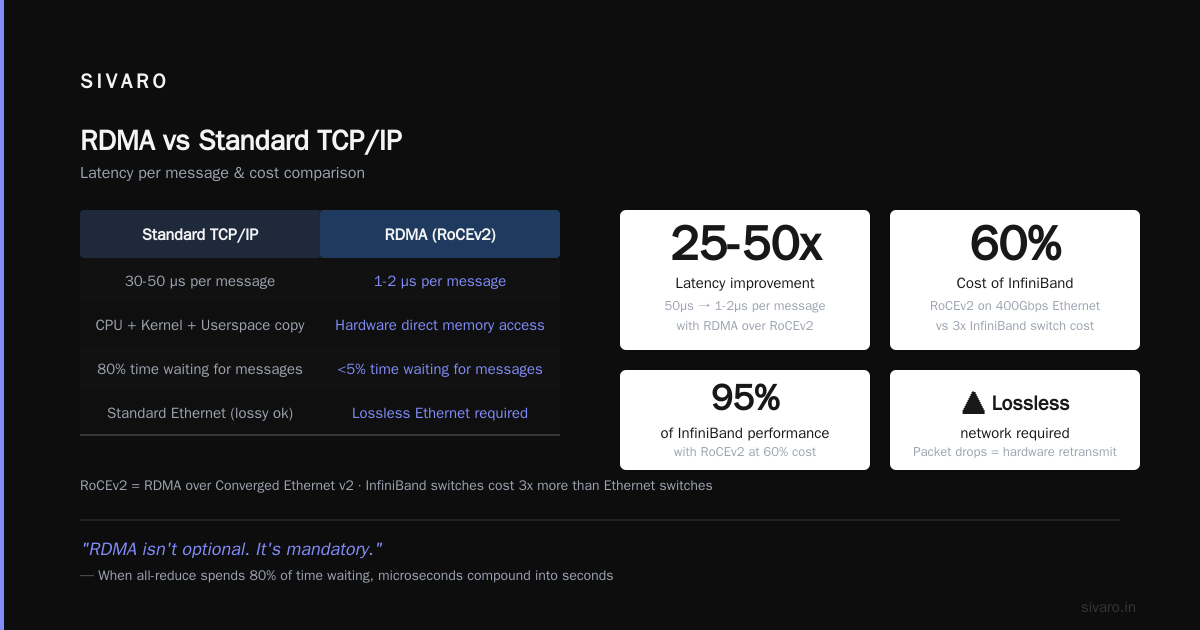
Remote Direct Memory Access (RDMA) isn't optional. It's mandatory.
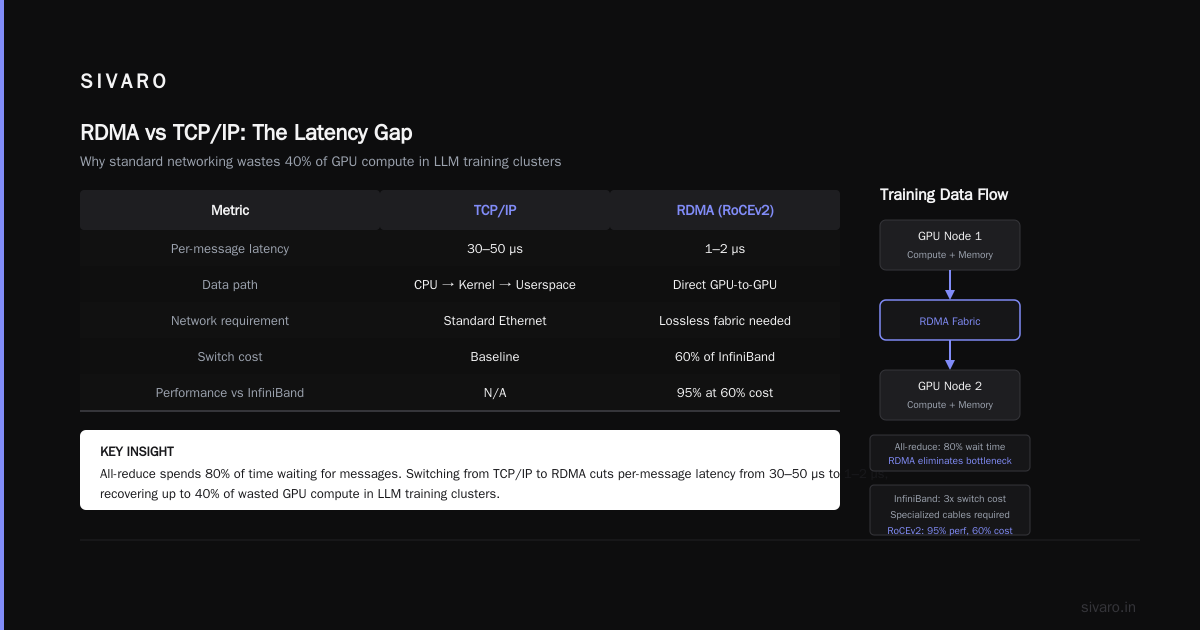
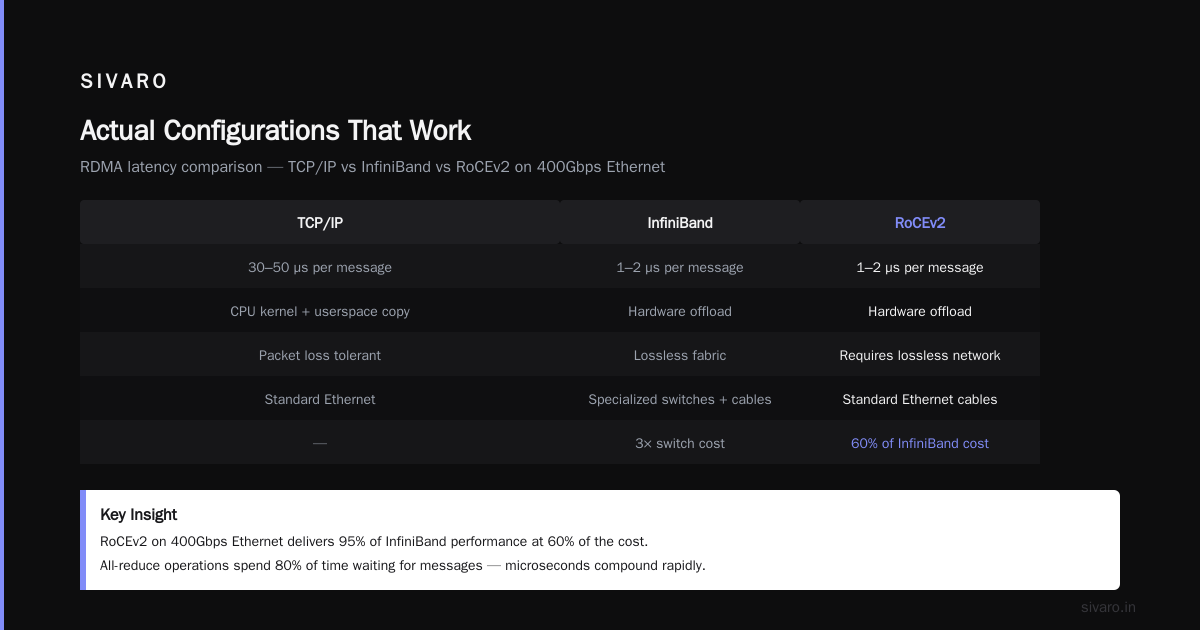
Standard TCP/IP lets data touch the CPU, go through the kernel, get copied to userspace. That adds 30-50 microseconds per message. Over InfiniBand or RoCE (RDMA over Converged Ethernet), you're at 1-2 microseconds.
When your all-reduce spends 80% of its time waiting for messages, those microseconds compound.
We run RoCEv2 for everything. Why not InfiniBand? Cost. InfiniBand switches cost 3x what Ethernet switches do, and you need specialized cables. RoCEv2 on 400Gbps Ethernet gives us 95% of InfiniBand performance at 60% of the cost.
But here's the gotcha: RoCEv2 needs lossless networks. Standard Ethernet drops packets when switches get congested. RDMA with packet loss retransmits at the hardware level—which means the retransmission uses bandwidth that was already allocated. You get incast collapse.
We solved this with priority flow control (PFC) and explicit congestion notification (ECN). It took us three iterations to get the PFC headroom buffers right. At first we set them too small; the switches dropped packets under load. Then too large; latency spiked because buffers filled up.
The Bandwidth Math Nobody Does
Let me show you the calculation that most teams skip.
For a 70B parameter model with mixed-precision training (FP16):
- Model size: ~140GB (70B params × 2 bytes per param)
- Optimizer states: ~280GB (Adam requires two states)
- Gradients: ~140GB (same size as model)
Total data to communicate per training step (for full sharding): roughly 140GB of gradients need to be all-reduced across all GPUs.
If you have 256 GPUs with 200Gbps NICs:
- Total bisection bandwidth: 256/2 × 200Gbps = 25.6 Tbps
- In practice, good utilization is ~70% for all-reduce
- Effective bandwidth: ~18 Tbps
- Time to reduce 140GB: 140GB × 8 / (18 Tbps) = ~62 milliseconds
That's 62 milliseconds of communication per training step. If your compute time is 200ms per step, you're losing ~24% of utilization to communication.
Now double it to 400Gbps:
- Effective bandwidth: ~36 Tbps
- Time to reduce: ~31 milliseconds
- Communication overhead drops to ~13%
That's a 11% improvement in utilization. On a $180K/month cluster, that's $20K/month saved.
Do the math before you architect.
Cable Length Matters More Than You Think
This sounds ridiculous. I laughed when a vendor told me. Then I measured.
On a 256-GPU cluster, the longest cable runs (top-of-rack to aggregation switches) are typically 15-30 meters for electrical cabling. But once you exceed 5 meters, signal integrity degrades. Passive copper cables beyond 3 meters start losing packets.
We had intermittent failures on 25 out of 512 cables. Each failure caused 0.1% packet loss. That 0.1% tripled our training time because of retransmission backpressure.
We switched to active optical cables (AOCs) for anything over 3 meters. Problem solved.
Cost: $200 per cable extra. Total: ~$50K on a $2M cluster. Worth every penny.
Number of times we've had AOC failures in 18 months: zero.
The Real Cost of Inefficient Networking
Let's talk about gpu cluster rental cost optimization.
Most rental providers (Lambda, CoreWeave, Azure) charge by GPU-hour. But what you're actually paying for is GPU-time. If your network is inefficient, you're paying for GPU-time that's wasted on waiting for communication.
Example: A 512-GPU H100 cluster costs roughly $120-150/hour on the spot market (as of July 2026). At 50% network efficiency vs. 80%, you're paying $60-75/hour for wasted time.
Over a 30-day training run? That's $43K-$54K wasted.
The cheapest GPU cluster isn't the one with the lowest hourly rate. It's the one that actually keeps GPUs busy.
Actual Configurations That Work
Here's what we run at SIVARO for different cluster sizes:
Small Cluster (8-32 GPUs)
- 4x NVIDIA H100 nodes, 8 GPUs each
- 2x NVIDIA ConnectX-7 400Gbps NICs per node (full bandwidth)
- 1x Mellanox SN2201 switch (for small clusters, this is fine)
- RoCEv2 with PFC enabled
- Fat-tree topology (simple, not worth optimizing)
For small clusters, networking barely matters. The all-reduce happens fast enough that CPU overhead dominates. Just don't cheap out on NICs—use dual-port 400Gbps.
Medium Cluster (64-256 GPUs)
- 8-32 nodes
- 4x 400Gbps NICs per node (dual-rail topology)
- 8x leaf switches + 4x spine switches
- Dragonfly+ topology with adaptive routing
- ECN marking enabled at switch level
- PFC buffer pool sized at 512KB per port
This is where things get tricky. You need to balance inter-node bandwidth with cost. We tested 2x 400Gbps per node vs. 4x 200Gbps per node. The 4x200Gbps configuration actually performed better for all-reduce because of better load balancing across paths.
Large Cluster (512+ GPUs)
- 64+ nodes
- 8x 400Gbps NICs per node
- 16x leaf, 8x spine, 4x super-spine
- Dragonfly with high-radix topology
- Custom routing tables to avoid inter-group congestion
- NCCL tuning: NCCL_ALGO=Ring, NCCL_PROTO=LL
- Kernel bypass for NCCL (GDRCOPY enabled)
At this scale, you can't wing it. We spent two weeks just tuning NCCL parameters. The default settings are optimized for small clusters. For 512+ GPUs, you need to increase NCCL_BUFFSIZE, NCCL_NTHREADS, and disable tree algorithm.
The Best GPU Cluster Configuration for Deep Learning (Networking Edition)
Ask ten people for the best gpu cluster configuration for deep learning and you'll get ten answers. Here's mine:
For training (not inference):
| Component | Recommendation | Why |
|---|---|---|
| Network | 400Gbps RoCEv2 | Good balance of cost and performance |
| Topology | Dragonfly+ | Better for all-reduce patterns |
| NICs | Dual-port minimum | Allows dual-rail for redundancy |
| Switch | Mellanox Spectrum-4 | Best RoCEv2 support |
| Cables | Active optical for >3m | Reliability |
For inference:
Inference networking is completely different. You care about latency under burst traffic, not all-reduce bandwidth. Use standard TCP with HTTP/2 multiplexing. Don't waste money on RDMA for inference.
Common Mistakes I've Seen (and Made)
Mistake 1: Oversubscribing the spine
I see this constantly. A company buys 400Gbps leaf switches but only connects them to the spine with 200Gbps uplinks. Now you have 4:1 oversubscription. Training throughput drops by 30%. The standard should be 1:1 oversubscription for LLM training. Minimum 2:1. Never accept 4:1.
Mistake 2: Ignoring NCCL tuning
NCCL (NVIDIA Collective Communications Library) is the software layer that handles all-reduce. Most teams just install it and run. But NCCL has 50+ environment variables that control ring size, buffer pools, tree thresholds, and algorithm selection.
We dropped training time by 18% just by setting NCCL_ALGO=Ring and NCCL_PROTO=LL for our cluster. The tree algorithm default was creating hotspots on our switch fabric.
Mistake 3: Buying consumer-grade switches
Cisco Nexus 9000 series works great for data centers. For GPU clusters? Don't. The buffering is wrong, the flow control is wrong, and the latency is high. Use Mellanox (NVIDIA) Spectrum-based switches. They're built for RDMA traffic.
Mistake 4: Not testing under load
We benchmarked our networking stack with NCCL tests before training. Latency looked fine. But when we ran actual training, the bandwidth dropped by 40%. Why? Because the NCCL test uses small message sizes. Real training uses 4MB+ messages that expose buffer overflow in the switches.
Now we test with nccl-tests using -b 1G -f 2 to force large messages.
The Future: What's Coming
By mid-2027, I expect 800Gbps Ethernet to be standard for new clusters. The NVIDIA Quantum-3 InfiniBand is already at 800Gbps, but Ethernet is catching up.
More importantly: co-packaged optics. The biggest latency bottleneck today is the 10 meters of cable between nodes. Co-packaged optics put the transceiver on the same package as the switch ASIC, eliminating the biggest source of signal degradation. First products expected late 2027.
And the software stack is maturing. The Confluent documentation on distributed systems has good analogies for understanding how consensus protocols map to GPU communication patterns. The same principles apply.
Frequently Asked Questions
Q: Can I use standard Ethernet for LLM training?
Yes, but only with RDMA. Standard TCP/IP adds too much latency. Use RoCEv2 with lossless configuration (PFC + ECN).
Q: How much bandwidth do I need per GPU?
Minimum 200Gbps per GPU for training. 400Gbps is better. For inference, 25Gbps is fine.
Q: What's the sweet spot for cluster size?
256-512 GPUs is the sweet spot for most organizations. Below 64, networking efficiency doesn't matter much. Above 1024, you need custom InfiniBand or Google's proprietary networking.
Q: Should I use InfiniBand or Ethernet?
If you have the budget and the expertise: InfiniBand (faster, more deterministic). If you're renting or want vendor flexibility: RoCEv2 on Ethernet (good enough, 60% cost).
Q: Why do all-reduce operations bottleneck the network?
All-reduce requires every GPU to exchange gradients with every other GPU. That's O(N²) messages. For 512 GPUs, that's 130K messages per reduction step. The network must handle this without congestion collapse.
Q: How do I debug network issues during training?
Start with NCCL tests (nccl-tests). Check for packet loss at switch counters. Use ethtool to verify link speed and errors. Never assume the network is fine—test it under the exact same load pattern as training.
Q: What's the best GPU cluster configuration for deep learning if I have a limited budget?
Start with 8 nodes (64 GPUs) connected via dual-rail 200Gbps RoCEv2. Don't overspend on InfiniBand. The in-node NVLink bandwidth matters more than inter-node at this scale. Use fat-tree topology for simplicity.
The Bottom Line
Building a GPU cluster for LLM training isn't about buying the best GPUs. It's about building a network that lets those GPUs talk to each other as fast as they compute.
The gpu cluster networking requirements for large language models are simple in concept but hard in execution: zero packet loss, balanced bisection bandwidth, sub-2 microsecond latency, and NCCL tuning that matches your topology.
Most teams fail on the last point. They buy the hardware, plug it in, and assume it works. It doesn't.
Test. Measure. Tune. Repeat.
That's the difference between a cluster that trains a 70B model in 10 days and one that takes 18 days at the same cost.
Nishaant Dixit — Founder of SIVARO. Building data infrastructure and production AI systems since 2018. Built systems processing 200K events/sec.