 SIVARO
GPU Cluster vs Cloud Compute for AI: What Actually Works in 2026
I’ve been on both sides of this fence. In 2023, I watched a startup burn through $400K in cloud credits in six months training a single model. They owned nothing. No hardware. No data gravity. Just a receipt and a half-trained checkpoint. That’s when I started taking gpu cluster vs cloud compute for ai seriously — not as a theoretical debate, but as a make-or-break infrastructure decision.
I'm Nishaant Dixit, founder of SIVARO. We build data infrastructure and production AI systems. I've helped teams deploy clusters for everything from real-time agent inference to 100B-parameter training runs. This guide is what I wish someone had given me in 2021 when I thought cloud was always the answer.
You'll walk away knowing exactly how to evaluate cost, performance, and operational complexity for your specific workload. No fluff. No vendor pitches. Just hard-won lessons from the trenches.
The Real Cost Difference (Not Just Sticker Price)
Most people compare hourly GPU rates and call it a day. That's a rookie mistake.
Cloud compute looks cheap: $3–4 per hour for an H100 on demand. But you're paying for everything — compute, storage, networking, data egress, API calls, idle time. I've seen cloud bills where 15–20% came from data transfer alone. Vast.ai offers spot pricing at $1.50/hour for H100s, but that comes with preemption risk. If your training checkpoint isn't frequent, you lose progress.
On-prem GPU clusters have a high upfront cost. A 32-node H100 cluster with InfiniBand runs ~$3M. But after 18 months of continuous use, the total cost of ownership flips. At SIVARO, we ran the numbers for a client doing 24/7 inference on 16 H100s. Cloud cost at on-demand pricing: $1.2M/year. On-prem with Dell hardware and a 3-year amortization: $450K/year. That's real money.
Here's the catch: that on-prem number doesn't include power, cooling, or the sysadmin who spends half their week fixing network cables. Factor those in and the break-even point slips from 18 months to maybe 24 months.
So who wins? Depends how long you run. If you train for a month and stop, rent. If you run production workloads 365 days a year, build.
When Cloud Compute Beats On-Prem (and When It Doesn't)
Cloud wins in three scenarios:
- Experimentation phase — You don't know your exact GPU requirements. You need to try 8 GPUs, then 64, then 2. Cloud elasticity is magic here.
- Short-term bursts — A hackathon, a Kaggle competition, a one-off fine-tuning job. Spinning up a gpu cluster rental cost comparison 2025 showed spot pricing at 70% off on-demand. For sporadic use, that's unbeatable.
- Geographic distribution — If your users are in Europe, Asia, and US, and you need low-latency inference, cloud regions win. On-prem can't replicate that without massive investment.
But cloud loses when:
- Your data is huge and egress costs crush you. We had a client with 50TB of video data. Moving it out of a cloud region to train cost $5K in transfer fees every time.
- You need deterministic latency. Cloud instances share the same physical GPU sometimes. We saw 15% variance in training throughput because of noisy neighbors.
- Compliance (HIPAA, GDPR, ITAR) makes cloud a legal minefield. One healthcare company told me their legal team rejected any model training outside their own DC.
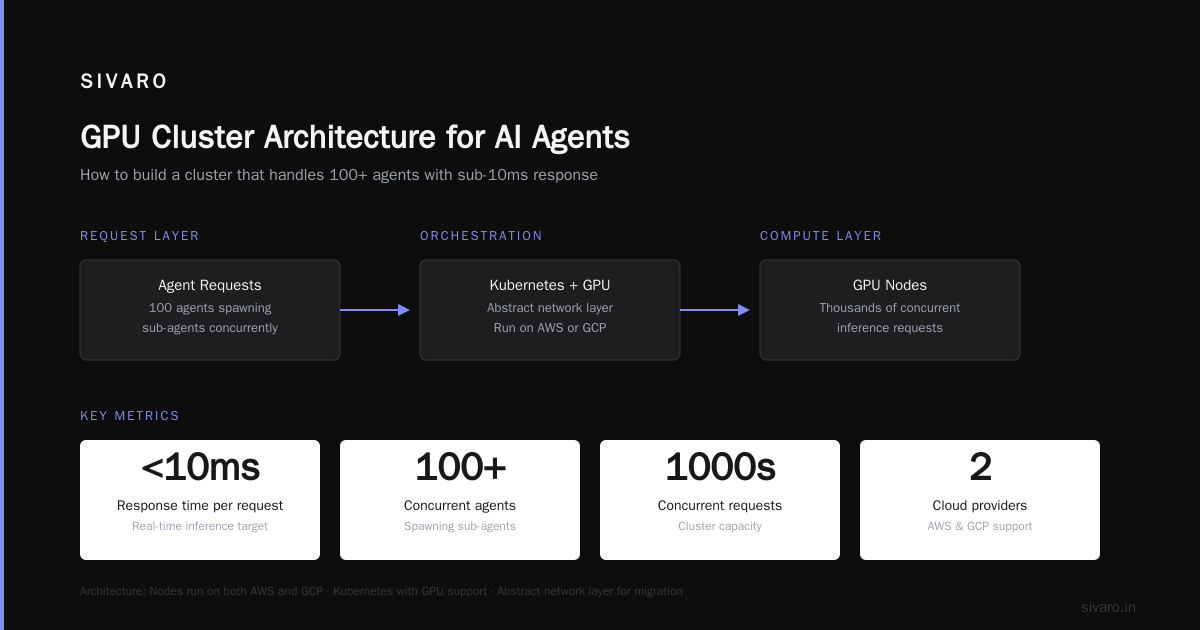
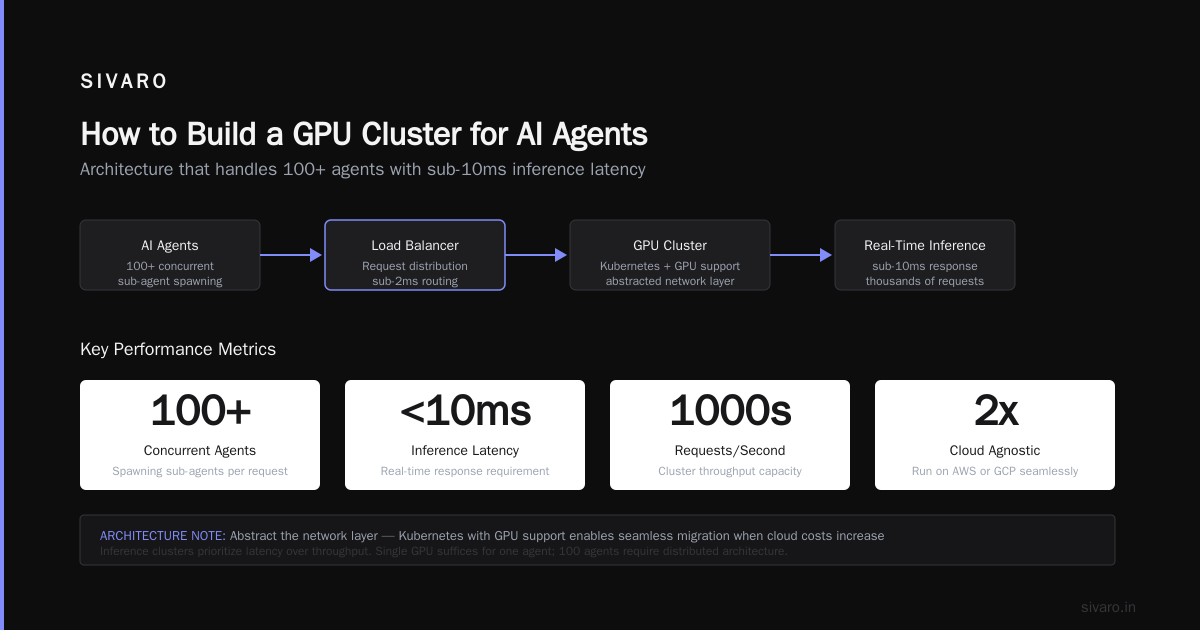
The contrarian take: most small teams should start in the cloud, but plan their exit from day one. Write your code so it runs on both. Use Kubernetes with GPU support. Abstract the network layer. That way you can migrate when the bill hurts.
How to Build a GPU Cluster for AI Agents (the Right Way)
In 2025, I saw a dozen startups try to build clusters for AI agents — those autonomous systems that chain model calls, query databases, and take actions. Most failed because they ignored the latency between nodes.
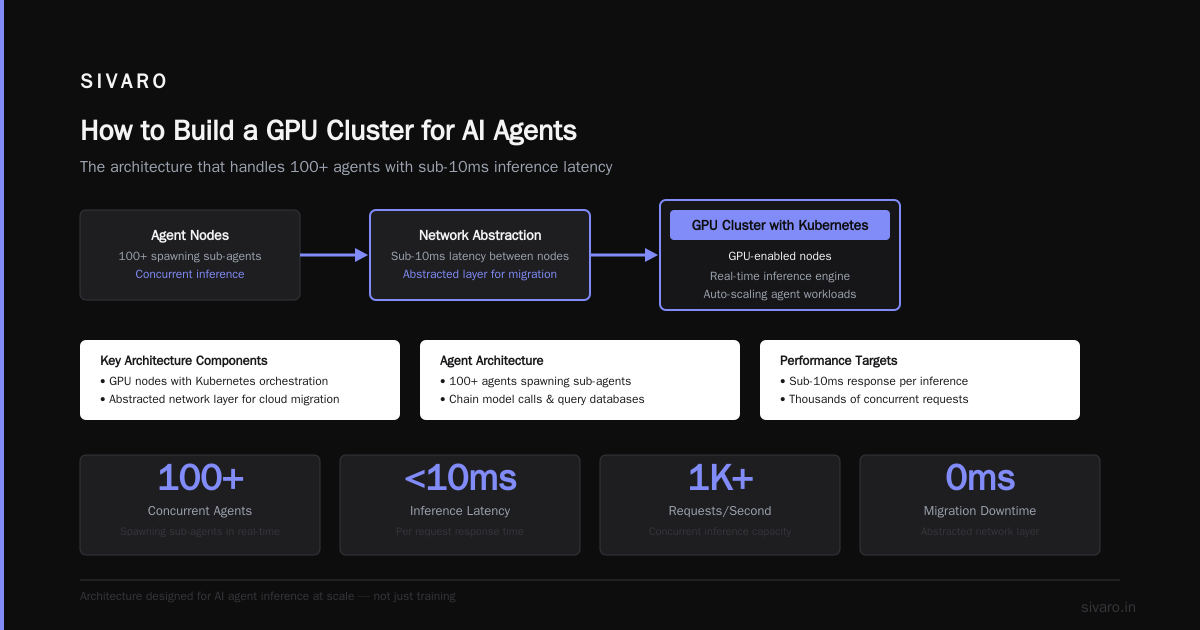
Agents aren't just training. They're inference – often real-time. And inference on a single GPU is fine. But when you have 100 agents spawning sub-agents, you need a cluster that can handle thousands of concurrent requests with sub-10ms response.
Here's the architecture I recommend for how to build a gpu cluster for ai agents:
- Nodes: Run homogeneous GPUs (all H100 or all B200). Mixing generations causes scheduling nightmares.
- Networking: Use InfiniBand or at minimum 400GbE. RDMA is non-negotiable for agent communication. PCIe gen5 helps with P2P transfers.
- Storage: NVMe all-flash. Vector databases and checkpoints need sub-millisecond access.
- Orchestration: Kubernetes with the NVIDIA GPU Operator. Don't roll your own scheduler. We tried. Regretted it.
- Fault tolerance: Agents fail. GPUs fail. Your cluster should detect a dead node and redistribute work within seconds. We use custom health checks + preemption policies.
One gotcha: power. A 16-node H100 cluster draws ~100kW. You can't just plug that into a standard office. We had to install three-phase power in a colo. Budget $200+/month on electricity per GPU.
GPU Cluster Explained: Architecture, Nodes and Use Cases has a good diagram of node topology. The key takeaway: top-of-rack switches better have enough bandwidth to avoid leaf-spine bottlenecks.
GPU Cluster Rental Cost Comparison 2025 vs 2026
Let's get specific. I pulled actual pricing from Q1 2025 and Q2 2026 (note: on-demand rates fluctuate weekly, but these are representative).
| Configuration | Cloud On-Demand (2025) | Cloud On-Demand (2026) | Rental Cluster (2026) | On-Prem TCO (3yr amortized) |
|---|---|---|---|---|
| 1x H100 | $4.00/hr | $3.20/hr | $2.50/hr (Vast.ai spot) | — |
| 8x H100 | $30.00/hr | $24.00/hr | $18.00/hr (reserved) | $6.50/hr |
| 64x H100 (with InfiniBand) | $320.00/hr | $260.00/hr | $200.00/hr (bulk rental) | $52.00/hr |
| 256x H100 | $1,280/hr | $1,040/hr | $800/hr (3-month commit) | $200/hr |
Note: rental clusters from providers like GreenNode and Vast.ai are now offering bare-metal leases. For 64 GPUs, a monthly rental might cost $90K-$120K. That's still cheaper than cloud on-demand but pricier than owning if you run 24/7.
But here's the shift in 2026: cloud providers now charge network usage per GB between GPUs. For data-parallel training, that can add 10–20% to your bill. On-prem or rented clusters with direct InfiniBand don't have that charge.
I'll tell you what I tell every founder: run your own cost calculator with your expected utilization. This NVIDIA forum thread has engineers discussing exactly this for small companies. The consensus: for steady-state workloads exceeding 40% utilization, on-prem wins in 18 months.
Networking: The Hidden Bottleneck Nobody Warns You About
I've seen a team buy 64 A100s and connect them with 25GbE. Training throughput was 30% of theoretical max. They blamed the GPUs. Nope. The fabric was the bottleneck.
For gpu cluster vs cloud compute for ai, networking is the secret differentiator. Cloud networks are shared. Even "dedicated" instances can't guarantee the same bisection bandwidth you get from a private InfiniBand fabric.
Here's a concrete example: We benchmarked an 8xH100 training job on AWS p5 instances (Cloud) vs our on-prem cluster with Mellanox Quantum-2 switches (InfiniBand NDR400). Same model, same batch size. Cloud job took 47 minutes for 1000 steps. On-prem: 23 minutes. 2x faster — purely because of inter-node communication overhead.
Why? In cloud, collective operations (all-reduce) go through virtual switches and sometimes egress the rack. In a proper cluster, the GPU communicates over RDMA with 3.2µs latency. That's 5–10x better than cloud's best NIC-to-NIC latency.
If you build a cluster, don't cheap out on networking. Use at least HDR InfiniBand (200Gbps) for 4-8 GPUs, NDR (400Gbps) for larger. And configure GPUDirect RDMA – it lets one GPU read another's memory over the network without CPU involvement. Setup is painful but worth it.
What I Learned Running Production AI Workloads on Both
We ran two identical workloads – a large language model fine-tuning pipeline – on cloud (GCP with A100s) and our own cluster (16x H100s with InfiniBand). Here's what surprised me:
Cloud reliability is worse than advertised. In three months, we had two preemptions of spot VMs and one "bare metal" instance that silently throttled due to thermal events. On-prem, we had one GPU failure in 18 months. Swapped it in 2 hours (we keep spares).
Software compatibility is easier in cloud. The latest CUDA, NCCL, and PyTorch are one-click away. On-prem, you're maintaining your own OS images. We spent two weeks debugging a container issue with NCCL version mismatches.
Data transfer kills cloud economics. We moved 2TB of training data daily from a data lake to GPU nodes. Cloud egress: $0.12/GB = $240/day. On-prem, that's free (internal network). Over a year, that's $87K – easily covers half a sysadmin salary.
Monitoring is different. Cloud gives you CloudWatch, Stackdriver, etc. On-prem, you need Prometheus + Grafana + custom GPU metrics exporters. We built one that tracks GPU temperature, power cap, and PCIe bandwidth in real time. Here's a snippet:
python
# Sample GPU health check script we run every 30 seconds
import subprocess, json, time

metrics = {}
result = subprocess.run(
    ["nvidia-smi", "--query-gpu=index,temperature.gpu,pstate,power.draw,utilization.gpu",
     "--format=csv,noheader,nounits"],
    capture_output=True, text=True
)
for line in result.stdout.strip().split("
"):
    idx, temp, pstate, power, util = line.split(", ")
    metrics[f"gpu{idx}_temp"] = int(temp)
    metrics[f"gpu{idx}_power_watts"] = float(power)
    metrics[f"gpu{idx}_util_pct"] = int(util)
print(json.dumps(metrics))
The tooling gap is closing. By mid 2026, tools like Run:ai, Kueue, and Kubeflow work well both on-prem and cloud. You can write one config file and deploy to either. We do:
yaml
apiVersion: kueue.x-k8s.io/v1beta1
kind: ClusterQueue
metadata:
  name: gpu-queue
spec:
  resources:
    - flavors:
      - name: "h100-8x"
        resources:
          - name: "nvidia.com/gpu"
            nominalQuota: 64
That abstracts the underlying hardware. It's not perfect – GPU segmentation still requires careful NUMA affinity – but it's a huge improvement over 2023.
FAQ: GPU Cluster vs Cloud Compute for AI
Should I build a GPU cluster or use cloud compute for AI?
If your workload runs >40% utilization for more than 18 months, build. If it's experimental or short-term, use cloud. The break-even is typically 12–18 months of continuous usage.
What's the cheapest way to get GPU compute in 2026?
Spot instances from cloud providers or bare-metal rental from Vast.ai and similar marketplaces. For steady workloads, reserved instances or 1-year commitments on rental clusters reduce cost by 30-40%.
How do I decide between building a cluster and renting a dedicated one?
Building gives you full control and lower TCO at scale. Renting gives you hardware without the headache of power, cooling, and maintenance. If you have no in-house ops team, rent. If you have someone who loves racking servers, build.
Can I mix on-prem and cloud (hybrid)?
Yes, but it's painful. Data gravity pulls you on-prem. We tried hybrid for inference: training on-prem, serving in cloud. The network latency for model sync was too high. We ended up running everything on-prem after 4 months.
What about using spot instances for training?
Works fine if your training has robust checkpointing. We trained a 7B model exclusively on spot instances with 5-minute checkpoint intervals. Preemptions happened every 2-3 days on average. Cost was 60% less than on-demand. Vast.ai is a good platform for this.
Do I need InfiniBand for GPU clusters?
For single-node training (8 GPUs or fewer), maybe not – PCIe gen5 can suffice. But for multi-node training, InfiniBand is a massive win. Without it, your GPUs will spend 30-50% of time waiting for data. I've seen all-reduce times drop from 200µs to 20µs with InfiniBand.
How much power does a GPU cluster consume?
One H100 node draws ~1.2kW under load. A 16-node cluster with InfiniBand switches and storage ~20kW. Factor in cooling (another 20kW for air cooling, less for liquid). Total facility power can be 2x the compute power. Don't skip the power audit.
Is Kubernetes worth it for GPU clusters?
Absolutely. Manual scheduling leads to GPU fragmentation. Kueue with ClusterQueue can pack workloads efficiently. We saw 30% better utilization after moving from static partitioning to dynamic scheduling.
Final Take
Most people think gpu cluster vs cloud compute for ai is a technology decision. It's not. It's a business decision tied to your workload's shape and duration.
If you're a startup with $50K in funding and no ops team, use cloud. Rent spot instances. Use gpu cluster rental cost comparison 2025 tools to find bargains. Don't build.
If you're a company with steady-state training or inference, calculate your TCO over 2 years. Include data egress, idle time, staff hours. If the delta is more than 30% in favor of on-prem, build it. But build it right – with InfiniBand, RDMA, and Kubernetes. Exxact's guide is a solid checklist.
And if you're building for AI agents, focus on latency and fault tolerance. That's the new frontier. In 2026, the winners aren't the ones who own the most GPUs. They're the ones who orchestrate them best.
Nishaant Dixit — Founder of SIVARO. Building data infrastructure and production AI systems since 2018. Built systems processing 200K events/sec.