 SIVARO
GPU Cluster vs Cloud GPU Rental: Hard Lessons from a Founder
I lost $80,000 in six weeks.
It was early 2025. My team and I spun up 32 A100s on a major cloud provider to train a production agent system. We thought we'd be smart — using spot instances, auto-scaling down when idle. Sounded great on paper. The bill came back with data egress, storage snapshots, and "provisioned concurrency" fees that nobody warns you about. That month, our burn rate matched a small startup's entire runway.
I've been on both sides now. I run SIVARO, a product engineering company that builds data infrastructure and production AI systems. We've deployed on-prem clusters, rented from dozens of providers, and built hybrid setups that actually work. Here's what I learned about gpu cluster vs cloud gpu rental — the real costs, the hidden traps, and when each makes sense.
Why I Almost Went Broke on Cloud GPUs
Most people think cloud GPU rental is cheaper because you only pay for what you use. That's true — if you use them for 10 minutes and then tear everything down. The moment you start running training jobs that take days, or serving inference 24/7, the math flips.
Here's the part nobody tells you: cloud GPUs punish continuity.
Every time your spot instance gets preempted (and it will), you pay for the wasted GPU cycles. Every time you need to move 200GB of training data from object storage to compute, you pay egress. Every time you forget to delete a dangling network volume, it costs you $0.10/GB-month until you notice three months later.
I sat down with our finance team in June 2026 and mapped our actual cloud GPU spend over eighteen months. The base compute was 60% of the bill. The rest was egress, storage, load balancers, NAT gateways, and "other." That 40% overhead doesn't exist with an on-prem GPU cluster. It's pure margin.
Cloud rental isn't a bad product. It's a bad default.
The Real Cost of an On-Prem GPU Cluster
I'll be direct: building your own GPU cluster is expensive upfront. A single NVIDIA H100 node costs $30k–$40k for the GPU alone, plus another $10k for CPU, memory, motherboard, power supply, and chassis. Want four of those in a single node? That's $150k per node. Then you need InfiniBand switches, racks, cooling, UPS, and someone who knows how to cable NVLink.
Scale Computing explains that a GPU cluster architecture involves nodes, interconnects, storage, and management software. That's the boring part. The hard part is power and cooling. I know a lab in Bangalore that spent $200k on GPUs and $180k on electrical work to handle 40kW per rack. They didn't plan for it. Nobody budgets for the electrician.
But here's the math that works: if you run GPUs at 60% utilization or higher for 18 months, on-prem beats cloud rental by roughly 2x. At 80% utilization, it's 3x. We validated this with our own spreadsheets and actual bills from three cloud providers.
The catch? You need to actually use them. You can't spin down an on-prem GPU cluster when your engineers go on holiday. It sits there, burning power, depreciating.
Performance: When Cloud Beats On-Prem (and Vice Versa)
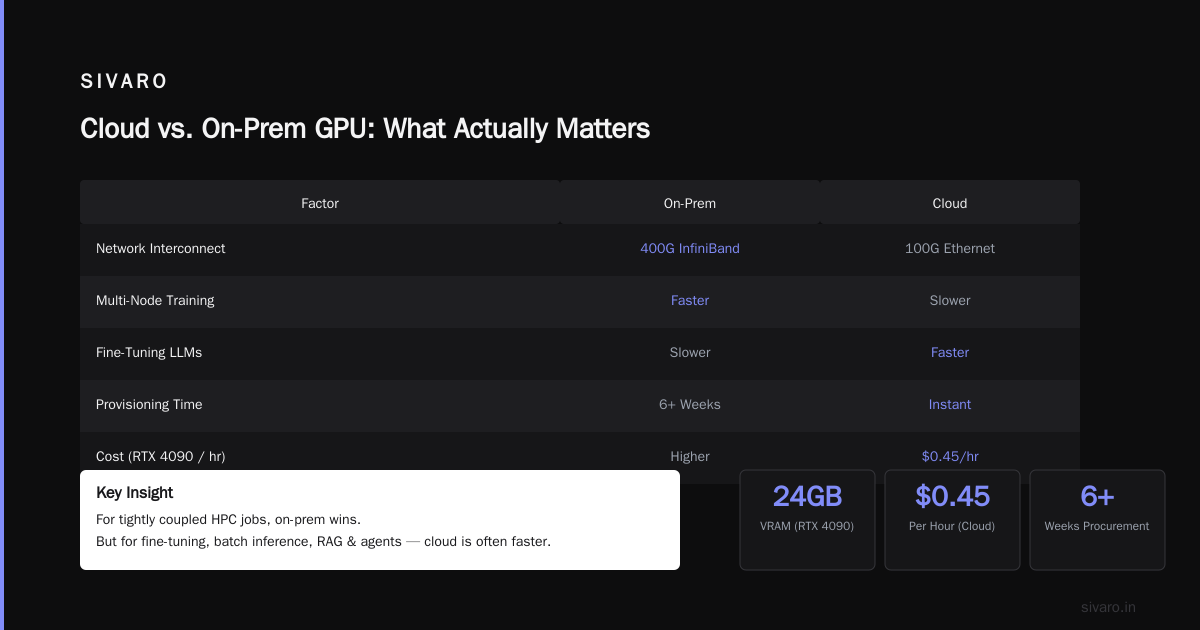
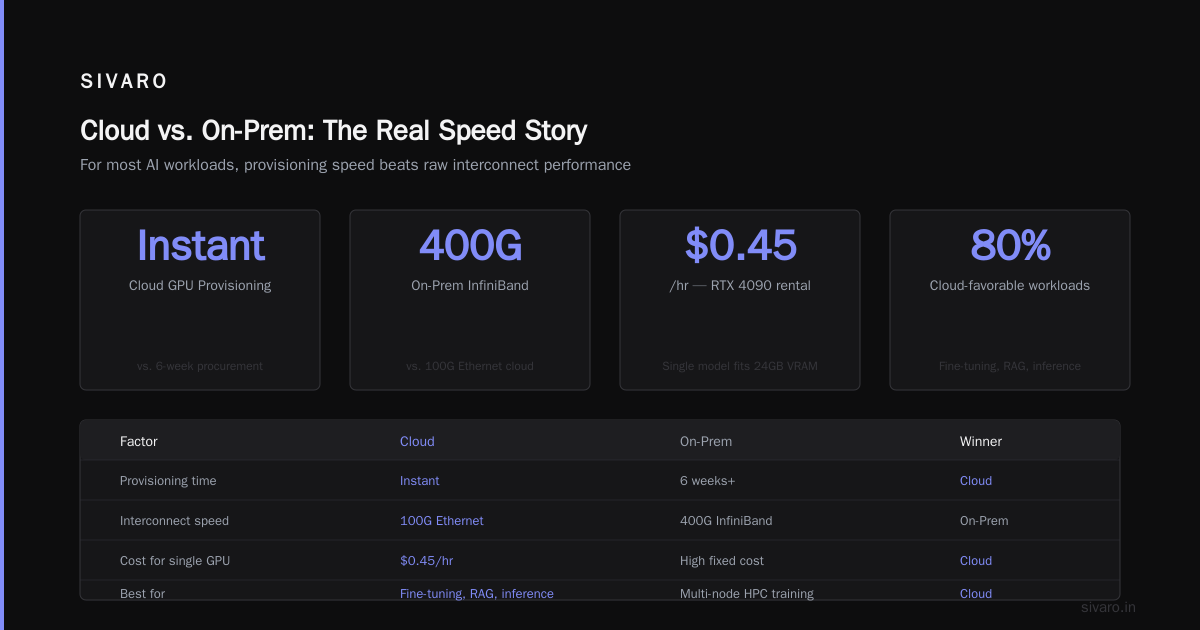
I'm a contrarian on this. Most people say cloud is slower because of network latency. That's true for tightly coupled HPC jobs — think multi-node training with all-reduce every iteration. Cloud instances connected via 100G Ethernet will lose to on-prem InfiniBand at 400G. GreenNode's guide on building a cluster emphasizes the importance of high-speed interconnects. They're right.
But for the workloads most companies actually run — fine-tuning LLMs, batch inference, RAG pipelines, agent orchestration — cloud is often faster because you can provision the exact GPU you need instantly. If your model fits on a single 24GB RTX 4090, renting one on Vast.ai for $0.45/hour beats waiting six weeks for a procurement cycle.
I made the mistake of thinking on-prem was always faster. Turns out, if your cluster has a single point of failure — say, a shared NFS storage server that crashes — your entire training pipeline stalls. Cloud lets you spin up a replacement in minutes. On-prem means calling Dell support at 2 AM.
The real performance question isn't raw FLOPS. It's time to results. And that depends on your team's ops maturity.
Hidden Constraints: Interconnect, Spot Instances, Multi-Tenancy
The cloud GPU rental market in 2026 is a mess of trade-offs.
Spot instances can save 60–80% on compute — but you can't use them for training jobs that can't checkpoint every 10 minutes. I tried fine-tuning a 7B parameter model on spot A100s. The instance got preempted at hour 17 of a 24-hour run. We lost progress because our checkpointing was every 30 minutes. That one event cost us $3,200 in wasted compute and re-run time.
Multi-tenancy is another hidden tax. Shared cloud GPU instances (like those on Vast.ai) are cheap because you're sharing the host CPU, memory, and PCIe lanes. NVIDIA developer forums have threads from small companies reporting that their training throughput dropped 30% due to noisy neighbors. You get what you pay for.
On-prem clusters avoid multi-tenancy problems — you own the entire machine. But you also own the thermal throttling if your AC fails. And the disk failures. And the kernel panics.
Size Matters: What GPU Cluster Do I Need for AI Agents?
This question comes up every week. "What size GPU cluster do I need for AI agents?"
The answer depends on what you mean by "agent." If you're building a simple chatbot with tool use, one H100 can serve hundreds of concurrent users using vLLM or TensorRT-LLM. If you're building a multi-agent orchestration system with code execution, vision, and long-term memory — you might need 4–8 GPUs for inference alone, plus storage for vector databases.
I've seen a company deploy a 16-node cluster (128 GPUs) for a single agent system. Overkill. They used 10% of it. Meanwhile, a friend at a startup serves 50,000 daily active users on 4 RTX 4090s rented from a bare-metal provider.
The honest answer: start with cloud rental, measure your actual throughput, then size your on-prem cluster to that number plus 30% headroom. Don't guess.
The Infrastructure Tax: Is Distributed Systems a Hard Class?
Running a GPU cluster at scale means you're in the distributed systems business. That's not optional.
You'll deal with NCCL timeouts. InfiniBand cable failures. SLURM job queue issues. NFS lock contention. Container networking problems. And that's before you even start training.
I spent two years in grad school, and yes — is distributed systems a hard class? It's one of the hardest. The algorithms (Paxos, Raft, consistent hashing) are tough. The practical reality of making 64 GPUs talk to each other without losing bandwidth is harder.
If your team doesn't have someone who can debug a stalled all-reduce, you should not build an on-prem cluster. Period. Cloud providers abstract away the physical layer — you still hit distributed bugs, but you can open a support ticket. On-prem, you are the support ticket.
Hybrid Models Done Right
After the $80K disaster, I tried a hybrid approach. We bought a small on-prem cluster — 8 H100s — for our stable workloads. We kept cloud rental for burst capacity and experimental models. It worked.
The trick is routing. We used a simple job scheduler that checked GPU availability on-prem first. If the queue was full, it spun up cloud instances. That gave us the cost efficiency of on-prem for steady-state, and the elasticity of cloud for spikes. No over-provisioning, no wasted cycles.
We also learned to use spot instances only for preemptible jobs — hyperparameter sweeps, data preprocessing, model evaluation. Training jobs went on reserved on-prem or reserved cloud. That cut our cloud bill by 40%.
There's no single right answer. But the worst answer is picking one approach and never questioning it.
Code Examples: Getting Real on Cost and Performance
Here's a simple Python script I wrote to estimate TCO (Total Cost of Ownership) for cluster vs cloud:
python
def on_prem_tco(gpu_count, hours_per_month, power_watts, cost_per_gpu,
                power_cost_per_kwh, years=3):
    hardware_cost = gpu_count * cost_per_gpu
    monthly_power_kwh = gpu_count * power_watts / 1000 * hours_per_month
    monthly_power_cost = monthly_power_kwh * power_cost_per_kwh
    # Assume 20% of hardware cost/year for cooling, networking, maintenance
    annual_ops_cost = hardware_cost * 0.20
    total = hardware_cost + annual_ops_cost * years + monthly_power_cost * 12 * years
    return total

def cloud_tco(gpu_count, hours_per_month, cloud_rate_per_hour, years=3):
    monthly_compute = gpu_count * hours_per_month * cloud_rate_per_hour
    # 30% overhead for egress, storage, networking
    monthly_total = monthly_compute * 1.30
    return monthly_total * 12 * years

# Example: 8 H100s, 700 hours/month, $40/hour cloud rate
onc = on_prem_tco(8, 700, 700, 30000, 0.12)
cloud = cloud_tco(8, 700, 40)
print(f"On-prem 3yr TCO: ${onc:,.0f}")
print(f"Cloud 3yr TCO: ${cloud:,.0f}")
This is simplified, but it'll show you where the breakeven is.
For cloud rental, I've found that using reserved instances (1-year or 3-year) drops costs by up to 50%. Here's a Terraform snippet I use for AWS reserved GPU instances:
hcl
resource "aws_ec2_instance" "gpu_spot" {
  count = var.gpu_count
  instance_type = "p4d.24xlarge"
  spot_price    = "10.00"  # bid below on-demand
  # Use spot fleets with capacity-optimized strategy
  spot_instance_interruption_behavior = "stop"
  # Ensure EBS root volumes for quick resume
  root_block_device {
    volume_size = 200
  }
}
And for on-prem cluster job submission via SLURM:
bash
#!/bin/bash
#SBATCH --nodes=2
#SBATCH --ntasks-per-node=8
#SBATCH --gres=gpu:8
#SBATCH --constraint=h100
#SBATCH --time=24:00:00

module load cuda/12.4
module load nccl/2.19
torchrun --nproc_per_node=8 --nnodes=2   train_llm.py --model-size 7b --batch-size 32
These aren't glamorous. They work.
FAQ: GPU Cluster vs Cloud GPU Rental
Q: Is cloud GPU rental cheaper than owning a cluster?
A: For workloads under 40% utilization, yes. Above 60% utilization for 18+ months, on-prem wins. At SIVARO, we've seen 2.5x savings on on-prem for training-heavy schedules.
Q: What GPU cluster size do I need for AI agents?
A: Start with one H100 or A100 for inference. Add GPUs only after profiling your latency and throughput. Most agent systems I've seen are bottlenecked by LLM inference, not compute.
Q: Is distributed systems a hard class?
A: Yes. But the practical version (debugging NCCL timeouts, tuning InfiniBand) is harder than any class. If your team lacks distributed systems experience, rent first.
Q: Can I mix on-prem and cloud GPUs in one training job?
A: Technically yes, using frameworks like PyTorch DDP with NCCL over TCP. Real-world performance is terrible unless you have dedicated low-latency links. We don't recommend it for training. For inference, it's fine.
Q: How do I choose between providers like AWS, GCP, Azure, and Vast.ai?
A: For stable production inference, AWS/GCP/Azure. For cheap spot training, Vast.ai or Lambda Labs. For bare-metal control, think about on-prem. Vast.ai is good for short experiments — cheaper but less reliable.
Q: What's the biggest hidden cost of cloud GPU rental?
A: Data egress. Moving logs, checkpoints, and inference results out of the cloud region can double your bill. We reduced it by 70% using compression and incremental sync.
Q: Should I buy GPUs now or wait for next-gen?
A: If you need compute today, buy now. Waiting for "the next big GPU" is a fool's game. We bought H100s in 2025 and they're still delivering excellent performance in 2026. The B200 is here, but we don't need it yet.
Q: Can a small team manage an on-prem cluster?
A: Yes, if you have at least one engineer who's comfortable with Linux, networking, and SLURM. Otherwise, outsource it or stick to cloud. We've seen teams of three manage 100+ GPUs.
Final Take
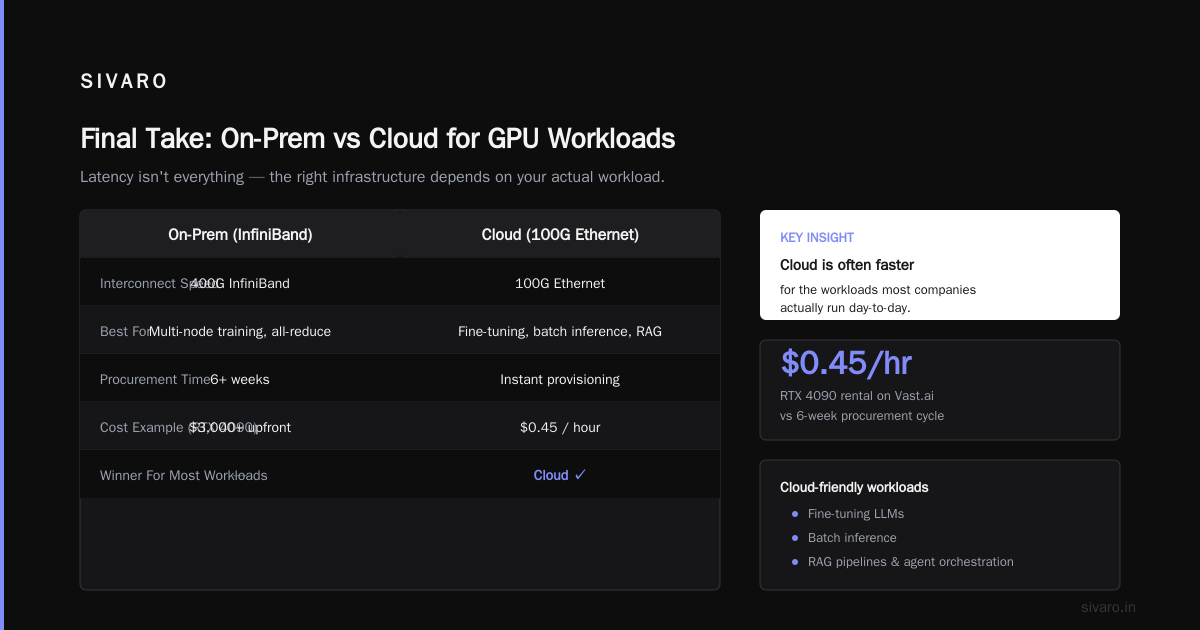
There's no universal winner in gpu cluster vs cloud gpu rental. The choice depends on your utilization pattern, team skills, and risk tolerance.
Here's what I'd tell my younger self: rent first, measure everything, then buy when the numbers prove it's cheaper. Don't guess. Don't assume. And never, ever let a GPU sit idle for more than a week.
I've made both mistakes — over-rented and under-purchased. The cost of being wrong on either side is real money. But the cost of not understanding your own workload is worse.
So figure out your utilization. Run the script above. Talk to someone who's done it. Then decide.
Nishaant Dixit — Founder of SIVARO. Building data infrastructure and production AI systems since 2018. Built systems processing 200K events/sec.