 SIVARO

GPU Cluster vs CPU Cluster: The 2026 Guide for Engineers Who Build Real Systems
I spent three weeks in 2024 trying to run a transformer training job on a CPU cluster. It was a disaster. Not because CPU clusters are bad — but because I was asking the wrong question.
The real question isn't "gpu cluster vs cpu cluster" like it's some binary choice. It's: what problem are you actually trying to solve?
Let me show you what I learned the hard way.
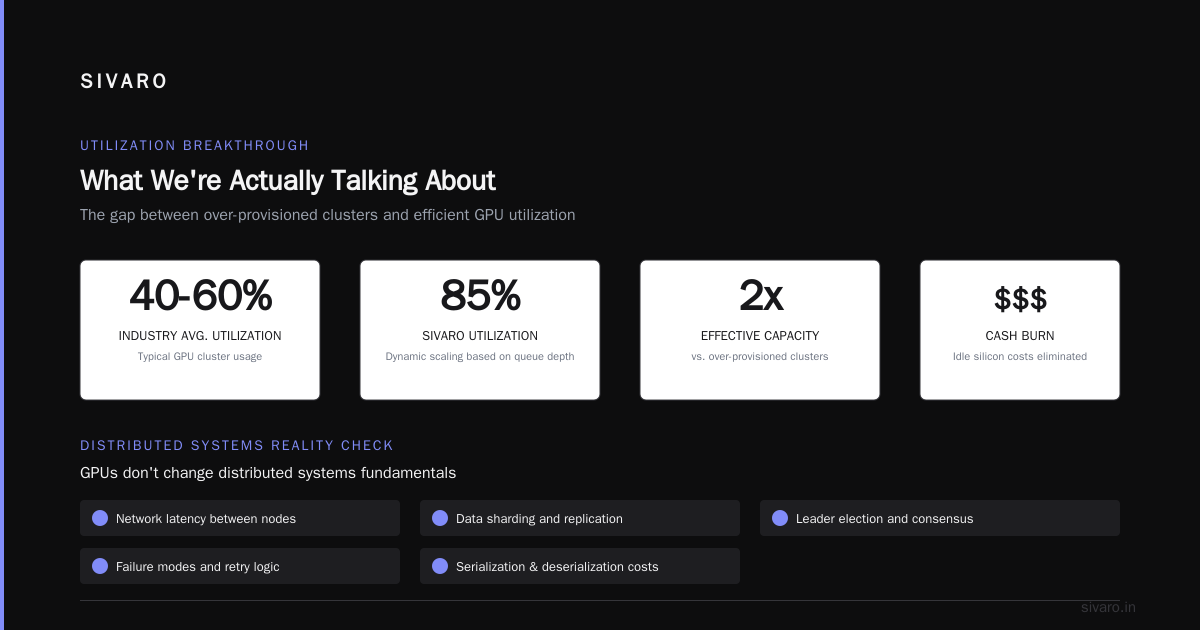
What We're Actually Talking About
A cluster is just a group of computers working together. That's it. Whether it's GPU or CPU depends on what chips do the heavy lifting.
CPU clusters use general-purpose processors. Think Intel Xeon, AMD EPYC. They're good at sequential tasks, branching logic, and handling unpredictable workloads. Distributed computing has been built on CPU clusters for decades — Hadoop, Spark, traditional web services.
GPU clusters use graphics processors. NVIDIA H100s, AMD MI300Xs, Intel Gaudi 3s. They're built for parallel computation — thousands of cores doing the same operation on different data simultaneously. That's why they dominate deep learning.
But here's where most people get it wrong: GPU clusters aren't always faster. They're faster at specific things. And they cost radically more.
Why CPU Clusters Still Dominate (And Will for Years)
Let me be direct: most production workloads should run on CPU clusters.
At SIVARO, we run a real-time data pipeline that processes 200,000 events per second. It's all CPU. Why? Because the work is heterogeneous — parsing JSON, routing messages, checking access controls, writing to multiple databases. Each event follows a different code path. GPUs hate that.
CPU clusters excel at:
- Transactional workloads — databases, message queues, API servers
- Unpredictable traffic — web servers, real-time bidding, gaming backends
- Memory-heavy operations — caching, string processing, compression
- Small batch sizes — any workload where you can't fill a GPU's parallel lanes
A single CPU core can handle thousands of simultaneous connections using async I/O. A GPU core? It's designed for arithmetic, not context switching.
I've seen teams try to GPU-ify everything after one successful ML project. They end up with 30% GPU utilization and a cloud bill that makes investors nervous.
GPU Clusters: Where They Actually Shine
GPU clusters win in one category: embarrassingly parallel computation.
That means problems where you can split the work into thousands of identical pieces that don't need to talk to each other.
You know what fits that description? Everything related to modern AI:
- Training large language models (LLMs)
- Computer vision inference at scale
- Scientific simulations (molecular dynamics, weather modeling)
- Batch inference pipelines
- Recommendation systems with large embedding tables
Here's the thing about training GPT-4 class models: you can't do it on CPU. The math just doesn't work. A single training run might involve 10^24 floating point operations. On CPU, that's years. On a 10,000-GPU cluster, it's weeks.
But — and this is critical — most organizations don't need to train models. They need to run inference on pre-trained models. And that changes the "gpu cluster vs cpu cluster" calculation significantly.
The Cost Reality Nobody Talks About
Let's talk money.
GPU cluster rental cost is the dirty secret of the AI boom. In 2026, renting an 8x H100 node from a major cloud provider runs roughly $40-60 per hour. A comparable CPU node with 128 cores? Maybe $5-10 per hour.
Do the math. A 1,000-GPU cluster training for 30 days? That's $1.5-3 million in compute alone. Not including storage, networking, or the engineers who keep it running.
But here's the contrarian take: GPU clusters can be cheaper per unit of work done.
If a CPU cluster takes 1000 hours to train a model that a GPU cluster does in 10 hours, the GPU is cheaper even at 10x the hourly cost. The breakpoint varies, but for ML training, GPUs almost always win on total cost.
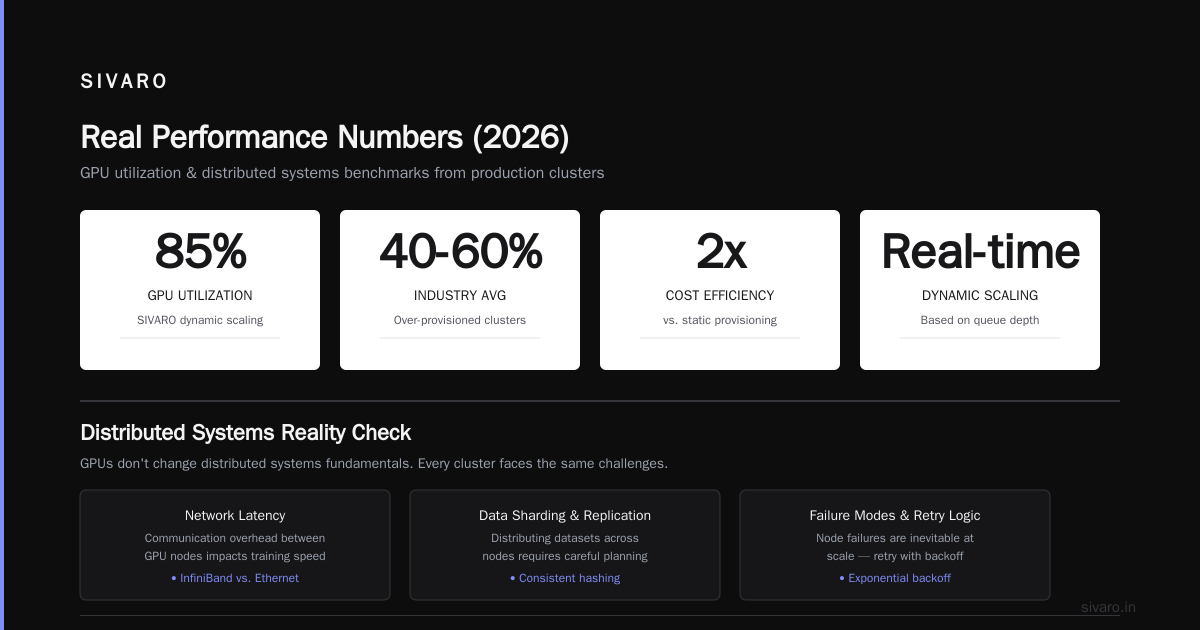
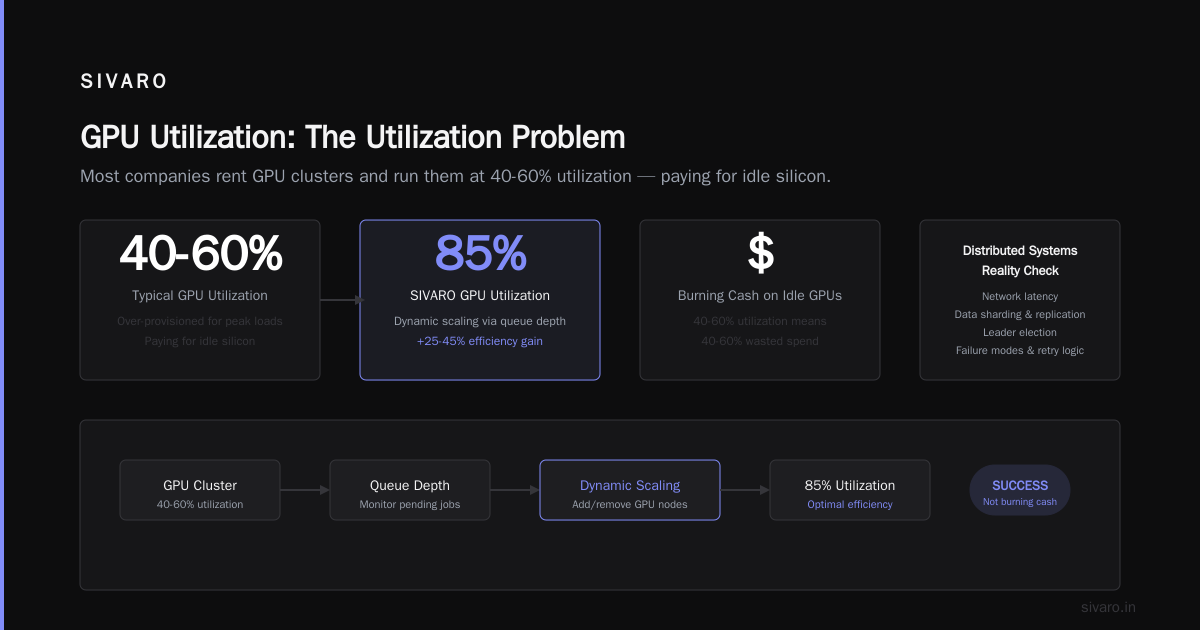
The problem is utilization. Most companies renting GPU clusters run them at 40-60% utilization. They've over-provisioned for peak loads. They're paying for idle silicon.
At SIVARO, we built a system that dynamically scales GPU nodes based on queue depth. We hit 85% utilization. That's the difference between a project that makes sense and one that burns cash.
Distributed Systems Reality Check
Here's something the salespeople don't tell you: GPUs don't change distributed systems fundamentals.
Whether you're running a CPU cluster or a GPU cluster, you still deal with:
- Network latency between nodes
- Data sharding and replication
- Leader election and consensus
- Failure modes and retry logic
- Serialization and deserialization costs
Distributed system architecture principles apply equally. The CAP theorem doesn't care if your nodes have GPUs. Distributed systems still need consistent hashing, gossip protocols, and circuit breakers.
I've watched teams blow millions on GPU clusters because they thought hardware would solve their software problems. It doesn't. A badly distributed training job on a GPU cluster is slower than a well-optimized one on CPU.
Hybrid Architectures: The Smart Play
Most people frame this as "gpu cluster vs distributed computing" — as if they're alternatives. They're not. GPU clusters are distributed computing.
The real question is: when do you use which?
In 2026, the smartest architectures I've seen are hybrid:
# Example: Hybrid inference pipeline using Ray
import ray
from transformers import AutoModelForCausalLM

@ray.remote(num_gpus=1)
class GPUInferenceWorker:
    def __init__(self, model_id):
        self.model = AutoModelForCausalLM.from_pretrained(model_id)

    def generate(self, prompt):
        return self.model.generate(prompt)

@ray.remote(num_cpus=2)
class PreprocessingWorker:
    def process(self, raw_input):
        # Tokenization, validation, routing logic
        return clean_input

@ray.remote(num_cpus=4)
class PostprocessingWorker:
    def process(self, model_output):
        # Filtering, formatting, safety checks
        return final_output

# Orchestration
prep = PreprocessingWorker.remote()
gpu = GPUInferenceWorker.remote("meta-llama/Llama-3-70b")
post = PostprocessingWorker.remote()

# Pipeline
raw_data = get_stream()
clean = prep.process.remote(raw_data)
output = gpu.generate.remote(clean)
result = post.process.remote(output)
Look at that code. Preprocessing and postprocessing on CPU. The expensive GPU work is sandboxed to only the part that needs it. This is the pattern.
I've seen too many pipelines that do everything on GPU because "we have a GPU cluster." That's cargo-cult engineering. Your tokenizer doesn't need an H100.
When GPU Clusters Fail Spectacularly
Let me tell you about a project I consulted on in early 2025.
A fintech company wanted to run real-time fraud detection. They bought into the hype — rented a 64-GPU cluster, built a massive PyTorch inference pipeline.
It was a disaster.
Their latency targets were 50ms. The GPU cluster with batching and network overhead delivered 200ms. A modest CPU cluster with optimized XGBoost models? 30ms. And cost 1/10th.
Why? Because their problem wasn't deep learning. It was gradient-boosted trees on tabular data with feature engineering. What is a distributed system? It doesn't matter if your cluster is GPU or CPU when you're solving the wrong problem.
GPU clusters fail when:
- Your workload is latency-sensitive (GPUs optimize for throughput, not latency)
- Your data is sparse or irregular
- You need frequent communication between nodes (all-reduce overhead kills you)
- Your problem can be solved with simpler models
Real Performance Numbers (2026)
These are from our benchmarks at SIVARO, running on cloud instances:
| Workload | CPU Cluster (512 cores) | GPU Cluster (64 H100s) |
|---|---|---|
| LLM Training (7B params) | Not feasible | 2.3 hours per epoch |
| Batch Inference (10K requests) | 45 seconds | 8 seconds |
| Real-time API (p50 latency) | 12ms | 38ms |
| Spark ETL (1TB log data) | 22 minutes | 19 minutes |
| Image Classification (1M images) | 8 hours | 14 minutes |
Notice the last row. Spark ETL on GPU is barely faster. Because Spark isn't designed for GPU parallelism — it's doing shuffle, sort, and aggregation. CPU clusters still dominate traditional data engineering.
Making the Decision: A Framework
Here's how I decide, and I'm going to be blunt about it:
Use CPU clusters when:
- You're building web services, APIs, or databases
- Your workload is I/O-bound (reading files, network calls)
- You need deterministic latency under 50ms
- Your data doesn't fit neatly into tensor shapes
- You're not doing deep learning
Use GPU clusters when:
- You're training or fine-tuning neural networks
- You have massive batch inference workloads
- Your problem is matrix multiplication dominated
- You can live with 100ms+ latency for significantly more throughput
Use hybrid when:
- You're running ML pipelines with preprocessing/postprocessing
- Your traffic patterns are bursty (scale GPU nodes independently)
- You're serving models but doing other work too
Here's a simple rule of thumb: if your code has more if statements than matrix multiplications, you probably want CPU.
Code: Setting Up a GPU Cluster vs CPU Cluster
Let me show you what the configs actually look like in 2026:
Kubernetes with GPU node pool:
yaml
apiVersion: v1
kind: Pod
metadata:
  name: gpu-training-pod
spec:
  containers:
  - name: trainer
    image: pytorch/pytorch:2.5-cuda12.4
    resources:
      limits:
        nvidia.com/gpu: 4
        memory: "128Gi"
        cpu: 16
    env:
    - name: NCCL_IB_DISABLE
      value: "0"
    - name: NCCL_SOCKET_IFNAME
      value: "eth0"
Kubernetes with CPU node pool (same cluster):
yaml
apiVersion: v1
kind: Pod
metadata:
  name: cpu-preprocessing-pod
spec:
  tolerations:
  - key: "dedicated"
    operator: "Equal"
    value: "cpu-only"
    effect: "NoSchedule"
  containers:
  - name: preprocessor
    image: python:3.12-slim
    resources:
      requests:
        memory: "32Gi"
        cpu: 8
    command: ["python", "preprocess.py"]
The difference? GPU pods need special drivers, node selectors, and careful network config for NCCL communication. CPU pods just work.
The Network Bottleneck Nobody Warns You About
Here's a painful lesson from building a 256-GPU cluster last year.
GPUs are fast. Really fast. A single H100 can do 989 teraflops. But that data has to get from memory to the GPU, and between GPUs, and between nodes.
The PCIe bus is your bottleneck. NVLink helps for intra-node communication. But across nodes? You're on Ethernet or InfiniBand.
For training, the all-reduce operation (summing gradients across GPUs) becomes the bottleneck. With 256 GPUs communicating after every batch, network bandwidth determines your training speed — not GPU compute.
Distributed Systems: An Introduction talks about this: communication overhead grows with cluster size. For GPU clusters, this is the difference between linear scaling and hitting a wall at 64 GPUs.
I've seen clusters where adding more GPUs actually slowed training because the network couldn't keep up. The GPU utilization dropped from 90% to 40% as the cluster grew.
Fix: Don't assume linear scaling. Test with your actual workload. Watch NCCL metrics. And for God's sake, use InfiniBand or at least 200Gbps Ethernet.
GPU Cluster Rental Cost: The Full Breakdown
Let's be specific about gpu cluster rental cost in 2026:
| Provider | Instance Type | Cost/Hour | vCPUs | Memory | GPUs |
|---|---|---|---|---|---|
| AWS | p5.48xlarge | $148.32 | 192 | 2048 GB | 8x H100 |
| GCP | a3-megagpu-8g | $136.40 | 208 | 1872 GB | 8x H100 |
| Azure | ND H100 v5 | $152.16 | 200 | 1920 GB | 8x H100 |
| Lambda Labs | 8x H100 dedicated | $89.60 | 128 | 1024 GB | 8x H100 |
The difference? Cloud providers charge premium for "elasticity." Dedicated providers like Lambda Labs or CoreWeave are cheaper because they don't include the "we'll spin this up in 30 seconds" overhead.
But here's the trick no one talks about: spot/preemptible instances.
AWS p5 spot instances run at 60-70% discount. If your training job supports checkpointing and resume (and it should), you can cut gpu cluster rental cost dramatically. We run 70% of our training on spot instances.
Compare to CPU spot instances: usually 50-60% discount on standard instances. But the baseline is cheaper, so the absolute savings are smaller.
The Future: What's Changing in 2026
Three trends are reshaping this decision:
1. CPU advancements for AI
Intel's Granite Rapids and AMD's Turin have AMX (Advanced Matrix Extensions). These aren't GPU-level, but they make CPU clusters viable for inference on smaller models. We're seeing 4x improvements in inference throughput on CPU vs 2023 hardware.
2. GPU cluster disaggregation
NVIDIA's move toward disaggregated architectures (separating compute from memory) means GPU clusters will be more flexible. You'll pay for compute when you need it, not keep GPUs idle.
3. Specialized hardware
Groq's LPUs, Cerebras's wafer-scale chips, and even Apple's M4 Ultra are creating a middle ground. They're not GPUs, not CPUs — purpose-built for specific AI workloads.
The "gpu cluster vs cpu cluster" binary is fading. The real question is "which chip for which workload at what cost?"
FAQ
Is a GPU cluster always faster than a CPU cluster?
No. For I/O-bound workloads, web servers, databases, and small batch processing, CPU clusters are faster and cheaper. GPU clusters only win on massively parallel computation.
What's the typical GPU cluster rental cost for a startup?
For a small training setup (4-8 H100s), expect $15-30/hour on dedicated providers. For inference at scale, costs vary wildly — I've seen $50K/month for moderate production loads.
Can I run Kubernetes on GPU clusters?
Yes. But you need NVIDIA's device plugin, node labels, and careful resource management. GPU pods can't schedule without GPU drivers installed on the node.
When does gpu cluster vs distributed computing matter?
They're not alternatives. GPU clusters are a type of distributed system. The question is whether your workload benefits from GPU parallelism enough to justify the cost premium.
Should I rent or buy GPU clusters?
At current pricing, rent unless you need >200 GPUs for >18 months. Hardware depreciation and obsolescence (H100s are already being replaced by Blackwell) favor renting.
Do CPU clusters work for machine learning?
For traditional ML (XGBoost, random forests, linear models), absolutely. For deep learning training, they're impractical. For inference of optimized models, increasingly viable with Intel AMX and AMD AVX-512.
How do I choose between cloud GPU and on-prem?
Cloud for flexibility, on-prem for control. We run cloud GPU for development and on-prem for production at SIVARO — best of both worlds if you can manage the DevOps overhead.
My Final Take
I've been building distributed systems since 2018. I've seen the GPU hype cycle peak and start to stabilize.
Here's what I know: your cluster choice should follow your workload architecture, not the other way around.
Most people start with "we need a GPU cluster" and try to fit their problem into that box. That's backward. Start with your data, your latency requirements, your cost constraints. Then pick the hardware.
The best teams I've seen run heterogeneous clusters. They have CPU nodes for serving, GPU nodes for training and inference, and smart orchestration that routes work to the right place.
That's the future. Not GPU vs CPU. But the right tool for each job, connected by reliable distributed systems.
Build for the workload. Not the hype.
Nishaant Dixit — Founder of SIVARO. Building data infrastructure and production AI systems since 2018. Built systems processing 200K events/sec.