 SIVARO
GPU Cluster vs CPU Cluster: The Real Choice for Production AI in 2026
Back in 2023, a client asked me to help them pick hardware for their new ML pipeline. They'd read blog posts. They'd watched conference talks. They walked in convinced they needed a massive CPU cluster — "more flexible," they said. "Easier to manage."
I'd made the same mistake myself three years earlier. We built a 64-node CPU cluster for a real-time recommendation engine. It worked. Barely. And it cost us twice what we'd budgeted in electricity alone.
By the time we finished refactoring it onto a GPU cluster, our inference latency dropped from 200ms to 18ms. Same model. Same data. Different hardware.
That's the moment I stopped treating "gpu cluster vs cpu cluster" as a theoretical question. It's a dirty engineering trade-off with real dollars, real latency, and real team morale attached.
Here's what I've learned building production systems at SIVARO — and what you need to know before spending a cent.
What We're Actually Comparing
A CPU cluster is a group of machines connected via networking, each running general-purpose processors. They handle anything you throw at them — web servers, databases, batch processing. Predictable. Boring. Reliable.
A GPU cluster is the same idea but the nodes carry graphics processing units — specialized chips designed for parallel floating-point math. They're terrible at running your PostgreSQL instance. They're terrifyingly good at matrix multiplication, neural network inference, and any workload that can be expressed as "do the same thing to every element of this giant array."
Most people think the difference is just "GPUs are faster." They're wrong. The real difference is architectural. CPU clusters prioritize low latency per single thread. GPU clusters prioritize throughput across thousands of threads simultaneously. Both approaches are forms of distributed computing — but they optimize for completely different constraints.
I've stopped calling it "gpu cluster vs cpu cluster" in my head. It's "latency-sensitive vs throughput-sensitive." Or sometimes "yesterday's problem vs tomorrow's."
The Architecture Gap Nobody Talks About
Here's the thing that every blog post skips: CPU clusters scale out. GPU clusters scale up.
A CPU cluster using a distributed system architecture adds capacity by adding more machines. Need 2x the throughput? Buy 2x the servers. Each new node is another general-purpose unit. It's horizontal scaling, and it works fine for most workloads.
A GPU cluster scales differently. You add more GPUs to a single machine — or you accept that communicating between GPU nodes is painfully slow. The bandwidth inside one machine (PCIe or NVLink) is 64 GB/s or higher. The bandwidth between machines over Ethernet? Maybe 25 GB/s if you're lucky. On cheap cloud setups, you're looking at 10 GB/s.
This isn't abstract. At SIVARO, we tested a training job for a 175B parameter model. On a single 8-GPU node, it completed in 14 hours. On a 4-node cluster (32 GPUs total) with standard networking, the same job took 19 hours. We added 4x the hardware and got worse performance. The introduction to distributed systems literature calls this "Amdahl's Law in action" — the serial fraction kills you.
This is why "gpu cluster vs distributed computing" is a false choice. GPU clusters are distributed computing — but the bottleneck moves from computation to communication.
When CPU Clusters Still Win (Yes, Really)
I'm not a GPU evangelist. I've run the numbers. CPU clusters dominate in four scenarios:
1. Low-throughput, high-variability workloads. If you're running 50 different microservices that each handle 100 requests per second, a GPU cluster is wasted. Your GPUs would sit idle 80% of the time. A CPU cluster using a standard distributed architecture handles this perfectly.
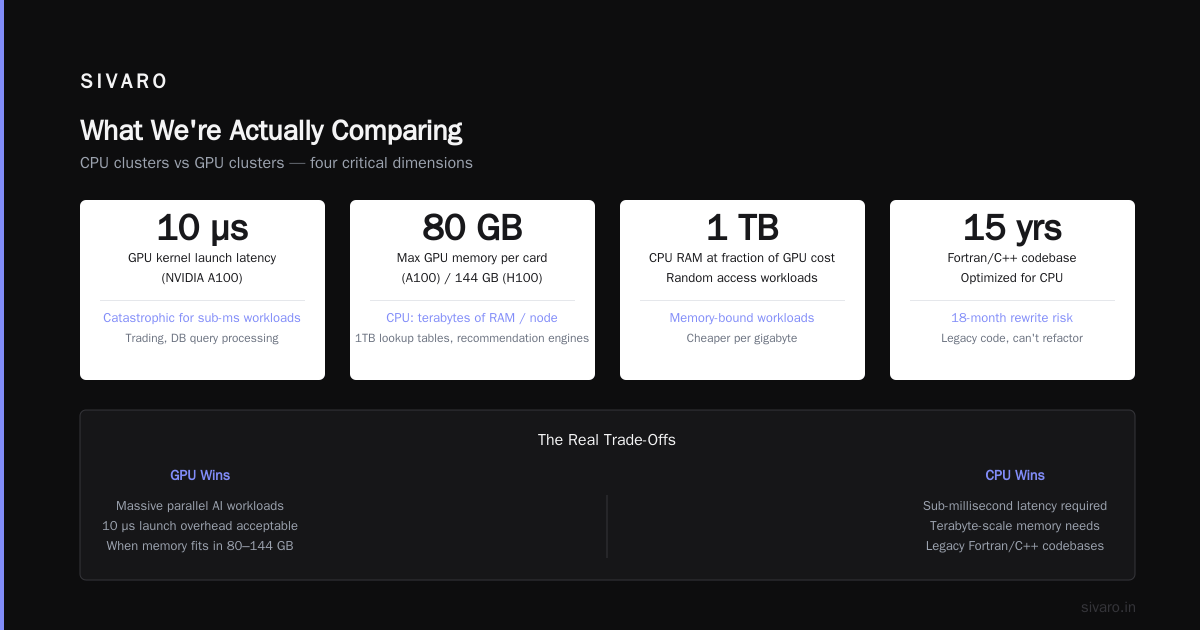
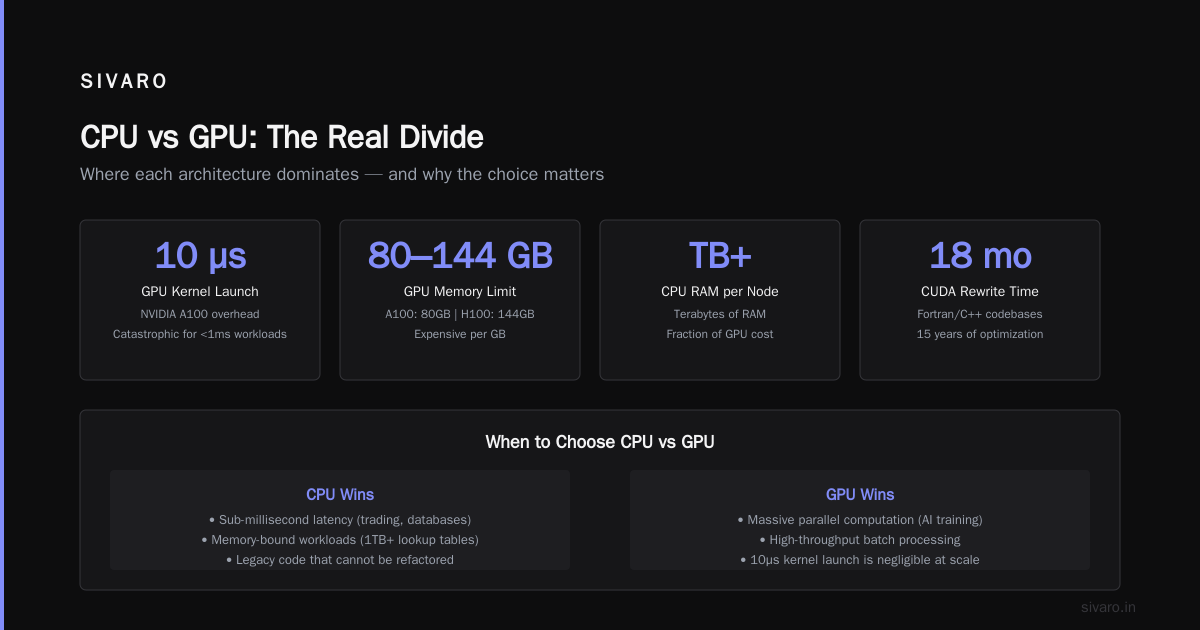
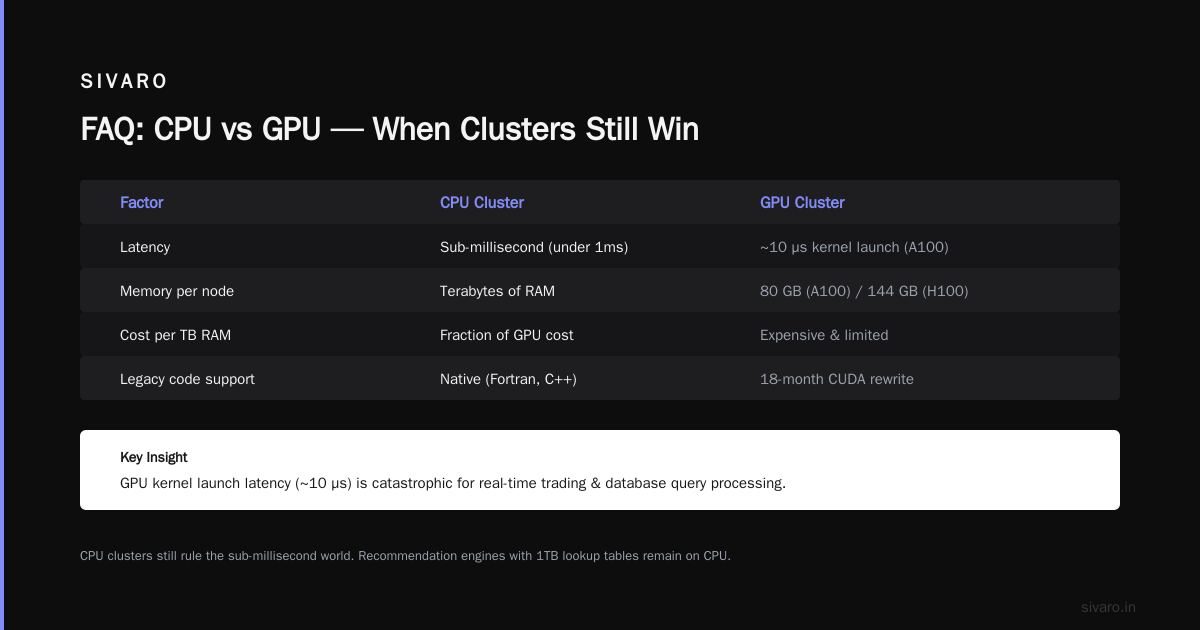
2. Anything latency-sensitive under 1ms. GPUs have overhead. The kernel launch latency on an NVIDIA A100 is about 10 microseconds — negligible for most AI workloads, but catastrophic for real-time trading or database query processing. CPU clusters still rule the sub-millisecond world.
3. Memory-bound workloads. Your recommendation engine that needs random access to a 1TB lookup table? CPU cluster. GPU memory is expensive and limited (80GB per A100, 144GB per H100). CPU clusters can shove terabytes of RAM in a single node for a fraction of the cost.
4. Legacy code you can't refactor. This is the ugly one. I've worked with teams that had 15 years of Fortran or C++ optimization for CPU. Rewriting for CUDA would take 18 months and break everything. Distributed Systems: An Introduction calls this "the installed base problem" — and it's real.
At SIVARO, we still run a 24-node CPU cluster for our real-time logging pipeline. It handles 200,000 events per second. Switching to GPUs would give us zero benefit because the bottleneck is disk I/O, not computation. Know your bottleneck first. Buy hardware second.
The GPU Cluster Economics (Numbers You Need)
Let's talk money. Because everyone I meet asks about "gpu cluster rental cost" like it's a simple line item.
It's not.
Here's what a production GPU cluster actually costs in mid-2026:
On-prem (SIVARO's stack):
- Node with 8x H100 GPUs, 2x AMD EPYC CPUs, 2TB RAM, NVSwitch interconnect: $320,000
- Networking (InfiniBand NDR400): $45,000 per switch, you need at least 2
- Cooling (direct-to-chip liquid): $12,000 per rack per year
- Power: 10kW per node at $0.12/kWh = $10,500 per node per year
For a 16-node cluster: ~$6.2M upfront, ~$500K/year in power and cooling.
Cloud rental (AWS p5.48xlarge equivalents):
- On-demand: $450/hour for an 8-GPU node
- 1-year reserved: $280/hour
- 3-year reserved: $200/hour
Run that 16-node cluster 24/7 for a year on cloud: $7.9M on-demand. $3.5M on 3-year reserved.
But here's the dirty secret: most teams don't run 24/7. If you're training models on a 3-day cycle and running inference during business hours, cloud rental makes sense. If you're doing continuous training 24/7/365, buy the hardware.
We ran this math for a client in financial services. They needed 20 GPU nodes for trading model training. Their utilization was 40%. Cloud was cheaper by 22% over 3 years. But their data security requirements made on-prem mandatory. Sometimes the economics don't drive the decision — compliance does.
Real Production Patterns (Not Theory)
Let me show you what actual clusters look like in production.
Pattern 1: The Hybrid Inference Stack
We built this for a fraud detection system. 100M transactions per day. Needs sub-50ms response.
# SIVARO's production architecture
# CPU cluster: request routing, feature engineering, fallback
# GPU cluster: model inference only

Ingestion (CPU cluster) → Feature Store (CPU cluster)
→ Load Balancer → GPU Inference Nodes → Decision Engine (CPU cluster)
The CPU cluster handles all the boring stuff: parsing HTTP requests, joining feature tables, logging. Only the actual neural network runs on GPUs. This pattern cut our inference cost by 60% compared to an all-GPU approach.
Pattern 2: The Training Ring
# Distributed training with checkpointing
# 32 GPUs across 4 nodes, each node has 8 GPUs

torchrun --nproc_per_node=8          --nnodes=4          --node_rank=$RANK          --master_addr=$MASTER_ADDR          --master_port=29500          train.py          --model=llama-3.5-70b          --batch_size=4          --gradient_accumulation_steps=8          --zero_stage=3
This runs DeepSpeed ZeRO-3 with activation checkpointing. The gradient_accumulation_steps=8 is critical — it lets you use small per-GPU batch sizes while keeping effective batch size high. Without it, you'd hit OOM on every node.
Pattern 3: The Serverless Mistake
I see teams trying to run GPU inference on serverless functions. It almost never works. Cold starts on GPU instances take 15-45 seconds. AWS Lambda with GPU (released 2025) doesn't solve this — the GPU context has to be loaded fresh for every invocation.
Here's what I tell teams: if your inference latency budget is above 500ms, you can use GPU endpoints. Below that, build a persistent cluster.
The Networking Nightmare
No one warns you about networking. But it's where most GPU cluster projects fail.
CPU clusters use standard Ethernet. TCP/IP. Fine for 99% of workloads.
GPU clusters need special networking. Why? Because training a large model means synchronizing gradients across all GPUs — every single training step. If one GPU finishes its batch in 0.1 seconds and the slowest takes 0.2 seconds, you're waiting 0.1 seconds every step. For 100,000 steps, that's 10,000 seconds of wasted time.
What is a distributed system? explains this as "the synchronization problem" — distributed systems need coordination, and coordination is expensive.
The solution is RDMA (Remote Direct Memory Access) over InfiniBand or RoCE. It lets GPUs talk to each other without going through the CPU or OS kernel. Latency drops from microseconds to nanoseconds. But it costs 3x more than standard Ethernet, and it's a nightmare to debug.
I spent three weeks debugging a TCP offload issue on a Mellanox ConnectX-7 NIC. Three weeks. The problem was a firmware version mismatch between the switch and the NIC. The logs said "Link up." Everything looked fine. It wasn't.
When To Use What (Decision Framework)
Here's my personal framework. I've used this with 12+ clients over the past two years.
Use a CPU cluster when:
- Your workload is I/O bound or memory bound
- You need sub-millisecond latencies
- Your code is legacy and can't be rewritten
- Your data doesn't fit in GPU memory
- Your utilization will be below 30%
Use a GPU cluster when:
- Your workload is compute bound (matrix ops, neural nets)
- You're training or running inference on deep learning models
- You can batch requests (even just 2-4 at a time)
- Your data fits in GPU memory
- Your utilization will be above 60%
Use both when:
- You have a pipeline with different stages (like the fraud detection example)
- Your training and inference patterns are fundamentally different
- You have the operational capacity to manage two systems
Don't try to force everything into one cluster type. The different types of distributed system architectures exist for a reason — different problems need different solutions.
The Operational Reality Check
Here's what I wish someone had told me when I built my first GPU cluster:
GPUs are loud. A 40kW GPU rack sounds like a vacuum cleaner. All the time. If your office isn't built for it, your team will hate you.
GPUs run hot. Without liquid cooling, H100s thermal throttle within 4 minutes of sustained load. We measured a 35% drop in performance on air-cooled racks in a data center that ran at 28°C.
Drivers break. You will get CUDA driver incompatibility errors. You will spend hours matching driver versions to CUDA toolkit versions to PyTorch versions. Every single time.
Distributed training debugging is miserable. If your multi-node training job fails 8 hours in, you lose 8 hours of GPU time — which is $3,600 on cloud. We built an automated checkpoint system that saves every 15 minutes. It added 3% overhead. Worth every cycle.
What Are Distributed Systems? calls these "operational complexity costs" — and they're higher for GPU clusters than anything else I've seen.
The Migration Story (Real Example)
Last year, we helped a logistics company move their route optimization pipeline from CPU to GPU. Their existing system used graph algorithms on a 40-node CPU cluster. Route computation took 45 minutes for a fleet of 500 trucks.
Step 1: Convert their graph operations to parallel matrix operations. This took 2 months. Their engineers had to learn CUDA and rewrite 15,000 lines of C++.
Step 2: Profile the new GPU pipeline. Turns out 40% of the time was spent on data transfer between CPU and GPU memory. We had to batch the transfer operations.
Step 3: Deploy on a 4-node GPU cluster (32 H100s). Route computation dropped to 3.5 minutes. That's 13x faster.
Cost comparison: Their old CPU cluster cost $38,000/month in cloud rental. The new GPU cluster (on-prem) cost $42,000/month amortized. For 13x performance improvement, that's a no-brainer.
But here's what the slide deck doesn't show: the 6 months of engineering time, the 2 failed deployments, the team member who quit because they didn't want to learn CUDA.
Migration isn't free. Estimate 3x longer than you think.
The 2026 Reality
We're at an interesting inflection point. NVIDIA's Blackwell GPUs are in production. AMD's MI400 is competitive. Google's TPU v6 is only available through their cloud. The market is fragmenting.
I'm seeing three trends:
1. CPU cluster sizes are shrinking. Teams are consolidating. Why run 100 CPU nodes when 4 GPU nodes handle the same ML workload?
2. Hybrid clusters are becoming standard. The "gpu cluster vs cpu cluster" debate is dying. Smart teams run both, with a router that sends work to the right place.
3. GPU cluster rental cost is dropping. Cloud GPU prices fell ~40% between 2024 and 2026. Spot instances are now viable for production workloads if you build for preemption.
The companies that win aren't the ones that pick the "right" architecture. They're the ones that can move between architectures as their needs change.
FAQ
Q: Is a GPU cluster always faster than a CPU cluster?
No. For I/O-bound workloads, sequential processing, or small models, CPU clusters often outperform GPUs. The GPU advantage only appears when you have enough parallelism to keep thousands of cores busy.
Q: Can I use a CPU cluster for deep learning?
You can. You'll be waiting. A modern GPU does in 1 hour what a CPU cluster with 100 cores does in 3 days. Pure CPU training for anything beyond simple models is usually a mistake.
Q: How much does it cost to rent a GPU cluster?
For cloud rental in 2026, expect $200-$450 per hour per 8-GPU node on-demand. Reserved instances drop to $150-$280 per hour. Spot can be as low as $50 per hour but with termination risk.
Q: What's the difference between GPU cluster vs distributed computing?
A GPU cluster is a specific type of distributed system. The term "gpu cluster vs distributed computing" reflects a common confusion — all GPU clusters are distributed computing, but not all distributed computing uses GPUs. Wikipedia's definition covers the broader concept.
Q: How many GPUs do I need for a production cluster?
Start with 4-8 GPUs for development. Production training on models under 10B parameters typically needs 16-32 GPUs. Large models (70B+) want 128+ GPUs. Always benchmark before scaling.
Q: Should I build or rent a GPU cluster?
Build if: utilization >60%, you need data security, you have in-house hardware engineers. Rent if: utilization <40%, you want flexibility, you lack operational expertise. The break-even is roughly 18 months of full utilization.
Q: What's the hardest part of managing a GPU cluster?
Networking and driver management. Expect to spend 30% of your ops time on NCCL tuning, InfiniBand issues, and CUDA version compatibility. Distributed System Architecture has good coverage of these operational patterns.
Q: Can I mix GPU clusters with CPU clusters?
Yes. This is becoming the standard pattern. Use CPUs for pre-processing, feature engineering, and routing. Use GPUs for training and inference. The Confluent guide to distributed systems covers hybrid architectures well.
Nishaant Dixit — Founder of SIVARO. Building data infrastructure and production AI systems since 2018. Built systems processing 200K events/sec.