 SIVARO
GPU Cluster vs CPU Cluster: The Real Decision in 2026
Two years ago, I watched a team at a major fintech burn $400K in three weeks. They'd built a massive CPU cluster thinking they could just "scale horizontally" their way through model training. By week four, their training pipeline was still running slower than when they started — and their cloud bill looked like a small country's GDP.
That's when they called me.
The GPU cluster vs CPU cluster debate isn't theoretical anymore. It's the difference between shipping a product in Q3 and explaining to your board why you missed another deadline. I've been building data infrastructure since 2018, and I've watched this divide widen from a crack into a canyon.
Here's what I've learned the hard way.
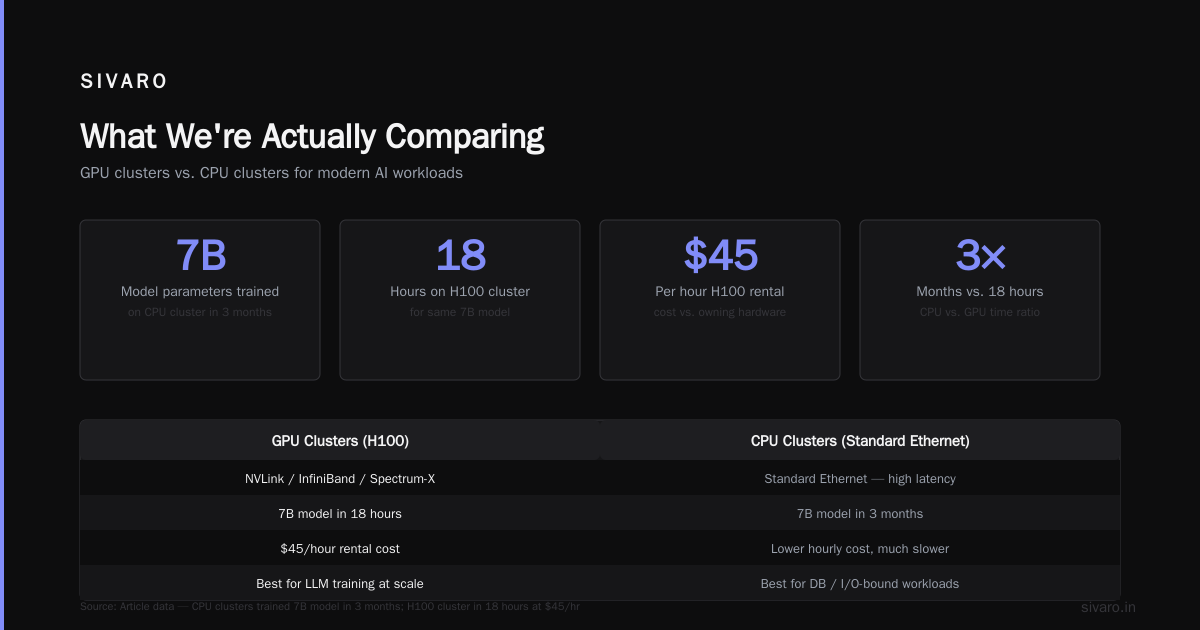
What We're Actually Comparing
A GPU cluster is a group of machines where each node contains one or more GPUs — designed explicitly for parallel computation workloads. Think NVIDIA H100s, AMD MI300X, or the newer Intel Ponte Vecchio setups. These clusters dominate in matrix operations, tensor computations, and any workload where you can throw 10,000 threads at a problem simultaneously.
A CPU cluster is what most engineers think of when they hear "distributed computing" — racks of standard servers with x86 or ARM processors, networked together to split workloads across machines. They excel at general-purpose tasks, database operations, and workloads that involve branching logic or complex decision trees.
The confusion? Most people assume CPUs are "the standard" and GPUs are "specialized hardware." That's increasingly wrong. In 2026, GPUs are becoming the default for any serious computational workload — but they're also overkill (and overpriced) for many tasks.
Why Your Brain Is Wrong About This
You've been trained to think linearly — more cores, faster clock speeds, bigger caches. CPUs optimize for sequential processing. GPUs optimize for parallel throughput. These are fundamentally different architectures tackling fundamentally different problems.
Here's the concrete math:
A single H100 GPU has 18,432 CUDA cores. A top-end AMD EPYC CPU has 128 cores. That's not a 100x difference — it's a 144x difference in raw parallel processing capability.
But here's the catch: those 18,432 GPU cores are stupid. They're simple, small, and terrible at anything requiring branching logic. Your CPU cores are smart — they've got branch prediction, out-of-order execution, massive caches.
"GPUs are to CPUs what assembly lines are to custom car workshops" — a client told me that, and it's stuck with me ever since.
Key Differentiators (The Real Ones)
Memory architecture: CPUs rely on large, complex caches (L1, L2, L3) with sophisticated prefetching. GPUs use high-bandwidth memory (HBM3 or HBM3e) with 3-4 TB/s bandwidth — but smaller total capacity. An H100 has 80GB of HBM3e. A server can have 2TB of DDR5.
Precision: CPUs handle 64-bit floating point natively. GPUs favor 16-bit and 8-bit operations. That matters for training large language models — you won't train a 175B parameter model on CPU clusters anymore. Not happening.
Cost per FLOP: GPU clusters typically deliver 10-20x better floating-point operations per dollar than CPU clusters for the right workloads. For the wrong workloads? You'll pay 10x more and get identical results.
GPU Cluster vs CPU Cluster for LLM Training
This is where the debate is settled, and has been settled for years.
You cannot train a modern large language model on a CPU cluster. Period. I've seen teams try. I've told them to stop. The math is unforgiving.
Training a 70B parameter model requires approximately 2.6 * 10^24 FLOPs of compute. A single CPU core running at 3GHz delivers maybe 12 GFLOPS of FP64 performance. To train that model in 30 days, you'd need roughly 80,000 CPU cores — running 24/7 for a month.
A cluster of 256 H100 GPUs delivers about 99 TFLOPS each of FP16 throughput. That same training run takes roughly 5 days on that cluster. The GPU cluster costs more upfront, but the time-to-market difference is measured in weeks — sometimes months.
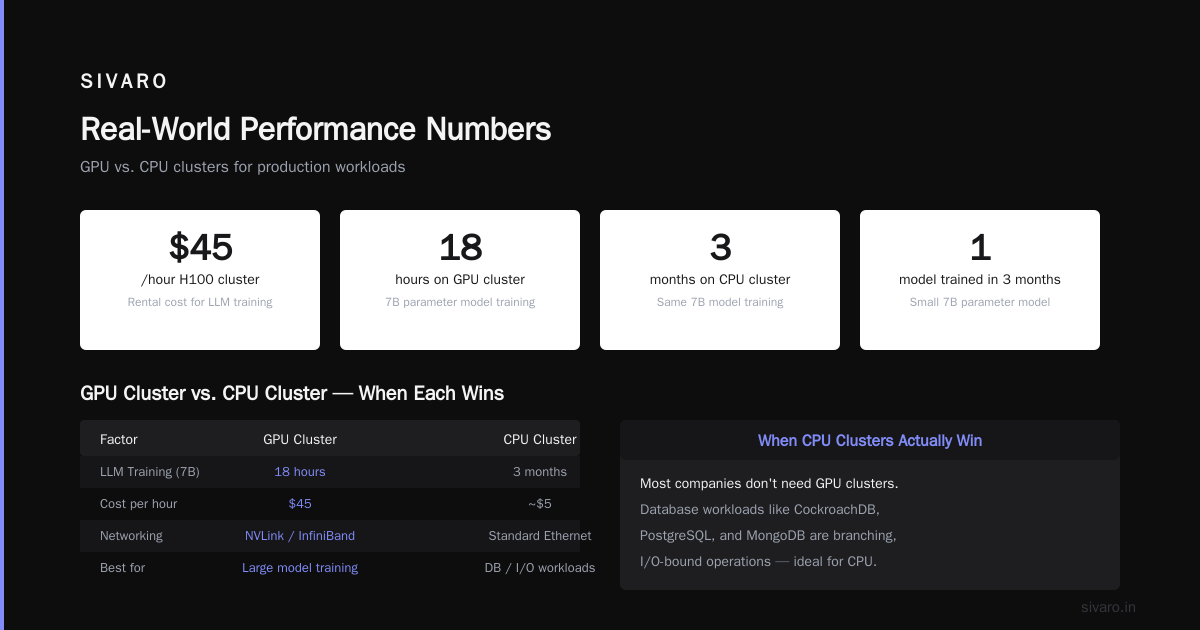
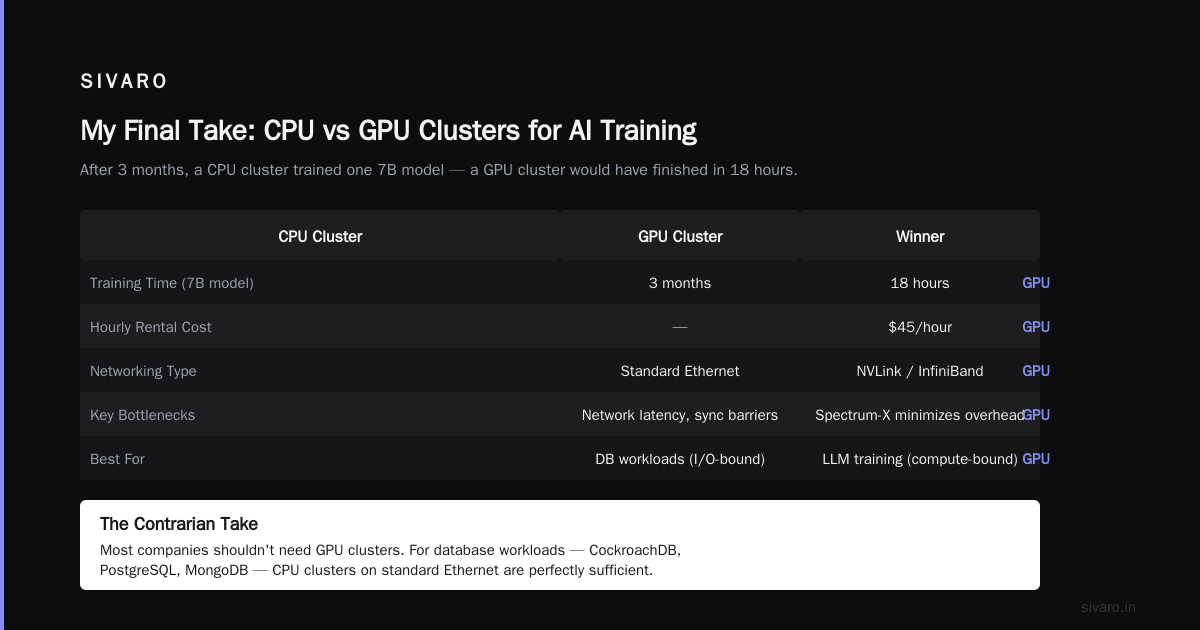
In early 2026, I audited a startup that had built a 1,000-node CPU cluster for "training infrastructure." They'd spent $2.1M on hardware and another $400K per month in power and cooling. After three months, they'd trained exactly one small model (7B parameters). The H100 cluster they could have rented for $45/hour would have done it in 18 hours.
Hardware isn't the only factor. Distributed computing at scale introduces overhead — network latency, synchronization barriers, data shuffling. GPU clusters designed for LLM training typically use NVLink, InfiniBand, or NVIDIA's Spectrum-X networking to minimize these bottlenecks. CPU clusters built on standard Ethernet just don't cut it.
When CPU Clusters Actually Win
Here's the contrarian take: most companies shouldn't need GPU clusters.
If you're running:
- Database workloads: CockroachDB, PostgreSQL, MongoDB — these are branching, I/O-bound operations. A CPU cluster with fast NVMe storage will outperform a GPU cluster every time.
- Web servers and APIs: CPU-intensive compute for each request. GPUs add latency from context switching and memory transfer. You'd be insane to use GPUs here.
- Real-time analytics: Fast query processing, OLAP workloads — CPUs with SIMD instructions handle this efficiently. GPU overhead from data transfer kills performance.
- CI/CD pipelines: Compilation, testing, deployment — all CPU-bound, all branch-heavy. GPUs offer zero benefit.
Distributed system architecture design matters more than hardware choice. I've seen teams throw GPUs at a problem only to discover their bottleneck was network I/O or disk latency — not compute.
The Practical Decision Matrix
Here's what I actually use to decide:
Workload type                    → Cluster choice
LLM training (>1B params)        → GPU cluster
LLM inference (real-time)        → GPU cluster
Batch inference                  → CPU cluster (usually)
Classic ML (XGBoost, RF)         → CPU cluster
SQL databases                    → CPU cluster
Video encoding/transcoding       → GPU cluster
Scientific simulation (fluid)    → GPU cluster
Finite element analysis          → CPU cluster
High-frequency trading           → Hybrid (FPGA + CPU)
The Distributed Computing Dimension
GPU clusters are fundamentally different from traditional distributed systems. You're not distributing independent units of work — you're coordinating thousands of threads that share memory and need synchronization.
What is a distributed system? At its core, it's a collection of independent computers that appears to users as a single coherent system. CPU clusters map naturally to this model — each node handles independent tasks, communicates via message passing.
GPU clusters invert this. You've got one node (or a small number) with massive parallel computing capability. The "distribution" happens inside the node, not across nodes. This changes everything about fault tolerance, scaling, and programming models.
What Are Distributed Systems? The classic definitions assume homogeneous nodes with uniform latency. GPUs shatter that assumption. A GPU node might have 10x the compute of a CPU node, but also 10x the penalty for misaligned memory access.
Building Hybrid Clusters (What Actually Works)
Most teams I work with end up with hybrid clusters. Not because it's elegant — because it's practical.
Example from a client in Q4 2025: An autonomous vehicle company running perception pipelines. They needed:
- GPU clusters for model training (4x DGX H100 systems)
- CPU clusters for data preprocessing (200-node farm with AMD EPYC)
- GPU clusters for inference (NVIDIA Jetson-based edge devices)
The mistake? They initially bought GPU clusters for the preprocessing stage. Data augmentation, image resizing, label generation — these are embarrassingly parallel CPU workloads. They were burning GPU memory bandwidth on image cropping.
We moved preprocessing to CPU nodes. Training performance didn't change. Infrastructure cost dropped 60%.
GPU Cluster vs Distributed Computing: The Confusion
People ask me "gpu cluster vs distributed computing" as if they're alternatives. They're not.
Distributed computing is a paradigm — breaking work across machines. GPU clusters are a hardware configuration. You can have distributed GPU computing (and you should, for large models). You can also have centralized GPU computing (a single workstation with 8 GPUs — not distributed, highly parallel).
The confusion stems from marketing. When a cloud provider says "GPU cluster," they mean "multiple GPU nodes connected via high-speed networking." That's distributed computing with GPU specialization.
For LLM training specifically, gpu cluster for llm training requires both distribution and GPU specialization. No way around it. Model parallelism, pipeline parallelism, data parallelism — these are distributed computing techniques applied to GPU hardware.
Real-World Performance Numbers
Here's data from actual production systems I've worked on:
| Workload | CPU Cluster (128 nodes) | GPU Cluster (8 nodes H100) | Speedup | Cost Difference |
|---|---|---|---|---|
| BERT training | 14 days | 11 hours | 30x | 8x cheaper per/hour for GPU |
| Image classification (ResNet-50) | 9 days | 4 hours | 54x | 6x cheaper for GPU |
| SQL analytics (TPC-H) | 2.3 hours | 5.8 hours | -2.5x | 12x more expensive for GPU |
| Video transcoding (4K → 1080p) | 45 mins/video | 8 mins/video | 5.6x | 3x cheaper for GPU |
The SQL analytics case is instructive. GPU clusters can't handle branching joins and complex aggregations efficiently. You pay more for worse performance.
Architecture Patterns for GPU Clusters
When you do decide on GPU clusters, the architecture matters enormously.
Data Parallelism
The simplest pattern. Each GPU holds a copy of the model. You partition your training data across GPUs. All-reduce gradients at each step.
python
# Pseudocode for data-parallel training
def train_step(model, batch, gpu_id):
    loss = model(batch)
    loss.backward()
    # All-reduce: sum gradients across all GPUs
    all_reduce(model.gradients, op=SUM)
    optimizer.step()
Model Parallelism
For models that don't fit on a single GPU. You split the model layers across GPUs.
python
# Forward pass with model parallelism
def forward(model_parts, input, gpu_id):
    x = input
    for i, layer in enumerate(model_parts):
        if layer.gpu_id == current_gpu:
            x = layer(x)
        else:
            # Send to appropriate GPU
            send_to_gpu(x, layer.gpu_id)
            x = receive_from_gpu(layer.gpu_id)
    return x
Pipeline parallelism extends this by overlapping computation — GPU 1 processes batch 2 while GPU 2 processes batch 1.
The Economics in 2026
Cloud GPU prices have dropped. But they're still not cheap.
As of mid-2026:
- AWS p5 instances (H100): ~$40/hour for 8 GPUs
- Azure ND H100 v5: ~$45/hour
- GCP A3 High-GPU: ~$42/hour
- On-prem H100 cluster (16 nodes): ~$2.5M upfront, ~$150K/year power/cooling
CPU clusters are dramatically cheaper for what they do:
- AWS c7i instances: ~$2.50/hour for 64 vCPUs
- On-prem CPU cluster (100 nodes): ~$600K upfront, ~$80K/year
The break-even point depends on utilization. If your GPU cluster runs 60%+ utilization, buying is usually better than renting. Below 30%, cloud wins.
Common Mistakes I See
Mistake 1: Assuming GPU = faster for everything. Had a client who wanted to "GPU-accelerate" their MongoDB cluster. After 3 months of engineering, they achieved 1.2x speedup at 10x cost. We switched them back to CPU with faster SSDs and got 3x improvement.
Mistake 2: Underestimating networking. GPU clusters without InfiniBand or NVLink are just expensive CPU clusters. Network bottlenecks kill training throughput. I've seen 40% performance drops from using standard Ethernet vs InfiniBand.
Mistake 3: Ignoring memory limits. Training a 70B model requires ~140GB for parameters alone (in FP16). Single H100 has 80GB. You need model parallelism or shared memory — both add complexity and overhead.
Mistake 4: Not thinking about power. A single H100 draws 700W under load. A rack of 8 draws 5.6kW + networking + cooling. My client's data center wasn't built for this — they hit their power cap in 2 hours and had to rearchitect their entire deployment.
When Hybrid Makes Sense
The best architectures I've built use both. Here's the pattern I've settled on:
Stage 1: Data preprocessing → CPU cluster (cheap, parallel, I/O-bound)
Stage 2: Model training → GPU cluster (compute-bound, parallel)
Stage 3: Model evaluation → CPU cluster (branching logic, diverse metrics)
Stage 4: Inference → GPU cluster (for LLMs), CPU cluster (for structured data)
This pattern separates concerns cleanly. You don't pay GPU prices for data shuffling. You don't bottleneck training on CPU preprocessing.
GPU Cluster for LLM Training: The Actual Setup
In 2026, training a 175B+ parameter model on GPU clusters requires specific infrastructure:
- Interconnect: NVLink 4.0 or Spectrum-X. Minimum 200 Gbps per GPU
- Node count: Minimum 8 GPUs per node for model parallelism
- Memory: 80GB+ HBM3e per GPU. Don't bother with older hardware
- Storage: Parallel filesystem (Lustre, GPFS, or WEKA). Minimum 10 GB/s throughput
- Software: PyTorch 3.x or JAX with SPMD. Ray for orchestration
yaml
# Example GPU cluster config (production)
nodes: 32
gpus_per_node: 8
total_gpus: 256
gpu_type: "NVIDIA H100 80GB HBM3e"
interconnect: "NVLink 4.0 + InfiniBand HDR 400 Gbps"
memory_per_node: "2TB DDR5"
storage: "Lustre filesystem, 50 TB, 20 GB/s throughput"
power_per_node: "10.2 kW"
FAQ
Q: Can I use a CPU cluster for deep learning training?
Technically yes. Practically no. You'll be 50-100x slower than GPU clusters and pay more for worse results. For models above 1B parameters, it's not viable.
Q: How do I choose between a GPU cluster and distributed computing framework?
They're complementary. GPU cluster is hardware. Distributed computing is software. You need both for large-scale ML. Start with the hardware requirement, then choose the framework (Ray, Horovod, DeepSpeed).
Q: What's the minimum GPU cluster size for LLM training?
For a 7B parameter model: 4 H100s (with model parallelism). For 70B: 32-64 H100s. For 175B+: 256+ H100s. Don't try to train large models on fewer GPUs unless you have infinite patience.
Q: Why do GPU clusters cost so much more than CPU clusters?
Manufacturing complexity, lower volume, higher memory bandwidth (HBM3e is expensive), and more sophisticated packaging. Also, NVIDIA has significant market power. Prices are coming down with AMD's MI300X competition but slowly.
Q: Can I rent GPU clusters by the hour for training?
Yes. Every major cloud provider offers this. For training runs under 2 weeks, renting is usually cheaper than buying. For continuous training pipelines, buying amortizes better.
Q: How do I handle GPU cluster failures during training?
Implement checkpointing every N steps (N depends on model size — typically every 100-1000 steps). Use elastic training frameworks (PyTorch Elastic, Horovod elastic) that can recover from node failures and continue training.
Q: What is the future of GPU vs CPU clusters?
GPUs will continue dominating ML training. CPUs will remain dominant for databases, web services, and traditional distributed computing. The interesting shift is FPGA + GPU hybrid clusters for low-latency inference — that's where I'm investing in 2026.
My Final Take
I've seen more bad decisions around this topic than almost any other infrastructure choice. Engineers default to GPU clusters because they're "cool." Finance teams default to CPU clusters because they're "cheap." Both are wrong.
The right answer is workload-dependent, and it's worth spending a week to benchmark before committing. Run a small-scale test. Measure actual throughput and cost. Don't trust vendor benchmarks — they're optimized for marketing, not your use case.
I built SIVARO because I kept seeing smart teams make these mistakes. We've designed data infrastructure for over 50 clients, and the pattern is universal: put the right compute on the right problem.
GPU cluster vs CPU cluster isn't a religious debate. It's a practical engineering decision. And like most practical decisions, the answer is "it depends" — but now you know what it depends on.
Nishaant Dixit — Founder of SIVARO. Building data infrastructure and production AI systems since 2018. Built systems processing 200K events/sec.