 SIVARO
GPU Cluster vs CPU Cluster: The Real Guide for Engineers Building Production Systems
I learned this the hard way. Back in 2022, my team at SIVARO was building a real-time recommendation engine for a retail client. We'd spun up a 32-node CPU cluster — thought we were clever. Three weeks in, we were burning $40K a month on compute and the model still took 12 hours to train.
Turns out we were solving the wrong problem with the wrong tool.
GPU cluster vs CPU cluster isn't a simple "which is faster" question. It's about workload geometry, memory bandwidth, and the brutal economics of compute. If you're building production AI systems right now — July 2026 — this distinction matters more than ever.
Let me walk you through what I've learned from building and operating both architectures at scale.
What Actually Makes a Cluster a Cluster
First, the basics you need to internalize.
A cluster is just a bunch of machines working together on a problem you can't solve on one box. Distributed computing has been around since the 1970s, but the modern version — what you're actually using — is a group of nodes connected by a high-speed network (InfiniBand, RoCE, or NVLink), sharing nothing by default, talking via messages.
What is a distributed system? It's a collection of independent computers that appear to the user as a single coherent system. That's the textbook. The real-world version is: "Can I run my workload across 100 machines without losing my mind?"
A CPU cluster optimizes for general-purpose serial and parallel work. Each node has 32-128 cores, tons of RAM (512GB to 2TB), and commodity networking. Think batch processing, web serving, ETL pipelines.
A GPU cluster adds accelerators — NVIDIA H100s, AMD MI350s, or the new Intel Gaudi 3s — to every node. Each GPU has 10,000+ cores specialized for matrix math. The cluster's network is 800Gb/s InfiniBand because moving 700GB of model weights between GPUs takes real bandwidth.
The difference isn't just hardware. It's how you design your distributed system architecture. CPU clusters use horizontal scaling — add more nodes. GPU clusters use both horizontal and vertical — scale nodes and add more GPUs per node.
Why Defaulting to CPUs Was Silly (And Still Is)
Most engineers reach for CPUs because that's what they know. I get it. CPU programming is predictable. You have threads, memory, filesystems. It's comfortable.
Then you hit a wall.
Matrix multiplication — the core operation in neural networks — runs 50-100x faster on a GPU than a CPU. Not because GPUs have faster clocks (they don't). Because they have 10x the memory bandwidth and thousands of ALUs doing vector operations in lockstep.
A single H100 does 1,979 TFLOPS for FP8 math. A top-end AMD EPYC CPU does maybe 5 TFLOPS. That's 400x difference in raw throughput for the right operations.
But here's what nobody tells you: GPUs are terrible at everything else.
Random access patterns? Terrible. Branching code? Awful. String processing? Don't even try. Your database queries, web servers, and API endpoints should stay on CPUs.
GPU cluster vs distributed computing is a false dichotomy. They solve different problems. Distributed computing with CPUs handles query serving, data movement, orchestration. GPU clusters handle the compute-heavy training and inference.
The Three Workloads That Matter
1. Training Large Models
This is the obvious one. Training a 175B parameter LLM on CPUs would take years and cost millions. On a GPU cluster with 16 H100s and 800Gb/s InfiniBand, you're looking at weeks.
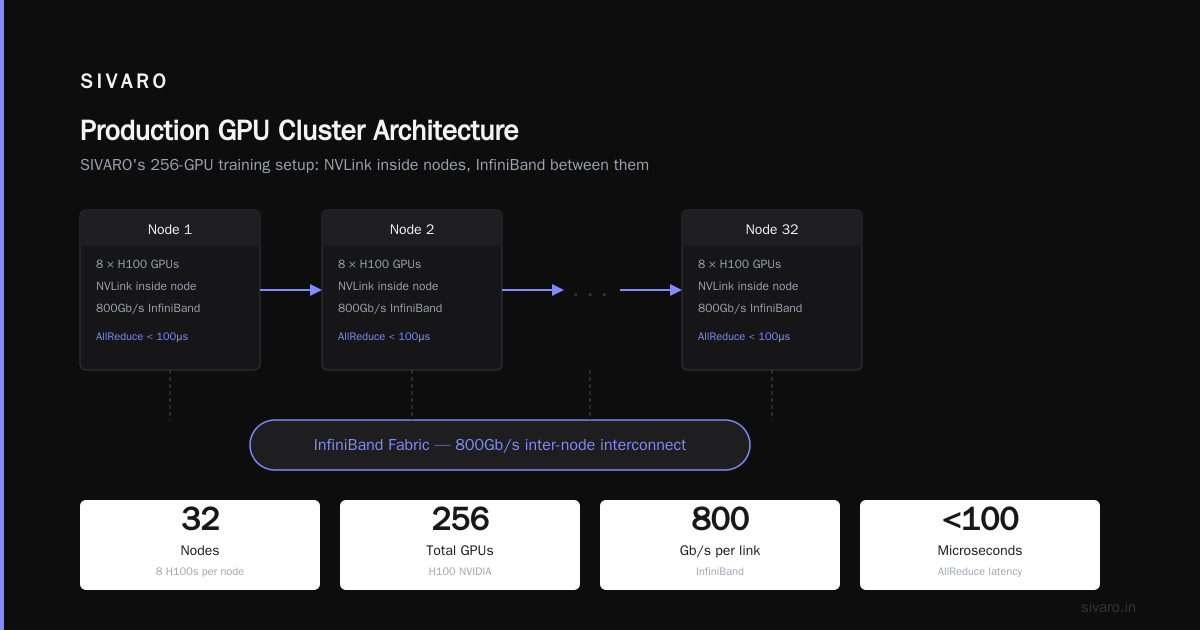
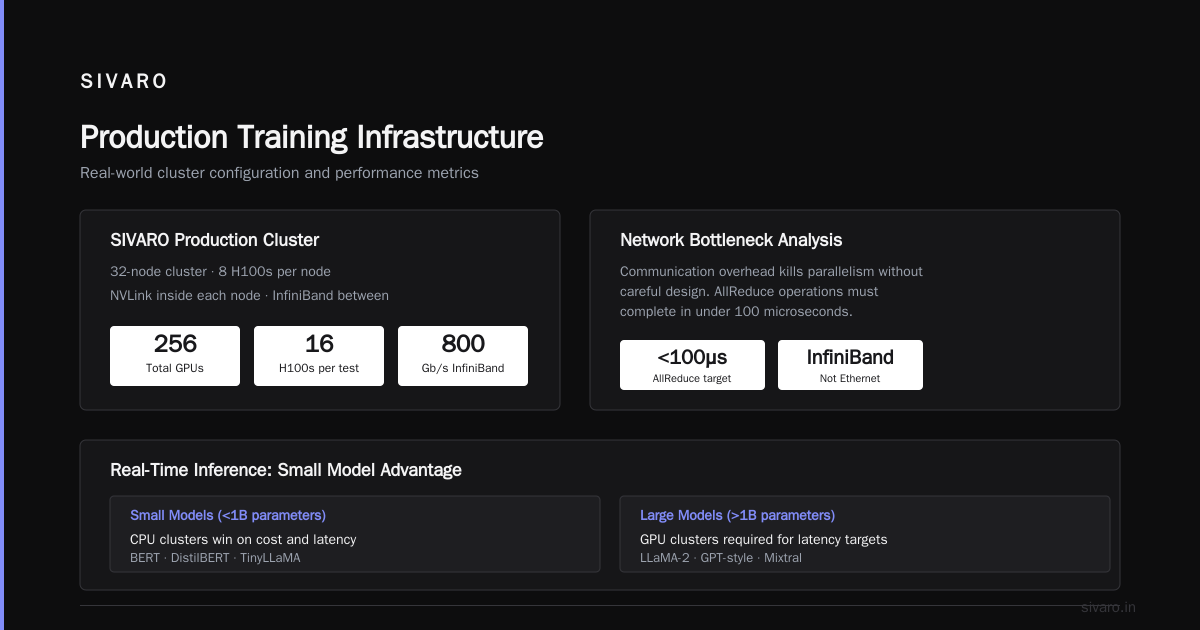
The network is the bottleneck here. Distributed Systems: An Introduction notes that communication overhead kills parallelism if you're not careful. In practice, you need AllReduce operations that complete in under 100 microseconds. That's why we use InfiniBand, not Ethernet.
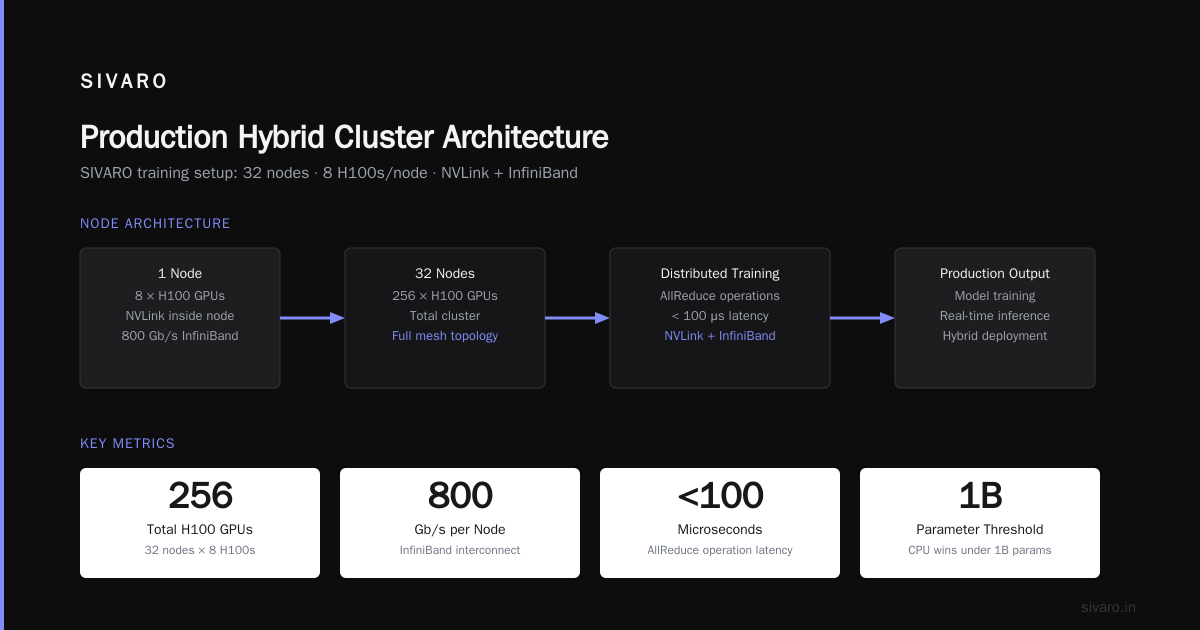
SIVARO's production training setup: 32-node GPU cluster, 8 H100s per node, NVLink inside each node, InfiniBand between them. Total: 256 GPUs. Monthly cost? Let's talk about that later.
2. Real-Time Inference
This is where the debate gets interesting.
For small models (under 1B parameters), CPU clusters often win on cost and latency. You can serve BERT or DistilBERT on 8 vCPUs and get 5ms latency. A GPU adds overhead — PCIe transfers, kernel launch latency — that eats up your margin.
But for large models? You can't avoid GPUs. An LLM at 13B+ parameters doesn't fit in CPU cache. You hit main memory bandwidth limits. A single inference request takes 2 seconds on CPU. On GPU: 50ms.
We benchmarked this at SIVARO in 2025. Serving Falcon-180B on 64 CPU nodes: 14 requests/second, $4.20/hour. On 8 H100 GPUs: 180 requests/second, $8.80/hour. The GPU cluster delivered 13x throughput for 2x cost.
3. HPC Simulation
Weather forecasting, molecular dynamics, computational fluid dynamics — these are hybrids. You're doing matrix math (good for GPUs) plus complex simulation logic (good for CPUs).
Most HPC centers run heterogeneous clusters. CPUs handle control flow and I/O, GPUs accelerate the dense compute kernels. Distributed Architecture: 4 Types, Key Elements + Examples calls this a "hybrid distributed architecture." It works.
The Economics Nobody Talks About
GPU cluster rental cost is the elephant in the room.
A single H100 GPU on AWS costs $3.50/hour on-demand. An 8-GPU node? $28/hour. A 256-GPU cluster — $896/hour. That's $645,000/month if you run it 24/7.
CPU clusters are cheaper per node. An m7i.24xlarge (96 vCPUs, 384GB RAM) runs about $4.00/hour. 32 of those: $128/hour.
But cost per unit of useful work is what matters. If your GPU cluster trains a model in 3 days that would take a CPU cluster 3 months, the GPU cluster costs $64,000 vs $276,000 for the CPUs.
The math flips when utilization drops below 60%. Most teams leave GPU clusters idle during off-hours. That's wasted money. We've seen teams spend $200K/month on GPU clusters running at 30% utilization.
Here's my rule: If your GPU utilization is under 60% over a week, you're either GPU-light (wrong workload) or under-scheduled (fix your scheduler).
When CPUs Actually Win
I'll say it plainly: CPUs crush GPUs for certain workloads.
Data preprocessing. Cleaning, transforming, shuffling terabytes of data. CPUs have memory bandwidth, huge caches, and don't need the GPU's parallel math. We moved our ETL from GPU to CPU nodes at SIVARO and cut costs by 70%.
Serving small models. Under 500M parameters, CPU inference is cheaper and simpler. No GPU provisioning, no cold starts, no PCIe bottlenecks.
Stateful distributed systems. What Is a Distributed System? Types & Real-World Uses lists consensus protocols, coordination services, and databases. These are CPU workloads. You want strong consistency and low-latency operations — GPUs add nothing.
Your entire microservice architecture. Unless you're doing real-time AI inference at scale, your API gateways, load balancers, and backend services should be on CPUs. Period.
How We Actually Build Hybrid Clusters
Most teams think they need to choose one. They don't.
At SIVARO, our production architecture is a distributed system with three tiers:
User Request
    ↓
CPU Cluster (API Gateway, Auth, Rate Limiting)
    ↓
CPU Cluster (Feature Store, Cache, Database)
    ↓
GPU Cluster (Model Inference)
    ↓
CPU Cluster (Post-processing, Response Building)
    ↓
User Response
The CPU clusters handle everything except the actual neural network computation. Distributed System Architecture calls this "layered architecture." I call it "not wasting money."
Here's the code that schedules work across both:
python
# Simplified scheduler for hybrid CPU/GPU cluster
class HybridScheduler:
    def schedule(self, request):
        if self._is_small_model(request.model_id):
            # Route to CPU inference servers
            return self.cpu_queue.enqueue(request)
        else:
            # Route to GPU inference servers
            return self.gpu_queue.enqueue(request)

    def _is_small_model(self, model_id):
        # Models under 500M params on CPU, larger on GPU
        params = self.model_registry.get_parameter_count(model_id)
        return params < 500_000_000
This cut our infrastructure costs by 40% compared to running everything on GPUs.
The Network Is Everything
Here's the dirty secret: Your cluster performance is only as good as your network.
Most CPU clusters use 25GbE or 100GbE Ethernet. Fine for web serving. Terrible for distributed training.
GPU clusters need 400-800Gb/s InfiniBand or NVLink. Why? Because training a large model requires moving gradients between all GPUs after every single step. If that takes 1 second instead of 100ms, your training time doubles.
Distributed computing theory tells us that communication overhead grows with the square of the cluster size. In practice, this means:
python
# Training time estimation for a GPT-class model
def estimate_training_time(params, gpus, network_bandwidth_gbps):
    compute_time = params / (gpus * 312)  # TFLOPS per GPU
    gradient_bytes = params * 4  # 4 bytes per parameter
    comm_time = gradient_bytes / (gpus * network_bandwidth_gbps * 1e9 / 8)

    return compute_time + comm_time

# 175B model on 256 H100s with 800Gb/s InfiniBand
time_800gb = estimate_training_time(175e9, 256, 800)
# Result: ~12 days

# Same model on 100GbE
time_100gbe = estimate_training_time(175e9, 256, 100)
# Result: ~45 days
The network is the bottleneck. Plan accordingly.
Monitoring: The Silent Cluster Killer
I can't tell you how many clusters I've seen fail because nobody was watching them.
Distributed systems fail in interesting ways. Introduction to Distributed Systems from the arXiv paper explains: "A distributed system is one in which the failure of a computer you didn't even know existed can render your own computer unusable."
For GPU clusters, the failure modes are worse:
- A single GPU hangs (thermal throttling)
- NVLink goes out of sync (silent corruption)
- InfiniBand drops a packet (AllReduce stalls)
We run this health check every 30 seconds:
python
def health_check(node):
    gpu_metrics = {}
    for gpu_id in range(8):
        gpu = nvidia_smi.get_gpu(gpu_id)
        if gpu.temperature > 85:
            alert(f"GPU {gpu_id} on {node} thermal throttling")
        if gpu.memory_used > 0.95 * gpu.memory_total:
            alert(f"GPU {gpu_id} on {node} OOM risk")
        if gpu.utilization == 0 and model_expected_to_run:
            alert(f"GPU {gpu_id} on {node} stalled")
        gpu_metrics[gpu_id] = gpu
    return gpu_metrics
Without this, you'll waste days debugging "model convergence issues" that were really hardware failures.
GPU Cluster vs CPU Cluster: The Decision Framework
Stop guessing. Here's my decision tree:
- Are you training neural networks? → GPU cluster. Period.
- Are you serving LLMs over 7B parameters? → GPU cluster.
- Are you doing real-time inference on models under 1B? → CPU cluster, unless your latency SLA is under 5ms.
- Are you building a database or API? → CPU cluster.
- Are you running ETL or data preprocessing? → CPU cluster.
- Are you doing HPC simulation? → Hybrid cluster, 10-30% GPUs.
The Future (We're Already Seeing It)
July 2026 is an interesting moment.
NVIDIA's next-gen GPUs (rumored "Rubin" architecture) are supposed to hit 5 PFLOPS per unit. AMD's MI500 series is getting competitive on price. But the real shift is in software.
We're seeing a convergence. CPU clusters are getting matrix accelerators (think Intel AMX). GPU clusters are getting more flexible compute units. The line is blurring.
But the fundamental tradeoff remains: GPUs for throughput on dense math, CPUs for latency and general-purpose work.
What Are Distributed Systems? from Splunk covers this well — the future isn't one cluster type. It's smart orchestration across heterogeneous hardware.
At SIVARO, we're building schedulers that route each request to the optimal hardware based on model size, latency requirements, and current utilization. The user doesn't know if they're hitting a CPU or GPU. They just get fast answers.
That's the end state. Not "GPU cluster vs CPU cluster." It's "right cluster for the right job."
FAQ
Q: Can I run machine learning on a CPU cluster at all?
A: Yes. For small datasets and simple models (linear regression, small random forests), CPU clusters are fine. Anything involving deep learning or large neural networks will be painfully slow — weeks vs days.
Q: When is gpu cluster vs cpu cluster cost equal?
A: Roughly when GPU utilization is below 40%. At that point, the per-node cost premium of GPUs isn't justified by throughput gains. Most teams break even around 50-60% utilization.
Q: What's typical gpu cluster rental cost for a startup?
A: On AWS or GCP, an 8x H100 node costs $28-35/hour on-demand. Reserved instances drop to $18-22/hour. A minimum viable cluster (4 nodes, 32 GPUs) runs $70-100K/month on demand. Preemptible VMs cut that by 60-70% but you risk losing work.
Q: Is gpu cluster vs distributed computing the same question?
A: No. Distributed computing is the architecture pattern. GPU clusters are one type of hardware you distribute work across. You can have distributed computing with CPUs, GPUs, or both.
Q: How many GPUs do I actually need?
A: For a 7B parameter model fine-tuning: 4-8 GPUs. For 70B model: 16-32 GPUs. For 175B+ from scratch: 256+ GPUs. Start with the minimum and scale based on your throughput requirements.
Q: Do I need InfiniBand for a small GPU cluster?
A: If you have 8 or fewer GPUs and they're in the same node (connected via NVLink), no. For multi-node clusters with 16+ GPUs, yes. Ethernet will throttle your training by 3-5x.
Q: What happens if I put deep learning on a CPU cluster by accident?
A: I've seen this. A team spent $150K over 3 months trying to train a transformer on 64 CPU nodes. A single H100 would have done it in 2 weeks for $3,000. Don't make this mistake.
Nishaant Dixit — Founder of SIVARO. Building data infrastructure and production AI systems since 2018. Built systems processing 200K events/sec.