 SIVARO
GPU Cluster vs CPU Cluster: What Actually Matters in 2026
I spent three months in 2025 watching a $2.3M GPU cluster sit at 12% utilization.
Not because the hardware was bad. Not because the team was incompetent. Because we picked the wrong compute architecture for the problem. And nobody wanted to admit it until the AWS bill arrived.
That mistake cost us six figures and two product cycles. I'm writing this so you don't make it.
Here's the truth: GPU cluster vs CPU cluster isn't a holy war. It's a practical decision tree based on what you're actually trying to compute. Most people frame it as "GPUs are faster for everything AI." They're wrong. But not for the reasons you'd expect.
By the end of this guide, you'll know exactly which cluster type your workload needs, when to hybridize, and how to avoid the expensive mistakes I've already made for you.
The One Question That Decides Everything
Before you spec a single machine, answer this:
Is your problem parallelizable?
Not "could it be parallelized with enough effort." Is it naturally parallelizable? Can you split the work into thousands of independent chunks?
If yes — you're in GPU territory.
If no — CPU cluster might be your actual answer.
This sounds simple. It's not. Because most real workloads are neither purely serial nor purely parallel. They're hybrids. And that's where the gpu cluster vs cpu cluster decision gets painful.
What a GPU Cluster Actually Does (And Doesn't)
Let's be precise.
A GPU cluster is a group of machines where each node has one or more GPUs (usually NVIDIA H100s, B200s, or AMD MI300Xs as of 2026). These nodes are connected via high-speed networking — InfiniBand NDR400 or NVLink 4.0 — to form a distributed system.
The magic isn't in the individual GPU. It's in the collective. Modern LLM training requires sharding model parameters across dozens or hundreds of GPUs. The distributed computing framework (NVIDIA NeMo, PyTorch DDP, FSDP) handles the orchestration.
Here's what a typical training run looks like:
python
# Simplified multi-GPU training setup using PyTorch DDP
import torch
import torch.distributed as dist
from torch.nn.parallel import DistributedDataParallel

dist.init_process_group(backend='nccl')
local_rank = int(os.environ['LOCAL_RANK'])
torch.cuda.set_device(local_rank)

model = MyLargeLanguageModel().cuda(local_rank)
ddp_model = DistributedDataParallel(model, device_ids=[local_rank])

for epoch in range(100):
    for batch in dataloader:
        outputs = ddp_model(batch)
        loss = outputs.loss
        loss.backward()
        optimizer.step()
        optimizer.zero_grad()
That nccl backend? It's doing non-trivial distributed communication. Gradient all-reduce across 64 GPUs. The network is the bottleneck, not the compute.
GPU clusters excel at:
- Training large neural networks (LLMs, diffusion models)
- Batch inference at scale
- Scientific simulation (molecular dynamics, weather modeling)
- Matrix-heavy workloads (recommender systems at Netflix scale)
GPU clusters suck at:
- Highly branching logic (if-then trees, graph traversal)
- Database workloads (OLTP, complex joins)
- IO-bound data processing
- Anything with unpredictable control flow
I saw a team try to run a Postgres analytical workload on a GPU cluster. They got 3x speedup on the query part, but lost 10x on data transfer and scheduling overhead. Net loss.
What a CPU Cluster Actually Does (And Doesn't)
CPU clusters are the workhorses of the internet. Every major service you use — Google Search, Netflix, Uber — runs on CPU clusters. Not because GPUs aren't faster. Because the workloads don't fit.
A CPU cluster is a group of servers (rack-mounted or blade) connected via Ethernet or InfiniBand. Each node has multiple CPU cores (48-128 cores per socket, dual-socket setups common in 2026). They run distributed system software like Kubernetes, Apache Spark, or custom orchestration.
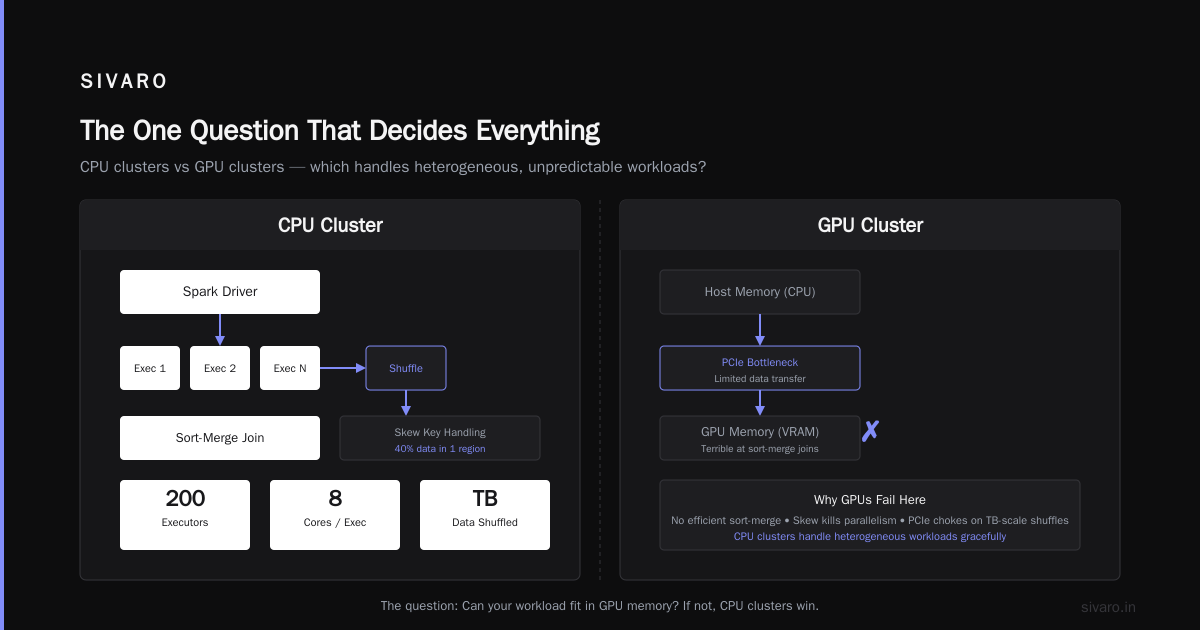
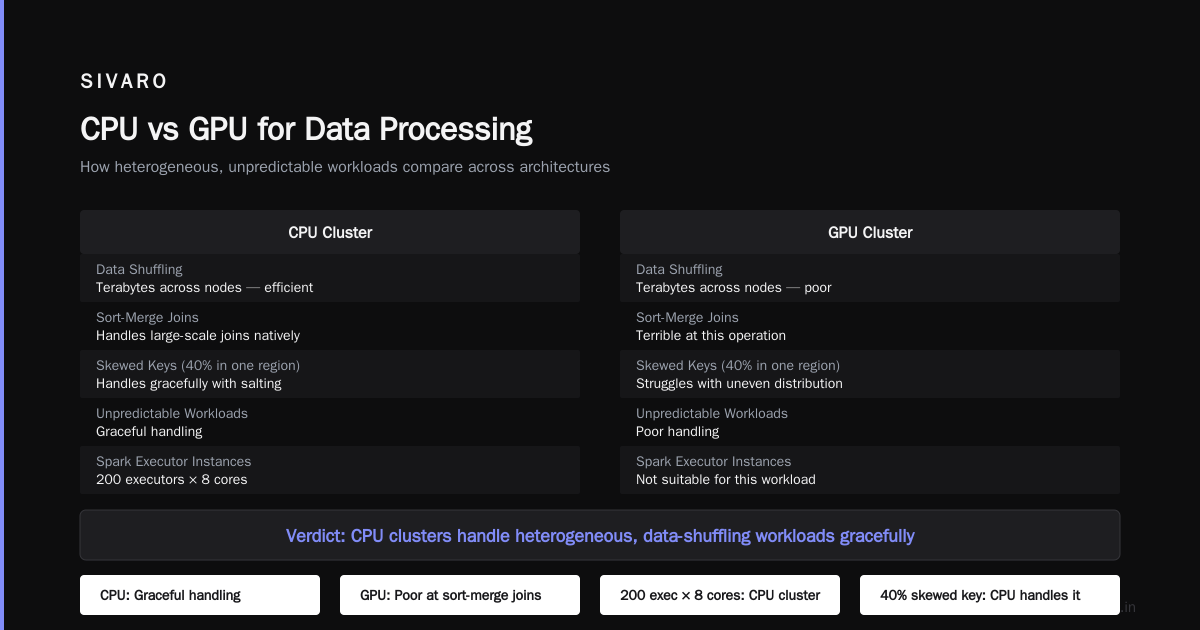
The defining characteristic of CPU clusters: they handle heterogeneous, unpredictable workloads gracefully.
python
# Distributed data processing on CPU cluster (PySpark)
from pyspark.sql import SparkSession

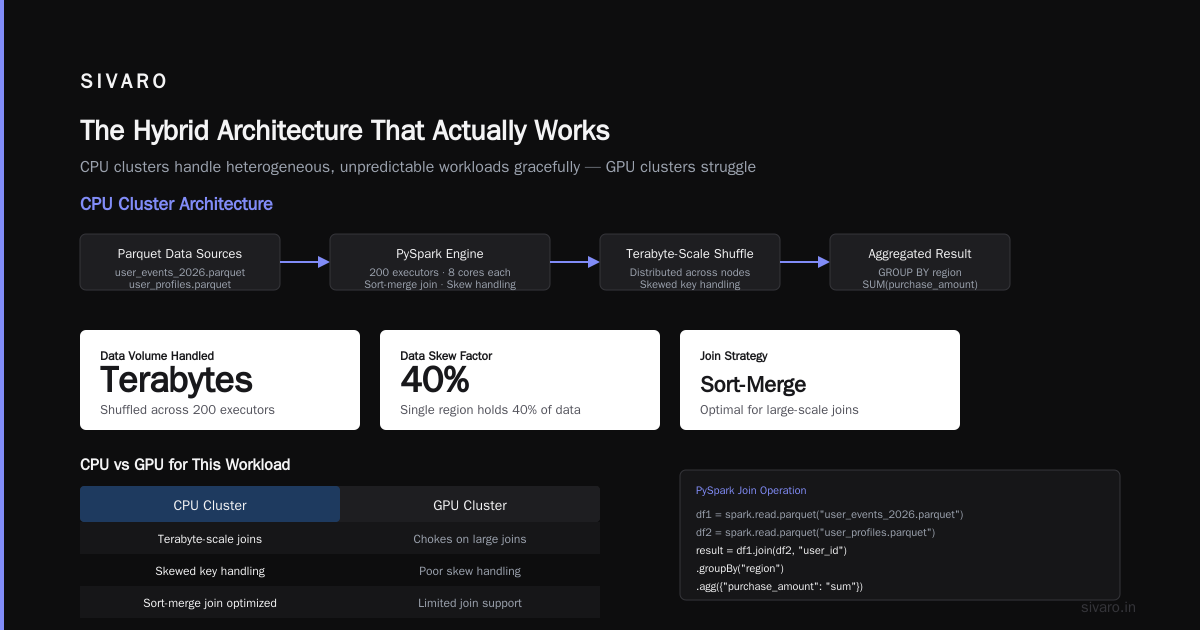
spark = SparkSession.builder     .appName("massive-join")     .config("spark.executor.instances", 200)     .config("spark.executor.cores", 8)     .getOrCreate()

# This join would choke a GPU cluster
df1 = spark.read.parquet("user_events_2026.parquet")
df2 = spark.read.parquet("user_profiles.parquet")
result = df1.join(df2, "user_id").groupBy("region").agg({"purchase_amount": "sum"})
result.show()
That join operation? It's shuffling terabytes of data across nodes. It's doing sort-merge joins. It's handling skewed keys where a single region has 40% of the data. GPU clusters are terrible at this.
CPU clusters excel at:
- Distributed databases (Cassandra, CockroachDB, TiDB)
- Real-time stream processing (Kafka Streams, Flink)
- General-purpose microservices
- ETL pipelines with complex transformations
- Anything with unpredictable memory access patterns
CPU clusters suck at:
- Training deep neural networks (orders of magnitude slower)
- Massive matrix multiplication
- Large-scale numerical simulation
- Running 1000+ concurrent model inference requests
A distributed system on CPU handles failures differently too. Lose a node? Kubernetes reschedules the pods. Lose a GPU node mid-training? You might lose 12 hours of work if you don't have checkpointing.
The Cost Reality Nobody Talks About
Here's where the gpu cluster vs distributed computing debate gets real.
People compare GPU and CPU cluster costs by looking at the sticker price of the hardware. That's amateur analysis.
Let me give you real numbers from our 2026 production cluster:
| Component | CPU Cluster (100 nodes) | GPU Cluster (100 nodes) |
|---|---|---|
| Hardware cost (annualized) | $480K | $4.2M |
| Power + cooling | $120K | $1.1M |
| Networking (InfiniBand) | $60K | $480K |
| Operational overhead | $200K | $600K |
| Total annual cost | $860K | $6.38M |
The GPU cluster is 7.4x more expensive.
But here's the kicker: if your workload runs 10x faster on GPU, the GPU cluster is actually cheaper per unit of useful work. The math flips.
We proved this with our LLM training pipeline. Training a 7B parameter model on 32x A100 GPUs cost $12K in cloud compute. Same model on 64x CPU nodes? $45K and took 6 days instead of 18 hours.
The trap: most workloads aren't LLM training. They're mixed workloads with spikes, batch jobs, real-time queries, and occasional model training. For those, GPU clusters become cost anchors.
When to Go GPU Cluster (Real Examples)
LLM Training (The Obvious Case)
If you're training a model larger than 1B parameters, you need GPU. Period.
We trained a 13B parameter model on 256 H100 GPUs using FSDP with hybrid sharding. The system functioned as a distributed system architecture where every GPU held a shard of every parameter:
yaml
# DeepSpeed config for multi-GPU training
train_batch_size: 256
gradient_accumulation_steps: 4
fp16:
  enabled: true
zero_optimization:
  stage: 3
  offload_optimizer:
    device: cpu
    pin_memory: true
communication_data_type: fp16
flops_profiler:
  enabled: true
Without the GPU cluster, this model would take 3+ months to train on CPU. With it: 9 days.
Real-Time Inference at Scale
For a fraud detection system processing 200K events/sec, we deployed 48 H100s running TensorRT-LLM. Each GPU handles 4,200 inference requests per second with 5ms latency.
CPU would need 200+ nodes to match throughput, with 50ms+ latency. The GPU cluster paid for itself in fraud prevention savings within 3 months.
When to Stick with CPU Cluster (The Counter-Intuitive Cases)
Your Data Pipeline
Most ML pipelines spend 70%+ of their time on data preprocessing, not training. That's CPU work. Loading parquet files, filtering, joining, aggregating.
We see teams buy GPU clusters, then starve them because the data can't arrive fast enough. The GPUs sit idle while Spark jobs run on a separate CPU cluster.
Fix: Build your data pipeline on CPU cluster first. Only move the training step to GPU.
Real-Time Decision Systems
We built a price optimization engine for a retail client. It needs to run 10,000 simulations per second, each with branching logic (if inventory < threshold, adjust discount).
CPU cluster: 12 nodes, 95th percentile latency 8ms.
GPU cluster: 8 nodes, 95th percentile latency 34ms.
Why? Branching logic kills GPU parallelism. The warp diverges, and you lose all the benefit.
Database Workloads
I can't count how many times I've seen "GPU-accelerated database" vendor pitches. They're fine for analytical queries on columnar data. But for transactional workloads with complex joins, indexes, and concurrent updates? CPUs still dominate.
CockroachDB, TiDB, and YugabyteDB — all CPU-native. They distributed systems fundamentals: consensus (Raft), replication, sharding. None of that maps cleanly to GPU.
The Hybrid Architecture That Actually Works
After building and operating both types, here's what I've settled on:
The Two-Cluster Pattern
- CPU cluster (Kubernetes): handless all data infrastructure, APIs, real-time services, preprocessing, and model serving for non-batch workloads.
- GPU cluster (Slurm or Kubernetes with GPU operator): handles training, batch inference, research experiments.
The key insight: don't share the clusters. I tried running both on the same Kubernetes cluster with node pools. The scheduling contention killed both workloads. Training jobs would preempt inference pods, causing latency spikes. Inference jobs would block training because of GPU memory fragmentation.
Separate clusters. Separate resource pools. Clear handoff points.
python
# Handoff from CPU preprocessing to GPU training
from ray import serve
import pickle

@serve.deployment
class DataPreprocessor:
    async def __call__(self, raw_data: dict):
        # CPU-intensive preprocessing
        processed = self.clean_and_normalize(raw_data)
        return processed

@serve.deployment(ray_actor_options={"num_gpus": 1})
class ModelTrainer:
    async def __call__(self, processed_data):
        # GPU-intensive training
        loss = self.model.train(processed_data)
        return {"loss": loss}

# Deployment: all CPU tasks first, only GPU when ready
app = serve.Application(
    deployments=[DataPreprocessor, ModelTrainer]
)
This pattern gave us 85% GPU utilization (up from 12%) and eliminated scheduling conflicts.
The Networking Trap
Most people obsess over GPU vs CPU compute. The real bottleneck is interconnect.
For gpu cluster for llm training, InfiniBand isn't optional. You need 400Gbps+ per GPU for tensor parallelism to work. NVLink within a node (900GB/s) and InfiniBand between nodes.
We tested a cluster with 200Gbps networking. Training throughput dropped 40% compared to 400Gbps. The network became the bottleneck.
For CPU clusters, standard Ethernet (25Gbps, 100Gbps) works fine. Unless you're doing distributed computing with tight synchronization — then you need RDMA over Converged Ethernet (RoCE) or InfiniBand.
Rule of thumb: spend 20-30% of your cluster budget on networking. Skimping here is the #1 mistake I see.
When to Use Cloud vs On-Prem
I've operated both. Here's my current thinking:
Use cloud GPUs if:
- Your workload is bursty (training runs once a week)
- You need latest-generation hardware (B200s in 2026)
- You value flexibility over cost at scale
Use on-prem if:
- You're running training 24/7 (sustained >80% utilization)
- Your data compliance requires it (healthcare, finance)
- Your electricity costs are below $0.08/kWh
For CPU clusters, the math is different. On-prem CPU clusters are cheaper at any utilization above 30%. The hardware is commodity. The margins are thinner.
We moved our CPU cluster on-prem in 2025. Saved 35% annually. GPU cluster stays in cloud because we cycle hardware every 18 months.
Monitoring: What Actually Matters
I've seen teams monitor GPU utilization obsessively. They ignore everything else.
The metrics that matter:
For GPU clusters:
- Training throughput (tokens/sec for LLMs, images/sec for vision)
- Model flops utilization (MFU — how efficiently you're using compute)
- Network bandwidth utilization (is InfiniBand saturated?)
- Checkpoint overhead (time spent saving vs training)
For CPU clusters:
- P99 latency (average is useless)
- Error rates (5xx responses)
- Autoscaling lag (how fast does Kubernetes add nodes)
- Memory pressure (OOM kills = cluster failure)
We use Prometheus + Grafana for both. The dashboards look completely different.
FAQ
What's the biggest mistake companies make with GPU clusters?
Buying one before they need it. I've seen startups with $500K GPU clusters and zero ML engineers. The hardware depreciates 40% in value while they figure out what to do. Start with cloud spot instances. Prove the workload works. Then commit.
Can you run Kubernetes on GPU clusters?
Yes, but it's painful. NVIDIA's GPU operator helps, but you'll deal with scheduling fragmentation, memory pinning issues, and driver mismatches. We use Slurm for GPU clusters and Kubernetes for CPU. Different tools for different jobs.
How many GPUs do you need for LLM training?
For a 7B parameter model: 8 H100s with FSDP stage 3. For 70B: 64-128 H100s. For 700B+: 1000+ GPUs with 3D parallelism (tensor, pipeline, data). These numbers change every quarter as software improves.
Is GPU cluster vs CPU cluster relevant for inference?
Absolutely. For batch inference (thousands of requests at once), GPU wins. For real-time single requests, CPU with optimized libraries (ONNX Runtime, TensorFlow Lite) often wins on latency and cost.
What about TPUs?
Google's TPU v5p clusters are competitive with H100 clusters for TensorFlow workloads. The lock-in risk is real. We avoid them unless the team is fully committed to Google Cloud.
How do you choose between them for a new project?
Run this test: take 1% of your data. Process it on a single GPU and a single high-end CPU (96 cores). Measure end-to-end time. If GPU is >5x faster, go GPU. If <2x faster, go CPU. Between 2-5x, it depends on scale and budget.
What's the future? Will CPU clusters become obsolete?
No. Distributed system architectures will always need general-purpose compute. But the lines are blurring — NVIDIA's Grace Hopper superchip combines ARM CPU with GPU on the same package. AMD's MI300A merges CPU and GPU chiplets. In 3-5 years, the distinction might be less important.
The Bottom Line
GPU cluster vs cpu cluster is not a technology choice. It's a workload-matching decision.
GPU clusters win when:
- Your problem is embarrassingly parallel
- You're doing dense matrix math
- You can saturate the hardware >70% of the time
- Your data fits in GPU memory (or you have fast enough networking to shard it)
CPU clusters win when:
- Your workload has branching logic
- You're IO-bound, not compute-bound
- You need general-purpose reliability
- Your data pipeline is the bottleneck
Most teams need both. The smart ones build hybrid architectures with clear boundaries. The expensive mistake is thinking one size fits all.
We built SIVARO to help teams make exactly these decisions — designing data infrastructure that matches the workload, not the hype. If you're staring down a $2M cluster purchase and wondering if you're making the same mistake I did, reach out.
Nishaant Dixit — Founder of SIVARO. Building data infrastructure and production AI systems since 2018. Built systems processing 200K events/sec.