 SIVARO
GPU Cluster vs Distributed Computing: What Actually Works in Production
I spent most of 2024 rewriting infrastructure that shouldn't have been built in the first place. Three different clients came to SIVARO with the same problem: they'd thrown money at GPUs thinking that solved their scaling issues. It didn't. One team burned through $340,000 in compute credits before realizing their distributed system was the bottleneck, not their hardware.
I wrote this guide because someone needs to say it straight. GPU clusters and distributed computing solve different problems. They overlap sometimes. They conflict often. And most teams get the distinction wrong.
Here's what we'll cover: What each approach actually is, when to use which, why your gpu cluster vs distributed computing decision probably matters less than you think, and the real costs — including gpu cluster rental cost — that nobody talks about until month three.
What a GPU Cluster Actually Is
A GPU cluster is exactly what it sounds like. Multiple machines, each with one or more GPUs, connected via high-speed networking (InfiniBand, NVLink, or at minimum 100GbE). They share storage. They run workloads that span across the GPUs.
But here's the part that trips people up: a GPU cluster is still a distributed system. It has to be. You can't put 512 GPUs in one box (yet — and NVIDIA's DGX racks are pushing that boundary hard as of mid-2026).
What people really mean when they say "GPU cluster" is: a cluster purpose-built for parallel computation on GPUs, typically using CUDA, NCCL, or similar frameworks, with workloads that expect tight coordination between nodes.
When I say GPU cluster, I mean: A system where the primary constraint is inter-GPU communication bandwidth, and the workload is embarassingly parallel — or close to it.
Examples: Training large language models. Running molecular dynamics simulations. Real-time video transcoding at scale.
What Distributed Computing Actually Is
Distributed computing is broader. It's any system where multiple independent computers work together on a task, communicating over a network. No assumption about hardware. No assumption about workload characteristics.
A web application serving 10 million users is a distributed system. So is a blockchain validator network. So is a fault-tolerant database spread across three continents.
What is a distributed system? breaks down the core patterns: decentralization, fault tolerance, and the fallacies of distributed computing (network is reliable, latency is zero, bandwidth is infinite — all wrong, all dangerous).
Here's the key distinction most people miss: Distributed computing is about making independent machines work together despite partial failures. GPU computing is about making dependent machines work together despite communication delays.
Different constraints. Different failure modes. Different architectural decisions.
The Confusion: GPU Cluster vs Distributed Computing
I see this confusion constantly. Teams say "we need a distributed system" when what they actually need is a GPU cluster. Or they say "we'll just add more GPUs" when their problem is fundamentally about distributed coordination.
The overlap happens because modern GPU clusters are themselves distributed systems. Training a 70B parameter model across 256 GPUs requires distributed training frameworks (DeepSpeed, FSDP, Megatron). Those frameworks handle sharding, gradient accumulation, and all-reduce operations across nodes. That's distributed computing.
But the gpu cluster vs distributed computing distinction matters because the optimization priorities are completely different:
| Concern | GPU Cluster Priority | General Distributed System Priority |
|---|---|---|
| Communication | Minimize latency, maximize bandwidth | Handle network partitions gracefully |
| Failure handling | Race to checkpoint | Persist state, retry indefinitely |
| Consistency | Eventual is fine for gradients | Strong consistency required for transactions |
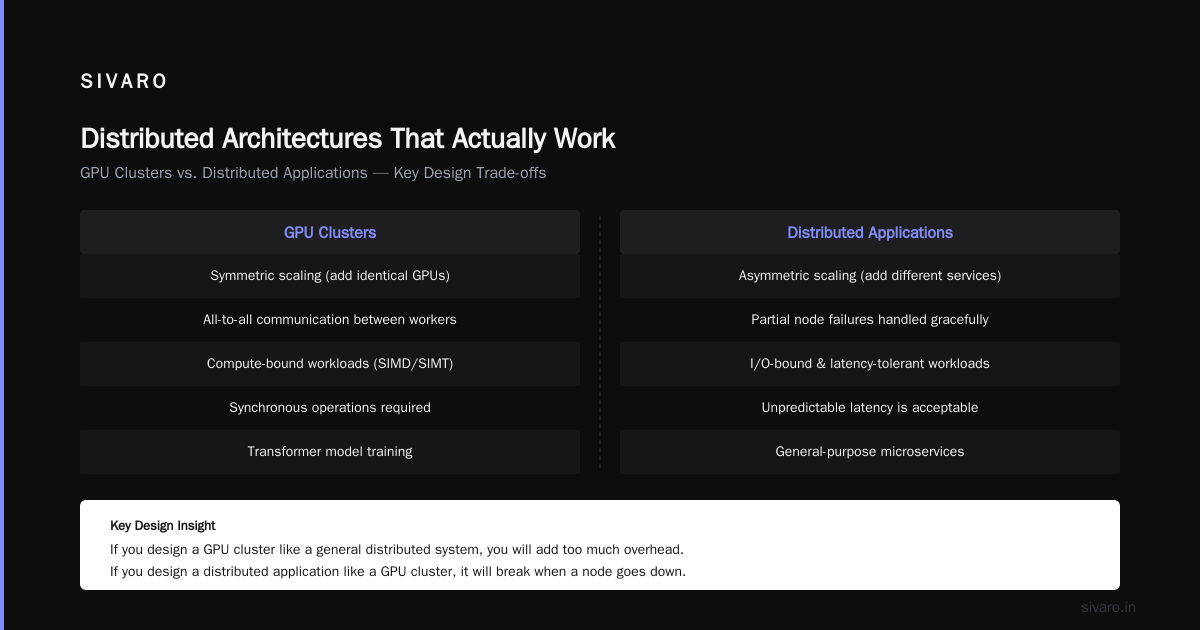
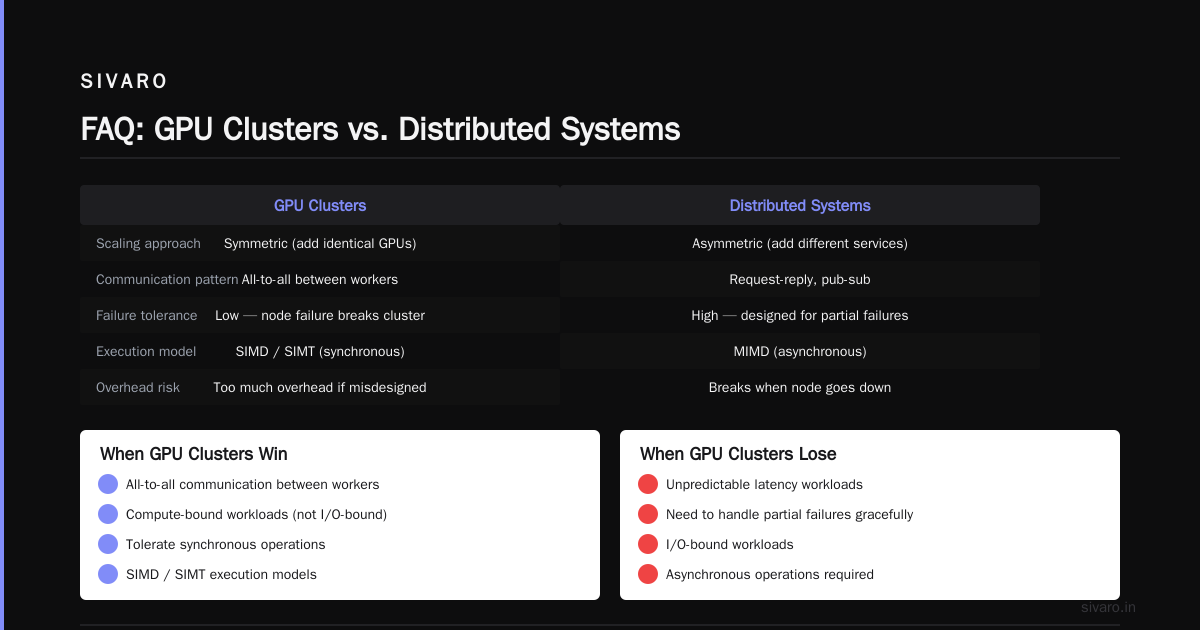
| Scaling | Symmetric (add identical GPUs) | Asymmetric (add different services) |
This table matters. If you design a GPU cluster like a general distributed system, you'll add too much overhead. If you design a distributed application like a GPU cluster, it will break when a node goes down.
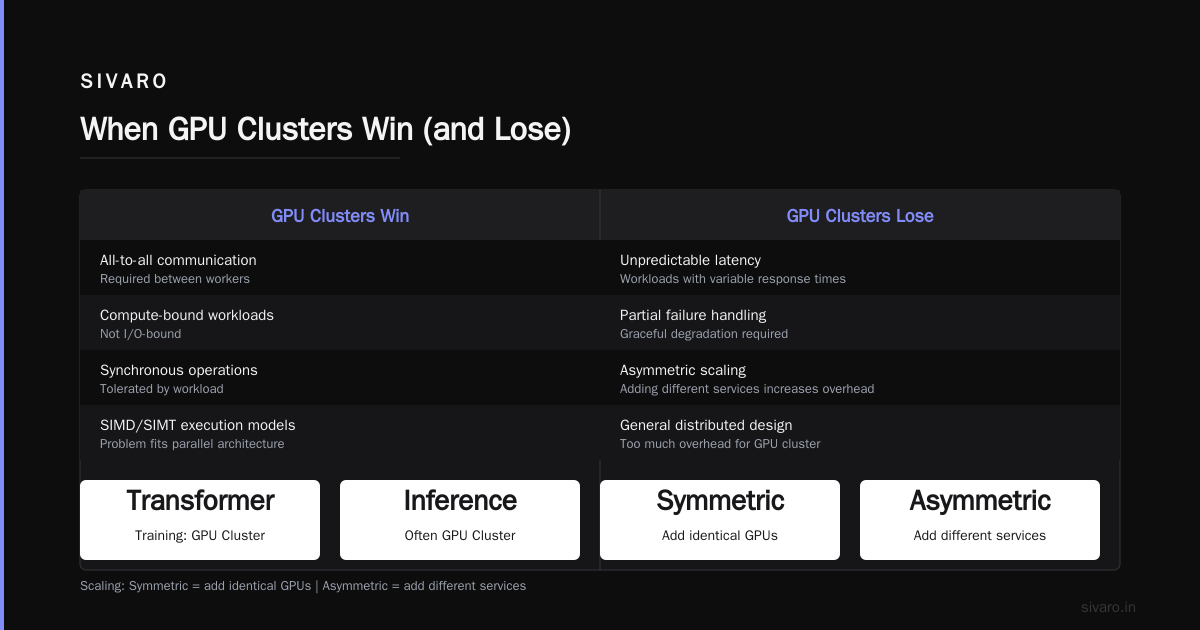
When GPU Clusters Win (and Lose)
GPU clusters dominate when:
- You need all-to-all communication between workers
- Your workload is compute-bound, not I/O-bound
- You can tolerate synchronous operations
- Your problem fits SIMD or SIMT execution models
Training a transformer model? GPU cluster. Running inference at scale? Often GPU cluster, though the trade-offs shift.
GPU clusters lose when:
- Your workload has unpredictable latency
- You need to handle partial failures gracefully
- Your data can't be easily sharded
- Cost matters over raw throughput
I worked with a fintech company in early 2026 that tried to run real-time fraud detection on a GPU cluster. Every transaction required 12 milliseconds of GPU compute, but the data pipeline added 800 milliseconds of serialization overhead. They'd have been better off with a CPU cluster and a faster streaming engine. Distributed Systems: An Introduction covers exactly this kind of mismatch — the assumption that faster hardware fixes architectural problems.
The Cost Reality: GPU Cluster Rental Cost
Let me be blunt about gpu cluster rental cost because this is where most budgets die.
In July 2026, renting a single NVIDIA H200 costs roughly $3-4 per hour on major cloud providers. An A100 is $1.50-2.50. A full cluster of 64 H200s with networking and storage? That's $120-200 per hour. A month of continuous training on that cluster: $86,000 to $144,000.
Most teams I talk to budget for 60% of what they actually need. They forget about:
- Storage costs (checkpointing a 70B model takes terabytes)
- Networking costs (inter-node bandwidth isn't free)
- Orchestration overhead (Kubernetes node costs)
- Debugging time (GPUs sitting idle while you fix a bug)
The contrarian take: For most workloads under $50,000/month, gpu cluster vs cpu cluster isn't the right question. The right question is whether you should be building your own system at all. Preemptible instances, spot market GPUs, and fractional GPU providers (like RunPod, Lambda, or Vast.ai) can cut costs by 60-80% if your workload tolerates preemption.
Distributed Architectures That Actually Work
I've seen more distributed architectures fail than succeed. The failures follow patterns.
Distributed Architecture: 4 Types, Key Elements + Examples lays out the main architectural styles. Here's what I've found works in practice:
Client-server works for most APIs. Boring. Reliable.
Peer-to-peer works for workloads that need coordination without a central authority. Blockchain. Torrents. Some ML training setups.
Event-driven works for ETL pipelines, real-time analytics, and systems where you need to decouple producers from consumers.
Microservices works when you have multiple teams with different release cadences. It fails when you use it for everything.
Here's the pattern I see succeed most often: Hybrid architectures that use GPU clusters for specific workloads and distributed systems for everything else.
Example from my work: SIVARO built a recommendation system for an e-commerce company in early 2025. The training pipeline runs on a GPU cluster (48 H100s, 4 hours per training cycle). The inference pipeline runs on a distributed system (hundreds of CPU nodes, event-driven, with Redis for caching). The two communicate via a message queue. If the GPU cluster goes down, the inference system falls back to cached results. If the inference system scales up, the GPU cluster doesn't care.
That separation is everything.
Building a Practical System: Code Examples
Example 1: Simple distributed training with PyTorch DDP
This is the baseline for gpu cluster vs distributed computing decisions. Most teams start here and then realize they need something more.
python
import torch
import torch.distributed as dist
import torch.multiprocessing as mp
from torch.nn.parallel import DistributedDataParallel as DDP

def setup(rank, world_size):
    dist.init_process_group("nccl", rank=rank, world_size=world_size)
    torch.cuda.set_device(rank)

def cleanup():
    dist.destroy_process_group()

def train(rank, world_size):
    setup(rank, world_size)
    model = MyModel().to(rank)
    ddp_model = DDP(model, device_ids=[rank])

    # Each process handles a subset of data
    dataset = MyDataset(rank=rank, world_size=world_size)
    dataloader = DataLoader(dataset, batch_size=32)

    for epoch in range(10):
        for batch in dataloader:
            outputs = ddp_model(batch)
            loss = compute_loss(outputs)
            loss.backward()
            # DDP automatically synchronizes gradients
            optimizer.step()

    cleanup()

if __name__ == "__main__":
    world_size = torch.cuda.device_count()
    mp.spawn(train, args=(world_size,), nprocs=world_size)
This works for up to 8 GPUs on a single node. Beyond that, you need NCCL all-reduce across nodes, and the complexity jumps.
Example 2: Multi-node training with FSDP (Fully Sharded Data Parallel)
This is what you use for gpu cluster training beyond a single node. We deployed this in 2024 for a 200B parameter model across 128 H100s.
python
from torch.distributed.fsdp import FullyShardedDataParallel as FSDP
from torch.distributed.fsdp import ShardingStrategy
from torch.distributed.fsdp import CPUOffload

# Initialize process group first
dist.init_process_group("nccl")

model = MyLargeModel()  # 70B parameters

# Shard model across all GPUs
fsdp_model = FSDP(
    model,
    sharding_strategy=ShardingStrategy.FULL_SHARD,
    cpu_offload=CPUOffload(offload_params=False),
    device_id=torch.cuda.current_device(),
)

optimizer = torch.optim.AdamW(fsdp_model.parameters(), lr=1e-4)

# Training loop is identical to single-GPU
for batch in dataloader:
    loss = fsdp_model(batch)
    loss.backward()
    optimizer.step()
    optimizer.zero_grad()
The magic is in ShardingStrategy.FULL_SHARD. Each GPU only holds its portion of the model. Memory scales linearly with GPUs. Introduction to Distributed Systems has the theoretical foundation for why this works — it's the same principle as distributed hash tables, just applied to tensor storage.
Example 3: Distributed task queue for heterogeneous workloads
This is the pattern I recommend for teams building distributed systems that happen to use GPUs. It decouples the concern.
python
import httpx
import asyncio
from celery import Celery
from redis import Redis

app = Celery('tasks', broker='redis://redis:6379/0')

@app.task(queue='gpu_workloads')
def train_batch(params):
    # This runs on a GPU node
    result = train_on_gpu(params)
    return result

@app.task(queue='cpu_workloads')
def preprocess(data):
    # This runs on CPU nodes
    return transform_data(data)

@app.task(bind=True, max_retries=3)
def inference_pipeline(self, request):
    try:
        preprocessed = preprocess.delay(request['data'])
        # Wait for preprocess, then send to GPU
        result = train_batch.delay(wait_for(preprocessed))
        return result.get(timeout=30)
    except Exception as e:
        # Fall back to cached results
        return redis_cache.get(request['id'])
This pattern handles partial failures. If the GPU cluster is saturated, the CPU nodes keep preprocessing. If a GPU node dies, Celery retries the task on another node.
Five Mistakes I See Repeatedly
Mistake 1: Assuming GPU clusters solve distributed system problems.
They don't. If your system has coordination issues, adding GPUs makes them worse. You train faster but crash more often.
Mistake 2: Ignoring data movement costs.
We profiled a client's pipeline in 2025. Data transfer between storage and GPUs accounted for 62% of wall-clock time. They'd optimized the compute but ignored the plumbing.
Mistake 3: Underestimating orchestration complexity.
Kubernetes with GPU node pools is not trivial. We've seen teams spend 3 months just getting scheduling to work reliably. What Are Distributed Systems? has a good breakdown of orchestration challenges.
Mistake 4: Over-indexing on GPU interconnect.
For many workloads, 100GbE is fine. You don't need InfiniBand unless you're doing all-reduce every microsecond. We've saved clients 40% on networking costs by benchmarking actual communication patterns first.
Mistake 5: Not planning for failure.
GPU clusters fail. Nodes drop. NCCL has bugs. Drivers crash. Build your system to survive a node going down mid-training. That means checkpointing, graceful degradation, and fallback strategies.
The Real Trade-off
Here's the decision framework I use at SIVARO:
Use a GPU cluster when:
- Your workload is compute-bound by floating point operations
- You need all-to-all communication patterns
- You can tolerate synchronous failure (all nodes must be up)
- Your budget for gpu cluster rental cost is above $50K/month
Use a general distributed system when:
- Your workload is I/O-bound or network-bound
- You need fault tolerance with partial availability
- Your tasks are independent or loosely coupled
- You're handling requests from many clients
Use both (carefully) when:
- You have distinct training and inference phases
- Different parts of your pipeline have different scaling needs
- You can afford the operational complexity
Most teams should default to distributed systems and add GPU clusters only for specific workloads. The reverse — building a GPU cluster and trying to make it work for everything — is a recipe for high costs and brittle systems.
FAQ
Q: Is a GPU cluster a distributed system?
Yes, technically. Any multi-node GPU cluster uses distributed computing principles. But the optimization goals are different enough that treating them as separate categories helps avoid design mistakes.
Q: When should I choose a CPU cluster over a GPU cluster?
When your workload is latency-sensitive, I/O-bound, or requires general-purpose computation. CPU clusters also win on cost for workloads that don't need massive parallelism. The gpu cluster vs cpu cluster decision starts with profiling your actual computation, not guessing.
Q: How do I reduce GPU cluster rental costs?
Use spot/preemptible instances, fractional GPU providers, or multi-tenant serving. Also benchmark your communication patterns — many teams over-provision networking. Distributed System Architecture has a good section on cost optimization.
Q: Can I run Kubernetes on a GPU cluster?
Yes, and you should. But configure GPU node pools with appropriate taints and tolerations. Don't run CPU workloads on GPU nodes — the cost per compute unit is dramatically higher.
Q: What's the biggest mistake teams make with distributed GPU training?
Not profiling data loading. Most teams optimize the forward/backward pass and ignore that data loading takes 3-4x longer. Profile end-to-end, not just the GPU kernel time.
Q: How do I decide between FSDP and DeepSpeed?
Both work. FSDP is simpler and has better PyTorch integration. DeepSpeed has more optimizations (ZeRO-3, gradient checkpointing). I default to FSDP and add DeepSpeed only when memory pressure demands it.
Q: What's the minimum GPU cluster size worth building?
For training: 8 GPUs minimum. Below that, single-node solutions (DGX or similar) are simpler and cheaper. For inference: 4 GPUs can work, but consider serverless GPU inference providers instead.
Q: How does the landscape look in 2026 vs 2023?
The biggest change is cost. GPU rental costs dropped roughly 30% from 2023 to 2026 for equivalent compute. But networking costs increased as clusters scaled. The gap between "can run on a single GPU" and "needs a cluster" widened significantly.
If you read this far, you probably have a system you're trying to scale. Send me your architecture diagram. I'll tell you where it breaks.
Nishaant Dixit — Founder of SIVARO. Building data infrastructure and production AI systems since 2018. Built systems processing 200K events/sec.