 SIVARO
GPU Cluster vs Distributed Computing: What's the Real Difference?
Let me tell you about a $400,000 mistake I saw firsthand.
A startup in early 2025 bought four NVIDIA H100 nodes, racked them, thought they had a "distributed computing system." They didn't. Their training jobs ran on one GPU. The other three sat idle 60% of the time. They spent three months trying to figure out why their "cluster" wasn't speeding up their workloads.
They confused a GPU cluster with distributed computing. They're not the same thing. And that confusion costs companies real money — millions if you're scaling.
I'm Nishaant Dixit. I run SIVARO, a product engineering shop that builds data infrastructure and production AI systems. We've helped teams at companies like (under NDA) deploy everything from 8-node GPU clusters to geo-distributed training pipelines. Here's the hard-won difference.
A GPU cluster is a rack of machines with GPUs, connected by fast interconnects like NVLink or InfiniBand. Distributed computing is a paradigm: you split a problem across multiple machines that coordinate via software (Ray, Spark, MPI, or custom RPC). One is hardware. The other is software. They overlap, but they are not synonyms.
By the end of this guide, you'll know exactly which one you need, when to combine them, and when to walk away from either.
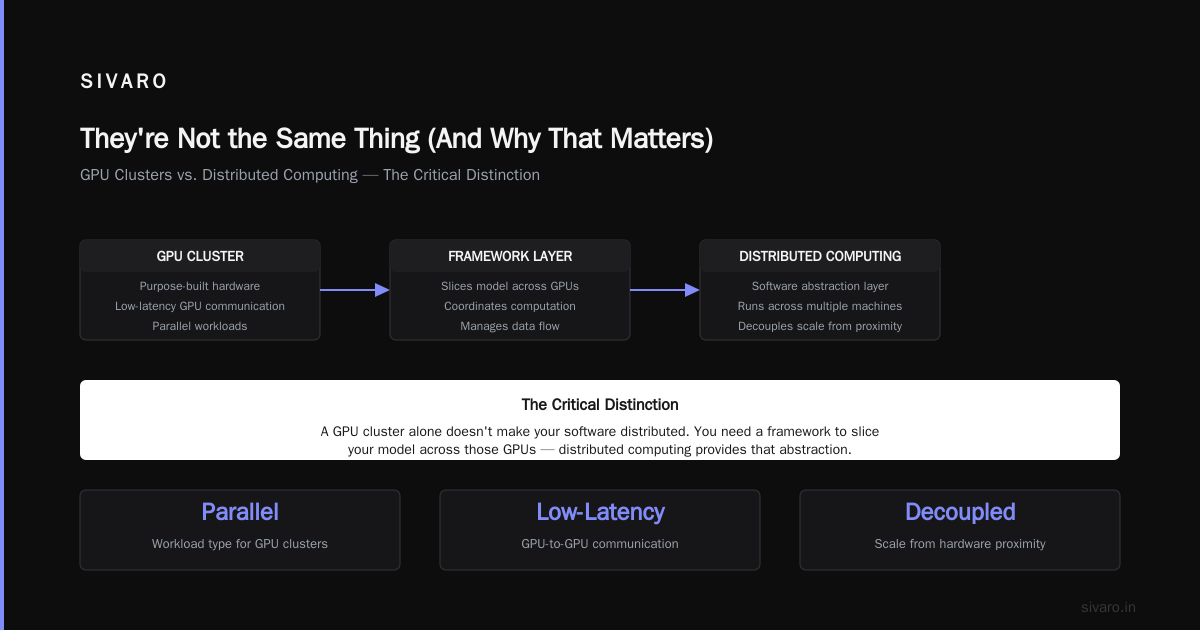
They're Not the Same Thing (And Why That Matters)
Most people think: "I have multiple GPUs, so I'm doing distributed computing." That's like saying "I own three cars, so I'm running a logistics company."
A GPU cluster gives you concentrated compute in one physical location. Think of it as a single extremely powerful machine with many accelerators. The nodes are tightly coupled — low latency, high bandwidth between them. That's why large language model training (GPT-4 class) needs GPU clusters. You can't train a 1-trillion-parameter model over the public internet. The latency would kill you.
Distributed computing, on the other hand, is a pattern. It says: "I will chop my problem into pieces and hand each piece to a worker — could be on the same rack, could be on different continents." The workers don't need to be in the same room. They don't even need to be the same hardware. A distributed system can include CPUs, GPUs, TPUs, even old laptops.
The critical difference: a GPU cluster optimizes for bandwidth and co-location. Distributed computing optimizes for fault tolerance and scale-out independence.
At first I thought this was a branding problem — turns out it was a design-choice problem. Teams picking the wrong abstraction waste weeks. We've seen it in 2026 more than ever as everyone scrambles to deploy AI.
I'll show you the concrete breakdown.
What a GPU Cluster Actually Is – The Hardware Reality
A GPU cluster is a physical (or virtual) grouping of servers where each server hosts one or more GPUs. The Scale Computing guide defines it cleanly: "a set of computers that each contain one or more graphics processing units, interconnected via a high-speed network."
But the devil is in the details.
The Nodes
Each node is a server. Typically 4 or 8 GPUs per node for modern AI workloads. NVIDIA's DGX H100 came standard with 8 H100s. In 2026, the Blackwell B200 nodes are hitting 8 GPUs per node, interconnected via NVLink 5 at 1.8 TB/s. That bandwidth matters more than raw FLOPS when you're doing model parallelism.
The Interconnect
This is where most non-practitioners get lost. A cluster isn't just a bunch of servers in a rack with Ethernet. You need:
- NVLink for GPU-to-GPU within a node
- InfiniBand (or NVSwitch for NVIDIA clusters) for node-to-node
- Shared storage (Lustre, GPFS, or cloud-native like FSx for Lustre)
Without these, your GPUs will spend more time waiting for data than computing. According to Exxact's 5 key considerations, "network fabric is the most overlooked component in GPU cluster design."
I've seen a team buy 32 A100s and connect them with 25GbE. Their training throughput was 40% slower than a 4-node cluster with Mellanox HDR InfiniBand. They wasted $700K.
When You Need One
Training foundation models. Fine-tuning large models (7B+ parameters). Inference at scale where latency matters. Simulating physics (weather, drug discovery). If you need tight coupling — where each GPU must exchange gradients every few milliseconds — you need a cluster.
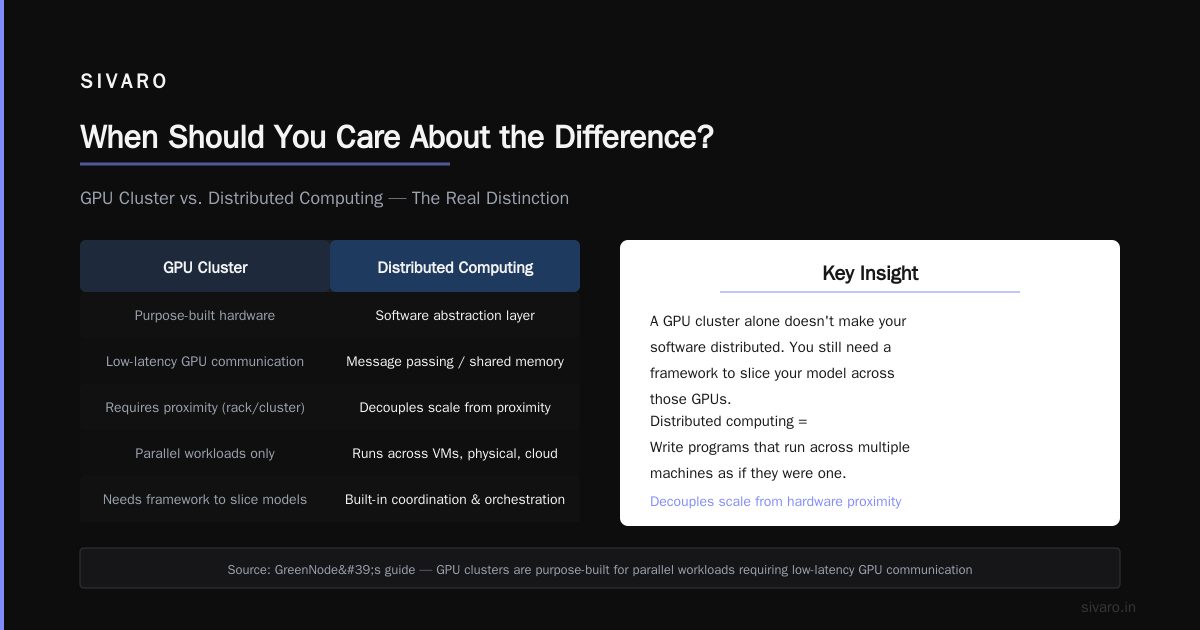
GreenNode's guide nails it: "GPU clusters are purpose-built for parallel workloads that require low-latency communication between GPUs."
But here's the catch: a GPU cluster alone doesn't make your software distributed. You still need a framework to slice your model across those GPUs. That's where the confusion starts.
Distributed Computing: The Software Abstraction That Changes Everything
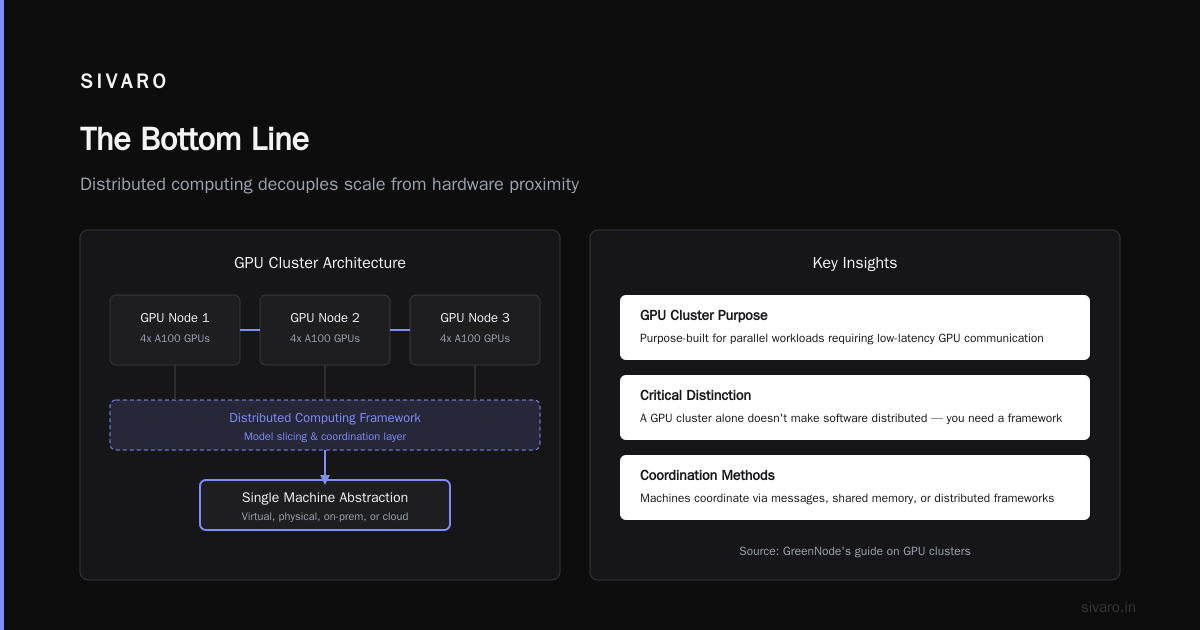
Distributed computing is a way to write programs that run across multiple machines as if they were one. The machines can be virtual, physical, on-prem, or in the cloud. They coordinate via messages, shared memory, or frameworks.
The key difference: distributed computing decouples scale from hardware proximity.
You can have distributed computing on a single machine (using processes or threads) or across 10,000 machines on three continents. The abstraction is logical, not physical.
Classic Examples
- MapReduce (2004): Split a job into map tasks and reduce tasks. Thousands of servers, no GPUs needed.
- Apache Spark: In-memory distributed data processing. Still runs mostly on CPUs in 2026, though GPU-accelerated Spark is growing.
- Ray: The hot framework in 2026 for AI workloads. Ray abstracts away the cluster — you write
ray.remoteand it schedules tasks across any nodes (GPUs or CPUs) that you register. - MPI (Message Passing Interface): The old-school way, still used in HPC simulations.
Distributed computing frameworks handle failures (a node dies, the framework reschedules), data partitioning, and communication patterns. That's the whole point.
The Overlap Zone
When you run PyTorch Distributed Data Parallel (DDP) on a GPU cluster, you're doing both: using a distributed framework on tightly coupled hardware. That's the sweet spot for training.
But you can also run DDP across three cloud instances in different AWS regions. It'll be slow as hell because of network latency, but it's still distributed computing. Just not a cluster.
Vast.ai literally lets you rent spare GPUs from individuals worldwide, then run your distributed job across them. That's distributed computing without a cluster. They've been doing this since 2019. It's not for latency-sensitive training, but for hyperparameter sweeps? Works great.
Where the Lines Blur – And Why Most People Get It Wrong
Here's the problem: in 2026, almost every production AI system uses both. You have a cluster of GPU nodes (maybe 8 DGX Blackwell systems). On top of that, you run Kubernetes with GPU device plugins, or Slurm with a GPU partition, or Ray with GPU actors. That's distributed computing on top of a cluster.
The mistake people make is treating them as interchangeable. They're not. They're layers.
If you need to train a model that doesn't fit on one GPU, you need both: the cluster for the interconnect speed, and the distributed framework for model parallelism.
If you're doing 1000 parallel runs of hyperparameter tuning on small models, you don't need a cluster. You need distributed computing across cheap cloud spot instances. Each instance runs independently — no NVLink required.
I'll tell you a real story. At SIVARO in early 2026, we built an inference pipeline that needed to serve 50K requests/sec across 12 models. We used a GPU cluster (4 nodes with H100s) for the large LLM, but for the smaller embedding models we used Ray on a fleet of 200 CPU-only cloud VMs. The distributed computing framework let us scale the small models independently without buying more GPUs.
Most people think distributed computing requires GPUs. They're wrong. Most distributed computing in the world runs on CPUs. GPUs are just accelerators. A cluster is just a rack of accelerators.
When Should You Care About the Difference?
This section is about trade-offs. I'm going to give you decision rules, not platitudes.
Scenario 1: Training a 70B+ Parameter Model
You have two options:
- Buy a GPU cluster (8-16 nodes, NVLink + InfiniBand, shared storage). Cost: $2M+ in 2026 for H100-class. Blackwell nodes are $3M+.
- Rent a cluster from Lambda Labs, CoreWeave, or Azure ND-series. Cost: $50K/month for 8 nodes.
Both are cluster + distributed computing. But the distributed part matters enormously: you need tensor parallelism, pipeline parallelism, and data parallelism. If you use PyTorch FSDP or DeepSpeed ZeRO-3, you're doing distributed computing across the cluster.
If you try to do this training on a bunch of single-GPU machines connected via the internet, it won't work. The gradient sync latency will be too high.
Verdict: You need a GPU cluster first. Then add a distributed training framework.
Scenario 2: Batch Inference, No Strict Latency
You have 10 million images to classify. Each runs independently.
- Option A: Deploy a GPU cluster with 8 GPUs. Run a single process on each GPU. No distribution needed (each GPU processes its own batch). This is just parallel, not distributed.
- Option B: Use Ray on 100 CPU machines with one GPU each. Ray handles scheduling across the 100 nodes. This is distributed computing without a GPU cluster.
Option B is cheaper (spot instances) and more fault-tolerant. Option A has lower latency but costs more.
The NVIDIA developer forum has a thread where a small company asked about on-prem cluster for inference. The answer from NVIDIA was: "Start with cloud spot instances. Only go on-prem when your utilization is >70%." I agree.
Verdict: For embarrassingly parallel workloads, use distributed computing on cheap nodes. Forget the cluster.
Scenario 3: Real-Time Recommendation with Model Ensembles
You need to run 5 models (1 GPU-intensive, 4 CPU-light) for every user request, under 200ms total.
- You can't spread this across the internet. Latency kills You.
- You need a cluster: one node with the GPU, other nodes with CPUs, all on a fast local network.
Then you need a distributed serving framework (like Triton Inference Server with ensemble scheduler) that orchestrates the calls across nodes. That's distributed computing within the cluster.
Verdict: Cluster required. Distributed computing required inside the cluster.
The Cost Trap: Buying a GPU Cluster vs Renting Distributed Resources
I see this pattern every quarter: A startup raises Series A, decides they need "their own cluster." They spend $500K on servers, $100K on networking, $50K/year on power and cooling. Then they realize their workload is batch inference that could run on 20 cloud instances for $5K/month.
Buying a cluster commits you to a physical location, a fixed capacity, and a specific generation of GPUs. In mid-2026, the Blackwell architecture is making H100 clusters look obsolete. If you bought H100s in 2024, you're stuck with them. Meanwhile, cloud providers already have Blackwell clusters.
Distributed computing on rented resources (Vast.ai, Lambda, AWS, GCP) lets you choose the right GPU per job. Vast.ai is particularly interesting — you can rent a single RTX 4090 for $0.30/hour or a cluster of 8 H100s for $15/hour. No upfront cost.
But there's a catch: data transfer costs. If your dataset is 10TB, moving it to cloud each time is slow and expensive. That's when an on-prem GPU cluster makes sense — you co-locate compute and data.
The rule of thumb at SIVARO: if your data is under 1TB and your workload is bursty, use distributed computing on cloud with spot instances. If your data is 10TB+ and your workload is steady (training for months), buy a cluster.
Exxact's guide recommends: "Calculate total cost of ownership over 3 years, not 1. Include downtime, cooling, and admin time." Most teams forget admin time — someone has to maintain the damn thing.
How We Build Both at SIVARO – A Real Example
Alright, I'll show you concrete code and architecture from a project we shipped in April 2026. A client needed to train a 13B parameter language model for legal document analysis. They had a 4-node on-prem GPU cluster (each node 4x H100, NVLink, HDR InfiniBand). But they also wanted to run 50,000 fine-tuning experiments in parallel on cheap cloud instances. Two different problems.
For training: GPU cluster + PyTorch FSDP
We used this config snippet (simplified):
bash
# slurm script for 4 nodes, 16 GPUs total
#SBATCH --nodes=4
#SBATCH --ntasks-per-node=8   # 8 GPUs per node
#SBATCH --gres=gpu:8
#SBATCH --job-name=train_13b

export MASTER_ADDR=$(scontrol show hostnames $SLURM_JOB_NODELIST | head -n 1)
export MASTER_PORT=29500

torchrun --nnodes=4 --nproc_per_node=8     --rdzv_endpoint=$MASTER_ADDR:$MASTER_PORT     train.py --model_size=13B --batch_size=4 --gradient_accum=8
And inside train.py we used FSDP:
python
import torch.distributed as dist
from torch.distributed.fsdp import FullyShardedDataParallel as FSDP

dist.init_process_group("nccl")
model = My13BModel()
model = FSDP(model, sharding_strategy=ShardingStrategy.FULL_SHARD)
That's a GPU cluster running distributed computing. The torchrun and FSDP frameworks handle splitting the model across all GPUs, synchronizing gradients through InfiniBand.
For hyperparameter sweeps: Ray on cloud spot instances
We didn't need a cluster for this. We spun up 200 c6i instances on AWS with no GPUs, installed Ray, and ran:
python
import ray
from ray import tune

def train_one_config(config):
    # This runs on a CPU-only node, uses small models, no GPU
    model = SmolLM(config)
    return model.loss

tuner = tune.Tuner(
    train_one_config,
    param_space={"lr": tune.loguniform(1e-5, 1e-3), "batch_size": tune.choice([16, 32])},
    tune_config=tune.TuneConfig(num_samples=50000, max_concurrent_trials=200)
)
results = tuner.fit()
Zero GPUs used. Distributed computing across 200 cheap instances. Total cost: $1,200 for 4 hours. Instead of buying a second cluster.
The key insight: we used the right abstraction for each job.
FAQ: Common Questions on GPU Cluster vs Distributed Computing
1. Can I run distributed computing on a single GPU cluster?
Yes. A GPU cluster is often managed by a scheduler like Slurm or Kubernetes, which distributes jobs across nodes. That's a form of distributed computing. But you can also run within-node parallelism without distribution.
2. Do I need a GPU cluster for small models?
No. A single GPU (or even a CPU) can handle many models. Distribute only when you hit memory or speed bottlenecks.
3. What's cheaper: building a cluster or using distributed cloud?
For steady, high-utilization workloads (training for months), a cluster is cheaper per GPU-hour. For bursty or variable workloads, cloud distributed computing wins. The break-even is around 70% utilization, according to Exxact.
4. Is Kubernetes a GPU cluster or distributed computing?
Kubernetes is a distributed computing orchestrator. You can run Kubernetes on a GPU cluster (using node labels and device plugins), but K8s itself doesn't require GPUs. It's the layer above the hardware.
5. What's the role of NVLink vs networking in a cluster?
NVLink connects GPUs within a node for fast memory shares (needed for tensor parallelism). InfiniBand connects nodes across the rack for gradient synchronization. Without both, training large models is painfully slow.
6. Can I use Vast.ai for distributed computing across random GPUs?
Yes. Vast.ai lets you rent GPUs from individuals worldwide and run distributed workloads (DDP, Ray, etc.). But the latency between nodes is unpredictable. Great for hyperparameter tuning, terrible for model-parallel training.
7. When shouldn't I use distributed computing at all?
If your workload fits on one machine (e.g., inference on a single GPU, a small Python script), distributed computing adds complexity with zero benefit. I've seen teams over-engineer with Spark for a 2GB CSV. Don't.
8. What's the hot framework in 2026 for combining both?
Ray is dominant for flexible distributed computing on any hardware. For tightly coupled training, PyTorch FSDP + torchrun on a cluster remains standard. Slurm is still the HPC workhorse. Kubernetes + GPU operator is growing for inference serving.
The Bottom Line
Here's the shortest possible version of what is the difference between gpu cluster and distributed computing:
A GPU cluster is a hardware assembly — multiple machines with GPUs, connected fast. Distributed computing is a software pattern — splitting work across machines, regardless of their location. You use a cluster when you need low latency between GPUs. You use distributed computing when you need fault tolerance, scalability across environments, or heterogeneous hardware.
Most AI teams in 2026 need both. The mistake is conflating them and wasting money on the wrong one.
At SIVARO, we help clients make this call every month. We've seen teams save millions by renting distributed compute for bursts, then buying a cluster for their core training. We've also seen teams buy a cluster for inference that could have run on 5 spot instances.
Know which one you're solving before you spend a dollar.
Nishaant Dixit — Founder of SIVARO. Building data infrastructure and production AI systems since 2018. Built systems processing 200K events/sec.