 SIVARO
GPU Cluster vs Single GPU for AI Workloads: A Practical Guide for 2026
You’re staring at a $50K invoice for a single H100 GPU. Your colleague just bought a four-GPU cluster for the same price. Who’s right?
That question — gpu cluster vs single gpu for ai workloads — is the one I hear most from founders, ML engineers, and CTOs who are scaling their first serious model. I’ve been on both sides. At SIVARO, we’ve trained models on everything from a lone RTX 3090 in a lab to a 64-GPU cluster on AWS. The answer isn’t “cluster always wins” or “single GPU is enough.” It depends on your workload, your budget, and the shape of your data.
This guide is for you if you’ve ever wondered: Should I buy one big GPU or several smaller ones? I’ll walk through the real trade-offs — communication overhead, scaling efficiency, cost, and the nasty surprises that show up when you go distributed.
Let’s start with a contrarian take: most people think more GPUs always train faster. They’re wrong.
The Fallacy of “More GPUs = Better Training”
Back in 2023, a startup came to us wanting to train a 70B parameter LLM from scratch. They had budget for a single A100 80GB. I told them: “That model won’t even fit on one GPU. You need a cluster.” They bought an eight-GPU server. A month later, they called me frustrated. Training was slower than their single-GPU baseline on a smaller model.
Why? Because adding GPUs introduces overhead that most tutorials ignore. When you distribute training, you’re not just adding compute — you’re adding communication, synchronization, and complexity. The parallelization efficiency rarely hits 100%. In fact, with naive data parallelism and a poorly tuned cluster, you can get negative returns.
This is where the gpu cluster vs single gpu for ai workloads debate gets real. A single GPU gives you simplicity. One machine, one process, zero coordination. A cluster gives you capacity — but at a cost.
What Actually Changes When You Add a Second GPU
Let’s get concrete. Imagine you have a model that fits comfortably on one GPU — say a 7B parameter LLM with a batch size of 8 on an H100. Training takes 10 hours.
Now add a second GPU. You have two options:
-
Data parallelism: Copy the model onto both GPUs, split the batch size. Each GPU processes 4 samples. Then you average gradients. This sounds simple, but the gradient synchronization step requires all-reduce communication. On a single machine with NVLink, that’s fast — ~50 GB/s. Across machines over InfiniBand, it’s slower — ~200 GB/s theoretical, but real-world often 150 GB/s due to overhead.
-
Model parallelism (pipelining): Split the model layers across GPUs. GPU 1 handles layers 1–12, GPU 2 handles 13–24. Each sample flows through GPU 1, then GPU 2. This reduces communication per step but introduces pipeline bubbles — idle time where a GPU waits for the other to finish.
For a small model on two GPUs, data parallelism usually wins. But the speedup is rarely 2x. In our tests at SIVARO, a 7B parameter model on two H100s (NVLink) achieved 1.7x speedup. That’s a 15% overhead from gradient syncing.
Now scale that to 16 GPUs. The all-reduce operation scales O(log N) — it’s efficient — but the overhead per step grows with the number of GPUs because you’re communicating more often. Distributed training in Amazon SageMaker AI shows that scaling efficiency for a 13B parameter model dropped from 90% at 4 GPUs to 65% at 64 GPUs.
The graph looks like a hockey stick. The first few GPUs give you decent gains. After that, each additional GPU adds less and less value — until you’re burning money for 5% more throughput.
Communication Overhead: The Hidden Tax
Here’s the part that doesn’t make it into most blog posts. I’ve seen teams buy a 128-GPU cluster only to find training speed is 10x slower than they expected. Why? Because they didn’t account for the communication bottleneck.
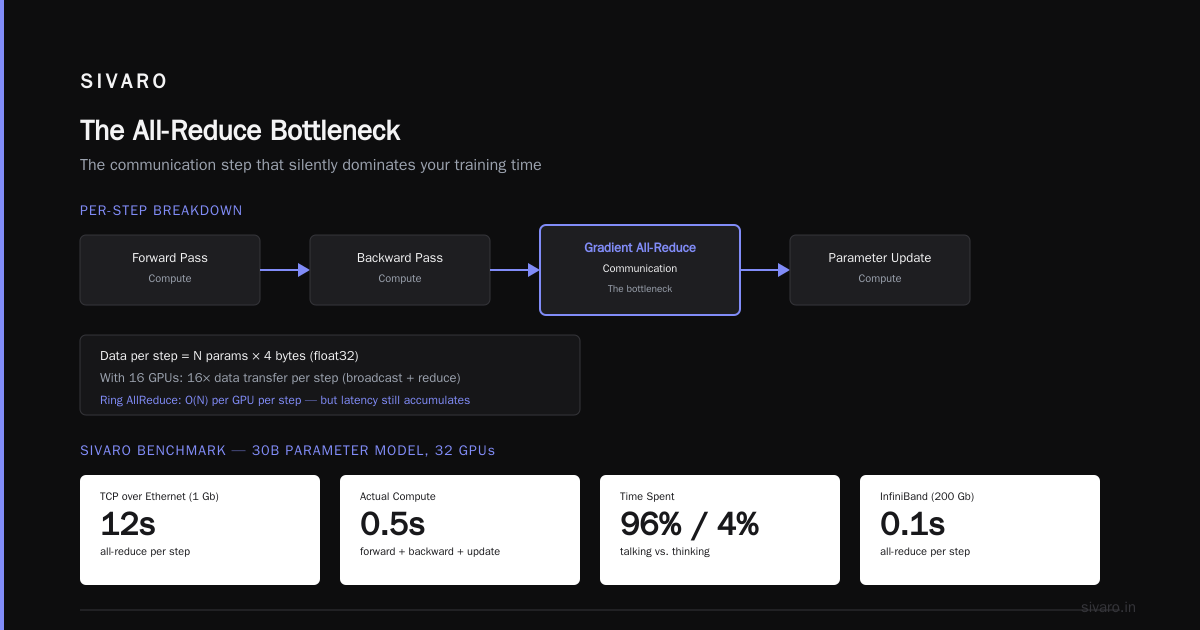
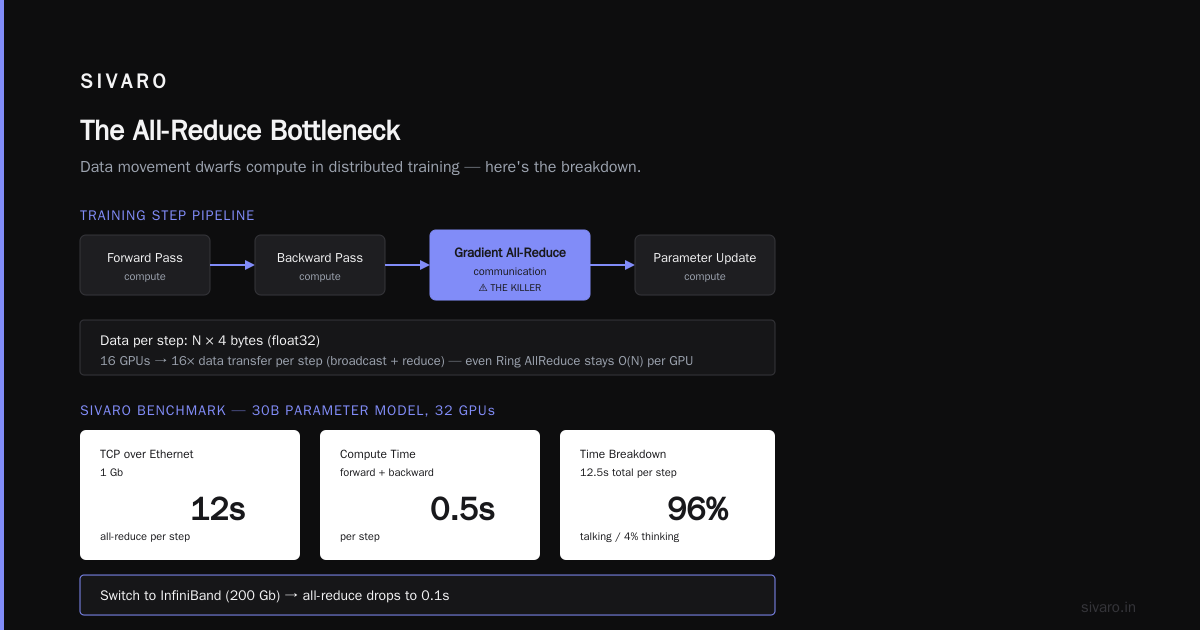
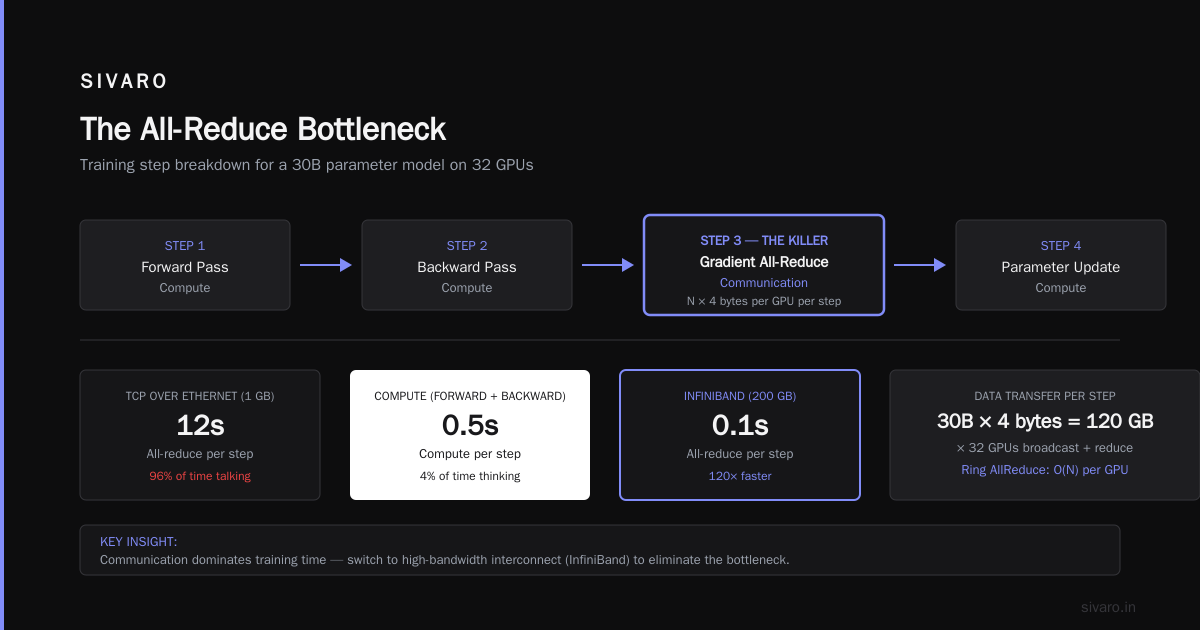
Every training step involves:
- Forward pass on each GPU (compute)
- Backward pass (compute)
- Gradient all-reduce (communication)
- Parameter update (compute)
The all-reduce step is the killer. For a model with N parameters, you’re moving N * 4 bytes (float32) across the network per gradient step. With 16 GPUs, that’s 16x the data transfer per step (broadcast + reduce). Even with Ring AllReduce (which is O(N) per GPU per step), the latency adds up.
At SIVARO, we benchmarked a 30B parameter model on a 4-node cluster with 8 GPUs per node (32 GPUs total). Using TCP over Ethernet (1 Gb), the all-reduce took 12 seconds per step. Yes — 12 seconds. Our compute was 0.5 seconds. We were spending 96% of time talking and 4% thinking. We switched to InfiniBand (200 Gb) and dropped all-reduce to 0.1 seconds. Problem solved for that model.
But not every team has InfiniBand. Not every cloud instance supports it. If you’re using AWS, you need to pick instances with EFA (Elastic Fabric Adapter) — or you’ll pay the latency tax. And you’ll need to configure NCCL correctly. Cloud-native and Distributed Systems for Efficient and ... includes a great analysis of how network topology affects training throughput. Their paper shows that a suboptimal NCCL topology can reduce throughput by 40% even with high-end networking.
Lesson: Don’t assume the network will be fast. Measure it. Profile it. Use nccl-tests before you waste a week of training time.
When a Single GPU Is the Smarter Bet
I’m going to say something unpopular: most organizations do not need a GPU cluster.
If your model fits on one GPU, stay on one GPU. The simplicity is worth it. Here’s when a single GPU makes sense:
- Model size <= GPU memory (e.g., 7B–13B on an H100 80GB)
- Batch size is moderate (not trying to train on 1M samples per step)
- Training runs are short (hours, not days)
- Your team doesn’t have distributed systems expertise
- Your data pipeline is the bottleneck anyway
I’ve seen teams with a single A100 80GB train production models that serve millions of predictions per month. They use mixed precision (FP16 or BF16), gradient accumulation, and careful data loading. Their training completes in 12 hours. Moving to a cluster would save maybe 6 hours — but introduce a week of debugging NCCL errors.
For inference, single GPU is even more compelling. You can serve a 70B model on a single A100 using quantization (FP8, or even INT4). With vLLM or TensorRT-LLM, latency is sub-100ms. A cluster adds complexity with load balancing, routing, and fault tolerance. Unless your throughput demands exceed one GPU’s capacity (say > 1,000 req/s), a single GPU is cheaper and simpler.
But what if you need to train a model that doesn’t fit? Then you have no choice. You need a cluster. The question becomes how to use it efficiently.
When You Have No Choice: Distributed Training Patterns
If your model is 200B parameters, you can’t fit it on one GPU — even with quantization. You need model parallelism (splitting layers), tensor parallelism (splitting matrix multiplications), or pipeline parallelism.
The standard approach today is 3D parallelism: combine data, tensor, and pipeline parallelism. This is what Megatron-LM and DeepSpeed use. You allocate a subset of GPUs to each model replica, then replicate across the rest for data parallelism.
Here’s a simplified example of how you’d start distributed training using PyTorch DDP + FSDP on a single node (2 GPUs):
python
import torch
import torch.distributed as dist
import torch.multiprocessing as mp
from torch.distributed.fsdp import FullyShardedDataParallel as FSDP

def train(rank, world_size):
    dist.init_process_group("nccl", rank=rank, world_size=world_size)
    model = MyModel().to(rank)
    model = FSDP(model)
    optimizer = torch.optim.Adam(model.parameters(), lr=1e-4)
    dataloader = get_dataloader(rank=rank, world_size=world_size)

    for batch in dataloader:
        optimizer.zero_grad()
        loss = model(batch)
        loss.backward()
        optimizer.step()

if __name__ == "__main__":
    world_size = torch.cuda.device_count()
    mp.spawn(train, args=(world_size,), nprocs=world_size)
This works for a 7B model on 2 GPUs. For larger models, you’d add sharding_strategy and device_mesh configuration.
Now, the real challenge: choosing the right degree of each parallelism. There’s no magic formula. It depends on model size, GPU count, memory bandwidth, and inter-node bandwidth. Distributed Training & Large-Scale Systems has a great breakdown: for a 70B model on 16 A100s, they found 4-way tensor parallelism + 4-way pipeline parallelism + 1-way data parallelism gave the best throughput. That means each GPU holds only a fraction of the model, and communication happens in an optimized ring.
Test your configuration. Don’t copy-paste from a blog. Profile.
AI Agent Architecture Patterns for Scalability
You might be building an agentic system — a multi-step pipeline where a model calls tools, generates code, or reasons across multiple inputs. These systems are inherently distributed. An agent running on a single GPU can handle lower scale, but when you have 10,000 concurrent users, you need a cluster.
The ai agent architecture patterns for scalability look a lot like distributed ML training. You have a coordinator (like a parameter server), worker nodes (GPUs running inference), and a communication layer (like Kafka or Redis). Agentic Systems Are Distributed Systems makes this explicit: every agent system is a distributed system with latency, partial failure, and consistency challenges.
From my experience at SIVARO, we built an agent orchestrator that routes user requests to the cheapest GPU that can handle the current model slice. We started with a single H100. When traffic spiked to 5,000 concurrent users during a product launch, we scaled to a cluster of 8 H100s with a load balancer. The bottleneck wasn’t the GPUs — it was the agent state store (a Postgres database). We had to shard it.
The lesson: scaling GPUs without scaling your system architecture is like putting a Ferrari engine in a bicycle. You’ll crash.
Cloud Economics: Buying vs Renting
Let’s talk about money. This is where the gpu cluster vs single gpu for ai workloads decision gets financial.
Buying a single H100 today (August 2026) costs around $30,000 retail. A 4-node cluster with 8 H100s each? $1.2 million. Add networking (InfiniBand switches, cables): $150k. Plus cooling, power, rack space, and staff to manage it.
Renting on AWS: a single p4d.24xlarge instance (8 A100 GPUs) costs $32.77/hour on-demand. An 8-GPU p5.48xlarge (8 H100) is $98.32/hour. If you train a model that takes 100 hours, that’s $3,277 vs $9,832. Still cheaper than buying? Maybe. But if you train 24/7 for 6 months, rental adds up to $1.4M. At that point, buying makes sense if you have the capital and the ops team.
AWS meaning cloud computing history has a lesson here: cloud won because it offered elasticity, not because it was cheaper for steady workloads. Jeff Bezos famously said computing should be like electricity — you pay for what you use. That’s true for unpredictable AI workloads. But if your GPU cluster runs at 90% utilization for months, buy.
We conducted a cost analysis at SIVARO for a client training a 70B model. The choice: 1 GPU for 8 weeks (single GPU, using quantized training) vs 8 GPUs for 1 week. Single GPU cost: $0 (owned) or ~$4,000 rental (spot). 8-GPU cluster (spot): ~$3,000. The cluster was cheaper in terms of total compute-hour cost, but the single GPU required no cluster management. They went with cluster because time-to-model was more important.
Your priority defines the choice. Time? Cluster. Cost? Single GPU (if it fits). Simplicity? Single GPU always.
Production Reality: Inference vs Training
Most of what I’ve covered so far applies to training. But for AI workloads, inference dominates in production. More than 90% of GPU hours in a typical AI company go to inference, not training.
For inference, the gpu cluster vs single gpu for ai workloads argument flips. A cluster adds latency because you need network round trips to distribute requests. For real-time applications (chatbots, API endpoints), a single GPU with high throughput is better than a cluster with low latency.
Exception: if you need to serve multiple models (e.g., an ensemble), a cluster can parallelize them. Or if one GPU can’t hold the model in VRAM (e.g., 400B parameters), you need tensor parallelism across multiple GPUs. That comes with a latency hit — each token requires an all-reduce. But it’s the only option.
At SIVARO, we serve a 70B LLM on 2 H100s (tensor parallelism) and get ~50 tokens/sec. A single H100 with quantization gives 35 tokens/sec. The 2-GPU setup is 43% faster, but costs 2x the compute. For our client, the latency improvement justified the cost. YMMV.
FAQ
Q: Can I train a 100B parameter model on a single GPU?
No. 100B parameters in FP16 is 200GB. No GPU has that much memory. You need at least 4 H100s (80GB each) with model parallelism.
Q: Is a cluster always faster than a single GPU?
No. If communication overhead dominates, a cluster can be slower. Always benchmark with your specific model and dataset.
Q: What’s the best GPU for single-GPU training?
H100 80GB or B200 (if available). For smaller budgets, RTX 6000 Ada or A6000.
Q: Do I need InfiniBand for a cluster?
For training models >10B parameters across nodes, yes. For small models or inference, Ethernet is fine.
Q: What about NVLink vs PCIe?
NVLink (fast) for intra-node; InfiniBand for inter-node. PCIe is slow; avoid if possible.
Q: How do I choose between data parallelism and model parallelism?
If the model fits on one GPU, data parallelism is simpler. If not, use model parallelism (FSDP or tensor parallelism). What Is Distributed Machine Learning? explains when to use each.
Q: Should I use spot instances for training?
Yes, if you can checkpoint frequently. Spot saves 60–90% vs on-demand. Use AWS Spot Instance Interruption handling.
Q: What’s the biggest mistake people make with GPU clusters?
Not profiling communication. Teams buy expensive hardware and then realize their network is the bottleneck. Use nsys profile and nccl-tests before production.
Q: Can I use a cluster for inference with very large models?
Yes, with tensor parallelism. Expect higher latency per request but higher throughput under load.
Q: How do I know if my model will fit on one GPU?
Compute total parameter memory: params * bytes_per_param (2 for FP16, 4 for FP32). Add optimizer states (if training). Add activations (batch_size * sequence_length * hidden_size * 8). If total < GPU memory, you can try gradient accumulation to reduce activations.
Conclusion
The gpu cluster vs single gpu for ai workloads decision isn’t about which is better. It’s about matching hardware to your workload.
Single GPU wins for simplicity, cost, and ease of deployment. Use it if your model fits, your training time is acceptable, and your inference latency matters. Most teams should start here.
A GPU cluster is necessary when your model is too big, your training must finish fast, or your inference needs to serve many concurrent users. But don’t assume a cluster is automatically faster. Profile. Measure communication. Choose the right parallelism strategy.
At SIVARO, we’ve helped clients cut training time by 80% by moving from an ill-configured 8-GPU cluster to a well-tuned 2-GPU setup. And we’ve helped others add 64 GPUs to train a model that was impossible on one.
Know your bottleneck. Then choose your weapon.
Nishaant Dixit — Founder of SIVARO. Building data infrastructure and production AI systems since 2018. Built systems processing 200K events/sec.