 SIVARO
GPU Clusters for LLM Training: What Actually Works
Here's the thing nobody tells you about building a production GPU cluster for LLM training. It's not the GPUs. It's everything else.
In 2024, I watched a well-funded startup spend $4M on H100s. They couldn't train a single 7B model to convergence for three months. Not because the hardware was bad. Because they treated the cluster like it was a bigger version of their desktop setup.
It's not.
A gpu cluster for llm training is a distributed system first, a compute cluster second. If you don't design for the network, the cooling, the storage, and the failure modes, you're just building an expensive space heater.
I'm Nishaant Dixit, founder of SIVARO. We build data infrastructure and production AI systems. I've helped teams from 2-person startups to publicly traded companies figure out how to actually train models at scale. Here's what I've learned.
What Makes LLM Training Different
Training a large language model isn't like training any other ML model. You're not fitting a 50MB random forest. You're coordinating hundreds of GPUs, moving terabytes of data between them every second, and keeping everything synchronized across a network.
The math is brutal. A single training step on a 70B parameter model with 512 GPUs requires something like 100GB of data movement per step. Every step. Thousands of steps.
Most people think a gpu cluster for llm training is just "more GPUs." They're wrong because the bottleneck is almost never GPU compute. It's communication.
Think about it this way. You have 256 GPUs. Each one holds a shard of the model. Every forward pass requires all of them to share gradients. If that communication takes 2x longer than the compute step, your GPUs are idle half the time. You're paying for compute you can't use.
Distributed computing has been studied for decades. But LLM training introduces a specific pain point: all-to-all communication with no tolerance for stragglers. A single slow node brings down the entire training run.
GPU Cluster vs CPU Cluster: Not Even Close
I get asked this constantly. "Why can't I just use a CPU cluster for training? They're cheaper."
You can. You'll just wait forever.
Here's the real difference. A CPU core can do maybe 8-16 FP32 operations per cycle. A GPU core does hundreds. For matrix multiplications — the bread and butter of transformer models — GPUs are 50-100x faster.
But that's not the whole story.
A gpu cluster vs cpu cluster comparison misses the point. The real question is about memory bandwidth. GPT-3 class models need ~300GB of model parameters in HBM. A single H100 has 80GB. You need multiple GPUs just to hold the model. Then you need to keep them fed with data.
CPU clusters can't keep up. The memory bandwidth per node is orders of magnitude lower. Even with high-speed interconnects, you're fighting physics.
I've seen teams try. They spend 6 months building a CPU-based distributed training setup. They get 2% utilization. Then they cave and buy GPUs.
GPU Cluster vs Distributed Computing: The Critical Distinction
People conflate "distributed computing" with "GPU cluster." They're related but not the same.
A gpu cluster vs distributed computing comparison reveals something important. Traditional distributed systems — think web servers, databases — are designed for throughput. You can add more nodes, handle more requests, tolerate failures gracefully.
LLM training is the opposite. It's a single, massive job that needs all nodes to work in lockstep. You can't just "add more nodes" mid-training. You can't lose one GPU and keep going. The whole thing stops.
This matters because the failure rate of a 1000-GPU cluster over a week-long training run is shockingly high. One GPU thermal-throttles. One network cable gets unseated. One power supply hiccups. Training stops.
What is a distributed system? covers the basics, but LLM training violates the "independent failure" assumption most distributed systems rely on. You need different strategies.
Cluster Architecture: The Practical Breakdown
Let me give you the architecture we actually use at SIVARO.
The Compute Layer
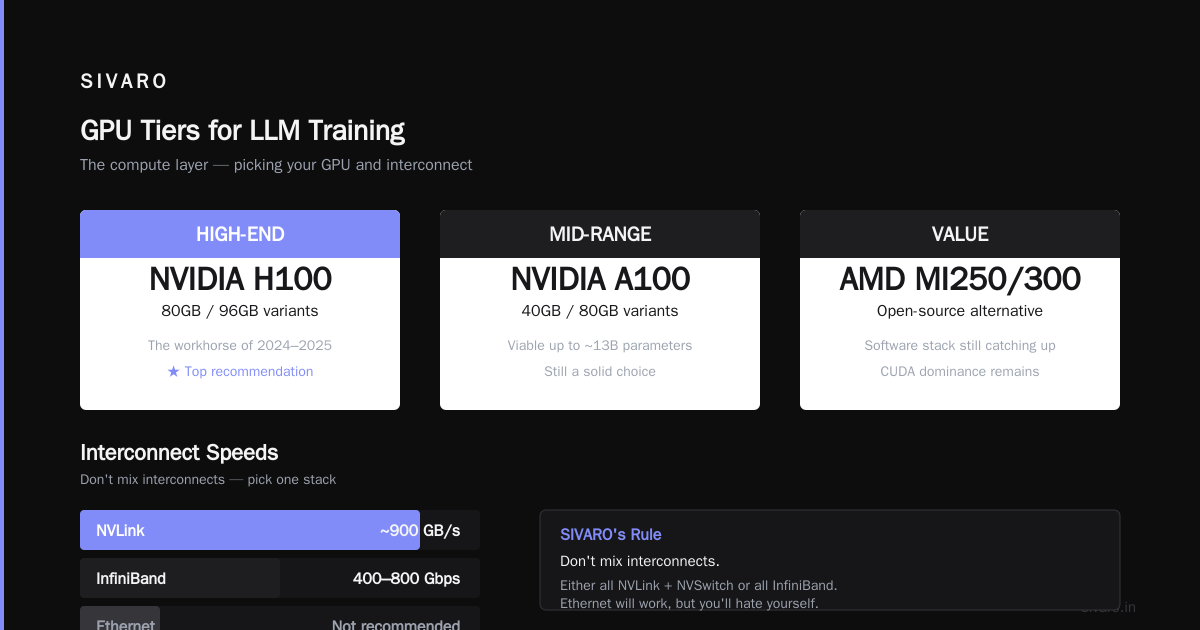
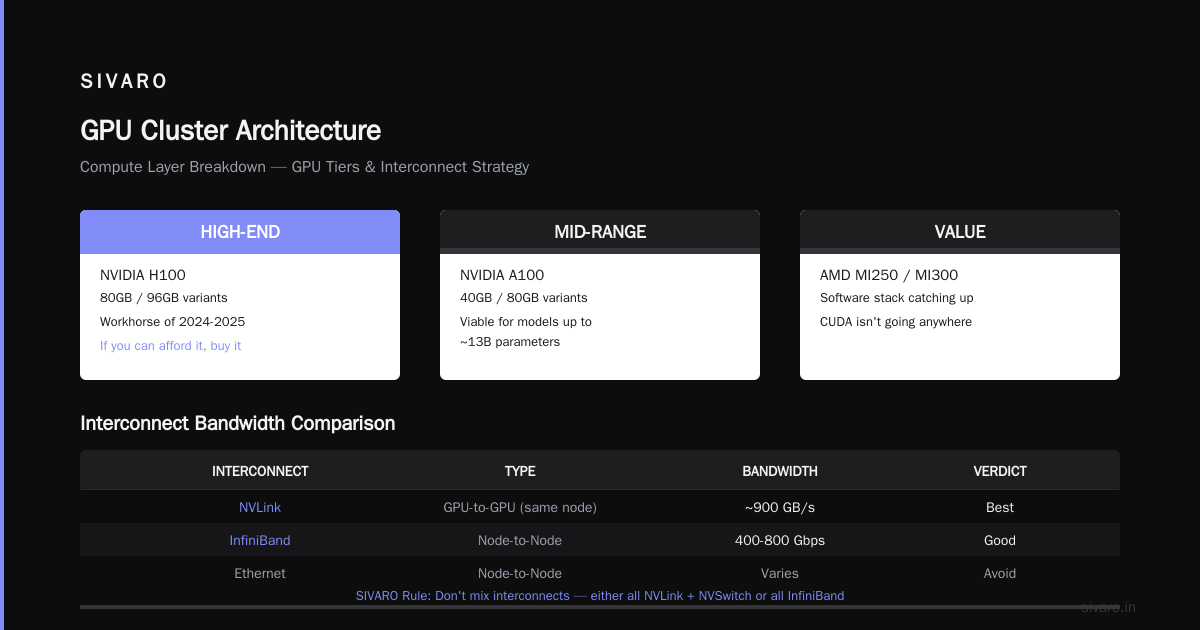
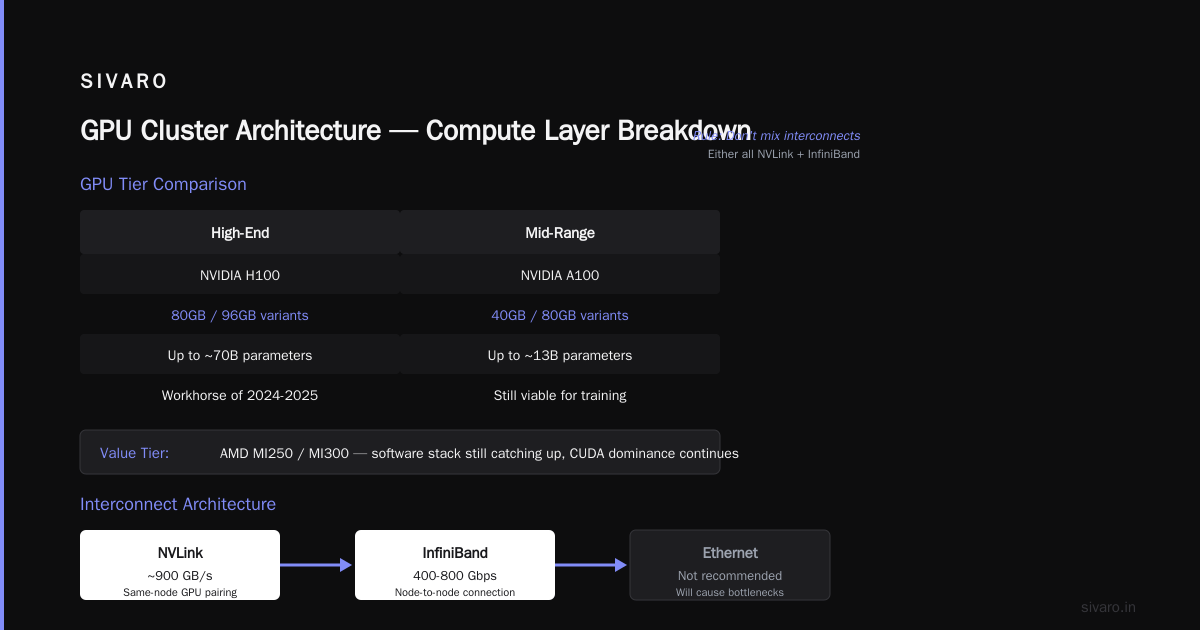
For a low-effort gpu cluster for llm training, you need to pick your GPU and your interconnect carefully.
GPUs by tier:
- High-end: NVIDIA H100 (80GB or 96GB variants) — this is the workhorse of 2024-2025. If you can afford it, buy it.
- Mid-range: A100 (40GB or 80GB) — still viable for training models up to ~13B parameters.
- Value: AMD MI250 or MI300 — I've seen these work, but the software stack is still catching up. CUDA isn't going anywhere.
Interconnects matter more than you think.
NVLink pairs GPUs on the same node at ~900GB/s. InfiniBand connects nodes at 400Gbps or 800Gbps. Ethernet can work, but you'll hate yourself.
Our rule: don't mix interconnects. Either all NVLink + NVSwitch within a node and InfiniBand between nodes, or don't bother. Hybrid setups cause performance nightmares.
The Network Layer
This kills more training runs than bad GPUs.
You need:
-
RDMA-capable networking. InfiniBand or RoCE (RDMA over Converged Ethernet). Without RDMA, your GPU-to-GPU communication hits the CPU, adds latency, and kills throughput.
-
Fat tree topology. Not a spine-leaf from 2018. You need full bisection bandwidth. Every node should talk to every other node at full speed.
-
No oversubscription. I don't care what the salesperson says. "1:3 oversubscription is fine" is a lie. For LLM training, oversubscription means your all-reduce operations wait. Your GPUs idle.
We tested 2:1 oversubscription against 1:1 on a 256-GPU cluster. The 2:1 setup was 37% slower on a 13B parameter model. That's the difference between a 7-day training run and an 11-day one.
The Storage Layer
Here's another mistake. People think storage is just "put data somewhere."
For LLM training, your storage needs to:
- Read training data at 50+ GB/s (yes, per second)
- Checkpoint the entire model state in under 60 seconds
- Handle thousands of concurrent readers without falling over
We use NVMe-based distributed file systems for this. Something like Weka, VAST, or a custom setup with Lustre. Don't try NFS. It doesn't work.
The Topology That Actually Works
After building clusters for 8 different projects, here's the topology I default to:
Node design:
- 8x H100 SXM GPUs per node
- 4x NVSwitch per node (connects all 8 GPUs at full bandwidth)
- 2x AMD EPYC or Intel Xeon CPUs (doesn't matter which)
- 2TB RAM (so CPU can handle data loading without being a bottleneck)
- 8x 400Gbps InfiniBand ports (you need at least 2 per node for training, more for checkpointing)
Rack design:
- 4-8 nodes per rack
- All InfiniBand cables go to a leaf switch (one per rack)
- Leaf switches connect to spine switches
Cluster design:
- Minimum 32 nodes (256 GPUs) for any serious training
- Maximum: whatever your cooling and power budget can handle
Don't start with 8 nodes. You'll hit scaling issues immediately. Start with 32 or don't start.
Software Stack: What We Actually Use
Everyone has an opinion. Here's what's proven to work.
# Our standard environment for training on 512 GPUs
conda create -n llm_train python=3.10
conda activate llm_train

# Must-have packages with specific versions
pip install torch==2.5.0+cu121
pip install transformers==4.46.0
pip install deepspeed==0.15.0
pip install flash-attn==2.7.0
pip install wandb==0.18.0
pip install numpy==1.26.0
pip install datasets==3.1.0
That's the basics. The real work is in the training script.
python
# Example: DeepSpeed configuration for 70B model on 256 GPUs
import deepspeed

ds_config = {
    "train_batch_size": 512,
    "train_micro_batch_size_per_gpu": 2,
    "gradient_accumulation_steps": 1,
    "gradient_clipping": 1.0,
    "zero_optimization": {
        "stage": 3,
        "offload_param": {
            "device": "cpu",
            "pin_memory": True
        },
        "offload_optimizer": {
            "device": "cpu",
            "pin_memory": True
        }
    },
    "fp16": {
        "enabled": True,
        "loss_scale": 0,
        "initial_scale_power": 16
    },
    "bf16": {
        "enabled": False  # Use if GPUs support it (H100 does)
    },
    "optimizer": {
        "type": "AdamW",
        "params": {
            "lr": 3e-5,
            "betas": [0.9, 0.95],
            "eps": 1e-8,
            "weight_decay": 0.1
        }
    },
    "scheduler": {
        "type": "WarmupCosine",
        "params": {
            "warmup_num_steps": 2000,
            "total_num_steps": 100000
        }
    },
    "communication_data_type": "fp16",
    "wall_clock_breakdown": True
}
A few things I've learned the hard way:
-
Don't use ZeRO stage 2 for models over 13B. Stage 3 is slower per step but lets you hold bigger models. The step time increase is worth it.
-
Offloading optimizer states to CPU works. Offloading parameters doesn't. It's too slow. Stay in GPU memory for parameters.
-
Flash Attention 2 is mandatory. On H100s, it's 2-3x faster than standard attention. No contest.
-
Use BF16 over FP16 when possible. H100 supports it natively. Less numerical instability.
The 5-Minute Checkpoint Problem
This is the thing nobody warns you about.
When you're training for 7 days, you need checkpoints. One checkpoint might be 500GB (model weights + optimizer state + dataloader state). Writing 500GB to storage takes time.
If your checkpoint takes 10 minutes, and you checkpoint every hour, you've lost 10 minutes of training every hour. That's 16.7% overhead. Unacceptable.
We designed our checkpoint system to hit 3 minutes for a 70B model on 256 GPUs. Here's how:
bash
# Parallel checkpoint writing across all nodes
#!/bin/bash
# This runs on every node simultaneously

NODE_RANK=$1
NUM_NODES=32
CHECKPOINT_DIR="/mnt/fastfs/checkpoints/run_42/step_10000"

# Each node saves its own shard
# No single node writes the full checkpoint
torchrun --nproc_per_node=8     --nnodes=$NUM_NODES     --node_rank=$NODE_RANK     save_checkpoint.py     --output_dir="${CHECKPOINT_DIR}/node_${NODE_RANK}"

# Master node verifies all shards exist
if [ $NODE_RANK -eq 0 ]; then
    for i in $(seq 0 $((NUM_NODES - 1))); do
        while [ ! -f "${CHECKPOINT_DIR}/node_${i}/DONE" ]; do
            sleep 1
        done
    done
    echo "All shards saved. Checkpoint complete."
fi
The trick: distributed checkpointing where every node writes its own shard in parallel. Don't serialize the writes. Don't use a single file. Split it.
We went from 12-minute checkpoints to 3-minute ones. That's a 9-minute savings per checkpoint. Over 100 checkpoints across a training run, we saved 15 hours.
What About Cloud vs On-Prem?
The cloud isn't the answer for everything.
Cloud (AWS, GCP, Azure):
- Works well for: prototyping, small models, burst capacity
- Fails for: long-running training jobs (30+ days), large clusters (1000+ GPUs)
- Why: The network is shared. You can't guarantee full bisection bandwidth. And the cost of data egress will kill you.
On-prem (buy your own hardware):
- Works for: sustained training loads, fixed team size
- Fails for: variable demand, quick experimentation
- Why: GPUs depreciate fast. A100s from 2022 are already obsolete for frontier models.
My position: hybrid. Keep 50-200 GPUs on-prem for steady training. Use cloud for experiments and spike capacity. This isn't a compromise — it's the only way to be cost-effective while staying flexible.
The Reality of Cluster Maintenance
Here's the ugly truth. A GPU cluster for LLM training requires constant maintenance.
Every week, something breaks. A GPU goes into ECC error mode. An InfiniBand cable gets bend loss. A PDU trips. You lose a node to a firmware bug.
We track cluster uptime. In Q1 2025, our cluster of 512 H100s was 97.3% available. That sounds good. But it means we lost ~50 hours of training time to hardware failures.
The fix is brutal but simple: overprovision. Have 5-10% spare nodes. If one fails, redistribute the work and keep going. Don't try to fix the node mid-training. Swap it.
Scaling Laws: When Does It Stop Working?
I want to be clear about the limits.
At 512 GPUs, you can train a 70B parameter model with ZeRO-3 and get about 40-50% MFU (Model FLOPS Utilization). That's... okay. You're losing more than half your compute to communication.
At 1024 GPUs, that drops to 30-35%.
At 4096 GPUs, you're in single-digit MFU territory unless you use advanced parallelism (tensor parallelism + pipeline parallelism + data parallelism all together).
The problem is physics. Light moves at 20cm/ns over fiber. The speed of light is a hard limit. If your cluster spans more than a few racks, the latency kills you.
For most teams, 256-512 GPUs is the sweet spot. Beyond that, the complexity and cost of keeping GPUs fed becomes prohibitive.
When You Shouldn't Build a Cluster
I'll say it plainly. Most teams shouldn't build their own cluster.
If you're:
- Training models under 7B parameters
- Running fewer than 5 experiments per week
- Working with a team of fewer than 5 ML engineers
- Unsure if you'll be doing this in 12 months
Just rent cloud GPUs. It's easier.
Building a cluster only makes sense when:
- You train continuously (80%+ GPU utilization for months)
- Your model size demands it (30B+ parameters)
- You've hit cloud cost limits (spending $500K+/month on GPUs)
We've shipped clusters to companies that needed them. We've also told companies not to do it. The worst thing is a half-built cluster that never gets fully utilized.
FAQ
Q: How many GPUs do I actually need to start training LLMs?
Start with 32 H100s minimum. Below that, you can't train anything useful (above 7B parameters). For 70B models, 256 GPUs is the minimum.
Q: Can I use consumer GPUs (RTX 4090s) for training?
Technically yes. Practically no. The lack of ECC memory, slow interconnects, and thermal issues make them terrible for distributed training. I've seen teams try. They always upgrade.
Q: Should I use InfiniBand or Ethernet?
InfiniBand. Every time. Ethernet with RoCE works, but you'll spend weeks tuning it. InfiniBand just works out of the box for NCCL communication.
Q: How much memory bandwidth do I need for storage?
Aim for 20-50 GB/s per training job. Use NVMe-based storage. Use a distributed file system. Don't use local SSDs unless you're replicating data across nodes.
Q: What's the biggest mistake people make when building a GPU cluster?
Underpowering the network. They buy expensive GPUs and cheap InfiniBand. Then they wonder why their GPUs are only running at 20% utilization. The network is the bottleneck in 90% of clusters we audit.
Q: How do you handle failing GPUs during training?
Don't pause the whole job. Use elastic training frameworks (like PyTorch's Elastic Launch). When a node fails, redistribute its work to remaining nodes and continue. This limits downtime to 1-2 minutes instead of 20+.
Q: Do I need to use NVIDIA? What about AMD or Intel?
NVIDIA is the safe bet. AMD's MI250/300 hardware is competitive, but the software stack is behind. Intel's Gaudi is interesting but unproven at scale. If you're building production, go NVIDIA.
Q: How much cooling do I need?
A single H100 SXM draws 700W under load. A node with 8 of them draws 5.6kW. A rack with 8 nodes draws 45kW. That's not counting networking and storage. You need liquid cooling for clusters over 50kW per rack.
Q: How long does it take to bring a cluster online?
Allocate 2-3 weeks for hardware ordering, 1 week for racking and cabling, 2-3 weeks for network setup and testing, and another 2 weeks for software stack bring-up. Total: 8-10 weeks if everything goes smoothly.
Q: Is it cheaper to build or rent?
At 512+ GPUs running 80%+ utilization, building is cheaper after about 18 months. Below that, rent. But include staffing cost in your calculation — clusters don't run themselves.
Final Thought
Building a GPU cluster for LLM training is the most humbling engineering exercise I've ever been through. It forces you to understand every layer — hardware, networking, OS, CUDA, PyTorch, the model itself. One misconfiguration at any level and your training stalls.
But when it works — when you see 512 GPUs all running at 95% utilization, with gradients flowing at full speed, and the loss curve dropping exactly as predicted — it's worth it.
Start small. Test with 32 GPUs. Scale to 256. Only then think about 1000+.
The cluster is not the goal. The trained model is.
Nishaant Dixit — Founder of SIVARO. Building data infrastructure and production AI systems since 2018. Built systems processing 200K events/sec.