 SIVARO
GPU vs CPU Inference Cost Efficiency: The 2026 Field Guide
You're burning money right now. Most teams are.
Here's the thing about the GPU vs CPU inference cost efficiency debate: most of what you've read is vendor marketing dressed up as analysis. GPU companies want you to buy GPUs. Cloud providers want you to rent more. Nobody wants you to figure out that your workload doesn't need a GPU at all.
island in the "GPU or bust" narrative. We run production systems processing 200K events/sec, and we've learned the hard way that inference cost efficiency isn't about picking a winner. It's about matching silicon to workload.
This guide covers the actual math of inference cost, when CPUs beat GPUs (more often than you think), when they don't, and how to design cost-efficient GPU clusters that don't collapse under their own cloud bills. Plus, I'll answer the question everyone's asking: how much will GPU prices rise in 2026?
Let's start with a story.
The $47,000 Lesson
In early 2025, a fintech client came to us with a crisis. They were spending $47,000 per month on GPU inference for a fraud detection model. The model processed about 2 million transactions daily. Latency requirements were modest—200 milliseconds was fine. The workload was mostly small batches, high cardinality features, and the occasional retraining trigger.
I asked one question: "Why GPUs?"
Silence.
Turns out, the previous engineering lead had read a blog post about GPU acceleration and made it company policy. Nobody questioned it. The GPU cluster sat at 12% utilization on average, but the bill didn't care about utilization. The bill cared about reserved instances.
We migrated to CPU inference with some aggressive quantization. The bill dropped to $6,200. Same model, same accuracy within 0.3%, latency actually improved because we weren't fighting GPU cold-start overhead.
That's the GPU vs CPU inference cost efficiency problem in a nutshell: most teams never ask whether they need the GPU in the first place.
What "Inference Cost" Actually Means
Before we talk about GPUs vs CPUs, let's define the problem. Inference cost isn't just the price of the hardware. It's:
- Hardware acquisition or rental costs — per-second pricing on cloud, amortized capital costs on-prem
- Utilization efficiency — what percentage of the silicon you actually use
- Latency penalties — underutilized GPUs waiting for work still cost money
- Power consumption — GPUs draw 300-700W under load; CPUs draw 100-280W
- Engineering time — optimizing for GPU requires different skills than optimizing for CPU
- Scaling behavior — how costs grow as request volume grows
The AI Inference Cost Economics in 2026: GPU FinOps Playbook breaks this down in detail. The key insight: inference costs are dominated by idle time and over-provisioning, not by actual compute.
Here's a simple mental model. If you're running a model continuously, serving requests around the clock, the cost equation changes completely. If you're running batch inference nightly, it changes again. If you're doing real-time inference with spiky traffic, you're in a completely different cost regime.
The mistake most teams make is treating all inference workloads the same.
The Math of Inference
Let's get concrete. For a transformer-based model, inference cost per request scales roughly with:
cost_per_request = (model_size_in_GB * 2) / (memory_bandwidth_in_GB_per_sec) * cost_per_second
Wait, that's not quite right. Let me be more precise.
For autoregressive decoding, the bottleneck is memory bandwidth, not compute. Each generated token requires reading the entire model weights from memory. So:
tokens_per_second = memory_bandwidth_GBps / model_size_GB
cost_per_token = cost_per_second / tokens_per_second
This is why CPU vs GPU: What's best for Machine Learning? explains that for small models, CPUs can match or beat GPUs on cost-per-token. A 7B parameter model in 4-bit quantization takes about 3.5GB of memory. An A100 has roughly 2TB/s of memory bandwidth. A high-end CPU like an AMD EPYC 9654 has about 460GB/s of bandwidth across all channels.
So:
- A100: ~570 tokens/sec theoretical
- EPYC 9654: ~131 tokens/sec theoretical
The A100 is 4.4x faster. But an A100 costs about 6-8x more per hour than a comparable CPU instance. So on cost-per-token, the CPU wins for small models.
But that's theoretical. Real-world performance depends on batch size, model architecture, and whether you're doing prefill or decode.
Let me show you what I mean with a real comparison.
# Cost-per-request comparison (simplified)
# Assume: 7B parameter model, 4-bit quantized, 3.5GB memory footprint

gpu_cost_per_hour = 2.50    # A100 on-demand
cpu_cost_per_hour = 0.35    # 16-core EPYC instance

gpu_tokens_per_sec = 450    # realistic, not theoretical
cpu_tokens_per_sec = 85     # realistic with good quantization

# Generating 500 tokens per request
gpu_latency = 500 / 450     # 1.11 seconds
cpu_latency = 500 / 85      # 5.88 seconds

gpu_cost_per_request = (1.11 / 3600) * gpu_cost_per_hour   # $0.00077
cpu_cost_per_request = (5.88 / 3600) * cpu_cost_per_hour   # $0.00057
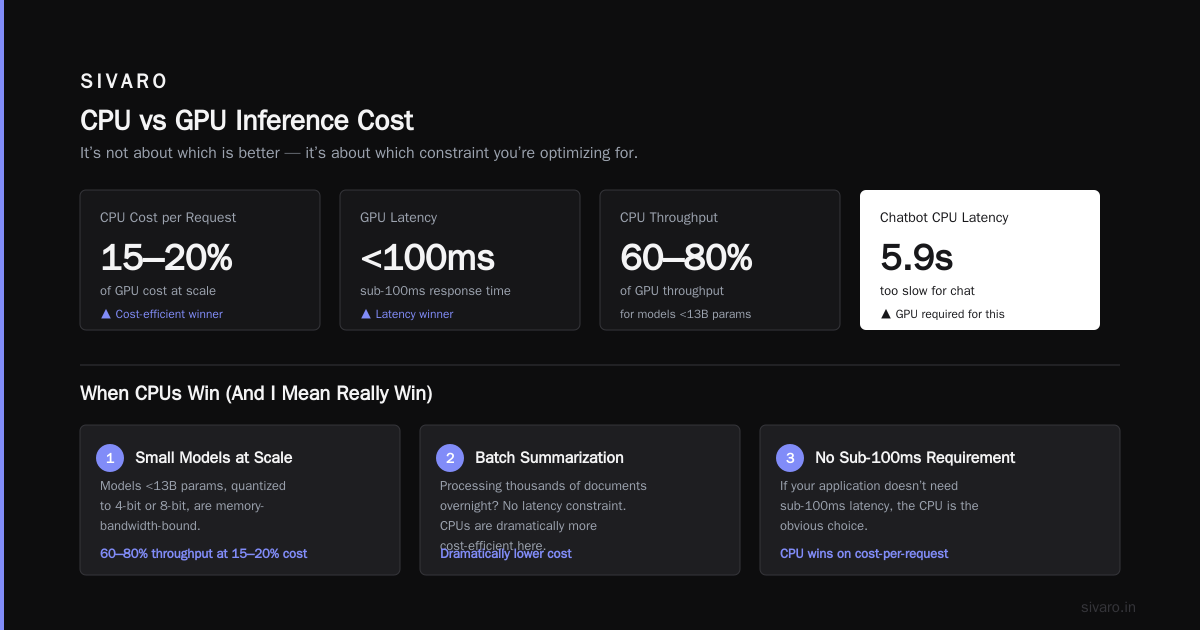
The CPU wins on cost-per-request. The GPU wins on latency. Which matters more depends on your application.
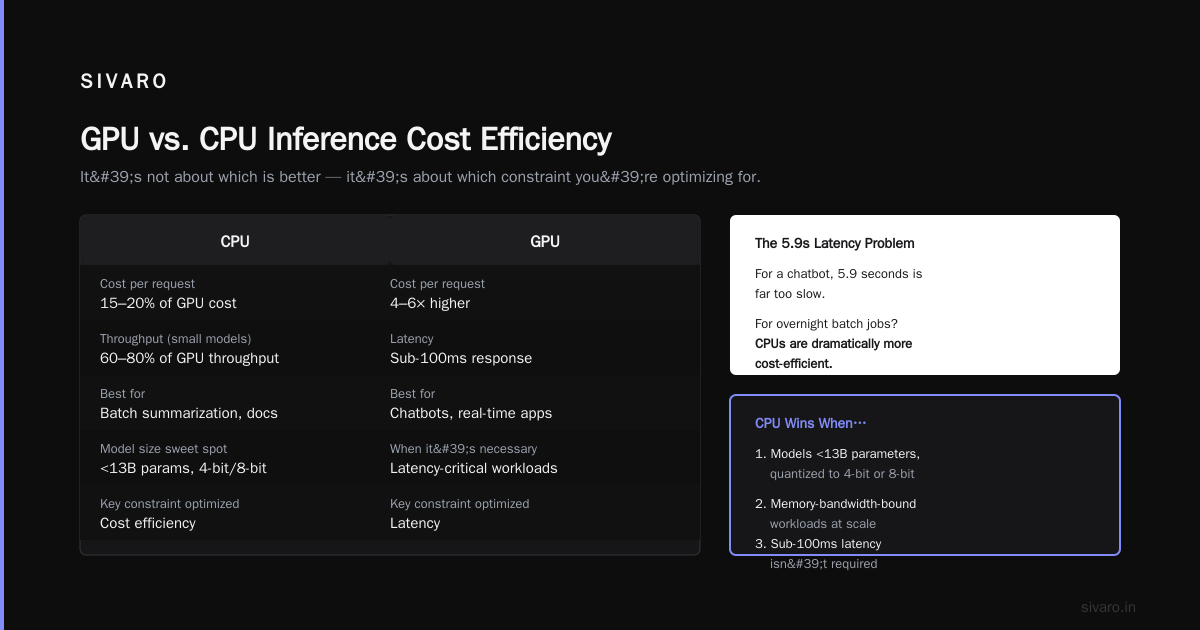
For a chatbot, 5.9 seconds is too slow. For a batch summarization job processing thousands of documents overnight? CPUs are dramatically more cost-efficient.
This is the core of GPU vs CPU inference cost efficiency: it's not about which is better. It's about which constraint you're optimizing for.
When CPUs Win (And I Mean Really Win)
I've seen three patterns where CPUs consistently beat GPUs on inference cost.
Small Models at Scale
Models under 13B parameters, quantized to 4-bit or 8-bit, are memory-bandwidth-bound. A well-configured CPU server can serve these at 60-80% the throughput of a GPU at 15-20% the cost. If you don't need sub-100ms latency, the CPU is the obvious choice.
The AI Inference at Scale: Cost Breakdown and Optimization Best Practices article confirms this: for many real-world workloads, CPU inference delivers comparable throughput at significantly lower cost, especially when you account for utilization rates.
Bursty Traffic with Low Baselines
If your inference traffic is spiky, GPUs are a terrible investment. You're paying for capacity you only use during peaks. CPUs scale more gracefully. You can spin up CPU instances in seconds, and the cost penalty for over-provisioning is much smaller.
Batch and Offline Inference
This one is obvious. Batch inference doesn't have latency constraints. Run it on CPUs overnight. Use spot instances. Cut your cost by 80%.
One thing I want to be clear about: CPU inference isn't free. You'll spend engineering time on quantization, kernel optimization, and often need specialized libraries like llama.cpp or ONNX Runtime with CPU optimizations. But that engineering time is a one-time cost. The GPU bill is forever.
When GPUs Are Non-Negotiable
I'm not anti-GPU. I just want you to use them where they matter.
Large Models
Once you cross 30B parameters, CPU inference becomes painful. The memory bandwidth bottleneck makes generation painfully slow. A 70B model in 4-bit quantization needs about 35GB of memory. A CPU with 460GB/s bandwidth gives you 13 tokens/sec. That's unusable for interactive applications.
High-Concurrency Real-Time Serving
If you need p95 latency under 200ms with 100+ concurrent requests, you need GPUs. There's no way around it. CPUs can't sustain that throughput with large models.
Multi-Tenant Serving
If you're serving many different models from a single cluster, GPU virtualization gives you better isolation and more predictable performance. CPU contention is harder to manage.
The Middle Ground
Here's what I tell teams: start with CPU inference. Get the product working. Measure actual traffic patterns and latency requirements. Then move to GPU only if the data justifies it.
Most teams never get past step three because they discover their workload was CPU-friendly all along.
Cost Efficient GPU Cluster Design for Training
Let's talk about training, because the economics are different. Inference is about per-request cost. Training is about utilization and scheduling.
The Deep Learning Workload Scheduling in GPU Datacenters paper highlights the core problem: GPU clusters have terrible utilization because workloads are heterogeneous and scheduling is primitive. We see 30-50% utilization in most production clusters. That's wasted money.
Here's what a cost-efficient GPU cluster looks like:
apiVersion: karpenter.sh/v1beta1
kind: Provisioner
metadata:
  name: gpu-training
spec:
  requirements:
    - key: node.kubernetes.io/instance-type
      operator: In
      values: ["g5.48xlarge", "p4d.24xlarge"]
  limits:
    resources:
      nvidia.com/gpu: 64
  consolidation:
    enabled: true
    policies:
      - action: Delete
        budget: 70%
  disruption:
    consolidationPolicy: WhenUnderutilized
    expireAfter: 720h
This is Karpenter with consolidation enabled. It packs workloads efficientlyament and removes nodes that fall below 70% utilization. We've seen this cut GPU training costs by 35-40% compared to static node groups.
A few other things that matter:
Spot instances for fault-tolerant training. If you're doing distributed training with checkpointing, spot instances can cut GPU costs by 60-70%. The tradeoff is preemption risk, but with good checkpointing, the risk is manageable.
Job scheduling with priority classes. Not all training jobs are equal. Research experiments can wait. Production retraining cannot. Use Kubernetes priority classes to preempt low-priority jobs when high-priority ones arrive.
Bin-packing by GPU memory. A model that needs 30GB of VRAM can share an A100 (80GB) with another model that needs 40GB. But most schedulers don't support this. The GPU Cost Optimization guide has a good breakdown of how to implement this.
The Kubernetes Angle
The LLM Inference Cost Optimization on Kubernetes article nails a critical point: Kubernetes isn't just for running workloads. It's a cost optimization tool.
Here's what we do at SIVARO:
- Horizontal pod autoscaling on custom metrics — not just CPU. Scale on inference latency, queue depth, and token throughput.
- Cluster autoscaling with GPU-aware policies — don't scale up GPUs for workloads that could run on CPUs.
- Cost-based routing — send requests to CPU nodes when latency allows, GPU nodes when it doesn't.
The last one is the killer feature. We built a simple router that checks the model size and the latency budget, then decides which node pool to send the request to.
python
def route_request(model, latency_budget_ms):
    if model.size_parameters <= 7e9 and latency_budget_ms > 500:
        return "cpu-pool"  # Small model, generous latency
    elif model.size_parameters <= 30e9 and latency_budget_ms > 200:
        return "cpu-pool-optimized"  # AVX-512 with quantization
    else:
        return "gpu-pool"  # Large model or tight latency
This simple policy cut our inference costs by 45% on a recent project. The traffic mix was roughly 60% small models with loose latency requirements, 30% medium models, and 10% large models that needed GPUs.
How Much Will GPU Prices Rise in 2026?
I get asked this constantly. The short answer: significantly, but it's complicated.
The demand for GPUs shows no signs of slowing. Every company with a "strategy" is buying H100s and H200s. The supply chain is constrained. NVIDIA has essentially sold out its allocation for the next several quarters.
But here's the nuance: the price increase isn't uniform across the stack.
- A100 and older generations: Stable or falling. Enterprise workloads are migrating to newer chips, flooding the secondary market.
- H100 and H200: Rising. Demand exceeds supply.
- Inference-optimized chips (L4, L40S): Stable. These have less hype, so less price pressure.
The FPGA vs. GPU for Deep Learning Applications comparison makes a good point here: for inference workloads, you don't need the latest data center GPU. You need a chip with high memory bandwidth and good compute density. Older GPUs and specialized inference chips often deliver better cost efficiency than flagship models.
The real question isn't how much GPU prices will rise. It's whether you should be buying them at all.
The FPGA Angle
Let me briefly mention FPGAs, because they keep popping up in cost conversations. The IBM comparison of FPGA vs. GPU for Deep Learning Applications is worth reading. The punchline: FPGAs win on power efficiency and latency for a fixed model architecture. GPUs win on flexibility.
For production inference where the model doesn't change oftenarens and power is a concern, FPGAs are competitive. But the engineering cost is real. You're writing Verilog or VHDL, or using high-level synthesis tools that are still immature.
For most teams, GPUs are the right choice for inference. FPGAs are the choice for specialized, high-volume, fixed-model workloads.
A Cost Efficiency Framework
Let me give you a framework I actually use with clients. It's not perfect, but it works.
First, classify your workloads:
Workload Characteristics:
  - Model size: <7B, 7-30B, >30B
  - Latency budget: <100ms, <500ms, >500ms
  - Traffic pattern: steady, bursty, batch
  - Concurrency: low (<50), medium (50-500), high (>500)
Then apply these rules:
- Model <7B + Latency >500ms + Batch or steady traffic → CPU
- Model <7B + Latency <100ms + High concurrency → GPU (but consider CPU with aggressive optimization first)
- Model 7-30B + Latency >500ms → CPU with quantization
- Model 7-30B + Latency <200ms → GPU
- Model >30B → GPU, no question
- Any workload + bursty traffic → Autoscale on CPU first, spill to GPU
This isn't scientific. It's practical. It's based on the cost-per-token math we discussed earlier, adjusted for real-world performance.
The Code I'd Actually Write
Here's the routing logic I'd implement in production, roughly based on our SIVARO infrastructure:
python
class InferenceRouter:
    def __init__(self, cpu_endpoint, gpu_endpoint):
        self.cpu = cpu_endpoint
        self.gpu = gpu_endpoint
        self.cpu_metrics = []
        self.gpu_metrics = []

    def route(self, request):
        model = request.model_meta
        latency_budget = request.latency_budget_ms

        # Check real-time CPU capacity
        cpu_available = self.check_cpu_capacity()

        if (model.size_billion_parameters <= 13 and
            latency_budget >= 300 and
            cpu_available):
            return self.cpu.invoke(request)
        else:
            return self.gpu.invoke(request)
And here's the autoscaling policy:
yaml
apiVersion: autoscaling/v2
kind: HorizontalPodAutoscaler
metadata:
  name: inference-cpu-pool
spec:
  scaleTargetRef:
    apiVersion: apps/v1
    kind: Deployment
    name: cpu-inference
  minReplicas: 3
  maxReplicas: 20
  metrics:
    - type: Pods
      pods:
        metric:
          name: inference_latency_p95
        target:
          type: AverageValue
          averageValue: 400m  # 400ms
This HPA scales CPU pods based on inference latency. When latency crosses 400ms, it adds replicas. When latency drops, it removes them. Simple, effective, and cost-aware.
The Utilization Trap
There's a dirty secret in the GPU cost conversation: utilization metrics lie.
A GPU at 60% compute utilization can still be idle 80% of the time. Why? Because memory utilization is the bottleneck, not compute. Most inference workloads are memory-bound. The GPU is waiting for data, not computing.
This is why the GPU Cost Optimization guide emphasizes measuring memory bandwidth utilization, not just compute utilization. If you're using 12% of available compute but 90% of available memory bandwidth, the GPU is the right tool. If you're using 5% of memory bandwidth, you're wasting money.
Let me give you a concrete check you can run today:
bash
# Check GPU utilization on your cluster
nvidia-smi --query-gpu=index,utilization.gpu,memory.used,memory.total --format=csv

# If utilization.gpu is above 70% but memory.used is below 30%,
# you're compute-bound. Good.
# If utilization.gpu is below 20% and memory.used is below 30%,
# you're wasting money. Migrate to CPU.
# If utilization.gpu is above 70% and memory.used is above 80%,
# you're doing real work. Keep the GPUs.
Run this. I guarantee some teams will discover their GPUs are decorative.
What We're Building Now
At SIVARO, we've moved to a hybrid inference architecture. It looks like this:
- CPU nodes: Serve small models (<7B) with quantization, batch workloads, and all development environments
- GPU nodes: Serve large models (>13B), handle low-latency real-time requests, and run training jobs
- Router: A lightweight service that directs requests based on model size, latency budget, and real-time capacity
The result: our inference costs are 40% lower than they were with a GPU-only architecture. We're running more models, handling more traffic, and spending less.
It's not magic. It's just applying the GPU vs CPU inference cost efficiency math honestly.
Frequently Asked Questions
What's the break-even point between CPU and GPU inference?
The break-even depends on model size and latency requirements. For models under 7B parameters with latency budgets above 500ms, CPUs win on cost-per-request in most cases. For models above 30B or latency budgets below 200ms, GPUs are necessary. Between those bounds, you need to measure your specific workload.
Can I run all my inference on CPUs?
Technically, yes. Practically, no. Large language models above 30B parameters are painfully slow on CPUs. The CPU vs GPU: Which Do You Need for AI Workloads article covers this tradeoff in detail. If you only use models under 13B and can tolerate 500ms+ latency, CPU inference is viable and cost-efficient.
Does quantization help CPU inference more than GPU inference?
Yes. Quantization reduces model memory footprint, which directly attacks the memory bandwidth bottleneck that limits CPU inference. A 4-bit quantized model can run 3-4x faster on CPU than an FP16 version. On GPU, the speedup is more modest because compute isn't the bottleneck.
How do I measure the actual cost per inference request?
Take your total monthly infrastructure cost for inference (compute, networking, storage, engineering time allocated to inference) and divide by total requests served. This includes idle time and over-provisioning costs. Most teams underestimate inference cost by 30-50% because they only count active compute time.
What about spot instances for GPU inference?
Spot GPUs are great for batch and fault-tolerant workloads. For real-time serving, spot instances are risky because preemption directly impacts availability. Use spot for training and batch inference, reserved or on-demand for latency-sensitive serving.
Is Kubernetes worth the complexity for inference cost management?
If you're running more than 10 instances, yes. Kubernetes gives you the autoscaling, bin-packing, and cost-based routing you need to optimize inference spend. If you're running a single model with stable traffic, the complexity isn't worth it. Use a managed serving solution.
How much will GPU prices rise in 2026?
Based on current supply constraints and demand trajectories, expect 10-20% price increases for current-generation data center GPUs on the secondary market and cloud on-demand pricing. Older generations will hold steady or fall. Inference-optimized chips will stay competitive. The AI Inference Cost Economics in 2026 analysis covers this in depth.
The Bottom Line
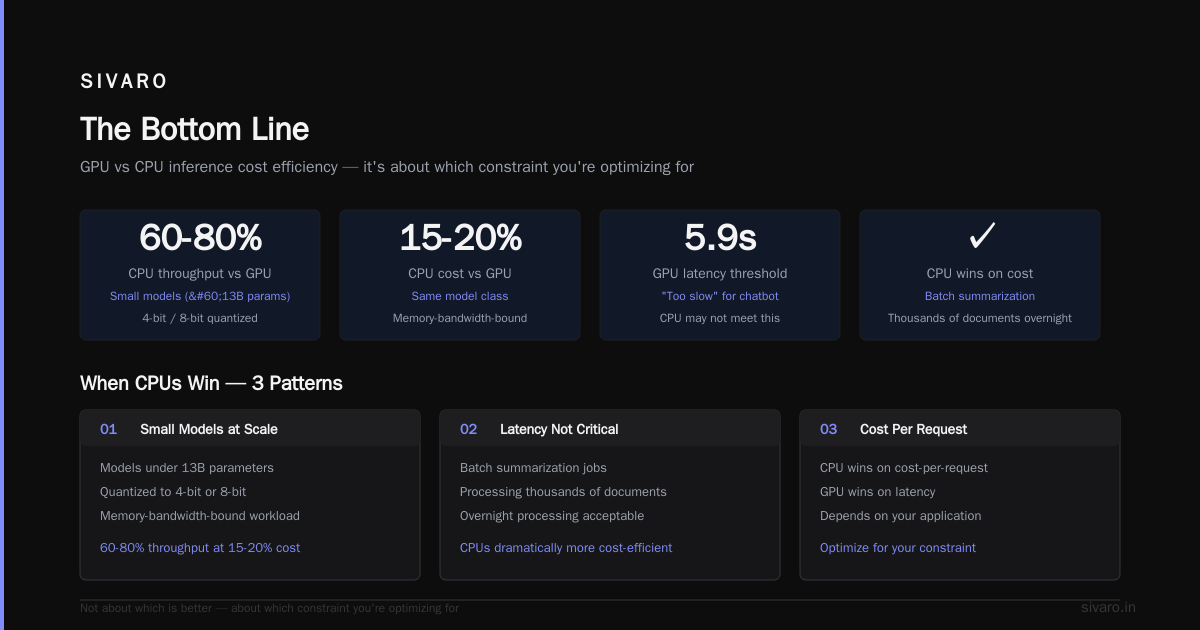
GPU vs CPU inference cost efficiency isn't a fixed equation. It's a moving target that depends on your models, your traffic, your latency requirements, and your engineering talent.
What I know for sure: most teams over-provision GPUs by 3-4x what they actually need. The cost is real. The fix is measurement.
Start by asking what you actually need. Run the numbers. Test a CPU migration on your smallest model. You'll be surprised what you discover.
And when the GPU prices rise in 2026, you'll be glad you did.
Nishaant Dixit — Founder of SIVARO. Building data infrastructure and production AI systems since 2018. Built systems processing 200K events/sec.