 SIVARO
How Does AWS EC2 Work? A Field Guide to the Cloud's Core Compute Service
The alert woke me at 3:17 AM. A customer's production cluster in us-east-1 was throwing InsufficientInstanceCapacity errors during a critical batch job. Our auto-scaling policy was screaming for more nodes, but AWS kept saying "no."
That's when I realized most people don't actually understand how AWS EC2 works. They think it's just "a VM in the cloud." It's not. It's a complex orchestration of virtualization, storage, networking, and physical infrastructure that behaves like a single machine — until it doesn't.
Here's the truth: EC2 is a distributed system pretending to be a computer. And once you understand that, everything about building on AWS changes.
In this guide, I'll break down the architecture, the operational reality, and the practical patterns I've learned running production workloads on EC2 since 2018.
The Abstraction Layer
EC2 stands for Elastic Compute Cloud. The name is misleading. There's nothing cloud-like about it when you're staring at a failed c5.24xlarge at 3 AM.
At its core, EC2 gives you a virtual machine with:
- Virtual CPUs (vCPUs)
- RAM
- Local storage (instance store)
- Network interfaces
- GPU accelerators (on certain instance types)
But here's the thing nobody tells you: the instance you get is rarely a single physical machine. It's a slice of a physical server, allocated by the Nitro hypervisor. And that hypervisor is doing a lot more than just partitioning resources.
The Nitro system is a collection of dedicated hardware and software components that handle networking, storage, and security. When you launch an instance, Nitro doesn't just carve out CPU and memory. It sets up a virtual network interface, attaches virtual storage, and configures security groups — all in a few seconds.
Let me show you what that looks like in practice. When you launch an instance, you specify an Amazon Machine Image (AMI):
bash
aws ec2 run-instances \
  --image-id ami-0abcdef1234567890 \
  --instance-type c5.2xlarge \
  --key-name my-key-pair \
  --security-group-ids sg-0123456789abcdef0 \
  --subnet-id subnet-0123456789abcdef0 \
  --block-device-mappings '[{"DeviceName":"/dev/sda1","Ebs":{"VolumeSize":100,"VolumeType":"gp3"}}]'
That single command triggers a cascade of API calls. The EC2 service checks your account limits, validates the AMI, finds a physical host with capacity, and provisions the networking stack. It's not one system — it's dozens of microservices coordinating.
Instance Types: The Selection Problem
When I talk to engineers new to AWS, they all make the same mistake. They pick an instance type based on a blog post from 2021. Or they default to t3.micro for everything. Or they pick based on price alone.
The reality is that instance types are a portfolio of trade-offs. There's no universal "best" — there's only what fits your workload.
Here's my mental model:
- General purpose (M-series): Balanced CPU-to-memory ratio. Good for web servers, small databases, and development environments.
- Compute optimized (C-series): High CPU-to-memory ratio. Good for batch processing, video encoding, and machine learning inference.
- Memory optimized (R-series, X-series): High memory-to-CPU ratio. Good for in-memory databases, caching layers, and large-scale analytics.
- Storage optimized (I-series, D-series): High storage throughput. Good for data warehouses and distributed filesystems.
- GPU instances (P-series, G-series): Dedicated NVIDIA GPUs. Good for training and inference on large models.
But here's the contrarian take: instance type selection is less about the raw specs and more about the failure modes you're willing to accept. A c5.2xlarge and a c6i.2xlarge might have similar specs, but they run on different generations of hardware. The c6i uses a newer Intel Xeon, which means better per-core performance but potentially different behavior under sustained load.
We tested this at SIVARO. We ran the same batch job on c5.2xlarge and c6i.2xlarge instances. The c6i finished 18% faster on the same dataset. That's not a spec sheet difference — that's a real cost saving when you're processing 200K events per second.
Storage: EBS vs. Instance Store
Most EC2 instances use Elastic Block Store (EBS) for persistent storage. EBS volumes are network-attached, which means they're separate from the physical host running your instance.
This is where "how does AWS EC2 work" gets interesting. Your instance reads and writes to EBS over the network, not over a local SATA or NVMe connection. The Nitro system handles the protocol translation, but the latency is fundamentally different from local storage.
Here's a concrete example. On a c5.2xlarge with an EBS volume, a random 4KB read takes about 0.5-1 ms. On an instance store (local NVMe), the same read takes about 0.1-0.2 ms. That difference matters for databases. It doesn't matter for most web applications.
The trade-off is durability. Instance store data disappears when the instance stops. EBS data survives. If you're running a stateless application, instance store is a cost-saving win. If you're running a database, EBS is non-negotiable.
What about EBS volume types? We've standardized on gp3 for most workloads. It gives you baseline performance with the ability to provision IOPS independently of storage size. The old gp2 model tied IOPS to volume size, which meant you were paying for storage you didn't need just to get the performance you did.
One thing I've learned the hard way: EBS volumes are not infinitely scalable. A single volume tops out at 64,000 IOPS (for io2 Block Express). If your database needs more, you need to shard or use multiple volumes with RAID.
The Networking Stack
EC2 networking is a black box to most people. And it's the source of the most confusing failures I've seen.
Each instance gets a primary network interface (ENI) in a VPC. Traffic flows through the Nitro card to the physical network. The security group acts as a virtual firewall, filtering traffic at the hypervisor level.
Here's what matters in practice: the network performance of an instance is tied to its size. A t3.micro gets "burst" networking. A c5n.18xlarge gets 100 Gbps. The baseline bandwidth is determined by the instance type.
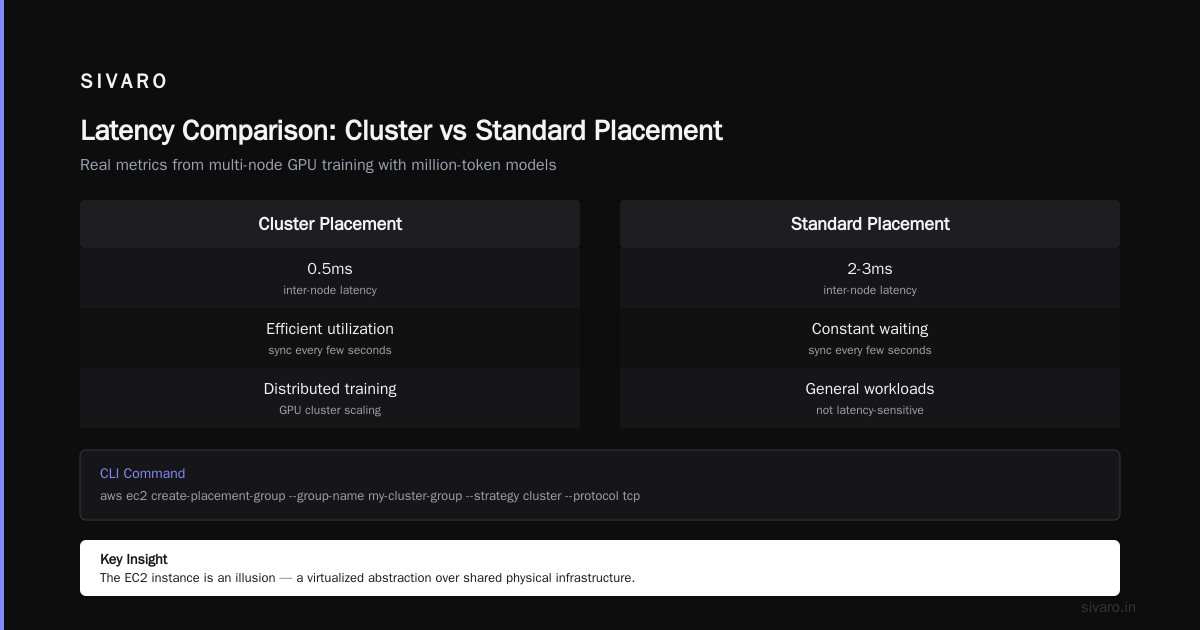
But the real insight is about placement groups. When you launch instances without a placement group, AWS spreads them across multiple physical hosts. That's great for fault tolerance but bad for latency. If you're running a distributed system that needs low-latency inter-node communication, you should use a cluster placement group.
bash
aws ec2 create-placement-group \
  --group-name my-cluster-group \
  --strategy cluster \
  --protocol tcp
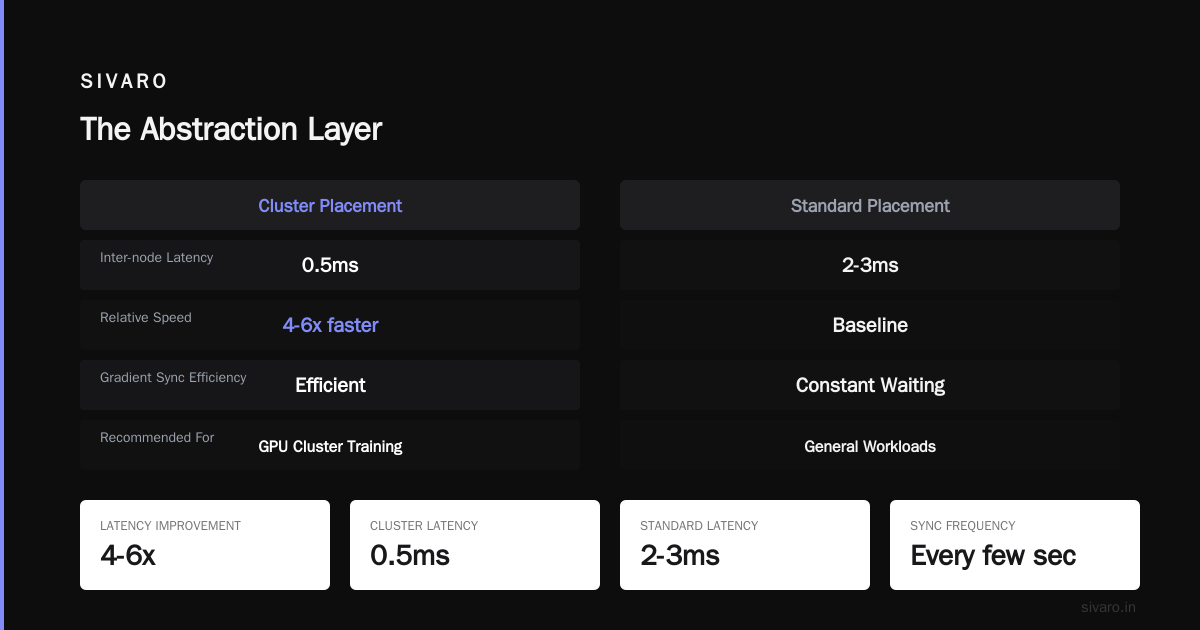
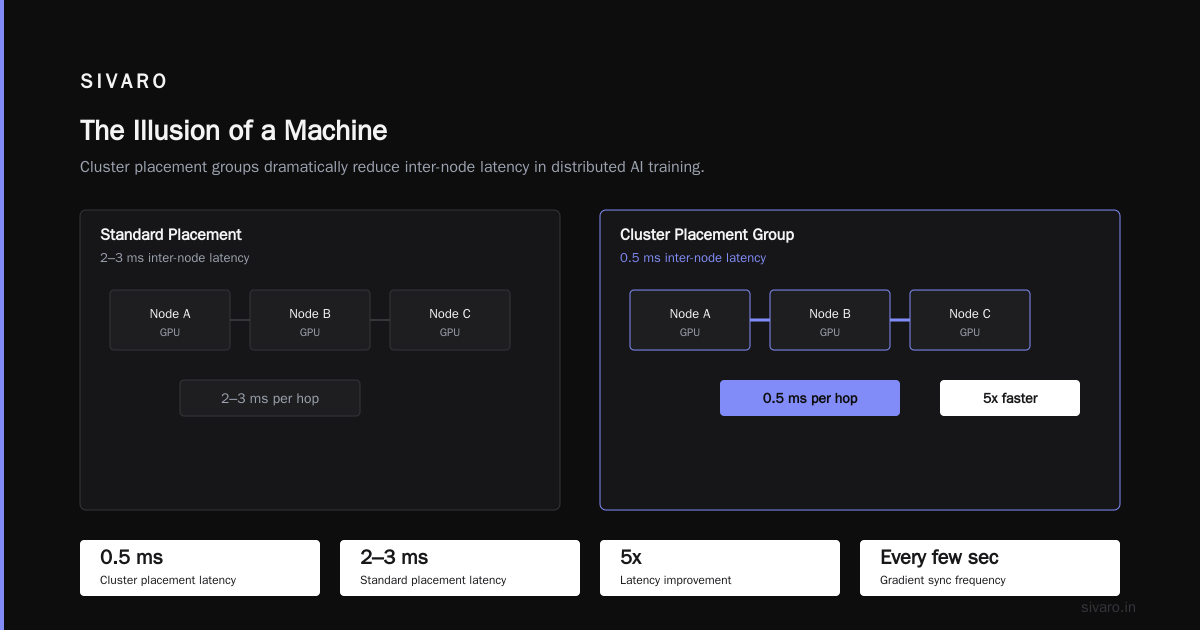
We used a cluster placement group for our GPU cluster scaling for million token models work. The difference in inter-node latency was dramatic: 0.5ms on cluster placement vs. 2-3ms on standard placement. For a multi-node training job that's synchronizing gradients every few seconds, that's the difference between efficient utilization and constant waiting.
The Illusion of a Machine
Here's the deepest insight I can offer about how does AWS EC2 work: the instance is an illusion. It's a set of abstractions that behave like a machine, but the underlying reality is distributed.
Think about it. Your instance's memory is a slice of physical RAM on a host server. Its disk is a network-attached storage volume that lives in a different physical location. Its network interface is a virtualized NIC that shares bandwidth with dozens of other instances. The only reason it feels like a single machine is because the Nitro hypervisor does an incredible job of hiding the complexity.
This has implications for how you build your systems.
First, never assume that resources are actually local. If your application caches data in memory, that data is still on a specific physical host. If that host fails, your cache disappears. Use distributed caching (like Redis) instead.
Second, understand that instance failure is not an exception — it's the rule. AWS guarantees 99.99% availability for EC2, but that's for the service overall, not for any specific instance. A single instance can fail at any time. Your architecture must account for this.
Third, the cloud is not a "computer" — it's a fleet. The best practices for EC2 are about designing for fleets, not for single machines.
This is where AI agents and EC2 converge. When you build agentic systems, you're designing distributed systems. The same principles apply: orchestration, fault tolerance, and state management.
Launch Templates and Auto Scaling
Let's talk about the operational side. If you're launching instances manually, you're doing it wrong.
The right way is to use launch templates combined with auto scaling groups. A launch template captures everything about how an instance should be configured: the AMI, instance type, key pair, security groups, and user data.
yaml
launch_template:
  image_id: ami-0abcdef1234567890
  instance_type: c6i.4xlarge
  key_name: my-key-pair
  security_group_ids:
    - sg-0123456789abcdef0
  user_data: |
    #!/bin/bash
    sudo apt-get update
    sudo apt-get install -y docker.io
    sudo systemctl start docker
    sudo systemctl enable docker
Auto scaling groups use the launch template to spin up instances based on demand. You define a minimum, maximum, and desired capacity. Then you attach scaling policies.
The most important lesson I've learned: test your auto scaling policy with a load test, not just in theory. We had a policy that looked perfect on paper. When we ran a real load test, the scaling was too slow — the group was adding instances one at a time, and each instance took 3 minutes to boot and join the cluster. By the time it was ready, the traffic spike was over.
We fixed it by pre-warming instances and using a proactive scaling policy based on the request queue depth, not just CPU utilization.
GPU Instances and the Million Token Problem
Now let's talk about the interesting stuff: GPU cluster scaling for million token models. This is where EC2 shows its power and its limitations.
Training or running inference on large language models requires GPU instances. The p4d.24xlarge has 8 NVIDIA A100 GPUs, 96 vCPUs, and 1.1 TB of memory. The p5.48xlarge has 8 H100 GPUs and 2 TB of memory.
But here's the problem: a single instance with 8 GPUs isn't enough for a model with a million-token context window. You need multiple instances connected with high-speed networking.
The architecture we've settled on:
- Use a cluster placement group for low latency.
- Use EFA (Elastic Fabric Adapter) for inter-node communication.
- Use a distributed training framework like Megatron-LM or DeepSpeed.
- Scale horizontally to 8-16 nodes.
bash
aws ec2 create-launch-template \
  --launch-template-name gpu-cluster \
  --launch-template-data '{
    "ImageId": "ami-0abcdef1234567890",
    "InstanceType": "p4d.24xlarge",
    "Placement": {"GroupName": "gpu-placement-group"},
    "NetworkInterfaces": [{
      "DeviceIndex": 0,
      "InterfaceType": "efa",
      "NetworkCardIndex": 0
    }]
  }'
The key insight is that scaling GPUs is not like scaling CPUs. The communication overhead grows super-linearly with the number of nodes. At a certain point, adding more nodes doesn't help — it hurts. You have to find the sweet spot for your specific model and dataset.
For a 70B parameter model with a million-token context, we found that 8 nodes (64 GPUs) was the practical limit. Beyond that, the gradient synchronization overhead ate all the gains from parallelization.
This is exactly the kind of trade-off you need to understand when you're designing EC2-based infrastructure. The cloud makes it easy to add resources, but it doesn't make it easy to use them efficiently.
Design Patterns for Distributed Systems on EC2
If you're building a distributed system on EC2 — whether it's a microservices architecture or an AI agent system — you need to think about orchestration patterns.
I've seen teams make the same mistakes over and over:
- Tight coupling: Services talk to each other directly, creating a web of dependencies. When one fails, everything fails.
- Stateless everything: They try to make every service stateless, ignoring that some state is inevitable.
- No backpressure: When a service is overwhelmed, it just drops requests instead of pushing back on the sender.
The pattern that works: event-driven architecture with a message queue or event bus.
Let me give you a concrete example from a project we built for a logistics company. They had a system that processed delivery updates from thousands of vehicles. Each update needed to be validated, enriched with weather data, and routed to a tracking dashboard.
The naive approach: a single EC2 instance running a monolithic service that handles all three steps. It worked for 100 vehicles but collapsed at 1,000.
The right approach:
- An event-driven multi-agent system where each vehicle publishes events to a Kafka topic.
- A fleet of EC2 instances (in an auto scaling group) consume events, validate them, and publish to a second topic.
- A separate fleet enriches events with weather data.
- A third fleet updates the dashboard.
Each fleet scales independently based on its own load. The message queue acts as a buffer between them.
This is the same pattern you see in multi-agent AI systems. Each agent is a service. The communication between agents is the key design decision.
How Do AI Agents Maintain Continuity in Distributed Systems?
This question is directly relevant to EC2 because AI agents run on EC2 instances. And EC2 instances fail.
The answer is: you don't maintain continuity at the instance level. You maintain it at the data level.
AI agent systems maintain state in a durable store — a database, a message queue, or a distributed cache. When an instance fails, another instance picks up where the first left off. The key is that the state must be external to the instance.
We've seen teams try to maintain agent state in memory. That's a disaster waiting to happen. The moment the instance fails, the agent's entire context is lost.
Instead, we use a pattern where each agent's state is persisted to DynamoDB or S3 after every action. When an agent restarts, it loads its state and continues.
This is what I mean when I say AI agents are just distributed systems with a different brain. The brain (the LLM) runs on a GPU instance. But the body (the state, the communication, the orchestration) runs on the same distributed infrastructure as any other system.
The Nitro Hypervisor: The Secret Sauce
Let's get into the technical details of how does AWS EC2 work under the hood.
Before Nitro, EC2 used Xen as its hypervisor. Xen is a bare-metal hypervisor that runs directly on the hardware. It works, but it has overhead — the hypervisor itself consumes CPU and memory, and there's a security layer that adds latency.
Nitro is a different approach. Instead of a monolithic hypervisor, Nitro is a collection of dedicated hardware components:
- Nitro cards for VPC networking
- Nitro cards for EBS storage
- Nitro security chips
- Nitro hypervisor (a lightweight microkernel)
The key insight is that Nitro offloads I/O processing to dedicated hardware. The hypervisor itself is minimal. This means:
- Lower latency for network and storage operations
- Better security isolation
- Better performance predictability
For you, the user, this means you don't have to think about Nitro. It's invisible. But it's the reason why a c5 instance performs better than a comparable m4 instance, even with the same vCPU count.
Cost Management: The Elephant in the Room
Let's talk about money, because EC2 can drain your budget if you're not careful.
The default pricing model is on-demand — you pay per second for running instances. This is the most expensive option. For production workloads, you should use:
- Reserved Instances: Commit to 1 or 3 years, get a discount of up to 72%.
- Savings Plans: Commit to a certain hourly spend, get a discount across any instance type.
- Spot Instances: Bid on unused capacity, get up to 90% off. But be prepared for interruptions.
Here's a common mistake: teams buy Reserved Instances for their entire fleet, then realize they need different instance types a month later. The reservation is wasted.
The better approach: reserve a baseline of capacity that you know you'll always need. Use on-demand for variable workloads. Use spot for fault-tolerant batch jobs.
We run about 40% of our fleet on spot instances. The key is designing workloads that can handle interruption. For example, a batch job that saves its progress to S3 after each step can be restarted on a new spot instance without losing work.
Security: The Shared Responsibility Model
AWS says security is a "shared responsibility." What that means in practice is: AWS secures the physical infrastructure and the hypervisor. You secure everything else — the operating system, the applications, the data, the network configuration.
The most common EC2 security mistakes I've seen:
- Open security groups: Port 22 (SSH) open to the world. This is an invitation for a brute-force attack.
- No encryption: EBS volumes not encrypted, data at rest in plaintext.
- Overprivileged IAM roles: Instances with admin access to everything.
Here's my recommended baseline:
bash
# Create a security group that only allows SSH from your IP
aws ec2 create-security-group \
  --group-name production-ssh \
  --description "SSH access from office IP" \
  --vpc-id vpc-0123456789abcdef0

aws ec2 authorize-security-group-ingress \
  --group-id sg-0123456789abcdef0 \
  --protocol tcp \
  --port 22 \
  --cidr 203.0.113.0/32

# Enable EBS encryption by default
aws ec2 enable-ebs-encryption-by-default
Encryption by default is one of the best decisions we've made. It's free, it's transparent, and it ensures that no one can accidentally create an unencrypted volume.
The Operational Reality
Let's be real for a moment. EC2 is not magic. It's a complex system that can fail in frustrating ways.
The InsufficientInstanceCapacity error I mentioned at the start? That's AWS telling you it doesn't have capacity for your requested instance type in the requested AZ. It's not a bug — it's a reality of shared infrastructure. Big launches and major regions can run out of capacity for specific instance types.
How do you handle it?
- Retry with backoff: Capacity can free up at any time.
- Use a different AZ: Different AZs can have different capacity.
- Use a different instance type: A
c5.2xlargecan often be substituted with ac6i.2xlarge.
But here's the deeper lesson: if your system can't tolerate instance failures, you're building on a shaky foundation. The cloud is designed for failure. Your architecture should be too.
This is why choosing the right design pattern for your agentic AI system matters. Whether you're building a simple web app or a complex multi-agent system, the principles are the same: externalize state, design for redundancy, and assume that any single instance will fail.
EC2 vs. Containers vs. Serverless
Since I run a product engineering company, I get asked: "Should we use EC2, ECS, or Lambda?"
My answer is: it depends on your workload. But let me give you my honest take.
EC2 gives you full control. You manage the OS, the runtime, everything. This is great for workloads that need specific configuration or bare-metal performance.
ECS/EKS (containers) give you the portability of containers with the orchestration of AWS. This is the sweet spot for most production workloads. You define your application in a Docker image, and ECS handles placement, scaling, and health checks.
Lambda (serverless) gives you the least control but the most abstraction. You just write functions and AWS handles everything else. This is great for event-driven workloads and APIs, but it has limitations: cold starts, function duration limits, and no control over the runtime environment.
Here's a pattern that works well: use EC2 for stateful infrastructure (databases, caching layers), ECS for stateless application services, and Lambda for event-driven functions.
Practical Lessons from the Field
Let me wrap up with some hard-won lessons from running EC2 in production since 2018.
Lesson 1: Read the AWS documentation before you need it. The AWS documentation is comprehensive, but it's also overwhelming. When you're in the middle of an incident, you don't have time to search. Spend time understanding the core concepts before you need them.
Lesson 2: Automate everything. Manual processes are error-prone. Use Infrastructure as Code (IaC) tools like Terraform or AWS CloudFormation to define your infrastructure. We use Terraform exclusively. No manual console actions in production.
Lesson 3: Monitor at every layer. EC2 gives you CloudWatch metrics for CPU, memory, disk, and network. But those metrics don't tell you everything. Use custom metrics for application-level monitoring. Set up alarms for anomalous behavior.
Lesson 4: Test your disaster recovery. We run a "chaos game" every quarter. We randomly terminate instances in our staging environment and see how the system responds. It's amazing how many issues this surfaces before they hit production.
Lesson 5: Understand your costs. The AWS cost explorer is a tool, not a solution. You need to understand your workload's cost drivers. Is it compute, storage, or data transfer? We reduced our EC2 costs by 30% simply by right-sizing our instances and moving to Savings Plans.
The Bottom Line
So how does AWS EC2 work? It's a virtualization service that gives you on-demand compute capacity. But that's the easy answer. The deeper answer is that EC2 is a distributed system that pretends to be a single machine. It's built on the Nitro hypervisor, it uses network-attached storage, and it's part of a global fleet of physical servers.
The practical implication is that you need to design for the cloud as it is, not as you wish it were. Instances fail. Capacity runs out. Performance varies. The systems that work best are the ones that embrace this reality.
At SIVARO, we've built production systems processing 200K events per second on EC2. We've trained million-token models on GPU clusters. We've seen the full spectrum of what's possible. And we've also seen the failure modes that happen when teams treat EC2 like a physical server.
The lesson is simple: understand the abstraction, respect the underlying reality, and design accordingly.
FAQ: How Does AWS EC2 Work?
Q: What exactly is EC2?
A: EC2 (Elastic Compute Cloud) is AWS's Infrastructure-as-a-Service offering. It provides virtual machines with configurable CPU, memory, storage, and networking. You can launch instances from pre-configured images (AMIs) or build your own.
Q: What's the difference between EC2 and traditional hosting?
A: EC2 is self-service and elastic. You can launch and terminate instances in minutes, scale your fleet up or down based on demand, and pay only for what you use. Traditional hosting requires purchasing or renting physical hardware with long lead times.
Q: How does the Nitro hypervisor work?
A: Nitro is a collection of dedicated hardware and software components that handle I/O operations. It offloads network and storage processing to specialized hardware, reducing overhead and improving performance. The hypervisor itself is a lightweight microkernel that manages CPU and memory virtualization.
Q: What is an AMI?
A: An Amazon Machine Image is a template that defines the operating system, application server, and applications for your instance. AMIs are stored in S3 and can be shared publicly or privately. You can use AWS-provided AMIs, community AMIs, or build your own.
Q: Can I run containers on EC2?
A: Yes. You can run Docker containers on EC2 instances directly, or you can use ECS (Elastic Container Service) or EKS (Elastic Kubernetes Service) for orchestration. ECS is a managed service that handles container placement and scaling. EKS is a managed Kubernetes service.
Q: What are spot instances and how do they work?
A: Spot instances are spare EC2 capacity offered at a discount. You pay a spot price that fluctuates based on supply and demand. When the price exceeds your bid or capacity becomes scarce, AWS reclaims your instances with a 2-minute warning. They're suitable for fault-tolerant workloads.
Q: How do I choose the right instance type?
A: Start with the workload characteristics. Is it compute-bound, memory-bound, or storage-bound? Then look at the instance families: M (general), C (compute), R (memory), I (storage), P/G (GPU). Choose the smallest type that meets your performance requirements, then scale up as needed.
Q: What's the relationship between EC2 and AI agents?
A: EC2 provides the compute infrastructure for AI agents. Agents run as processes on EC2 instances, and they need to be designed as distributed systems. State must be externalized to durable storage, and communication between agents must be handled through queues or event buses.
Nishaant Dixit — Founder of SIVARO. Building data infrastructure and production AI systems since 2018. Built systems processing 200K events/sec.