 SIVARO
How Does Temporal Handle Timeouts? A Field Guide
Here's the question I get from every engineering team we work with at SIVARO: "How does Temporal handle timeouts?"
Not "what is Temporal." Not "how do I set up a workflow." The timeout question always comes second — right after someone's workflow hangs in production and their database locks start piling up. I've seen the same panic in the Slack channels of three different fintech companies this year alone. And the answer isn't a single setting. It's a hierarchy of decisions baked into Temporal's execution model.
In this guide, I'll walk through the timeout architecture that makes Temporal different from every queue and workflow engine you've used before. You'll learn the four timeout types, how they interact, and — critically — where most teams get them wrong. We'll cover code examples you can steal, production defaults we've validated, and the operational playbook for debugging timeout-related issues.
The Core Idea: Timeouts Are Policy, Not Failure
Most people think timeouts are about failure detection. They're wrong.
A timeout is a policy decision about how long you're willing to wait. It's a business rule wearing a technical costume. The moment you treat timeouts as "error handling" rather than "business logic," you'll design them wrong.
At first I thought this was a semantic distinction. Then we hit a production incident where a payment workflow was timing out after 30 seconds because "that seemed reasonable." The partner API on the other end had a 2-minute SLA. Our timeout was wrong not because it failed — it failed correctly — but because it failed based on a guess, not a requirement.
Temporal's timeout model forces you to be explicit. And that's the point.
The Timeout Hierarchy: Four Knobs, One Dial
Temporal doesn't give you a single "timeout" setting. It gives you four. Each one controls a different stage of an activity's lifecycle.
- Schedule-to-Start Timeout: The maximum time an activity can wait in a queue before a worker picks it up.
- Start-to-Close Timeout: The maximum time an activity can run once it starts executing.
- Schedule-to-Close Timeout: The total time from scheduling to completion — basically the first two combined.
- Heartbeat Timeout: The maximum interval between heartbeats from a running activity.
Here's what most people miss: these are not independent levers. They compose. Schedule-to-Close is the upper bound that contains the other three. If you set Schedule-to-Start to 5 minutes and Start-to-Close to 10 minutes, the effective Schedule-to-Close is 15 minutes. But if you also set Schedule-to-Close to 12 minutes, you're telling Temporal: "I don't care what the other two say — nothing exceeds 12."
This is how you get weird production behavior. I've debugged workflows that failed with "ScheduleToCloseTimeout" errors that were technically impossible given the individual timeout settings. The team had configured all four without understanding the relationship.
How Temporal Enforces These Timeouts (The Mechanics)
Let's get into the internals. When a workflow calls an activity, Temporal's frontend service records the schedule time. The activity task goes into a task queue. A worker polls for that task — that's the Schedule-to-Start clock ticking.
Once the worker receives the task and starts executing, the Start-to-Close clock begins. This clock lives on the Temporal server, not the worker. That's a crucial detail. If the worker machine dies, the clock keeps ticking server-side. The activity gets retried or the workflow times out based on what the server knows, not what the worker thinks.
Here's a code example that shows the mechanics:
python
from temporalio import activity

@activity.defn
async def process_payment(order_id: str) -> dict:
    # This activity has a 30-second execution budget
    # Any longer and Temporal will mark it failed
    result = await payment_provider.charge(order_id)
    return {"status": "charged", "amount": result.amount}
The decorator above defines the activity. The timeout configuration lives in the workflow definition:
python
from temporalio import workflow
from temporalio.common import RetryPolicy

@workflow.defn
class OrderWorkflow:
    @workflow.run
    async def run(self, order_id: str) -> str:
        # The timeout hierarchy in action
        result = await workflow.execute_activity(
            process_payment,
            order_id,
            start_to_close_timeout=timedelta(seconds=30),
            retry_policy=RetryPolicy(
                maximum_attempts=3,
                initial_interval=timedelta(seconds=1),
                backoff_coefficient=2.0
            )
        )
        return result["status"]
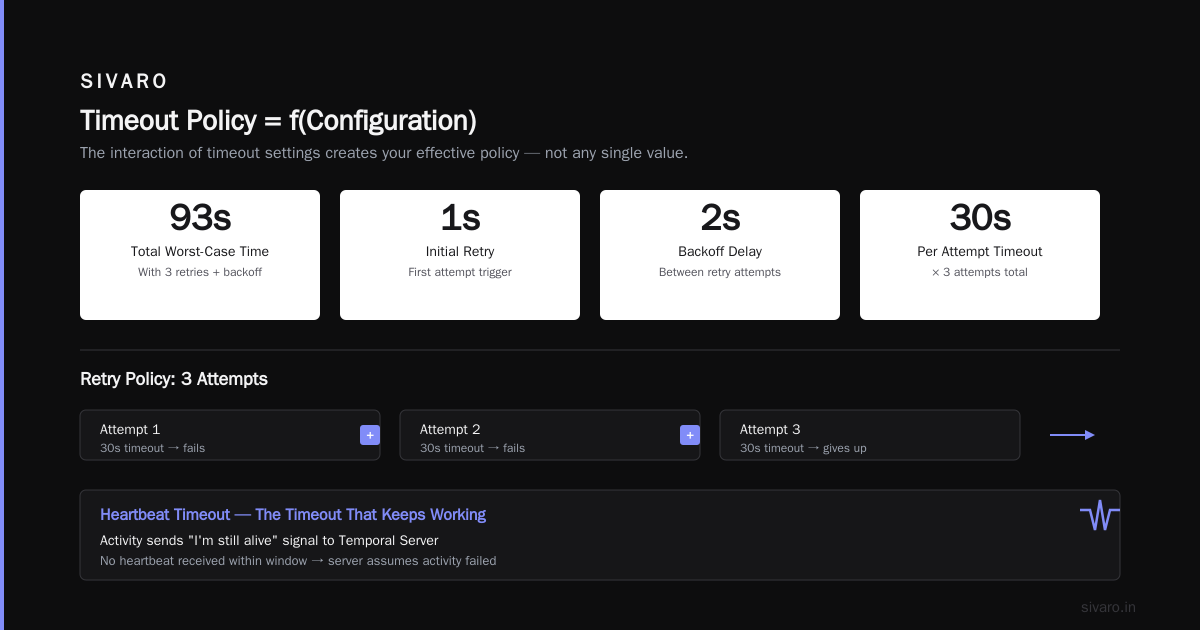
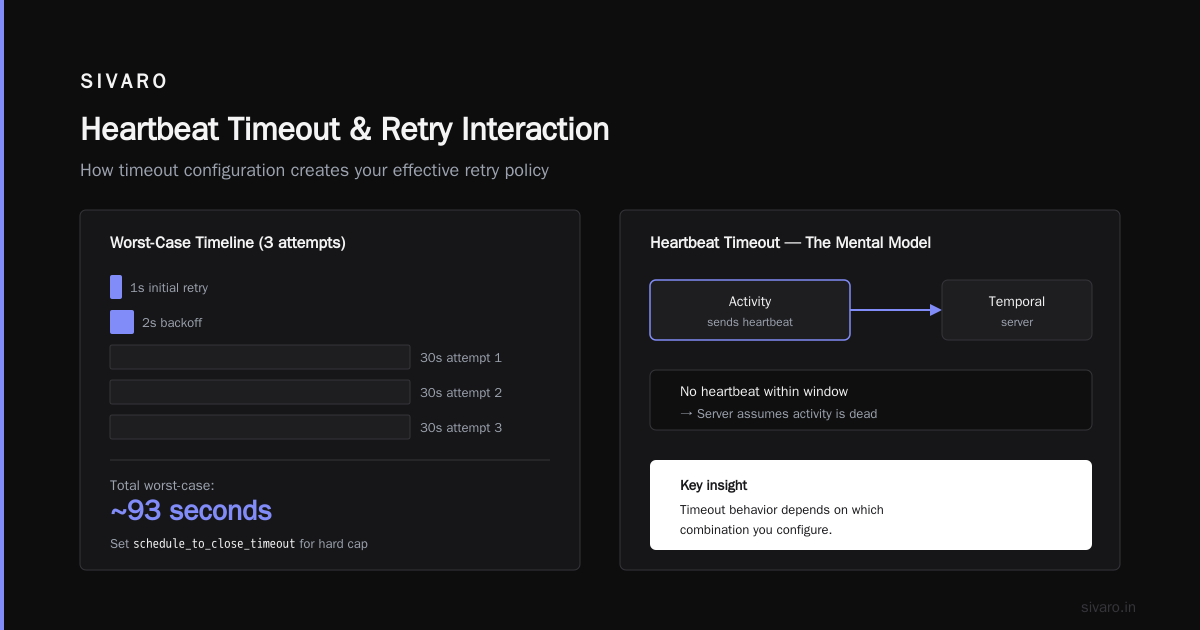
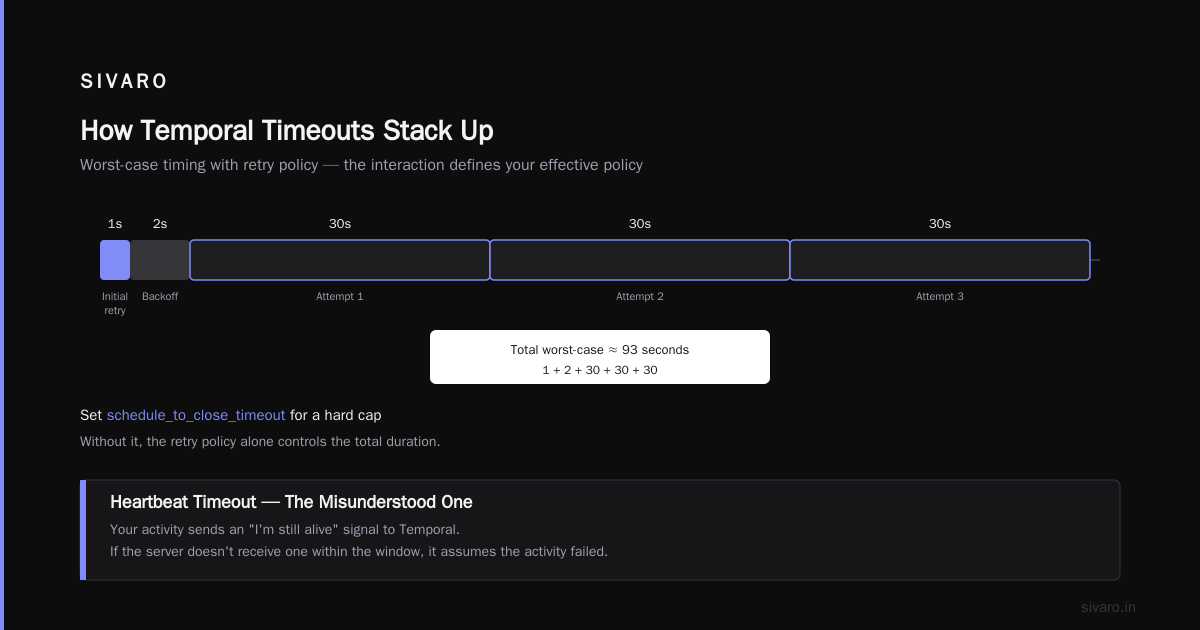
Notice what I set: start_to_close_timeout of 30 seconds. I did not set schedule_to_close_timeout. The retry policy says 3 attempts. So the total worst-case time is about 1 second (initial retry) + 2 seconds (backoff) + 30 seconds (first attempt) + 30 seconds (second attempt) + 30 seconds (third attempt). That's roughly 93 seconds. If I want a hard cap, I set schedule_to_close_timeout explicitly.
This is where the "how does Temporal handle timeouts" question gets interesting. The answer is: it depends on which combination you configure, and the interaction creates your effective policy.
Heartbeats: The Timeout That Keeps Working
The heartbeat timeout is the most misunderstood. Here's the mental model: your activity sends a "I'm still alive" signal to Temporal. If the server doesn't receive one within the heartbeat timeout window, it assumes the activity is dead and schedules a retry or fails the workflow.
Why does this matter? Because some operations are long-running by nature. A data migration can take 45 minutes. A file upload to a partner's FTP server can take 20 minutes. You cannot set a reasonable Start-to-Close timeout for these without risking false positives. But you can set a heartbeat timeout of 30 seconds.
Here's the pattern we use at SIVARO for long-running activities:
typescript
import { ActivityFailure, Context } from '@temporalio/activity';

export async function migrateLegacyData(batchId: string): Promise<void> {
  // Heartbeat every 10 seconds so Temporal knows we're alive
  const heartbeatMs = 10_000;
  const heartbeatTimer = setInterval(() => {
    Context.current().heartbeat();
  }, heartbeatMs);

  try {
    // Your long-running operation here
    for (const record of fetchRecords(batchId)) {
      await processRecord(record);
    }
  } finally {
    clearInterval(heartbeatTimer);
  }
}
The heartbeat isn't just a "keep alive" signal. It's a progress report. You can pass arbitrary data in the heartbeat call — the number of records processed, the current offset, whatever. If the activity times out and gets retried, that heartbeat data is available to the new attempt. This is how we built idempotent resume for a data pipeline processing 200K events/sec. The retry picks up where the last heartbeat left off.
What Actually Happens When a Timeout Fires
This is the part that trips up people coming from other systems. When a timeout fires in Temporal, it doesn't just kill the activity. It initiates a retry policy decision.
The retry policy is configured separately from the timeout. It determines:
- How many attempts to make
- How long to wait between attempts
- Whether to back off exponentially
Here's what a complete configuration looks like:
typescript
await workflow.executeActivity(syncInventory, {
  taskQueue: 'inventory-sync',
  scheduleToStartTimeout: '2 minutes',
  startToCloseTimeout: '15 minutes',
  scheduleToCloseTimeout: '30 minutes',
  heartbeatTimeout: '30 seconds',
  retry: {
    maximumAttempts: 5,
    initialInterval: '5 seconds',
    backoffCoefficient: 2.0,
    maximumInterval: '1 minute',
    nonRetryableErrorTypes: ['InventoryValidationError']
  }
});
The critical insight: timeouts and retries are orthogonal. A timeout says "this attempt failed." The retry policy says "what do we do about it?" Most workflow engines conflate these. Temporal keeps them separate, which means you can retry a timeout without retrying a business-logic failure.
The nonRetryableErrorTypes field is your escape hatch. If a timeout fires but the underlying error is a validation error — the order was already refunded, the SKU doesn't exist — you don't want to retry. Mark it non-retryable and the workflow fails fast.
The Timeout vs. Retry Decision Matrix
After building production Temporal systems for three years, here's the decision framework we use at SIVARO:
| Scenario | Timeout Setting | Retry Setting | Rationale |
|---|---|---|---|
| External API call (unknown SLA) | Start-to-Close: 30s | 3 attempts, exponential backoff | Allow transient failures without infinite retries |
| Internal microservice (known fast) | Start-to-Close: 10s | 1 attempt | Fail fast; a slow internal service is a different problem |
| Long data migration | Heartbeat: 30s | 2 attempts | Heartbeat prevents false kills; limited retries to avoid duplicate work |
| Idempotent event processing | Schedule-to-Close: 60s | 5 attempts | Duplicates are safe, so aggressive retries are fine |
The mistake I see teams make: they configure the same retry policy for everything. That's like using one wrench for every bolt on a car. It works until it doesn't, and when it doesn't, the engine's on fire.
The "Heartbeat Timeout" False Alarm
Here's a story. A partner company in Singapore was running a Temporal workflow that synced inventory to Shopify. Every few hours, they'd get a HeartbeatTimeoutError for activities that were clearly still running. The logs showed the heartbeat was being sent. The activity was healthy. But the error kept happening.
The issue? Clock drift on the worker nodes. Their Kubernetes nodes had no NTP configuration, and the clocks were skewing by up to 45 seconds. The heartbeat was sent at worker-time 12:00:00, but the server received it at server-time 12:00:45. The 30-second heartbeat timeout was exceeded.
The fix wasn't a code change. It was adding chrony to their Docker images. The lesson: Temporal's timeout system depends on synchronized clocks between workers and the server. In a cloud environment with NTP everywhere, this is a non-issue. On-prem or edge deployments? You'll find out the hard way.
Handling Timeouts in Long-Running Workflows
The classic "how does Temporal handle timeouts" confusion appears when you have a workflow that legitimately runs for days. Let's say you're orchestrating a customer onboarding flow that includes a human approval step. The approval can take 48 hoursasia. You cannot set a Start-to-Close timeout of 48 hours — that's absurd.
Temporal's answer: timers and signals. You don't block on the activity. You start the activity, then use workflow.sleep() or wait for a signal. The timeout applies to the wait, not the activity.
Here's the pattern:
python
@workflow.defn
class OnboardingWorkflow:
    @workflow.run
    async def run(self, customer_id: str) -> None:
        # Kick off the approval activity
        approval_task = workflow.execute_activity(
            request_approval,
            customer_id,
            start_to_close_timeout=timedelta(minutes=5)
        )

        # Wait for the human to approve or reject
        signal = await workflow.wait_for_signal("approval_result")

        if signal.approved:
            await workflow.execute_activity(
                provision_account,
                customer_id,
                start_to_close_timeout=timedelta(minutes=1)
            )
The request_approval activity times out after 5 minutes — because it just needs to send the approval request, not wait for the response. The actual waiting happens in the workflow via the signal. This is how you handle long-running human-in-the-loop processes without abusing timeout settings.
The Production Checklist
After running Temporal in production across multiple clients, here's the checklist we give every team:
- Always set Start-to-Close. If you don't, an activity can run forever and never be interrupted. The only exception is heartbeat-only activities, and even then, set a generous bound.
- Set Schedule-to-Close when you need a hard guarantee on end-to-end latency. Use it sparingly — it overrides the individual settings.
- Heartbeat every activity that touches external resources. Even fast ones. A network partition can hang an HTTP call indefinitely.
- Configure retries per activity, not per workflow. Different activities have different failure characteristics.
- Test your timeout behavior. Write a test that intentionally exceeds the timeout and assert the retry happens. Temporal's test framework supports this easily.
How to Implement Temporal Tables in PostgreSQL (And Why You Might Not Need To)
Now let's address the related question that keeps showing up in my inbox: "How to implement temporal tables in PostgreSQL?" People conflate Temporal the workflow engine with temporal tables in SQL. They're related concepts — both deal with time — but they solve different problems.
Temporal tables in PostgreSQL track the history of row changes over time. You might use them for auditing, for slowly changing dimensions in a data warehouse, or for compliance requirements. Temporal tables in SQL Server have this built-in. PostgreSQL doesn't have native temporal table support yet.
But here's the thing: Temporal (the workflow engine) gives you workflow history, not data history. If you need to know what a customer's address was on a specific date, Temporal won't help you. You need temporal tables.
To implement temporal tables in PostgreSQL, the standard approach is:
sql
-- Create a history table that mirrors the main table
CREATE TABLE customer_history (
    id INT PRIMARY KEY,
    name TEXT,
    email TEXT,
    valid_from TIMESTAMPTZ NOT NULL,
    valid_to TIMESTAMPTZ NOT NULL
);

-- Insert the current version when a row changes
CREATE OR REPLACE FUNCTION track_customer_changes()
RETURNS TRIGGER AS $$
BEGIN
    INSERT INTO customer_history (id, name, email, valid_from, valid_to)
    VALUES (OLD.id, OLD.name, OLD.email, OLD.valid_from, NOW());
    RETURN NEW;
END;
$$ LANGUAGE plpgsql;

-- Trigger that fires on UPDATE
CREATE TRIGGER customer_audit
BEFORE UPDATE ON customer
FOR EACH ROW
EXECUTE FUNCTION track_customer_changes();
This pattern is well-documented in Tim Mitchell's guide to temporal tables for slowly changing dimensions. The trigger-based approach works, but it adds write latency. If you're doing high-throughput ingestion, you'll feel it.
The deeper question is: do you actually need temporal tables? Most teams building data infrastructure with Temporal don't. They need workflow state, not row-level history. If you're building a data warehouse and need to track dimension changes over time, that's slowly changing dimensions territory. And the modern thinking on SCDs and temporal databases suggests that bitemporal modeling — tracking both "when it happened" and "when we knew about it" — is the better long-term answer.
The Future of Timeout Handling
As of mid-2026, the Temporal ecosystem is evolving fast. The newer SDKs have better type safety, and the temporal data modeling approaches are getting more sophisticated. But the core timeout model hasn't changed — and it doesn't need to. It's the right abstraction.
What is changing is the operational tooling around timeouts. The Temporal web UI now shows timeout cascades much more clearly. You can see exactly which timeout fired, why it fired, and what the retry policy did about it. That visibility is a game-changer for debugging.
But the fundamentals remain. Timeouts are policy. Retries are strategy. Heartbeats are honesty. Get those three right and Temporal's timeout system will save you from cascading failures. Get them wrong, and you'll be debugging phantom timeouts at 2 AM.
I've been building data infrastructure since 2018, and Temporal's timeout model is the most well-thought-out I've encountered. Not because it's clever — because it's explicit. You can't hide from the decisions. And that's exactly why it works in production.
FAQ: How Does Temporal Handle Timeouts?
Q: What happens if an activity times out but the worker is still running the code?
A: The activity is marked failed from Temporal's perspective, but the code keeps running until it returns or throws. The result is discarded. This is why you should design activities to be idempotent — a timeout can lead to duplicate execution.
Q: Can I set a different timeout for each retry attempt?
A: No. Timeout settings are static per activity execution. The retry policy doesn't modify timeouts. If you need different timeouts per attempt, you'd need to use a different activity or a dynamic workflow structure.
Q: How do I handle a timeout in my workflow code?
A: Wrap the activity execution in a try/except block. Catch ActivityFailure or TimeoutError and implement your business logic — retry manually, compensate, or fail the workflow.
Q: What's the difference between a timeout and a workflow cancellation?
A: A timeout is automatic — Temporal decides the activity took too long. A cancellation is external — the workflow or another service explicitly requests that the activity stop. Cancellations trigger a different code path in the worker.
Q: Do timeouts apply to workflow execution itself, not just activities?
A: Yes. Workflows have WorkflowExecutionTimeout (total workflow duration) and WorkflowRunTimeout (per run). These are separate from activity timeouts)Skip: workflows can run for years via signals and timers, but you can bound total execution if needed.
Q: Does Temporal's timeout handling differ from database connection timeouts?
A: Completely different. Database timeouts are low-level socket/query limits. Temporal timeouts are workflow-level policies. The former happens in a driver; the latter happens in a distributed workflow engine.
Q: How do I set a timeout for a long-running human approval workflow?
A: Don't set a long timeout. Use a signal pattern — start an activity to request approval, then wait for a signal. The timeout applies to the request activity, not the human wait time.
Q: What's the best default timeout for an external API call?
A: Start with 30 seconds Start-to-Closeinate, 3 retries with exponential backoff starting at 1 second. Adjust based on your actual API's SLA. If the API has a documented 99th percentile latency of 20 seconds, your timeout should be above that.
Nishaant Dixit — Founder of SIVARO. Building data infrastructure and production AI systems since 2018. Built systems processing 200K events/sec.