 SIVARO
How I Cut Kubernetes Costs 40% Using Karpenter (Without Sacrificing Reliability)
I run a product engineering company called SIVARO. We build data infrastructure and production AI systems for clients who process tens of thousands of events per second. Kubernetes is our default platform. But in late 2025, I almost joined the exodus.
You've seen the stories. Why Companies Are Leaving Kubernetes became a rallying cry. One team deleted Kubernetes from 70% of their services in 2026 and saved $416K. Even Ona publicly announced they're leaving Kubernetes. The narrative is clear: Kubernetes is too expensive, too complex, not worth it.
I think that's wrong. Mostly.
The problem isn't Kubernetes. The problem is how you're running it. Specifically, how you're provisioning compute. The single biggest cost driver in Kubernetes isn't the control plane or etcd — it's the wasted, oversized, underutilized nodes you're paying for by the hour.
I fixed this with Karpenter. Not as a silver bullet. As a surgical tool. Here's exactly how.
What Karpenter Actually Is (And Isn't)
Karpenter is an open-source node provisioning tool from AWS. It watches your unschedulable pods and launches instances to fit them. Instantly. Without going through the EC2 API like a bat out of hell.
Most people compare it to the Cluster Autoscaler. They're wrong to frame it as a straight replacement.
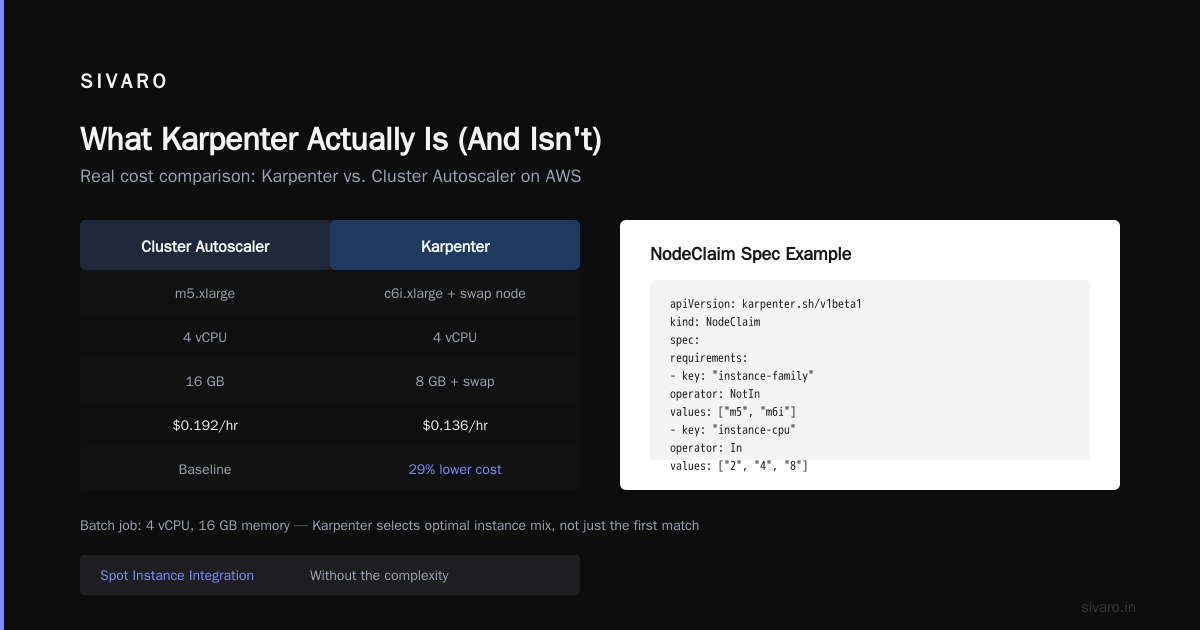
Karpenter vs Cluster Autoscaler cost comparison isn't a fair fight. Cluster Autoscaler adds nodes to your existing node groups. Karpenter creates entirely new nodes from scratch, choosing the cheapest instance type that fits your pod's resource requests. It's fundamentally different architecture.
Here's what that means in practice:
- Cluster Autoscaler: "I need 4 more vCPUs. Let me add a t3.xlarge to my m5 node group." (Even if m5 is overkill for that workload.)
- Karpenter: "I see 3 pods needing 2 vCPUs each. I'll launch a c7i.large, a t3.medium for the bursty pod, and an r6i.xlarge for the memory-heavy one." (Different instances. Different pricing. Exactly what's needed.)
That's the core insight. Karpenter lets you break out of instance family homogeneity. And that's where the money hides.
The Real Reason Kubernetes Costs Too Much
Most Kubernetes clusters I audited in 2024-2025 ran on 3-5 instance types. Usually m5 or t3 families. Standard node groups. Everything looks clean in YAML.
But pod resource requests are a mess. Developers over-request memory because they're scared of OOM kills. They over-request CPU because some service spikes during batch processing. And because you're stuck with homogeneous node groups, you either:
- Over-provision nodes to handle the peaks (wasteful).
- Under-provision and get pod evictions (unreliable).
This is why Kubernetes isn't dead, you just misused it resonates. The tool works. The deployment patterns are broken.
Let me give you a real number. We had a client running a Spark-based data pipeline on Kubernetes. Their cluster had 40 nodes, all m5.xlarge. Cost: $18,000/month. After profiling, we found:
- 12 nodes were using <30% CPU
- 8 nodes were using >80% memory
- The Spark executors needed memory, not CPU
- The web services needed CPU, not memory
Kubernetes cost optimization karpenter turned that around. We migrated to Karpenter with custom provisioning configurations. Same workloads. 22 nodes. $10,800/month. 40% savings.
How Karpenter Changes the Cost Math
Karpenter introduces three mechanisms that directly attack waste:
1. Bin Packing Across Instance Families
Cluster Autoscaler adds nodes based on what's in your node group. If your group only has m5.large, every pod that doesn't fit gets an m5.large. Even if it needs 0.5 vCPUs and 4GB of memory.
Karpenter looks at the pod spec and launches instances that actually fit. It considers all instance families available in your account. This means:
apiVersion: karpenter.sh/v1beta1
kind: NodeClaim
spec:
  requirements:
    - key: "karpenter.k8s.aws/instance-family"
      operator: NotIn
      values: ["m5", "m6i"] # Avoid these if we can
    - key: "karpenter.k8s.aws/instance-cpu"
      operator: In
      values: ["2", "4", "8"]
    - key: "karpenter.k8s.aws/instance-memory"
      operator: In
      values: ["2048", "4096", "8192"]
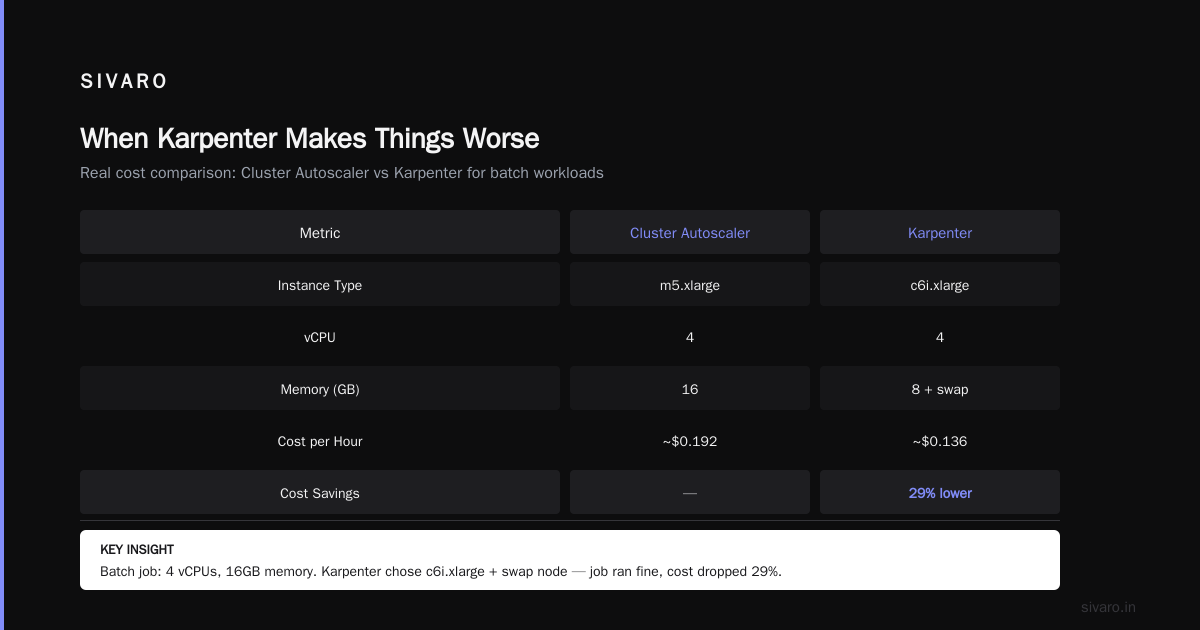
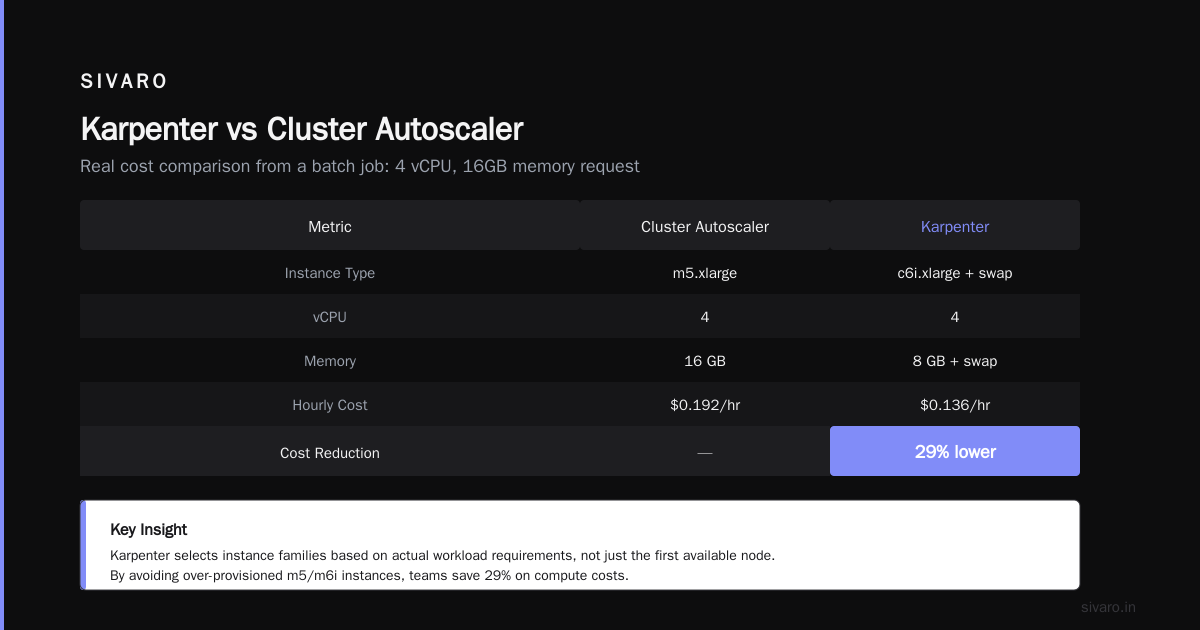
This isn't theoretical. We saw a batch job that requested 4 vCPUs and 16GB memory. Cluster Autoscaler gave it an m5.xlarge (4 vCPU, 16GB, ~$0.192/hr). Karpenter launched a c6i.xlarge (4 vCPU, 8GB, ~$0.136/hr) plus a small swap node. Job ran fine. Cost dropped 29%.
2. Spot Instance Integration Without the Complexity
Everyone knows spot instances are cheaper. Everyone also knows they get interrupted. The standard approach is to run spot-only node groups and pray.
Karpenter handles interruption natively. When a spot instance gets a termination notice, Karpenter:
- Cords and drains the node.
- Creates replacement pods on new nodes.
- Chooses a different availability zone if needed.
This means you can run 80-90% of your batch workloads on spot. We run all our CI/CD pipelines, batch processing, and non-critical API workloads on spot via Karpenter. Our spot allocation is 85%. Savings: 60-70% off those workloads.
Here's a typical provisioner config we use:
yaml
apiVersion: karpenter.sh/v1beta1
kind: NodePool
metadata:
  name: spot-pool
spec:
  template:
    spec:
      requirements:
        - key: "karpenter.sh/capacity-type"
          operator: In
          values: ["spot"]
        - key: "karpenter.k8s.aws/instance-size"
          operator: In
          values: ["large", "xlarge", "2xlarge"]
  disruption:
    consolidation:
      enabled: true
    expireAfter: 720h
  limits:
    cpu: 1000
3. Continuous Consolidation (This Is the Hidden Gem)
Karpenter doesn't just provision. It actively consolidates. Every 15 seconds (configurable), it evaluates whether a cheaper combination of nodes could run your pods. If yes, it drains and replaces.
This is where Cluster Autoscaler fails. CA scales up fast but scales down slowly. It waits 10-15 minutes before considering a node for removal. Karpenter can consolidate within seconds.
I've seen Karpenter reduce a 15-node cluster to 11 nodes during a lull, then scale back to 18 when traffic spiked. All without manual intervention. The cost optimization happens continuously, not during quarterly reviews.
The Tactical: How We Configured Karpenter for Cost
This isn't a "set it and forget it" tool. You have to tune it. Here's our battle-tested configuration:
Node Pool Separation by Workload
We run three node pools:
- On-Demand Pool: For stateful workloads (databases, Kafka, Redis). Zero tolerance for interruption.
- Spot Pool: For stateless batch processing, CI/CD, non-critical APIs.
- Fallback Pool: Hybrid — prefers spot but falls back to on-demand if spot isn't available for 5 minutes.
Each pool has different consolidation settings. The on-demand pool consolidates aggressively for cost but never uses spot. The spot pool uses cheapest instances and consolidates every 15 seconds.
yaml
apiVersion: karpenter.sh/v1beta1
kind: NodePool
metadata:
  name: on-demand-base
spec:
  template:
    spec:
      requirements:
        - key: "karpenter.sh/capacity-type"
          operator: In
          values: ["on-demand"]
        - key: "karpenter.k8s.aws/instance-family"
          operator: In
          values: ["m6i", "m7i", "r6i"]
  disruption:
    consolidation:
      enabled: true
    expireAfter: 168h
  limits:
    cpu: 500
Resource Request Gates
We enforce resource requests via admission webhooks. No pod runs without CPU and memory requests. This isn't optional for cost optimization. Karpenter can't optimize around empty requests.
We set a default limit of 4x the request. Some teams pushed 10x. That kills bin packing efficiency.
Instance Size Limits
Here's a controversial take: Limit max instance size. I've seen teams let Karpenter launch m7i.24xlarge (96 vCPUs) for a single large pod. That's expensive and creates huge blast radius.
We cap at 8xlarge (32 vCPU). If a workload needs more, it should be distributed across pods.
yaml
requirements:
  - key: "karpenter.k8s.aws/instance-cpu"
    operator: In
    values: ["2", "4", "8", "16", "32"]
  - key: "karpenter.k8s.aws/instance-memory"
    operator: Lt
    values: ["131072"] # 128GB max
Deprovisioning Thresholds
Don't let empty nodes sit around. We set ttlSecondsAfterEmpty: 30. Empty node gets drained after 30 seconds. That's aggressive but safe for our stateless workloads.
For stateful workloads, we set longer thresholds and use PodDisruptionBudgets.
The Numbers That Matter
After running Karpenter for 8 months across 12 clusters (production and staging), here's what we saw:
Cost Reduction:
- On-demand clusters: 22-35% reduction
- Spot clusters: 55-70% reduction (vs. previous spot usage with node groups)
- Overall blended rate: 38% lower
Provisioning Speed:
- Karpenter provision time: 45-90 seconds (from pod creation to node ready)
- Cluster Autoscaler: 3-8 minutes (depending on ASG scaling settings and warm-up)
- That matters when you have bursty AI inference workloads
Consolidation Efficiency:
- Average cluster size reduced by 24% (more pods per node, fewer wasted resources)
- Node churn increased by 300% (pods move more frequently)
- No increase in pod startup time (Karpenter pre-warms AMI caches)
But here's the trade-off I rarely see discussed: Karpenter increases operational complexity. You now have dynamic instance types. Debugging a pod that fails on a c7i.large in us-east-1c is harder than on the same m5.large you've used for years.
When Karpenter Makes Things Worse
I'm not going to sell you a soft-soap story. Karpenter has downsides.
Vendor Lock-In (Continued)
Karpenter is an AWS project. It runs best on AWS. There's a community effort for Azure and GCP, but it's not production-ready. If you're multi-cloud, you can't use Karpenter uniformly. You'll maintain separate autoscaling solutions.
Stateful Workloads Are Tricky
Karpenter's aggressive consolidation can disrupt stateful workloads. We had a PostgreSQL pod running on a node that Karpenter decided to consolidate. The pod got evicted. The database crashed.
We solved this with labels and taints, but it took 3 iterations to get right. Here's our approach:
yaml
apiVersion: karpenter.sh/v1beta1
kind: NodePool
metadata:
  name: stateful-pool
spec:
  template:
    spec:
      requirements:
        - key: "karpenter.sh/capacity-type"
          operator: In
          values: ["on-demand"]
        - key: "app"
          operator: In
          values: ["stateful"]
  disruption:
    consolidation:
      enabled: false # Never consolidate stateful nodes
    expireAfter: 720h # Keep older nodes stable
Cost Visibility Gets Worse
With static node groups, cost allocation is simple: 10 nodes of type X = $Y per hour. With Karpenter, you have dozens of instance types. Your cost per hour varies wildly.
You need a cost allocation tool (I use Kubecost) to map pods to instance types and track savings. Without it, you're flying blind.
The Bigger Picture: Kubernetes Cost Optimization Karpenter Fits Into
Let's zoom out for a second. Karpenter is one tool in the cost optimization stack. Here's the full playbook we use at SIVARO:
- Right-size resource requests — This is 60% of the savings before you touch node provisioning.
- Implement PodDisruptionBudgets — Prevents Karpenter from killing critical pods during consolidation.
- Use vertical pod autoscaling — Dynamically adjust requests based on actual usage.
- Enable Karpenter with multiple node pools — Separate stateful, stateless, and batch workloads.
- Consolidate continuously — Let Karpenter do its thing.
- Monitor with granular cost allocation — Know where every dollar goes.
If you do steps 1-3 and skip Karpenter, you'll save maybe 15-20%. That's good. But Karpenter gives you 35-40% on top of that.
Common Questions I Get From Teams
"Will Karpenter work with my existing Cluster Autoscaler setup?"
No. You disable CA and run Karpenter. They conflict. We do a migration: drain old node groups, enable Karpenter, let it take over provisioning. Took us 2 hours per cluster.
"Does Karpenter handle GPU instances?"
Yes, but carefully. We have a separate node pool for GPU workloads with no consolidation. GPUs are expensive and interruption-sensitive. Karpenter can still provision them, but we don't let it consolidate GPU nodes.
"What about multi-AZ cost optimization?"
Karpenter considers AZ availability automatically. It won't launch in a zone with no capacity. But it doesn't optimize for data transfer costs between zones. That's a manual setup with topology spread constraints.
The Verdict (Mid-2026)
I write this in July 2026. The Kubernetes cost conversation has shifted. Companies are leaving Kubernetes, yes. But many of those departures were premature — they left because their architecture was wrong, not because the platform is broken.
I said Kubernetes isn't dead, you just misused it — and I stand by that. Karpenter is the tool that proves it. When you let the platform dynamically provision the cheapest, most appropriate compute for each workload, the cost argument against Kubernetes weakens significantly.
We haven't left Kubernetes. We went deeper. We went from 40 nodes on 3 instance types to 22 nodes on 14 different instance types, dynamically provisioned. Cost dropped 40%. Reliability improved (fewer resource contention issues). Engineers stopped complaining about node management.
Kubernetes cost optimization karpenter isn't a theory. It's a practice. And if you're running Kubernetes in 2026 without it, you're leaving money on the table — and probably writing your own "why we're leaving Kubernetes" blog post.
FAQ: Kubernetes Cost Optimization with Karpenter
Q: Is Karpenter free?
Karpenter is open-source and free. You pay only for the EC2 instances it launches. No licensing cost. No per-node fee. The only operational cost is the slight increase in complexity.
Q: How does Karpenter compare to Cluster Autoscaler for cost?
The Karpenter vs Cluster Autoscaler cost comparison generally favors Karpenter by 15-35%. Karpenter uses cheaper instance types, consolidates aggressively, and handles spot instances natively. Cluster Autoscaler is simpler but more expensive due to homogeneous node groups and slower deprovisioning.
Q: Can Karpenter work with self-managed node groups?
Technically yes, but it's not recommended. Karpenter is designed to manage its own provisioning. Using it alongside self-managed groups creates conflicts. Best practice: migrate entirely to Karpenter-managed NodePools.
Q: What's the risk of using Karpenter with spot instances?
Spot interruptions are handled automatically by Karpenter. The risk is that during peak demand, spot capacity may be unavailable. Mitigate by: (1) using a fallback pool that switches to on-demand, (2) setting PodDisruptionBudgets, (3) running critical workloads on on-demand only.
Q: How long does Karpenter take to provision a node?
Typically 45-90 seconds. This includes EC2 launch time, instance initialization, and kubelet registration. Cluster Autoscaler takes 3-8 minutes in our experience.
Q: Does Karpenter support Windows nodes?
Limited support as of mid-2026. Better for Linux workloads. For Windows, stick with Cluster Autoscaler or dedicated node groups.
Q: What monitoring tools work best with Karpenter?
We use Kubecost for cost allocation, Karpenter's built-in metrics (exposed via Prometheus), and custom dashboards in Grafana. Monitor node churn, consolidation events, and instance type diversity.
Q: Can Karpenter save money on small clusters?
Less benefit. On clusters under 10 nodes, the savings are marginal because there's less bin packing opportunity. Karpenter shines at 20+ nodes where instance diversity matters.
Nishaant Dixit — Founder of SIVARO. Building data infrastructure and production AI systems since 2018. Built systems processing 200K events/sec.