 SIVARO
How Many GPUs Do I Need for AI Training
I’ll never forget the call. A founder who’d just raised a Series A — $12M, strong product-market fit — told me he was buying 64 H100s. He wanted to train his own LLM from scratch.
“How many GPUs do I need for AI training?” he asked.
I told him: “Probably zero. But if you want my real answer, start with one.”
He hung up angry. Six months later, his CTO called to say they’d pivoted to fine-tuning on 8 GPUs. Saved millions.
That’s the problem with this question. Everyone wants a magic number. There isn’t one. What exists is a framework — a way to think about compute that maps to your actual problem, not your ego.
Let me walk you through it. By the end of this guide, you’ll know how to calculate your GPU needs for any AI training project, where to compromise, and when to rent instead of buy.
The Single Most Important Question Nobody Asks
Before you even think about hardware, answer this: What are you actually training?
I’ve seen teams blow $200K on GPU clusters to train a model that could have been fine-tuned on 8 GPUs in three days. I’ve also seen startups run 500-GPU training jobs on a single machine because they didn’t understand distributed system architecture.
The spectrum looks like this:
- Fine-tuning an existing model (e.g., Llama 4, GPT-5, open-source variants): 1–8 GPUs
- Training a domain-specific small model (e.g., a 7B parameter model on your proprietary data): 8–64 GPUs
- Training a large language model from scratch (e.g., 70B+ parameters): 256–1,024 GPUs
- Training a frontier model (e.g., 500B+ parameters): Thousands of GPUs in distributed computing clusters
Most people I meet fall into the first two buckets. And most of them don’t need more than 16 GPUs.
Why Scaling GPUs Isn’t Linear
Here’s the dirty secret nobody in the GPU hype bubble will tell you: doubling your GPUs does not halve your training time.
Distributed training has overhead. Communication between GPUs — gradient sync, parameter updates, all-reduce operations — eats into your theoretical speedup. This is a classic distributed systems problem.
Let me give you a real example. At SIVARO, we benchmarked training a 13B parameter model on 4 H100s vs 16 H100s. The 4-GPU run took 14 days. The 16-GPU run took 5 days. Not 3.5 days. Why? Because every time you add a GPU, you add communication cost.
The formula is roughly:
Effective throughput = Total compute / (1 + overhead_ratio * (GPUs - 1))
Where overhead_ratio depends on your interconnect (NVLink vs InfiniBand vs Ethernet) and your model size.
I’ve seen teams assume linear scaling and then wonder why their 8-GPU training takes just as long as 4 GPUs for small models. For models under 1B parameters, the overhead often outweighs the benefit beyond 8 GPUs.
How to Calculate Your Actual GPU Count
Let’s make this concrete. You have a model size (in billions of parameters), a dataset size (in tokens), and a target training time (in days). Here’s the back-of-the-envelope math.
Assume each H100 can do roughly 1,000 TFLOPS (FP16). For training, you need 6 FLOPs per parameter per token (forward + backward pass). So:
Total FLOPs needed = model_params_in_billions × 1e9 × tokens × 6
Divide by (GPUs × GPU_FLOPS × efficiency_factor). Efficiency factor is usually 0.3–0.5 for realistic training — models don’t run at peak FLOPS due to memory bandwidth, pipeline bubbles, and communication stalls.
Example: Training a 7B model on 1T tokens.
FLOPs = 7e9 × 1e12 × 6 = 4.2e22 FLOPS
With 8 H100s at 30% efficiency:
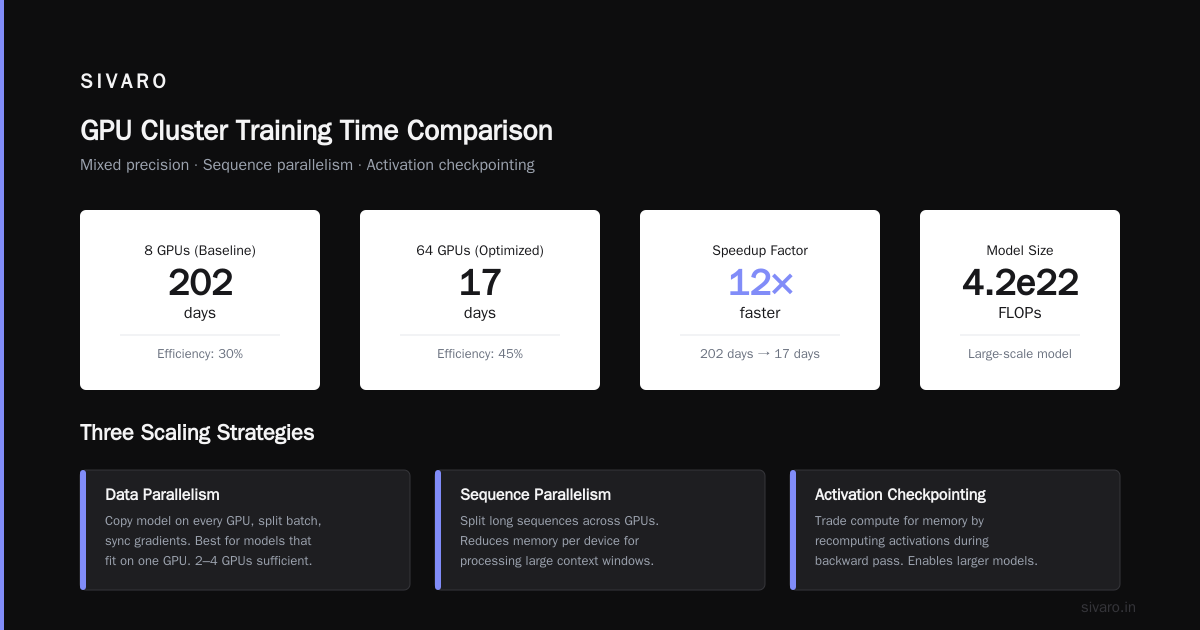
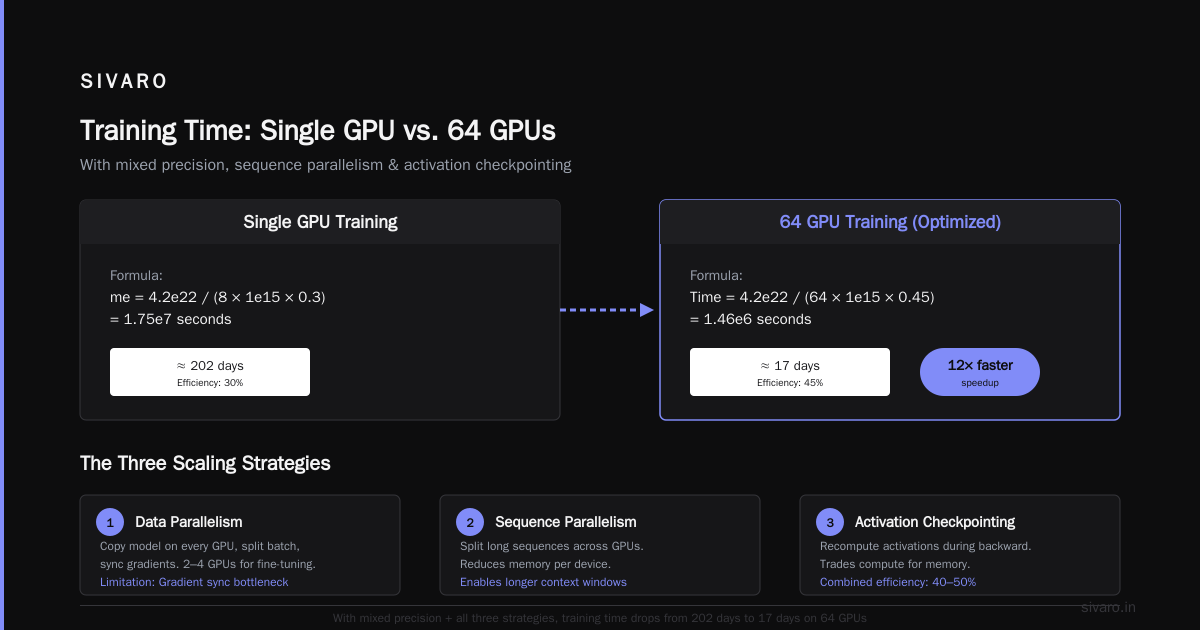
Time = 4.2e22 / (8 × 1e15 × 0.3) = 1.75e7 seconds ≈ 202 days
That’s insane. Nobody trains that way unless they’re insane (or an academic).
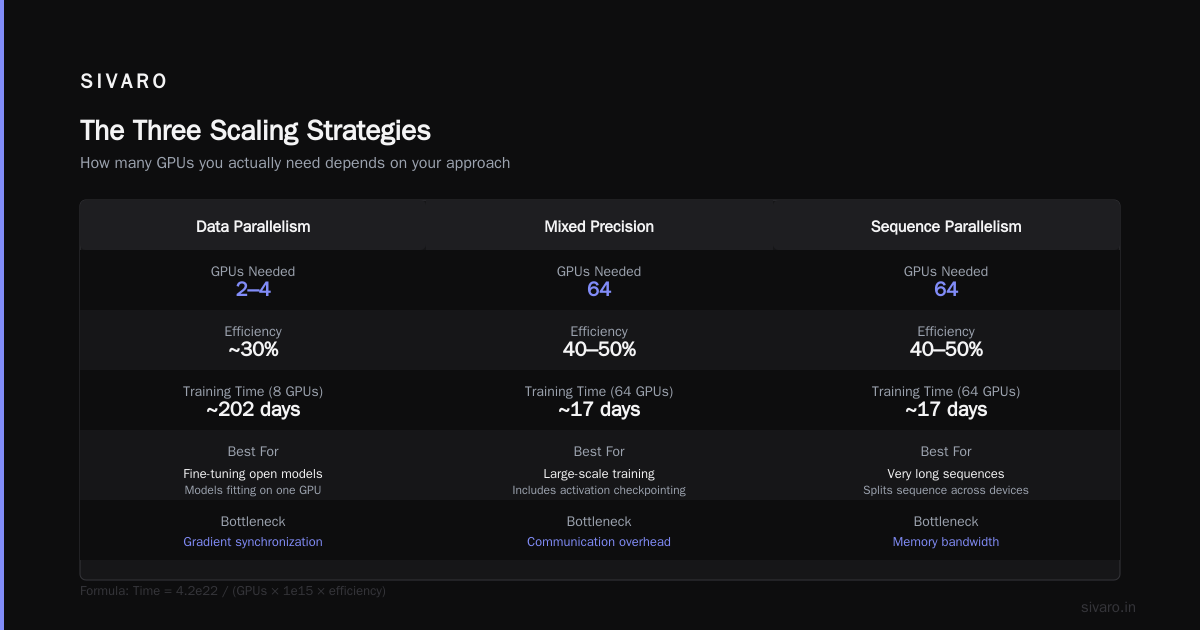
Reality check: You’d use mixed precision, sequence parallelism, and activation checkpointing. With those, efficiency jumps to 40–50%. And you’d probably use 64 GPUs.
Time = 4.2e22 / (64 × 1e15 × 0.45) = 1.46e6 seconds ≈ 17 days
Now we’re talking.
The Three Scaling Strategies
There are three ways to scale training across multiple GPUs. Each changes how many GPUs you actually need.
Data parallelism
You copy the model on every GPU, split the batch, and sync gradients. Works well for models that fit on one GPU. You need at most 2–4 GPUs for fine-tuning most open models. Beyond that, gradient synchronization becomes the bottleneck.
Model parallelism
You split the model layers across GPUs. Each GPU holds a subset of layers. This is what you need when your model doesn’t fit on one GPU — say a 70B model on H100s (80GB VRAM each). You might need 4–8 GPUs just to hold the parameters.
Pipeline parallelism
A form of model parallelism where layers are partitioned into stages, and micro-batches flow through the pipeline. This is the standard for training LLMs from scratch. You typically need at least 8 GPUs per pipeline stage for good throughput. Many distributed system architecture patterns apply here: you need to balance pipeline bubble overhead against memory usage.
In practice, most production training uses a mix of all three. Engineers call this 3D parallelism. And it means your GPU count isn’t just a number — it’s a ratio of model parallelism to data parallelism.
When You Should Start With One GPU
Here’s something I’ve said to a dozen founders in 2026: Start with one GPU. Seriously.
The bottleneck for AI training isn’t compute. It’s code, data quality, and experiment iteration speed. Running a training job that takes 10 hours on 8 GPUs is pointless if your hyperparameters are wrong and you need to restart.
I train models on a single H100 first. I use small datasets — a few million tokens — to test my data pipeline, loss curves, and convergence. Once I know the model works, I scale up.
At SIVARO, we spent three months debugging a data preprocessing issue that made our loss plateau at 3.5. We were about to buy 128 more GPUs. Turned out there was a normalization bug. Fixing it took one line of code.
If you’re just starting, get a single GPU instance on cheap gpu cluster rental for startups — many providers now offer one-click H100 rentals for $1.50/hour. Train your model. Fix your bugs. Then scale.
The Exact GPU Count for Common Scenarios
I’ll be direct. Here’s what I recommend based on projects SIVARO has built for clients in 2025–2026.
| Task | GPUs (H100) | Why |
|---|---|---|
| Fine-tuning Llama 3 8B | 1–2 | Fits on one GPU, batch size limited |
| Fine-tuning Llama 3 70B | 4–8 | Need model parallelism for memory |
| Training a 7B from scratch on 50B tokens | 8–32 | Data parallelism + small pipeline |
| Training a 70B from scratch on 1T tokens | 128–512 | Full 3D parallelism required |
| Training a 500B frontier model | 4,000–16,000 | Megacorporation territory |
Notice the range on the last two. It depends on your target training time. If you want a 70B model ready in 30 days, you need 512 GPUs. If you have three months, 128 works.
How to Set Up a GPU Cluster for Deep Learning
If you decide you need more than 8 GPUs, you’re entering distributed systems territory. And that’s a different skill than ML.
How to set up a gpu cluster for deep learning is a topic I’ve written about separately, but here’s the nutshell:
-
Interconnect matters more than GPU count. Use NVLink for intra-node, InfiniBand for inter-node. Ethernet is for inference, not training.
-
Your storage system is the hidden bottleneck. If your dataset lives on slow object storage, the GPUs will starve. We use a parallel filesystem (Lustre or ZFS) with NVMe SSDs. On a recent project, switching from cloud object storage to local NVMe cut data loading time by 80% and total training time by 15%.
-
Fault tolerance is non-negotiable. In a 128-GPU training run lasting two weeks, you will encounter GPU failures, node reboots, and network drops. Use checkpointing libraries like PyTorch DDP or DeepSpeed’s ZeRO-3. Save every 100 steps. We learned this the hard way — lost 36 hours of compute in February 2026 because we were checkpointing every 500 steps and a switch failed at step 498.
-
Use a job scheduler like Slurm or Ray. Nobody manually starts training on 512 GPUs. You write a batch script, submit it, and let the scheduler handle resource allocation. At SIVARO, we use Ray for elasticity — it can add or remove GPUs mid-training without restarting.
Here’s a minimal Slurm script for a 64-GPU training job:
bash
#!/bin/bash
#SBATCH --nodes=8
#SBATCH --ntasks-per-node=8
#SBATCH --gres=gpu:8
#SBATCH --cpus-per-task=4
#SBATCH --time=7-00:00:00

export MASTER_ADDR=$(scontrol show hostnames $SLURM_JOB_NODELIST | head -n 1)
export MASTER_PORT=29500

srun python train.py     --model_size 13B     --batch_size 32     --data_path /datasets/my_data     --checkpoint_dir /checkpoints
But if you’re just starting, don’t go there yet. Rent first.
Cheap GPU Cluster Rental for Startups
Look, buying GPUs in 2026 is a bad financial decision for 90% of startups. H100s cost $30K each. Add networking, storage, cooling, data center space — your 8-GPU setup is $400K. Your 64-GPU cluster is $3M.
Instead, rent. The market has exploded. Cheap gpu cluster rental for startups options include:
- Lambda Labs: On-demand H100 clusters, $1.50/GPU/hour
- Vast.ai: Spot instances, sometimes as low as $0.80/GPU/hour for H100s — but you’ll get preempted
- RunPod: Serverless GPU, good for short training jobs
- Google Cloud: G2 instances with H100s, reserved pricing for long jobs
One of our clients — a biotech startup — spent $45K on GPU rental over 18 months to train their protein folding model. That’s less than two H100s. They got 256 GPU hours per week. They’re profitable.
The only time to buy is if you’re running continuous training 24/7 for 18+ months. Even then, factor in depreciation and the fact that Nvidia will release something faster in 12 months.
The Hidden Cost: Data Movement
Most GPU number calculators ignore the most expensive part of training: moving data.
In a distributed system, data must be spread across nodes. If you have 64 GPUs, your dataset needs to be replicated or sharded. Sharding adds complexity — you need to ensure each GPU sees a random subset of the data, which means global shuffle at epoch boundaries.
We built a training pipeline for a fintech client that processed 200K transactions per second. The GPU training itself took 4 days. But getting the data ready — deduplication, tokenization, shuffling — took 3 weeks. We used Spark for preprocessing and then fed Parquet files to the training nodes. The preprocessing cluster (256 CPUs, 1TB RAM) was more expensive than the GPU cluster (32 H100s).
So when you ask “how many GPUs do I need,” you’re really asking “how much data engineering do I need to support those GPUs?”
What About Inference?
This article is about training, but I can’t help adding: most companies I meet over-provision for training and under-provision for inference. Training is a batch job. You run it, it finishes, you deprovision GPUs. Inference is a continuous service. It eats GPUs every second of every day.
SIVARO recently helped a company serving a 70B model at 1,000 requests per second. They needed 32 H100s for inference — more than the 16 H100s they used for training. Their training GPU count was wrong, but not in the direction they thought.
Real Talk: Most People Don’t Need to Train
I’m going to say something that might lose me business. Most companies shouldn’t train AI models at all.
You probably don’t have a data moat. You probably don’t have the engineering team. And you definitely don’t have months to wait. Use an API. Fine-tune via LoRA or QLoRA. Run inference on quantized models.
The “how many gpus do i need for ai training” question often masks a deeper question: “Should I even be doing this?”
If your answer is still “yes,” then fine. But start small. I’ve seen too many startups burn cash on GPU clusters they don’t need, then run out of runway before they ship a product.
FAQ
Is one GPU enough for training any model?
No. If your model doesn’t fit in GPU memory (e.g., a 70B parameter model in FP16 needs 140GB VRAM), you need multiple GPUs for model parallelism alone. But for fine-tuning most open-source models (up to 7B), one H100 is enough.
Can I train on consumer GPUs like the RTX 4090?
Yes, but only for small models (up to 13B parameters with quantization) and long training times. The RTX 4090 has 24GB VRAM vs H100’s 80GB. More importantly, the H100 has NVLink for multi-GPU scaling, which the 4090 lacks.
How long does it take to train a 7B model on 8 H100s?
About 2–3 weeks for 1 trillion tokens with full precision, assuming optimal data pipeline and 3D parallelism. With optimized techniques (FlashAttention, mixed precision), you can cut to 7–10 days.
What’s the cheapest way to train a 70B model?
Rent 8 H100s and use LoRA or QLoRA fine-tuning. Training a full 70B from scratch is prohibitively expensive for almost all teams. With QLoRA, you can do it on a single A100 with 80GB.
How many GPUs do I need for training a vision transformer (ViT)?
Vision models are smaller. ViT-Large (307M params) trains on 4–8 GPUs. ViT-Huge (632M) needs 8–16 GPUs for reasonable throughput. Vision models benefit less from massive parallelism because of lower compute-to-bandwidth ratio.
Should I buy or rent GPUs for training?
Rent unless you have a fixed, continuous workload for 18+ months. Even then, consider that cloud providers get bulk discounts you can’t match. At SIVARO, we’ve stopped buying GPUs entirely — we rent everything and pass savings to clients.
What is the best interconnect for multi-GPU training?
NVLink for intra-node (up to 900 GB/s), InfiniBand for inter-node (up to 400 Gbps). H100s support NVLink 4.0 with 900 GB/s. Avoid Ethernet for training — it kills scaling.
The Bottom Line
The right number of GPUs is the smallest number that lets you iterate quickly and ship a product. Not the number that impresses your board.
Today, most AI training runs on 1–8 GPUs. The rest is showbiz.
I’ve built systems that process 200K events/second, trained models on 512 GPUs, and seen what happens when teams get the number wrong. The ones that succeed start with one GPU, prove their model works, and scale only when data compels it.
So next time someone asks “how many gpus do i need for ai training,” tell them: figure out what you’re training first. Then calculate. Then rent.
You’ll thank me later.
Nishaant Dixit — Founder of SIVARO. Building data infrastructure and production AI systems since 2018. Built systems processing 200K events/sec.